#include <attrmgr.h>
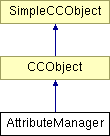
Inheritance diagram for AttributeManager:
Public Types | |
| enum | AttrsToMakeCurrent { ALL, NOT_APPLIED, NONE } |
Public Member Functions | |
| AttributeManager () | |
| ~AttributeManager () | |
| Attribute manager destructor Currently destroys all attributes in all attribute groups. | |
| BOOL | InitInstance () |
| Creates the current attribute groups, and adds the initial current attributes to them. | |
| AttrsToMakeCurrent | GetAttributesToMakeCurrent (List &Attribs, List &AttrGroupsList, BOOL bPasteAttrs) |
| To determine which attributes in the Attribs list to make current. The user is prompted where neccessary. | |
| BOOL | WeShouldMakeAttrCurrent (BOOL AttributeApplied, NodeAttribute *pAttr, List *pAttrGroupList, BOOL DroppedAttr=FALSE, BOOL AttrDroppedOntoPage=FALSE) |
| To determine if we should make an attribute current or not. The routine does NOT delete the Attrib if it is not being made current. | |
| BOOL | ApplyCurrentAttribsToNode (NodeRenderableInk *Node) |
| This function determines the attribute group associated with the object and then applies all attributes in the group to the object. If the group has a base group then all attributes in the base group with types different to those already applied get added to the object etc. | |
| NodeAttribute * | GetSelToolCurrentAttribute (CCRuntimeClass *AttrType) |
| For finding current attribute pAttrType in the current attribute group specified by the currently selected tool. | |
| NodeAttribute * | GetCurrentAttribute (CCRuntimeClass *AttrGroup, CCRuntimeClass *AttrType) |
| For finding current attribute pAttrType in attribute group pAttrGroup. | |
| void | GetCurrentLineAndFillColour (CCRuntimeClass *AttrGroup, DocColour *LineCol, DocColour *FillCol) |
| BOOL | WriteCurrentAttributes (BaseCamelotFilter *pFilter) |
| void | UpdateForDeletedColours (ColourList *ParentList) |
| Called by the ColourManager when colours in use by the attribute manager may have been deleted. | |
Static Public Member Functions | |
| static BOOL | InitDefaults () |
| Initialises the Attribute Manager. Registers basic attributes Declares attribute preferences When TRUE - Whenever an attribute is applied to objects the attribute becomes a current attribute. When TRUE - The user is prompted before setting a current attribute, except when the LastAttrAppliedBecomesCurrent preference is TRUE when it makes no sense to prompt the user. | |
| static void | Deinit () |
| static void | AttributeSelected (NodeAttribute *Attrib, NodeAttribute *OldAttr=NULL) |
| This function should be called whenever an attribute is selected by the user. | |
| static void | AttributesSelected (List &AttribsToApply, UINT32 OpName) |
| This high level function should be called whenever we need to apply multiple attributes to the selection (eg. PasteAttributes). | |
| static void | ApplyAttribToNode (NodeRenderableInk *InkNode, NodeAttribute *NewAttr) |
| Replaces an attribute within a specified Ink Node. | |
| static void | ReplaceAttributes (NodeAttribute *Attrib, List *OldAttrs) |
| static void | UpdateCurrentAttr (NodeAttribute *Attr, BOOL Mutate, List *pAttrGroupList, BOOL TellWorld=TRUE) |
| Adds Attr to all attribute groups in the AttrGroupList. If the list is empty then the attribute gets added to the attribute group associated with the selected tool. | |
| static BOOL | UpdateCurrentAppliedAttr (NodeAttribute *pAttr, List *pAttrGroupList, BOOL bAttrApplied, BOOL bMutate) |
| static BOOL | UpdateAfterAttrApplied (NodeAttribute *pAttr) |
| static BOOL | CanBeAppliedToSelection (NodeAttribute *Attrib, List *pAttrGroups) |
| This function would ideally live in the SelRange. It determines if the attribute can be applied to at least one object in the selection. | |
| static BOOL | CanBeAppliedToNode (NodeRenderableInk *pObject, NodeAttribute *Attrib, List *pAttrGroups) |
| This function would ideally live in the SelRange. It determines if the attribute can be applied to a specified object. | |
| static void | FindDefaultColour (ColourList *ColList, UINT32 NameResID, DocColour *Result) |
| static UINT32 | RegisterDefaultAttribute (CCRuntimeClass *pNodeType, AttributeValue *pValue) |
| static AttributeEntry * | GetDefaultAttributes () |
| Get a copy of all the default attributes. This is used by render regions and import filters to initialise themselves to a sensible default state. | |
| static NodeAttribute * | GetDefaultAttribute (AttrIndex AttrID) |
| static AttributeValue * | GetDefaultAttributeVal (AttrIndex AttrID) |
| static BOOL | GetDefaultAttribute (AttrIndex aiToGet, AttributeValue *pavReturn) |
| Gets the default value of a particular attribute. | |
| static UINT32 | GetNumAttributes () |
| Find out how many attributes have been registered with the attribute manager. This also tells you how long the default attribute array is as returned by AttributeManager::GetDefaultAttributes. | |
| static BOOL | ApplyBasedOnDefaults (Node *Target, AttributeEntry *AttrsToApply) |
| Given a set of attributes, apply the ones that differ from the defaults to the specified node. Most commonly used by import filters. | |
| static NodeAttribute * | GetOtherAttrToApply (NodeAttribute *AttrApplied, BOOL *IsMutate) |
Static Public Attributes | |
| static BOOL | LastAttrAppliedBecomesCurrent = 1 |
| static BOOL | AskBeforeSettingCurrentAttr = 0 |
| static BOOL | ShouldAskAboutContoneColours = 1 |
| static BOOL | HaveAskedAboutContoneColours = 0 |
| static BOOL | UserCancelledContoneColours = 0 |
| static BOOL | SendMessages = 1 |
| static DocColour | DefaultBlack = DocColour(0L, 0L, 0L) |
| static DocColour | DefaultWhite = DocColour(255L, 255L, 255L) |
| static NodeRenderableInk * | pLastNodeAppliedTo = NULL |
| static DocRect | LastAppliedBounds = DocRect(0,0,0,0) |
Private Member Functions | |
| BOOL | CreateCurrentAttributeGroup (CCRuntimeClass *AttrGroup, CCRuntimeClass *BaseGroup, String_256 &GrpName) |
| This fn creates a new AttributeGroup. An AttributeGroup will contain a set of current attributes which get applied to new objects which are associated with the group. | |
| NodeAttribute * | UpdateCurrentAttribute (CCRuntimeClass *AttrGroup, NodeAttribute *Attribute, BOOL fCheckTransparency=TRUE, BOOL DefiningGroups=FALSE, BOOL TellWorld=TRUE, BOOL bForceNewValue=FALSE) |
| This function Adds Attribute to the specified AttrGroup. | |
| AttributeGroup * | GetAttributeGroup (CCRuntimeClass *GroupID) |
| This function obtains a pointer to the requested group. | |
| void | AddAttributeToGroup (AttributeGroup *pAttrGroup, NodeAttribute *Attribute, BOOL fCheckTransparency, BOOL TellWorld=TRUE, BOOL bRetainValues=FALSE) |
| This function is a helper for AttributeManager::UpdateCurrentAttribute. it adds the specified attribute to the specified Attribute group. and BROADCASTS a CurrentAttrChangedMsg message. | |
| BOOL | WriteCurrentAttributeGroupRecord (BaseCamelotFilter *pFilter, AttributeGroup *pGroup) |
Static Private Member Functions | |
| static void | ApplyAttribToNodeHelper (NodeRenderableInk *InkNode, NodeAttribute *NewAttr) |
| Replaces an attribute within a specified Ink Node. | |
| static BOOL | RegisterBasicAttributes () |
| Register all the 'built-in' rendering attributes that Camelot has. This allows us to register these basic attributes first and in a known order, so we can use a constant instead of a variable to access them, thus allowing us to get to these attributes quicker. | |
| static BOOL | EnsureTableSpaceAvailable () |
Private Attributes | |
| List | AttrGroupList |
Static Private Attributes | |
| static AttributeEntry * | DefaultAttrValues = NULL |
| static NodeTypeEntry * | DefaultNodeAttrs = NULL |
| static UINT32 | NumAttributes = 0 |
| static UINT32 | AttributeTableSize = 0 |
Friends | |
| class | BaseCamelotFilter |
It has been extended to store default attribute information by Tim
Definition at line 215 of file attrmgr.h.
|
|
Definition at line 255 of file attrmgr.h. 00255 { ALL, NOT_APPLIED, NONE };
|
|
|
Definition at line 199 of file attrmgr.cpp.
|
|
|
Attribute manager destructor Currently destroys all attributes in all attribute groups.
Definition at line 1069 of file attrmgr.cpp. 01070 { 01071 // Delete all groups 01072 AttributeGroup* CurrentGroup = (AttributeGroup*)AttrGroupList.GetHead(); 01073 NodeAttribute* CurrentAttr; 01074 NodeAttribute* NextAttr; 01075 while (CurrentGroup != NULL) 01076 { 01077 // Delete all attributes in the group 01078 CurrentAttr = CurrentGroup->AttrListHd;// get pointer to first attribute in the 01079 // group 01080 while (CurrentAttr != NULL) 01081 { 01082 NextAttr = (NodeAttribute*)CurrentAttr->FindNext(); 01083 delete CurrentAttr; 01084 CurrentAttr = NextAttr; 01085 } 01086 01087 delete (AttrGroupList.RemoveItem((ListItem*)CurrentGroup)); 01088 CurrentGroup =(AttributeGroup*)AttrGroupList.GetHead(); // Get next group 01089 } 01090 }
|
|
||||||||||||||||||||||||
|
This function is a helper for AttributeManager::UpdateCurrentAttribute. it adds the specified attribute to the specified Attribute group. and BROADCASTS a CurrentAttrChangedMsg message.
TellWorld: Broadcast a CurrentAttrChangedMsg
Definition at line 1543 of file attrmgr.cpp. 01548 { 01549 // Add Attribute to the group 01550 if (pAttrGroup->AttrListHd != NULL) 01551 Attribute->AttachNode(pAttrGroup->AttrListHd, NEXT, fCheckTransparency); 01552 else 01553 pAttrGroup->AttrListHd = Attribute; 01554 01555 // If this is a Fill Attribute then we need to make sure its 01556 // in a sensible state. 01557 if (Attribute->IsAFillAttr()) 01558 { 01559 AttrFillGeometry* Fill = (AttrFillGeometry*)Attribute; 01560 // Ensure that all it's control points are deselected, else 01561 // when it is applied to an object, the user may get confused. 01562 Fill->DeselectAll(); 01563 01564 if (!bRetainValues && Fill->GetBoundingRect().IsEmpty()) 01565 { 01566 // If the bounding box is Empty then we know that this 01567 // fill has never been applied to an object before. 01568 // We ensure that it's control points are Null, so 01569 // they will be set to some sensible default (centre of 01570 // the object usually) when eventually applied. 01571 DocCoord coord; 01572 Fill->SetStartPoint( &coord ); 01573 Fill->SetEndPoint( &coord ); 01574 Fill->SetEndPoint2( &coord ); 01575 } 01576 01577 } 01578 01579 // Tell everyone that the Current Attributes have Changed. 01580 if (TellWorld) 01581 { 01582 BROADCAST_TO_ALL(CurrentAttrChangedMsg()); 01583 } 01584 }
|
|
||||||||||||
|
Replaces an attribute within a specified Ink Node.
Definition at line 3398 of file attrmgr.cpp. 03399 { 03400 // need to check the case where the selected node 03401 03402 ApplyAttribToNodeHelper(InkNode, NewAttr); 03403 03404 // We only need to tell everyone if the node is within the selection 03405 if (InkNode != NULL && (InkNode->IsSelected() || InkNode->IsChildOfSelected()) && SendMessages) 03406 { 03407 // Inform the selection that attributes have changed 03408 SelRange* Sel = GetApplication()->FindSelection(); 03409 if (Sel) 03410 Sel->AttrsHaveChanged(); 03411 03412 if (NewAttr->IsKindOf(CC_RUNTIME_CLASS(AttrColourChange)) ) 03413 { 03414 // If the Attrib was a Colour Mutator, then we must have changed a colour 03415 // so lets tell someone about it 03416 BROADCAST_TO_ALL(SelChangingMsg(SelChangingMsg::COLOURATTCHANGED)); 03417 } 03418 else 03419 { 03420 // We've probably changed a Colour 03421 BROADCAST_TO_ALL(SelChangingMsg(SelChangingMsg::COLOURATTCHANGED)); 03422 // and the Attrib may have changed shape or summit. Who knows ? 03423 BROADCAST_TO_ALL(SelChangingMsg(SelChangingMsg::NONCOLOURATTCHANGED)); 03424 03425 if (Sel) Sel->UpdateBounds(); 03426 } 03427 03428 // And ensure that if we've caused the SelRange to set up any delayed message 03429 // broadcasts, that it sends them now rather than at some random time in the future 03430 // when some Op just happens to end. 03431 if (Sel) 03432 Sel->BroadcastAnyPendingMessages(); 03433 } 03434 03435 03436 delete NewAttr; 03437 }
|
|
||||||||||||
|
Replaces an attribute within a specified Ink Node.
Scope: private
Definition at line 3458 of file attrmgr.cpp. 03459 { 03460 #if !defined(EXCLUDE_FROM_RALPH) 03461 BOOL ApplyAttribute = FALSE; 03462 List AttrGroupList; 03463 03464 pLastNodeAppliedTo = NULL; 03465 03466 if (InkNode != NULL && NewAttr != NULL) 03467 { 03468 ApplyAttribute = CanBeAppliedToNode(InkNode, NewAttr, &AttrGroupList); 03469 } 03470 03471 if (ApplyAttribute) 03472 { 03473 // Obtain a pointer to the op descriptor for the attribute operation 03474 OpDescriptor* OpDesc = OpDescriptor::FindOpDescriptor(CC_RUNTIME_CLASS(OpApplyAttribToNode)); 03475 03476 // Get the number of selected fill control points, 'cus we may want to do 03477 // something different depending on how many their are. 03478 03479 #ifdef BUILDSHADOWS 03480 // New check which will only be done in BUILDSHADOWS 03481 if(InkNode->IS_KIND_OF(NodeShadow)) 03482 { 03483 AttrFillGeometry::SelectionCount = 1; 03484 } 03485 else 03486 #endif 03487 { 03488 AttrFillGeometry::SelectionCount = AttrFillGeometry::CountSelectionControlPoints(); 03489 } 03490 03491 // Removed the following section as we can do this now 03492 /* if (IS_A(NewAttr, AttrColourDrop)) 03493 { 03494 if (IS_A (InkNode, NodeBitmap)) 03495 { 03496 // Ask the user wether or not they want to use a 24bit copy of the BMP or use the Default Bitmap? 03497 //InformWarning(_R(IDS_BFX_BMP_CONVERT_MSG),_R(IDS_OK),0,0,0,1,2); 03498 03499 NodeBitmap* pBitmap = (NodeBitmap*) InkNode; 03500 03501 if (pBitmap->GetBitmap ()->ActualBitmap->GetBitmapInfoHeader ()->biBitCount == 32) 03502 { 03503 // we don't want the code to fire if were trying to apply a nocolour attribute .... 03504 03505 BOOL isNoColour = FALSE; 03506 03507 isNoColour = (((FlatFillAttribute*) NewAttr->GetAttributeValue ())->GetStartColour ()->IsTransparent ()); 03508 03509 if (!isNoColour) 03510 { 03511 // Load and build the question text. 03512 String_256 QueryString(_R(IDS_QUERYTRANSP322)); 03513 03514 // The only way of bringing up a box with a string in it 03515 Error::SetError(0, QueryString, 0); 03516 INT32 DlgResult = InformMessage(NULL, _R(IDS_YES), _R(IDS_NO)); 03517 Error::ClearError(); 03518 03519 switch (DlgResult) 03520 { 03521 case 2: // NO 03522 return; // break out of this stuff! 03523 } 03524 } 03525 } 03526 } 03527 } 03528 */ 03529 // Invoke the operation, passing Attrib as a parameter 03530 OpParam tempParam((void *)InkNode,(void *)NewAttr); 03531 OpDesc->Invoke(&tempParam); 03532 } 03533 03534 Document* CurrentDoc = Document::GetSelected(); 03535 if (CurrentDoc == NULL) 03536 return; // We are not going to be able to do anything if there is no document 03537 03538 AttributeManager& AttrMgr = CurrentDoc->GetAttributeMgr(); 03539 03540 if (AttrMgr.WeShouldMakeAttrCurrent(ApplyAttribute, NewAttr, &AttrGroupList, 03541 TRUE, // Drag n' drop 03542 InkNode == NULL)) // Dropped onto page 03543 { 03544 UpdateCurrentAttr(NewAttr, NewAttr->IsAFillAttr(), &AttrGroupList); 03545 03546 // Some Attributes require a second attribute to be changed as well. 03547 BOOL IsMutate; 03548 NodeAttribute* pOther = AttributeManager::GetOtherAttrToApply(NewAttr, &IsMutate); 03549 03550 if (pOther != NULL) 03551 { 03552 UpdateCurrentAttr(pOther, IsMutate, &AttrGroupList); // can't have a NULL AttrGroupList 03553 // or it will apply to tools list 03554 } 03555 03556 if (pOther) 03557 { 03558 delete pOther; 03559 } 03560 } 03561 03562 // Don't forget the AttrGroupList 03563 AttrGroupList.DeleteAll(); 03564 #endif 03565 }
|
|
||||||||||||
|
Given a set of attributes, apply the ones that differ from the defaults to the specified node. Most commonly used by import filters.
Definition at line 2287 of file attrmgr.cpp. 02288 { 02289 // Cycle through each type of attribute, and add it if: 02290 // (a) It is of a type that can take the attribute, and 02291 // (b) the attribute is different to the default attribute. 02292 02293 // There is a short cut for telling if the attribute has been changed from the default; 02294 // if the pointer to the attribute is still the same as our copy, then it can't have 02295 // changed 02296 02297 // ****** Bodge ******** 02298 // We must make the Line and Fill colours in the Default Attrs 02299 // into Index colours in the Current Document !! 02300 /* 02301 DocColour DefBlack; 02302 FindDefaultColour(ColourManager::GetCurrentColourList(), 02303 _R(IDS_BLACKNAME), &DefBlack); 02304 02305 ((StrokeColourAttribute*)DefaultAttrValues[ATTR_STROKECOLOUR].pAttr)->SetStartColour(&DefBlack); 02306 ((FillGeometryAttribute*)DefaultAttrValues[ATTR_FILLGEOMETRY].pAttr)->SetStartColour(&DefBlack); 02307 */ 02308 // ****** End Bodge ******** 02309 02310 for (INT32 i = NumAttributes - 1; i >= 0; i--) 02311 { 02312 // Has it changed, and is it of the right node type? 02313 if (!AttrsToApply[i].Ignore && 02314 (DefaultAttrValues[i].pAttr != AttrsToApply[i].pAttr) && 02315 (Target->IsKindOf(DefaultNodeAttrs[i].pNodeType))) 02316 { 02317 // This node can take this type of attribute. 02318 if ((DefaultAttrValues[i].pAttr == NULL) || 02319 (AttrsToApply[i].pAttr->GetRuntimeClass() != 02320 DefaultAttrValues[i].pAttr->GetRuntimeClass()) || 02321 AttrsToApply[i].pAttr->IsDifferent(DefaultAttrValues[i].pAttr)) 02322 { 02323 // The attribute is different to the default - construct the appropriate 02324 // attribute node. 02325 Node *pNode = AttrsToApply[i].pAttr->MakeNode(); 02326 02327 // Enough memory? 02328 if (pNode == NULL) 02329 return FALSE; 02330 02331 // Add it to the target 02332 pNode->AttachNode(Target, FIRSTCHILD); 02333 } 02334 } 02335 02336 } 02337 02338 // All default attributes processed ok. 02339 return TRUE; 02340 }
|
|
|
This function determines the attribute group associated with the object and then applies all attributes in the group to the object. If the group has a base group then all attributes in the base group with types different to those already applied get added to the object etc.
Definition at line 1740 of file attrmgr.cpp. 01741 { 01742 ERROR3IF(Node == NULL, "NULL object passed to AttributeManager::ApplyCurrentAttribsToNode"); 01743 01744 // Find the attribute group that contains the attributes we need to initially apply to the 01745 // node. 01746 CCRuntimeClass* IDCurrentAttrGroup = Node->GetCurrentAttribGroup(); 01747 ERROR3IF (IDCurrentAttrGroup == NULL, "Object has NULL attribute group associated with it"); 01748 01749 // We need to find out quickly if an attribute has already been applied to Node 01750 // Maps Attribute types to TRUE/FALSE values 01751 CCAttrMap* pAppliedAttrsMap; 01752 01753 try 01754 { 01755 pAppliedAttrsMap = new CCAttrMap(30); 01756 } 01757 catch( ... ) 01758 { 01759 return FALSE; 01760 } 01761 01762 // Loop back here to apply base group attributes 01763 do 01764 { 01765 // Search for IDCurrentAttrGroup 01766 AttributeGroup* CurrentGrp = (AttributeGroup*)AttrGroupList.GetHead(); 01767 while (CurrentGrp != NULL) 01768 { 01769 if (CurrentGrp->AttrGroup == IDCurrentAttrGroup) // Found the group 01770 { 01771 // Create a copy of each attribute and add it as a child of Node 01772 NodeAttribute* CurrentAttrib = CurrentGrp->AttrListHd; 01773 while (CurrentAttrib != NULL) 01774 { 01775 // Has an attribute of the same type already been applied to the node, 01776 // this should only ever be the case if we are applying attributes from a base group !. 01777 CCRuntimeClass* CurrentAttrType = CurrentAttrib->GetAttributeType(); 01778 01779 void* NotUsed; 01780 if( !pAppliedAttrsMap->Lookup( CurrentAttrType, NotUsed ) && 01781 Node->RequiresAttrib( CurrentAttrib ) ) 01782 { 01783 // Ensure the nodes bounding box is up to date, so that fill 01784 // attributes can be scaled correctly. 01785 Node->InvalidateBoundingRect(); 01786 DocRect NodeBounds = Node->GetBoundingRect(TRUE); 01787 01788 // Take a copy of the attribute 01789 NodeAttribute* AttribClone = (NodeAttribute*)CurrentAttrib->SimpleCopy(); 01790 ERRORIF(!AttribClone, _R(IDE_NOMORE_MEMORY), FALSE); 01791 01792 // Scale and move the attributes bounds so that it is ready to apply to the 01793 // new object. 01794 AttribClone->TransformToNewBounds(NodeBounds); 01795 01796 // Attach AttribClone to Node 01797 AttribClone->AttachNode(Node, FIRSTCHILD); 01798 01799 if (AttribClone->GetAttributeType() == CC_RUNTIME_CLASS(AttrFillGeometry) || 01800 AttribClone->GetAttributeType() == CC_RUNTIME_CLASS(AttrTranspFillGeometry)) 01801 { 01802 // Now the Attribute is in the tree, we need to tell the fill 01803 // attribute to check that it's control points are valid. 01804 // Unless the fill we transformed above, this will usually 01805 // involve the fill 'centring' itself within the bounds of its 01806 // parent. 01807 ((AttrFillGeometry*)AttribClone)->AttributeChanged(); 01808 } // end if 01809 01810 // Add the attributes type to the applied attributes map so that it does not get 01811 // applied again. 01812 pAppliedAttrsMap->SetAt(CurrentAttrType, NULL); 01813 } 01814 CurrentAttrib = (NodeAttribute*)CurrentAttrib->FindNext(); 01815 } 01816 // ok now apply attributes from the base group, if one exists 01817 IDCurrentAttrGroup = CurrentGrp->BaseGroup; 01818 break; 01819 } 01820 CurrentGrp = (AttributeGroup *) AttrGroupList.GetNext(CurrentGrp); 01821 ERROR3IF(CurrentGrp == NULL, "Unable to find attribute group"); 01822 } 01823 // break takes us here 01824 } while (IDCurrentAttrGroup != NULL); 01825 01826 delete pAppliedAttrsMap; // Map no longer required 01827 return TRUE; 01828 }
|
|
||||||||||||
|
This function should be called whenever an attribute is selected by the user.
OldAttr: When no-null, this specifies the node which 'Attrib' is to replace. It is used when an attribute is edited. When Attrib == NULL, this specifies a Mutator (see above). Intermediate: TRUE when we expect someone to call AttributeSelected again after this call with the same attr types, same selection and Intermediate set to FALSE If any nodes are selected the function invokes an operation to apply the attribute to the selected nodes. If no nodes are selected then the attribute may become a current attribute depending on the preferences.
Definition at line 2389 of file attrmgr.cpp. 02390 { 02391 #if !defined(EXCLUDE_FROM_RALPH) 02392 ENSURE( (Attrib != NULL || OldAttr != NULL), "NULL attributes passed to AttributeSelected"); 02393 02394 BOOL Mutate = (Attrib == NULL); 02395 AttrFillGeometry* Mutator = NULL; 02396 02397 pLastNodeAppliedTo = NULL; 02398 02399 // If parameter one is NULL then we must be doing a Mutation 02400 if (Mutate) 02401 { 02402 ERROR3IF(!OldAttr->IsAFillAttr(), "A Mutator must be a fill attribute"); 02403 // Make a more sensible pointer 02404 Mutator = (AttrFillGeometry*)OldAttr; 02405 } 02406 02407 // If there are any objects selected then the attribute needs to be applied to these objects 02408 // OpDescriptor* OpDesc = NULL; 02409 // BOOL MakeAttrCurrent = FALSE; // until we know better 02410 02411 SelRange* Sel = GetApplication()->FindSelection(); 02412 ERROR3IF(Sel==NULL,"Can't find SelRange!"); 02413 if (Sel==NULL) return; 02414 02415 // If there are no objects in the selection, or if none of the selected objects require 02416 // the attribute, then it will not be applied 02417 02418 BOOL ApplyAttribute; 02419 02420 List AttrGroupList; 02421 02422 if (Attrib != NULL) 02423 { 02424 ApplyAttribute = CanBeAppliedToSelection(Attrib, &AttrGroupList); 02425 } 02426 else 02427 { 02428 ERROR3IF(OldAttr == NULL, "What are we applying then exactly ??"); 02429 ApplyAttribute = CanBeAppliedToSelection(OldAttr, &AttrGroupList); // Mutator 02430 } 02431 02432 02433 if (ApplyAttribute) 02434 { 02435 // We need to invoke an operation to apply the attribute to the currently selected 02436 // objects. 02437 02438 // Get the number of selected fill control points, 'cus we may want to do 02439 // something different depending on how many their are. 02440 AttrFillGeometry::SelectionCount = AttrFillGeometry::CountSelectionControlPoints(); 02441 02442 // Obtain a pointer to the op descriptor for the attribute operation 02443 BOOL bApplying = TRUE; 02444 OpDescriptor* OpDesc = OpDescriptor::FindOpDescriptor(CC_RUNTIME_CLASS(OpApplyAttribToSelected)); 02445 02446 // But first ... Was the pervious Op the same ? 02447 Operation* pLastOp = Document::GetSelected()->GetOpHistory().FindLastOp(); 02448 02449 if (Mutate && pLastOp && pLastOp->GetRuntimeClass() == CC_RUNTIME_CLASS(OpApplyAttribToSelected)) 02450 { 02451 // The last operation was similar to this one, but was it exactly the same type ? 02452 OpApplyAttribToSelected* pLastApplyOp = (OpApplyAttribToSelected*)pLastOp; 02453 02454 if (pLastApplyOp->GetValueChangeType() == Mutator->GetRuntimeClass() && 02455 pLastApplyOp->IsMergeableApplyOp()) 02456 { 02457 // Yep, they are exactly the same type of value change. 02458 // So we don't need to do an undoable op for this new change, 02459 // we can just invoke a special op that will change the attributes 02460 // directly. 02461 02462 // But first ... Is the selection still the same ? 02463 RestoreSelectionsAction* pRestoreSelAct = (RestoreSelectionsAction*) 02464 pLastApplyOp->GetUndoActionList()->FindActionOfClass(CC_RUNTIME_CLASS(RestoreSelectionsAction)); 02465 SelectionState* LastOpsSelection = pRestoreSelAct->GetSelState(); 02466 02467 SelectionState CurrentSelection; 02468 CurrentSelection.Record(); 02469 02470 if (*LastOpsSelection == CurrentSelection) 02471 { 02472 FillBlobSelectionState CurrentFillBlobState; 02473 CurrentFillBlobState.Record(); 02474 02475 if (OpRepeatApplyAttribToSelected::FillBlobState == CurrentFillBlobState) 02476 { 02477 OpDesc = OpDescriptor::FindOpDescriptor(CC_RUNTIME_CLASS(OpRepeatApplyAttribToSelected)); 02478 bApplying = FALSE; 02479 } 02480 } 02481 } 02482 } 02483 02484 // Invoke the operation, passing Attrib as a parameter 02485 OpParam tempParam((void *)Attrib,(void *)OldAttr); 02486 OpDesc->Invoke(&tempParam); 02487 02488 // Remember the current blob selection state, so we can decide whether or not to 02489 // merge future apply operations 02490 if (bApplying) 02491 OpRepeatApplyAttribToSelected::FillBlobState.Record(); 02492 02493 UpdateAfterAttrApplied(Mutate ? Mutator : NULL); 02494 02495 } 02496 02497 BOOL bCurrentUpdated = UpdateCurrentAppliedAttr(Mutate ? Mutator: Attrib, &AttrGroupList, ApplyAttribute, Mutate); 02498 if (!bCurrentUpdated) 02499 { 02500 // Allow fill tools to update after a cancel 02501 BROADCAST_TO_ALL(SelChangingMsg(SelChangingMsg::NONCOLOURATTCHANGED)); 02502 } 02503 02504 // Tidy up attributes because they were only patterns and are no longer needed 02505 if (Mutate) 02506 { 02507 if (Mutator != NULL) 02508 { 02509 delete Mutator; 02510 Mutator = NULL; 02511 } 02512 } 02513 if (Attrib != NULL) 02514 { 02515 delete Attrib; 02516 Attrib = NULL; 02517 } 02518 02519 // Don't forget the AttrGroupList 02520 AttrGroupList.DeleteAll(); 02521 02522 // And ensure that if we've caused the SelRange to set up any delayed message 02523 // broadcasts, that it sends them now rather than at some random time in the future 02524 // when some Op just happens to end. 02525 Sel->BroadcastAnyPendingMessages(); 02526 #endif 02527 }
|
|
||||||||||||
|
This high level function should be called whenever we need to apply multiple attributes to the selection (eg. PasteAttributes).
very important ~~~~~~~~~~~~~~ This function only ever applies copies of attributes in the AttribsToApply list. It is the responsibility of the caller to delete these attributes, if this is appropriate. OpName: The name to give the operation which is performed by this function to apply attributes. eg. 'Paste Attributes'
If no nodes are selected then the attributes may become current depending on the preferences and what the user decides.
Definition at line 2634 of file attrmgr.cpp. 02635 { 02636 #if !defined(EXCLUDE_FROM_RALPH) 02637 // The AttributeList cannot be empty 02638 ERROR3IF(AttribsToApply.IsEmpty(), "No attributes to apply in AttributeManager::AttributesSelected"); 02639 if (AttribsToApply.IsEmpty()) return; // nothing to do 02640 02641 // If there is no current document then there is very little we can do 02642 Document* CurrentDoc = Document::GetSelected(); 02643 if (CurrentDoc == NULL) 02644 return; // We are not going to be able to do anything if there is no document 02645 02646 SelRange* Sel = GetApplication()->FindSelection(); 02647 ERROR3IF(Sel==NULL,"Can't find SelRange!"); 02648 if (Sel==NULL) return; 02649 02650 // If there are no objects in the selection, or if none of the selected objects require 02651 // the attribute, then it will not be applied 02652 02653 // Obtain a pointer to the op descriptor for the operation 02654 OpDescriptor* OpDesc = OpDescriptor::FindOpDescriptor(CC_RUNTIME_CLASS(OpApplyAttribsToSelected)); 02655 02656 List AttrGroupsList; // Will contain a list of current Attribute group sets. one for each attribute 02657 // in the AttribsToApply list. Each item in this list will be a ListListItem. 02658 02659 BOOL Success; // FALSE if the operation fails 02660 BOOL AnyAttrsApplied; // FALSE if the operation has not applied any attributes 02661 02662 // Build the parameter we are about to pass to the operation 02663 ApplyAttribsToSelectedParam OpParam(&AttribsToApply, 02664 OpName, 02665 &AttrGroupsList, // One per attribute applied 02666 &Success, // Indicates if op was successful 02667 &AnyAttrsApplied); // Indicates if the operation applied 02668 // any attributes 02669 02670 02671 // Invoke the operation 02672 OpDesc->Invoke(&OpParam); 02673 02674 if (Success) 02675 { 02676 // Inform neccessary parties 02677 if (AnyAttrsApplied) 02678 { 02679 // Inform the selection that attributes have changed 02680 Sel->AttrsHaveChanged(); 02681 02682 // We've probably changed a Colour 02683 BROADCAST_TO_ALL(SelChangingMsg(SelChangingMsg::COLOURATTCHANGED)); 02684 // and the Attrib may have changed shape or summit. Who knows ? 02685 BROADCAST_TO_ALL(SelChangingMsg(SelChangingMsg::NONCOLOURATTCHANGED)); 02686 Sel->UpdateBounds(); 02687 } 02688 02689 // ~~~~~~~~~~~~~~~~~~~~~~~~~~~~~~~~~~~~~~~~~~~~~~~~~~~~~~~~~~~~~~~~~~~~~~~~~~ 02690 // Now decide which attributes in the AttribsToApply list should be made current 02691 02692 AttributeManager& AttrMgr = CurrentDoc->GetAttributeMgr(); 02693 AttrsToMakeCurrent AttribsToMakeCurrent = AttrMgr.GetAttributesToMakeCurrent(AttribsToApply, 02694 AttrGroupsList, 02695 FALSE); 02696 02697 if (AttribsToMakeCurrent == NONE) 02698 { 02699 // Allow fill tools to update after a cancel 02700 // I'm not sure if we need this ???? Ask Will 02701 BROADCAST_TO_ALL(SelChangingMsg(SelChangingMsg::NONCOLOURATTCHANGED)); 02702 } 02703 else 02704 { 02705 BOOL AttributeApplied; 02706 NodeAttributePtrItem* pAttr = (NodeAttributePtrItem*)(AttribsToApply.GetHead()); 02707 ListListItem* pAttrsGroups = (ListListItem*) (AttrGroupsList.GetHead()); 02708 while (pAttr) 02709 { 02710 AttributeApplied = (!(pAttrsGroups->list.IsEmpty())); // Empty Current attribute group list 02711 if (!AttributeApplied || (AttribsToMakeCurrent == ALL)) 02712 { 02713 // Add attribute to all current attribute groups in the list, or to the 02714 // group associated with the current tool if the list is empty. 02715 UpdateCurrentAttr(pAttr->NodeAttribPtr, 02716 FALSE, // Not a mutator 02717 &(pAttrsGroups->list), 02718 FALSE); // Don't tell world yet (too slow) 02719 } 02720 pAttr = (NodeAttributePtrItem*)(AttribsToApply.GetNext(pAttr)); 02721 pAttrsGroups = (ListListItem*)(AttrGroupsList.GetNext(pAttrsGroups)); 02722 } 02723 // Tell world current attributes have changed 02724 BROADCAST_TO_ALL(CurrentAttrChangedMsg()); 02725 } 02726 } 02727 // Tidyup 02728 AttrGroupsList.DeleteAll(); // Delete all group lists 02729 02730 // And ensure that if we've caused the SelRange to set up any delayed message 02731 // broadcasts, that it sends them now rather than at some random time in the future 02732 // when some Op just happens to end. 02733 Sel->BroadcastAnyPendingMessages(); 02734 #endif 02735 }
|
|
||||||||||||||||
|
This function would ideally live in the SelRange. It determines if the attribute can be applied to a specified object.
Definition at line 3283 of file attrmgr.cpp. 03285 { 03286 BOOL RequiresAttrib = FALSE; 03287 03288 CCRuntimeClass* NewAttrGroup; 03289 CCRuntimeClass* InSetAttrGroup; // One that's already in the list 03290 AttributeGroupItem* pAttrGrpItem; 03291 03292 BOOL InSet; 03293 03294 NodeRenderableInk* Current = pObject; 03295 03296 if (Current != NULL) 03297 { 03298 if (Current->RequiresAttrib(Attrib)) 03299 { 03300 RequiresAttrib = TRUE; 03301 03302 // Obtain the attribute group 03303 NewAttrGroup = Current->GetCurrentAttribGroup(); 03304 ERROR3IF(NewAttrGroup == NULL, "Object has a NULL attribute group"); 03305 03306 InSet = FALSE; 03307 03308 // Search the AttrGroups set to see if it's already there 03309 pAttrGrpItem = (AttributeGroupItem*)pAttrGroups->GetHead(); 03310 while(pAttrGrpItem != NULL) 03311 { 03312 InSetAttrGroup = pAttrGrpItem->AttrGroup; 03313 ERROR3IF(InSetAttrGroup == NULL, "NULL attribute group found"); 03314 if (NewAttrGroup == InSetAttrGroup) 03315 { 03316 InSet = TRUE; 03317 break; // It's already in the set don't add it 03318 } 03319 pAttrGrpItem = (AttributeGroupItem*)pAttrGroups->GetNext(pAttrGrpItem); 03320 } 03321 03322 if (!InSet) // The AttrGroup needs adding to the pAttrGroups set 03323 { 03324 // Create a new AttrGroupItem 03325 pAttrGrpItem = new AttributeGroupItem(); 03326 if (pAttrGrpItem == NULL) 03327 return FALSE; // Panic !! 03328 03329 pAttrGrpItem->AttrGroup = NewAttrGroup; 03330 03331 // And add it to our set 03332 pAttrGroups->AddHead(pAttrGrpItem); // Most recent at start of list. 03333 } 03334 } 03335 } 03336 03337 return RequiresAttrib; 03338 }
|
|
||||||||||||
|
This function would ideally live in the SelRange. It determines if the attribute can be applied to at least one object in the selection.
Definition at line 3231 of file attrmgr.cpp. 03232 { 03233 #if !defined(EXCLUDE_FROM_RALPH) 03234 SelRange* Sel = GetApplication()->FindSelection(); 03235 03236 BOOL RequiresAttrib = FALSE; 03237 03238 // Go though all the selected nodes 03239 NodeRenderableInk* Current = (NodeRenderableInk*)Sel->FindFirst(); 03240 while (Current != NULL) 03241 { 03242 // See if this node requires the attribute 03243 if (CanBeAppliedToNode(Current, Attrib, pAttrGroups)) 03244 { 03245 RequiresAttrib = TRUE; 03246 if ((INT32)(pAttrGroups->GetCount()) == NUM_ATTR_GROUPS) 03247 break; 03248 } 03249 Current = (NodeRenderableInk*)(Sel->FindNext(Current)); 03250 } 03251 return RequiresAttrib; 03252 #else 03253 return FALSE; 03254 #endif 03255 }
|
|
||||||||||||||||
|
This fn creates a new AttributeGroup. An AttributeGroup will contain a set of current attributes which get applied to new objects which are associated with the group.
BaseGroups ~~~~~~~~~~ An attribute group can specify an optional BaseGroup. For example the BaseTextClass group uses the NodeRenderableInk group as its base. This specifies a type of inheritance relationship. When an attribute is added to an attribute group using the UpdateCurrentAttribute function, this first of all searches the list of attributes in this group, and if it finds an attribute of the same type then the attribute replaces the existing attribute. However if an attribute of the same type cannot be found in the group, and the group has an associated base group, then we try to add the attribute to the base group etc. Current attributes are applied to an object by calling the ApplyCurrentAttribsToNode function. This function determines the attribute group associated with the object and then applies all attributes in the group to the object. If the group has a base group then all attributes in the base group with types different to those already applied get added to the object etc.
Definition at line 1326 of file attrmgr.cpp. 01329 { 01330 // Try to create a new CurrentAttributeGroup 01331 AttributeGroup* NewGrp = new AttributeGroup(); 01332 ERRORIF(!NewGrp, _R(IDE_NOMORE_MEMORY), FALSE); 01333 NewGrp->AttrGroup = AttrGroup; 01334 NewGrp->AttrListHd = NULL; // New group has no attributes 01335 NewGrp->BaseGroup = BaseGroup; 01336 NewGrp->GroupName = GrpName; 01337 // Add the new group to the attribute group list 01338 AttrGroupList.AddHead((ListItem*)NewGrp); 01339 return TRUE; 01340 }
|
|
|
Definition at line 1145 of file attrmgr.cpp. 01146 { 01147 // Delete all the default attributes 01148 for (UINT32 i = 0; i < NumAttributes; i++) 01149 delete DefaultAttrValues[i].pAttr; 01150 01151 CCFree(DefaultAttrValues); 01152 CCFree(DefaultNodeAttrs); 01153 01154 #if !defined(EXCLUDE_FROM_RALPH) 01155 // Tidy up the Fill blob state record 01156 OpRepeatApplyAttribToSelected::FillBlobState.DeleteAll(); 01157 #endif 01158 }
|
|
|
Definition at line 1985 of file attrmgr.cpp. 01986 { 01987 if (AttributeTableSize == 0) 01988 { 01989 // Set intitial table size. 01990 AttributeTableSize = AttributeTableGranularity; 01991 01992 // Allocate table for AttributeValue objects. 01993 DefaultAttrValues = (AttributeEntry *) CCMalloc(TSIZE(AttributeEntry)); 01994 if (DefaultAttrValues==NULL) 01995 return FALSE; 01996 01997 // Allocate table for NodeAttribute objects. 01998 DefaultNodeAttrs = (NodeTypeEntry *) CCMalloc(TSIZE(NodeTypeEntry)); 01999 if (DefaultNodeAttrs==NULL) 02000 return FALSE; 02001 } 02002 else if (NumAttributes >= AttributeTableSize) 02003 { 02004 // Table is full - allocate some more table space. 02005 AttributeTableSize += AttributeTableGranularity; 02006 02007 AttributeEntry *pTmpAttrs = 02008 (AttributeEntry *) CCRealloc(DefaultAttrValues, TSIZE(AttributeEntry)); 02009 02010 if (pTmpAttrs==NULL) 02011 return FALSE; 02012 02013 DefaultAttrValues = pTmpAttrs; 02014 02015 // Increase table block for NodeAttributes as well. 02016 NodeTypeEntry *pTmpNodeAttrs = 02017 (NodeTypeEntry *) CCRealloc(DefaultNodeAttrs, TSIZE(NodeTypeEntry)); 02018 02019 if (pTmpNodeAttrs == NULL) 02020 { 02021 // Error - try to realloc first block down to previous size 02022 // (this shouldn't fail, but just in case...) 02023 AttributeTableSize -= AttributeTableGranularity; 02024 pTmpAttrs = (AttributeEntry *) CCRealloc(DefaultAttrValues, TSIZE(AttributeEntry)); 02025 02026 if (pTmpAttrs != NULL) 02027 // It worked, so install as actual pointer 02028 DefaultAttrValues = pTmpAttrs; 02029 02030 // Return error 02031 return FALSE; 02032 } 02033 02034 // Worked ok - install pointer. 02035 DefaultNodeAttrs = pTmpNodeAttrs; 02036 } 02037 02038 // It worked 02039 return TRUE; 02040 }
|
|
||||||||||||||||
|
Definition at line 237 of file attrmgr.cpp. 00240 { 00241 ERROR3IF(Result == NULL, "AttrMgr: FindDefaultColour - NULL Result param is illegal"); 00242 if (Result == NULL) 00243 return; 00244 00245 // Generate an appropriate colour definition for the desired default colour 00246 ColourRGBT DesiredDef; // Existing colour we wish to match (RGB black) 00247 ColourHSVT DefaultDef; // Definition, if we are forced to create a new colour (HSV black) 00248 ColourCMYK CMYKBlack; // CMYK definition for black 00249 ColourCMYK CMYKWhite; // CMYK definition for white 00250 00251 DesiredDef.Red = DesiredDef.Green = DesiredDef.Blue = DesiredDef.Transparent = 0; 00252 DefaultDef.Hue = DefaultDef.Saturation = DefaultDef.Value = DefaultDef.Transparent = 0; 00253 CMYKBlack.Cyan = CMYKBlack.Magenta = CMYKBlack.Yellow = 0; 00254 CMYKBlack.Key = FIXED24(1.0); 00255 CMYKWhite.Cyan = CMYKWhite.Magenta = CMYKWhite.Yellow = CMYKWhite.Key = 0; 00256 00257 00258 if (NameResID ==_R(IDS_BLACKNAME)) 00259 // We want the default black to be CMYK so overprint/seps work 00260 *Result = DocColour(COLOURMODEL_CMYK, (ColourGeneric *) &CMYKBlack); 00261 else if (NameResID == _R(IDS_WHITENAME)) 00262 // We want the default white to be CMYK so overprint/seps work 00263 { 00264 *Result = DocColour(COLOURMODEL_CMYK, (ColourGeneric *) &CMYKWhite); 00265 // I need to define the desired colour to make the search work OK. 00266 DesiredDef.Red = DesiredDef.Green = DesiredDef.Blue = FIXED24(1.0); 00267 DefaultDef.Value = FIXED24(1.0); 00268 } 00269 else if (NameResID == _R(IDS_REDNAME)) 00270 { 00271 DesiredDef.Red = FIXED24(1.0); 00272 DefaultDef.Saturation = DefaultDef.Value = FIXED24(1.0); 00273 } 00274 else if (NameResID == _R(IDS_YELLOWNAME)) 00275 { 00276 DesiredDef.Red = DesiredDef.Green = FIXED24(1.0); 00277 DefaultDef.Hue = FIXED24(1.0 / 6.0); // 60 degree hue. 00278 DefaultDef.Saturation = DefaultDef.Value = FIXED24(1.0); 00279 } 00280 else 00281 { 00282 // Fill in result with an appropriate Immediate colour in case we fail 00283 *Result = DocColour(COLOURMODEL_HSVT, (ColourGeneric *) &DefaultDef); 00284 } 00285 00286 if (ColList != NULL) 00287 { 00288 // Try to find a colour style of appropriate appearance in our colour list 00289 ColourContext *CCRGB = ColourContext::GetGlobalDefault(COLOURMODEL_RGBT); 00290 if (CCRGB == NULL) 00291 { 00292 ERROR3("AttrMgr: FindDefault Colour - Failed to get RGB Colour Context"); 00293 return; 00294 } 00295 00296 // Search the colour list to see if an existing colour is close enough to the desired 00297 // colour to use it. 00298 IndexedColour *NewDefault = (IndexedColour *) ColList->GetHead(); 00299 ColourRGBT RGBDef; 00300 00301 while (NewDefault != NULL) 00302 { 00303 if (!NewDefault->IsDeleted()) // If this colour is alive... 00304 { 00305 // Convert this colour to RGB, and see if it looks like our default 00306 // If it is, we drop out with NewDefault still pointing at it. 00307 CCRGB->ConvertColour(NewDefault, (ColourGeneric *) &RGBDef); 00308 00309 if ((ABS(RGBDef.Red - DesiredDef.Red)) <= FIXED24(COL_ACCURACY) && 00310 (ABS(RGBDef.Green - DesiredDef.Green)) <= FIXED24(COL_ACCURACY) && 00311 (ABS(RGBDef.Blue - DesiredDef.Blue)) <= FIXED24(COL_ACCURACY)) 00312 break; 00313 } 00314 00315 NewDefault = (IndexedColour *) ColList->GetNext(NewDefault); 00316 } 00317 00318 // If we failed to find a style, create a local colour instead 00319 if (NewDefault == NULL) 00320 { 00321 if (NameResID == _R(IDS_BLACKNAME)) 00322 NewDefault = new INDEXEDCOLOUR_CMYK(&CMYKBlack); 00323 else if (NameResID == _R(IDS_WHITENAME)) 00324 NewDefault = new INDEXEDCOLOUR_CMYK(&CMYKWhite); 00325 else 00326 NewDefault = new INDEXEDCOLOUR_HSVT(&DefaultDef); 00327 00328 if (NewDefault == NULL) 00329 { 00330 ERROR3("AttrMgr: FindDefaultColour failed to generate new default IndexedColour"); 00331 return; 00332 } 00333 00334 // Set the colour to have a name. 00335 String_64 ColourName; 00336 ColourName.Load ( NameResID ); 00337 00338 NewDefault->SetName ( ColourName ); 00339 00340 // Add the new colour to the end of the colour list 00341 ColList->AddItem(NewDefault); 00342 } 00343 00344 if (NewDefault != NULL) // Fix the DocColour to reference the new IndexedColour 00345 Result->MakeRefToIndexedColour(NewDefault); 00346 } 00347 00348 // else just return - Result has a safe immediate colour definition 00349 }
|
|
|
This function obtains a pointer to the requested group.
Definition at line 1495 of file attrmgr.cpp. 01496 { 01497 AttributeGroup* CurrentGrp; 01498 CurrentGrp = (AttributeGroup*)AttrGroupList.GetHead(); 01499 do 01500 { 01501 if (CurrentGrp->AttrGroup == GroupID) 01502 { 01503 return CurrentGrp; 01504 } 01505 CurrentGrp = (AttributeGroup *) AttrGroupList.GetNext(CurrentGrp); 01506 01507 } while (CurrentGrp); 01508 01509 return NULL; // Not found 01510 }
|
|
||||||||||||||||
|
To determine which attributes in the Attribs list to make current. The user is prompted where neccessary.
Definition at line 2909 of file attrmgr.cpp. 02912 { 02913 #if !defined(EXCLUDE_FROM_RALPH) 02914 if (LastAttrAppliedBecomesCurrent) // Preference 02915 { 02916 // All attributes should become current, applied or not 02917 return ALL; 02918 } 02919 02920 // if all attributes have been applied to at least one object then no attributes 02921 // should be made current 02922 02923 BOOL AllAttrsApplied = TRUE; 02924 02925 ListListItem* pCurrentAttrSet = (ListListItem*)(AttrGroupSetList.GetHead()); 02926 while (pCurrentAttrSet) 02927 { 02928 if (pCurrentAttrSet->list.IsEmpty()) 02929 { 02930 // The current attribute group set is empty => Attribute has not been applied 02931 AllAttrsApplied = FALSE; 02932 break; 02933 } 02934 pCurrentAttrSet = (ListListItem*)(AttrGroupSetList.GetNext(pCurrentAttrSet)); 02935 } 02936 02937 if (AllAttrsApplied) 02938 return NONE; 02939 02940 if (!AttributeManager::AskBeforeSettingCurrentAttr) 02941 return NOT_APPLIED; 02942 02943 // ok so ask the user 02944 SelRange* Sel = GetApplication()->FindSelection(); 02945 02946 UINT32 nQueryStringID; 02947 02948 if (Sel->Count() > 0) 02949 { 02950 if (bPasteAttrs) 02951 // This question is misleading in the context of Paste Attributes 02952 // where the paste has already succeeded but this question pops up 02953 // asking about current attrs... 02954 return NONE; 02955 else 02956 // 'Some attributes could not be applied to the selection.' 02957 // 'Do you wish to make these Current Attributes ?' 02958 nQueryStringID = _R(IDS_ATTRS_NOT_REQD_BY_OBJS); 02959 } 02960 else 02961 { 02962 if (bPasteAttrs) 02963 nQueryStringID = _R(IDS_NO_OBJS_SEL_PASTE_ATTRS_CURRENT); 02964 else 02965 // 'No objects are currently selected.' 02966 // 'Do you wish to make the applied attributes Current Attributes ?' 02967 nQueryStringID = _R(IDS_NO_OBJS_SEL_MAKE_ATTRS_CURRENT); 02968 } 02969 02970 String_256 QueryString(nQueryStringID); 02971 02972 // The only way of bringing up a box with a string in it 02973 Error::SetError(0, QueryString, 0); 02974 SetNextMsgHelpContext(nQueryStringID); 02975 INT32 DlgResult = InformMessage(0, _R(IDS_SET), _R(IDS_CANCEL), _R(IDS_QUIET)); 02976 Error::ClearError(); 02977 02978 // Now decide what to do 02979 switch(DlgResult) 02980 { 02981 case 1: // Set 02982 { 02983 return NOT_APPLIED; 02984 } 02985 case 2: // Cancel 02986 { 02987 return NONE; 02988 } 02989 case 3: // Quiet 02990 { 02991 // Don't ask again 02992 AttributeManager::AskBeforeSettingCurrentAttr = FALSE; 02993 // Send round a message to say that this has changed so that if the edit options 02994 // tab is up, it knows about it. 02995 BROADCAST_TO_ALL(OptionsChangingMsg(OptionsChangingMsg::ASKBEFORESETTINGATTR)); 02996 return NOT_APPLIED; 02997 } 02998 default: 02999 { 03000 ERROR3("I don't know what to do"); 03001 return NONE; 03002 } 03003 } 03004 #else 03005 return NONE; 03006 #endif 03007 }
|
|
||||||||||||
|
For finding current attribute pAttrType in attribute group pAttrGroup.
Definition at line 1852 of file attrmgr.cpp. 01854 { 01855 CCRuntimeClass* GroupToFind = AttrGroup; 01856 do 01857 { 01858 // First find AttrGroup 01859 AttributeGroup* CurrentGrp = (AttributeGroup*)AttrGroupList.GetHead(); 01860 while (CurrentGrp != NULL) 01861 { 01862 if (CurrentGrp->AttrGroup == GroupToFind) 01863 { 01864 // Found the group 01865 NodeAttribute* CurrentAttrib = CurrentGrp->AttrListHd; 01866 while (CurrentAttrib != NULL) 01867 { 01868 if (CurrentAttrib->GetAttributeType() == AttrType) 01869 { 01870 return CurrentAttrib; 01871 } 01872 CurrentAttrib = (NodeAttribute*)CurrentAttrib->FindNext(); 01873 } 01874 // Attribute not found in the group, try a base group 01875 GroupToFind = CurrentGrp->BaseGroup; 01876 break; 01877 } 01878 CurrentGrp = (AttributeGroup *) AttrGroupList.GetNext(CurrentGrp); 01879 ERROR3IF(CurrentGrp == NULL, "Could not find attribute group"); 01880 } 01881 // break to here 01882 } while (GroupToFind != NULL); 01883 01884 ENSURE(FALSE,"Attribute manager unable to find current attribute"); 01885 return NULL; 01886 }
|
|
||||||||||||||||
|
Definition at line 1956 of file attrmgr.cpp. 01958 { 01959 // First find AttrGroup 01960 AttributeGroup* CurrentGrp = (AttributeGroup*)AttrGroupList.GetHead(); 01961 while (CurrentGrp != NULL) 01962 { 01963 if (CurrentGrp->AttrGroup == AttrGroup) 01964 { 01965 // Found the group 01966 NodeAttribute* CurrentAttrib = CurrentGrp->AttrListHd; 01967 while (CurrentAttrib != NULL) 01968 { 01969 if (CurrentAttrib->GetAttributeType() == CC_RUNTIME_CLASS(AttrStrokeColour)) 01970 *LineCol = ((AttrStrokeColour*)CurrentAttrib)->Value.Colour; 01971 if ((CurrentAttrib->GetAttributeType() == CC_RUNTIME_CLASS(AttrFillGeometry)) && 01972 (((AttrFillGeometry*)CurrentAttrib)->GetStartColour())) 01973 *FillCol = *((AttrFillGeometry*)CurrentAttrib)->GetStartColour(); 01974 CurrentAttrib = (NodeAttribute*)CurrentAttrib->FindNext(); 01975 } 01976 return; 01977 } 01978 CurrentGrp = (AttributeGroup *) AttrGroupList.GetNext(CurrentGrp); 01979 } 01980 ENSURE(FALSE,"Attribute manager unable to find attribute group"); 01981 }
|
|
||||||||||||
|
Gets the default value of a particular attribute.
Definition at line 2227 of file attrmgr.cpp. 02228 { 02229 //Check our data 02230 ERROR3IF(NumAttributes <= 0, "AttributeManager::GetDefaultAttribute - No attributes have registered yet!"); 02231 ERROR3IF(pavReturn==NULL, "AttributeManager::GetDefaultAttribute - passed NULL pointer"); 02232 02233 //Get the attribute entry we are looking for 02234 AttributeEntry* paeReturn=&DefaultAttrValues[aiToGet]; 02235 02236 //And return the attribute pointer hidden inside that attribute entry 02237 if (paeReturn && paeReturn->pAttr) 02238 { 02239 //Put a copy of the default AttributeValue into the AttributeValue that 02240 //the pointer we have been passed points to 02241 *pavReturn=*(paeReturn->pAttr); 02242 02243 //And return TRUE 02244 return TRUE; 02245 } 02246 else 02247 //There's been a problem. Return FALSE. 02248 return FALSE; 02249 }
|
|
|
Definition at line 2139 of file attrmgr.cpp. 02140 { 02141 AttributeValue * pAttrVal = NULL; 02142 NodeAttribute * pNewAttr = NULL; 02143 if(!DefaultAttrValues) 02144 { 02145 ENSURE(FALSE,"Default attr table not allocated yet."); 02146 return NULL; 02147 } 02148 02149 if (AttrID==ATTR_BAD_ID) 02150 { 02151 ENSURE(FALSE,"BAD ID passed to GetDefaultAttribute"); 02152 return NULL; 02153 } 02154 02155 pAttrVal = DefaultAttrValues[AttrID].pAttr; 02156 if(!pAttrVal) 02157 { 02158 ENSURE(FALSE,"No default attr for ATTR_ID"); 02159 return NULL; 02160 } 02161 02162 // make a new node out of this attribute value 02163 pNewAttr = pAttrVal->MakeNode(); 02164 if(!pNewAttr) 02165 { 02166 ENSURE(FALSE,"Not enough mem to create default attribute copy"); 02167 return NULL; 02168 } 02169 02170 return pNewAttr; 02171 }
|
|
|
Get a copy of all the default attributes. This is used by render regions and import filters to initialise themselves to a sensible default state.
Definition at line 2092 of file attrmgr.cpp. 02093 { 02094 // Copy the default attribute table and return it. 02095 ENSURE(NumAttributes > 0, "No attributes have registered yet!"); 02096 02097 // Allocate the block required (NB. can't use new as it doesn't call the correct 02098 // new operator for some unknown reason - sees to be linked to array allocation?). 02099 INT32 Size = NumAttributes * sizeof(AttributeEntry); 02100 AttributeEntry *pAttrs = (AttributeEntry *) CCMalloc(Size); 02101 if (pAttrs == NULL) 02102 return NULL; 02103 02104 // Copy the data and return a pointer to it 02105 memcpy(pAttrs, DefaultAttrValues, Size); 02106 02107 // ****** Bodge ******** 02108 // We must make the Line and Fill colours in the Default Attrs 02109 // into Index colours in the Current Document !! 02110 /* 02111 DocColour DefBlack; 02112 FindDefaultColour(ColourManager::GetCurrentColourList(), 02113 _R(IDS_BLACKNAME), &DefBlack); 02114 02115 ((StrokeColourAttribute*)DefaultAttrValues[ATTR_STROKECOLOUR].pAttr)->SetStartColour(&DefBlack); 02116 ((FillGeometryAttribute*)DefaultAttrValues[ATTR_FILLGEOMETRY].pAttr)->SetStartColour(&DefBlack); 02117 */ 02118 // ****** End Bodge ******** 02119 02120 return pAttrs; 02121 }
|
|
|
Definition at line 2186 of file attrmgr.cpp. 02187 { 02188 AttributeValue * pAttrVal = NULL; 02189 // NodeAttribute * pNewAttr = NULL; 02190 if(!DefaultAttrValues) 02191 { 02192 ENSURE(FALSE,"Default attr table not allocated yet."); 02193 return NULL; 02194 } 02195 02196 pAttrVal = DefaultAttrValues[AttrID].pAttr; 02197 if(!pAttrVal) 02198 { 02199 ENSURE(FALSE,"No default attr for ATTR_ID"); 02200 return NULL; 02201 } 02202 02203 return pAttrVal; 02204 }
|
|
|
Find out how many attributes have been registered with the attribute manager. This also tells you how long the default attribute array is as returned by AttributeManager::GetDefaultAttributes.
Definition at line 2266 of file attrmgr.cpp. 02267 { 02268 return NumAttributes; 02269 }
|
|
||||||||||||
|
Definition at line 3770 of file attrmgr.cpp. 03772 { 03773 // Lets just ask the object 03774 return AttrApplied->GetOtherAttrToApply(IsMutate); 03775 03776 /* 03777 NodeAttribute* OtherAttr = NULL; 03778 03779 // Stroke Colour Change 03780 if (AttrApplied->GetRuntimeClass() == CC_RUNTIME_CLASS(AttrStrokeColourChange)) 03781 { 03782 // A stroke colour change also needs to set the Stroke Transparency 03783 03784 OtherAttr = new AttrStrokeTranspChange; 03785 if (OtherAttr == NULL) 03786 return NULL; 03787 03788 UINT32 Transp; 03789 03790 DocColour Col = *((AttrFillGeometry*)AttrApplied)->GetStartColour(); 03791 03792 if (Col.IsTransparent()) 03793 Transp = 255; 03794 else 03795 Transp = 0; 03796 03797 ((AttrStrokeTranspChange *)OtherAttr)->SetStartTransp(&Transp); 03798 03799 *IsMutate = TRUE; 03800 } 03801 03802 // Transparency Change 03803 if (AttrApplied->GetRuntimeClass() == CC_RUNTIME_CLASS(AttrTranspChange)) 03804 { 03805 // A transparency change also needs to set the Stroke Transparency 03806 03807 if (AttrFillGeometry::FillSelectionCount() > 0) 03808 return NULL; // Only set line transparency if no control 03809 // points are selected 03810 03811 OtherAttr = new AttrStrokeTranspChange; 03812 if (OtherAttr == NULL) 03813 return NULL; 03814 03815 UINT32 Transp = *((AttrFillGeometry*)AttrApplied)->GetStartTransp(); 03816 03817 ((AttrStrokeTranspChange *)OtherAttr)->SetStartTransp(&Transp); 03818 03819 *IsMutate = TRUE; 03820 } 03821 03822 // Make Flat Transparency 03823 if (AttrApplied->GetRuntimeClass() == CC_RUNTIME_CLASS(AttrMakeFlatTransp)) 03824 { 03825 // A transparency change also needs to set the Stroke Transparency 03826 OtherAttr = new AttrStrokeTranspChange; 03827 if (OtherAttr == NULL) 03828 return NULL; 03829 03830 UINT32 Transp = 128; 03831 03832 ((AttrStrokeTranspChange *)OtherAttr)->SetStartTransp(&Transp); 03833 03834 *IsMutate = TRUE; 03835 } 03836 03837 // Fractal Fill 03838 if (AttrApplied->IsAFractalFill() ) 03839 { 03840 // A Fractal fill change also needs to set the Fill Mapping 03841 03842 BOOL Tileable = ((AttrFillGeometry*)AttrApplied)->GetTileable(); 03843 03844 if (((AttrFillGeometry*)AttrApplied)->GetAttributeType() == 03845 CC_RUNTIME_CLASS(AttrFillGeometry)) 03846 { 03847 OtherAttr = new AttrFillMappingLinear; 03848 } 03849 else 03850 { 03851 OtherAttr = new AttrTranspFillMappingLinear; 03852 } 03853 03854 if (OtherAttr == NULL) 03855 return NULL; 03856 03857 if (Tileable) 03858 ((AttrFillMappingLinear*)OtherAttr)->SetRepeat(RT_Repeating); 03859 else 03860 ((AttrFillMappingLinear*)OtherAttr)->SetRepeat(RT_RepeatInverted); 03861 03862 *IsMutate = FALSE; 03863 } 03864 03865 // Fill Mapping Change 03866 if (AttrApplied->GetAttributeType() == CC_RUNTIME_CLASS(AttrFillMapping) || 03867 AttrApplied->GetAttributeType() == CC_RUNTIME_CLASS(AttrTranspFillMapping)) 03868 { 03869 // If the fill mapping is changing, then we must make sure that 03870 // any fractal tileable flags are updated 03871 03872 OtherAttr = new AttrFractalTileableChange; 03873 if (OtherAttr == NULL) 03874 return NULL; 03875 03876 if (AttrApplied->GetAttributeType() == CC_RUNTIME_CLASS(AttrFillMapping)) 03877 { 03878 ((AttrValueChange*)OtherAttr)->MutateColourFills(TRUE); 03879 } 03880 else 03881 { 03882 ((AttrValueChange*)OtherAttr)->MutateTranspFills(TRUE); 03883 } 03884 03885 INT32 Repeat = ((AttrFillMapping*)AttrApplied)->GetRepeat(); 03886 BOOL Tile; 03887 03888 switch (Repeat) 03889 { 03890 case RT_Simple: 03891 Tile = FALSE; 03892 break; 03893 03894 case RT_Repeating: 03895 Tile = TRUE; 03896 break; 03897 03898 case RT_RepeatInverted: 03899 Tile = FALSE; 03900 break; 03901 03902 default: 03903 Tile = TRUE; 03904 break; 03905 } 03906 03907 ((AttrValueChange*)OtherAttr)->SetTileable(Tile); 03908 03909 *IsMutate = TRUE; 03910 } 03911 03912 // Transparency Type Change 03913 if (AttrApplied->GetRuntimeClass() == CC_RUNTIME_CLASS(AttrTranspTypeChange)) 03914 { 03915 // A transparency type change also needs to set the Stroke Transparency type 03916 03917 OtherAttr = new AttrStrokeTranspTypeChange; 03918 if (OtherAttr == NULL) 03919 return NULL; 03920 03921 UINT32 TranspType = ((AttrFillGeometry*)AttrApplied)->GetTranspType(); 03922 03923 ((AttrStrokeTranspTypeChange *)OtherAttr)->SetTranspType(TranspType); 03924 03925 *IsMutate = TRUE; 03926 } 03927 03928 // Remove Transparency also need to remove line transparency 03929 if (AttrApplied->GetRuntimeClass() == CC_RUNTIME_CLASS(AttrRemoveTransp)) 03930 { 03931 OtherAttr = new AttrRemoveStrokeTransp; 03932 if (OtherAttr == NULL) 03933 return NULL; 03934 03935 *IsMutate = TRUE; 03936 } 03937 03938 return OtherAttr; 03939 */ 03940 }
|
|
|
For finding current attribute pAttrType in the current attribute group specified by the currently selected tool.
Definition at line 1908 of file attrmgr.cpp. 01909 { 01910 CCRuntimeClass* CurrentAttribGroup; 01911 01912 // If the attribute is derived from AttrTxtBase then we must use the BaseTextClass 01913 // attribute group. This is not that nice (a better system will be written 01914 // if current attributes become more complex in future !. 01915 01916 if (pAttrType->IsKindOf(CC_RUNTIME_CLASS(AttrTxtBase))) 01917 { 01918 CurrentAttribGroup = CC_RUNTIME_CLASS(BaseTextClass); 01919 } 01920 else 01921 { 01922 // Obtain the current attribute group associated with the current tool 01923 Tool* CurrentTool = Tool::GetCurrent(); 01924 if (CurrentTool == NULL) 01925 { 01926 return FALSE; 01927 } 01928 01929 CurrentAttribGroup = 01930 CurrentTool->Parent->m_ToolInfo.CurrentAttributeGroup; 01931 01932 ENSURE (CurrentAttribGroup != NULL, "Tool has no associated current attribute group"); 01933 } 01934 01935 return GetCurrentAttribute( CurrentAttribGroup, pAttrType); 01936 }
|
|
|
Initialises the Attribute Manager. Registers basic attributes Declares attribute preferences When TRUE - Whenever an attribute is applied to objects the attribute becomes a current attribute. When TRUE - The user is prompted before setting a current attribute, except when the LastAttrAppliedBecomesCurrent preference is TRUE when it makes no sense to prompt the user. Preference: AskBeforeSettingCurrentAttr Section: Attributes Range: TRUE or FALSE
Definition at line 1130 of file attrmgr.cpp. 01131 { 01132 BOOL ok = RegisterBasicAttributes(); 01133 #if !defined(EXCLUDE_FROM_RALPH) 01134 ok = ok && Camelot.DeclareSection(TEXT("Attributes"), 10) && 01135 Camelot.DeclarePref(TEXT("Attributes"), TEXT("LastAttrAppliedBecomesCurrent"), 01136 &AttributeManager::LastAttrAppliedBecomesCurrent, 0, 1) && 01137 Camelot.DeclarePref(TEXT("Attributes"), TEXT("AskBeforeSettingCurrentAttr"), 01138 &AttributeManager::AskBeforeSettingCurrentAttr,0, 1) && 01139 Camelot.DeclarePref(TEXT("Attributes"), TEXT("AskBeforeSettingContoneColours"), 01140 &AttributeManager::ShouldAskAboutContoneColours,0, 1); 01141 #endif 01142 return (ok); 01143 }
|
|
|
Creates the current attribute groups, and adds the initial current attributes to them.
Definition at line 373 of file attrmgr.cpp. 00374 { 00375 // **************************************************************************************** 00376 // **************************************************************************************** 00377 // IMPORTANT !!, whenever a new attribute gets added here, make sure that the ObjectRegistry 00378 // is updated as well. Also remember that there are now two current attribute groups to 00379 // fill in (TEXT and INK) 00380 00381 // Register all attribute groups here 00382 00383 // Register the NodeRenderableInk attribute group first. The attributes in this group 00384 // get applied to all objects except text (sort of - see CreateCurrentAttributeGroup) 00385 00386 String_256 strGraphic( _R(IDS_GRAPHIC) ); 00387 CreateCurrentAttributeGroup( CC_RUNTIME_CLASS(NodeRenderableInk), (CCRuntimeClass *)NULL, 00388 strGraphic ); 00389 00390 // Set up initial current attributes 00391 // ~~~~~~~~~~~~~~~~~~~~~~~~~~~~~~~~~~~~~~~~~~~~~~~~~~~~~~~~~~~~~~~~~~~~~~~~~~~~~~~~~~~~~ 00392 AttrFlatColourFill* Attr1 = new AttrFlatColourFill; 00393 if (Attr1 == NULL) 00394 return FALSE; 00395 00396 // Find default black/whith indexed colours. This will create the new 00397 // colours if necessary. This all occurs in the Current Document. 00398 // The constant values give the RGB definition of the colour, and 00399 // the id of its name string (e.g. 255,255,255 "Default White") 00400 DocColour DefWhite; 00401 // FindDefaultColour(ColourManager::GetCurrentColourList(), 00402 // _R(IDS_WHITENAME), &DefWhite); 00403 FindDefaultColour(NULL, 00404 _R(IDS_WHITENAME), &DefWhite); 00405 DocColour DefBlack; 00406 // FindDefaultColour(ColourManager::GetCurrentColourList(), 00407 // _R(IDS_BLACKNAME), &DefBlack); 00408 FindDefaultColour(NULL, 00409 _R(IDS_BLACKNAME), &DefBlack); 00410 00411 Attr1->SetStartColour(&DefBlack); 00412 Attr1->SetEndColour(&DefWhite); 00413 00414 UpdateCurrentAttribute(CC_RUNTIME_CLASS(NodeRenderableInk), Attr1, FALSE, TRUE); 00415 00416 // ~~~~~~~~~~~~~~~~~~~~~~~~~~~~~~~~~~~~~~~~~~~~~~~~~~~~~~~~~~~~~~~~~~~~~~~~~~~~~~~~~~~~~ 00417 00418 AttrFlatTranspFill* Attr4 = new AttrFlatTranspFill; 00419 if (Attr4 == NULL) 00420 return FALSE; 00421 00422 UINT32 Transp = 0; 00423 Attr4->SetStartTransp(&Transp); 00424 Attr4->SetEndTransp(&Transp); 00425 UpdateCurrentAttribute(CC_RUNTIME_CLASS(NodeRenderableInk), Attr4, FALSE, TRUE); 00426 00427 // ~~~~~~~~~~~~~~~~~~~~~~~~~~~~~~~~~~~~~~~~~~~~~~~~~~~~~~~~~~~~~~~~~~~~~~~~~~~~~~~~~~~~~ 00428 00429 00430 AttrFillMappingLinear* FillMapp = new AttrFillMappingLinear; 00431 if (FillMapp == NULL) 00432 return FALSE; 00433 UpdateCurrentAttribute(CC_RUNTIME_CLASS(NodeRenderableInk), FillMapp, FALSE, TRUE); 00434 00435 00436 // ~~~~~~~~~~~~~~~~~~~~~~~~~~~~~~~~~~~~~~~~~~~~~~~~~~~~~~~~~~~~~~~~~~~~~~~~~~~~~~~~~~~~~ 00437 00438 00439 AttrTranspFillMappingLinear* TranspFillMapp = new AttrTranspFillMappingLinear; 00440 if (TranspFillMapp == NULL) 00441 return FALSE; 00442 UpdateCurrentAttribute(CC_RUNTIME_CLASS(NodeRenderableInk), TranspFillMapp, FALSE, TRUE); 00443 00444 00445 // ~~~~~~~~~~~~~~~~~~~~~~~~~~~~~~~~~~~~~~~~~~~~~~~~~~~~~~~~~~~~~~~~~~~~~~~~~~~~~~~~~~~~~ 00446 00447 00448 AttrFillEffectFade* Attr5 = new AttrFillEffectFade; 00449 if (Attr5 == NULL) 00450 return FALSE; 00451 UpdateCurrentAttribute(CC_RUNTIME_CLASS(NodeRenderableInk), Attr5, FALSE, TRUE); 00452 00453 // ~~~~~~~~~~~~~~~~~~~~~~~~~~~~~~~~~~~~~~~~~~~~~~~~~~~~~~~~~~~~~~~~~~~~~~~~~~~~~~~~~~~~~ 00454 00455 00456 AttrStrokeColour* Attr2 = new AttrStrokeColour; 00457 if (Attr2 == NULL) 00458 return FALSE; 00459 Attr2->Value.Colour = DefBlack; 00460 00461 UpdateCurrentAttribute(CC_RUNTIME_CLASS(NodeRenderableInk), Attr2, FALSE, TRUE); 00462 00463 // ~~~~~~~~~~~~~~~~~~~~~~~~~~~~~~~~~~~~~~~~~~~~~~~~~~~~~~~~~~~~~~~~~~~~~~~~~~~~~~~~~~~~~ 00464 00465 00466 AttrStrokeTransp* Attr6 = new AttrStrokeTransp; 00467 if (Attr6 == NULL) 00468 return FALSE; 00469 Attr6->Value.Transp = 0; 00470 Attr6->Value.TranspType = TT_Mix; 00471 UpdateCurrentAttribute(CC_RUNTIME_CLASS(NodeRenderableInk), Attr6, FALSE, TRUE); 00472 00473 00474 // ~~~~~~~~~~~~~~~~~~~~~~~~~~~~~~~~~~~~~~~~~~~~~~~~~~~~~~~~~~~~~~~~~~~~~~~~~~~~~~~~~~~~~ 00475 00476 00477 AttrLineWidth* Attr3 = new AttrLineWidth; 00478 if (Attr3 == NULL) 00479 return FALSE; 00480 00481 Attr3->Value.LineWidth = 500;// 0.5pt 00482 UpdateCurrentAttribute(CC_RUNTIME_CLASS(NodeRenderableInk), Attr3, FALSE, TRUE); 00483 00484 00485 00486 // ~~~~~~~~~~~~~~~~~~~~~~~~~~~~~~~~~~~~~~~~~~~~~~~~~~~~~~~~~~~~~~~~~~~~~~~~~~~~~~~~~~~~~ 00487 00488 00489 AttrStartArrow* StartArrow = new AttrStartArrow; 00490 if (StartArrow == NULL) 00491 return FALSE; 00492 00493 UpdateCurrentAttribute(CC_RUNTIME_CLASS(NodeRenderableInk), StartArrow, FALSE, TRUE); 00494 00495 00496 00497 // ~~~~~~~~~~~~~~~~~~~~~~~~~~~~~~~~~~~~~~~~~~~~~~~~~~~~~~~~~~~~~~~~~~~~~~~~~~~~~~~~~~~~~ 00498 00499 00500 AttrEndArrow* EndArrow = new AttrEndArrow; 00501 if (EndArrow == NULL) 00502 return FALSE; 00503 00504 UpdateCurrentAttribute(CC_RUNTIME_CLASS(NodeRenderableInk), EndArrow, FALSE, TRUE); 00505 00506 00507 00508 // ~~~~~~~~~~~~~~~~~~~~~~~~~~~~~~~~~~~~~~~~~~~~~~~~~~~~~~~~~~~~~~~~~~~~~~~~~~~~~~~~~~~~~ 00509 00510 00511 AttrStartCap* StCaps = new AttrStartCap; 00512 if (StCaps == NULL) 00513 return FALSE; 00514 00515 StCaps->Value.StartCap = LineCapButt; 00516 00517 UpdateCurrentAttribute(CC_RUNTIME_CLASS(NodeRenderableInk), StCaps, FALSE, TRUE); 00518 00519 // ~~~~~~~~~~~~~~~~~~~~~~~~~~~~~~~~~~~~~~~~~~~~~~~~~~~~~~~~~~~~~~~~~~~~~~~~~~~~~~~~~~~~~ 00520 00521 00522 AttrJoinType* JoinType = new AttrJoinType; 00523 if (JoinType == NULL) 00524 return FALSE; 00525 00526 UpdateCurrentAttribute(CC_RUNTIME_CLASS(NodeRenderableInk), JoinType, FALSE, TRUE); 00527 00528 // ~~~~~~~~~~~~~~~~~~~~~~~~~~~~~~~~~~~~~~~~~~~~~~~~~~~~~~~~~~~~~~~~~~~~~~~~~~~~~~~~~~~~~ 00529 00530 00531 AttrMitreLimit* MitreLimit = new AttrMitreLimit; 00532 if (MitreLimit == NULL) 00533 return FALSE; 00534 00535 UpdateCurrentAttribute(CC_RUNTIME_CLASS(NodeRenderableInk), MitreLimit, FALSE, TRUE); 00536 00537 // ~~~~~~~~~~~~~~~~~~~~~~~~~~~~~~~~~~~~~~~~~~~~~~~~~~~~~~~~~~~~~~~~~~~~~~~~~~~~~~~~~~~~~ 00538 00539 00540 AttrUser* User = new AttrUser; 00541 if (User == NULL) 00542 return FALSE; 00543 00544 UpdateCurrentAttribute(CC_RUNTIME_CLASS(NodeRenderableInk), User, FALSE, TRUE); 00545 00546 // ~~~~~~~~~~~~~~~~~~~~~~~~~~~~~~~~~~~~~~~~~~~~~~~~~~~~~~~~~~~~~~~~~~~~~~~~~~~~~~~~~~~~~ 00547 00548 00549 AttrWebAddress* WebAddress = new AttrWebAddress; 00550 if (WebAddress == NULL) 00551 return FALSE; 00552 00553 UpdateCurrentAttribute(CC_RUNTIME_CLASS(NodeRenderableInk), WebAddress, FALSE, TRUE); 00554 00555 00556 // ~~~~~~~~~~~~~~~~~~~~~~~~~~~~~~~~~~~~~~~~~~~~~~~~~~~~~~~~~~~~~~~~~~~~~~~~~~~~~~~~~~~~~ 00557 00558 00559 00560 00561 AttrWindingRule* WindingRule = new AttrWindingRule; 00562 if (WindingRule == NULL) 00563 return FALSE; 00564 00565 UpdateCurrentAttribute(CC_RUNTIME_CLASS(NodeRenderableInk), WindingRule, FALSE, TRUE); 00566 00567 // ~~~~~~~~~~~~~~~~~~~~~~~~~~~~~~~~~~~~~~~~~~~~~~~~~~~~~~~~~~~~~~~~~~~~~~~~~~~~~~~~~~~~~ 00568 00569 00570 AttrDashPattern* DashPattern = new AttrDashPattern; 00571 if (DashPattern == NULL) 00572 return FALSE; 00573 00574 UpdateCurrentAttribute(CC_RUNTIME_CLASS(NodeRenderableInk), DashPattern, FALSE, TRUE); 00575 00576 00577 // ~~~~~~~~~~~~~~~~~~~~~~~~~~~~~~~~~~~~~~~~~~~~~~~~~~~~~~~~~~~~~~~~~~~~~~~~~~~~~~~~~~~~~ 00578 // BLOCK 00579 { 00580 AttrOverprintLine *OPAttr = new AttrOverprintLine; 00581 if (OPAttr == NULL) 00582 return FALSE; 00583 00584 UpdateCurrentAttribute(CC_RUNTIME_CLASS(NodeRenderableInk), OPAttr, FALSE, TRUE); 00585 } 00586 00587 // ~~~~~~~~~~~~~~~~~~~~~~~~~~~~~~~~~~~~~~~~~~~~~~~~~~~~~~~~~~~~~~~~~~~~~~~~~~~~~~~~~~~~~ 00588 // BLOCK 00589 { 00590 AttrOverprintFill *OPAttr = new AttrOverprintFill; 00591 if (OPAttr == NULL) 00592 return FALSE; 00593 00594 UpdateCurrentAttribute(CC_RUNTIME_CLASS(NodeRenderableInk), OPAttr, FALSE, TRUE); 00595 } 00596 00597 // ~~~~~~~~~~~~~~~~~~~~~~~~~~~~~~~~~~~~~~~~~~~~~~~~~~~~~~~~~~~~~~~~~~~~~~~~~~~~~~~~~~~~~ 00598 // BLOCK 00599 { 00600 AttrPrintOnAllPlates *POAPAttr = new AttrPrintOnAllPlates; 00601 if (POAPAttr == NULL) 00602 return FALSE; 00603 00604 UpdateCurrentAttribute(CC_RUNTIME_CLASS(NodeRenderableInk), POAPAttr, FALSE, TRUE); 00605 } 00606 00607 00608 #ifdef VECTOR_STROKING // Neville 6/8/97 00609 // ~~~~~~~~~~~~~~~~~~~~~~~~~~~~~~~~~~~~~~~~~~~~~~~~~~~~~~~~~~~~~~~~~~~~~~~~~~~~~~~~~~~~~ 00610 00611 00612 AttrStrokeType* pStroke = new AttrStrokeType; 00613 if (pStroke == NULL) 00614 return FALSE; 00615 00616 UpdateCurrentAttribute(CC_RUNTIME_CLASS(NodeRenderableInk), pStroke, FALSE, TRUE); 00617 00618 00619 // ~~~~~~~~~~~~~~~~~~~~~~~~~~~~~~~~~~~~~~~~~~~~~~~~~~~~~~~~~~~~~~~~~~~~~~~~~~~~~~~~~~~~~ 00620 00621 00622 AttrVariableWidth* pVarWidth = new AttrVariableWidth; 00623 if (pVarWidth == NULL) 00624 return FALSE; 00625 00626 UpdateCurrentAttribute(CC_RUNTIME_CLASS(NodeRenderableInk), pVarWidth, FALSE, TRUE); 00627 00628 // ~~~~~~~~~~~~~~~~~~~~~~~~~~~~~~~~~~~~~~~~~~~~~~~~~~~~~~~~~~~~~~~~~~~~~~~~~~~~~~~~~~~~~~~~ 00629 AttrBevelIndent* pBevelIndent = new AttrBevelIndent; 00630 if (pBevelIndent == NULL) 00631 return FALSE; 00632 00633 UpdateCurrentAttribute(CC_RUNTIME_CLASS(NodeRenderableInk), pBevelIndent, FALSE, TRUE); 00634 00635 AttrBevelLightAngle* pBevelLightAngle = new AttrBevelLightAngle; 00636 if (pBevelLightAngle == NULL) 00637 return FALSE; 00638 00639 UpdateCurrentAttribute(CC_RUNTIME_CLASS(NodeRenderableInk), pBevelLightAngle, FALSE, TRUE); 00640 00641 AttrBevelContrast* pBevelContrast = new AttrBevelContrast; 00642 if (pBevelContrast == NULL) 00643 return FALSE; 00644 00645 UpdateCurrentAttribute(CC_RUNTIME_CLASS(NodeRenderableInk), pBevelContrast, FALSE, TRUE); 00646 00647 AttrBevelLightTilt* pBevelTilt = new AttrBevelLightTilt; 00648 if (pBevelTilt == NULL) 00649 return FALSE; 00650 00651 UpdateCurrentAttribute(CC_RUNTIME_CLASS(NodeRenderableInk), pBevelTilt, FALSE, TRUE); 00652 00653 AttrBevelType* pBevelType = new AttrBevelType; 00654 if (pBevelType == NULL) 00655 return FALSE; 00656 00657 UpdateCurrentAttribute(CC_RUNTIME_CLASS(NodeRenderableInk), pBevelType, FALSE, TRUE); 00658 00659 // ~~~~~~~~~~~~~~~~~~~~~~~~~~~~~~~~~~~~~~~~~~~~~~~~~~~~~~~~~~~~~~~~~~~~~~~~~~~~~~~~~~~~~~~~ 00660 00661 AttrBrushType* pBrushType = new AttrBrushType; 00662 if (pBrushType == NULL) 00663 return FALSE; 00664 00665 UpdateCurrentAttribute(CC_RUNTIME_CLASS(NodeRenderableInk), pBrushType, FALSE, TRUE); 00666 00667 #endif // VECTOR_STROKING 00668 00669 // ~~~~~~~~~~~~~~~~~~~~~~~~~~~~~~~~~~~~~~~~~~~~~~~~~~~~~~~~~~~~~~~~~~~~~~~~~~~~~~~~~~~~~~~~ 00670 AttrFeather* pFeather = new AttrFeather; 00671 if (pFeather == NULL) 00672 return FALSE; 00673 00674 UpdateCurrentAttribute(CC_RUNTIME_CLASS(NodeRenderableInk), pFeather, FALSE, TRUE); 00675 00676 // ~~~~~~~~~~~~~~~~~~~~~~~~~~~~~~~~~~~~~~~~~~~~~~~~~~~~~~~~~~~~~~~~~~~~~~~~~~~~~~~~~~~~~~~~ 00677 // ~~~~~~~~~~~~~~~~~~~~~~~~~~~~~~~~~~~~~~~~~~~~~~~~~~~~~~~~~~~~~~~~~~~~~~~~~~~~~~~~~~~~~~~~ 00678 00679 // Create the attribute group for all text objects 00680 String_256 strText( _R(IDS_TEXT) ); 00681 CreateCurrentAttributeGroup( CC_RUNTIME_CLASS(BaseTextClass), 00682 CC_RUNTIME_CLASS(NodeRenderableInk), 00683 strText ); // Base class 00684 00685 00686 // Attributes specific to text objects first 00687 // ~~~~~~~~~~~~~~~~~~~~~~~~~~~~~~~~~~~~~~~~~ 00688 00689 // ---------------------------------------------------------------------------------- 00690 // Create the Current text attributes 00691 00692 AttrTxtFontTypeface* FntAttr = new AttrTxtFontTypeface; 00693 if (FntAttr == NULL) 00694 return FALSE; 00695 00696 PORTNOTETRACE("text", "Japanese default font disabled"); 00697 #ifndef EXCLUDE_FROM_XARALX 00698 // If we are in Japan we don't want Times to be the current font 00699 if (UnicodeManager::IsDBCSOS()) 00700 { 00701 // This is the Japanese standard font - it's specified in DBCS characters 00702 // so it won't work in UNICODE builds 00703 String_64 FontName = wxT("\x82\x6c\x82\x72 \x82\x6f\x83\x53\x83\x56\x83\x62\x83\x4e"); 00704 00705 FONTMANAGER->CacheNamedFont(&FontName, FC_UNDEFINED); 00706 FntAttr->Value.HTypeface = FONTMANAGER->GetFontHandle(&FontName, FC_UNDEFINED); 00707 } 00708 #endif 00709 00710 UpdateCurrentAttribute(CC_RUNTIME_CLASS(BaseTextClass), FntAttr, FALSE, TRUE); 00711 00712 00713 // ~~~~~~~~~~~~~~~~~~~~~~~~~~~~~~~~~~~~~~~~~~~~~~~~~~~~~~~~~~~~~~~~~~~~~~~~~~~~~~~~~~~~~ 00714 00715 00716 AttrTxtBold* BoldAttr = new AttrTxtBold; 00717 if (BoldAttr == NULL) 00718 return FALSE; 00719 00720 UpdateCurrentAttribute(CC_RUNTIME_CLASS(BaseTextClass), BoldAttr, FALSE, TRUE); 00721 00722 00723 // ~~~~~~~~~~~~~~~~~~~~~~~~~~~~~~~~~~~~~~~~~~~~~~~~~~~~~~~~~~~~~~~~~~~~~~~~~~~~~~~~~~~~~ 00724 00725 00726 AttrTxtItalic* ItalicAttr = new AttrTxtItalic; 00727 if (ItalicAttr == NULL) 00728 return FALSE; 00729 00730 UpdateCurrentAttribute(CC_RUNTIME_CLASS(BaseTextClass), ItalicAttr, FALSE, TRUE); 00731 00732 00733 // ~~~~~~~~~~~~~~~~~~~~~~~~~~~~~~~~~~~~~~~~~~~~~~~~~~~~~~~~~~~~~~~~~~~~~~~~~~~~~~~~~~~~~ 00734 00735 00736 AttrTxtUnderline* UnderlineAttr = new AttrTxtUnderline; 00737 if (UnderlineAttr == NULL) 00738 return FALSE; 00739 00740 00741 UpdateCurrentAttribute(CC_RUNTIME_CLASS(BaseTextClass), UnderlineAttr, FALSE, TRUE); 00742 00743 00744 // ~~~~~~~~~~~~~~~~~~~~~~~~~~~~~~~~~~~~~~~~~~~~~~~~~~~~~~~~~~~~~~~~~~~~~~~~~~~~~~~~~~~~~ 00745 00746 AttrTxtFontSize* FontSizeAttr = new AttrTxtFontSize; 00747 if (FontSizeAttr == NULL) 00748 return FALSE; 00749 00750 // change default text size to 12pt (Jonathan) 00751 FontSizeAttr->Value.FontSize = 12000; 00752 00753 UpdateCurrentAttribute(CC_RUNTIME_CLASS(BaseTextClass), FontSizeAttr, FALSE, TRUE); 00754 00755 // ~~~~~~~~~~~~~~~~~~~~~~~~~~~~~~~~~~~~~~~~~~~~~~~~~~~~~~~~~~~~~~~~~~~~~~~~~~~~~~~~~~~~~ 00756 00757 00758 00759 AttrTxtAspectRatio* AspectRatioAttr = new AttrTxtAspectRatio; 00760 if (AspectRatioAttr == NULL) 00761 return FALSE; 00762 00763 UpdateCurrentAttribute(CC_RUNTIME_CLASS(BaseTextClass), AspectRatioAttr, FALSE, TRUE); 00764 00765 00766 // ~~~~~~~~~~~~~~~~~~~~~~~~~~~~~~~~~~~~~~~~~~~~~~~~~~~~~~~~~~~~~~~~~~~~~~~~~~~~~~~~~~~~~ 00767 00768 00769 AttrTxtJustification* JustificationAttr = new AttrTxtJustification; 00770 if (JustificationAttr == NULL) 00771 return FALSE; 00772 00773 UpdateCurrentAttribute(CC_RUNTIME_CLASS(BaseTextClass), JustificationAttr, FALSE, TRUE); 00774 00775 00776 // ~~~~~~~~~~~~~~~~~~~~~~~~~~~~~~~~~~~~~~~~~~~~~~~~~~~~~~~~~~~~~~~~~~~~~~~~~~~~~~~~~~~~~ 00777 00778 00779 AttrTxtTracking* TxtTrackingAttr = new AttrTxtTracking; 00780 if (TxtTrackingAttr == NULL) 00781 return FALSE; 00782 00783 UpdateCurrentAttribute(CC_RUNTIME_CLASS(BaseTextClass), TxtTrackingAttr, FALSE, TRUE); 00784 00785 // ~~~~~~~~~~~~~~~~~~~~~~~~~~~~~~~~~~~~~~~~~~~~~~~~~~~~~~~~~~~~~~~~~~~~~~~~~~~~~~~~~~~~~ 00786 00787 AttrTxtScript* TxtScriptAttr = new AttrTxtScript; 00788 if (TxtScriptAttr == NULL) 00789 return FALSE; 00790 00791 UpdateCurrentAttribute(CC_RUNTIME_CLASS(BaseTextClass), TxtScriptAttr, FALSE, TRUE); 00792 00793 // ~~~~~~~~~~~~~~~~~~~~~~~~~~~~~~~~~~~~~~~~~~~~~~~~~~~~~~~~~~~~~~~~~~~~~~~~~~~~~~~~~~~~~ 00794 00795 AttrTxtBaseLine* TxtBaseLineAttr = new AttrTxtBaseLine; 00796 if (TxtBaseLineAttr == NULL) 00797 return FALSE; 00798 00799 UpdateCurrentAttribute(CC_RUNTIME_CLASS(BaseTextClass), TxtBaseLineAttr, FALSE, TRUE); 00800 00801 00802 // ~~~~~~~~~~~~~~~~~~~~~~~~~~~~~~~~~~~~~~~~~~~~~~~~~~~~~~~~~~~~~~~~~~~~~~~~~~~~~~~~~~~~~ 00803 00804 AttrTxtLineSpace* TxtLineSpaceAttr = new AttrTxtLineSpace; 00805 if (TxtLineSpaceAttr == NULL) 00806 return FALSE; 00807 00808 UpdateCurrentAttribute(CC_RUNTIME_CLASS(BaseTextClass), TxtLineSpaceAttr, FALSE, TRUE); 00809 00810 // ~~~~~~~~~~~~~~~~~~~~~~~~~~~~~~~~~~~~~~~~~~~~~~~~~~~~~~~~~~~~~~~~~~~~~~~~~~~~~~~~~~~~~ 00811 00812 AttrTxtLeftMargin* TxtLeftMarginAttr = new AttrTxtLeftMargin; 00813 if (TxtLeftMarginAttr == NULL) 00814 return FALSE; 00815 00816 UpdateCurrentAttribute(CC_RUNTIME_CLASS(BaseTextClass), TxtLeftMarginAttr, FALSE, TRUE); 00817 00818 AttrTxtRightMargin* TxtRightMarginAttr = new AttrTxtRightMargin; 00819 if (TxtRightMarginAttr == NULL) 00820 return FALSE; 00821 00822 UpdateCurrentAttribute(CC_RUNTIME_CLASS(BaseTextClass), TxtRightMarginAttr, FALSE, TRUE); 00823 00824 AttrTxtFirstIndent* TxtFirstIndentAttr = new AttrTxtFirstIndent; 00825 if (TxtFirstIndentAttr == NULL) 00826 return FALSE; 00827 00828 UpdateCurrentAttribute(CC_RUNTIME_CLASS(BaseTextClass), TxtFirstIndentAttr, FALSE, TRUE); 00829 00830 AttrTxtRuler* TxtRulerAttr = new AttrTxtRuler; 00831 if (TxtRulerAttr == NULL) 00832 return FALSE; 00833 00834 UpdateCurrentAttribute(CC_RUNTIME_CLASS(BaseTextClass), TxtRulerAttr, FALSE, TRUE); 00835 00836 00837 // Attributes which are not unique to the BaseText group 00838 // ~~~~~~~~~~~~~~~~~~~~~~~~~~~~~~~~~~~~~~~~~~~~~~~~~~~~~~~~~~~~~~~~~~~~~~~~~~~~~~~~~~~~~ 00839 Attr1 = new AttrFlatColourFill; 00840 if (Attr1 == NULL) 00841 return FALSE; 00842 00843 // Set default black and white colours 00844 Attr1->SetStartColour(&DefBlack); 00845 Attr1->SetEndColour(&DefWhite); 00846 00847 UpdateCurrentAttribute(CC_RUNTIME_CLASS(BaseTextClass), Attr1, FALSE, TRUE); 00848 00849 // ~~~~~~~~~~~~~~~~~~~~~~~~~~~~~~~~~~~~~~~~~~~~~~~~~~~~~~~~~~~~~~~~~~~~~~~~~~~~~~~~~~~~~ 00850 00851 Attr4 = new AttrFlatTranspFill; 00852 if (Attr4 == NULL) 00853 return FALSE; 00854 00855 Transp = 0; 00856 Attr4->SetStartTransp(&Transp); 00857 Attr4->SetEndTransp(&Transp); 00858 UpdateCurrentAttribute(CC_RUNTIME_CLASS(BaseTextClass), Attr4, FALSE, TRUE); 00859 00860 // ~~~~~~~~~~~~~~~~~~~~~~~~~~~~~~~~~~~~~~~~~~~~~~~~~~~~~~~~~~~~~~~~~~~~~~~~~~~~~~~~~~~~~ 00861 00862 00863 FillMapp = new AttrFillMappingLinear; 00864 if (FillMapp == NULL) 00865 return FALSE; 00866 UpdateCurrentAttribute(CC_RUNTIME_CLASS(BaseTextClass), FillMapp, FALSE, TRUE); 00867 00868 00869 // ~~~~~~~~~~~~~~~~~~~~~~~~~~~~~~~~~~~~~~~~~~~~~~~~~~~~~~~~~~~~~~~~~~~~~~~~~~~~~~~~~~~~~ 00870 00871 00872 TranspFillMapp = new AttrTranspFillMappingLinear; 00873 if (TranspFillMapp == NULL) 00874 return FALSE; 00875 UpdateCurrentAttribute(CC_RUNTIME_CLASS(BaseTextClass), TranspFillMapp, FALSE, TRUE); 00876 00877 00878 // ~~~~~~~~~~~~~~~~~~~~~~~~~~~~~~~~~~~~~~~~~~~~~~~~~~~~~~~~~~~~~~~~~~~~~~~~~~~~~~~~~~~~~ 00879 00880 00881 Attr5 = new AttrFillEffectFade; 00882 if (Attr5 == NULL) 00883 return FALSE; 00884 UpdateCurrentAttribute(CC_RUNTIME_CLASS(BaseTextClass), Attr5, FALSE, TRUE); 00885 00886 // ~~~~~~~~~~~~~~~~~~~~~~~~~~~~~~~~~~~~~~~~~~~~~~~~~~~~~~~~~~~~~~~~~~~~~~~~~~~~~~~~~~~~~ 00887 00888 00889 Attr2 = new AttrStrokeColour; 00890 if (Attr2 == NULL) 00891 return FALSE; 00892 Attr2->Value.Colour = DocColour(COLOUR_NONE); // Text has no stroke colour attribute 00893 00894 UpdateCurrentAttribute(CC_RUNTIME_CLASS(BaseTextClass), Attr2, FALSE, TRUE); 00895 00896 // ~~~~~~~~~~~~~~~~~~~~~~~~~~~~~~~~~~~~~~~~~~~~~~~~~~~~~~~~~~~~~~~~~~~~~~~~~~~~~~~~~~~~~ 00897 00898 00899 Attr6 = new AttrStrokeTransp; 00900 if (Attr6 == NULL) 00901 return FALSE; 00902 Attr6->Value.Transp = 0; 00903 Attr6->Value.TranspType = TT_Mix; 00904 UpdateCurrentAttribute(CC_RUNTIME_CLASS(BaseTextClass), Attr6, FALSE, TRUE); 00905 00906 // ~~~~~~~~~~~~~~~~~~~~~~~~~~~~~~~~~~~~~~~~~~~~~~~~~~~~~~~~~~~~~~~~~~~~~~~~~~~~~~~~~~~~~ 00907 00908 Attr3 = new AttrLineWidth; 00909 if (Attr3 == NULL) 00910 return FALSE; 00911 00912 Attr3->Value.LineWidth = 250; // Text has 250 line width 00913 UpdateCurrentAttribute(CC_RUNTIME_CLASS(BaseTextClass), Attr3, FALSE, TRUE); 00914 00915 00916 00917 // ~~~~~~~~~~~~~~~~~~~~~~~~~~~~~~~~~~~~~~~~~~~~~~~~~~~~~~~~~~~~~~~~~~~~~~~~~~~~~~~~~~~~~ 00918 00919 00920 StartArrow = new AttrStartArrow; 00921 if (StartArrow == NULL) 00922 return FALSE; 00923 00924 UpdateCurrentAttribute(CC_RUNTIME_CLASS(BaseTextClass), StartArrow, FALSE, TRUE); 00925 00926 00927 00928 // ~~~~~~~~~~~~~~~~~~~~~~~~~~~~~~~~~~~~~~~~~~~~~~~~~~~~~~~~~~~~~~~~~~~~~~~~~~~~~~~~~~~~~ 00929 00930 00931 EndArrow = new AttrEndArrow; 00932 if (EndArrow == NULL) 00933 return FALSE; 00934 00935 UpdateCurrentAttribute(CC_RUNTIME_CLASS(BaseTextClass), EndArrow, FALSE, TRUE); 00936 00937 00938 00939 // ~~~~~~~~~~~~~~~~~~~~~~~~~~~~~~~~~~~~~~~~~~~~~~~~~~~~~~~~~~~~~~~~~~~~~~~~~~~~~~~~~~~~~ 00940 00941 00942 StCaps = new AttrStartCap; 00943 if (StCaps == NULL) 00944 return FALSE; 00945 00946 StCaps->Value.StartCap = LineCapButt; 00947 00948 UpdateCurrentAttribute(CC_RUNTIME_CLASS(BaseTextClass), StCaps, FALSE, TRUE); 00949 00950 // ~~~~~~~~~~~~~~~~~~~~~~~~~~~~~~~~~~~~~~~~~~~~~~~~~~~~~~~~~~~~~~~~~~~~~~~~~~~~~~~~~~~~~ 00951 00952 00953 JoinType = new AttrJoinType; 00954 if (JoinType == NULL) 00955 return FALSE; 00956 00957 UpdateCurrentAttribute(CC_RUNTIME_CLASS(BaseTextClass), JoinType, FALSE, TRUE); 00958 00959 // ~~~~~~~~~~~~~~~~~~~~~~~~~~~~~~~~~~~~~~~~~~~~~~~~~~~~~~~~~~~~~~~~~~~~~~~~~~~~~~~~~~~~~ 00960 00961 00962 MitreLimit = new AttrMitreLimit; 00963 if (MitreLimit == NULL) 00964 return FALSE; 00965 00966 UpdateCurrentAttribute(CC_RUNTIME_CLASS(BaseTextClass), MitreLimit, FALSE, TRUE); 00967 00968 // ~~~~~~~~~~~~~~~~~~~~~~~~~~~~~~~~~~~~~~~~~~~~~~~~~~~~~~~~~~~~~~~~~~~~~~~~~~~~~~~~~~~~~ 00969 00970 00971 WindingRule = new AttrWindingRule; 00972 if (WindingRule == NULL) 00973 return FALSE; 00974 00975 UpdateCurrentAttribute(CC_RUNTIME_CLASS(BaseTextClass), WindingRule, FALSE, TRUE); 00976 00977 // ~~~~~~~~~~~~~~~~~~~~~~~~~~~~~~~~~~~~~~~~~~~~~~~~~~~~~~~~~~~~~~~~~~~~~~~~~~~~~~~~~~~~~ 00978 00979 00980 DashPattern = new AttrDashPattern; 00981 if (DashPattern == NULL) 00982 return FALSE; 00983 00984 UpdateCurrentAttribute(CC_RUNTIME_CLASS(BaseTextClass), DashPattern, FALSE, TRUE); 00985 00986 // ~~~~~~~~~~~~~~~~~~~~~~~~~~~~~~~~~~~~~~~~~~~~~~~~~~~~~~~~~~~~~~~~~~~~~~~~~~~~~~~~~~~~~ 00987 // BLOCK 00988 { 00989 AttrOverprintLine *OPAttr = new AttrOverprintLine; 00990 if (OPAttr == NULL) 00991 return FALSE; 00992 00993 UpdateCurrentAttribute(CC_RUNTIME_CLASS(BaseTextClass), OPAttr, FALSE, TRUE); 00994 } 00995 00996 // ~~~~~~~~~~~~~~~~~~~~~~~~~~~~~~~~~~~~~~~~~~~~~~~~~~~~~~~~~~~~~~~~~~~~~~~~~~~~~~~~~~~~~ 00997 // BLOCK 00998 { 00999 AttrOverprintFill *OPAttr = new AttrOverprintFill; 01000 if (OPAttr == NULL) 01001 return FALSE; 01002 01003 UpdateCurrentAttribute(CC_RUNTIME_CLASS(BaseTextClass), OPAttr, FALSE, TRUE); 01004 } 01005 01006 // ~~~~~~~~~~~~~~~~~~~~~~~~~~~~~~~~~~~~~~~~~~~~~~~~~~~~~~~~~~~~~~~~~~~~~~~~~~~~~~~~~~~~~ 01007 // BLOCK 01008 { 01009 AttrPrintOnAllPlates *POAPAttr = new AttrPrintOnAllPlates; 01010 if (POAPAttr == NULL) 01011 return FALSE; 01012 01013 UpdateCurrentAttribute(CC_RUNTIME_CLASS(BaseTextClass), POAPAttr, FALSE, TRUE); 01014 } 01015 01016 #ifdef VECTOR_STROKING // Neville 6/8/97 01017 // ~~~~~~~~~~~~~~~~~~~~~~~~~~~~~~~~~~~~~~~~~~~~~~~~~~~~~~~~~~~~~~~~~~~~~~~~~~~~~~~~~~~~~ 01018 01019 // BLOCK 01020 { 01021 AttrStrokeType* pStroke = new AttrStrokeType; 01022 if (pStroke == NULL) 01023 return FALSE; 01024 01025 UpdateCurrentAttribute(CC_RUNTIME_CLASS(BaseTextClass), pStroke, FALSE, TRUE); 01026 } 01027 01028 // ~~~~~~~~~~~~~~~~~~~~~~~~~~~~~~~~~~~~~~~~~~~~~~~~~~~~~~~~~~~~~~~~~~~~~~~~~~~~~~~~~~~~~ 01029 01030 01031 // BLOCK 01032 { 01033 AttrVariableWidth* pVarWidth = new AttrVariableWidth; 01034 if (pVarWidth == NULL) 01035 return FALSE; 01036 01037 UpdateCurrentAttribute(CC_RUNTIME_CLASS(BaseTextClass), pVarWidth, FALSE, TRUE); 01038 } 01039 01040 // ~~~~~~~~~~~~~~~~~~~~~~~~~~~~~~~~~~~~~~~~~~~~~~~~~~~~~~~~~~~~~~~~~~~~~~~~~~~~~~~~~~~~~~~~ 01041 { 01042 01043 } 01044 01045 #endif // VECTOR_STROKING 01046 // ~~~~~~~~~~~~~~~~~~~~~~~~~~~~~~~~~~~~~~~~~~~~~~~~~~~~~~~~~~~~~~~~~~~~~~~~~~~~~~~~~~~~~ 01047 01048 return TRUE; // Success 01049 }
|
|
|
Register all the 'built-in' rendering attributes that Camelot has. This allows us to register these basic attributes first and in a known order, so we can use a constant instead of a variable to access them, thus allowing us to get to these attributes quicker.
Definition at line 1177 of file attrmgr.cpp. 01178 { 01179 // First, make sure the default balck & white colours are sensible 01180 // (The defaults are RGB, which don't separate too well) 01181 ColourCMYK Def; 01182 Def.Cyan = Def.Magenta = Def.Yellow = 0; 01183 01184 Def.Key = 1.0; 01185 DefaultBlack = DocColour(COLOURMODEL_CMYK, (ColourGeneric *) &Def); 01186 01187 Def.Key = 0; 01188 DefaultWhite = DocColour(COLOURMODEL_CMYK, (ColourGeneric *) &Def); 01189 01190 // Register all the basic Camelot attributes - these must be done 01191 // first and in the correct order (i.e. in the same order as the enumerated 01192 // type - see attrmgr.h). 01193 if (StrokeColourAttribute::Init() && 01194 StrokeTranspAttribute::Init() && 01195 ColourFillAttribute::Init() && 01196 TranspFillAttribute::Init() && 01197 FillMappingAttribute::Init() && 01198 TranspFillMappingAttribute::Init() && 01199 FillEffectAttribute::Init() && 01200 LineWidthAttribute::Init() && 01201 01202 WindingRuleAttribute::Init() && 01203 // StartCapAttribute::Init() && // RIP 01204 JoinTypeAttribute::Init() && 01205 QualityAttribute::Init() && 01206 DashPatternAttribute::Init() && 01207 StartCapAttribute::Init() && 01208 StartArrowAttribute::Init() && 01209 EndArrowAttribute::Init() && 01210 MitreLimitAttribute::Init() && 01211 UserAttribute::Init() && 01212 WebAddressAttribute::Init() && 01213 // MouldAttribute::Init() && // RIP 01214 01215 TxtFontTypefaceAttribute::Init() && // < -- Text related attributes start here 01216 TxtBoldAttribute::Init() && 01217 TxtItalicAttribute::Init() && 01218 TxtAspectRatioAttribute::Init() && 01219 TxtJustificationAttribute::Init() && 01220 TxtTrackingAttribute::Init() && 01221 TxtUnderlineAttribute::Init() && 01222 TxtFontSizeAttribute::Init() && 01223 TxtScriptAttribute::Init() && 01224 TxtBaseLineAttribute::Init() && 01225 TxtLineSpaceAttribute::Init() && // < -- And end here 01226 01227 TxtLeftMarginAttribute::Init() && // New text attributes 01228 TxtRightMarginAttribute::Init() && 01229 TxtFirstIndentAttribute::Init() && 01230 TxtRulerAttribute::Init() && // end of new text attributes 01231 01232 OverprintLineAttrValue::Init() && // Imagesetting attributes 01233 OverprintFillAttrValue::Init() && 01234 PrintOnAllPlatesAttrValue::Init() 01235 01236 #ifdef VECTOR_STROKING // Neville 6/8/97 01237 && 01238 StrokeTypeAttrValue::Init() && // New-style stroke attributes 01239 VariableWidthAttrValue::Init() && 01240 01241 BevelAttributeValueIndent::Init() && // Bevelling attributes 01242 BevelAttributeValueType::Init() && 01243 BevelAttributeValueContrast::Init() && 01244 BevelAttributeValueLightAngle::Init() && 01245 BevelAttributeValueLightTilt::Init() && 01246 01247 BrushAttrValue::Init() && 01248 #endif // VECTOR_STROKING 01249 01250 FeatherAttrValue::Init() && 01251 ClipRegionAttribute::Init() 01252 01253 ) 01254 { 01255 // Other attributes initialised ok - set drawing mode attribute directly. 01256 // (Doesn't have a fixed ID as it's not used much, and there's no NodeAttribute 01257 // for it). 01258 DrawingModeAttribute *pDMAttr = new DrawingModeAttribute(DM_COPYPEN); 01259 if (pDMAttr==NULL) 01260 return FALSE; 01261 01262 DrawingModeAttribute::ID = RegisterDefaultAttribute(NULL, pDMAttr); 01263 if (DrawingModeAttribute::ID==ATTR_BAD_ID) 01264 return FALSE; 01265 01266 // All attributes initialised ok 01267 return TRUE; 01268 } 01269 01270 // Failed to intialise 01271 return FALSE; 01272 }
|
|
||||||||||||
|
Definition at line 2045 of file attrmgr.cpp. 02047 { 02048 // Make sure we have the room to add a new attribute. 02049 if (!EnsureTableSpaceAvailable()) 02050 return ATTR_BAD_ID; 02051 02052 ENSURE(pValue != NULL, "NULL AttributeValue passed to RegisterDefaultAttribute()"); 02053 02054 // Add new attribute value - make it permanent so render regions don't try to 02055 // delete it when they exit. 02056 DefaultAttrValues[NumAttributes].pAttr = pValue; 02057 DefaultAttrValues[NumAttributes].Temp = FALSE; 02058 DefaultAttrValues[NumAttributes].Ignore = FALSE; 02059 02060 // Add new attribute node type 02061 DefaultNodeAttrs[NumAttributes].pNodeType = pNodeType; 02062 02063 // Update attribute count. 02064 NumAttributes++; 02065 02066 // Allocate ID (actually just an offset into the arrays). 02067 return (NumAttributes - 1); 02068 }
|
|
||||||||||||
|
Definition at line 3356 of file attrmgr.cpp. 03357 { 03358 #if !defined(EXCLUDE_FROM_RALPH) 03359 // Obtain a pointer to the op descriptor for the attribute operation 03360 OpDescriptor* OpDesc = OpDescriptor::FindOpDescriptor(CC_RUNTIME_CLASS(OpReplaceAttributes)); 03361 03362 // Get the number of selected fill control points, 'cus we may want to do 03363 // something different depending on how many their are. 03364 AttrFillGeometry::SelectionCount = AttrFillGeometry::CountSelectionControlPoints(); 03365 03366 UseLastAttrApplied = FALSE; 03367 03368 // Invoke the operation, passing Attrib as a parameter 03369 ReplaceAttributesParam param(Attrib, OldAttrs); 03370 OpDesc->Invoke(¶m); 03371 03372 if (SendMessages) 03373 { 03374 // We've probably changed a Colour 03375 BROADCAST_TO_ALL(SelChangingMsg(SelChangingMsg::COLOURATTCHANGED)); 03376 // and the Attrib may have changed shape or summit. Who knows ? 03377 BROADCAST_TO_ALL(SelChangingMsg(SelChangingMsg::NONCOLOURATTCHANGED)); 03378 } 03379 #endif 03380 }
|
|
|
Definition at line 2530 of file attrmgr.cpp. 02531 { 02532 if (SendMessages) 02533 { 02534 // Inform the selection that attributes have changed 02535 SelRange* Sel = GetApplication()->FindSelection(); 02536 02537 Sel->AttrsHaveChanged(); 02538 02539 AttrFillGeometry::SelectionCount = AttrFillGeometry::CountSelectionControlPoints(); 02540 02541 if (pAttr && pAttr->IsKindOf(CC_RUNTIME_CLASS(AttrColourChange))) 02542 { 02543 // If the Attrib was a Colour Mutator, then we must have changed a colour 02544 // so lets tell someone about it 02545 BROADCAST_TO_ALL(SelChangingMsg(SelChangingMsg::COLOURATTCHANGED)); 02546 } 02547 else 02548 { 02549 // We've probably changed a Colour 02550 BROADCAST_TO_ALL(SelChangingMsg(SelChangingMsg::COLOURATTCHANGED)); 02551 // and the Attrib may have changed shape or summit. Who knows ? 02552 BROADCAST_TO_ALL(SelChangingMsg(SelChangingMsg::NONCOLOURATTCHANGED)); 02553 02554 Sel->UpdateBounds(); 02555 } 02556 } 02557 02558 return TRUE; 02559 }
|
|
||||||||||||||||||||
|
Definition at line 2561 of file attrmgr.cpp. 02562 { 02563 Document* CurrentDoc = Document::GetSelected(); 02564 if (CurrentDoc == NULL) 02565 return FALSE; // We are not going to be able to do anything if there is no document 02566 02567 AttributeManager& AttrMgr = CurrentDoc->GetAttributeMgr(); 02568 if (AttrMgr.WeShouldMakeAttrCurrent(bAttrApplied, pAttr, pAttrGroupList)) 02569 { 02570 NodeAttribute* NewCurrent = pAttr; 02571 02572 // 02573 UpdateCurrentAttr(NewCurrent, bMutate, pAttrGroupList); 02574 02575 // Some Attributes require a second attribute to be changed as well. 02576 BOOL IsMutate; 02577 NodeAttribute* pOther = AttributeManager::GetOtherAttrToApply(NewCurrent, &IsMutate); 02578 02579 if (pOther != NULL) 02580 { 02581 UpdateCurrentAttr(pOther, IsMutate, pAttrGroupList); // can't have a NULL AttrGroupList 02582 // or it will apply to tools list 02583 delete pOther; 02584 } 02585 02586 return TRUE; 02587 } 02588 02589 return FALSE; 02590 }
|
|
||||||||||||||||||||
|
Adds Attr to all attribute groups in the AttrGroupList. If the list is empty then the attribute gets added to the attribute group associated with the selected tool.
pAttrGroupList:A list of attribute groups that the attribute should be added to. If this list is empty then the attribute will be added to the attribute group associated with the current tool.The List should contain AttributeGroupItems. TellWorld: Broadcast a CurrentAttrChangedMsg The CanBeAppliedToSelection routine outputs the AttrGroupList which should be passed to this routine.
Definition at line 3601 of file attrmgr.cpp. 03605 { 03606 // Disabled until Will updates attrmgr 03607 //ERROR3IF(pAttrGroupList == NULL, "The Attribute group list is not an optional parameter"); 03608 03609 if (UseLastAttrApplied) 03610 { 03611 // Have we applied an Attribute ? 03612 if (pLastNodeAppliedTo != NULL) 03613 { 03614 NodeAttribute* pLastAttrApplied; 03615 03616 // Get the attribute applied to the last node we did something to 03617 if (!pLastNodeAppliedTo->FindAppliedAttribute(Attr->GetAttributeType(), &pLastAttrApplied)) 03618 { 03619 return; 03620 } 03621 03622 // Make a copy of the Attribute 03623 Attr = (NodeAttribute*)pLastAttrApplied->SimpleCopy(); 03624 if (Attr == NULL) 03625 return; 03626 03627 // We need to set the bounds for fill attributes 03628 if (Attr->IsAFillAttr()) 03629 { 03630 DocRect Bounds = pLastNodeAppliedTo->GetBoundingRect(); 03631 ((AttrFillGeometry*)Attr)->SetBoundingRect(Bounds); 03632 } 03633 03634 if (Attr->IsAFractalFill()) 03635 { 03636 // The current attr, should always use the default DPI for fractals. 03637 ((AttrFillGeometry*)Attr)->SetFractalDPI(AttrFillGeometry::FractalDPI); 03638 } 03639 03640 Mutate = FALSE; 03641 } 03642 } 03643 03644 Document* CurrentDoc = Document::GetSelected(); 03645 03646 if (CurrentDoc == NULL) 03647 return; // We are not going to be able to do anything if there is no document 03648 03649 NodeAttribute* CurrentAttrib = Attr; 03650 03651 // Find the attribute manager 03652 AttributeManager& AttrMgr = CurrentDoc->GetAttributeMgr(); 03653 03654 AttributeGroupItem* pAttributeGroupItem = NULL; // Will remain NULL if there is no List 03655 03656 if (pAttrGroupList != NULL) // Defensive coding, should have been trapped at start of routine 03657 { 03658 pAttributeGroupItem = (AttributeGroupItem*) pAttrGroupList->GetHead(); 03659 } 03660 03661 // ~~~~~~~~~~~~~~~~~~~~~~~~~~~~~~~~~~~~~~~~~~~~~~~~~~~~~~~~~~~~~~~~~~~~~~~~~~~~~~~~~~~~~ 03662 // Obtain the first attribute group to add to 03663 03664 CCRuntimeClass* CurrentAttribGroup; // The attribute group we are currently applying to. 03665 03666 if (pAttributeGroupItem == NULL) 03667 { 03668 // empty list or no list case 03669 03670 // No attribute groups have been specified. Apply the attribute to the group 03671 // associated with the selected tool. 03672 03673 CurrentAttribGroup = 03674 Tool::GetCurrent()->Parent->m_ToolInfo.CurrentAttributeGroup; 03675 } 03676 else 03677 { 03678 // List has at least one item 03679 CurrentAttribGroup = pAttributeGroupItem->AttrGroup; 03680 ERROR3IF(CurrentAttribGroup == NULL, "Illegal NULL attribute group specified"); 03681 } 03682 03683 // ~~~~~~~~~~~~~~~~~~~~~~~~~~~~~~~~~~~~~~~~~~~~~~~~~~~~~~~~~~~~~~~~~~~~~~~~~~~~~~~~~~~~~~ 03684 // Add the attribute to all neccessary attribute groups 03685 do 03686 { 03687 if (Mutate) 03688 { 03689 // Special Mutate handling 03690 ERROR3IF(!(Attr->IS_KIND_OF(AttrFillGeometry)), "Mutator is not a AttrFillGeometry"); 03691 03692 // Get the current Fill Attribute of the same type as the Mutator 03693 AttrFillGeometry* CurrentAttr = (AttrFillGeometry*)AttrMgr 03694 .GetCurrentAttribute(CurrentAttribGroup, 03695 Attr->GetAttributeType()); 03696 03697 // Mutate it into the new type 03698 CurrentAttrib = (AttrFillGeometry*)CurrentAttr->Mutate((AttrFillGeometry*)Attr); 03699 03700 if (CurrentAttrib) 03701 { 03702 // Make sure the mutated attr has a valid attr bounds so it can be 03703 // transformed to new objects that are created 03704 DocRect Bounds = ((AttrFillGeometry*)Attr)->GetBoundingRect(); 03705 ((AttrFillGeometry*)CurrentAttrib)->SetBoundingRect(Bounds); 03706 } 03707 03708 if (CurrentAttrib && (*CurrentAttrib == *CurrentAttr)) 03709 { 03710 delete CurrentAttrib; 03711 CurrentAttrib = NULL; 03712 } 03713 } 03714 03715 if (CurrentAttrib) // NULL is not an error case 03716 { 03717 // Create a copy of the CurrentAttrib, as it may be added to many groups 03718 NodeAttribute* pAttrToApply = (NodeAttribute*)(CurrentAttrib->SimpleCopy()); 03719 if (pAttrToApply == NULL) 03720 { 03721 return; // get outta here 03722 } 03723 03724 // Update the attribute group 03725 AttrMgr.UpdateCurrentAttribute(CurrentAttribGroup, pAttrToApply); 03726 03727 if (Mutate) 03728 delete CurrentAttrib; 03729 } 03730 03731 // Try to find the new AttributeGroup 03732 CurrentAttribGroup = NULL; 03733 if (pAttributeGroupItem) 03734 { 03735 pAttributeGroupItem = (AttributeGroupItem*)pAttrGroupList->GetNext(pAttributeGroupItem); 03736 if (pAttributeGroupItem) 03737 { 03738 CurrentAttribGroup = pAttributeGroupItem->AttrGroup; 03739 ERROR3IF(CurrentAttribGroup == NULL, "Illegal NULL attribute group specified"); 03740 } 03741 } 03742 03743 } while (CurrentAttribGroup != NULL); 03744 03745 if (UseLastAttrApplied && pLastNodeAppliedTo != NULL) 03746 { 03747 // Delete the copy we made 03748 delete Attr; 03749 } 03750 }
|
|
||||||||||||||||||||||||||||
|
This function Adds Attribute to the specified AttrGroup.
DefiningGroups This should be set to TRUE when calling the function from the AttributeManager's Init method. It adds the attribute to the attribute group specified. The attribute does not have to already live in the group and base groups are ignored. It indicates that we are specifying which attributes go in which groups. TellWorld: Broadcast a CurrentAttrChangedMsg. Always FALSE when DefiningGroups is TRUE. The function searches the set of attributes in AttrGroup, and if it finds an attribute of the same type then the attribute replaces the existing attribute. However if an attribute of the same type cannot be found in the group, and the group has an associated base group, then we try to add the attribute to the base group etc. If the attribute cannot be added to any attribute group then the function errors.
Definition at line 1392 of file attrmgr.cpp. 01398 { 01399 ERROR3IF (AttrGroup == NULL, "Invalid attribute group specified"); 01400 01401 // Before we update the current attribute inform the SelRange 01402 01403 SelRange* Sel = GetApplication()->FindSelection(); 01404 if (Sel) 01405 Sel->AttrsHaveChanged(); 01406 01407 01408 // This is a bit of a botch 01409 // if we are applying a text attribute then it can only be added to the AttrTxtBase 01410 // attribute group. If we add more attribute groups in future then a more elegant 01411 // way of specifying this will need to be provided. This was added because if 01412 // a text attribute is being applied, nothing is selected, and we are not in 01413 // the text tool then the existing system does not know which attribute group 01414 // to add the attribute to. 01415 01416 if (Attribute->IsKindOfTextAttribute()) 01417 { 01418 AttrGroup = CC_RUNTIME_CLASS(BaseTextClass); 01419 } 01420 01421 AttributeGroup* CurrentGrp; 01422 CCRuntimeClass* IDAttrGroupToAddTo = AttrGroup; // We want to add to this group 01423 01424 01425 // Loop until we have found a home for the attribute, we will loop back here if 01426 // we try to add to a base group. 01427 do 01428 { 01429 // Try to find the attribute group we want to add the attribute to 01430 CurrentGrp = (AttributeGroup*)AttrGroupList.GetHead(); 01431 while (CurrentGrp != NULL) 01432 { 01433 if (CurrentGrp->AttrGroup == IDAttrGroupToAddTo) 01434 { 01435 if (DefiningGroups) 01436 { 01437 AddAttributeToGroup(CurrentGrp, Attribute, fCheckTransparency, FALSE, bForceNewValue); 01438 return Attribute; 01439 } 01440 // Found the group, see if the attribute belongs in the group 01441 NodeAttribute* CurrentAttrib = CurrentGrp->AttrListHd; 01442 while (CurrentAttrib != NULL) 01443 { 01444 if (CurrentAttrib->GetAttributeType() == Attribute->GetAttributeType()) 01445 { 01446 // Attributes share the same type 01447 // Do they have the same value ? 01448 if (!bForceNewValue && (CurrentAttrib->GetRuntimeClass()) == (Attribute->GetRuntimeClass())) 01449 { 01450 if ((*CurrentAttrib) == (*Attribute)) 01451 { 01452 delete Attribute; 01453 return NULL; // Job done, no need to change the attr it's the same 01454 } 01455 } 01456 01457 if (CurrentGrp->AttrListHd == CurrentAttrib) 01458 { // We will be deleting the item at the head of the list 01459 CurrentGrp->AttrListHd = (NodeAttribute*)CurrentAttrib->FindNext(); 01460 } 01461 01462 // It is safe to delete the old current attribute now 01463 CurrentAttrib->UnlinkNodeFromTree(); // Remove the attribute from the list 01464 delete CurrentAttrib; 01465 01466 AddAttributeToGroup(CurrentGrp, Attribute, fCheckTransparency, TellWorld, bForceNewValue); 01467 return Attribute; // attribute has been set 01468 } 01469 // Try the next attribute in the group 01470 CurrentAttrib = (NodeAttribute*)CurrentAttrib->FindNext(); 01471 } 01472 //break; // Attribute not found in the group, try the base class 01473 } 01474 //Find the next attribute group 01475 CurrentGrp = (AttributeGroup *) AttrGroupList.GetNext(CurrentGrp); 01476 } 01477 } while (CurrentGrp != NULL); //(IDAttrGroupToAddTo != NULL); 01478 01479 return NULL; 01480 }
|
|
|
Called by the ColourManager when colours in use by the attribute manager may have been deleted.
Definition at line 1681 of file attrmgr.cpp. 01682 { 01683 AttributeGroup* CurrentGrp = (AttributeGroup*)AttrGroupList.GetHead(); 01684 NodeAttribute* CurrentAttrib; 01685 DocColour *pColour; 01686 UINT32 Context = 0; 01687 BOOL Changed = FALSE; 01688 IndexedColour *NewDefault = NULL; 01689 01690 while (CurrentGrp != NULL) 01691 { 01692 CurrentAttrib = CurrentGrp->AttrListHd; 01693 while (CurrentAttrib != NULL) 01694 { 01695 Context = 0; 01696 do 01697 { 01698 // Get the next colour field from the attribute 01699 pColour = CurrentAttrib->EnumerateColourFields(Context++); 01700 01701 // If there is another colour, see if we need to fix it. 01702 if (pColour != NULL) 01703 Changed |= UpdateDeletedColour(ParentList, pColour, &NewDefault); 01704 } 01705 while (pColour != NULL); // Do for all colour fields in this attribute 01706 01707 CurrentAttrib = (NodeAttribute*)CurrentAttrib->FindNext(); 01708 } 01709 01710 CurrentGrp = (AttributeGroup *) AttrGroupList.GetNext(CurrentGrp); 01711 } 01712 01713 if (Changed) 01714 { 01715 // Tell everyone that the Current Attributes have Changed. 01716 BROADCAST_TO_ALL(CurrentAttrChangedMsg()); 01717 } 01718 }
|
|
||||||||||||||||||||||||
|
To determine if we should make an attribute current or not. The routine does NOT delete the Attrib if it is not being made current. > static BOOL AttributeManager::WeShouldMakeAttrCurrent(BOOL AttributeApplied, NodeAttribute* pAttr, List* pAttrGroupList, BOOL DroppedAttr FALSE, BOOL AttrDroppedOntoPage = FALSE)
pAttrGroupList: A list of attribute groups that the attribute should be added to. If this list is empty then the attribute will be added to the attribute group associated with the current tool.The List should contain AttributeGroupItems. DroppedAttr: TRUE if the attribute is being applied by dragging and dropping. AttrDroppedOntoPage: This flag should only be set to TRUE if a drag n' drop drop attribute operation is taking place. Set to TRUE if the attribute was not dropped onto an object.
Definition at line 3048 of file attrmgr.cpp. 03053 { 03054 #if !defined(EXCLUDE_FROM_RALPH) 03055 UseLastAttrApplied = FALSE; 03056 03057 //Graham 20/8/96: First we ask the attribute if it wants to be become current. 03058 //All attributes can become current except Hot Link attributes at the moment 03059 if(!pAttr->ShouldBecomeCurrent()) return FALSE; 03060 03061 03062 // We need to consider setting the attribute as current if 03063 // a. It has not been applied 03064 // b. LastAttrAppliedBecomesCurrent is TRUE 03065 if ((!AttributeApplied) || LastAttrAppliedBecomesCurrent) 03066 { 03067 // Determine if we need to ask the user's permission prior to setting the attribute 03068 if (LastAttrAppliedBecomesCurrent || (!AttributeManager::AskBeforeSettingCurrentAttr)) 03069 { 03070 UseLastAttrApplied = LastAttrAppliedBecomesCurrent; 03071 03072 return TRUE; 03073 } 03074 else 03075 { 03076 // Create a string describing the attribute groups the attribute could be added to 03077 // this is a little bit messy. It would be nicer if the group list contained the 03078 // proper group set at this point. This is a release BODGE ! 03079 03080 String_256 AttrGroupsString; 03081 03082 03083 // If the attriburte is a text attribute then we will be adding it to a text group 03084 if (pAttr->IsKindOfTextAttribute()) 03085 { 03086 AttrGroupsString = String(_R(IDS_TEXT)); 03087 } 03088 else 03089 { 03090 // if the AttrGroupList is empty we will use the attribute group associated with 03091 // the selected tool. 03092 if (pAttrGroupList->IsEmpty()) 03093 { 03094 ToolListItem* pItem = Tool::GetCurrent()->Parent; 03095 if (pItem) 03096 AttrGroupsString = GetAttributeGroup((pItem->m_ToolInfo.CurrentAttributeGroup))->GroupName; 03097 } 03098 else 03099 { 03100 // Add all group names 03101 AttributeGroupItem* pAttributeGroupItem; 03102 pAttributeGroupItem = (AttributeGroupItem*) pAttrGroupList->GetHead(); 03103 ERROR3IF(!pAttributeGroupItem, "Attribute group list should not be empty"); 03104 AttrGroupsString = (GetAttributeGroup(pAttributeGroupItem->AttrGroup))->GroupName; 03105 pAttributeGroupItem = (AttributeGroupItem*) pAttrGroupList->GetNext(pAttributeGroupItem); 03106 if (pAttributeGroupItem) 03107 { 03108 AttrGroupsString += String(TEXT(" ")); 03109 AttrGroupsString += String(_R(IDS_AND)); 03110 AttrGroupsString += String(TEXT(" ")); 03111 AttrGroupsString += (GetAttributeGroup(pAttributeGroupItem->AttrGroup))->GroupName; 03112 } 03113 } 03114 } 03115 03116 AttrGroupsString += String(TEXT(" ")); 03117 AttrGroupsString += String(_R(IDS_ATTRIBUTEC)); 03118 AttrGroupsString += String(_R(IDS_QM)); 03119 03120 03121 String_256 AttrNameString; 03122 AttrNameString += String(_R(IDS_K_ATTRMGR_OPENQUOTE)); 03123 AttrNameString += String_256(pAttr->GetAttrNameID()); 03124 AttrNameString += String(_R(IDS_K_ATTRMGR_CLOSEQUOTE)); 03125 AttrNameString += String(_R(IDS_A_CURRENT)); 03126 AttrNameString += String(TEXT(" ")); 03127 AttrNameString += AttrGroupsString; 03128 03129 // Ask the user what they want to do in this situation 03130 SelRange* Sel = GetApplication()->FindSelection(); 03131 UINT32 nQueryStringID; 03132 if (DroppedAttr) 03133 { 03134 // A drag n' drop apply? 03135 if (AttrDroppedOntoPage) 03136 { 03137 // Attribute was dropped onto the page 03138 nQueryStringID = _R(IDS_DROPPED_ONTO_PAGE); 03139 } 03140 else 03141 { 03142 // Object did not require the attribute 03143 nQueryStringID = _R(IDS_ATTRIB_NOT_REQUIRED_BY_OBJECT); 03144 } 03145 } 03146 else if (Sel->Count() > 0) 03147 { 03148 // The attribute was not required by anyone 03149 nQueryStringID = _R(IDS_ATTRIB_NOT_REQUIRED); 03150 } 03151 else 03152 { 03153 // There were no objects selected 03154 // No objects are currently selected\n Do you wish to make 03155 nQueryStringID = _R(IDS_MAKE_COL_CURRENT_ATTRIB); 03156 } 03157 03158 // Load and build the question text. 03159 String_256 QueryString(nQueryStringID); 03160 QueryString += AttrNameString; 03161 03162 // The only way of bringing up a box with a string in it 03163 Error::SetError(0, QueryString, 0); 03164 SetNextMsgHelpContext(nQueryStringID); 03165 INT32 DlgResult = InformMessage(0, _R(IDS_SET), _R(IDS_CANCEL), _R(IDS_QUIET)); 03166 Error::ClearError(); 03167 03168 switch(DlgResult) 03169 { 03170 case 1: // Set 03171 { 03172 return TRUE; 03173 } 03174 case 2: // Cancel 03175 { 03176 return FALSE; 03177 } 03178 case 3: // Quiet 03179 { 03180 // Don't ask again 03181 AttributeManager::AskBeforeSettingCurrentAttr = FALSE; 03182 // Send round a message to say that this has changed so that if the edit options 03183 // tab is up, it knows about it. 03184 BROADCAST_TO_ALL(OptionsChangingMsg(OptionsChangingMsg::ASKBEFORESETTINGATTR)); 03185 return TRUE; 03186 } 03187 default: 03188 { 03189 ERROR3("I don't know what to do"); 03190 return FALSE; 03191 } 03192 } 03193 03194 } 03195 } 03196 else 03197 return FALSE; 03198 #else 03199 return FALSE; 03200 #endif 03201 }
|
|
||||||||||||
|
Definition at line 4025 of file attrmgr.cpp. 04026 { 04027 BOOL ok = TRUE; 04028 04029 CXaraFileRecord Rec(TAG_CURRENTATTRIBUTES, TAG_CURRENTATTRIBUTES_SIZE); 04030 04031 ok = Rec.Init(); 04032 04033 if (pGroup->AttrGroup == CC_RUNTIME_CLASS(NodeRenderableInk)) 04034 { 04035 if (ok) ok = Rec.WriteBYTE(ATTRIBUTEGROUP_INK); // write out 1 for main Ink group 04036 } 04037 else if (pGroup->AttrGroup == CC_RUNTIME_CLASS(BaseTextClass)) 04038 { 04039 if (ok) ok = Rec.WriteBYTE(ATTRIBUTEGROUP_TEXT); // write out 2 for text group 04040 } 04041 else 04042 { 04043 ERROR3("Unknown Attribute Group"); 04044 ok = FALSE; 04045 } 04046 04047 // Finally, write the record out to file 04048 // In the process get the record number that this was written out as 04049 INT32 RecordNumber = 0L; 04050 if (ok) RecordNumber = pFilter->Write(&Rec); 04051 04052 // If we have had a problem at any of the stages then return that to the caller 04053 return (ok && RecordNumber > 0); 04054 }
|
|
|
Definition at line 3956 of file attrmgr.cpp. 03957 { 03958 BOOL ok = TRUE; 03959 AttributeGroup* CurrentGrp; 03960 03961 // In all Attributes groups... 03962 CurrentGrp = (AttributeGroup*)AttrGroupList.GetHead(); 03963 03964 while (ok && CurrentGrp != NULL) 03965 { 03966 if (ok) ok = WriteCurrentAttributeGroupRecord(pFilter, CurrentGrp); 03967 if (ok) ok = pFilter->WriteZeroSizedRecord(TAG_DOWN); 03968 03969 // In this group, find all attributes 03970 NodeAttribute* CurrentAttrib = CurrentGrp->AttrListHd; 03971 while (ok && CurrentAttrib != NULL) 03972 { 03973 // Only write out those currents that differ from the fixed defaults... 03974 BOOL bWriteAttr = TRUE; // If in doubt, write it out... 03975 NodeAttribute* pDefaultAttr = NULL; 03976 AttrIndex attrid = CurrentAttrib->GetAttributeIndex(); 03977 03978 if (attrid!=ATTR_BAD_ID && attrid<ATTR_FIRST_FREE_ID) 03979 pDefaultAttr = GetDefaultAttribute(attrid); 03980 03981 if (pDefaultAttr!=NULL && *CurrentAttrib == *pDefaultAttr) 03982 // Found a default value and it was the same as the current value 03983 // So don't write it out 03984 bWriteAttr = FALSE; 03985 03986 if (bWriteAttr) 03987 { 03988 // Write out the attribute to the filter 03989 CurrentAttrib->WritePreChildrenNative(pFilter); 03990 CurrentAttrib->WritePostChildrenNative(pFilter); 03991 if (CurrentAttrib->IsKindOf(CC_RUNTIME_CLASS(AttrFillGeometry))) 03992 ((AttrFillGeometry*)CurrentAttrib)->WriteBoundingRect(pFilter); 03993 } 03994 03995 if (pDefaultAttr) 03996 delete pDefaultAttr; 03997 03998 // Try the next attribute in the group 03999 CurrentAttrib = (NodeAttribute*)CurrentAttrib->FindNext(); 04000 } 04001 04002 if (ok) ok = pFilter->WriteZeroSizedRecord(TAG_UP); 04003 04004 //Find the next attribute group 04005 CurrentGrp = (AttributeGroup *) AttrGroupList.GetNext(CurrentGrp); 04006 } 04007 04008 return ok; 04009 }
|
|
|
|
|
|
|
|
|
|
|
|
|
|
|
|
|
|
|
|
|
|
|
|
|
|
|
|
|
|
|
|
|
|
|
|
|
|
|
|
|
|
|
|
|
|
|
|
|
 1.4.4
1.4.4