#include <dlgmgr.h>
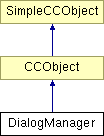
Inheritance diagram for DialogManager:
Public Member Functions | |
| DialogManager () | |
| DialogManager constructor. It allocates our special Property atom. | |
| CWindowID | Create (DialogOp *DialogOp) |
| ~DialogManager () | |
| DialogManager destructor. | |
| void | SetPropertyPageModified (BOOL Value) |
| Sets the modified property of the currently active property page of the current tabbed dialog (if it exists). | |
Static Public Member Functions | |
| static BOOL | Create (DialogOp *DlgOp, CDlgResID MainDlgID, CDlgResID SubDlgID, CDlgMode Mode=MODELESS, INT32 OpeningPage=-1, CWindowID ParentWnd=NULL) |
| static void | Open (CWindowID WindowID, DialogOp *DlgOp) |
| static void | Close (CWindowID WindowID, DialogOp *DlgOp) |
| The close method removes a modeless dialog from the display but keeps all system resources associated with it. It hides the dialog. It can be called on a modal dialog but it does nothing. | |
| static BOOL | MergeDialogs (CWindowID Dialog, CWindowID Mergee, bool fAbove) |
| This function places the contents of a dialog above or below the contents of an existing dialog. | |
| static BOOL | BringToTop (CWindowID WindowID, DialogOp *pDlgOp) |
| This function brings an open dialog to the top of the z-order. | |
| static wxBookCtrlBase * | GetBookControl (CWindowID WindowID, CGadgetID Gadget=0) |
| This function will return a pointer to the book control in a window. If the window is of type wxPropertySheetDialog then it Gadget is not required. | |
| static BOOL | IsGadgetTickable (CWindowID WindowID, CGadgetID Gadget) |
| Determines if the gadget is of a type that can be ticked. | |
| static BOOL | ColourPickerAbort (CWindowID WindowID, CGadgetID Gadget, WPARAM wParam=0) |
| Instructs camelots custom colour control (which I also wrote) to 'shutdown' and (indirectly) return control to the colour editor dialog. | |
| static void | Delete (CWindowID WindowID, DialogOp *DlgOp) |
| The delete method will delete all system resources and other information which is kept about the dialog. It also records the dialogs current position so that it can be restored the next time the dialog is created. | |
| static void | ProcessMouseEvent (CDlgMessage DialogMessageType, wxWindow *pDlg, UINT32 wParam, INT32 lParam) |
| static wxWindow * | GetGadget (CWindowID WindowID, CGadgetID Gadget) |
| static OpDescriptor * | GetGadgetOpDescriptor (CWindowID WindowID, CGadgetID Gadget) |
| static BOOL | SetUnitGadgetValue (CWindowID WindowID, CGadgetID Gadget, UnitType Unit, MILLIPOINT value, BOOL EndOfList=TRUE, INT32 ListPos=0) |
| Send custom WM_SETBITMAPEX message to custom controls This method is used to set a gadget which should hold a number to a certain value. The actual type of the gadget does not matter. | |
| static BOOL | SetDimensionUnitGadgetValue (CWindowID WindowID, CGadgetID Gadget, UnitType units, double value, Node *pNode, BOOL IncludeUnitSpecifier=TRUE, BOOL EndOfList=FALSE, INT32 ListPos=0) |
| as SetDimensionGadgetValue() but you can specify the units in which it is displayed | |
| static BOOL | SetLongGadgetValue (CWindowID WindowID, CGadgetID Gadget, INT32 value, BOOL EndOfList=TRUE, INT32 ListPos=0) |
| This function is used to set a numeric gadget value. It performs different functions depending on the type of the gadget. | |
| static BOOL | SetDoubleGadgetValue (CWindowID WindowID, CGadgetID Gadget, double value, BOOL EndOfList=TRUE, INT32 ListPos=0) |
| This function is used to set a numeric gadget value. It performs different functions depending on the type of the gadget. | |
| static BOOL | SetStringGadgetValue (CWindowID WindowID, CGadgetID Gadget, UINT32 IDStrID, BOOL EndOfList=TRUE, INT32 ListPos=0) |
| This function is used to set a gadgets value to a resource string. It can only be used on gadgets with a string value type. | |
| static BOOL | SetStringGadgetValue (CWindowID WindowID, CGadgetID Gadget, const StringBase &StrVal, BOOL EndOfList=TRUE, INT32 ListPos=0) |
| This function is used to set a gadgets string value. It can only be used on gadgets with a string value type. | |
| static BOOL | SetCustomComboGadgetValue (CWindowID WindowID, CGadgetID Gadget, CustomComboBoxControlDataItem *TheItem, BOOL EndOfList=TRUE, INT32 ListPos=0) |
| This function is used to set a CustomComboBoxes item (i.e. basically insert another item). | |
| static BOOL | SelectCustomComboGadgetValueOnString (CWindowID WindowID, CGadgetID Gadget, StringBase *StrVal) |
| This function is used to select an item (StrVal) within cc_2dBitmapComboBoxEdit custom comboboxes. | |
| static BOOL | SetGadgetRange (CWindowID WindowID, CGadgetID Gadget, INT32 Min, INT32 Max, INT32 PageInc=1) |
| For setting the range of a gadget. | |
| static BOOL | SetListBoxSelection (CWindowID WindowID, CGadgetID Gadget, INT32 Index, BOOL SelectIt, BOOL SingleSelection) |
| For selecting the Value specified by Index in a list Gadget. A subroutine used by the selection-setting DialogManager calls. | |
| static BOOL | SetBoolGadgetSelected (CWindowID WindowID, CGadgetID Gadget, BOOL IsSelected, INT32 ListPos=0) |
| For setting the selection state of a gadget, or an item within a list gadget. | |
| static BOOL | SetSelectedValueIndex (CWindowID WindowID, CGadgetID Gadget, INT32 Index) |
| For selecting the Value specified by Index in a list Gadget. | |
| static BOOL | SetSelectedValueRange (CWindowID WindowID, CGadgetID Gadget, WORD StartIndex, WORD EndIndex, BOOL Selected=TRUE) |
| For selecting the Value specified by Index in a list Gadget. | |
| static BOOL | SetDimensionGadgetValue (CWindowID WindowID, CGadgetID Gadget, MILLIPOINT value, Node *pNode, BOOL IncludeUnitSpecifier=TRUE, BOOL EndOfList=FALSE, INT32 ListPos=-1) |
| This is the routine to call for displaying a node's dimension in a control. It creates a string that represents 'Value' in the units the user wants, possibly scaled up/down if the user has specified a dimension scaling factor (e.g. 1 mile = 2 cm) Once the string is created, SetStringGadgetValue is called on the control, so you should be aware of this routine's features/limitations before calling SetDimensionGadgetValue. | |
| static BOOL | SetMemoryGadgetValue (CWindowID WindowID, CGadgetID Gadget, UINT32 value, BOOL EndOfList=TRUE, INT32 ListPos=0) |
| This method is used to set a gadget which should display an amount of memory being used or allocated. The value will be rounded to the nearest K or M or G byte value. The actual type of the gadget does not matter. | |
| static BOOL | SetGadgetHelp (CWindowID WindowID, CGadgetID Gadget, UINT32 BubbleID, UINT32 StatusID, UINT32 ModuleID=0) |
| Allows the Bubble and Status ID's of a control to be changed at runtime. | |
| static MILLIPOINT | GetUnitGadgetValue (CWindowID WindowID, CGadgetID Gadget, UnitType DefaultType, MILLIPOINT StartRange, MILLIPOINT EndRange, UINT32 IDSInvalidMsg=0, BOOL *Valid=NULL) |
| This function will obtain the gadget value and validate it. Validation will check that data has been entered in a correct unit type, and that it is in the range StartRange..EndRange. If the user enters an incorrect value the InvalidMsgID string will be displayed to the user in a dialog box, and Valid will have a FALSE value. | |
| static INT32 | GetLongGadgetValue (CWindowID WindowID, CGadgetID Gadget, INT32 StartRange, INT32 EndRange, UINT32 IDSInvalidMsg=0, BOOL *Valid=NULL, Convert::PFNSTRINGTOINT32 pfnParser=Convert::StringToLong) |
| This function will obtain the gadget value and validate it. Validation will check that a correct INT32 value has been entered, and that it is in the range StartRange..EndRange. If the user enters an incorrect value the InvalidMsgID string will be displayed to the user in a dialog box, and Valid will have a FALSE value. | |
| static double | GetDoubleGadgetValue (CWindowID WindowID, CGadgetID Gadget, double StartRange, double EndRange, UINT32 IDSInvalidMsg=0, BOOL *Valid=NULL, Convert::PFNSTRINGTODOUBLE pfnParser=Convert::StringToDouble) |
| This function will obtain the gadget value and validate it. Validation will check that a correct double value has been entered, and that it is in the range StartRange..EndRange. If the user enters an incorrect value the InvalidMsgID string will be displayed to the user in a dialog box, and Valid will have a FALSE value. | |
| static BOOL | GetBoolGadgetSelected (CWindowID WindowID, CGadgetID Gadget, UINT32 IDSInvalidMsg=0, BOOL *Valid=NULL, INT32 ListPos=0) |
| This function will obtain the gadget value and validate it. Validation will check that a correct INT32 value has been entered, and that it is in the range StartRange..EndRange. If the user enters an incorrect value the InvalidMsgID string will be displayed to the user in a dialog box, and Valid will have a FALSE value. [This does not seem correct - AMB]. | |
| static String_256 | GetStringGadgetValue (CWindowID WindowID, CGadgetID Gadget, BOOL *Valid=NULL, INT32 ListPos=-1) |
| For finding a gadgets string value. This function can only be used for gadgets with a text value. | |
| static BOOL | GetGadgetRange (CWindowID WindowID, CGadgetID Gadget, INT32 *Min, INT32 *Max) |
| For obtaining the range of a gadget. | |
| static MILLIPOINT | GetDimensionGadgetValue (CWindowID WindowID, CGadgetID Gadget, Node *pNode, BOOL *Valid=NULL, INT32 ListPos=-1) |
| This is the routine to call for getting user-entered dimensions from a control. The value is scaled from user dimensions to an internal millipoint value. The routine uses DialogManager::GetStringGadgetValue to extract the string from the control. The caller should be aware of the features/limitations of this routine before calling GetDimensionGadgetValue. | |
| static BOOL | GetDoubleAndUnitGadgetValue (double *pMPValue, double *pUnitValue, UnitType *pUnitType, CWindowID WindowID, CGadgetID Gadget, Node *pNode) |
| Read the value from a gadget as a double millipont values accounting for unit scaling ALSO read the type of unit specified and the gadget value in terms of these units ie 0.5m would return 36000.0, 0.5 and METERS (assuming scaling 1m->1in). | |
| static UINT32 | GetMemoryGadgetValue (CWindowID WindowID, CGadgetID Gadget, UINT32 StartRange, UINT32 EndRange, UINT32 IDSInvalidMsg=0, BOOL *Valid=NULL) |
| This function allows a memory value to be read back from a control. It will cope with the memory being specified in bytes, K, M or G bytes and will also validate it. Validation will check that data has been entered in a correct unit type, and that it is in the range StartRange..EndRange. If the user enters an incorrect value the InvalidMsgID string will be displayed to the user in a dialog box, and Valid will have a FALSE value. | |
| static BOOL | DeleteAllValues (CWindowID WindowID, CGadgetID Gadget) |
| For deleting all values in a list-gadget. | |
| static BOOL | DeleteValue (CWindowID WindowID, CGadgetID Gadget, BOOL EndOfList=TRUE, INT32 ListPos=0) |
| For deleting a gadget value. | |
| static BOOL | GetValueCount (CWindowID WindowID, CGadgetID Gadget, INT32 *Count) |
| For finding the number of values stored in a gadget. | |
| static BOOL | GetValueIndex (CWindowID WindowID, CGadgetID Gadget, INT32 *Index) |
| For finding the index of the currently selected item in a gadget. | |
| static BOOL | GetValueIndex (CWindowID WindowID, CGadgetID Gadget, WORD *Index) |
| For finding the index of the currently selected item in a gadget. | |
| static INT32 | GetSelectedCount (CWindowID WindowID, CGadgetID Gadget) |
| Returns the number of selected items in a list-type gadget. | |
| static INT32 | GetFirstSelectedItem (CWindowID WindowID, CGadgetID Gadget) |
| Returns the index of the first selected item in a list-type gadget. | |
| static INT32 * | GetSelectedItems (CWindowID WindowID, CGadgetID Gadget) |
| Returns a ptr to an INT32 array that holds the list of selected indexes. The last array entry contains -1. | |
| static BOOL | EnableGadget (CWindowID WindowID, CGadgetID Gadget, BOOL Enabled) |
| For enabling/disabling a gadget. | |
| static BOOL | IsGadgetEnabled (CWindowID WindowID, CGadgetID Gadget) |
| For checking if a gadget is enabled/disabled. | |
| static BOOL | SetGadgetWritable (CWindowID id, CGadgetID Gadget, BOOL enable) |
| Sets the state of the 'Read Only' flag of an edit field or combo box. | |
| static BOOL | HideGadget (CWindowID WindowID, CGadgetID Gadget, BOOL Hide) |
| For hiding/showing gadgets. | |
| static BOOL | GadgetRedraw (CWindowID WindowID, CGadgetID Gadget, BOOL Redraw) |
| This function sets a gadgets redraw state. If Redraw = FALSE then the gadget will not be redrawn when changes are made to it. Conversely if Redraw = TRUE then the Gadget will redraw itself after any changes are made. | |
| static void | Layout (CWindowID WindowID, BOOL CanYield=FALSE) |
| Relayout dialog - for sizer changes. | |
| static void | RelayoutDialog (DialogTabOp *DlgOp) |
| Force the dialog to relayout after control hide Scope: public. | |
| static BOOL | SetKeyboardFocus (CWindowID WindowID, CGadgetID Gadget) |
| Sets the keyboard focus to the given control. | |
| static BOOL | DefaultKeyboardFocus () |
| Sets the keyboard focus to the "default" window, which currently is the main frame window (which in turn sets it to the active view window). | |
| static BOOL | HighlightText (CWindowID WindowID, CGadgetID Gadget, INT32 nStart=0, INT32 nEnd=-1) |
| Highlights the given range of text (by default all of it) within a control that holds editable text, eg. an edit field. | |
| static BOOL | CaptureMouse (CWindowID WindowID, CGadgetID Gadget) |
| Allows the given control to Capture the mouse. | |
| static BOOL | ReleaseMouse (CWindowID WindowID, CGadgetID Gadget) |
| Release the mouse captured by the given control. | |
| static void | PaintGadgetNow (CWindowID WindowID, CGadgetID gid) |
| Immediate paints any invalid areas of the given control (like the Windows "UpdateWindow" function). | |
| static void | InvalidateGadget (CWindowID WindowID, CGadgetID Gadget, BOOL EraseBackround=TRUE) |
| Invalidates the control so that it will be repainted soon. | |
| static void | InvalidateGadget (CWindowID WindowID, CGadgetID Gadget, ReDrawInfoType *ExtraInfo, DocRect *InvalidRect) |
| Causes the Dialog Manager to tell the host os to get the cc_DialogDraw gadget to be redrawn, over the specfied rectangle. You should recieve a DIM_REDRAW message in the not too distant future. | |
| static void | ScrollKernelRenderedGadget (CWindowID WindowID, CGadgetID Gadget, DocRect *RectToScroll, DocCoord *ScrollBy) |
| Causes the Dialog Manager to tell the host os to get the cc_DialogDraw gadget to be scrolled, over the specfied rectangle. You should recieve a DIM_REDRAW message in the not too distant future, to update any portions that 'scroll into view'. | |
| static BOOL | GetKernelRenderedGadgetInfo (CWindowID WindowID, CGadgetID Gadget, ReDrawInfoType *Result) |
| Allows the user access to the same information which is passed in to DIM_REDRAW and the kernel-rendered-dialogue mouse-handling messages. This is just for convenience so they can calculate stuff at a time other than handling those two types of dialogue event (e.g. if a document message causes you to have to redraw a small portion of your gadget, you need this information to calculate the invalidation rectangle from). | |
| static void | SetEditGadgetType (CWindowID WindowID, CGadgetID Gadget, EditGadgetType Type) |
| Subclasses the edit gadget so that it only accepts characters specified by the Type parameter. | |
| static void | SetEditGadgetType (CWindowID WindowID, CGadgetID, UINT32 IDSValidChar) |
| To subclass the edit gadget so that it only accepts characters in the string specified by IDSValidChar. | |
| static void | DualFunctionButton (CWindowID DialogWnd, CGadgetID ButtonGadget) |
| To subclass the button gadget so that it accepts right mouse button clicks. | |
| static BOOL | MakeListBoxDragable (CWindowID WindowID, CGadgetID Gadget) |
| static void | SetComboListLength (CWindowID WindowID, CGadgetID Gadget) |
| static void | SetGadgetBitmaps (CWindowID DialogWnd, CGadgetID Gadget, UINT32 Bitmap1, UINT32 Bitmap2) |
| This function will set the bitmaps associated with a gadget. | |
| static void | SetGadgetBitmaps (CWindowID DialogWnd, CGadgetID Gadget, const CGadgetImageList &images) |
| This function will set the bitmaps associated with a gadget. | |
| static void | SetGadgetBitmap (CWindowID WindowID, CGadgetID Gadget, ResourceID Bitmap) |
| This function will set the bitmaps associated with a gadget. | |
| static ResourceID | GetGadgetBitmap (CWindowID WindowID, CGadgetID Gadget) |
| This function will get the bitmaps associated with a gadget. | |
| static void | SetBitmapButtonIndexes (CWindowID WindowID, CGadgetID Gadget, UINT32 UnselectedIndex, UINT32 SelectedIndex) |
| This function allows you to specify bitmaps for both the selected and unselected states of a bitmap button. Most likely you have already selected your bitmap for the selected state in your resource file, however this allows you to specify the unselected state also. | |
| static UINT32 | GetGadgetImageCount (CWindowID wnd, CGadgetID Gadget) |
| To get the number of images set in the trree control. | |
| static void | DeInit () |
| Deinitialise the DialogManager. | |
| static BOOL | IsADialogWindow (wxWindow *pWnd) |
| To determine if hwnd is the handle of a dialog. | |
| static CTreeItemID | SetTreeGadgetItem (CWindowID wnd, CGadgetID Gadget, CTreeItemID hParent, const StringBase &str, CTreeItemID hInsAfter, INT32 iImage, CCObject *pObj=NULL) |
| To insert an item into a tree control. | |
| static CCObject * | GetTreeGadgetItemData (CWindowID wnd, CGadgetID Gadget, CTreeItemID hItem) |
| To insert an item into a tree control. | |
| static BOOL | SelectTreeGadgetItem (CWindowID wnd, CGadgetID Gadget, CTreeItemID hItem, BOOL bNewState=TRUE) |
| To select an item in a tree control. | |
| static CTreeItemID | GetTreeGadgetRootItem (CWindowID wnd, CGadgetID Gadget) |
| To get the ID of the root item in the tree control. | |
| static CTreeItemID | GetTreeGadgetFirstSelectedItem (CWindowID wnd, CGadgetID Gadget) |
| To get the ID of the first selected item in the tree control. | |
| static BOOL | TreeGadgetExpandItem (CWindowID wnd, CGadgetID Gadget, CTreeItemID hItem) |
| To expand an item in the tree control. | |
| static CTreeItemID | GetTreeGadgetNextVisItem (CWindowID wnd, CGadgetID Gadget, CTreeItemID hItem) |
| To get the ID of the next visible item in the tree control after a specified item. | |
| static CTreeItemID | GetTreeGadgetFirstChildItem (CWindowID wnd, CGadgetID Gadget, CTreeItemID hItem) |
| To get the ID of the first child item of the specified in the tree control. | |
| static UINT32 | GetTreeGadgetChildrenCount (CWindowID wnd, CGadgetID Gadget, CTreeItemID hItem, BOOL bRecursive=FALSE) |
| To get the number of children of an item in a tree control. | |
| static BOOL | AddAPage (DialogTabOp *pDialogTabOp, CDlgResID DialogResID, CGadgetID Gadget=0) |
| Adds a page to the tabbed dialog with resource ID DialogResID. | |
| static CWindowID | GetPageWindow (CWindowID Win, CDlgResID PageID, INT32 *PageIndex=NULL) |
| Returns the Window ID of a page within a property sheet. If the page is NULL then Win is simply returned, It can be called on a non property sheet dialog. Just pretend that they are property sheets without any pages. | |
| static BOOL | SetTitlebarName (CWindowID Win, String_256 *Name) |
| Sets the titlebar text of the dialog. | |
| static BOOL | ModalDialogOpen (DialogOp **pModal=NULL) |
| To determine if there is currently an open modal dialog. | |
| static BOOL | IsWindowVisible (CWindowID Win) |
| To test the visibility of Win. | |
| static BOOL | IsCustomComboDropdownVisible (CWindowID WindowID, CGadgetID Gadget) |
| To test the visibility of WinID's dropdown. | |
| static BOOL | CloseDropdown (CWindowID WindowID, CGadgetID Gadget, BOOL CloseVal) |
| Used to close the controls dropdown. This routine was written because of the amount of trouble that I was experiencing with my custom controls down to escape key processing (which is viewed as a hotkey within camelot). | |
| static void | EnableAllDialogs (BOOL Enable, wxWindow *pExceptMe=NULL) |
| Enables or Disables all Dialogs on the DialogOp message handler list. This is useful when opening/closing modal dialogs. | |
| static BOOL | RecordActiveDialogState () |
| This function will get called before a MODAL dialog is opened. It records which window is currently active, and if the window is a MODAL dialog. After a MODAL dialog is closed RestoreActiveDialogState is called to restore the active window. | |
| static void | RestoreActiveDialogState () |
| This function is called after a MODAL dialog is closed. it restores the Active window. | |
| static CDlgResID | GetActivePage (CWindowID WindowID, CGadgetID Gadget=0) |
| To find out the currently active page in a tabbed dialog. | |
| static BOOL | AddDialogControlToHelper (CWindowID WindowID, CGadgetID Gadget) |
| To add this control to the static dialog control helper, which will subclass it. | |
| static BOOL | RemoveDialogControlFromHelper (CWindowID, CGadgetID) |
| To add this control to the static dialog control helper, which will subclass it. | |
| static BOOL | GetStatusLineText (String_256 *ptext, CWindowID window) |
| Fills in the status line text from the help text if over a control Scope: Public. | |
| static CWindowID | GetWindowUnderPointer (WinCoord *wc=NULL) |
| Fills in the status line text from the help text if over a control Scope: Public. | |
| static UINT32 | SetTimer (DialogOp *pDialogOp, CWindowID WindowID, UINT32 nIDEvent, UINT32 nElapse, void(*lpfnTimer)(void *)=NULL, void *param=NULL, BOOL OneShot=FALSE) |
| Allows the user access to setting a timer caller back or event for a dialog box. The caller can either specify a call back procedure to be called when the timer goes off or if null is specified, a DIM_TIMER message will be sent. This maps onto the Windows API/CWnd call. The return value is effectively the handle onto the timer system. It must be passed to the KillTimer member function to kill the timer. A Nonzero value indicates successful allocation of the timer; non-zero implies a problem. | |
| static BOOL | KillTimer (DialogOp *pDialogOp, CWindowID WindowID, INT32 nIDEvent) |
| Allows the user access to killing a timer caller back or event that has been set up for a dialog box. Kills the timer event identified by nIDEvent from the earlier call to SetTimer. Any pending WM_TIMER messages associated with the timer are removed from the message queue. | |
| static BOOL | GetWindowPosition (CWindowID WindowID, wxRect *pRect) |
| Allows the user to get the current window position. | |
| static BOOL | GetWindowPosition (CWindowID WindowID, RECT *pRect) |
| static BOOL | GetGadgetPosition (CWindowID WindowID, CGadgetID Gadget, wxRect *pRect) |
| Allows the user to get the current position of the specified gadget or icon. | |
| static BOOL | GetGadgetPosition (CWindowID WindowID, CGadgetID Gadget, RECT *pRect) |
| static BOOL | SetWindowPosition (CWindowID WindowID, const wxRect &Rect) |
| Allows the user to set the current window position. | |
| static BOOL | SetWindowPosition (CWindowID WindowID, const RECT &Rect) |
| static BOOL | SetGadgetPosition (CWindowID WindowID, CGadgetID Gadget, const wxRect &Rect) |
| Allows the user to set the current position of the specified gadget or icon. | |
| static BOOL | SetGadgetPosition (CWindowID WindowID, CGadgetID Gadget, const RECT &Rect) |
| static INT32 | GetScreenDpi () |
| Allows the user to find out the screen dpi. | |
| static BOOL | GetScreenSize (INT32 *pWidth, INT32 *pHeight) |
| Allows the user to find out the screen size. | |
| static void | FreePaneInfoHash () |
| Free the pane info hash if it exists Scope: protected. | |
Static Public Attributes | |
| static wxWindow * | pDlgCurrent = NULL |
Static Protected Member Functions | |
| static void | Event (DialogEventHandler *pEvtHandler, wxEvent &event) |
| OnCommand message handler. Translates a windows Command message into a DIM. | |
| static void | EnsurePanePreferenceDeclared (wxString key) |
| Ensures the relevant preference has been declared Scope: protected. | |
| static void | InitPaneInfoHash () |
| Initializes the pane info hash if it has not been previously initialized Scope: protected. | |
| static void | LoadPaneInfo (wxString key, wxAuiPaneInfo &paneinfo) |
| Loads the pane info structure from the hash Scope: protected. | |
| static void | SavePaneInfo (wxString key, wxAuiPaneInfo &paneinfo) |
| Saves the pane info structure to the hash Scope: protected. | |
Static Protected Attributes | |
| static IdToSerializedPaneInfo * | s_pPaneInfoHash = NULL |
Static Private Member Functions | |
| static void | CreateRecursor (wxWindow *pwxWindow) |
| Initialize platform dependent resources. | |
| static BOOL | CreateBar (DialogBarOp *DlgOp) |
| Handles the creation of a bar Scope: private. | |
| static BOOL | CreateTabbedDialog (DialogTabOp *pTabDlgOp, CDlgMode Mode, INT32 OpeningPage, CDlgResID MainDlgID) |
| Handles the creation of a tabbed dialog Opening page allows a page to be specified that is not the initial page, which will be the default if this is the first time the dialog has been opened or if it has been opened before then the initial page will be the last one opened. Scope: private. | |
| static BOOL | PostCreate (DialogOp *pDialogOp, INT32 OpeningPage) |
| This function will get called after a dialog has been created. If a modeless dialog has been created then it gets called directly from the Create method. For a modal dialog however it gets called after receiving a WM_INIT_DIALOG message. It completes the creation process. | |
| static void | DeletePropShtDetails (DialogTabOp *pOp) |
| static DLGTEMPLATE * | MergeDialog (CDlgResID Main, CDlgResID Other) |
| Merge two dialogs together into one dialog template. The return value points to the new merged dialog, which the caller should pass to CreateDialogIndirect(). Once the dialog has been created using this block, CCFree() should be called on the block to return it to the system pool. The significance of the 'Main' and 'Other' names is that the dialog style (border, menuname, classname, title and font) is taken from 'Main' - the header of 'Other' is discarded. | |
| static void | SetGadgetIDToFocus (wxWindow *pDialogWnd) |
| If a child control of the dialog window has the focus then the function sets the Gadget to the ID of this control. | |
| static List * | GetControlList (CWindowID) |
| Hide the mechanism we use to attach our lists to various windows. In fact we use window properties. | |
| static void | DeleteControlList (CWindowID) |
| Deletes the Properties that are used to store the ControlList. Should be called as the very last thing before the Window is vaped e.g. in response to a WM_DESTROY message. Destroying it earlier will cause GetControlList to return NULL which proves fatal within the various message handlers. Scope: Private, static. | |
| static LPWSTR | MovePastWideStr (LPWSTR pWideStr) |
| Given a ptr to the first byte in a wide string (or char string if win16) return a ptr to the byte past the null. | |
| static size_t | SizeDlgHeader (DLGTEMPLATE *pHeader) |
| Given a ptr to DIALOGBOXHEADER, return its size. | |
| static size_t | SizeCtrlData (DLGITEMTEMPLATE *pData) |
| Given a ptr to a controldata struct, return its length. Under Win32, all strings are UniCode (as they are in the res file). | |
| static wxPropertySheetDialog * | GetPropertySheetFromOp (DialogTabOp *pDialogTabOp) |
| static BOOL | HandleScrollBarMsg (wxWindow *pScrollWnd, UINT32 wParam, INT32 lParam, WORD CurrentThumbPos) |
| static DialogPosition * | FindDialogPositionRecord (CDlgResID DialogID) |
| Searches the DialogPositionList to see if this dialog has been created before if it has then a pointer to its DialogPosition record is returned, else NULL is retuned. Scope: private. | |
| static INT32 FAR PASCAL EXPORT | ValidateEditGadgetProc (wxWindow *pwnd, UINT32 message, UINT32 wParam, INT32 lParam) |
| subclassed edit control proc | |
| static INT32 FAR PASCAL EXPORT | RgtMouseButtonProc (wxWindow *pwnd, UINT32 message, UINT32 wParam, INT32 lParam) |
| subclassed button control proc | |
| static BOOL | CustomControlMsg (wxWindow *pwnd, UINT32 wParam, INT32 lParam) |
| Handles custom control messages. | |
Static Private Attributes | |
| static List | DiscardStrList |
| static List | DialogPositionList |
| static List | ScrollPageIncList |
| static UINT32 | MsgDragList |
| static UINT32 | MsgSlaveDrawItem |
| static ActiveDlgStateStack | ActiveDlgStack |
Friends | |
| class | DialogEventHandler |
| class | wxPropertySheetDialog |
Definition at line 330 of file dlgmgr.h.
|
|
DialogManager constructor. It allocates our special Property atom.
Definition at line 192 of file dlgmgr.cpp.
|
|
|
DialogManager destructor.
Definition at line 6428 of file dlgmgr.cpp.
|
|
||||||||||||||||
|
Adds a page to the tabbed dialog with resource ID DialogResID.
Definition at line 7003 of file dlgmgr.cpp. 07004 { 07005 // Try to add the page to the property sheet associated with the DialogTabOp 07006 // let's try and find it 07007 wxBookCtrlBase* pNoteBook = GetBookControl(pDialogTabOp->WindowID, Gadget); 07008 07009 // We need to create a page object 07010 // Because wxNotebookPage is derived from an MFC object we have to cope with exceptions 07011 wxWindow* pNewPage; 07012 wxString ObjectName; 07013 try 07014 { 07015 const TCHAR* pDialogName=CamResource::GetObjectNameFail( DialogResID ); 07016 ERROR1IF(pDialogName == NULL, FALSE, _R(IDE_CANNOT_CREATE_DIALOG)); 07017 TRACEUSER( "jlh92", _T("Cre tab %s\n"), pDialogName ); 07018 ObjectName = pDialogName; 07019 07020 pNewPage = wxXmlResource::Get()->LoadPanel( pNoteBook, pDialogName ); 07021 ERROR1IF(pNewPage == NULL, FALSE, _R(IDE_CANNOT_CREATE_DIALOG)); 07022 pNewPage->SetId( DialogResID ); 07023 07024 CamArtProvider::Get()->EnsureChildBitmapsLoaded( pNewPage ); 07025 } 07026 catch( CMemoryException ) 07027 { 07028 ERROR1(FALSE, _R(IDS_OUT_OF_MEMORY)); 07029 } 07030 07031 // Just to be safe 07032 ERROR1IF(pNewPage == NULL, FALSE, _R(IDS_OUT_OF_MEMORY)); 07033 07034 wxString Title = wxEmptyString; 07035 if (pNewPage->IsKindOf(CLASSINFO(wxDialog))) 07036 Title=((wxDialog *)pNewPage)->GetTitle(); 07037 if (Title.IsEmpty()) 07038 Title = pNewPage->GetLabel(); // because wxPanel doesn't seem to support a title 07039 if( Title.IsEmpty() ) 07040 { 07041 ResourceID NameResID = CamResource::GetResourceID( PCTSTR(ObjectName) ); 07042 PCTSTR pszStringLookup = CamResource::GetTextFail( NameResID ); 07043 if( NULL != pszStringLookup ) 07044 { 07045 Title = pszStringLookup; 07046 TRACEUSER( "jlh92", _T("Page (FST) = \"%s\"\n"), pszStringLookup ); 07047 } 07048 } 07049 if( Title.IsEmpty() ) 07050 { 07051 // Finally, in desperation, we (mis-)use the tooltip string because now the wx folks have removed 07052 // the label, even though it's needed for accessibility. Aarrghh 07053 wxToolTip* pTip = pNewPage->GetToolTip(); 07054 if (pTip) Title=pTip->GetTip(); 07055 } 07056 07057 wxImageList * pImageList = NULL; 07058 wxBitmap b; 07059 // Add images if present 07060 if (pDialogTabOp->HasImages()) 07061 { 07062 // Get the image list 07063 pImageList = pNoteBook->GetImageList(); 07064 07065 wxBitmap * pBitmap = CamArtProvider::Get()->FindBitmap(DialogResID); 07066 if (!pBitmap || (pBitmap==CamArtProvider::Get()->GetMissingBitmap()) || !pBitmap->Ok()) 07067 { 07068 TRACEUSER("Phil", _T("Unable to use options tab icon %d\n"), DialogResID); 07069 int /*TYPENOTE: Correct */ w=32; 07070 int /*TYPENOTE: Correct */ h=32; 07071 if (pImageList) 07072 pImageList->GetSize(0, w, h); 07073 b = wxArtProvider::GetBitmap(wxART_HELP_SETTINGS, wxART_OTHER, wxSize(w, h)); 07074 } 07075 else 07076 b= *pBitmap; 07077 07078 // If there is no image list, create one 07079 if (!pImageList) 07080 { 07081 pImageList = new wxImageList(b.GetWidth(), b.GetHeight()); 07082 if (pImageList) 07083 pNoteBook->AssignImageList(pImageList); 07084 } 07085 07086 } 07087 07088 if (pImageList) 07089 pImageList->Add(b); 07090 pNoteBook->AddPage( pNewPage, Title ); 07091 if (pImageList) 07092 pNoteBook->SetPageImage(pNoteBook->GetPageCount()-1, pImageList->GetImageCount()-1); 07093 07094 return true; 07095 }
|
|
||||||||||||
|
To add this control to the static dialog control helper, which will subclass it.
Definition at line 5103 of file dlgmgr.cpp. 05104 { 05105 // For the time being, we do this by Hide/Unhide 05106 wxWindow * pGadget = GetGadget(WindowID, Gadget); 05107 if (!pGadget) return FALSE; 05108 pGadget->Show(TRUE); 05109 return TRUE; 05110 }
|
|
||||||||||||
|
This function brings an open dialog to the top of the z-order.
Definition at line 1087 of file dlgmgr.cpp. 01088 { 01089 ERROR2IF(!WindowID, FALSE, "BringToTop called on a dialog without a window"); 01090 ( (wxWindow *)WindowID )->Raise(); 01091 if (pDlgOp->pEvtHandler->wxAUImanaged) 01092 CCamFrame::GetMainFrame()->UpdateFrameManager(); 01093 return TRUE; 01094 }
|
|
||||||||||||
|
Allows the given control to Capture the mouse.
Definition at line 5384 of file dlgmgr.cpp. 05385 { 05386 // Set the focus to the control within the given window/dialogue box. 05387 // For the time being, we do this by Hide/Unhide 05388 wxWindow * pGadget = GetGadget(WindowID, Gadget); 05389 if (!pGadget) return FALSE; 05390 05391 pGadget->CaptureMouse(); 05392 return TRUE; 05393 }
|
|
||||||||||||
|
The close method removes a modeless dialog from the display but keeps all system resources associated with it. It hides the dialog. It can be called on a modal dialog but it does nothing.
Definition at line 1017 of file dlgmgr.cpp. 01018 { 01019 // Hide the dialog 01020 01021 // Determine if we are hiding a bar 01022 PORTNOTE("dialog","Removed DialogBarOp usage") 01023 #ifndef EXCLUDE_FROM_XARALX 01024 if (pDlgOp->IsKindOf(CC_RUNTIME_CLASS(DialogBarOp))) 01025 { 01026 // Find the BaseBar object 01027 wxWindow* pCWnd = CWnd::FromHandlePermanent(WindowID); 01028 ENSURE(pCWnd != NULL, "Could not find bar object"); 01029 // Show the bar window 01030 if (pCWnd != NULL) 01031 { 01032 ((BaseBar*)pCWnd)->Hide((DialogBarOp*)pDlgOp); 01033 } 01034 } 01035 else 01036 #endif 01037 if (!(pDlgOp->IsModal())) // The delete method closes a modal dialog 01038 { 01039 ENSURE(WindowID != NULL,"NULL WindowID"); 01040 ( (wxWindow *)WindowID )->Show( false ); 01041 } 01042 01043 if (pDlgOp->pEvtHandler->wxAUImanaged) 01044 CCamFrame::GetMainFrame()->UpdateFrameManager(); 01045 }
|
|
||||||||||||||||
|
Used to close the controls dropdown. This routine was written because of the amount of trouble that I was experiencing with my custom controls down to escape key processing (which is viewed as a hotkey within camelot).
Definition at line 6956 of file dlgmgr.cpp. 06957 { 06958 PORTNOTE("dialog","Programatic CB drop not supported by wx") 06959 return (TRUE); 06960 }
|
|
||||||||||||||||
|
Instructs camelots custom colour control (which I also wrote) to 'shutdown' and (indirectly) return control to the colour editor dialog.
Definition at line 1769 of file dlgmgr.cpp. 01770 { 01771 PORTNOTETRACE("dialog","DialogManager::ColourPickerAbort - do nothing"); 01772 #ifndef EXCLUDE_FROM_XARALX 01773 // Currently the gadget is only tickable if it is a button 01774 HWND hGadget = GetDlgItem((HWND)WindowID, (INT32)Gadget); 01775 String_256 ClassNameStr; // The control type 01776 01777 // Find out the class type of the gadget 01778 GetClassName(hGadget, (TCHAR*)ClassNameStr, 255); 01779 01780 if (ClassNameStr == String_8(TEXT("cc_colPicker"))) 01781 { 01782 BOOL RetVal = FALSE; 01783 01784 RetVal = SendMessage(hGadget, WM_COLOURPICKERABORT, wParam, 0); 01785 01786 return (RetVal); 01787 } 01788 01789 return (TRUE); 01790 ENSURE(FALSE, "Calling ColourPickerAbort for an invalid control"); 01791 #endif 01792 return FALSE; 01793 }
|
|
|
|
|
||||||||||||||||||||||||||||
|
Definition at line 320 of file dlgmgr.cpp. 00324 { 00325 ERROR2IF(!DlgOp, FALSE, _T("Create Passed Null DialogOp")); 00326 ERROR2IF(DlgOp->pEvtHandler, FALSE, _T("Window has already been created. Having two is greedy")); 00327 00328 DlgOp->pEvtHandler = new DialogEventHandler(DlgOp); 00329 ERRORIF(!DlgOp->pEvtHandler || !DlgOp->pEvtHandler->pDialogOp, FALSE, _R(IDE_CANNOT_CREATE_DIALOG)); 00330 00331 BOOL wxAUImanaged = FALSE; 00332 if ( DlgOp->IsABar() || DlgOp->IsAGallery() ) 00333 { 00334 BOOL modal = DlgOp->IsModal(); 00335 ERROR2IF(modal, FALSE, "Attempting to create a wxAUImanaged Dialog that is modal"); 00336 // They wanted a bar. Well, the main difference to us is we let wxAUI manage it. 00337 wxAUImanaged = TRUE; 00338 } 00339 00340 // ERROR2IF( DlgOp->IS_KIND_OF(DialogBarOp), FALSE, _T("Bar creation not yet supported")); 00341 // ERROR2IF( DlgOp->IS_KIND_OF(DialogTabOp), FALSE, _T("Tabbed dialogs not yet supported")); 00342 ERROR2IF( SubDlgID !=0, FALSE, _T("Merging of dialogs not yet supported")); 00343 00344 // if no parent dialog window specified use the main frame window 00345 if ((ParentWnd == NULL) || wxAUImanaged) 00346 ParentWnd = GetMainFrame(); 00347 00348 const TCHAR* pDialogName = NULL; 00349 wxWindow* pDialogWnd = NULL; 00350 00351 if( DlgOp->IS_KIND_OF(DialogTabOp) && !(((DialogTabOp*)DlgOp)->LoadFrameFromResources())) 00352 { 00353 // ok first try and create the property sheet 00354 wxDynamicPropertySheetDialog* pPropertySheet; 00355 00356 // error handling done later 00357 pPropertySheet = new wxDynamicPropertySheetDialog(); 00358 if (pPropertySheet) 00359 { 00360 pPropertySheet->SetTabType(((DialogTabOp*)DlgOp)->GetTabType()); 00361 if (!pPropertySheet->Create((wxWindow *)ParentWnd, wxID_ANY, (TCHAR*) (*((DialogTabOp*)DlgOp)->GetName()) )) 00362 { 00363 delete pPropertySheet; 00364 pPropertySheet=NULL; // error handling done below 00365 } 00366 else 00367 { 00368 wxStdDialogButtonSizer *sizer = new wxStdDialogButtonSizer(); 00369 wxButton * ok=new wxButton(pPropertySheet, wxID_OK); 00370 sizer->AddButton(ok); // Add an OK button 00371 sizer->AddButton(new wxButton(pPropertySheet, wxID_CANCEL)); // Add a Cancel button 00372 sizer->AddButton(new wxButton(pPropertySheet, wxID_APPLY)); // Add an Apply button 00373 sizer->AddButton(new wxButton(pPropertySheet, wxID_HELP)); // Add a Help button 00374 ok->SetDefault(); 00375 ok->SetFocus(); 00376 pPropertySheet->SetAffirmativeId(wxID_OK); 00377 sizer->Realize(); 00378 pPropertySheet->GetInnerSizer()->Add( sizer, 0, wxGROW|wxALIGN_CENTER_VERTICAL|wxTOP|wxBOTTOM|wxLEFT|wxRIGHT, 2); 00379 pPropertySheet->GetInnerSizer()->AddSpacer(2); 00380 } 00381 } 00382 pDialogWnd=pPropertySheet; 00383 } 00384 else 00385 { 00386 pDialogName=CamResource::GetObjectNameFail(MainDlgID); 00387 ERROR1IF(pDialogName == NULL, FALSE, _R(IDE_CANNOT_CREATE_DIALOG)); 00388 00389 PORTNOTE("dialog","A more general scheme is needed to allow creation of a panel for non-toolbar type dialog") 00390 if (wxAUImanaged || _R(IDD_BITMAPPREVIEWDIALOG) == MainDlgID ) 00391 pDialogWnd = wxXmlResource::Get()->LoadPanel((wxWindow *)ParentWnd, pDialogName); 00392 else 00393 pDialogWnd = wxXmlResource::Get()->LoadDialog((wxWindow *)ParentWnd, pDialogName); 00394 } 00395 00396 ERROR1IF(pDialogWnd == NULL, FALSE, _R(IDE_CANNOT_CREATE_DIALOG)); 00397 00398 pDialogWnd->Hide(); 00399 CamArtProvider::Get()->EnsureChildBitmapsLoaded(pDialogWnd); 00400 00401 // On the Mac, panels etc. are by default transparent; fix them up 00402 #ifdef __WXMAC__ 00403 pDialogWnd->SetBackgroundStyle(wxBG_STYLE_COLOUR); 00404 pDialogWnd->SetBackgroundColour(wxSystemSettings::GetColour(wxSYS_COLOUR_WINDOW)); 00405 #endif 00406 00407 // Note that we might one day want to create (say) wxPanels, or wxToolbars instead above 00408 // It deosn't matter to us, we just want a wxWindow 00409 00410 DlgOp->pEvtHandler->pwxWindow = pDialogWnd; 00411 DlgOp->pEvtHandler->wxAUImanaged = wxAUImanaged; 00412 DlgOp->pEvtHandler->ID =MainDlgID; 00413 // Set the DialogOp's WindowID 00414 DlgOp->WindowID = (CWindowID)pDialogWnd; 00415 pDialogWnd->PushEventHandler(DlgOp->pEvtHandler); 00416 00417 if (DlgOp->IS_KIND_OF(DialogTabOp)) 00418 { 00419 // on balance we might be best ignoring errors here - we are really now past 00420 // the point of no return, and the dialog can be closed cleanly by the user 00421 // but let's try anyway 00422 if (!CreateTabbedDialog( (DialogTabOp*)DlgOp, Mode, OpeningPage, MainDlgID )) 00423 { 00424 // try using our own tolerant delete mechanism 00425 Delete(pDialogWnd, DlgOp); 00426 ERROR1(FALSE, _R(IDE_CANNOT_CREATE_DIALOG)); 00427 } 00428 } 00429 00430 CreateRecursor(pDialogWnd); 00431 00432 // Register all the child controls 00433 ControlList::Get()->RegisterWindowAndChildren(pDialogWnd, DlgOp); 00434 00435 ControlList::Get()->ReflectAllStates(); // might as well do the processing before the bar / dialog appears 00436 00437 // we call this directly now 00438 BOOL ok = PostCreate(DlgOp, OpeningPage); 00439 00440 if( ok && 00441 Mode == MODAL && 00442 pDialogWnd->IsKindOf( CLASSINFO(wxDialog) ) ) 00443 { 00444 ((wxDialog *) pDialogWnd)->ShowModal(); 00445 } 00446 00447 #ifdef USE_WXAUI 00448 if (wxAUImanaged) 00449 { 00450 wxString Title = wxEmptyString; 00451 if (pDialogWnd->IsKindOf(CLASSINFO(wxDialog))) 00452 Title=((wxDialog *)pDialogWnd)->GetTitle(); 00453 if (Title.IsEmpty()) Title = pDialogWnd->GetLabel(); // because wxPanel doesn't seem to support a title 00454 if (Title.IsEmpty()) 00455 { 00456 const TCHAR * ResString=CamResource::GetTextFail(pDialogWnd->GetId()); 00457 if (ResString) 00458 Title=wxString(ResString); 00459 } 00460 if (Title.IsEmpty()) 00461 { 00462 // Finally, in desperation, we (mis-)use the tooltip string because now the wx folks have removed 00463 // the label, even though it's needed for accessibility. Aarrghh 00464 wxToolTip* pTip = pDialogWnd->GetToolTip(); 00465 if (pTip) Title=pTip->GetTip(); 00466 } 00467 if (Title.IsEmpty()) 00468 Title = wxString(CamResource::GetText(_R(IDS_ANONYMOUSBARTITLE))); 00469 00470 00471 // We really should take a wxPaneInfo() as an additional parameter to this function to allow this sort 00472 // of stuff to be specified. Or try and retrieve it from the DialogBarOp or similar. Anyway, for now 00473 // give it some default parameters 00474 wxAuiPaneInfo paneinfo; 00475 if (!DlgOp->IsABar()) 00476 { 00477 // default galleries to 300 deep. Specifying -1 as a width doesn't seem to work 00478 paneinfo.FloatingSize(100,300); 00479 } 00480 LoadPaneInfo(wxString(CamResource::GetObjectName(pDialogWnd->GetId())), paneinfo); 00481 paneinfo.DestroyOnClose(FALSE); 00482 if (DlgOp->IsABar()) 00483 { 00484 if (DlgOp->IsKindOf(CC_RUNTIME_CLASS(StatusLine))) 00485 paneinfo.Bottom().Layer(1).Row(2).LeftDockable(FALSE).RightDockable(FALSE).Floatable(FALSE).Movable(FALSE).Gripper(FALSE).CaptionVisible(FALSE).PaneBorder(FALSE); 00486 else 00487 { 00488 paneinfo.ToolbarPane().Fixed(); 00489 if (DlgOp->IsVertical()) 00490 { 00491 paneinfo.Left().Layer(0).GripperTop().TopDockable(FALSE).BottomDockable(FALSE); 00492 } 00493 else 00494 { 00495 paneinfo.Top().Layer(1).Row(2).LeftDockable(FALSE).RightDockable(FALSE); 00496 } 00497 } 00498 } 00499 else 00500 { 00501 // Gallery 00502 paneinfo.Layer(3).GripperTop().TopDockable(FALSE).BottomDockable(FALSE).Float().Dockable(FALSE); // temporarilly stop galleries from docking 00503 } 00504 00505 if (DlgOp->IsKindOf(CC_RUNTIME_CLASS(InformationBarOp))) 00506 { 00507 paneinfo.Floatable(FALSE); // temporarilly do not allow Info Bars to float as they can be closed 00508 // which means they can't be reopened (no UI), and wxAUI rightly objects to the 00509 // tool switch that deletes them deleting the window. 00510 } 00511 00512 paneinfo.Name(pDialogName).Caption(Title).PinButton(TRUE); 00513 00514 wxSizer * pSizer = pDialogWnd->GetSizer(); 00515 if (pSizer) 00516 { 00517 pSizer->SetSizeHints(pDialogWnd); 00518 pDialogWnd->SetSizerAndFit(pSizer); 00519 } 00520 00521 // Ensure the main frame is shown if the pane is floating, or it can get "behind" 00522 // the main frame on wxGTK 00523 if (paneinfo.IsFloating() && !CCamFrame::GetFrameManager()->GetManagedWindow()->IsShown()) 00524 CCamFrame::GetFrameManager()->GetManagedWindow()->Show(); 00525 00526 CCamFrame::GetFrameManager()->AddPane(pDialogWnd, paneinfo); 00527 00528 CCamFrame::GetMainFrame()->UpdateFrameManager(); 00529 00530 // Make sure newly created floating panes are at the top in an attempt to fix 00531 // Bugzilla bug 1393 (can't duplicate here...) 00532 wxWindow * pTLW = pDialogWnd; 00533 while (pTLW->GetParent()) 00534 pTLW=pTLW->GetParent(); 00535 if (pTLW->IsKindOf(CLASSINFO(wxAuiFloatingFrame))) 00536 pTLW->Raise(); 00537 00538 } 00539 #endif 00540 00541 return ok; 00542 }
|
|
|
Handles the creation of a bar Scope: private.
Definition at line 7642 of file dlgmgr.cpp. 07643 { 07644 PORTNOTETRACE("dialog","DialogManager::CreateBar - do nothing"); 07645 #ifndef EXCLUDE_FROM_XARALX 07646 BaseBar* DBWnd = NULL; 07647 // We need to create a DialogBar object 07648 if ( DlgOp->IsKindOf(CC_RUNTIME_CLASS(SuperGallery)) ) 07649 { 07650 #ifdef EXCLUDE_GALS 07651 return FALSE; 07652 #else 07653 DBWnd = new GalleryBar(); 07654 #endif 07655 } 07656 else 07657 { 07658 DBWnd = new DialogBar(); 07659 } 07660 07661 07662 if (DBWnd != NULL) 07663 { 07664 // Attempt to create the window 07665 if(!(DBWnd->Create((DialogBarOp*)DlgOp))) // Should set the error code 07666 { 07667 delete DBWnd; 07668 } 07669 } 07670 else 07671 { 07672 07673 ERROR1(FALSE, _R(IDS_OUT_OF_MEMORY)); // Failed to create the DialogBar 07674 } 07675 #endif 07676 return TRUE; 07677 }
|
|
|
Initialize platform dependent resources.
Definition at line 560 of file dlgmgr.cpp. 00561 { 00562 // Process this one 00563 wxPlatformDependent::Get()->InitWindow(pwxWindow); 00564 00565 // bodge OD combo boxes not to have scroll bars so often 00566 if (pwxWindow->IsKindOf(CLASSINFO(wxOwnerDrawnComboBox))) 00567 { 00568 ((wxOwnerDrawnComboBox*)pwxWindow)->SetPopupMaxHeight(600); 00569 ((wxOwnerDrawnComboBox*)pwxWindow)->SetPopupAnchor(wxLEFT); 00570 } 00571 00572 // Now process children if any 00573 wxWindowList::Node * pNode = pwxWindow->GetChildren().GetFirst(); 00574 while (pNode) 00575 { 00576 CreateRecursor(pNode->GetData()); 00577 pNode = pNode->GetNext(); 00578 } 00579 return; 00580 }
|
|
||||||||||||||||||||
|
Handles the creation of a tabbed dialog Opening page allows a page to be specified that is not the initial page, which will be the default if this is the first time the dialog has been opened or if it has been opened before then the initial page will be the last one opened. Scope: private.
Definition at line 7727 of file dlgmgr.cpp. 07729 { 07730 wxBookCtrlBase * pBook = GetBookControl(pTabDlgOp->WindowID); 07731 if (!pBook) 07732 return TRUE; // nothing to do 07733 07734 // Before we can create the property sheet we must add pages to it. 07735 // Let's ask the op do do this for us 07736 if (!(pTabDlgOp->RegisterYourPagesInOrderPlease())) 07737 { 07738 // We failed to add pages to the dialog so we must tidy-up and fail 07739 return FALSE; 07740 } 07741 #if 0 07742 // Something very odd happens with the image list so we copy and reset it 07743 if (pBook->GetImageList()) 07744 { 07745 wxImageList temp=*pBook->GetImageList(); 07746 pBook->SetImageList(&temp); 07747 } 07748 #endif 07749 07750 // Get the dialog sized to fit 07751 RelayoutDialog(pTabDlgOp); 07752 07753 // Scroll to start and end after yeild 07754 ::wxYield(); 07755 pBook->SetSelection(pBook->GetPageCount()-1); 07756 pBook->SetSelection(0); 07757 07758 // First check if the OpeningPage parameter is not equal to -1, in which case this 07759 // specifies the active page to be opened. 07760 // Has to be an index as otherwise we have not specified the pages yet and so cannot 07761 // convert the PageID into an index which is what the PropertySheets require. 07762 UINT32 ActivePageIndex = 0; 07763 if (OpeningPage != -1) 07764 { 07765 // Set the index of the page that is to be the active one to the one that has 07766 // been specified. 07767 ActivePageIndex = OpeningPage; 07768 } 07769 else 07770 { 07771 // Determine if this dialog has been created before 07772 DialogPosition* pPosDetails = FindDialogPositionRecord( mainDlgID ); 07773 if (pPosDetails != NULL) 07774 { 07775 // The dialog has been created before so find out the index of the active page 07776 ActivePageIndex = pPosDetails->ActivePageIndex; 07777 } 07778 } 07779 07780 // Now that the pages have been registered, check if the dialog has been opened 07781 // before. If so force the new ActivePage to be specified rather than the old. 07782 if (OpeningPage != -1) 07783 { 07784 // Determine if this dialog has been created before 07785 DialogPosition* pPosDetails = FindDialogPositionRecord( mainDlgID ); 07786 if (pPosDetails != NULL) 07787 { 07788 // The dialog has been created before so check if the specified page was the 07789 // last active one. If it was then everything should be ok. 07790 // if (OpeningPage != pPosDetails->ActivePageIndex) 07791 // { 07792 ERROR3IF(pBook == NULL, "There is no current PropertySheet"); 07793 wxNotebookPage* pPage = (wxNotebookPage*)(pBook->GetPage(OpeningPage)); 07794 ERROR3IF(pPage == NULL, "There is no active page"); 07795 pPosDetails->ActivePage = pPage->GetId(); 07796 TRACEUSER( "MarkH", _T("CreateTabbedDialog ActivePage = %d\n"),pPosDetails->ActivePage); 07797 // pPosDetails->ActivePage = 27666; 07798 pPosDetails->ActivePageIndex = OpeningPage; 07799 // } 07800 } 07801 } 07802 07803 return TRUE; 07804 }
|
|
||||||||||||||||
|
Handles custom control messages.
Definition at line 5884 of file dlgmgr.cpp. 05885 { 05886 PORTNOTETRACE("dialog","DialogManager::CustomControlMsg - do nothing"); 05887 #ifndef EXCLUDE_FROM_XARALX 05888 String_256 ClassNameStr; 05889 GetClassName( HWND(lParam), (TCHAR*)ClassNameStr, 255); 05890 if ((ClassNameStr == String_16(TEXT("cc_BitmapButton")))|| 05891 ClassNameStr == String_16(TEXT("cc_SmallButton"))) 05892 { 05893 Gadget = HIWORD(wParam); 05894 switch (LOWORD(wParam)) 05895 { 05896 case BN_CLICKED: 05897 DialogManager::DIM = DIM_LFT_BN_CLICKED; 05898 DialogManager::HandleMessage = TRUE; 05899 return TRUE; 05900 05901 case BN_BUTTONUP: 05902 DialogManager::DIM = DIM_LFT_BN_UP; 05903 DialogManager::HandleMessage = TRUE; 05904 return TRUE; 05905 05906 case WM_MOUSEMOVE: 05907 DialogManager::DIM = DIM_MOUSE_MOVE; 05908 DialogManager::HandleMessage = TRUE; 05909 return TRUE; 05910 05911 05912 default: 05913 TRACEUSER( "JustinF", _T("Unknown message ID in DialogManager::CustomControlMsg\n")); 05914 break; 05915 } 05916 } 05917 #endif 05918 return FALSE; // Not a custom control message 05919 }
|
|
|
Sets the keyboard focus to the "default" window, which currently is the main frame window (which in turn sets it to the active view window).
Definition at line 5444 of file dlgmgr.cpp. 05445 { 05446 // Set the focus to the main window, which will in turn set it to the active view. 05447 GetMainFrame()->SetFocus(); 05448 return TRUE; 05449 }
|
|
|
Deinitialise the DialogManager.
Definition at line 6361 of file dlgmgr.cpp. 06362 { 06363 // Because this function is called from CCamApp::SaveAllModified, of all places, 06364 // it gets called twice on system shutdown (once on receipt of WM_QUERYENDSESSION, 06365 // which itself calls CCamApp::SaveAllModified, and once on receipt of WM_ENDSESSION, 06366 // which performs a SC_CLOSE system command which ultimately also calls SaveAllModified. 06367 // This flags is a bodge for v1.1 to stop this happening, a better solution would be 06368 // to rewrite the dialog manager to be more rational. 06369 06370 // It's not currently broken this way changed TRACE to ERROR3- Alex 06371 06372 static BOOL fCalledOnceBodge = FALSE; 06373 if (!fCalledOnceBodge) fCalledOnceBodge = TRUE; 06374 else 06375 { 06376 ERROR3( wxT("DialogManager::DeInit called twice - please fix me properly sometime\n") ); 06377 return; 06378 } 06379 06380 // save current bar state - this should check whether save prefs on exit is set!!!! 06381 PORTNOTE("dialog","Removed IsFullScreenMode usage") 06382 #ifndef EXCLUDE_FROM_XARALX 06383 if( GetMainFrame()->IsFullScreenMode() ) 06384 DialogBarOp::WriteNamedBars("clean"); 06385 else 06386 DialogBarOp::WriteNamedBars("normal"); 06387 #endif 06388 06389 // Send a CANCEL message to all open dialogs 06390 BROADCAST_TO_CLASS(DialogMsg(NULL, DIM_CANCEL, 0), DialogOp); 06391 // BODGE Special nasty stuff for v1 release. 06392 06393 // InformationBarOp is completely deaf to the message broadcast above so we must 06394 // make sure their windows are destroyed (manually) 06395 InformationBarOp::SetVisibility(FALSE, TRUE); 06396 06397 // Delete all Dialog position info 06398 ListItem* DlgPos = DialogPositionList.GetHead(); 06399 ListItem* NextPos; 06400 while (DlgPos != NULL) 06401 { 06402 // Make sure that all dialogs have been deleted. 06403 ENSURE( ((DialogPosition*)DlgPos)->DlgWinList.IsEmpty(), 06404 "Live Dialog box found whilst destoying dialog manager"); 06405 06406 NextPos = DialogPositionList.GetNext(DlgPos); 06407 delete DialogPositionList.RemoveItem(DlgPos); 06408 DlgPos = NextPos; 06409 } 06410 // We do not delete s_pPaneInfoHash here because the preferences have not been written out 06411 }
|
|
||||||||||||
|
The delete method will delete all system resources and other information which is kept about the dialog. It also records the dialogs current position so that it can be restored the next time the dialog is created.
Definition at line 1811 of file dlgmgr.cpp. 01812 { 01813 ERROR2IF (!pDlgOp, (void)0, "No dialog op to DialogManager::Delete()"); 01814 ERROR2IF (!WindowID, (void)0, "No window to DialogManager::Delete()"); 01815 01816 if (!pDlgOp->pEvtHandler) 01817 { 01818 ERROR3("DialogManager::Delete() No dialog op event handler - has this window been deleted twice?"); 01819 return; 01820 } 01821 01822 // If we've already been destroyed (by something else) - a situation which should never happen - then 01823 // return without doing anything 01824 if (pDlgOp->pEvtHandler && pDlgOp->pEvtHandler->m_GrimReaperSent) 01825 { 01826 TRACEALL(_T("DialogManager::Delete() Window has been deleted by something else, then Delete() called")); 01827 return; 01828 } 01829 01830 if (((wxWindow *)WindowID)->IsBeingDeleted()) 01831 { 01832 ERROR3("Trying to delete a window that is already being deleted, has an event handler, but has not sent grim reaper"); 01833 return; 01834 } 01835 01836 wxBookCtrlBase * pBook=NULL; 01837 // Only do special processing for DialogTabOp 01838 if (pDlgOp->IS_KIND_OF(DialogTabOp)) 01839 pBook=GetBookControl(WindowID); 01840 // ResourceID BookGadget=pBook?pBook->GetId():0; 01841 01842 // See if the dialogs has a position record (If it's a DialogBarOp it won't have one) 01843 DialogPosition* DlgPos = (DialogPosition*)DialogPositionList.GetHead(); 01844 CWindowIDItem* WinID; 01845 while(DlgPos != NULL) 01846 { 01847 // Search the DlgWinList for the DlgPos for WindowID 01848 WinID = (CWindowIDItem*)DlgPos->DlgWinList.GetHead(); 01849 while (WinID != NULL) 01850 { 01851 if ((WinID->DlgWin) == WindowID) // Found the dialogs position record 01852 { 01853 // The Dialogs window is about to be destroyed so delete the WinID from the 01854 // DlgWinList of DlgPos. 01855 delete(DlgPos->DlgWinList.RemoveItem((ListItem*)WinID)); 01856 goto FoundPos; // What a rebel 01857 } 01858 WinID = (CWindowIDItem*)DlgPos->DlgWinList.GetNext((ListItem*)WinID); 01859 } 01860 // Get the next position record 01861 DlgPos = ((DialogPosition*)DialogPositionList.GetNext((ListItem*)DlgPos)); 01862 } 01863 // No DialogPosition record was found so must be a DialogBarOp 01864 01865 01866 FoundPos: 01867 01868 wxWindow *pCWnd = (wxWindow *)WindowID; 01869 01870 01871 if (DlgPos != NULL) 01872 { 01873 // Record the dialog's position so that it can be restored if the dialog is created again 01874 wxRect DialogRect( pCWnd->GetRect() ); 01875 DlgPos->LastX = DialogRect.x; 01876 DlgPos->LastY = DialogRect.y; 01877 DlgPos->ActivePage = 0; 01878 DlgPos->ActivePageIndex = 0; 01879 01880 // If the dialog is tabbed then we need to record the active page as well 01881 // We can't find the runtime class of the DialogOp at this point because Delete can be called 01882 // from its destructor 01883 if (pBook) 01884 { 01885 wxNotebookPage* pPage = pBook->GetCurrentPage(); 01886 if (pPage) 01887 { 01888 DlgPos->ActivePage = pPage->GetId(); 01889 // Store the pages index as well 01890 GetPageWindow(WindowID, DlgPos->ActivePage, &(DlgPos->ActivePageIndex)); 01891 } 01892 else 01893 ERROR3("There is no active page"); 01894 } 01895 } 01896 01897 if (pDlgOp->pEvtHandler->wxAUImanaged) 01898 { 01899 wxAuiPaneInfo paneinfo = CCamFrame::GetMainFrame()->GetFrameManager()->GetPane(pCWnd); 01900 if (paneinfo.IsOk()) 01901 SavePaneInfo(wxString(CamResource::GetObjectName(pCWnd->GetId())), paneinfo); 01902 // Remove the bar from wxAUI 01903 CCamFrame::GetMainFrame()->GetFrameManager()->DetachPane(pCWnd); 01904 CCamFrame::GetMainFrame()->UpdateFrameManager(); 01905 } 01906 01907 // Delete all discardable strings associated with the dialog 01908 DlgDiscardString* DiscardStr = (DlgDiscardString*)(DiscardStrList.GetHead()); 01909 while (DiscardStr != NULL) // While there are still strings to delete 01910 { 01911 DlgDiscardString* Next = (DlgDiscardString*)(DiscardStrList.GetNext(DiscardStr)); 01912 if (DiscardStr->DlgWindow == WindowID) // The string belongs to the dialog being 01913 // deleted 01914 { 01915 delete (DiscardStr->pStr); // Delete the string 01916 delete(DiscardStrList.RemoveItem(DiscardStr)); // Delete the DiscardStr record 01917 } 01918 DiscardStr = Next; // Get next string record 01919 } 01920 01921 // Delete all scrollPageInc information associated with the dialog 01922 ScrollPageInc* PgInc = (ScrollPageInc*)(ScrollPageIncList.GetHead()); 01923 while (PgInc != NULL) 01924 { 01925 ScrollPageInc* Next = (ScrollPageInc*)(ScrollPageIncList.GetNext((ListItem*)PgInc)); 01926 if( PgInc->pDlgWindow == WindowID ) // The ScrollPageInc record belongs to the dialog 01927 // being deleted. 01928 delete (ScrollPageIncList.RemoveItem( (ListItem*)PgInc) ); // Delete the 01929 // ScrollPageInc record 01930 PgInc = Next; // Get next record 01931 } 01932 01933 // Delete all ControlInfo records 01934 List* ControlInfoList = GetControlList( (wxWindow *)WindowID ); 01935 01936 // Kill of Dropdowns 01937 DropDown::KillDropDownsByWindow(WindowID); 01938 CGridDropDown::KillDropDownsByWindow(WindowID); 01939 01940 // Remove new-form control list 01941 ControlList::Get()->RemoveWindowAndChildren((wxWindow *)WindowID); 01942 01943 // We are about to destroy the window. Disconnecting our event handler sounds like a good 01944 // idea at this point, as Destroy() does not destroy the window immediately, so there 01945 // is a possibility of receiving further events 01946 ((wxWindow *)WindowID)->PopEventHandler(FALSE); // leave the DialogOp's destructor to delete it 01947 pDlgOp->pEvtHandler->Destroy(); 01948 01949 01950 if (pDlgOp->IsModal() && WindowID->IsKindOf(CLASSINFO(wxDialog))) 01951 // A normal Modal 01952 { 01953 ( (wxDialog *)WindowID )->EndModal( TRUE ); 01954 ( (wxWindow *)WindowID )->Destroy(); 01955 } 01956 else 01957 { 01958 ( (wxWindow *)WindowID )->Destroy(); 01959 } 01960 01961 if (ControlInfoList) 01962 { 01963 // Its one of our special windows with an attached list 01964 01965 while (!ControlInfoList->IsEmpty()) 01966 delete(ControlInfoList->RemoveHead()); 01967 // Delete the ControlInfo list 01968 delete (ControlInfoList); 01969 ControlInfoList = NULL; 01970 } 01971 01972 // Restore the active/disabled window state 01973 if (pDlgOp->IsModal()) 01974 { 01975 // DialogManager::RestoreActiveDialogState(); 01976 } 01977 01978 DefaultKeyboardFocus(); 01979 // All spick and span 01980 }
|
|
||||||||||||
|
For deleting all values in a list-gadget.
This function can be used to delete list items from ComboBox, ListBox, or cc_ListBox controls. ALL items in the given Gadget will be deleted (i.e. it resets the list to containing no items at all. This is equivalent to calling DeleteValue for each list item in turn)
Definition at line 4683 of file dlgmgr.cpp. 04684 { 04685 wxWindow * pGadget = GetGadget(WindowID, Gadget); 04686 if (!pGadget) return FALSE; 04687 04688 //if ( pGadget->IsKindOf(CLASSINFO(wxControlWithItems)) ) // Includes wxListBox - this seems to have false positives 04689 if ( pGadget->IsKindOf(CLASSINFO(wxListBox)) || 04690 pGadget->IsKindOf(CLASSINFO(wxComboBox)) || 04691 pGadget->IsKindOf(CLASSINFO(wxChoice)) 04692 ) 04693 { 04694 ((wxControlWithItems *)pGadget)->Clear(); 04695 return TRUE; 04696 } 04697 else if (pGadget->IsKindOf(CLASSINFO(wxOwnerDrawnComboBox))) 04698 { 04699 ((wxOwnerDrawnComboBox *)pGadget)->Clear(); 04700 return TRUE; 04701 } 04702 else if ( pGadget->IsKindOf(CLASSINFO(wxTreeCtrl)) 04703 ) 04704 { 04705 ((wxTreeCtrl*)pGadget)->DeleteAllItems(); 04706 return TRUE; 04707 } 04708 04709 ERROR3("Invalid control"); 04710 return FALSE; 04711 }
|
|
|
Deletes the Properties that are used to store the ControlList. Should be called as the very last thing before the Window is vaped e.g. in response to a WM_DESTROY message. Destroying it earlier will cause GetControlList to return NULL which proves fatal within the various message handlers. Scope: Private, static.
Definition at line 6484 of file dlgmgr.cpp. 06485 { 06486 PORTNOTETRACE("dialog","DialogManager::DeleteControlList - do nothing"); 06487 #ifndef EXCLUDE_FROM_XARALX 06488 RemoveProp( hWnd, MAKEINTATOM(GetListAtom) ); 06489 #ifndef WIN32 06490 RemoveProp( hWnd, MAKEINTATOM(GetListAtomSegment) ); 06491 #endif 06492 #endif 06493 }
|
|
|
|
|
||||||||||||||||||||
|
For deleting a gadget value.
EndOfList: TRUE if the value is to be deleted from the end of the gadgets value list. (Default = TRUE) ListPos: If EndOfList = FALSE then this input specifies the position in the list (Default = 0, so if you want to delete the value at the top of the list simply specify EndOfList = FALSE)
This function can be used to delete list items from ListBox or ComboBox controls.
Definition at line 4753 of file dlgmgr.cpp. 04757 { 04758 wxWindow * pGadget = GetGadget(WindowID, Gadget); 04759 if (!pGadget) return FALSE; 04760 04761 //if ( pGadget->IsKindOf(CLASSINFO(wxControlWithItems)) ) // Includes wxListBox - this seems to have false positives 04762 if ( pGadget->IsKindOf(CLASSINFO(wxListBox)) || 04763 pGadget->IsKindOf(CLASSINFO(wxComboBox)) || 04764 pGadget->IsKindOf(CLASSINFO(wxChoice)) 04765 ) 04766 { 04767 if (EndOfList) 04768 ((wxControlWithItems *)pGadget)->Delete(((wxControlWithItems *)pGadget)->GetCount()-1); 04769 else 04770 ((wxControlWithItems *)pGadget)->Delete(ListPos); 04771 return TRUE; 04772 } 04773 else if (pGadget->IsKindOf(CLASSINFO(wxOwnerDrawnComboBox))) 04774 { 04775 if (EndOfList) 04776 ((wxOwnerDrawnComboBox *)pGadget)->Delete(((wxOwnerDrawnComboBox *)pGadget)->GetCount()-1); 04777 else 04778 ((wxOwnerDrawnComboBox *)pGadget)->Delete(ListPos); 04779 return TRUE; 04780 } 04781 04782 ERROR3("Invalid control"); 04783 return FALSE; 04784 }
|
|
||||||||||||
|
To subclass the button gadget so that it accepts right mouse button clicks.
Definition at line 6126 of file dlgmgr.cpp. 06128 { 06129 PORTNOTETRACE("dialog","DialogManager::DualFunctionButton - do nothing"); 06130 #ifndef EXCLUDE_FROM_XARALX 06131 // This function should only be called for a button control 06132 HWND hGadget = GetDlgItem((HWND)DialogWnd, (INT32)ButtonGadget); 06133 #if _DEBUG 06134 String_256 ClassNameStr; 06135 GetClassName(hGadget, (TCHAR*)ClassNameStr, 255); 06136 06137 ENSURE((ClassNameStr == String_8(TEXT("Button"))), "DualFunctionButton function called\n" 06138 "on a gadget which is not a button"); 06139 #endif 06140 06141 ControlInfo* ControlInfoPtr; // This structure will be passed to the 06142 // RgtMOuseButtonProc. 06143 06144 ControlInfoPtr = new ControlInfo; 06145 ControlInfoPtr->pControlWnd = hGadget; 06146 ControlInfoPtr->lpfnOldProc = (FARPROC) GetWindowLong(hGadget, GWL_WNDPROC); 06147 06148 // Store the button control info in the dialog's Edit control info list 06149 GetControlList( DialogWnd )->AddHead(ControlInfoPtr); 06150 06151 FARPROC lpfnDualFn = MakeProcInstance((FARPROC) DialogManager::RgtMouseButtonProc, 06152 AfxGetApp()->m_hInstance); 06153 06154 // Subclass the control so that it calls the new button proc 06155 SetWindowLong(hGadget, GWL_WNDPROC, (INT32) lpfnDualFn ); 06156 #endif 06157 }
|
|
||||||||||||
|
Enables or Disables all Dialogs on the DialogOp message handler list. This is useful when opening/closing modal dialogs.
Definition at line 5939 of file dlgmgr.cpp. 05940 { 05941 // Obtain a list of all live dialogs 05942 List *pDlgList = MessageHandler::GetClassList( CC_RUNTIME_CLASS(DialogOp) ); 05943 05944 ERROR3IF( pDlgList == NULL, "Could not find the DialogOp Class List" ); 05945 if( NULL != pDlgList ) 05946 { 05947 ListItem *CurrentOp = pDlgList->GetHead(); 05948 DialogOp *pDlgOp; 05949 while( CurrentOp != NULL ) 05950 { 05951 if (CurrentOp->IS_KIND_OF(DialogOp)) // They all should be 05952 { 05953 pDlgOp = (DialogOp*)CurrentOp; 05954 // Determine if the dialog has an associated window 05955 if (pDlgOp->HasWindow()) 05956 { 05957 if (pDlgOp->WindowID != pExceptMe) 05958 { 05959 ( (wxWindow *)pDlgOp->WindowID )->Enable( FALSE != Enable ); 05960 } 05961 } 05962 } 05963 CurrentOp = pDlgList->GetNext(CurrentOp); // Get next operation in the live list 05964 } 05965 } 05966 05967 // For some reason, the green bit of code below did not disable common dialogs. Therefore 05968 // the semi-bodge below was added to disable the active window. 05969 05970 wxWindow *pActiveWindow = wxWindow::FindFocus(); 05971 if( NULL != pActiveWindow ) 05972 { 05973 if( pActiveWindow != pExceptMe ) 05974 { 05975 pActiveWindow->Enable( FALSE != Enable ); 05976 } 05977 } 05978 }
|
|
||||||||||||||||
|
For enabling/disabling a gadget.
This function can be called for all controls
Definition at line 5160 of file dlgmgr.cpp. 05161 { 05162 wxWindow * pGadget = GetGadget(WindowID, Gadget); 05163 if (!pGadget) return FALSE; 05164 pGadget->Enable( FALSE != Enabled ); 05165 return (TRUE); 05166 }
|
|
|
Ensures the relevant preference has been declared Scope: protected.
Definition at line 821 of file dlgmgr.cpp. 00822 { 00823 if (!s_pPaneInfoHash) 00824 InitPaneInfoHash(); 00825 00826 if (!s_pPaneInfoHash) 00827 return; 00828 00829 IdToSerializedPaneInfo::iterator i=s_pPaneInfoHash->find(key); 00830 if (i==s_pPaneInfoHash->end()) 00831 { 00832 // ok, it's not in the hash, so it can't have been declared as a preference 00833 // yet. So we will declare it as a preference now 00834 (*s_pPaneInfoHash)[key]=_T(""); 00835 i=s_pPaneInfoHash->find(key); 00836 if (i==s_pPaneInfoHash->end()) 00837 { 00838 ERROR3("This hash leaks like a seive"); 00839 return; 00840 } 00841 // -------------------------------------------------------------------------- 00842 // Detect first-time run and make Open File dialog default to Examples folder 00843 if (Camelot.DeclareSection(_T("BarPositions"), 10)) 00844 { 00845 Camelot.DeclarePref( NULL, (TCHAR *)(key.c_str()), &(i->second) ); 00846 } 00847 } 00848 }
|
|
||||||||||||
|
OnCommand message handler. Translates a windows Command message into a DIM.
Definition at line 1110 of file dlgmgr.cpp. 01111 { 01112 WXTYPE EventType = event.GetEventType(); 01113 // CDlgMessage DIM = DIM_NONE; 01114 ResourceID id = event.GetId(); 01115 UINT_PTR DlgMsgParam = 0; 01116 INT32 PageID = 0; 01117 BOOL HandleMessage=FALSE; 01118 BOOL Defer=TRUE; 01119 01120 if (!pEvtHandler->pwxWindow || !pEvtHandler->pDialogOp) 01121 { 01122 // We are in the process of destruction 01123 event.Skip(); 01124 return; 01125 } 01126 01127 // First handle events we previously asked to defer processing of 01128 if (event.IsKindOf(CLASSINFO(wxCamDialogEvent)) && (EventType == wxEVT_CAMDIALOG_DEFERREDMSG)) 01129 { 01130 // We posted this event and asked it to come back later, and it duly has 01131 wxCamDialogEvent * pDialogEvent = (wxCamDialogEvent *)(&event); 01132 pDialogEvent->msg.DlgWndID = pEvtHandler->pwxWindow; // this ensures we are using a valid window pointer 01133 // Send it around 01134 BROADCAST_TO_CLASS( DialogMsg(pDialogEvent->msg), DialogOp ); 01135 return; 01136 } 01137 01138 wxWindow * pGadget = NULL; 01139 if (id) pGadget = GetGadget(pEvtHandler->pwxWindow, id); 01140 01141 // We tend to get this second-hand from our child, we handle this differently 01142 if( !pGadget && (event.GetEventObject() != pEvtHandler->pwxWindow)) 01143 { 01144 pGadget = (wxWindow *)event.GetEventObject(); 01145 id = pGadget->GetId(); 01146 } 01147 01148 // Try and find-out whether our control is part of a tabbed dialog page 01149 if( NULL != pGadget ) 01150 { 01151 // pEvtHandler->pwxWindow maybe our immediate wxPanel\wxDialog, but won't 01152 // be in case of tabbed dialog 01153 wxWindow* pDialog = pGadget->GetParent(); 01154 while( NULL != pDialog && !pDialog->IsKindOf( CLASSINFO(wxDialog) ) && 01155 !pDialog->IsKindOf( CLASSINFO(wxPanel) ) ) 01156 { 01157 pDialog = pDialog->GetParent(); 01158 } 01159 01160 // Could this be part of a tabbed dialog? 01161 if( NULL != pDialog && pDialog->IsKindOf( CLASSINFO(wxPanel) ) ) 01162 { 01163 // A parent of type wxBookCtrlBase would synch it 01164 wxWindow *pDialogParent = pDialog->GetParent(); 01165 if( NULL != pDialogParent && pDialogParent->IsKindOf( CLASSINFO(wxBookCtrlBase) ) ) 01166 PageID = pDialog->GetId(); 01167 } 01168 } 01169 01170 // Make up a default message 01171 DialogMsg msg(pEvtHandler->pwxWindow, DIM_NONE, id, DlgMsgParam, PageID); 01172 01173 if (!event.IsKindOf(CLASSINFO(wxMouseEvent))) // MouseEvents are too noisy 01174 { 01175 TRACEUSER("amb",_T("event %d(%s) received, ID=%d(%s), wxw=%llx"), EventType, DialogEventHandler::GetEventName(EventType), id, 01176 CamResource::GetObjectName((ResourceID)id), pEvtHandler->pwxWindow); 01177 } 01178 01179 if ( 01180 (EventType == wxEVT_LEFT_DCLICK) || 01181 (EventType == wxEVT_MIDDLE_DCLICK) || 01182 (EventType == wxEVT_RIGHT_DCLICK) || 01183 FALSE) 01184 { 01185 // OK, these are a bit deadly. We expected there to be TWO mouse up mouse downs. People 01186 // don't seem to hang off double clicks themselves, but do their own double click handling 01187 // (why oh why). So we generate an extra mouse down and mouse up, and sending them to 01188 // ourselves. This may not be necessary on all platforms. 01189 wxMouseEvent *MouseDown = (wxMouseEvent *)(event.Clone()); 01190 wxMouseEvent *MouseUp = (wxMouseEvent *)(event.Clone()); 01191 if (MouseDown && MouseUp) 01192 { 01193 if (EventType == wxEVT_LEFT_DCLICK) 01194 { 01195 MouseDown->SetEventType(wxEVT_LEFT_DOWN); 01196 MouseUp->SetEventType(wxEVT_LEFT_UP); 01197 } 01198 else if (EventType == wxEVT_MIDDLE_DCLICK) 01199 { 01200 MouseDown->SetEventType(wxEVT_MIDDLE_DOWN); 01201 MouseUp->SetEventType(wxEVT_MIDDLE_UP); 01202 } 01203 else 01204 { 01205 MouseDown->SetEventType(wxEVT_RIGHT_DOWN); 01206 MouseUp->SetEventType(wxEVT_RIGHT_UP); 01207 } 01208 01209 //MouseDown.SetEventObject(pEvtHandler->pwxWindow); 01210 // MouseUp.SetEventObject(pEvtHandler->pwxWindow); 01211 // set it for processing later 01212 pEvtHandler->pwxWindow->GetEventHandler()->ProcessEvent(*MouseDown); 01213 pEvtHandler->pwxWindow->GetEventHandler()->ProcessEvent(*MouseUp); 01214 } 01215 if (MouseDown) delete MouseDown; 01216 if (MouseUp) delete MouseUp; 01217 } 01218 01219 /* Here is a list of possible command events 01220 wxEVT_COMMAND_BUTTON_CLICKED 01221 wxEVT_COMMAND_CHECKBOX_CLICKED 01222 wxEVT_COMMAND_CHOICE_SELECTED 01223 wxEVT_COMMAND_LISTBOX_SELECTED 01224 wxEVT_COMMAND_LISTBOX_DOUBLECLICKED 01225 wxEVT_COMMAND_CHECKLISTBOX_TOGGLED 01226 wxEVT_COMMAND_TEXT_UPDATED // only with WXWIN_COMPATIBILITY_EVENT_TYPES 01227 wxEVT_COMMAND_TEXT_ENTER // only with WXWIN_COMPATIBILITY_EVENT_TYPES 01228 wxEVT_COMMAND_TEXT_URL // only with WXWIN_COMPATIBILITY_EVENT_TYPES 01229 wxEVT_COMMAND_TEXT_MAXLEN // only with WXWIN_COMPATIBILITY_EVENT_TYPES 01230 wxEVT_COMMAND_MENU_SELECTED 01231 wxEVT_COMMAND_SLIDER_UPDATED 01232 wxEVT_COMMAND_RADIOBOX_SELECTED 01233 wxEVT_COMMAND_RADIOBUTTON_SELECTED 01234 wxEVT_COMMAND_SCROLLBAR_UPDATED // Obselete - see wxWVT_SCROLL 01235 wxEVT_COMMAND_VLBOX_SELECTED 01236 wxEVT_COMMAND_COMBOBOX_SELECTED 01237 wxEVT_COMMAND_TOOL_RCLICKED 01238 wxEVT_COMMAND_TOOL_ENTER 01239 wxEVT_COMMAND_SPINCTRL_UPDATED 01240 01241 We can't use switch on these - GRRR! 01242 */ 01243 01244 if ( 01245 (EventType == wxEVT_COMMAND_BUTTON_CLICKED) || 01246 FALSE) 01247 { 01248 // We should cope with Right Button here 01249 if ((ResourceID)id == _R(wxID_OK) ) 01250 { 01251 msg.DlgMsg = DIM_COMMIT; 01252 HandleMessage = TRUE; 01253 } 01254 else if (id == _R(ID_CC_APPLY_NOW)) 01255 { 01256 // Clicking on the apply now button is the same as a soft commit 01257 msg.DlgMsg = DIM_SOFT_COMMIT; 01258 HandleMessage = TRUE; 01259 } 01260 else if (id == _R(wxID_CANCEL)) 01261 { 01262 msg.DlgMsg = DIM_CANCEL; 01263 // Do not defer processing of clicks on the close button because the default handler may destroy the window on 01264 // exit from this call 01265 Defer=FALSE; 01266 HandleMessage = TRUE; 01267 } 01268 else if (id == _R(wxID_HELP)) 01269 { 01270 // Our clients expect this ID, so keep them happy 01271 msg.DlgMsg = DIM_LFT_BN_CLICKED; 01272 msg.GadgetID = _R(ID_HELP); 01273 HandleMessage = TRUE; 01274 } 01275 else 01276 { 01277 msg.DlgMsg = DIM_LFT_BN_CLICKED; 01278 HandleMessage = TRUE; 01279 } 01280 } 01281 else if ( 01282 (EventType == wxEVT_COMMAND_CHOICE_SELECTED) || 01283 (EventType == wxEVT_COMMAND_LISTBOX_SELECTED) || 01284 (EventType == wxEVT_COMMAND_CHECKLISTBOX_TOGGLED) || 01285 // We skip this because it's generated when we change the text ourselves. We should probably do something more subtle 01286 // (EventType == wxEVT_COMMAND_TEXT_UPDATED) || // only with WXWIN_COMPATIBILITY_EVENT_TYPES 01287 (EventType == wxEVT_COMMAND_TEXT_URL) || // only with WXWIN_COMPATIBILITY_EVENT_TYPES 01288 // (EventType == wxEVT_COMMAND_TEXT_MAXLEN) || // only with WXWIN_COMPATIBILITY_EVENT_TYPES 01289 (EventType == wxEVT_COMMAND_MENU_SELECTED) || 01290 // (EventType == wxEVT_COMMAND_SLIDER_UPDATED) || 01291 (EventType == wxEVT_COMMAND_RADIOBOX_SELECTED) || 01292 (EventType == wxEVT_COMMAND_VLBOX_SELECTED) || 01293 (EventType == wxEVT_COMMAND_COMBOBOX_SELECTED) || 01294 (EventType == wxEVT_COMMAND_SPINCTRL_UPDATED) || 01295 (( 01296 (EventType == wxEVT_SCROLL_CHANGED) || 01297 (EventType == wxEVT_SCROLL_THUMBTRACK) || 01298 (EventType == wxEVT_SCROLL_THUMBRELEASE) || 01299 (EventType == wxEVT_SCROLL_LINEUP) || 01300 (EventType == wxEVT_SCROLL_LINEDOWN) || 01301 (EventType == wxEVT_SCROLL_PAGEUP) || 01302 (EventType == wxEVT_SCROLL_PAGEDOWN) 01303 ) && 01304 !( 01305 (pGadget && pGadget->IsKindOf(CLASSINFO(wxSlider))) || 01306 (pGadget && pGadget->IsKindOf(CLASSINFO(wxSliderCombo))) 01307 ) 01308 ) || // Don't handle slider scroll stuff here 01309 (EventType == wxEVT_COMMAND_TREE_SEL_CHANGED) || 01310 FALSE) 01311 { 01312 msg.DlgMsg = DIM_SELECTION_CHANGED; 01313 msg.DlgMsgParam = NO_COMMIT; 01314 HandleMessage = TRUE; 01315 } 01316 else if( EventType == wxEVT_COMMAND_TEXT_UPDATED && // only with WXWIN_COMPATIBILITY_EVENT_TYPES 01317 pGadget == wxWindow::FindFocus() ) 01318 { 01319 msg.DlgMsg = DIM_TEXT_CHANGED; 01320 HandleMessage = TRUE; 01321 } 01322 else if( 01323 (EventType == wxEVT_COMMAND_TEXT_ENTER) || 01324 FALSE) 01325 { 01326 msg.DlgMsg = DIM_SELECTION_CHANGED; 01327 msg.DlgMsgParam = ENTER_COMMIT; 01328 HandleMessage = TRUE; 01329 } 01330 else if( 01331 (( (EventType == wxEVT_SCROLL_THUMBTRACK) || 01332 (EventType == wxEVT_SCROLL_LINEUP) || 01333 (EventType == wxEVT_SCROLL_LINEDOWN) || 01334 (EventType == wxEVT_SCROLL_PAGEUP) || 01335 (EventType == wxEVT_SCROLL_PAGEDOWN) 01336 ) && (pGadget && ( pGadget->IsKindOf(CLASSINFO(wxSlider)) || pGadget->IsKindOf(CLASSINFO(wxSliderCombo)) ))) || 01337 FALSE) // Handle slider movements - note SCROLL_CHANGED always comes later 01338 { 01339 msg.DlgMsg = DIM_SLIDER_POS_CHANGING; 01340 HandleMessage = TRUE; 01341 } 01342 else if( 01343 // Do not handle THUMB_RELEASE because we get a SCROLL_CHANGED anyway, and having two means we generate two SETs which will generate 2 undo records 01344 // on (for instance) transparency and Bevel tools 01345 ((/*EventType == wxEVT_SCROLL_THUMBRELEASE ||*/ EventType == wxEVT_SCROLL_CHANGED) && 01346 ( (pGadget && pGadget->IsKindOf(CLASSINFO(wxSlider))) || (pGadget && pGadget->IsKindOf(CLASSINFO(wxSliderCombo))) ) 01347 ) || // Handle slider changes 01348 FALSE) 01349 { 01350 msg.DlgMsg = DIM_SLIDER_POS_SET; 01351 HandleMessage = TRUE; 01352 } 01353 else if( 01354 (EventType == wxEVT_COMMAND_CHECKBOX_CLICKED) || 01355 (EventType == wxEVT_COMMAND_RADIOBUTTON_SELECTED) || 01356 FALSE) 01357 { 01358 msg.DlgMsg = DIM_LFT_BN_CLICKED; // apparently not a DIM_SELECTION_CHANGED - the click itself is eaten by the radio control - please do not change - AMB 01359 HandleMessage = TRUE; 01360 } 01361 else if ( 01362 (EventType == wxEVT_COMMAND_LISTBOX_DOUBLECLICKED) || 01363 FALSE) 01364 { 01365 msg.DlgMsg = DIM_SELECTION_CHANGED_COMMIT; 01366 HandleMessage = TRUE; 01367 } 01368 else if ( 01369 (EventType == wxEVT_LEFT_DOWN) || 01370 FALSE) 01371 { 01372 msg.DlgMsg = DIM_LFT_BN_DOWN; 01373 HandleMessage = TRUE; 01374 } 01375 else if ( 01376 (EventType == wxEVT_LEFT_UP) || 01377 FALSE) 01378 { 01379 msg.DlgMsg = DIM_LFT_BN_UP; 01380 HandleMessage = TRUE; 01381 } 01382 else if ( 01383 (EventType == wxEVT_RIGHT_DOWN) || 01384 FALSE) 01385 { 01386 msg.DlgMsg = DIM_RGT_BN_DOWN; 01387 HandleMessage = TRUE; 01388 } 01389 else if ( 01390 (EventType == wxEVT_RIGHT_UP) || 01391 FALSE) 01392 { 01393 msg.DlgMsg = DIM_RGT_BN_UP; 01394 HandleMessage = TRUE; 01395 } 01396 else if ( 01397 (EventType == wxEVT_MIDDLE_DOWN) || 01398 FALSE) 01399 { 01400 msg.DlgMsg = DIM_MID_BN_DOWN; 01401 HandleMessage = TRUE; 01402 } 01403 else if ( 01404 (EventType == wxEVT_MIDDLE_UP) || 01405 FALSE) 01406 { 01407 msg.DlgMsg = DIM_MID_BN_UP; 01408 HandleMessage = TRUE; 01409 } 01410 else if ( 01411 (EventType == wxEVT_MOTION) || 01412 FALSE) 01413 { 01414 msg.DlgMsg = ((wxMouseEvent *)&event)->Dragging()?DIM_MOUSE_DRAG:DIM_MOUSE_MOVE; 01415 HandleMessage = TRUE; 01416 } 01417 else if ( 01418 (EventType == wxEVT_MOUSEWHEEL) || 01419 FALSE) 01420 { 01421 msg.DlgMsg = (((wxMouseEvent *)&event)->GetWheelRotation()>0)?DIM_MOUSEWHEEL_UP:DIM_MOUSEWHEEL_DOWN; 01422 HandleMessage = TRUE; 01423 } 01424 else if ( 01425 (EventType == wxEVT_MOVE) || 01426 FALSE) 01427 { 01428 msg.DlgMsg = DIM_DLG_MOVED; 01429 HandleMessage = TRUE; 01430 } 01431 else if ( 01432 (EventType == wxEVT_SIZE) || 01433 FALSE) 01434 { 01435 if (event.GetEventObject() != pEvtHandler->pwxWindow) 01436 { 01437 Defer = FALSE; 01438 msg.DlgMsg = DIM_CTRL_RESIZED; 01439 HandleMessage = TRUE; 01440 } 01441 else 01442 { 01443 msg.DlgMsg = DIM_DLG_RESIZED; 01444 HandleMessage = TRUE; 01445 } 01446 } 01447 else if ( 01448 (EventType == wxEVT_COMMAND_NOTEBOOK_PAGE_CHANGED) && 01449 pGadget && pGadget->IsKindOf(CLASSINFO(wxBookCtrlBase))) 01450 { 01451 msg.DlgMsg = DIM_SET_ACTIVE; 01452 wxWindow *pPage = ((wxBookCtrlBase*)pGadget)->GetCurrentPage(); 01453 msg.PageID = pPage?(pPage->GetId()):0; 01454 HandleMessage = TRUE; 01455 } 01456 else if ( 01457 ((EventType == wxEVT_CAMDIALOG_REDRAW) && (pGadget)) || 01458 FALSE) 01459 { 01460 if (CCamApp::IsDisabled()) 01461 { 01462 TRACE( _T("kernel-rendered gadget repaint has been aborted: the system is disabled (due to an error/ensure?)\n")); 01463 HandleMessage = FALSE; 01464 } 01465 else 01466 { 01467 // HDC hDC = pInfo->PaintInfo.hdc; 01468 // HPALETTE OldPalette = PaletteManager::StartPaintPalette(hDC); 01469 01470 ReDrawInfoType ExtraInfo; 01471 01472 ExtraInfo.pMousePos = NULL; // No mouse position info for redraw events 01473 01474 01475 // Build a CC dc out of it for rendering to the screen 01476 // Get a MFC CDC to put the DC in 01477 CCPaintDC MyDc(pGadget); 01478 01479 ExtraInfo.pDC = &MyDc; 01480 01481 // The devices DPI 01482 ExtraInfo.Dpi = OSRenderRegion::GetFixedDCPPI(MyDc).GetHeight(); 01483 01484 // How big the window is 01485 wxSize WindowSize = pGadget->GetClientSize(); 01486 ExtraInfo.dx = (((INT32)WindowSize.GetWidth())*72000) / ExtraInfo.Dpi; 01487 ExtraInfo.dy = (((INT32)WindowSize.GetHeight())*72000) / ExtraInfo.Dpi; 01488 01489 MyDc.GetDC()->BeginDrawing(); 01490 01491 wxRegionIterator upd(pGadget->GetUpdateRegion()); // get the update rect list 01492 01493 BOOL Stop = FALSE; 01494 01495 while (upd && !Stop) 01496 { 01497 // Alternatively we can do this: 01498 wxRect ClipRect(upd.GetRect()); 01499 // Should we clip this to the WindowSize here? For reasons which are not entirely clear, setting the 01500 // ClipRect breaks GRenderRegions. But if we don't set the clip rect, it breaks (at least some) 01501 // code that uses OSRenderRegion (sigh). Right now this is too painful to debug, so instead we 01502 // cop out, and ask the control whether or not it would like a ClipRect set. Those that say no 01503 // will paint the entire area, so we only give them one call 01504 01505 BOOL UseClipRect = (pGadget->IsKindOf(CLASSINFO(wxCamDrawControl))) 01506 && (((wxCamDrawControl*)pGadget)->GetStyle() & wxCDCS_SETCLIPRECT); 01507 01508 if (UseClipRect) 01509 { 01510 MyDc.GetDC()->SetClippingRegion(ClipRect); 01511 ClipRect.Inflate(1,1); // work around wxRect problems. 01512 } 01513 else 01514 { 01515 ClipRect = wxRect(WindowSize); 01516 Stop = TRUE; // cease drawing after this one 01517 } 01518 01519 DocRect DocClipRect; 01520 01521 // Convert to millipoints, Also need to flip the y coords to get a 01522 // rectangle in with the origin in the bottom left. 01523 DocClipRect.lo.x = (ClipRect.GetLeft() * 72000) / ExtraInfo.Dpi; 01524 DocClipRect.lo.y = ExtraInfo.dy - ((ClipRect.GetBottom() * 72000) / ExtraInfo.Dpi); 01525 01526 DocClipRect.hi.x = (ClipRect.GetRight() * 72000) / ExtraInfo.Dpi; 01527 DocClipRect.hi.y = ExtraInfo.dy - ((ClipRect.GetTop() * 72000) / ExtraInfo.Dpi); 01528 01529 // Set the pointer in the extra info structure 01530 ExtraInfo.pClipRect = &DocClipRect; 01531 01532 // Build the message and send it to the dialog op 01533 // It is up to the dialog op to build a render region etc and attach the CCDC to it 01534 // and to tidy the region up after it has finished drawing in it CDlgMessage 01535 BROADCAST_TO_CLASS(DialogMsg(pEvtHandler->pwxWindow, DIM_REDRAW, id, (UINT_PTR)(void *)&ExtraInfo, PageID), DialogOp); 01536 01537 upd ++ ; 01538 } 01539 01540 MyDc.GetDC()->EndDrawing(); 01541 01542 // if (OldPalette) 01543 // PaletteManager::StopPaintPalette(hDC, OldPalette); 01544 } 01545 } 01546 01547 //case wxEVT_COMMAND_TOOL_RCLICKED: 01548 //case wxEVT_COMMAND_TOOL_ENTER: 01549 01550 01551 // Handle filling in ExtraInfo on redraw events 01552 if ((msg.DlgMsg != DIM_NONE) && pGadget && pGadget->IsKindOf(CLASSINFO(wxCamDrawControl)) && event.IsKindOf(CLASSINFO(wxMouseEvent))) 01553 { 01554 switch (msg.DlgMsg) 01555 { 01556 case DIM_LFT_BN_DOWN: 01557 case DIM_LFT_BN_UP: 01558 case DIM_LFT_BN_CLICKED: 01559 case DIM_RGT_BN_DOWN: 01560 case DIM_RGT_BN_UP: 01561 case DIM_RGT_BN_CLICKED: 01562 case DIM_MID_BN_DOWN: 01563 case DIM_MID_BN_UP: 01564 case DIM_MID_BN_CLICKED: 01565 case DIM_MOUSE_DRAG: 01566 case DIM_MOUSE_MOVE: 01567 case DIM_MOUSEWHEEL_UP: 01568 case DIM_MOUSEWHEEL_DOWN: 01569 { 01570 01571 // HDC hDC = pInfo->PaintInfo.hdc; 01572 // HPALETTE OldPalette = PaletteManager::StartPaintPalette(hDC); 01573 01574 ReDrawInfoType ExtraInfo; 01575 01576 ExtraInfo.pMousePos = NULL; // No mouse position info for redraw events 01577 01578 01579 // Build a CC dc out of it for rendering to the screen 01580 // Get a MFC CDC to put the DC in 01581 CCPaintDC MyDc(pGadget); 01582 01583 ExtraInfo.pDC = NULL; 01584 01585 // The devices DPI 01586 ExtraInfo.Dpi = OSRenderRegion::GetFixedDCPPI(MyDc).GetHeight(); 01587 01588 // How big the window is 01589 wxSize WindowSize = pGadget->GetClientSize(); 01590 ExtraInfo.dx = (((INT32)WindowSize.GetWidth())*72000) / ExtraInfo.Dpi; 01591 ExtraInfo.dy = (((INT32)WindowSize.GetHeight())*72000) / ExtraInfo.Dpi; 01592 01593 // Work out the MILLIPOINT coordinates of the mouse position 01594 // Note that the Y value is flipped, as the kernel-origin is at the bottom left 01595 INT32 XPos = ((wxMouseEvent *)(&event))->GetX(); 01596 INT32 YPos = ((wxMouseEvent *)(&event))->GetY(); 01597 01598 DocCoord MousePos; 01599 MousePos.x = (XPos * 72000) / ExtraInfo.Dpi; 01600 MousePos.y = ExtraInfo.dy - ((YPos * 72000) / ExtraInfo.Dpi); 01601 ExtraInfo.pMousePos = &MousePos; 01602 01603 BROADCAST_TO_CLASS(DialogMsg(pEvtHandler->pwxWindow, msg.DlgMsg, id, (UINT_PTR)(void *)&ExtraInfo, PageID), DialogOp); 01604 01605 msg.DlgMsg = DIM_NONE; // Stop further processing 01606 } 01607 01608 default: 01609 break; 01610 } 01611 } 01612 01613 01614 // If we have a message to send, then send it (or defer it for later) 01615 if (msg.DlgMsg != DIM_NONE) 01616 { 01617 // Restore focus after selection change etc. if the dialog Op is non-modal 01618 if (!(pEvtHandler->pDialogOp->IsModal()) && (( DIM_SELECTION_CHANGED == msg.DlgMsg ) || ( DIM_SLIDER_POS_SET == msg.DlgMsg ))) 01619 { 01620 TRACEUSER( "luke", _T("Change focus") ); 01621 AfxGetApp().GiveActiveCanvasFocus(); 01622 } 01623 01624 if (Defer) 01625 { 01626 // We should send the message out later - we use the same ID 01627 wxCamDialogEvent deferredevent (wxEVT_CAMDIALOG_DEFERREDMSG, event.GetId(), msg); 01628 deferredevent.SetEventObject(pEvtHandler->pwxWindow); 01629 // set it for processing later 01630 pEvtHandler->pwxWindow->GetEventHandler()->AddPendingEvent(deferredevent); 01631 } 01632 else 01633 { 01634 BROADCAST_TO_CLASS( DialogMsg(msg), DialogOp ); 01635 } 01636 } 01637 01638 // If we haven't marked this message as handled, call Skip() so that others can handle 01639 // it 01640 if (!HandleMessage) event.Skip(); // we didn't handle it 01641 return; 01642 }
|
|
|
Searches the DialogPositionList to see if this dialog has been created before if it has then a pointer to its DialogPosition record is returned, else NULL is retuned. Scope: private.
Definition at line 940 of file dlgmgr.cpp. 00941 { 00942 // Search the DialogPositionList to see if the dialog has been created before 00943 DialogPosition* DlgPos = (DialogPosition*)(DialogPositionList.GetHead()); 00944 while (DlgPos != NULL) 00945 { 00946 if (DlgPos->DlgResourceID == DialogID) // The dialog has been created before 00947 { 00948 return DlgPos; 00949 break; 00950 } 00951 // Get the next DialogPosition record 00952 DlgPos = (DialogPosition*)(DialogPositionList.GetNext((ListItem*)DlgPos)); 00953 } 00954 return NULL; // Dialog has not been created before 00955 }
|
|
|
Free the pane info hash if it exists Scope: protected.
Definition at line 798 of file dlgmgr.cpp. 00799 { 00800 if (s_pPaneInfoHash) 00801 { 00802 delete s_pPaneInfoHash; 00803 s_pPaneInfoHash = NULL; 00804 } 00805 }
|
|
||||||||||||||||
|
This function sets a gadgets redraw state. If Redraw = FALSE then the gadget will not be redrawn when changes are made to it. Conversely if Redraw = TRUE then the Gadget will redraw itself after any changes are made.
This function can be called for all controls
Definition at line 5324 of file dlgmgr.cpp. 05325 { 05326 wxWindow * pGadget = GetGadget(WindowID, Gadget); 05327 if (!pGadget) return FALSE; 05328 05329 if( Redraw ) 05330 { 05331 pGadget->Thaw(); 05332 } 05333 else 05334 { 05335 pGadget->Freeze(); 05336 } 05337 05338 return TRUE; 05339 }
|
|
||||||||||||
|
To find out the currently active page in a tabbed dialog.
For an unknown reason this function returns -1 if the gadget is not found. Which I think is wxID_OK. Who knows DONT USE THIS FUNCTION Definition at line 7556 of file dlgmgr.cpp. 07557 { 07558 // first check to see if we have a property sheet object 07559 wxBookCtrlBase * pBookControl = GetBookControl(WindowID, Gadget); 07560 if (pBookControl == NULL) 07561 return CDlgResID(-1); 07562 07563 wxNotebookPage* pOurPage = pBookControl->GetCurrentPage(); 07564 if (pOurPage == NULL) 07565 return CDlgResID(-1); 07566 07567 return pOurPage->GetId(); 07568 }
|
|
||||||||||||
|
This function will return a pointer to the book control in a window. If the window is of type wxPropertySheetDialog then it Gadget is not required.
Definition at line 1666 of file dlgmgr.cpp. 01667 { 01668 // No window ID? Well no book control then 01669 if (!WindowID) return NULL; 01670 01671 // If it's a property sheet dialog then we know a quick way... 01672 if (WindowID->IsKindOf(CLASSINFO(wxPropertySheetDialog))) 01673 return ((wxPropertySheetDialog*)WindowID)->GetBookCtrl(); 01674 01675 // Let's see if there is a default gadget to use in the DialogOp 01676 if (!Gadget) 01677 { 01678 if ((WindowID->GetEventHandler())->IsKindOf(CLASSINFO(DialogEventHandler))) 01679 { 01680 DialogOp * pDialogOp = ((DialogEventHandler *)(WindowID->GetEventHandler()))->pDialogOp; 01681 // If it's a DialogTabOp, ask it for its default book gadget. If there isn't 01682 // one, that's OK too 01683 if ((pDialogOp) && (pDialogOp->IS_KIND_OF(DialogTabOp))) 01684 Gadget=((DialogTabOp*)pDialogOp)->GetDefaultBookGadget(); 01685 } 01686 } 01687 01688 // If we were passed a gadget ID, we can go use it 01689 if (Gadget) 01690 { 01691 wxWindow * pGadget = GetGadget(WindowID, Gadget); 01692 if (pGadget->IsKindOf(CLASSINFO(wxBookCtrlBase))) 01693 return (wxBookCtrlBase*)pGadget; 01694 else 01695 return NULL; 01696 } 01697 01698 // See if any of the children are wxBookCtrlBase 01699 wxWindowList::Node * pNode = WindowID->GetChildren().GetFirst(); 01700 while (pNode) 01701 { 01702 wxWindow * child = pNode->GetData(); 01703 if (child->IsKindOf(CLASSINFO(wxBookCtrlBase))) 01704 return (wxBookCtrlBase*)child; 01705 pNode = pNode->GetNext(); 01706 } 01707 01708 // OK, they aren't. Recurse through them 01709 pNode = WindowID->GetChildren().GetFirst(); 01710 while (pNode) 01711 { 01712 wxBookCtrlBase * pBook=GetBookControl(WindowID, 0); 01713 if (pBook) 01714 return pBook; 01715 pNode = pNode->GetNext(); 01716 } 01717 01718 return NULL; 01719 }
|
|
||||||||||||||||||||||||
|
This function will obtain the gadget value and validate it. Validation will check that a correct INT32 value has been entered, and that it is in the range StartRange..EndRange. If the user enters an incorrect value the InvalidMsgID string will be displayed to the user in a dialog box, and Valid will have a FALSE value. [This does not seem correct - AMB].
The function can be used to obtain a BOOL value from the following controls: Button ListBox cc_CheckList For ListBox/cc_CheckList controls the bool value of the currently selected listitem is returned. This function would normally be called in response to a DIM_SELECTION_CHANGED or DIM_SELECTION_CHANGED_COMMIT message.
Definition at line 4215 of file dlgmgr.cpp. 04220 { 04221 wxWindow * pGadget = GetGadget(WindowID, Gadget); 04222 if (!pGadget) return FALSE; 04223 04224 if ( pGadget->IsKindOf(CLASSINFO(wxListBox)) || 04225 pGadget->IsKindOf(CLASSINFO(wxComboBox)) || 04226 pGadget->IsKindOf(CLASSINFO(wxOwnerDrawnComboBox)) || 04227 pGadget->IsKindOf(CLASSINFO(wxChoice)) ) 04228 { 04229 // Support listboxes with multiple selections 04230 if (pGadget->IsKindOf(CLASSINFO(wxListBox))) 04231 { 04232 return ((wxListBox *)pGadget)->IsSelected(ListPos); 04233 } 04234 if (pGadget->IsKindOf(CLASSINFO(wxOwnerDrawnComboBox))) 04235 return (((wxOwnerDrawnComboBox *)pGadget)->GetSelection() == ListPos); 04236 else 04237 return (((wxControlWithItems *)pGadget)->GetSelection() == ListPos); 04238 } 04239 04240 return GetLongGadgetValue(WindowID, Gadget, 0, 1, IDSInvalidMsg, Valid); 04241 }
|
|
|
Hide the mechanism we use to attach our lists to various windows. In fact we use window properties.
Definition at line 6449 of file dlgmgr.cpp. 06450 { 06451 PORTNOTETRACE("dialog","DialogManager::GetControlList - do nothing"); 06452 #ifndef EXCLUDE_FROM_XARALX 06453 HANDLE Prop = GetProp( hWnd, MAKEINTATOM(GetListAtom) ); // Atoms & Properties are fast 06454 if (Prop) 06455 { 06456 #if WIN32 06457 return (List*)(INT32)Prop; 06458 #else 06459 HANDLE Seg = GetProp( hWnd, MAKEINTATOM(GetListAtomSegment) ); 06460 INT32 ptr = MAKEINT32( Prop, Seg ); 06461 return (List*)ptr; 06462 #endif 06463 } 06464 else 06465 #endif 06466 return NULL; 06467 }
|
|
||||||||||||||||||||||||
|
This is the routine to call for getting user-entered dimensions from a control. The value is scaled from user dimensions to an internal millipoint value. The routine uses DialogManager::GetStringGadgetValue to extract the string from the control. The caller should be aware of the features/limitations of this routine before calling GetDimensionGadgetValue.
Definition at line 4483 of file dlgmgr.cpp. 04488 { 04489 MILLIPOINT Val=72000; 04490 DimScale* pDimScale = DimScale::GetPtrDimScale(pNode); 04491 String_256 Str; 04492 04493 Str = GetStringGadgetValue(WindowID,Gadget,Valid,ListPos); 04494 if (Valid != NULL && *Valid) 04495 *Valid = pDimScale->ConvertToMillipoints(Str,&Val); 04496 return Val; 04497 }
|
|
||||||||||||||||||||||||||||
|
Read the value from a gadget as a double millipont values accounting for unit scaling ALSO read the type of unit specified and the gadget value in terms of these units ie 0.5m would return 36000.0, 0.5 and METERS (assuming scaling 1m->1in). BOOL DialogManager::GetDoubleAndUnitGadgetValue(double* pMPValue, double* pUnitValue, UnitType* pUnitType, CWindowID WindowID, CGadgetID Gadget, Node* pNode)
Definition at line 4521 of file dlgmgr.cpp. 04527 { 04528 ERROR2IF( pMPValue==NULL,FALSE,"DialogManager::GetDoubleAndUnitGadgetValue() - pMPValue==NULL"); 04529 ERROR2IF(pUnitValue==NULL,FALSE,"DialogManager::GetDoubleAndUnitGadgetValue() - pUnitValue==NULL"); 04530 ERROR2IF( pUnitType==NULL,FALSE,"DialogManager::GetDoubleAndUnitGadgetValue() - pUnitType==NULL"); 04531 ERROR2IF( pNode==NULL,FALSE,"DialogManager::GetDoubleAndUnitGadgetValue() - pNode==NULL"); 04532 DimScale* pDimScale = DimScale::GetPtrDimScale(pNode); 04533 ERROR2IF( pDimScale==NULL,FALSE,"DialogManager::GetDoubleAndUnitGadgetValue() - pDimScale==NULL"); 04534 04535 // separate string into double value and unit type 04536 BOOL ok = TRUE; 04537 double UnitValue = 1.0; 04538 UnitType units; 04539 String_256 GadgetString=GetStringGadgetValue(WindowID,Gadget,&ok); 04540 if (ok) ok=Convert::StringToComponents(GadgetString, &UnitValue, &units); 04541 if (!ok) return FALSE; 04542 04543 // if no unit type specified, use units associated with the specified node 04544 if (units==NOTYPE) 04545 units=pDimScale->GetUnits(); 04546 04547 // and get the value in millipoints accounting for scaled units 04548 double MPValue = 1.0; 04549 ok=pDimScale->ConvertToDouble(GadgetString,&MPValue); 04550 if (!ok) return FALSE; 04551 04552 // set outputs and return 04553 *pMPValue = MPValue; 04554 *pUnitValue = UnitValue; 04555 *pUnitType = units; 04556 04557 return TRUE; 04558 }
|
|
||||||||||||||||||||||||||||||||
|
This function will obtain the gadget value and validate it. Validation will check that a correct double value has been entered, and that it is in the range StartRange..EndRange. If the user enters an incorrect value the InvalidMsgID string will be displayed to the user in a dialog box, and Valid will have a FALSE value.
The function can be used to obtain a double value from the string value of the following controls: Edit ListBox ComboBox Static cc_CheckList Button For ListBox and ComboBox controls the INT32 value of the currently selected listitem is returned. This function would normally be called in response to a DIM_SELECTION_CHANGED or DIM_SELECTION_CHANGED_COMMIT message. You can override the conversion from the string value to the double by providing your own pfnParser parameter. This could, for example, remove percentage signs from the text before conversion. For Button controls this function returns back the current state of the button For ScrollBar controls this function returns back the current position of the scroll bars thumb. For cc_Slider controls this function returns the current position of the bar in the slider. Note for some controls, like sliders, the value comes back as an INT32 converted to a double so you might as well use GetLongGadgetValue.
Definition at line 4113 of file dlgmgr.cpp. 04120 { 04121 wxWindow * pGadget = GetGadget(WindowID, Gadget); 04122 if (!pGadget) return FALSE; 04123 04124 if (( pGadget->IsKindOf(CLASSINFO(wxButton))) || 04125 ( pGadget->IsKindOf(CLASSINFO(wxBitmapButton))) || 04126 ( pGadget->IsKindOf(CLASSINFO(wxCheckBox))) || 04127 ( pGadget->IsKindOf(CLASSINFO(wxRadioButton))) || 04128 ( pGadget->IsKindOf(CLASSINFO(wxScrollBar))) || 04129 ( pGadget->IsKindOf(CLASSINFO(wxSlider))) || 04130 ( pGadget->IsKindOf(CLASSINFO(wxSliderCombo))) || 04131 ( pGadget->IsKindOf(CLASSINFO(wxGauge))) 04132 ) 04133 return (double)GetLongGadgetValue( WindowID, Gadget, (INT32)(floor(StartRange+0.5)), (INT32)(floor(EndRange+0.5)), IDSInvalidMsg, Valid); 04134 04135 String_256 StrValue = GetStringGadgetValue(WindowID, Gadget, NULL); 04136 04137 // Convert the string to an INT32 if it's valid 04138 double Value=0.0; 04139 BOOL IsValid = (*pfnParser)(StrValue, &Value); 04140 if (IsValid) 04141 { 04142 IsValid = ((Value >= StartRange) && (Value <= EndRange)); 04143 } 04144 04145 if (Valid != NULL) 04146 { 04147 *Valid = IsValid; 04148 04149 if (!IsValid) // The value is invalid 04150 { 04151 if (IDSInvalidMsg != 0) 04152 InformWarning(IDSInvalidMsg); // Scold the user, if a message was supplied 04153 return (0); 04154 } 04155 } 04156 04157 return Value; // Valid input, or caller did not want validation 04158 }
|
|
||||||||||||
|
Returns the index of the first selected item in a list-type gadget.
Definition at line 4898 of file dlgmgr.cpp. 04899 { 04900 wxWindow * pGadget = GetGadget(WindowID, Gadget); 04901 if (!pGadget) return -1; 04902 04903 if ( pGadget->IsKindOf(CLASSINFO(wxListBox)) || 04904 pGadget->IsKindOf(CLASSINFO(wxComboBox)) || 04905 pGadget->IsKindOf(CLASSINFO(wxChoice)) ) 04906 { 04907 // Support listboxes with multiple selections 04908 if (pGadget->IsKindOf(CLASSINFO(wxListBox))) 04909 { 04910 wxArrayInt sels; 04911 if ( ((wxListBox *)pGadget)->GetSelections(sels) ) 04912 { 04913 return sels[0]; 04914 } 04915 return -1; 04916 } 04917 return ((wxControlWithItems *)pGadget)->GetSelection(); 04918 } 04919 else if (pGadget->IsKindOf(CLASSINFO(wxOwnerDrawnComboBox))) 04920 return ((wxOwnerDrawnComboBox *)pGadget)->GetSelection(); 04921 04922 return -1; 04923 }
|
|
||||||||||||
|
Definition at line 2818 of file dlgmgr.cpp. 02819 { 02820 ERROR2IF(!WindowID || !WindowID->IsKindOf(CLASSINFO(wxWindow)), FALSE, "Bad Window ID passed"); 02821 wxWindow * pGadget=WindowID->FindWindow(Gadget); 02822 // TRACEUSER("amb",_T("pwxDialog=0x%016llx Gadget=%d(%s) pGadget=0x%016llx"), WindowID, Gadget, CamResource::GetObjectName((ResourceID)Gadget), pGadget); 02823 if (!pGadget) 02824 { 02825 // Some dialogs seem to consciously do this, EG galleries 02826 // ERROR3_PF((_T("Bad Gadget ID %d(%s) passed"), Gadget, CamResource::GetObjectName((ResourceID)Gadget))); 02827 return NULL; 02828 } 02829 #if 0 02830 const TCHAR * pGadgetClassName = (const TCHAR *) pGadget->GetClassInfo()->GetClassName(); 02831 TRACEUSER("amb",_T("Gadget is a %s"),pGadgetClassName); 02832 #endif 02833 return pGadget; 02834 }
|
|
||||||||||||
|
This function will get the bitmaps associated with a gadget.
Definition at line 2121 of file dlgmgr.cpp. 02122 { 02123 wxWindow* pGadget = GetGadget(WindowID, Gadget); 02124 if (!pGadget) return 0; 02125 02126 if ( pGadget->IsKindOf(CLASSINFO(wxCamArtControl)) 02127 ) 02128 { 02129 return ((wxCamArtControl *)pGadget)->GetBitmapId(); 02130 } 02131 return 0; 02132 }
|
|
||||||||||||
|
To get the number of images set in the trree control.
Definition at line 9363 of file dlgmgr.cpp. 09364 { 09365 ERROR3("Unimplemented!"); 09366 return 0; 09367 }
|
|
||||||||||||
|
Definition at line 2848 of file dlgmgr.cpp. 02849 { 02850 wxWindow * pWindow = GetGadget(WindowID, Gadget); 02851 if (!pWindow) return NULL; 02852 02853 // If it's not a wxControl, return 02854 if (!pWindow->IsKindOf(CLASSINFO(wxControl))) 02855 return NULL; 02856 02857 wxControl * pControl = (wxControl *)pWindow; 02858 return ControlList::Get()->Find(pControl); 02859 }
|
|
||||||||||||||||
|
Definition at line 7301 of file dlgmgr.cpp. 07302 { 07303 wxRect Rect; 07304 if (!GetGadgetPosition(WindowID, Gadget, &Rect)) return FALSE; 07305 pRect->bottom=Rect.GetBottom(); 07306 pRect->top=Rect.GetTop(); 07307 pRect->left=Rect.GetLeft(); 07308 pRect->right=Rect.GetRight(); 07309 return TRUE; 07310 }
|
|
||||||||||||||||
|
Allows the user to get the current position of the specified gadget or icon.
Definition at line 7289 of file dlgmgr.cpp. 07290 { 07291 wxWindow * pGadget = GetGadget(WindowID, Gadget); 07292 if (!pGadget) return FALSE; 07293 07294 // We just need to pass back the normal position of the window 07295 if (pRect) 07296 *pRect = pGadget->GetSize(); 07297 07298 return TRUE; 07299 }
|
|
||||||||||||||||||||
|
For obtaining the range of a gadget.
The function returns a ScrollBar control's Min and Max values.
Definition at line 4412 of file dlgmgr.cpp. 04416 { 04417 INT32 min=0; 04418 INT32 max=0; 04419 04420 wxWindow * pGadget = GetGadget(WindowID, Gadget); 04421 if (!pGadget) return FALSE; 04422 04423 if ( pGadget->IsKindOf(CLASSINFO(wxScrollBar)) ) 04424 { 04425 max = ((wxScrollBar *)pGadget)->GetRange(); 04426 } 04427 04428 if ( pGadget->IsKindOf(CLASSINFO(wxSlider)) ) 04429 { 04430 min=((wxSlider *)(pGadget))->GetMin(); 04431 max=((wxSlider *)(pGadget))->GetMax(); 04432 } 04433 04434 if ( pGadget->IsKindOf(CLASSINFO(wxSliderCombo)) ) 04435 { 04436 min=((wxSliderCombo *)(pGadget))->GetSliderMin(); 04437 max=((wxSliderCombo *)(pGadget))->GetSliderMax(); 04438 } 04439 04440 if ( pGadget->IsKindOf(CLASSINFO(wxGauge)) ) 04441 { 04442 max = ((wxGauge *)(pGadget))->GetRange(); 04443 } 04444 04445 if (Min) *Min=min; 04446 if (Max) *Max=max; 04447 04448 return TRUE; 04449 }
|
|
||||||||||||||||
|
Allows the user access to the same information which is passed in to DIM_REDRAW and the kernel-rendered-dialogue mouse-handling messages. This is just for convenience so they can calculate stuff at a time other than handling those two types of dialogue event (e.g. if a document message causes you to have to redraw a small portion of your gadget, you need this information to calculate the invalidation rectangle from).
Definition at line 5782 of file dlgmgr.cpp. 05784 { 05785 ERROR3IF(WindowID == 0 || Gadget == 0 || Result == NULL, 05786 "DialogManager::GetKernelRenderedGadgetInfo: NULL parameters are illegal!"); 05787 05788 // For the time being, we do this by Hide/Unhide 05789 wxWindow * pTheWindow = GetGadget(WindowID, Gadget); 05790 if (!pTheWindow) return FALSE; 05791 05792 Result->pDC = NULL; 05793 Result->pClipRect = NULL; 05794 Result->pMousePos = NULL; 05795 05796 // Install some 'safe' defaults, just in case of serious error 05797 Result->dx = Result->dy = 72000; 05798 Result->Dpi = 96; 05799 05800 // If a totally rampant call, error (debug) and return failure 05801 ERROR3IF( NULL == pTheWindow, 05802 "DialogManager::GetKernelRenderedGadgetInfo - Illegal window/gadget"); 05803 if( pTheWindow == 0 ) 05804 return(FALSE); 05805 05806 // Get the screen DPI 05807 wxScreenDC ScreenDC; 05808 PORTNOTE("dialog","Can't handle different DPIs, using X") 05809 Result->Dpi = OSRenderRegion::GetFixedDCPPI(ScreenDC).x; // x; 05810 05811 // Calculate how big the window is, in MILLIPOINTS 05812 wxSize WindowSize( pTheWindow->GetClientSize() ); 05813 05814 Result->dx = ( INT32(WindowSize.GetWidth())*72000 ) / Result->Dpi; 05815 Result->dy = ( INT32(WindowSize.GetHeight())*72000) / Result->Dpi; 05816 return(TRUE); 05817 }
|
|
||||||||||||||||||||||||||||||||
|
This function will obtain the gadget value and validate it. Validation will check that a correct INT32 value has been entered, and that it is in the range StartRange..EndRange. If the user enters an incorrect value the InvalidMsgID string will be displayed to the user in a dialog box, and Valid will have a FALSE value.
The function can be used to obtain a INT32 value from the string value of the following controls: Edit ListBox ComboBox Static cc_CheckList Button For ListBox and ComboBox controls the INT32 value of the currently selected listitem is returned. This function would normally be called in response to a DIM_SELECTION_CHANGED or DIM_SELECTION_CHANGED_COMMIT message. You can override the conversion from the string value to the INT32 by providing your own pfnParser parameter. This could, for example, remove percentage signs from the text before conversion. For Button controls this function returns back the current state of the button For ScrollBar controls this function returns back the current position of the scroll bars thumb. For cc_Slider controls this function returns the current position of the bar in the slider.
Definition at line 3928 of file dlgmgr.cpp. 03935 { 03936 wxWindow * pGadget = GetGadget(WindowID, Gadget); 03937 if (!pGadget) return FALSE; 03938 03939 if ( pGadget->IsKindOf(CLASSINFO(wxButton)) || 03940 pGadget->IsKindOf(CLASSINFO(wxBitmapButton)) ) 03941 { 03942 // These bitmap buttons are meant to be tristate 03943 PORTNOTETRACE("dialog","DialogManager::GetLongGadgetValue on BitmapButton - do nothing"); 03944 return 0; 03945 } 03946 03947 if ( pGadget->IsKindOf(CLASSINFO(wxCheckBox)) ) 03948 { 03949 if (Valid) *Valid=TRUE; 03950 return ((wxCheckBox *)(pGadget))->GetValue() != 0; 03951 } 03952 03953 if ( pGadget->IsKindOf(CLASSINFO(wxRadioButton)) ) 03954 { 03955 if (Valid) *Valid=TRUE; 03956 return ((wxRadioButton *)(pGadget))->GetValue() != 0; 03957 } 03958 03959 if ( pGadget->IsKindOf(CLASSINFO(wxScrollBar)) ) 03960 { 03961 if (Valid) *Valid=TRUE; 03962 return (INT32)(((wxScrollBar *)(pGadget))->GetThumbPosition()); 03963 } 03964 03965 if ( pGadget->IsKindOf(CLASSINFO(wxSlider)) ) 03966 { 03967 if (Valid) *Valid=TRUE; 03968 return (INT32)(((wxSlider *)(pGadget))->GetValue()); 03969 } 03970 03971 if ( pGadget->IsKindOf(CLASSINFO(wxSliderCombo)) ) 03972 { 03973 if (Valid) *Valid=TRUE; 03974 return (INT32)(((wxSliderCombo *)(pGadget))->GetSliderValue()); 03975 } 03976 03977 if ( pGadget->IsKindOf(CLASSINFO(wxGauge)) ) 03978 { 03979 if (Valid) *Valid=TRUE; 03980 return (INT32)(((wxGauge *)(pGadget))->GetValue()); 03981 } 03982 03983 if ( pGadget->IsKindOf(CLASSINFO(wxCamArtControl)) ) 03984 { 03985 if (Valid) *Valid=TRUE; 03986 return (INT32)(((wxCamArtControl *)(pGadget))->GetValue()); 03987 } 03988 03989 #if 0 03990 // it seems on an edit box we might be meant to set the garet, but it's difficult to know what's 03991 // going on here 03992 else if (ClassNameStr == String_16(TEXT("cc_CustomEdit")))//? 03993 { 03994 CCustomEdit* pCEdit = (CCustomEdit*)CWnd::FromHandlePermanent(hGadget); 03995 Value = pCEdit->GetPos(); 03996 IsValid = ((Value >= StartRange) && (Value <= EndRange)); 03997 TRACEUSER( "Marc", _T("dlgmgr.cpp, getting pos %d\n"),Value); 03998 } 03999 #endif 04000 04001 // Hmmm - no luck so far, let's try a string 04002 04003 // Obtain the controls text 04004 String_256 StrValue = GetStringGadgetValue(WindowID, Gadget, NULL); 04005 04006 // Convert the string to an INT32 if it's valid 04007 INT32 Value=0; 04008 BOOL IsValid = (*pfnParser)(StrValue, &Value); 04009 if (IsValid) 04010 { 04011 IsValid = ((Value >= StartRange) && (Value <= EndRange)); 04012 } 04013 04014 if (Valid != NULL) 04015 { 04016 *Valid = IsValid; 04017 04018 if (!IsValid) // The value is invalid 04019 { 04020 if (IDSInvalidMsg != 0) 04021 InformWarning(IDSInvalidMsg); // Scold the user, if a message was supplied 04022 return (0); 04023 } 04024 } 04025 04026 return Value; // Valid input, or caller did not want validation 04027 }
|
|
||||||||||||||||||||||||||||
|
This function allows a memory value to be read back from a control. It will cope with the memory being specified in bytes, K, M or G bytes and will also validate it. Validation will check that data has been entered in a correct unit type, and that it is in the range StartRange..EndRange. If the user enters an incorrect value the InvalidMsgID string will be displayed to the user in a dialog box, and Valid will have a FALSE value.
The function can be used to obtain a memory value from the string value of the following controls: Edit ListBox ComboBox Static For ListBox and ComboBox controls the unit value of the currently selected listitem is returned. This function would normally be called in response to a DIM_SELECTION_CHANGED or DIM_SELECTION_CHANGED_COMMIT message.
Definition at line 4619 of file dlgmgr.cpp. 04625 { 04626 BOOL IsValid; 04627 04628 // Obtain the controls text 04629 String_256 StrValue = GetStringGadgetValue(WindowID, Gadget, NULL); 04630 04631 // Convert the string to millipoints if it's valid 04632 UINT32 Value = Convert::StringToBytes(StrValue, &IsValid); 04633 04634 if (Valid == NULL) // If don't want it validated, return the value now 04635 return(Value); 04636 04637 if (IsValid) 04638 { 04639 // Check that the value is in the range StartRange..EndRange 04640 if ((Value >= StartRange) && (Value <= EndRange)) 04641 { 04642 *Valid = TRUE; 04643 return (Value); // A correct value was entered 04644 } 04645 } 04646 04647 // The value is invalid 04648 if (IDSInvalidMsg != 0) 04649 InformWarning(IDSInvalidMsg); // Scold the user, if a message was supplied 04650 04651 return( 0 ); 04652 }
|
|
||||||||||||||||
|
Returns the Window ID of a page within a property sheet. If the page is NULL then Win is simply returned, It can be called on a non property sheet dialog. Just pretend that they are property sheets without any pages.
Definition at line 7117 of file dlgmgr.cpp. 07118 { 07119 if (PageID == 0) 07120 { 07121 return Win; // A page is not required 07122 } 07123 07124 wxBookCtrlBase* pBookCtrl = GetBookControl(Win); 07125 if (!pBookCtrl) 07126 { 07127 ERROR3("No BookControl found"); 07128 return Win; 07129 } 07130 07131 wxNotebookPage* pCurrentPage; 07132 07133 // Find the window ID of the page 07134 for (UINT32 i = 0; i < pBookCtrl->GetPageCount(); i++) 07135 { 07136 pCurrentPage = (wxNotebookPage*)(pBookCtrl->GetPage(i)); 07137 if (pCurrentPage->GetId() == INT32(PageID) ) 07138 { 07139 if (PageIndex != NULL) 07140 { 07141 *PageIndex = i; 07142 } 07143 // Found page so return window id 07144 return pCurrentPage; 07145 } 07146 } 07147 ERROR3("The page specified does not exist on this tabbed dialog"); 07148 return Win; // Probably safer than NULL 07149 }
|
|
|
Definition at line 6977 of file dlgmgr.cpp. 06978 { 06979 wxWindow * pWindow = pDialogTabOp->WindowID; 06980 return pWindow->IsKindOf(CLASSINFO(wxPropertySheetDialog))?(wxPropertySheetDialog*)pWindow:NULL; 06981 }
|
|
|
Allows the user to find out the screen dpi.
Definition at line 7384 of file dlgmgr.cpp. 07385 { 07386 // Get the screen DPI 07387 wxScreenDC ScreenDC; 07388 PORTNOTE("dialog","Can't handle different DPIs, using X") 07389 return OSRenderRegion::GetFixedDCPPI(ScreenDC).x; 07390 }
|
|
||||||||||||
|
Allows the user to find out the screen size.
Definition at line 7406 of file dlgmgr.cpp. 07407 { 07408 ERROR2IF(pWidth == NULL || pHeight == NULL,FALSE,"GetScreenSize Bad params!"); 07409 07410 // HORZRES Width, in pixels, of the screen. 07411 // VERTRES Height, in raster lines, of the screen. 07412 INT32 Width = wxSystemSettings::GetMetric( wxSYS_SCREEN_X ); 07413 INT32 Height = wxSystemSettings::GetMetric( wxSYS_SCREEN_Y ); 07414 07415 // Tell the caller about the new values 07416 *pWidth = Width; 07417 *pHeight = Height; 07418 07419 return TRUE; 07420 }
|
|
||||||||||||
|
Returns the number of selected items in a list-type gadget.
Definition at line 4858 of file dlgmgr.cpp. 04859 { 04860 // INT32 Count = -1; 04861 wxWindow * pGadget = GetGadget(WindowID, Gadget); 04862 if (!pGadget) return FALSE; 04863 04864 if ( pGadget->IsKindOf(CLASSINFO(wxListBox)) || 04865 pGadget->IsKindOf(CLASSINFO(wxComboBox)) || 04866 pGadget->IsKindOf(CLASSINFO(wxChoice)) 04867 ) 04868 { 04869 // Support listboxes with multiple selections 04870 if (pGadget->IsKindOf(CLASSINFO(wxListBox))) 04871 { 04872 wxArrayInt sels; 04873 return ((wxListBox *)pGadget)->GetSelections(sels); 04874 } 04875 04876 return (((wxControlWithItems *)pGadget)->GetSelection() == wxNOT_FOUND)?0:1; 04877 } 04878 else if (pGadget->IsKindOf(CLASSINFO(wxOwnerDrawnComboBox))) 04879 return (((wxOwnerDrawnComboBox *)pGadget)->GetSelection() == wxNOT_FOUND)?0:1; 04880 04881 return -1; 04882 }
|
|
||||||||||||
|
Returns a ptr to an INT32 array that holds the list of selected indexes. The last array entry contains -1.
The caller is responsible for deleting the array that's returned. e.g INT32* pArray = GetSelectedItems(WindowID,Gadget); if (pArray != NULL) { ..... // Use the array delete [] pArray; }
Definition at line 4951 of file dlgmgr.cpp. 04952 { 04953 INT32* pList = NULL; 04954 04955 wxArrayInt sels; 04956 04957 wxWindow * pGadget = GetGadget(WindowID, Gadget); 04958 if (!pGadget) return NULL; 04959 04960 if ( pGadget->IsKindOf(CLASSINFO(wxListBox)) || 04961 pGadget->IsKindOf(CLASSINFO(wxComboBox)) || 04962 pGadget->IsKindOf(CLASSINFO(wxOwnerDrawnComboBox)) || 04963 pGadget->IsKindOf(CLASSINFO(wxChoice)) ) 04964 { 04965 // Support listboxes with multiple selections 04966 if (pGadget->IsKindOf(CLASSINFO(wxListBox))) 04967 { 04968 ((wxListBox *)pGadget)->GetSelections(sels); 04969 } 04970 else if (pGadget->IsKindOf(CLASSINFO(wxOwnerDrawnComboBox))) 04971 { 04972 sels[0]=((wxOwnerDrawnComboBox *)pGadget)->GetSelection(); 04973 } 04974 else 04975 { 04976 sels[0]=((wxControlWithItems *)pGadget)->GetSelection(); 04977 } 04978 04979 size_t Count = sels.GetCount(); 04980 04981 pList = new INT32[Count+1]; 04982 04983 if (pList) 04984 { 04985 UINT32 i; 04986 for (i=0; i<Count; i++) 04987 { 04988 pList[i]=sels[i]; 04989 } 04990 pList[Count] = -1; // terminate the list 04991 } 04992 04993 return pList; // may be NULL if no memory 04994 04995 } 04996 return NULL; 04997 }
|
|
||||||||||||
|
Fills in the status line text from the help text if over a control Scope: Public.
Definition at line 7824 of file dlgmgr.cpp. 07825 { 07826 if (!ptext) 07827 return FALSE; 07828 if (!window) 07829 window=::wxChildWindowFromPoint(wxGetMousePosition(), FALSE, -1); 07830 if (!window) 07831 return FALSE; 07832 07833 wxHelpProvider * hp = wxHelpProvider::Get(); 07834 07835 // Now some controls contain other controls, so we look down the heirarch if we can't find one 07836 // immediately 07837 wxString help; 07838 do 07839 { 07840 if (!window->IsKindOf(CLASSINFO(wxControl))) 07841 return FALSE; 07842 07843 if (hp) 07844 help = hp->GetHelp(window); 07845 else 07846 help = ((wxControl *)window)->GetHelpText(); 07847 07848 if (help.IsEmpty()) 07849 { 07850 wxToolTip* pTip = window->GetToolTip(); 07851 if (pTip) help=pTip->GetTip(); 07852 } 07853 07854 window=window->GetParent(); 07855 } while (window && help.IsEmpty()); 07856 07857 if (help.IsEmpty()) 07858 return FALSE; 07859 07860 *ptext = help; 07861 return TRUE; 07862 }
|
|
||||||||||||||||||||
|
For finding a gadgets string value. This function can only be used for gadgets with a text value.
This function returns the string value for the following controls Edit ListBox ComboBox Static Button For ListBox and ComboBox controls the string value of the currently selected listitem is returned. This function would normally be called in response to a DIM_SELECTION_CHANGED or DIM_SELECTION_CHANGED_COMMIT message.
Definition at line 4294 of file dlgmgr.cpp. 04298 { 04299 if (Valid) 04300 *Valid = TRUE; 04301 String_256 StrVal; 04302 04303 wxWindow * pGadget = GetGadget(WindowID, Gadget); 04304 wxString String; 04305 04306 if (!pGadget) goto invalid; 04307 04308 // if ( pGadget->IsKindOf(CLASSINFO(wxControlWithItems)) ) // Includes wxListBox - this seems to have false positives 04309 if ( pGadget->IsKindOf(CLASSINFO(wxListBox)) || 04310 pGadget->IsKindOf(CLASSINFO(wxComboBox)) || 04311 pGadget->IsKindOf(CLASSINFO(wxOwnerDrawnComboBox)) || 04312 pGadget->IsKindOf(CLASSINFO(wxChoice)) ) 04313 { 04314 if (ListPos >=0) 04315 { 04316 if (pGadget->IsKindOf(CLASSINFO(wxOwnerDrawnComboBox))) 04317 { 04318 if (ListPos>=(INT32)((wxOwnerDrawnComboBox *)pGadget)->GetCount()) goto invalid; 04319 String = ((wxOwnerDrawnComboBox *)pGadget)->GetString(ListPos); 04320 } 04321 else 04322 { 04323 if (ListPos>=(INT32)((wxControlWithItems *)pGadget)->GetCount()) goto invalid; 04324 String = ((wxControlWithItems *)pGadget)->GetString(ListPos); 04325 } 04326 goto out; 04327 } 04328 04329 if (pGadget->IsKindOf(CLASSINFO(wxComboBox))) 04330 { 04331 String = ((wxComboBox *)pGadget)->GetValue(); 04332 goto out; 04333 } 04334 04335 if (pGadget->IsKindOf(CLASSINFO(wxOwnerDrawnComboBox))) 04336 { 04337 String = ((wxOwnerDrawnComboBox *)pGadget)->GetValue(); 04338 goto out; 04339 } 04340 04341 INT32 sel; 04342 if (pGadget->IsKindOf(CLASSINFO(wxOwnerDrawnComboBox))) 04343 sel = ((wxOwnerDrawnComboBox *)pGadget)->GetSelection(); 04344 else 04345 sel = ((wxControlWithItems *)pGadget)->GetSelection(); 04346 04347 if ( (sel == wxNOT_FOUND) || (sel < 0)) goto invalid; 04348 04349 if (pGadget->IsKindOf(CLASSINFO(wxOwnerDrawnComboBox))) 04350 String = ((wxOwnerDrawnComboBox *)pGadget)->GetString(sel); 04351 else 04352 String = ((wxControlWithItems *)pGadget)->GetString(sel); 04353 04354 goto out; 04355 } 04356 04357 if ( pGadget->IsKindOf(CLASSINFO(wxTextCtrl)) ) 04358 { 04359 String = ((wxTextCtrl *)pGadget)->GetValue(); 04360 goto out; 04361 } 04362 04363 if ( pGadget->IsKindOf(CLASSINFO(wxSliderCombo)) ) 04364 { 04365 String = ((wxSliderCombo *)pGadget)->GetValue(); 04366 goto out; 04367 } 04368 04369 String = pGadget->GetLabel(); 04370 04371 out: 04372 StrVal = String.c_str(); 04373 return StrVal; 04374 04375 invalid: 04376 if (Valid) 04377 *Valid=FALSE; 04378 return StrVal; 04379 }
|
|
||||||||||||||||||||
|
To get the number of children of an item in a tree control.
Definition at line 9332 of file dlgmgr.cpp. 09333 { 09334 wxWindow* pGadget = GetGadget(wnd, Gadget); 09335 if (!pGadget) return 0; 09336 09337 if( pGadget->IsKindOf( CLASSINFO(wxTreeCtrl) ) ) 09338 { 09339 return UINT32( ((wxTreeCtrl*)pGadget)->GetChildrenCount( hItem, FALSE != bRecursive ) ); 09340 } 09341 09342 ERROR3("SetTreeGadgetItem called on non-tree gadget"); 09343 return 0; 09344 }
|
|
||||||||||||||||
|
To get the ID of the first child item of the specified in the tree control.
Definition at line 9297 of file dlgmgr.cpp. 09298 { 09299 wxWindow* pGadget = GetGadget(wnd, Gadget); 09300 if (!pGadget) return CTreeItemID(); 09301 09302 if ( pGadget->IsKindOf(CLASSINFO(wxTreeCtrl)) 09303 ) 09304 { 09305 wxTreeItemIdValue sessioncookie; 09306 return ((wxTreeCtrl*)pGadget)->GetFirstChild(hItem, sessioncookie); 09307 } 09308 09309 ERROR3("SetTreeGadgetItem called on non-tree gadget"); 09310 return CTreeItemID(); 09311 }
|
|
||||||||||||
|
To get the ID of the first selected item in the tree control.
Definition at line 9195 of file dlgmgr.cpp. 09196 { 09197 wxWindow* pGadget = GetGadget(wnd, Gadget); 09198 if (!pGadget) return CTreeItemID(); 09199 09200 if ( pGadget->IsKindOf(CLASSINFO(wxTreeCtrl)) 09201 ) 09202 { 09203 return ((wxTreeCtrl*)pGadget)->GetSelection(); 09204 } 09205 09206 ERROR3("SetTreeGadgetItem called on non-tree gadget"); 09207 return CTreeItemID(); 09208 }
|
|
||||||||||||||||
|
To insert an item into a tree control.
Definition at line 9087 of file dlgmgr.cpp. 09088 { 09089 wxWindow* pGadget = GetGadget(wnd, Gadget); 09090 if (!pGadget) return NULL; 09091 09092 if ( pGadget->IsKindOf(CLASSINFO(wxTreeCtrl)) 09093 ) 09094 { 09095 wxTreeItemData* pData = ((wxTreeCtrl*)pGadget)->GetItemData(hItem); 09096 if (pData) // && pData->IsKindOf(CLASSINFO(CamelotTreeItemData))) 09097 return ((CamelotTreeItemData*)pData)->GetObject(); 09098 09099 return NULL; 09100 } 09101 09102 ERROR3("SetTreeGadgetItem called on non-tree gadget"); 09103 09104 return NULL; 09105 }
|
|
||||||||||||||||
|
To get the ID of the next visible item in the tree control after a specified item.
Definition at line 9264 of file dlgmgr.cpp. 09265 { 09266 wxWindow* pGadget = GetGadget(wnd, Gadget); 09267 if (!pGadget) return CTreeItemID(); 09268 09269 if ( pGadget->IsKindOf(CLASSINFO(wxTreeCtrl)) 09270 ) 09271 { 09272 return ((wxTreeCtrl*)pGadget)->GetNextVisible(hItem); 09273 } 09274 09275 ERROR3("SetTreeGadgetItem called on non-tree gadget"); 09276 return CTreeItemID(); 09277 }
|
|
||||||||||||
|
To get the ID of the root item in the tree control.
Definition at line 9160 of file dlgmgr.cpp. 09161 { 09162 wxWindow* pGadget = GetGadget(wnd, Gadget); 09163 if (!pGadget) return CTreeItemID(); 09164 09165 if ( pGadget->IsKindOf(CLASSINFO(wxTreeCtrl)) 09166 ) 09167 { 09168 return ((wxTreeCtrl*)pGadget)->GetRootItem(); 09169 09170 return CTreeItemID(); 09171 } 09172 09173 ERROR3("SetTreeGadgetItem called on non-tree gadget"); 09174 return CTreeItemID(); 09175 }
|
|
||||||||||||||||||||||||||||||||
|
This function will obtain the gadget value and validate it. Validation will check that data has been entered in a correct unit type, and that it is in the range StartRange..EndRange. If the user enters an incorrect value the InvalidMsgID string will be displayed to the user in a dialog box, and Valid will have a FALSE value.
The function can be used to obtain a unit value from the string value of the following controls: Edit ListBox ComboBox Static For ListBox and ComboBox controls the unit value of the currently selected listitem is returned. This function would normally be called in response to a DIM_SELECTION_CHANGED or DIM_SELECTION_CHANGED_COMMIT message.
Definition at line 3810 of file dlgmgr.cpp. 03817 { 03818 MILLIPOINT Value = 0; // The return value 03819 03820 BOOL IsValid; 03821 03822 // Obtain the controls text 03823 String_256 StrValue = GetStringGadgetValue(WindowID, Gadget, NULL); 03824 03825 // Convert the string to millipoints if it's valid 03826 Value = Convert::StringToMillipoints(StrValue, DefaultType, &IsValid); 03827 03828 if (Valid == NULL) // If don't want it validated, return the value now 03829 return(Value); 03830 03831 if (IsValid) 03832 { 03833 // Check that the value is in the range StartRange..EndRange 03834 if ((Value >= StartRange) && (Value <= EndRange)) 03835 { 03836 *Valid = TRUE; 03837 return (Value); // A correct value was entered 03838 } 03839 } 03840 03841 // The value is invalid 03842 if (IDSInvalidMsg != 0) 03843 InformWarning(IDSInvalidMsg); // Scold the user, if a message was supplied 03844 03845 return( 0 ); 03846 }
|
|
||||||||||||||||
|
For finding the number of values stored in a gadget.
This function can be called on ListBox and ComboBox controls to obtain the number of values in their lists.
Definition at line 4816 of file dlgmgr.cpp. 04819 { 04820 wxWindow * pGadget = GetGadget(WindowID, Gadget); 04821 if (!pGadget) return FALSE; 04822 04823 //if ( pGadget->IsKindOf(CLASSINFO(wxControlWithItems)) ) // Includes wxListBox - this seems to have false positives 04824 if ( pGadget->IsKindOf(CLASSINFO(wxListBox)) || 04825 pGadget->IsKindOf(CLASSINFO(wxComboBox)) || 04826 pGadget->IsKindOf(CLASSINFO(wxChoice)) 04827 ) 04828 { 04829 INT32 c = ((wxControlWithItems *)pGadget)->GetCount(); 04830 if (Count) *Count=c; 04831 return TRUE; 04832 } 04833 else if (pGadget->IsKindOf(CLASSINFO(wxOwnerDrawnComboBox))) 04834 { 04835 INT32 c = ((wxOwnerDrawnComboBox *)pGadget)->GetCount(); 04836 if (Count) *Count=c; 04837 return TRUE; 04838 } 04839 04840 ERROR3("Invalid control"); 04841 return FALSE; 04842 }
|
|
||||||||||||||||
|
For finding the index of the currently selected item in a gadget.
The function can be called for ListBox and ComboBox controls (including our custom combobox cc_1dBitmapComboBoxEdit)
Definition at line 5079 of file dlgmgr.cpp. 05082 { 05083 if (Index) *Index=GetFirstSelectedItem(WindowID, Gadget); 05084 return TRUE; 05085 }
|
|
||||||||||||||||
|
For finding the index of the currently selected item in a gadget.
The function can be called for ListBox and ComboBox controls
This function now works internally as well, since comparing a INT32 -1 with a word -1 didn't work out too well...
Definition at line 5037 of file dlgmgr.cpp. 05040 { 05041 INT32 index = GetFirstSelectedItem(WindowID, Gadget); 05042 if (Index) *Index=index; 05043 TRACEUSER("amb", _T("Index is %d"),index); 05044 return TRUE; 05045 }
|
|
||||||||||||
|
Definition at line 7263 of file dlgmgr.cpp. 07264 { 07265 wxRect Rect; 07266 if (!GetWindowPosition(WindowID, &Rect)) return FALSE; 07267 pRect->bottom=Rect.GetBottom(); 07268 pRect->top=Rect.GetTop(); 07269 pRect->left=Rect.GetLeft(); 07270 pRect->right=Rect.GetRight(); 07271 return TRUE; 07272 }
|
|
||||||||||||
|
Allows the user to get the current window position.
Definition at line 7257 of file dlgmgr.cpp. 07258 { 07259 *pRect = wxRect(WindowID->GetPosition(), WindowID->GetSize()); 07260 return TRUE; 07261 }
|
|
|
Fills in the status line text from the help text if over a control Scope: Public.
Definition at line 7880 of file dlgmgr.cpp. 07881 { 07882 wxPoint pt=wxGetMousePosition(); 07883 wxWindow * w=::wxChildWindowFromPoint(pt, FALSE, -1); 07884 if (wc && w) 07885 { 07886 pt = w->ScreenToClient(pt); 07887 wc->x=pt.x; 07888 wc->y=pt.y; 07889 } 07890 return w; 07891 }
|
|
||||||||||||||||||||
|
|
|
||||||||||||||||
|
For hiding/showing gadgets.
This function can be called for all controls
Definition at line 5263 of file dlgmgr.cpp. 05264 { 05265 // For the time being, we do this by Hide/Unhide 05266 wxWindow * pGadget = GetGadget(WindowID, Gadget); 05267 if (!pGadget) return FALSE; 05268 pGadget->Show(!Hide); 05269 return TRUE; 05270 }
|
|
||||||||||||||||||||
|
Highlights the given range of text (by default all of it) within a control that holds editable text, eg. an edit field.
Definition at line 5472 of file dlgmgr.cpp. 05473 { 05474 // Find out the window class of the control. Only those with editable text can 05475 // be highlighted. 05476 // For the time being, we do this by Hide/Unhide 05477 wxWindow * pGadget = GetGadget(WindowID, Gadget); 05478 if (!pGadget) return FALSE; 05479 05480 #ifdef _DEBUG 05481 ERROR3IF( !pGadget->IsKindOf( CLASSINFO(wxListBox) ) && 05482 !pGadget->IsKindOf( CLASSINFO(wxComboBox) ) && 05483 !pGadget->IsKindOf( CLASSINFO(wxOwnerDrawnComboBox) ) && 05484 !pGadget->IsKindOf( CLASSINFO(wxTextCtrl) ), 05485 "Wrong kind of control in DialogManager::HighlightText"); 05486 #endif 05487 05488 if( pGadget->IsKindOf( CLASSINFO(wxTextCtrl) ) ) 05489 { 05490 ( (wxTextCtrl *)pGadget )->SetSelection( -1, -1 ); 05491 } 05492 else if( pGadget->IsKindOf( CLASSINFO(wxComboBox) ) ) 05493 { 05494 ( (wxComboBox *)pGadget )->SetSelection( -1, -1 ); 05495 } 05496 else if( pGadget->IsKindOf( CLASSINFO(wxOwnerDrawnComboBox) ) ) 05497 { 05498 ( (wxOwnerDrawnComboBox *)pGadget )->SetSelection( -1 ); 05499 } 05500 05501 return TRUE; 05502 }
|
|
|
Initializes the pane info hash if it has not been previously initialized Scope: protected.
Definition at line 773 of file dlgmgr.cpp. 00774 { 00775 if (s_pPaneInfoHash) 00776 return; 00777 00778 s_pPaneInfoHash = new IdToSerializedPaneInfo; 00779 }
|
|
||||||||||||||||||||
|
Causes the Dialog Manager to tell the host os to get the cc_DialogDraw gadget to be redrawn, over the specfied rectangle. You should recieve a DIM_REDRAW message in the not too distant future.
InvalidRect - The MILLIPOINT rectangle to invalidate, in the (0,0)->(dx,dy) coordinate space used in ReDrawInfoType structures. (or NULL to invalidate the entire window) Notes: If you are using a Virtual coordinate space which differs from the (0,0)->(dx,dy) space that this requires, then you'll need to call some conversion methods which do not yet exist! Definition at line 5594 of file dlgmgr.cpp. 05597 { 05598 if (InvalidRect == NULL) // No rect - invalidate the entire window 05599 { 05600 InvalidateGadget(WindowID, Gadget); 05601 return; 05602 } 05603 05604 if (ExtraInfo == NULL || WindowID == 0) 05605 { 05606 ERROR2RAW("DialogManager::InvalidateGadget was passed illegal NULL parameter(s)"); 05607 return; 05608 } 05609 05610 ERROR3IF(ExtraInfo->Dpi == 0, "Screen DPI is zero? I think not! Divide-by-zeros imminent!"); 05611 if (!ExtraInfo->Dpi) return; 05612 05613 INT32 PixelSize = 72000 / ExtraInfo->Dpi; // Size of a pixel in MILLIPOINTS 05614 05615 DocRect irect=*InvalidRect; 05616 if (irect.lo.y > irect.hi.y) 05617 { 05618 // not an ERROR3 because this is in rendering code 05619 TRACEALL( _T("Rectangle upside down in InvalidateGadget\n") ); 05620 // swap over the rect Y co-ords 05621 INT32 temp=irect.lo.y; 05622 irect.lo.y=irect.hi.y; 05623 irect.lo.y=temp; 05624 } 05625 05626 wxRect ToRedraw(irect.lo.x / PixelSize, (ExtraInfo->dy-irect.hi.y) / PixelSize, 05627 (irect.hi.x-irect.lo.x) / PixelSize, (irect.hi.y-irect.lo.y)/PixelSize); 05628 05629 wxWindow * pGadget = GetGadget(WindowID, Gadget); 05630 // Invalidate the gadget, but only if we found a legal window to invalidate 05631 ERROR3IF((!pGadget), "DialogManager::InvalidateGadget - Gadget not valid"); 05632 05633 if (pGadget) 05634 { 05635 // GTK seems a bit precious about invalid coordinates, so clip to the client size 05636 wxRect GadgetRect(pGadget->GetClientSize()); 05637 ToRedraw=ToRedraw.Intersect(GadgetRect); 05638 pGadget->Refresh(TRUE, &ToRedraw); 05639 } 05640 }
|
|
||||||||||||||||
|
Invalidates the control so that it will be repainted soon.
Definition at line 5551 of file dlgmgr.cpp. 05552 { 05553 if (!Gadget) 05554 { 05555 ((wxWindow *)WindowID)->Refresh(EraseBackground); 05556 return; 05557 } 05558 // For the time being, we do this by Hide/Unhide 05559 wxWindow * pGadget = GetGadget(WindowID, Gadget); 05560 if (!pGadget) return; 05561 05562 pGadget->Refresh(EraseBackground); 05563 }
|
|
|
To determine if hwnd is the handle of a dialog.
Definition at line 6820 of file dlgmgr.cpp. 06821 { 06822 return( DialogOp::IsADialogWindow( pWnd ) ); 06823 }
|
|
||||||||||||
|
To test the visibility of WinID's dropdown.
Definition at line 6913 of file dlgmgr.cpp. 06914 { 06915 PORTNOTETRACE("dialog","DialogManager::IsCustomComboDropdownVisible - do nothing"); 06916 #ifndef EXCLUDE_FROM_XARALX 06917 String_256 ClassNameStr; // The control type 06918 06919 HWND hGadget = GetDlgItem((HWND)WindowID, (INT32)Gadget); 06920 // Find out the class type of the gadget 06921 GetClassName(hGadget, (TCHAR*)ClassNameStr, 255); 06922 06923 if ((ClassNameStr == String_64(TEXT("cc_1dBitmapComboBoxEdit"))) || 06924 (ClassNameStr == String_64(TEXT("cc_2dBitmapComboBoxEdit"))) ) 06925 { 06926 BOOL RetVal = FALSE; 06927 06928 RetVal = SendMessage (hGadget, WM_CCQUERYDROPDOWN, (WPARAM) (0), (LPARAM) 0); 06929 06930 return (RetVal); 06931 } 06932 return (TRUE); 06933 ENSURE(FALSE, "Calling IsCustomComboDropdownVisible for an invalid control"); 06934 #endif 06935 return FALSE; 06936 }
|
|
||||||||||||
|
For checking if a gadget is enabled/disabled.
Definition at line 5229 of file dlgmgr.cpp. 05230 { 05231 wxWindow* pGadget = GetGadget(WindowID, Gadget); 05232 if (!pGadget) 05233 return FALSE; 05234 05235 return pGadget->IsEnabled(); 05236 }
|
|
||||||||||||
|
Determines if the gadget is of a type that can be ticked.
Definition at line 1739 of file dlgmgr.cpp. 01741 { 01742 wxWindow * pGadget = GetGadget(WindowID, Gadget); 01743 if (!pGadget) return FALSE; 01744 01745 // Not sure why this is an exhaustive list 01746 return ( pGadget->IsKindOf(CLASSINFO(wxCheckBox)) || 01747 pGadget->IsKindOf(CLASSINFO(wxButton)) || 01748 (pGadget->IsKindOf(CLASSINFO(wxCamArtControl)) && (((wxCamArtControl*)pGadget)->GetStyle() & wxCACS_PUSHBUTTON)) || 01749 pGadget->IsKindOf(CLASSINFO(wxBitmapButton)) 01750 ); 01751 }
|
|
|
To test the visibility of Win.
Definition at line 6892 of file dlgmgr.cpp.
|
|
||||||||||||||||
|
Allows the user access to killing a timer caller back or event that has been set up for a dialog box. Kills the timer event identified by nIDEvent from the earlier call to SetTimer. Any pending WM_TIMER messages associated with the timer are removed from the message queue.
Definition at line 7235 of file dlgmgr.cpp. 07236 { 07237 if (!pDialogOp || !pDialogOp->pEvtHandler) 07238 return 0; 07239 07240 return pDialogOp->pEvtHandler->DeleteTimer(nIDEvent); 07241 }
|
|
||||||||||||
|
Relayout dialog - for sizer changes.
Definition at line 5287 of file dlgmgr.cpp. 05288 { 05289 ((wxWindow *)WindowID)->Layout(); 05290 if (CanYield) 05291 { 05292 // wxWidgets needs a yield to process these, but we can't always yield 05293 wxWindowDisabler(WindowID); 05294 wxYieldIfNeeded(); 05295 } 05296 }
|
|
||||||||||||
|
Loads the pane info structure from the hash Scope: protected.
Definition at line 866 of file dlgmgr.cpp. 00867 { 00868 if (!s_pPaneInfoHash) 00869 InitPaneInfoHash(); 00870 00871 if (!s_pPaneInfoHash) 00872 return; 00873 00874 EnsurePanePreferenceDeclared(key); 00875 00876 IdToSerializedPaneInfo::iterator i=s_pPaneInfoHash->find(key); 00877 if (i==s_pPaneInfoHash->end()) 00878 return; 00879 00880 // do not bother trying to process empty strings 00881 if (i->second.IsEmpty()) 00882 return; 00883 00884 TRACEUSER("amb", _T("key=%s"), (const TCHAR *)key); 00885 TRACEUSER("amb", _T("val=%s"), (const TCHAR *)(i->second)); 00886 00887 wxString name = (wxString)((const TCHAR *)(i->second)); 00888 CCamFrame::GetFrameManager()->LoadPaneInfo(name, paneinfo); 00889 }
|
|
||||||||||||
|
Definition at line 6178 of file dlgmgr.cpp. 06180 { 06181 // This function should only be called for a LISTBOX control 06182 // For the time being, we do this by Hide/Unhide 06183 wxWindow * pGadget = GetGadget(WindowID, Gadget); 06184 if (!pGadget) return FALSE; 06185 #if _DEBUG 06186 ENSURE( pGadget->IsKindOf( CLASSINFO( wxListBox ) ), 06187 "MakeListBoxDragable function called\non a gadget which is not a Listbox" ); 06188 #endif 06189 06190 return TRUE; // pretend worked 06191 }
|
|
||||||||||||
|
Merge two dialogs together into one dialog template. The return value points to the new merged dialog, which the caller should pass to CreateDialogIndirect(). Once the dialog has been created using this block, CCFree() should be called on the block to return it to the system pool. The significance of the 'Main' and 'Other' names is that the dialog style (border, menuname, classname, title and font) is taken from 'Main' - the header of 'Other' is discarded.
Definition at line 6686 of file dlgmgr.cpp. 06688 { 06689 PORTNOTETRACE("dialog","DialogManager::MergeDialog - do nothing"); 06690 #ifndef EXCLUDE_FROM_XARALX 06691 HGLOBAL hGlobal[2]; 06692 HRSRC hRes[2]; 06693 DLGTEMPLATE *pDlg[2]; 06694 INT32 HeaderSize[2]; 06695 ADDR pNew, 06696 pOld; 06697 INT32 Size; 06698 DLGTEMPLATE *pHeader; 06699 06700 #if WIN32 06701 WORD Count, Total; 06702 #else 06703 BYTE Count, Total; 06704 #endif 06705 06706 size_t Len[2], 06707 ItemSize; 06708 UINT32 xOffset = 0; 06709 06710 // Find, load and lock the dialog resources 06711 hRes[0] = FindResource(MainInst, MAKEINTRESOURCE(MainID), RT_DIALOG); 06712 hGlobal[0] = LoadResource(MainInst, hRes[0]); 06713 pDlg[0] = (DLGTEMPLATE *) LockResource(hGlobal[0]); 06714 06715 hRes[1] = FindResource(OtherInst, MAKEINTRESOURCE(OtherID), RT_DIALOG); 06716 hGlobal[1] = LoadResource(OtherInst, hRes[1]); 06717 pDlg[1] = (DLGTEMPLATE *) LockResource(hGlobal[1]); 06718 06719 // Calculate how big they each are, excluding header. 06720 // We would ideally use GlobalSize to find this, but it doesn't work under NT. 06721 06722 Total = 0; 06723 06724 for (UINT32 i = 0; i <= 1; i++) 06725 { 06726 Count = pDlg[i]->cdit; 06727 Total += Count; 06728 HeaderSize[i] = SizeDlgHeader(pDlg[i]); 06729 pOld = ((ADDR) pDlg[i]) + HeaderSize[i]; 06730 Len[i] = 0; 06731 06732 while (Count--) 06733 { 06734 DLGITEMTEMPLATE *pControl = (DLGITEMTEMPLATE *) pOld; 06735 06736 // Find out how big the control is 06737 ItemSize = SizeCtrlData(pControl); 06738 06739 // Update the right margin limit if this is the main dialog 06740 if (i == 0) 06741 { 06742 UINT32 xLimit = pControl->x + pControl->cx; 06743 xOffset= max(xOffset, xLimit); 06744 } 06745 06746 // Update the length and move on to the next control 06747 Len[i] += ItemSize; 06748 pOld += ItemSize; 06749 } 06750 } 06751 06752 // Allocate a new one, using header size + each data size. 06753 // The header of 'Main' is used for the new dialog. 06754 Size = SizeDlgHeader(pDlg[0]); 06755 pNew = (ADDR) CCMalloc(Size + Len[0] + Len[1]); 06756 06757 // Copy in the header... 06758 memcpy( pNew, pDlg[0], (size_t) Size ); 06759 06760 pHeader = (DLGTEMPLATE *) pNew; // new header now 06761 pNew += Size; 06762 06763 // ... then data[0] ... 06764 memcpy(pNew, ((ADDR) pDlg[0]) + HeaderSize[0], Len[0]); 06765 pNew += Len[0]; 06766 06767 // ... and then data[1]. 06768 memcpy(pNew, ((ADDR) pDlg[1]) + HeaderSize[1], Len[1]); 06769 06770 // Fixup count in new header. 06771 pHeader->cdit = Total; 06772 06773 // Now move all the controls in the sub-dialog to the right so they don't overlap with 06774 // the controls in the main dialog. 06775 Count = pDlg[1]->cdit; 06776 06777 while (Count--) 06778 { 06779 DLGITEMTEMPLATE *pControl = (DLGITEMTEMPLATE *) pNew; 06780 06781 // Shift the control to the right 06782 pControl->x += xOffset; 06783 06784 // Move on to the next control 06785 pNew += SizeCtrlData(pControl); 06786 } 06787 06788 // now its safe to free up the resource handles 06789 // Note: hRes handles never freed - how can you do this? 06790 06791 UnlockResource(hGlobal[0]); 06792 FreeResource(hGlobal[0]); 06793 06794 UnlockResource(hGlobal[1]); 06795 FreeResource(hGlobal[1]); 06796 06797 return pHeader; 06798 #else 06799 return NULL; 06800 #endif 06801 }
|
|
||||||||||||||||
|
This function places the contents of a dialog above or below the contents of an existing dialog.
Definition at line 1060 of file dlgmgr.cpp. 01061 { 01062 wxSizer* pMainSizer = Dialog->GetSizer(); 01063 wxSizer* pVertSizer( new wxBoxSizer( wxVERTICAL ) ); 01064 if( fAbove ) 01065 pVertSizer->Add( Mergee, wxALL ); 01066 pVertSizer->Add( pMainSizer ); 01067 if( !fAbove ) 01068 pVertSizer->Add( Mergee, wxALL ); 01069 01070 Dialog->SetSizerAndFit( pVertSizer, false ); 01071 return TRUE; 01072 }
|
|
|
To determine if there is currently an open modal dialog.
Definition at line 6841 of file dlgmgr.cpp. 06842 { 06843 // Obtain the list of all Dialogs 06844 List* DialogClassList = MessageHandler::GetClassList(CC_RUNTIME_CLASS(DialogOp)); 06845 ENSURE(DialogClassList != NULL, "Could not find DialogOp message handler list"); 06846 06847 // Look for an open modal dialog 06848 for (MessageHandler* pMsgHandler = (MessageHandler*)DialogClassList->GetHead(); 06849 pMsgHandler != NULL; 06850 pMsgHandler = (MessageHandler*)DialogClassList->GetNext(pMsgHandler)) 06851 { 06852 ENSURE(pMsgHandler->IsKindOf(CC_RUNTIME_CLASS(DialogOp)), 06853 "MessageHandler of DialogOp class list is not a DialogOp"); 06854 if (pMsgHandler->IsKindOf(CC_RUNTIME_CLASS(DialogOp))) 06855 { 06856 // Ok we got ourselves a DialogOp 06857 DialogOp* pDlgOp = (DialogOp*)pMsgHandler; 06858 // Is the dialog open ? 06859 if (pDlgOp->WindowID != NULL) 06860 { 06861 // Is the Dialog modal 06862 if (pDlgOp->IsModal() ) 06863 { 06864 if (pModal != NULL) 06865 { 06866 *pModal = pDlgOp; 06867 } 06868 return TRUE; // found one 06869 } 06870 } 06871 } 06872 } 06873 return FALSE; // No modal dialog's open 06874 }
|
|
|
Given a ptr to the first byte in a wide string (or char string if win16) return a ptr to the byte past the null.
Definition at line 6518 of file dlgmgr.cpp. 06519 { 06520 // Skip the string 06521 while (*pWideStr++) 06522 ; 06523 06524 // Return the address of the following character 06525 return pWideStr; 06526 }
|
|
||||||||||||
|
Definition at line 973 of file dlgmgr.cpp. 00974 { 00975 // Determine if we are opening a bar 00976 PORTNOTE("dialog","Removed DialogBarOp usage") 00977 #ifndef EXCLUDE_FROM_XARALX 00978 if (pDlgOp->IsKindOf(CC_RUNTIME_CLASS(DialogBarOp))) 00979 { 00980 // Find the BaseBar object 00981 BaseBar *pCWnd = (wxWindow *)WindowID; 00982 ENSURE( pCWnd != NULL, "Could not find bar object" ); 00983 // Show the bar window 00984 if( pCWnd != NULL ) 00985 { 00986 pCWnd->Show( (DialogBarOp *)pDlgOp ); 00987 } 00988 } 00989 else 00990 #endif 00991 if( !pDlgOp->IsModal() ) // The create method opens a modal dialog 00992 { 00993 ( (wxWindow *)WindowID )->Show( true ); // Show the hidden dialog 00994 } 00995 00996 if (pDlgOp->pEvtHandler->wxAUImanaged) 00997 CCamFrame::GetMainFrame()->UpdateFrameManager(); 00998 00999 }
|
|
||||||||||||
|
Immediate paints any invalid areas of the given control (like the Windows "UpdateWindow" function).
Definition at line 5521 of file dlgmgr.cpp. 05522 { 05523 if (!Gadget) 05524 { 05525 ((wxWindow *)WindowID)->Update(); 05526 wxPlatformDependent::Get()->FixUpdate((wxWindow *)WindowID); 05527 return; 05528 } 05529 // For the time being, we do this by Hide/Unhide 05530 wxWindow * pGadget = GetGadget(WindowID, Gadget); 05531 if (!pGadget) return; 05532 05533 pGadget->Update(); 05534 wxPlatformDependent::Get()->FixUpdate(pGadget); 05535 }
|
|
||||||||||||
|
This function will get called after a dialog has been created. If a modeless dialog has been created then it gets called directly from the Create method. For a modal dialog however it gets called after receiving a WM_INIT_DIALOG message. It completes the creation process.
Scope: private Definition at line 602 of file dlgmgr.cpp. 00603 { 00604 ERROR2IF( !pDialogOp || !pDialogOp->pEvtHandler || !pDialogOp->pEvtHandler->pwxWindow, 00605 FALSE, _T("Bad DialogOp / EvtHandler in DialogManager::PostCreate()")); 00606 00607 wxWindow * pDialogWnd = pDialogOp->pEvtHandler->pwxWindow; 00608 00609 // If the dialog has been created before then its position will have to be reset 00610 INT32 DlgX=0; // Dialog box X position 00611 INT32 DlgY=0; // Dialog box Y position 00612 CDlgResID ActivePage=0; // Active page for tabbed dialogs 00613 UINT32 ActivePageIndex=0; 00614 00615 BOOL CreatedBefore = FALSE; // TRUE if the dialog has been created before 00616 00617 wxBookCtrlBase * pBook=NULL; 00618 // Only do special processing for DialogTabOp 00619 if (pDialogOp->IS_KIND_OF(DialogTabOp)) 00620 pBook=GetBookControl(pDialogWnd); 00621 00622 ResourceID BookGadget=pBook?pBook->GetId():0; 00623 00624 if (pBook && (OpeningPage>=0)) 00625 { 00626 ActivePage = pBook->GetPage(OpeningPage)->GetId(); 00627 ActivePageIndex = OpeningPage; 00628 } 00629 00630 // Search the DialogPositionList to see if the dialog has been created before 00631 DialogPosition* DlgPos = FindDialogPositionRecord(pDialogOp->pEvtHandler->ID); 00632 if (DlgPos != NULL) 00633 { 00634 DlgX = DlgPos->LastX; 00635 DlgY = DlgPos->LastY; 00636 00637 // Find the last active page if there was one 00638 if (OpeningPage<0) 00639 { 00640 ActivePage = DlgPos->ActivePage; 00641 ActivePageIndex = DlgPos->ActivePageIndex; 00642 } 00643 CreatedBefore = TRUE; 00644 } 00645 00646 if (pBook && ((ActivePageIndex<0) || 00647 (ActivePageIndex >= pBook->GetPageCount()) || 00648 ((UINT32)(pBook->GetPage(ActivePageIndex)->GetId()) != ActivePage) 00649 )) 00650 { 00651 ActivePageIndex=0; 00652 ActivePage = pBook->GetPage(0)->GetId(); 00653 } 00654 00655 // Get the size of the dialog box (Required for the SetWindowPos function) 00656 wxRect DialogRect( pDialogWnd->GetRect() ); 00657 INT32 DialogWidth = DialogRect.GetWidth(); 00658 INT32 DialogHeight = DialogRect.GetHeight(); 00659 00660 // Create the WindowIDItem which will be stored in the DialogPosition. 00661 CWindowIDItem *pWinID = new CWindowIDItem; 00662 if( NULL == pWinID ) 00663 { 00664 // We need to destroy the dialog window 00665 pDialogWnd->PopEventHandler(FALSE); 00666 pDialogOp->pEvtHandler->Destroy(); 00667 pDialogWnd->Destroy(); 00668 ERROR1(FALSE, _R(IDS_OUT_OF_MEMORY)); 00669 } 00670 00671 00672 if (!CreatedBefore) // If this is the first time the dialog has been created then position 00673 // it centrally on the screen 00674 { 00675 // Get the size of the screen 00676 INT32 ScreenWidth = wxSystemSettings::GetMetric( wxSYS_SCREEN_X ); 00677 INT32 ScreenHeight = wxSystemSettings::GetMetric( wxSYS_SCREEN_Y ); 00678 00679 // Centre the dialog box 00680 DlgX = (ScreenWidth - DialogWidth) / 2; 00681 DlgY = (ScreenHeight - DialogHeight) / 2; 00682 00683 // Create a DialogPosition record 00684 DlgPos = new DialogPosition; 00685 if (DlgPos == NULL) 00686 { 00687 // We need to destroy the dialog window 00688 pDialogWnd->PopEventHandler(FALSE); 00689 pDialogOp->pEvtHandler->Destroy(); 00690 pDialogWnd->Destroy(); 00691 return FALSE; // Failed to created DialogPosition record 00692 } 00693 DlgPos->DlgResourceID = pDialogOp->pEvtHandler->ID; 00694 00695 // Even though the position is recorded when the dialog is deleted. It is neccessary 00696 // to record it here also because another dialog with the same resource ID could be 00697 // created before this dialog is deleted. 00698 DlgPos->LastX = DlgX; 00699 DlgPos->LastY = DlgY; 00700 00701 DlgPos->ActivePage = 0; 00702 DlgPos->ActivePageIndex=0; 00703 00704 if (pBook) 00705 { 00706 // Record the active page. 00707 DlgPos->ActivePage = ActivePage; 00708 DlgPos->ActivePageIndex = ActivePageIndex; 00709 } 00710 // Add the position record to the DialogPositionList 00711 DialogPositionList.AddHead((ListItem*)DlgPos); 00712 } 00713 00714 // Store the Dialog window handle in the position record. 00715 pWinID->DlgWin = pDialogWnd; 00716 DlgPos->DlgWinList.AddTail( pWinID ); 00717 00718 // Position the dialog 00719 pDialogWnd->SetSize(DlgX, DlgY, DialogWidth, DialogHeight); 00720 00721 // In japan we need to set the font so it dosen't use the default ANSI MS San Serif 00722 PORTNOTE("dialog","Removed FontFactory usage") 00723 #ifndef EXCLUDE_FROM_XARALX 00724 if( UnicodeManager::IsDBCSOS() ) 00725 FontFactory::ApplyFontToWindow( DialogWnd, STOCKFONT_DIALOG ); */ 00726 #endif 00727 00728 // Inform the Dialog that it has been created so that it can be initialised 00729 // Note that for DialogTabOp's seperate Create messages are sent for each page 00730 // from the wxNotebookPage OnCreate handler. 00731 // Alex moved this inside the if statement 00732 BROADCAST_TO_CLASS( DialogMsg( pDialogOp->WindowID, DIM_CREATE, 0 ), DialogOp ); 00733 00734 if (pBook) 00735 { 00736 // BROADCAST a create message to each page 00737 UINT32 i; 00738 for (i=0; i<pBook->GetPageCount(); i++) 00739 { 00740 BROADCAST_TO_CLASS(DialogMsg(pDialogOp->WindowID, DIM_CREATE, BookGadget, 0, pBook->GetPage(i)->GetId()) ,DialogOp); 00741 } 00742 00743 // And tell the active page which is active 00744 BROADCAST_TO_CLASS( DialogMsg( pDialogOp->WindowID, DIM_SET_ACTIVE, BookGadget, 0, ActivePage ), DialogOp ); 00745 pBook->SetSelection(ActivePageIndex); 00746 } 00747 00748 // If the dialog which has just been created is modal then disable all other 00749 // dialogs. 00750 00751 if( !GetMainFrame()->IsEnabled() ) 00752 { 00753 EnableAllDialogs(FALSE, pDialogWnd); 00754 } 00755 00756 return TRUE; // Success 00757 }
|
|
||||||||||||||||||||
|
|
|
|
This function will get called before a MODAL dialog is opened. It records which window is currently active, and if the window is a MODAL dialog. After a MODAL dialog is closed RestoreActiveDialogState is called to restore the active window.
Definition at line 7443 of file dlgmgr.cpp. 07444 { 07445 // The new way of checking if a modal dialog is about is to determine if the 07446 //ActiveDlgStack is empty 07447 BOOL IsModal = !(ActiveDlgStack.GetTop() == NULL); 07448 // Which window is currently active 07449 wxWindow * ActiveWindow = wxWindow::FindFocus(); 07450 07451 // I think we need to look upwards here till we find a TLW 07452 while (ActiveWindow && !ActiveWindow->IsKindOf(CLASSINFO(wxTopLevelWindow)) && ActiveWindow->GetParent()) 07453 { 07454 ActiveWindow = ActiveWindow->GetParent(); 07455 } 07456 07457 // Record this information 07458 ActiveDlgStateItem* pActiveDlgItem = new ActiveDlgStateItem; 07459 if (!pActiveDlgItem) 07460 return FALSE; // Out of memory 07461 07462 pActiveDlgItem->pActiveWindow = ActiveWindow; 07463 pActiveDlgItem->fIsAModalDialog = IsModal; 07464 07465 DialogManager::ActiveDlgStack.Push(pActiveDlgItem); 07466 return TRUE; 07467 }
|
|
|
Force the dialog to relayout after control hide Scope: public.
Definition at line 7695 of file dlgmgr.cpp. 07696 { 07697 if (pDlgOp->WindowID->IsKindOf(CLASSINFO(wxPropertySheetDialog))) 07698 { 07699 ((wxPropertySheetDialog*)(pDlgOp->WindowID))->LayoutDialog(); 07700 } 07701 else 07702 Layout(pDlgOp->WindowID); 07703 }
|
|
||||||||||||
|
Release the mouse captured by the given control.
Definition at line 5411 of file dlgmgr.cpp. 05412 { 05413 // get the handle off the control 05414 // For the time being, we do this by Hide/Unhide 05415 wxWindow * pGadget = GetGadget(WindowID, Gadget); 05416 if (!pGadget) return FALSE; 05417 05418 // Check whether the control has the mouse capture 05419 if( wxWindow::GetCapture() == pGadget ) 05420 { 05421 pGadget->ReleaseMouse(); 05422 return TRUE; 05423 } 05424 else 05425 return FALSE; 05426 }
|
|
||||||||||||
|
To add this control to the static dialog control helper, which will subclass it.
Definition at line 5127 of file dlgmgr.cpp. 05128 { 05129 // For the time being, we do this by Hide/Unhide 05130 wxWindow * pGadget = GetGadget(WindowID, Gadget); 05131 if (!pGadget) return FALSE; 05132 pGadget->Show(FALSE); 05133 return TRUE; 05134 }
|
|
|
This function is called after a MODAL dialog is closed. it restores the Active window.
Definition at line 7483 of file dlgmgr.cpp. 07484 { 07485 ActiveDlgStateItem *pActiveDlgState = (ActiveDlgStateItem *)ActiveDlgStack.Pop(); 07486 ERROR3IF(!pActiveDlgState, "RestoreActiveDialogState called when stack was empty"); 07487 if (!pActiveDlgState) 07488 return; 07489 07490 wxFrame *MainFrame = GetMainFrame(); // Could be NULL (especially during startup) 07491 07492 if( NULL != pActiveDlgState->pActiveWindow ) 07493 { 07494 // Enable/Disable the mainframe 07495 if (MainFrame) 07496 { 07497 MainFrame->Enable( !pActiveDlgState->fIsAModalDialog ); 07498 } 07499 07500 // Enable the active window 07501 pActiveDlgState->pActiveWindow->Enable( true ); 07502 07503 // Restore the active window 07504 pActiveDlgState->pActiveWindow->SetFocus(); 07505 07506 if( pActiveDlgState->fIsAModalDialog ) 07507 { 07508 // Disable all dialogs except the active window 07509 EnableAllDialogs( FALSE, pActiveDlgState->pActiveWindow ); 07510 } 07511 else 07512 { 07513 // And all other dialogs 07514 EnableAllDialogs(TRUE); 07515 } 07516 } 07517 else 07518 { 07519 TRACE( wxT("There is no active window to restore. This is expected during startup before the MainFrame has been created\n") ); 07520 // This could be an error situation. Enable everything, so that the user is not locked out. 07521 07522 // Enable the mainframe 07523 if( MainFrame ) 07524 MainFrame->Enable( true ); 07525 07526 // And all other dialogs 07527 EnableAllDialogs( TRUE ); 07528 } 07529 delete pActiveDlgState; 07530 return; 07531 }
|
|
||||||||||||||||||||
|
subclassed button control proc
Definition at line 6298 of file dlgmgr.cpp. 06302 { 06303 PORTNOTETRACE("dialog","DialogManager::DualFunctionButton - do nothing"); 06304 #ifndef EXCLUDE_FROM_XARALX 06305 // We need to access the control's dialog window to find the old proc 06306 HWND DlgWin = GetParent(hwnd); 06307 06308 // -------------------------------------------------------------------------------------- 06309 // Search the dialog's control list to find the information about the control 06310 List* ControlInfoList = GetControlList(DlgWin); 06311 ControlInfo* CurrentCntrl = (ControlInfo*)ControlInfoList->GetHead(); 06312 // The lookup must be as quick as possible 06313 while (CurrentCntrl != NULL) 06314 { 06315 if (CurrentCntrl->ControlWnd == hwnd) 06316 break; 06317 CurrentCntrl = (ControlInfo*)ControlInfoList->GetNext(CurrentCntrl); 06318 } 06319 06320 ENSURE(CurrentCntrl != NULL, "Could not find information for a dual function button"); 06321 if ((message == WM_RBUTTONDOWN) || (message == WM_RBUTTONUP)) 06322 { 06323 06324 // Set the state of the button 06325 wParam = (message == WM_RBUTTONDOWN) ? 1:0; 06326 message = BM_SETSTATE; 06327 lParam = 0L; 06328 CallWindowProc((WNDPROC)(CurrentCntrl->lpfnOldProc), hwnd, message, wParam, lParam); 06329 06330 // Send Command message to the control's parent dialog 06331 if (wParam == 1) // WM_RBUTTONDOWN message 06332 #if WIN32 06333 SendMessage(DlgWin, WM_COMMAND, MAKEINT32(GetWindowLong(hwnd, GWL_ID),BN_RGT_CLICKED), LPARAM(hwnd)); 06334 #else 06335 SendMessage(DlgWin, WM_COMMAND, GetWindowWord(hwnd, GWW_ID), MAKEINT32(hwnd,BN_RGT_CLICKED)); 06336 #endif 06337 } 06338 else if (message==WM_DESTROY) 06339 DeleteControlList( hwnd ); 06340 return CallWindowProc((WNDPROC)(CurrentCntrl->lpfnOldProc), hwnd, message, wParam, lParam); 06341 #else 06342 return 0; 06343 #endif 06344 }
|
|
||||||||||||
|
Saves the pane info structure to the hash Scope: protected.
Definition at line 905 of file dlgmgr.cpp. 00906 { 00907 // work around mysterious wxGTK sizing bug 00908 if ((paneinfo.IsOk()) && (paneinfo.IsFloating())) 00909 { 00910 paneinfo.FloatingSize(paneinfo.window->GetParent()->GetSize()); 00911 } 00912 00913 if (!s_pPaneInfoHash) 00914 InitPaneInfoHash(); 00915 00916 if (!s_pPaneInfoHash) 00917 return; 00918 00919 EnsurePanePreferenceDeclared(key); 00920 00921 (*s_pPaneInfoHash)[key]=CCamFrame::GetFrameManager()->SavePaneInfo(paneinfo); 00922 }
|
|
||||||||||||||||||||
|
Causes the Dialog Manager to tell the host os to get the cc_DialogDraw gadget to be scrolled, over the specfied rectangle. You should recieve a DIM_REDRAW message in the not too distant future, to update any portions that 'scroll into view'.
ScrollBy - Gives the X and Y amounts in millipoints to scroll the given rectangle. I don't know what will happen if neither of these values is zero!
If ScrollBy is such that the entire visible region will be scrolled out of view, this ends up just invalidating the scrollrect. I have not tried scrolling an entire window with this method, so it may be that it doesn't work properly (it should work, but you might need to set up a proper clipping rectangle to stop masty redraw effects) To produce the best results, you should udate your scroll position after calling this method and immediately call PaintGadgetNow to minimise the time for which the window layout is in a state of flux. Definition at line 5690 of file dlgmgr.cpp. 05692 { 05693 ERROR3IF(ScrollBy == NULL || WindowID == 0 || Gadget == 0, 05694 "DialogManager::ScrollKernelRenderedGadget - NULL Params are illegal"); 05695 05696 // For the time being, we do this by Hide/Unhide 05697 wxWindow * pWinToScroll = GetGadget(WindowID, Gadget); 05698 if (!pWinToScroll) return; 05699 05700 ERROR3IF( pWinToScroll == 0, 05701 "DialogManager::ScrollKernelRenderedGadget - Illegal window/gadget"); 05702 05703 if( pWinToScroll == 0 ) 05704 return; 05705 05706 ReDrawInfoType ExtraInfo; 05707 GetKernelRenderedGadgetInfo(WindowID, Gadget, &ExtraInfo); 05708 05709 INT32 PixelSize = 72000 / ExtraInfo.Dpi; // Size of a pixel in MILLIPOINTS 05710 05711 INT32 ScrollDX = ScrollBy->x / PixelSize; 05712 INT32 ScrollDY = ScrollBy->y / PixelSize; 05713 05714 // Grid-lock the scroll offsets to a multiple of device pixels in size, for return 05715 ScrollBy->x = ScrollDX * PixelSize; 05716 ScrollBy->y = ScrollDY * PixelSize; 05717 05718 if (abs(ScrollBy->x) >= RectToScroll->Width() || 05719 abs(ScrollBy->y) >= RectToScroll->Height()) 05720 { 05721 // Have scrolled far enough that none of the currently visible stuff will be 05722 // visible after scrolling, so just force redraw the affected rectangle 05723 // (Actually, the 'else' part should get this right anyway, but I don't 05724 // want to have to test everything on 6 billion OSes, and it's probably 05725 // marginally more efficient this way) 05726 InvalidateGadget(WindowID, Gadget, &ExtraInfo, RectToScroll); 05727 } 05728 else 05729 { 05730 if (RectToScroll != NULL) 05731 { 05732 // Get the base scroll area in Windows OS coords 05733 wxRect BaseRect; 05734 BaseRect.x = RectToScroll->lo.x / PixelSize; 05735 BaseRect.width = ( RectToScroll->hi.x - RectToScroll->lo.x ) / PixelSize; 05736 BaseRect.y = ( ExtraInfo.dy - RectToScroll->hi.y ) / PixelSize; 05737 // BaseRect.height = ( ExtraInfo.dy + RectToScroll->lo.y - RectToScroll->hi.y ) / PixelSize; 05738 BaseRect.height = ( RectToScroll->hi.y - RectToScroll->lo.y ) / PixelSize; 05739 05740 // Copy the scroll area contents with a blit, and invalidate the 'hole' 05741 pWinToScroll->ScrollWindow( -ScrollDX, -ScrollDY, &BaseRect ); 05742 } 05743 else 05744 { 05745 // Just scroll the entire window client area 05746 pWinToScroll->ScrollWindow( -ScrollDX, -ScrollDY, NULL ); 05747 } 05748 } 05749 }
|
|
||||||||||||||||
|
This function is used to select an item (StrVal) within cc_2dBitmapComboBoxEdit custom comboboxes.
Definition at line 3142 of file dlgmgr.cpp. 03145 { 03146 PORTNOTETRACE("dialog","DialogManager::SelectCustomComboGadgetValueOnString - do nothing"); 03147 #ifndef EXCLUDE_FROM_XARALX 03148 String_256 ClassNameStr; // The control type 03149 03150 HWND hGadget = GetDlgItem((HWND)WindowID, (INT32)Gadget); 03151 // Find out the class type of the gadget 03152 GetClassName(hGadget, (TCHAR*)ClassNameStr, 255); 03153 03154 if( ClassNameStr == String_64( TEXT("cc_2dBitmapComboBoxEdit") ) ) 03155 { 03156 BOOL RetVal = FALSE; 03157 03158 RetVal = SendMessage (hGadget, CB_FINDSTRINGEXACT, (WPARAM) (-1), (INT32)(TCHAR*)(*StrVal)); 03159 03160 return (RetVal); 03161 } 03162 return (TRUE); 03163 ENSURE(FALSE, "Calling SelectCustomComboGadgetValueOnString for an invalid control"); 03164 #else 03165 return FALSE; 03166 #endif 03167 }
|
|
||||||||||||||||||||
|
To select an item in a tree control.
Definition at line 9127 of file dlgmgr.cpp. 09128 { 09129 wxWindow* pGadget = GetGadget(wnd, Gadget); 09130 if (!pGadget) return FALSE; 09131 09132 if ( pGadget->IsKindOf(CLASSINFO(wxTreeCtrl)) 09133 ) 09134 { 09135 ((wxTreeCtrl*)pGadget)->SelectItem(hItem, FALSE != bNewState); 09136 return TRUE; 09137 } 09138 09139 ERROR3("SetTreeGadgetItem called on non-tree gadget"); 09140 return FALSE; 09141 }
|
|
||||||||||||||||||||
|
This function allows you to specify bitmaps for both the selected and unselected states of a bitmap button. Most likely you have already selected your bitmap for the selected state in your resource file, however this allows you to specify the unselected state also.
Definition at line 2204 of file dlgmgr.cpp. 02207 { 02208 PORTNOTETRACE("dialog","DialogManager::SetBitmapButtonIndexes - do nothing"); 02209 #ifndef EXCLUDE_FROM_XARALX 02210 // Find out about the Gadget 02211 HWND hGadget = GetDlgItem((HWND)WindowID, (INT32)Gadget); 02212 02213 // Find out the class type of the gadget 02214 String_256 ClassNameStr; 02215 GetClassName(hGadget, (TCHAR*)ClassNameStr, 255); 02216 02217 02218 // Send new style messages to the button classes because they can use PNG 02219 // resources 02220 if (ClassNameStr == String_16(TEXT("cc_BitmapButton")) 02221 || ClassNameStr == String_16(TEXT("cc_SmallBitmapButton")) ) 02222 { 02223 SetGadgetBitmaps(hGadget, AfxGetResourceHandle(), SelectedIndex, UnselectedIndex); 02224 } 02225 #endif 02226 }
|
|
||||||||||||||||||||
|
For setting the selection state of a gadget, or an item within a list gadget.
Definition at line 3376 of file dlgmgr.cpp. 03378 { 03379 // INT32 Count = -1; 03380 wxWindow * pGadget = GetGadget(WindowID, Gadget); 03381 if (!pGadget) return FALSE; 03382 03383 if ( pGadget->IsKindOf(CLASSINFO(wxListBox)) || 03384 pGadget->IsKindOf(CLASSINFO(wxComboBox)) || 03385 pGadget->IsKindOf(CLASSINFO(wxOwnerDrawnComboBox)) || 03386 pGadget->IsKindOf(CLASSINFO(wxChoice)) 03387 ) 03388 { 03389 // Support listboxes with multiple selections 03390 if (pGadget->IsKindOf(CLASSINFO(wxListBox))) 03391 { 03392 return SetListBoxSelection(WindowID, Gadget, Index, SelectIt, FALSE); 03393 } 03394 03395 if (Index>=0) 03396 { 03397 if (SelectIt) 03398 { 03399 if (pGadget->IsKindOf(CLASSINFO(wxOwnerDrawnComboBox))) 03400 ((wxOwnerDrawnComboBox *)pGadget)->SetSelection(Index); 03401 else 03402 ((wxControlWithItems *)pGadget)->SetSelection(Index); 03403 } 03404 else 03405 { 03406 // We clear the current selection if it is current 03407 if (pGadget->IsKindOf(CLASSINFO(wxOwnerDrawnComboBox))) 03408 { 03409 if (((wxOwnerDrawnComboBox *)pGadget)->GetSelection() == Index) 03410 ((wxOwnerDrawnComboBox *)pGadget)->SetSelection(wxNOT_FOUND); 03411 } 03412 else 03413 { 03414 if (((wxControlWithItems *)pGadget)->GetSelection() == Index) 03415 ((wxControlWithItems *)pGadget)->SetSelection(wxNOT_FOUND); 03416 } 03417 } 03418 return TRUE; 03419 } 03420 else 03421 { 03422 if (SelectIt) 03423 { 03424 // Hmmm - we've been asked to set the selection on every item 03425 // in a control where only one thing can be selected. Give 03426 // it a go then.. 03427 INT32 i; 03428 if (pGadget->IsKindOf(CLASSINFO(wxOwnerDrawnComboBox))) 03429 for (i=0; i<(INT32)((wxOwnerDrawnComboBox *)pGadget)->GetCount(); i++) 03430 ((wxOwnerDrawnComboBox *)pGadget)->SetSelection(i); 03431 else 03432 for (i=0; i<(INT32)((wxControlWithItems *)pGadget)->GetCount(); i++) 03433 ((wxControlWithItems *)pGadget)->SetSelection(i); 03434 } 03435 else 03436 { 03437 if (pGadget->IsKindOf(CLASSINFO(wxOwnerDrawnComboBox))) 03438 ((wxOwnerDrawnComboBox *)pGadget)->SetSelection(wxNOT_FOUND); 03439 else 03440 ((wxControlWithItems *)pGadget)->SetSelection(wxNOT_FOUND); 03441 } 03442 } 03443 } 03444 03445 // The following types are cannot be ticked /.unticked. OpDescriptors 03446 // do this then break the control setting 03447 if ( pGadget->IsKindOf(CLASSINFO(wxScrollBar)) 03448 || pGadget->IsKindOf(CLASSINFO(wxSlider)) 03449 || pGadget->IsKindOf(CLASSINFO(wxSliderCombo)) 03450 || pGadget->IsKindOf(CLASSINFO(wxGauge)) ) 03451 return TRUE; 03452 03453 // Assume that we can set it via the SetLongGadgetValue function (radio buttons, etc) 03454 return(SetLongGadgetValue(WindowID, Gadget, SelectIt)); 03455 }
|
|
||||||||||||
|
Definition at line 2003 of file dlgmgr.cpp. 02004 { 02005 // This function existed to resize the combo box, but under wx combo boxes resize 02006 // automagically when their contents are adjusted. 02007 return; 02008 }
|
|
||||||||||||||||||||||||
|
This function is used to set a CustomComboBoxes item (i.e. basically insert another item). EndOfList and ListPos do not actually do anything (as yet), BUT have been left a function arguments to avoid having to change too many function calls when converting calls on windows ComboBoxes into our new custom comboboxes! NOTES on ListPos value: >= 0 Insert the item into the control (only at end of list) == -1 Select the item with this index (TheItem should be equal to NULL)
This function can be used to set items in the following controls: cc_1dBitmapComboBoxEdit cc_2dBitmapComboBoxEdit
Definition at line 3069 of file dlgmgr.cpp. 03074 { 03075 PORTNOTETRACE("dialog","DialogManager::SetCustomComboGadgetValue - do nothing"); 03076 #ifndef EXCLUDE_FROM_XARALX 03077 String_256 ClassNameStr; // The control type 03078 03079 HWND hGadget = GetDlgItem((HWND)WindowID, (INT32)Gadget); 03080 // Find out the class type of the gadget 03081 GetClassName(hGadget, (TCHAR*)ClassNameStr, 255); 03082 03083 if ((ClassNameStr == String_64(TEXT("cc_1dBitmapComboBoxEdit"))) || 03084 (ClassNameStr == String_64(TEXT("cc_2dBitmapComboBoxEdit"))) ) 03085 { 03086 BOOL RetVal = FALSE; 03087 03088 if (ListPos == 0) // Insert the string in the combo box's edit gadget 03089 { 03090 ASSERT (TheItem); 03091 03092 RetVal = SendMessage (hGadget, WM_CCINSERTBITMAP, 0, (WPARAM) (CustomComboBoxControlDataItem*) TheItem); 03093 03094 } 03095 else if (ListPos >= 1) // but ListPos can be used to set the selected 03096 // item (other than tbe many/custom representations) 03097 { 03098 ASSERT (TheItem == NULL); 03099 03100 RetVal = SendMessage (hGadget, CB_SETCURSEL, (WPARAM) (ListPos-1), (LPARAM) 0); 03101 } 03102 else if ((ListPos == -1) || (ListPos == -2)) 03103 { 03104 ASSERT (TheItem == NULL); 03105 03106 RetVal = SendMessage (hGadget, CB_SETCURSEL, (WPARAM) (ListPos), (LPARAM) 0); 03107 } 03108 03109 return (RetVal); 03110 } 03111 return (TRUE); 03112 ENSURE(FALSE, "Calling SetCustomComboGadgetValue for an invalid control"); 03113 #endif 03114 return FALSE; 03115 }
|
|
||||||||||||||||||||||||||||||||
|
This is the routine to call for displaying a node's dimension in a control. It creates a string that represents 'Value' in the units the user wants, possibly scaled up/down if the user has specified a dimension scaling factor (e.g. 1 mile = 2 cm) Once the string is created, SetStringGadgetValue is called on the control, so you should be aware of this routine's features/limitations before calling SetDimensionGadgetValue.
EndOfList: TRUE if the value is to be a added to the end of the gadgets value list. (Default = TRUE) FALSE if the value is to be added to the ListPos position in the list. ListPos: If EndOfList = FALSE then this input specifies the position in the list (Default = 0, so if you want to add the value to the top of the list simply specify EndOfList = FALSE) If the gadget is a ComboBox then setting ListPos = -1 will set the combo box's edit gadget field.
Definition at line 3601 of file dlgmgr.cpp. 03608 { 03609 DimScale *pDimScale = DimScale::GetPtrDimScale(pNode); 03610 String_256 Str; 03611 03612 pDimScale->ConvertToUnits( Value, &Str, IncludeUnitSpecifier ); 03613 SetStringGadgetValue( WindowID, Gadget, Str, EndOfList, ListPos ); 03614 03615 return TRUE; 03616 }
|
|
||||||||||||||||||||||||||||||||||||
|
as SetDimensionGadgetValue() but you can specify the units in which it is displayed
EndOfList: TRUE if the value is to be a added to the end of the gadgets value list. (Default = TRUE) FALSE if the value is to be added to the ListPos position in the list. ListPos: If EndOfList = FALSE then this input specifies the position in the list (Default = 0, so if you want to add the value to the top of the list simply specify EndOfList = FALSE) If the gadget is a ComboBox then setting ListPos = -1 will set the combo box's edit gadget field.
Definition at line 2436 of file dlgmgr.cpp. 02444 { 02445 DimScale* pDimScale = DimScale::GetPtrDimScale(pNode); 02446 ERROR2IF(pDimScale==NULL,FALSE,"DialogManager::SetDimensionUnitGadgetValue() - pDimScale==NULL"); 02447 02448 String_256 Str; 02449 BOOL ok = pDimScale->ConvertToUnits(Value,&Str,IncludeUnitSpecifier,-1,units); 02450 if (ok) ok = SetStringGadgetValue(WindowID,Gadget,Str,EndOfList,ListPos); 02451 02452 return ok; 02453 }
|
|
||||||||||||||||||||||||
|
This function is used to set a numeric gadget value. It performs different functions depending on the type of the gadget.
EndOfList: TRUE if the value is to be a added to the end of the gadgets value list. (Default = TRUE) FALSE if the value is to be added to the ListPos position in the list. ListPos: If EndOfList = FALSE then this input specifies the position in the list (Default = 0, so if you want to add the value to the top of the list simply specify EndOfList = FALSE) If the gadget is a ComboBox then setting ListPos = -1 will set the combo box's edit gadget field.
If the gadget is a button it sets the button's current state. For check and radio buttons it sets the state to either checked (Value = 1) or unchecked (Value = 0). In the case of a 3 state button the third state can be specified by a (Value = 2). For Push buttons it can be used to set a depressed (Value = 1)/ normal state(Value = 0) If the gadget is a scrollbar it sets the current position on the thumb The function can be used to set the values of the following controls. Edit Static Button ListBox ComboBox ScrollBar cc_CheckList cc_Slider Note most of these only take settings to integer precision so you might as well use SetLongGadgetValue instead (the exception being text fields of course).
Definition at line 2676 of file dlgmgr.cpp. 02681 { 02682 wxWindow * pGadget = GetGadget(WindowID, Gadget); 02683 if (!pGadget) return FALSE; 02684 02685 if (( pGadget->IsKindOf(CLASSINFO(wxButton))) || 02686 ( pGadget->IsKindOf(CLASSINFO(wxBitmapButton))) || 02687 ( pGadget->IsKindOf(CLASSINFO(wxCheckBox))) || 02688 ( pGadget->IsKindOf(CLASSINFO(wxRadioButton))) || 02689 ( pGadget->IsKindOf(CLASSINFO(wxScrollBar))) || 02690 ( pGadget->IsKindOf(CLASSINFO(wxSlider))) || 02691 ( pGadget->IsKindOf(CLASSINFO(wxSliderCombo))) || 02692 ( pGadget->IsKindOf(CLASSINFO(wxCamArtControl))) || 02693 ( pGadget->IsKindOf(CLASSINFO(wxGauge))) 02694 ) 02695 return SetLongGadgetValue( WindowID, Gadget, (INT32)(floor(Value+0.5)), EndOfList, ListPos); 02696 02697 String_256 StrValue; 02698 // Convert Value to a string 02699 Convert::DoubleToString(Value, &StrValue); 02700 return(SetStringGadgetValue(WindowID, Gadget, StrValue, EndOfList, ListPos)); 02701 }
|
|
||||||||||||||||
|
To subclass the edit gadget so that it only accepts characters in the string specified by IDSValidChar.
Definition at line 6084 of file dlgmgr.cpp. 06087 { 06088 wxWindow * pGadget = GetGadget(WindowID, Gadget); 06089 if (!pGadget) return; 06090 06091 String_256 s; 06092 if (!s.Load(IDSValidChar)) 06093 { 06094 ERROR3("Could not load validator string"); 06095 return; 06096 } 06097 wxArrayString valstring; 06098 TCHAR * p = (TCHAR *)s; 06099 TCHAR c; 06100 while ((c=*p++)!=0) 06101 { 06102 valstring.Add(wxString(c)); 06103 } 06104 wxTextValidatorFixed validator(wxFILTER_INCLUDE_CHAR_LIST); 06105 validator.SetIncludes(valstring); 06106 pGadget->SetValidator(validator); 06107 }
|
|
||||||||||||||||
|
Subclasses the edit gadget so that it only accepts characters specified by the Type parameter.
Definition at line 6013 of file dlgmgr.cpp. 06016 { 06017 UINT32 IDSValidChars=0; // Resource ID of valid input characters 06018 switch (Type) 06019 { 06020 // Obtain the resource of the string containing the set of characters which the 06021 // control should accept. 06022 case UNIT_NUMERIC: IDSValidChars = _R(IDS_UNIT_NUMERIC_CHARS); break; 06023 case INT_NUMERIC: IDSValidChars = _R(IDS_INT_NUMERIC_CHARS); break; 06024 case REAL_NUMERIC: IDSValidChars = _R(IDS_REAL_NUMERIC_CHARS); break; 06025 }; 06026 SetEditGadgetType(Win, Gadget, IDSValidChars); 06027 }
|
|
||||||||||||||||
|
This function will set the bitmaps associated with a gadget.
Definition at line 2095 of file dlgmgr.cpp. 02096 { 02097 wxWindow* pGadget = GetGadget(WindowID, Gadget); 02098 if (!pGadget) return; 02099 02100 if ( pGadget->IsKindOf(CLASSINFO(wxCamArtControl)) 02101 ) 02102 { 02103 ((wxCamArtControl *)pGadget)->SetBitmapId(Bitmap); 02104 pGadget->Refresh(); 02105 } 02106 }
|
|
||||||||||||||||
|
This function will set the bitmaps associated with a gadget.
Definition at line 2148 of file dlgmgr.cpp. 02149 { 02150 wxWindow* pGadget = GetGadget(WindowID, Gadget); 02151 if (!pGadget) return; 02152 02153 if ( pGadget->IsKindOf(CLASSINFO(wxTreeCtrl)) 02154 ) 02155 { 02156 wxImageList* plist = new wxImageList(imagelist.GetWidth(), imagelist.GetHeight()); 02157 02158 CamArtProvider* pCAP = CamArtProvider::Get(); 02159 ERROR3IF(pCAP==NULL, "Can't find CamArtProvider!"); 02160 02161 ListItem* pItem = NULL; 02162 ResourceID resID=0; 02163 pItem = imagelist.FindFirstBitmap(&resID); 02164 while (pItem) 02165 { 02166 wxBitmap* pBitmap = pCAP->FindBitmap(resID); 02167 plist->Add((const wxBitmap&) *pBitmap); 02168 02169 pItem = imagelist.FindNextBitmap(pItem, &resID); 02170 } 02171 02172 ((wxTreeCtrl*)pGadget)->AssignImageList(plist); // Tree control takes ownership of the list 02173 02174 return; 02175 } 02176 02177 ERROR3("SetTreeGadgetItem called on non-tree gadget"); 02178 return; 02179 }
|
|
||||||||||||||||||||
|
This function will set the bitmaps associated with a gadget.
cc_Slider: In this case Bitmap1 is used as the Base of the slider and Bitmap2 is used as the little slideing bar. (Drop the 'e' before 'ing' Rik) cc_BitmapButton: Bitmap1 & Bitmap2 are ignored. Instead, the bitmaps are specified by the window title text, in the same way as bitmap buttons in bars. (added by Markn 27/3/95) Definition at line 2043 of file dlgmgr.cpp. 02044 { 02045 PORTNOTETRACE("dialog","DialogManager::SetGadgetBitmaps - do nothing"); 02046 #ifndef EXCLUDE_FROM_XARALX 02047 // Find out about the Gadget 02048 HWND hGadget = GetDlgItem((HWND)WindowID, (INT32)Gadget); 02049 02050 // Find out the class type of the gadget 02051 String_256 ClassNameStr; 02052 GetClassName(hGadget, (TCHAR*)ClassNameStr, 255); 02053 02054 // Only do something if it is a slider 02055 if ((ClassNameStr == String_16(TEXT("cc_Slider")))) 02056 { 02057 // Fill in the details of the bitmaps 02058 SliderBitmapInfo BitmapInfo; 02059 BitmapInfo.hAppInstance = AfxGetResourceHandle(); //AfxGetApp()->m_hInstance; 02060 BitmapInfo.BaseBmpStr = MAKEINTRESOURCE(Bitmap1); 02061 BitmapInfo.SliderBmpStr = MAKEINTRESOURCE(Bitmap2); 02062 02063 // Send a message to the slider, telling to use the bitmaps 02064 SendMessage(hGadget, WM_SET_CHANNEL_WIDTH, 8, 0); 02065 SendMessage(hGadget, WM_SET_SLIDERBITMAPS, 0, (INT32)&BitmapInfo); 02066 02067 } 02068 02069 // Send new style messages to the button classes because they can use PNG 02070 // resources 02071 if (ClassNameStr == String_16(TEXT("cc_BitmapButton")) 02072 || ClassNameStr == String_16(TEXT("cc_SmallBitmapButton")) ) 02073 { 02074 SetGadgetBitmaps(hGadget, AfxGetResourceHandle()); 02075 } 02076 #endif 02077 }
|
|
||||||||||||||||||||||||
|
Allows the Bubble and Status ID's of a control to be changed at runtime.
Definition at line 3716 of file dlgmgr.cpp. 03721 { 03722 PORTNOTE("dialog","DialogManager::SetGadgetHelp - do nothing") 03723 #ifndef EXCLUDE_FROM_XARALX 03724 // Find the gadgets window 03725 HWND hGadget = GetDlgItem((HWND)WindowID, (INT32)Gadget); 03726 03727 // Setup the Control help Info structure 03728 ControlHelpInfo Info; 03729 Info.BubbleID = BubbleID; 03730 Info.StatusID = StatusID; 03731 Info.ModuleID = ModuleID; 03732 03733 // Tell the the control helper to update the ID's in it's table 03734 // We must also update any child window's entries. 03735 do 03736 { 03737 if (!ControlHelper::NotifyControlChanged(hGadget, &Info)) 03738 return FALSE; 03739 03740 hGadget = GetWindow(hGadget, GW_CHILD); 03741 } 03742 while (hGadget != NULL); 03743 #endif 03744 return TRUE; 03745 }
|
|
|
If a child control of the dialog window has the focus then the function sets the Gadget to the ID of this control.
Definition at line 5843 of file dlgmgr.cpp. 05844 { 05845 PORTNOTETRACE("dialog","DialogManager::SetGadgetIDToFocus - do nothing"); 05846 #ifndef EXCLUDE_FROM_XARALX 05847 // Determine which gadget has the focus 05848 wxWindow *pFocusWindow = wxWindow::FindFocus(); 05849 05850 // If the Focus Window is a child of the dialog window then set Gadget equal 05851 // to the control ID of this window 05852 wxWindow *pCurrentChild; 05853 wxWindowList &listChild = pDialogWnd->GetChildren(); 05854 wxWindowList::iterator iter = listChild.begin(); 05855 wxWindowList::iterator end = listChild.end(); 05856 for(; 05857 iter != end; 05858 ++iter ) 05859 { 05860 if( CurrentChild == FocusWindow ) 05861 { 05862 // The focus is with a gadget 05863 Gadget = GetDlgCtrlID( FocusWindow ); 05864 break; 05865 } 05866 } 05867 #endif 05868 }
|
|
||||||||||||||||
|
Definition at line 7367 of file dlgmgr.cpp. 07368 { 07369 return SetGadgetPosition( WindowID, Gadget, wxRect(wxPoint(Rect.left, Rect.top), wxPoint(Rect.right, Rect.bottom))); 07370 }
|
|
||||||||||||||||
|
Allows the user to set the current position of the specified gadget or icon.
Definition at line 7358 of file dlgmgr.cpp. 07359 { 07360 wxWindow * pGadget = GetGadget(WindowID, Gadget); 07361 if (!pGadget) return FALSE; 07362 07363 pGadget->SetSize( Rect ); 07364 return TRUE; 07365 }
|
|
||||||||||||||||||||||||
|
For setting the range of a gadget.
For scrollbar or trackbar gadgets this function sets the scrollbar's Min and Max values. The PageInc value specifies how many units the scroll bar should move when a PAGE message is received. This function can also be used to set the range of cc_Slider controls.
Definition at line 3211 of file dlgmgr.cpp. 03216 { 03217 wxWindow * pGadget = GetGadget(WindowID, Gadget); 03218 if (!pGadget) return FALSE; 03219 03220 INT32 LineIncr = (Max-Min+50)/100; 03221 // Don't set PgIncr for now 03222 // if (LineIncr>PgIncr/2) 03223 // LineIncr = PgIncr/2; 03224 if (LineIncr<1) 03225 LineIncr=1; 03226 03227 if ( pGadget->IsKindOf(CLASSINFO(wxScrollBar)) ) 03228 { 03229 wxScrollBar * pScroll = (wxScrollBar *)pGadget; 03230 ERROR3IF(Min !=0 , "Scrollbars with non-zero minimum need to be subclassed"); 03231 pScroll->SetScrollbar(pScroll->GetThumbPosition(), pScroll->GetThumbSize(), Max-Min, PgIncr, TRUE); 03232 return TRUE; 03233 } 03234 03235 if ( pGadget->IsKindOf(CLASSINFO(wxSlider)) ) 03236 { 03237 ((wxSlider *)(pGadget))->SetRange(Min, Max); 03238 ((wxSlider *)(pGadget))->SetLineSize(LineIncr); 03239 return TRUE; 03240 } 03241 03242 if ( pGadget->IsKindOf(CLASSINFO(wxSliderCombo)) ) 03243 { 03244 ((wxSliderCombo *)(pGadget))->SetRange(Min, Max); 03245 ((wxSliderCombo *)(pGadget))->SetLineSize(LineIncr); 03246 return TRUE; 03247 } 03248 03249 if ( pGadget->IsKindOf(CLASSINFO(wxGauge)) ) 03250 { 03251 ERROR3IF(Min !=0 , "Gauges with non-zero minimum need to be subclassed"); 03252 ((wxGauge *)(pGadget))->SetRange(Max-Min); 03253 return TRUE; 03254 } 03255 03256 return FALSE; 03257 }
|
|
||||||||||||||||
|
Sets the state of the 'Read Only' flag of an edit field or combo box.
Definition at line 5181 of file dlgmgr.cpp. 05182 { 05183 // Get the window handle of the gadget, from the gadget ID 05184 wxWindow* pGadget = GetGadget( WindowID, Gadget ); 05185 if( !pGadget ) 05186 return FALSE; 05187 05188 if( pGadget->IsKindOf( CLASSINFO(wxTextCtrl) ) ) 05189 ( (wxTextCtrl*)pGadget )->SetEditable( FALSE != enable ); 05190 else 05191 { 05192 PORTNOTETRACE("other", "Removed SetGadgetWritable handling of on TextCtrl"); 05193 #ifndef EXCLUDE_FROM_XARALX 05194 // See if it's got a child window (it may be a Combo Box) 05195 HWND hEdit = ::ChildWindowFromPoint(gadget, CPoint(1,1)); 05196 05197 if (hEdit) // Was there a child window ? 05198 gadget = hEdit; // Yes, so send the message to it 05199 05200 if (enable) 05201 ::SendMessage(gadget, EM_SETREADONLY, FALSE, 0); // Clear the Read Only Flag 05202 else 05203 ::SendMessage(gadget, EM_SETREADONLY, TRUE, 0); // Set the Read Only Flag 05204 #else 05205 return FALSE; 05206 #endif 05207 } 05208 05209 return TRUE; 05210 }
|
|
||||||||||||
|
Sets the keyboard focus to the given control.
Definition at line 5357 of file dlgmgr.cpp. 05358 { 05359 // Set the focus to the control within the given window/dialogue box. 05360 // For the time being, we do this by Hide/Unhide 05361 wxWindow * pGadget = GetGadget(WindowID, Gadget); 05362 if (!pGadget) return FALSE; 05363 05364 pGadget->SetFocus(); 05365 return TRUE; 05366 }
|
|
||||||||||||||||||||||||
|
For selecting the Value specified by Index in a list Gadget. A subroutine used by the selection-setting DialogManager calls.
Definition at line 3292 of file dlgmgr.cpp. 03293 { 03294 wxWindow * pGadget = GetGadget(WindowID, Gadget); 03295 if (!pGadget) return FALSE; 03296 03297 if (pGadget->IsKindOf(CLASSINFO(wxListBox))) 03298 { 03299 if (SingleSelection) 03300 { 03301 ((wxListBox *)pGadget)->SetSelection(wxNOT_FOUND); 03302 // It's not clear from the docs that that actually clears the selection in a list box (it 03303 // says "doesn't affect other selected items" so try this to be safe 03304 wxArrayInt sels; 03305 INT32 i; 03306 for (i=0; i<((wxListBox *)pGadget)->GetSelections(sels); i++) 03307 ((wxListBox *)pGadget)->Deselect(sels[i]); 03308 } 03309 03310 if (Index>=0) 03311 { 03312 if (SelectIt) 03313 { 03314 ((wxListBox *)pGadget)->SetSelection(Index); 03315 } 03316 else 03317 { 03318 ((wxListBox *)pGadget)->Deselect(Index); 03319 } 03320 return TRUE; 03321 } 03322 else 03323 { 03324 INT32 i; 03325 for (i=0; i<(INT32)((wxListBox *)pGadget)->GetCount(); i++) 03326 { 03327 if (SelectIt) 03328 { 03329 ((wxListBox *)pGadget)->SetSelection(i); 03330 } 03331 else 03332 { 03333 ((wxListBox *)pGadget)->Deselect(i); 03334 } 03335 } 03336 } 03337 } 03338 03339 ERROR3("SetListBoxSelection called for non-listbox control"); 03340 return(FALSE); 03341 }
|
|
||||||||||||||||||||||||
|
This function is used to set a numeric gadget value. It performs different functions depending on the type of the gadget.
EndOfList: TRUE if the value is to be a added to the end of the gadgets value list. (Default = TRUE) FALSE if the value is to be added to the ListPos position in the list. ListPos: If EndOfList = FALSE then this input specifies the position in the list (Default = 0, so if you want to add the value to the top of the list simply specify EndOfList = FALSE) If the gadget is a ComboBox then setting ListPos = -1 will set the combo box's edit gadget field.
If the gadget is a button it sets the button's current state. For check and radio buttons it sets the state to either checked (Value = 1) or unchecked (Value = 0). In the case of a 3 state button the third state can be specified by a (Value = 2). For Push buttons it can be used to set a depressed (Value = 1)/ normal state(Value = 0) If the gadget is a scrollbar it sets the current position on the thumb The function can be used to set the values of the following controls. Edit Static Button ListBox ComboBox ScrollBar cc_CheckList cc_Slider
Definition at line 2525 of file dlgmgr.cpp. 02530 { 02531 wxWindow * pGadget = GetGadget(WindowID, Gadget); 02532 if (!pGadget) return FALSE; 02533 02534 if ( pGadget->IsKindOf(CLASSINFO(wxButton)) || 02535 pGadget->IsKindOf(CLASSINFO(wxBitmapButton)) ) 02536 { 02537 // These bitmap buttons are meant to be tristate 02538 PORTNOTETRACE("dialog","DialogManager::SetLongGadgetValue on BitmapButton - do nothing"); 02539 return FALSE; 02540 } 02541 02542 // Oh if only virtual functions work here. Sadly, they don't, as SetValue is not in wxControl 02543 if ( pGadget->IsKindOf(CLASSINFO(wxCheckBox)) ) 02544 { 02545 ((wxCheckBox *)(pGadget))->SetValue(Value !=0); 02546 return TRUE; 02547 } 02548 02549 if ( pGadget->IsKindOf(CLASSINFO(wxRadioButton)) ) 02550 { 02551 ((wxRadioButton *)(pGadget))->SetValue( Value != 0 ); 02552 return TRUE; 02553 } 02554 02555 if ( pGadget->IsKindOf(CLASSINFO(wxScrollBar)) ) 02556 { 02557 ((wxScrollBar *)(pGadget))->SetThumbPosition(Value); 02558 return TRUE; 02559 } 02560 02561 if ( pGadget->IsKindOf(CLASSINFO(wxSlider)) ) 02562 { 02563 ((wxSlider *)(pGadget))->SetValue(Value); 02564 return TRUE; 02565 } 02566 02567 if ( pGadget->IsKindOf(CLASSINFO(wxSliderCombo)) ) 02568 { 02569 ((wxSliderCombo *)(pGadget))->SetSliderValue(Value); 02570 return TRUE; 02571 } 02572 02573 if ( pGadget->IsKindOf(CLASSINFO(wxGauge)) ) 02574 { 02575 ((wxGauge *)(pGadget))->SetValue(Value); 02576 return TRUE; 02577 } 02578 02579 if ( pGadget->IsKindOf(CLASSINFO(wxCamArtControl)) ) 02580 { 02581 ((wxCamArtControl *)(pGadget))->SetValue(Value); 02582 return TRUE; 02583 } 02584 02585 02586 #if 0 02587 // it seems on an edit box we might be meant to set the garet, but it's difficult to know what's 02588 // going on here 02589 else if (ClassNameStr == String_16(TEXT("cc_CustomEdit")))//? 02590 { 02591 ... 02592 } 02593 #endif 02594 02595 // Hmmm - no luck so far, let's try a string 02596 02597 String_256 StrValue; 02598 // Convert Value to a string 02599 Convert::LongToString(Value, &StrValue); 02600 return(SetStringGadgetValue(WindowID, Gadget, StrValue, EndOfList, ListPos)); 02601 }
|
|
||||||||||||||||||||||||
|
This method is used to set a gadget which should display an amount of memory being used or allocated. The value will be rounded to the nearest K or M or G byte value. The actual type of the gadget does not matter.
EndOfList: TRUE if the value is to be a added to the end of the gadgets value list. (Default = TRUE) FALSE if the value is to be added to the ListPos position in the list. ListPos: If EndOfList = FALSE then this input specifies the position in the list (Default = 0, so if you want to add the value to the top of the list simply specify EndOfList = FALSE) If the gadget is a ComboBox then setting ListPos = -1 will set the combo box's edit gadget field.
If gadget g1 is a string then SetMemoryGadgetValue(g1win, g1, 4*1024) will set g1's value to '4 Mbytes' For Windows ----------- The function can be used to set the string values of the following controls. Edit Static Button ListBox ComboBox
Definition at line 3679 of file dlgmgr.cpp. 03684 { 03685 String_256 StrValue; 03686 Convert::BytesToString(&StrValue, Value); 03687 return (SetStringGadgetValue(WindowID, Gadget, StrValue, EndOfList, ListPos)); 03688 }
|
|
|
Sets the modified property of the currently active property page of the current tabbed dialog (if it exists).
Definition at line 7590 of file dlgmgr.cpp. 07591 { 07592 PORTNOTE( "dialog", "Removed RegisterWindowMessage usage" ) 07593 #ifndef EXCLUDE_FROM_XARALX 07594 DlgTabOpToPropShtItem* pTabItem = (DlgTabOpToPropShtItem*)DlgTabOpToPropShtList.GetHead(); 07595 if (pTabItem->pPropertySheet != NULL) 07596 { 07597 wxNotebookPage* pActivePage = pTabItem->pPropertySheet->GetActivePage(); 07598 if (pActivePage != NULL) 07599 pActivePage->SetModified(Modified); 07600 } 07601 #endif 07602 }
|
|
||||||||||||||||
|
For selecting the Value specified by Index in a list Gadget.
The function can be called on ListBox and ComboBox gadgets to set the currently selected value
Definition at line 3492 of file dlgmgr.cpp. 03495 { 03496 if (Index>=0) 03497 return SetBoolGadgetSelected(WindowID, Gadget, TRUE, Index); 03498 return SetBoolGadgetSelected(WindowID, Gadget, FALSE, -1); 03499 }
|
|
||||||||||||||||||||||||
|
For selecting the Value specified by Index in a list Gadget.
The function can be called on ListBox or cc_CheckList gadgets to set the currently selected value
Definition at line 3535 of file dlgmgr.cpp. 03540 { 03541 INT32 i; 03542 for (i=StartIndex; i<=EndIndex; i++) 03543 SetBoolGadgetSelected(WindowID, Gadget, Selected, i); 03544 return (TRUE); 03545 }
|
|
||||||||||||||||||||||||
|
This function is used to set a gadgets string value. It can only be used on gadgets with a string value type. The following inputs only need to be provided if the gadget has multiple values, for example a ListBox. EndOfList: TRUE if the value is to be a added to the end of the gadgets value list. (Default = TRUE) FALSE if the value is to be added to the ListPos position in the list. ListPos: If EndOfList = FALSE then this input specifies the position in the list (Default = 0, so if you want to add the value to the top of the list simply specify EndOfList = FALSE) If the gadget is a ComboBox then setting ListPos = -1 will set the combo box's edit gadget field.
This function can be used to set the string values of the following controls: Button Static Edit ListBox ComboBox
Definition at line 2918 of file dlgmgr.cpp. 02923 { 02924 wxWindow * pGadget = GetGadget(WindowID, Gadget); 02925 if (!pGadget) return FALSE; 02926 02927 wxString String( (const TCHAR*)StrVal ); 02928 02929 //if ( pGadget->IsKindOf(CLASSINFO(wxControlWithItems)) ) // Includes wxListBox - this seems to have false positives 02930 if ( pGadget->IsKindOf(CLASSINFO(wxListBox)) || 02931 pGadget->IsKindOf(CLASSINFO(wxComboBox)) || 02932 pGadget->IsKindOf(CLASSINFO(wxOwnerDrawnComboBox)) || 02933 pGadget->IsKindOf(CLASSINFO(wxChoice)) 02934 ) 02935 { 02936 if (EndOfList) 02937 { 02938 if (pGadget->IsKindOf(CLASSINFO(wxOwnerDrawnComboBox))) 02939 ((wxOwnerDrawnComboBox *)pGadget)->Append(String); 02940 else 02941 ((wxControlWithItems *)pGadget)->Append(String); 02942 return TRUE; 02943 } 02944 02945 if (pGadget->IsKindOf(CLASSINFO(wxComboBox)) && (pGadget->GetWindowStyle() & wxCB_SORT)) 02946 { 02947 PORTNOTETRACE("dialog", "Mainting original order of combos displayed sorted is not supported"); 02948 pGadget->SetWindowStyle(pGadget->GetWindowStyle() & ~wxCB_SORT); 02949 } 02950 02951 if (pGadget->IsKindOf(CLASSINFO(wxOwnerDrawnComboBox)) && (pGadget->GetWindowStyle() & wxCB_SORT)) 02952 { 02953 PORTNOTETRACE("dialog", "Mainting original order of combos displayed sorted is not supported"); 02954 pGadget->SetWindowStyle(pGadget->GetWindowStyle() & ~wxCB_SORT); 02955 } 02956 02957 if (pGadget->IsKindOf(CLASSINFO(wxListBox)) && (pGadget->GetWindowStyle() & wxLB_SORT)) 02958 { 02959 PORTNOTETRACE("dialog", "Mainting original order of list boxes displayed sorted is not supported"); 02960 pGadget->SetWindowStyle(pGadget->GetWindowStyle() & ~wxLB_SORT); 02961 } 02962 02963 if (ListPos >=0) 02964 { 02965 if ( 02966 (pGadget->IsKindOf(CLASSINFO(wxComboBox)) && (pGadget->GetWindowStyle() & wxCB_SORT)) || 02967 (pGadget->IsKindOf(CLASSINFO(wxOwnerDrawnComboBox)) && (pGadget->GetWindowStyle() & wxCB_SORT)) || 02968 (pGadget->IsKindOf(CLASSINFO(wxListBox)) && (pGadget->GetWindowStyle() & wxLB_SORT)) || 02969 (pGadget->IsKindOf(CLASSINFO(wxChoice))) 02970 ) 02971 { 02972 // Control does not support inserting at a position as it is sorted. We should append it and 02973 // it will appear in the right place 02974 if (pGadget->IsKindOf(CLASSINFO(wxOwnerDrawnComboBox))) 02975 ((wxOwnerDrawnComboBox *)pGadget)->Append(String); 02976 else 02977 ((wxControlWithItems *)pGadget)->Append(String); 02978 return TRUE; 02979 } 02980 if (pGadget->IsKindOf(CLASSINFO(wxOwnerDrawnComboBox))) 02981 return (((wxOwnerDrawnComboBox *)pGadget)->Insert(String, ListPos) <0 )?FALSE:TRUE; 02982 else 02983 return (((wxControlWithItems *)pGadget)->Insert(String, ListPos) <0 )?FALSE:TRUE; 02984 } 02985 02986 if (pGadget->IsKindOf(CLASSINFO(wxComboBox))) 02987 { 02988 ((wxComboBox *)pGadget)->SetValue(String); 02989 return TRUE; 02990 } 02991 02992 if (pGadget->IsKindOf(CLASSINFO(wxOwnerDrawnComboBox))) 02993 { 02994 ((wxOwnerDrawnComboBox *)pGadget)->SetValue(String); 02995 return TRUE; 02996 } 02997 02998 ERROR3("Attempt to insert item into edit field of gadget without one"); 02999 return FALSE; 03000 } 03001 03002 if ( pGadget->IsKindOf(CLASSINFO(wxTextCtrl)) ) 03003 { 03004 ((wxTextCtrl *)pGadget)->SetValue(String); 03005 return TRUE; 03006 } 03007 03008 if ( pGadget->IsKindOf(CLASSINFO(wxSliderCombo)) ) 03009 { 03010 ((wxSliderCombo *)pGadget)->SetValue(String); 03011 return TRUE; 03012 } 03013 03014 pGadget->SetLabel(String); 03015 03016 return TRUE; 03017 }
|
|
||||||||||||||||||||||||
|
This function is used to set a gadgets value to a resource string. It can only be used on gadgets with a string value type.
EndOfList: TRUE if the value is to be a added to the end of the gadgets value list. (Default = TRUE) FALSE if the value is to be added to the ListPos position in the list. ListPos: If EndOfList = FALSE then this input specifies the position in the list (Default = 0, so if you want to add the value to the top of the list simply specify EndOfList = FALSE) If the gadget is a ComboBox then setting ListPos = -1 will set the combo box's edit gadget field.
This function can be used to set the string values of the following controls: Button Static Edit ListBox ComboBox
Definition at line 2763 of file dlgmgr.cpp. 02768 { 02769 String_256* StrVal = new String_256(IDStr); // Obtain the string resource 02770 ERROR1IF(StrVal == NULL, FALSE, _R(IDS_OUT_OF_MEMORY)); 02771 02772 // It is neccessary to store the new strings on the DiscardStrList so that 02773 // when the dialog is deleted the strings are also deleted. 02774 DlgDiscardString *DiscardStr = new DlgDiscardString; 02775 if( DiscardStr == NULL ) 02776 { 02777 delete StrVal; 02778 ERROR1(FALSE, _R(IDS_OUT_OF_MEMORY)); 02779 } 02780 02781 // If we are setting a string in a gadget on a page within a 02782 // property sheet then we need to store the windowID of the property sheet 02783 // This way it will get deleted when the property sheet is deleted in the 02784 // Delete method 02785 02786 wxWindow *pCWnd = (wxWindow *)WindowID; 02787 wxWindow *WndID = pCWnd; 02788 /* if (pCWnd != NULL) 02789 { 02790 if (pCWnd->IsKindOf(RUNTIME_CLASS(wxNotebookPage))) 02791 { 02792 wxWindow* Parent = pCWnd->GetParent(); 02793 ERROR2IF(Parent == NULL, FALSE, "Property page found without parent property sheet"); 02794 ERROR2IF(!(Parent->IsKindOf(RUNTIME_CLASS(wxPropertySheetDialog))), FALSE,"Property page parent not a property sheet"); 02795 WndID = Parent->GetSafeHwnd(); 02796 } 02797 } */ 02798 02799 DiscardStr->DlgWindow = WndID; 02800 DiscardStr->pStr = StrVal; 02801 DiscardStrList.AddHead( DiscardStr ); 02802 02803 return (SetStringGadgetValue(WindowID, Gadget, *StrVal, EndOfList, ListPos)); 02804 }
|
|
||||||||||||||||||||||||||||||||
|
Allows the user access to setting a timer caller back or event for a dialog box. The caller can either specify a call back procedure to be called when the timer goes off or if null is specified, a DIM_TIMER message will be sent. This maps onto the Windows API/CWnd call. The return value is effectively the handle onto the timer system. It must be passed to the KillTimer member function to kill the timer. A Nonzero value indicates successful allocation of the timer; non-zero implies a problem.
Definition at line 7208 of file dlgmgr.cpp. 07210 { 07211 if (!pDialogOp || !pDialogOp->pEvtHandler) 07212 return 0; 07213 07214 return pDialogOp->pEvtHandler->AddTimer(pDialogOp, nIDEvent, nElapse, lpfnTimer, param, OneShot); 07215 }
|
|
||||||||||||
|
Sets the titlebar text of the dialog.
Definition at line 7167 of file dlgmgr.cpp. 07168 { 07169 // iterate to find the TLW 07170 wxWindow * pTLW = (wxWindow *)(Win); 07171 while (pTLW && !pTLW->IsKindOf(CLASSINFO(wxTopLevelWindow))) 07172 pTLW = pTLW->GetParent(); 07173 07174 if (pTLW) 07175 pTLW->SetLabel( (TCHAR *)(*Name) ); 07176 07177 return true; 07178 }
|
|
||||||||||||||||||||||||||||||||
|
To insert an item into a tree control.
Definition at line 9036 of file dlgmgr.cpp. 09043 { 09044 wxWindow * pGadget = GetGadget(wnd, Gadget); 09045 if (!pGadget) return CTreeItemID(); 09046 09047 wxString String = str; 09048 09049 if ( pGadget->IsKindOf(CLASSINFO(wxTreeCtrl)) 09050 ) 09051 { 09052 CamelotTreeItemData* pData = NULL; 09053 if (pObj) 09054 pData = new CamelotTreeItemData(pObj); 09055 09056 return ((wxTreeCtrl*)pGadget)->InsertItem(hParent, hInsAfter, String, iImage, -1, pData); 09057 } 09058 09059 ERROR3("SetTreeGadgetItem called on non-tree gadget"); 09060 09061 return CTreeItemID(); 09062 }
|
|
||||||||||||||||||||||||||||
|
Send custom WM_SETBITMAPEX message to custom controls This method is used to set a gadget which should hold a number to a certain value. The actual type of the gadget does not matter.
EndOfList: TRUE if the value is to be a added to the end of the gadgets value list. (Default = TRUE) FALSE if the value is to be added to the ListPos position in the list. ListPos: If EndOfList = FALSE then this input specifies the position in the list (Default = 0, so if you want to add the value to the top of the list simply specify EndOfList = FALSE) If the gadget is a ComboBox then setting ListPos = -1 will set the combo box's edit gadget field.
If gadget g1 is a string then SetGadgetValue(g1win, g1, pt, 100000) will set g1's value to '100pt' If g1 is an integer field then the function would set the gadgets value to 100. For Windows ----------- The function can be used to set the string values of the following controls. The string will have a unit suffix. Edit Static Button ListBox ComboBox
Definition at line 2381 of file dlgmgr.cpp. 02387 { 02388 // Convert the unit value into a string 02389 String_256 StrValue; 02390 // Convert::MillipointsToString(Value, Unit, 3, &StrValue); 02391 Convert::MillipointsToString( Value, Unit, &StrValue ); // Display using defaults 02392 return( SetStringGadgetValue( WindowID, Gadget, StrValue, EndOfList, ListPos ) ); 02393 }
|
|
||||||||||||
|
Definition at line 7338 of file dlgmgr.cpp. 07339 { 07340 return SetWindowPosition( WindowID, wxRect(wxPoint(Rect.left, Rect.top), wxPoint(Rect.right, Rect.bottom))); 07341 }
|
|
||||||||||||
|
Allows the user to set the current window position.
Definition at line 7331 of file dlgmgr.cpp. 07332 { 07333 WindowID->SetPosition(Rect.GetTopLeft()); 07334 WindowID->SetSize(Rect.GetSize()); 07335 return TRUE; 07336 }
|
|
|
Given a ptr to a controldata struct, return its length. Under Win32, all strings are UniCode (as they are in the res file).
Definition at line 6606 of file dlgmgr.cpp. 06607 { 06608 #if WIN32 06609 // Get pointer to the data after the DLGITEMTEMPLATE structure. 06610 WORD *pData = (WORD *) (pControl + 1); 06611 06612 // Skip the class 06613 if (*pData == 0xFFFF) 06614 // There is only one more word - the atom of the window class - skip it. 06615 pData += 2; 06616 else 06617 // The class is specified as a string - skip it 06618 pData = (WORD *) MovePastWideStr((LPWSTR) pData); 06619 06620 // Skip the 'title' array 06621 if (*pData == 0xFFFF) 06622 // There is only one more word - it is a resource ID - skip it. 06623 pData += 2; 06624 else 06625 // The title array is a string - skip it 06626 pData = (WORD *) MovePastWideStr((LPWSTR) pData); 06627 06628 // Skip the creation data. 06629 UINT32 Extra = (UINT32) *pData; 06630 pData++; 06631 06632 #else 06633 // Get pointer to the data after the DLGITEMTEMPLATE structure. 06634 ADDR pData = (ADDR) (pControl + 1); 06635 06636 // Skip the class 06637 if ((*pData) & 0x80) 06638 pData++; 06639 else 06640 pData = (ADDR) MovePastWideStr((LPWSTR) pData); 06641 06642 // Skip the 'text' array 06643 pData = (ADDR) MovePastWideStr((LPWSTR) pData); 06644 06645 // Skip the creation data. 06646 BYTE Extra = *pData; 06647 pData++; 06648 06649 #endif 06650 06651 // Get end pointer and double-word align it. 06652 ADDR pEnd = (ADDR) pData; 06653 DWORD_ALIGN(pEnd); 06654 06655 // Compute size of control data and return it. 06656 ADDR pStart = (ADDR) pControl; 06657 pEnd += Extra; 06658 return (size_t) (pEnd - pStart); 06659 }
|
|
|
Given a ptr to DIALOGBOXHEADER, return its size.
Definition at line 6541 of file dlgmgr.cpp. 06542 { 06543 // Move past the header 06544 ADDR pResult = (ADDR) (pHeader + 1); 06545 06546 // skip szMenuName 06547 06548 #if WIN32 06549 06550 pResult = (ADDR) MovePastWideStr((LPWSTR) pResult); 06551 06552 #else 06553 06554 switch (*pResult++) 06555 { 06556 // See SDK help file (Dialog Box Resource) for details 06557 case 0: 06558 break; 06559 06560 case 0xFF: 06561 pResult += 2; 06562 break; 06563 06564 default: 06565 pResult += camStrlen((LPTCHAR) (pResult)) + 1; 06566 break; 06567 } 06568 06569 #endif 06570 06571 // then skip szClassName 06572 06573 pResult = (ADDR) MovePastWideStr((LPWSTR) pResult); 06574 06575 // then the caption 06576 06577 pResult = (ADDR) MovePastWideStr((LPWSTR) pResult); 06578 06579 PORTNOTE("dialog","Removed DLGTEMPLATE usage") 06580 #ifndef EXCLUDE_FROM_XARALX 06581 // then the font stuff 06582 if( (pHeader->style) & DS_SETFONT ) 06583 pResult = (ADDR) MovePastWideStr((LPWSTR) (pResult + 2)); // skip font size too 06584 #endif 06585 06586 DWORD_ALIGN(pResult); 06587 06588 // Compute the size of the header and return it. 06589 return (size_t) (pResult - ((ADDR) pHeader)); 06590 }
|
|
||||||||||||||||
|
To expand an item in the tree control.
Definition at line 9230 of file dlgmgr.cpp. 09231 { 09232 wxWindow* pGadget = GetGadget(wnd, Gadget); 09233 if (!pGadget) return FALSE; 09234 09235 if ( pGadget->IsKindOf(CLASSINFO(wxTreeCtrl)) 09236 ) 09237 { 09238 ((wxTreeCtrl*)pGadget)->Expand(hItem); 09239 return TRUE; 09240 } 09241 09242 ERROR3("SetTreeGadgetItem called on non-tree gadget"); 09243 return FALSE; 09244 }
|
|
||||||||||||||||||||
|
subclassed edit control proc
Definition at line 6216 of file dlgmgr.cpp. 06220 { 06221 PORTNOTETRACE("dialog","DialogManager::DualFunctionButton - do nothing"); 06222 #ifndef EXCLUDE_FROM_XARALX 06223 // We need to access the control's dialog window to find the valid characters the control 06224 // should accept. 06225 06226 HWND DlgWin = GetParent(hwnd); 06227 06228 // -------------------------------------------------------------------------------------- 06229 // Search the dialog's edit control list to find the information about the control 06230 List* ControlInfoList = GetControlList(DlgWin); 06231 ControlInfo* CurrentCntrl = (ControlInfo*)ControlInfoList->GetHead(); 06232 // The lookup must be as quick as possible 06233 while (CurrentCntrl != NULL) 06234 { 06235 if (CurrentCntrl->ControlWnd == hwnd) 06236 break; 06237 CurrentCntrl = (ControlInfo*)ControlInfoList->GetNext(CurrentCntrl); 06238 } 06239 06240 ENSURE(CurrentCntrl != NULL, "Could not find information for a typed edit control"); 06241 06242 // Load in the valid input characters for the edit control 06243 String_256 ValidChars; 06244 ValidChars.Load(CurrentCntrl->IDSValidCh, NULL); 06245 06246 if (message == WM_CHAR) // Character message 06247 { 06248 06249 BOOL CharValid = FALSE; 06250 06251 INT32 LenValidChars = ValidChars.Length(); 06252 TCHAR KeyCh = ((TCHAR)wParam); 06253 for (INT32 i=0; ( (i < LenValidChars) && (!CharValid) ); i++) 06254 if (((TCHAR*)ValidChars)[i] == (TCHAR)KeyCh) 06255 { 06256 CharValid = TRUE; 06257 } 06258 if (!CharValid) 06259 { 06260 // Check if the character is a special control character 06261 if ((KeyCh != (TCHAR)'\b') && // backspace 06262 (KeyCh != (TCHAR)'\t') && // tab 06263 (KeyCh != (TCHAR)'\n') && // linefeed 06264 (KeyCh != (TCHAR)'\r')) // carriage return 06265 06266 return (0); // An invalid character was input. 06267 } 06268 } 06269 else if (message==WM_DESTROY) 06270 DeleteControlList( hwnd ); 06271 06272 return CallWindowProc((WNDPROC)(CurrentCntrl->lpfnOldProc), hwnd, message, wParam, lParam); 06273 #else 06274 return 0; 06275 #endif 06276 }
|
|
|
|
|
|
|
|
|
|
|
|
|
|
|
|
|
|
|
|
|
|
|
|
|
|
|
|
|
|
|
 1.4.4
1.4.4