#include <combshps.h>
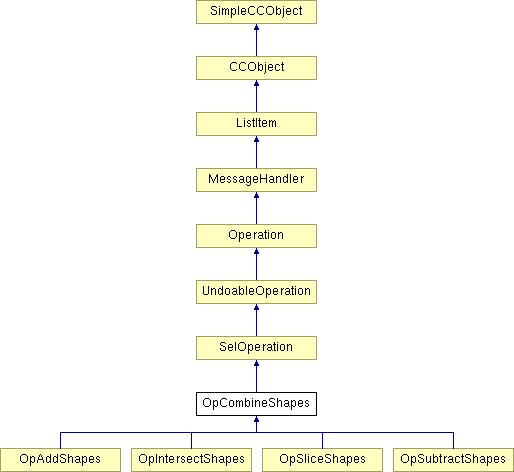
Inheritance diagram for OpCombineShapes:
Public Member Functions | |
| OpCombineShapes () | |
| Default constructor. | |
| ~OpCombineShapes () | |
| Default destructor - does nothing. | |
| virtual void | Do (OpDescriptor *) |
| This is it! The routine that gets all the hard work underway. | |
| virtual void | GetOpName (String_256 *) |
| The GetOpName fn is overridden so that we return back a description appropriate to the type of attribute that the operation applies. | |
Static Public Member Functions | |
| static BOOL | Init () |
| Declares a preference that allows you to clear memory in delete(). | |
| static OpState | GetState (String_256 *, OpDescriptor *) |
| Gives the op an oppertunity to say whether the op is executable or not. | |
Protected Attributes | |
| CombineReason | Reason |
Private Member Functions | |
| BOOL | ConvertToShapes (Range *pRange, BOOL bCombineEffectBitmaps) |
| This subtracts all the shapes in all the lists from all the lines in all the lists This subtracts all the shapes in all the lists from pLine This subtracts all the shapes in pSelObjPathList from pLine This generates the data structure that holds all the paths generated by the selected objects. NOTE! Pointers to paths in the tree are stored in the lists (unlike CreateSelObjPathLists). | |
| BOOL | CreateSelObjPathLists (BOOL bCombineEffectBitmaps) |
| This generates the data structure that holds all the paths generated by the selected objects. | |
| BOOL | CreateSelObjPathList (Node *pNode, SelObjPathList *pSelObjPathList, BOOL IsFirstNode=TRUE, BOOL bCombineEffectBitmaps=TRUE, BecomeAReason reason=BECOMEA_PASSBACK) |
| This generates the data structure that holds all the paths generated by a given selected object. | |
| BOOL | DoAddShapes () |
| This adds all the paths together to form a combined silhouette path of the selection. | |
| BOOL | AddPathsFromList (Path *pPath, SelObjPathList *pSelObjPathList) |
| This adds all the paths in the list together to form a combined silhouette path of the selection. | |
| BOOL | AddPaths (Path *pPath1, Path *pPath2) |
| This adds the two paths together using ClipPathToPath, storing the result in pPath1. | |
| BOOL | AddOrMergePaths (Path *pPath1, Path *pPath2) |
| Helper function for DoAddShapes and AddPathsFromList. | |
| BOOL | DoCombineShapes (ClipStyle Style, BOOL bCombineEffectBitmaps) |
| Firstly, this adds all the paths together in the last list to form the clip path. Then all the other paths in the other lists are combined with the clip path, using the method specified in 'Flags'. | |
| BOOL | CombinePathsFromList (ClipStyle Style, Path *pClipPath, Path *pStrokedClipPath, SelObjPathList *pSelObjPathList, BOOL bCombineEffectBitmaps=TRUE) |
| This combines pClipPath with all the paths in pSelObjPathList. | |
| BOOL | CombinePaths (ClipStyle Style, Path *pClipPath, Path *pStrokedClipPath, Path *pSrcPath, Path *pDestPath) |
| This combines pClipPath from pSrcPath using ClipPathToPath, storing the result in pDestPath. | |
| BOOL | DoHideListedNodes (BOOL bCombineEffectBitmaps) |
| This hides all the nodes that were selected when the op was invoked. | |
| BOOL | DoSelectResultNodes (BOOL bCombineEffectBitmaps) |
| This selects all the nodes in the results list. | |
| BOOL | ApplyAttributes (NodeRenderableInk *pSrcNode, NodeRenderableInk *pDestNode, CCAttrMap *pAttrMap, SelObjPathListItem *pListItem=NULL) |
| This applies attrs pDestNode. If pAttrMap == NULL, the attrs applied to pSrcNode are applied to pDestNode, else the attrs in pAttrMap are applied. | |
| BOOL | ApplyEffects (SelObjPathListItem *pListItem, NodeRenderableInk *pDestNode, NodeRenderableInk *pParentEffect) |
| To delete the extra attributes we allocated in AdjustAttributesForStroke This applies attrs pDestNode. If pAttrMap == NULL, the attrs applied to pSrcNode are applied to pDestNode, else the attrs in pAttrMap are applied. | |
| BOOL | StrokePathToPath (Path *pPath, Path *pDest) |
| This picks out a subpath from Src and places it into pDest Strokes pPath, and places result in pDest. | |
| BOOL | ConvertClipLineToShape (Path *pClipPath, Path *pSrcPath, Path *pDestPath) |
| Only call this if pClipPath is a line. | |
| DocRect | GetBoundingRect (Path *pPath) |
| This gets the exact pure path bounds, using GDraw_CalcStrokeBBox. | |
| BOOL | DoInsertNewNode (NodeRenderableBounded *pNewNode) |
| High-level interface to UndoableOperation::DoInsertNode(). | |
| UINT32 | AdjustAttributesForStroke (CCAttrMap *pAttrMap, SelObjPathListItem *pListItem=NULL) |
| If we are doing combine shapes on a stroked shape then we need to make the following changes: 1) Do not keep the AttrStrokeType and VariableWidth around, this is because their effects have been achieved via the DoBecomeA so if we keep them then effectively we are stroking our final output twice. 2) Set line width to zero. Once again the line width effect has been extracted from the DoBecomeA 3) Use the current stroke colour for the new fill colour. 4) Ditch the stroke colour? | |
| BOOL | BeginSlowJob () |
| Wrapper around BeginSlowJob() that sets up the hour glass counter correctly. | |
| SelObjPathList * | GetFirstList () |
| SelObjPathList * | GetLastList () |
| SelObjPathList * | GetNextList (SelObjPathList *pItem) |
| ListRange * | CopyRange (Range *pRange) |
| Copy the specified range of nodes. | |
Private Attributes | |
| List | ListOfSelObjPathLists |
| ListRange * | pListOfResults |
| DocRect | OriginalBoundingRect |
| SelRange * | pSelRange |
| INT32 | NumPaths |
| INT32 | JobCount |
| INT32 | NodeInsertCount |
| Node * | pContextNode |
| AttachNodeDirection | AttachDir |
Definition at line 232 of file combshps.h.
|
|
Default constructor.
Definition at line 167 of file combshps.cpp. 00168 { 00169 Reason = COMBINE_NONE; 00170 pSelRange = NULL; 00171 NumPaths = 0; 00172 JobCount = 0; 00173 00174 pContextNode = NULL; 00175 pListOfResults = NULL; 00176 }
|
|
|
Default destructor - does nothing.
Definition at line 193 of file combshps.cpp. 00194 { 00195 ListOfSelObjPathLists.DeleteAll(); 00196 if (pListOfResults) 00197 { 00198 delete pListOfResults; 00199 pListOfResults = NULL; 00200 }; 00201 }
|
|
||||||||||||
|
Helper function for DoAddShapes and AddPathsFromList.
Definition at line 749 of file combshps.cpp. 00750 { 00751 BOOL ok = TRUE; 00752 // if num coords == 0, the path is effectively empty, so just copy this node path's path 00753 if (pPath1->GetNumCoords() == 0) 00754 ok = pPath1->MergeTwoPaths(*pPath2); 00755 else 00756 { 00757 // Otherwise actually 'add' the paths together, using ClipPathToPath 00758 ok = AddPaths(pPath1,pPath2); 00759 00760 // If this fails, we can just merge the two paths together as this achieves the desired 00761 // silhouette effect 00762 if (!ok) ok = pPath1->MergeTwoPaths(*pPath2); 00763 00764 } 00765 return(ok); 00766 }
|
|
||||||||||||
|
This adds the two paths together using ClipPathToPath, storing the result in pPath1.
Definition at line 785 of file combshps.cpp. 00786 { 00787 ERROR2IF(pPath1 == NULL,FALSE,"pPath1 == NULL"); 00788 ERROR2IF(pPath2 == NULL,FALSE,"pPath2 == NULL"); 00789 00790 // check for a zero-bounding box path 00791 DocRect dr = pPath2->GetBoundingRect(); 00792 00793 if (dr.Width() <= 1 && dr.Height() <= 1) 00794 { 00795 ERROR3("We have a zero bounding rect path"); 00796 return FALSE; 00797 } 00798 00799 Path StrokedPath2; 00800 if (!StrokedPath2.Initialise()) return FALSE; 00801 00802 // is path 2 a line? 00803 if (pPath2->GetPathType() == PATHTYPE_LINE) 00804 { 00805 if (!StrokePathToPath(pPath2,&StrokedPath2)) 00806 return FALSE; 00807 } 00808 00809 INT32 len = CombinePaths(CLIP_STYLE_ADD,pPath2,&StrokedPath2,pPath1,pPath1); 00810 00811 return (len > 0); 00812 }
|
|
||||||||||||
|
This adds all the paths in the list together to form a combined silhouette path of the selection.
Definition at line 671 of file combshps.cpp. 00672 { 00673 // Check our input params 00674 ERROR3IF(pPath == NULL,"pPath == NULL"); 00675 ERROR3IF(pSelObjPathList == NULL,"pSelObjPathList== NULL"); 00676 if (pPath == NULL || pSelObjPathList == NULL) return FALSE; 00677 00678 NodePath* pTempPath = new NodePath; 00679 if (pTempPath == NULL) return FALSE; 00680 if (!pTempPath->SetUpPath()) return FALSE; 00681 00682 // Get the first path in this list 00683 SelObjPathListItem* pSelObjPathListItem = pSelObjPathList->GetFirstItem(); 00684 00685 BOOL ok = TRUE; 00686 00687 while (ok && pSelObjPathListItem != NULL) 00688 { 00689 // Get a pointer to the actual node path in this list item 00690 Path* pSrcPath = pSelObjPathListItem->GetPath(); 00691 00692 if (pSrcPath != NULL) 00693 { 00694 // Add this path into the TempPath 00695 ok = AddOrMergePaths(&(pTempPath->InkPath), pSrcPath); 00696 00697 // If the TempPath is now too large 00698 if (ok && pTempPath->InkPath.GetNumCoords() > AddPathGranularity) 00699 { 00700 // Combine the TempPath with the output path 00701 ok = AddOrMergePaths(pPath, &(pTempPath->InkPath)); 00702 // And clear the TempPath 00703 if (ok) ok = pTempPath->InkPath.ClearPath(FALSE); 00704 } 00705 if (ok) pSelObjPathList->SetProducedPaths(TRUE); 00706 } 00707 else 00708 { 00709 // What? No Src path? Surely not! 00710 ERROR3("pSrcPath == NULL"); 00711 ok = FALSE; 00712 } 00713 00714 if (ok) 00715 ok = ::ContinueSlowJob(++JobCount); 00716 00717 // Get the next item in the selected object path list. 00718 pSelObjPathListItem = pSelObjPathList->GetNextItem(pSelObjPathListItem); 00719 } 00720 00721 // If the TempPath has anything in 00722 if (ok && pTempPath->InkPath.GetNumCoords() > 0) 00723 { 00724 // Combine the TempPath with the output path 00725 ok = AddOrMergePaths(pPath, &(pTempPath->InkPath)); 00726 } 00727 00728 delete pTempPath; 00729 00730 return (ok); 00731 }
|
|
||||||||||||
|
If we are doing combine shapes on a stroked shape then we need to make the following changes: 1) Do not keep the AttrStrokeType and VariableWidth around, this is because their effects have been achieved via the DoBecomeA so if we keep them then effectively we are stroking our final output twice. 2) Set line width to zero. Once again the line width effect has been extracted from the DoBecomeA 3) Use the current stroke colour for the new fill colour. 4) Ditch the stroke colour?
Definition at line 2135 of file combshps.cpp. 02136 { 02137 if (pAttrMap == NULL) 02138 return 0; 02139 02140 // first see if we have an active stroke, if not we can just quit already 02141 AttrStrokeType* pStroke = NULL; 02142 pAttrMap->Lookup(CC_RUNTIME_CLASS(AttrStrokeType), (void*&)pStroke); 02143 02144 if (pStroke == NULL || !pStroke->HasPathProcessor()) 02145 return 0; 02146 02147 AttrVariableWidth* pVarWidth = NULL; 02148 pAttrMap->Lookup(CC_RUNTIME_CLASS(AttrVariableWidth), (void*&)pVarWidth); 02149 02150 // CGS: we should only really continue IF we have an active value function! Otherwise, we seem to run 02151 // into problems when we have give new objects most recent attributes turned on .... 02152 if ((pVarWidth == NULL) || !pVarWidth->HasActiveValueFunction ()) 02153 return (0); 02154 02155 // right so we want to set the line width to zero 02156 AttrLineWidth* pLineWidth = new AttrLineWidth; 02157 if (pLineWidth != NULL) 02158 { 02159 pAttrMap->RemoveAttribute(CC_RUNTIME_CLASS(AttrLineWidth)); 02160 pLineWidth->Value.LineWidth = 0; 02161 pAttrMap->SetAt(CC_RUNTIME_CLASS(AttrLineWidth), (void*)pLineWidth); 02162 } 02163 02164 // now get the stroke colour and use it to make a fill colour 02165 AttrStrokeColour * pColour = NULL; 02166 02167 // look up the stroke colour attribute 02168 pAttrMap->Lookup(CC_RUNTIME_CLASS(AttrStrokeColour), 02169 (void *&)pColour); 02170 02171 02172 // make a new flat fill attribute and apply this to the node 02173 if (pColour) 02174 { 02175 if (!pListItem || pListItem->GetStrokeCreatedPassbackPath ()) 02176 { 02177 StrokeColourAttribute * pAttrVal = (StrokeColourAttribute *)pColour->GetAttributeValue(); 02178 02179 if (pAttrVal) 02180 { 02181 AttrFlatColourFill* pFill = new AttrFlatColourFill; 02182 02183 if (pFill) 02184 { 02185 DocColour Col = pAttrVal->Colour; 02186 pFill->SetStartColour(&Col); 02187 02188 // set back in the map 02189 pAttrMap->RemoveAttribute(CC_RUNTIME_CLASS(AttrFillGeometry)); 02190 pAttrMap->SetAt(CC_RUNTIME_CLASS(AttrFillGeometry), (void*)pFill); 02191 } 02192 else 02193 return 2; 02194 } 02195 } 02196 // now make a new stroke colour and set it transparent 02197 AttrStrokeColour* pNewStrokeCol = new AttrStrokeColour; 02198 if (pNewStrokeCol) 02199 { 02200 pNewStrokeCol->Value.Colour = DocColour(COLOUR_NONE); 02201 pAttrMap->RemoveAttribute(CC_RUNTIME_CLASS(AttrStrokeColour)); 02202 pAttrMap->SetAt(CC_RUNTIME_CLASS(AttrStrokeColour), (void*)pNewStrokeCol); 02203 } 02204 } 02205 02206 // now remove the stroke and var width attributes, and any brushes whilst we're here 02207 pAttrMap->RemoveAttribute(CC_RUNTIME_CLASS(AttrVariableWidth)); 02208 pAttrMap->RemoveAttribute(CC_RUNTIME_CLASS(AttrStrokeType)); 02209 pAttrMap->RemoveAttribute(CC_RUNTIME_CLASS(AttrBrushType)); 02210 02211 return 1; 02212 }
|
|
||||||||||||||||||||
|
This applies attrs pDestNode. If pAttrMap == NULL, the attrs applied to pSrcNode are applied to pDestNode, else the attrs in pAttrMap are applied.
Definition at line 2063 of file combshps.cpp. 02064 { 02065 ERROR3IF(pSrcNode == NULL,"pSrcNode == NULL"); 02066 ERROR3IF(pDestNode == NULL,"pDestNode == NULL"); 02067 if (pSrcNode == NULL || pDestNode == NULL) return FALSE; 02068 02069 BOOL ok = TRUE; // Set to TRUE if we successfully apply attrs to pDestNode 02070 BOOL DeleteAttrs = FALSE; // TRUE if we need to delete attr map before returning 02071 02072 02073 if (pAttrMap == NULL) 02074 { 02075 // Find the currently applied attributes and make a local copy of the map (like most 02076 // passback functions do) 02077 CCAttrMap AppliedMap(30); 02078 ok = pSrcNode->FindAppliedAttributes(&AppliedMap); 02079 pAttrMap = AppliedMap.Copy(); 02080 DeleteAttrs = TRUE; 02081 } 02082 02083 // if we have a stroked object we need to do some attribute juggling 02084 if (AdjustAttributesForStroke(pAttrMap, pListItem) == 2) 02085 return FALSE; 02086 02087 // If all's OK, apply attrs to pDestNode 02088 ok = pDestNode->ApplyAttributes(pAttrMap,TRUE); 02089 02090 // Delete the copied attr map if we have to 02091 if (DeleteAttrs) 02092 { 02093 pAttrMap->DeleteAttributes(); 02094 delete pAttrMap; 02095 } 02096 02097 return ok; 02098 }
|
|
||||||||||||||||
|
To delete the extra attributes we allocated in AdjustAttributesForStroke This applies attrs pDestNode. If pAttrMap == NULL, the attrs applied to pSrcNode are applied to pDestNode, else the attrs in pAttrMap are applied.
Definition at line 2297 of file combshps.cpp. 02298 { 02299 BOOL ok = TRUE; 02300 PORTNOTE("other", "Removed OpCombineShapes::ApplyEffects"); 02301 #ifndef EXCLUDE_FROM_XARALX 02302 02303 ERROR3IF(pListItem == NULL, "pListItem == NULL"); 02304 ERROR3IF(pDestNode == NULL, "pDestNode == NULL"); 02305 02306 NodeRenderableInk* pSrcNode = pListItem->GetCreatedByNode(); 02307 ERROR3IF(pSrcNode == NULL, "pSrcNode == NULL"); 02308 02309 // Get the effect stack for the object which produced this path (pSrcNode) 02310 // If the source node had effects applied to it 02311 // And that stack is different than the stack above the context node 02312 // Then we must copy the effect stack onto the destination node 02313 ListRange* pStack = pListItem->GetEffectStack(); 02314 Node* pEffect = NULL; 02315 if (pStack) 02316 pEffect = pStack->FindFirst(); 02317 if (pEffect) 02318 { 02319 if (pParentEffect==NULL || pParentEffect!=pEffect) 02320 { 02321 // We need to copy the effect stack onto this object 02322 OpLiveEffect::DoCopyEffectsStack(this, pDestNode, pStack, GetWorkingDoc(), GetWorkingDoc()); 02323 } 02324 } 02325 #endif 02326 return ok; 02327 }
|
|
|
Wrapper around BeginSlowJob() that sets up the hour glass counter correctly.
Definition at line 382 of file combshps.cpp. 00383 { 00384 NumPaths = 0; 00385 JobCount = 0; 00386 SelObjPathList* pList = GetFirstList(); 00387 while (pList != NULL) 00388 { 00389 NumPaths += pList->GetCount(); 00390 pList = GetNextList(pList); 00391 } 00392 00393 INT32 SlowJobCount = NumPaths; 00394 if (Reason == COMBINE_SLICE) 00395 SlowJobCount *= 2; 00396 String_64 Str(_R(IDS_COMBINE_SLOWJOB)); 00397 return (::BeginSlowJob(SlowJobCount,FALSE,&Str)); 00398 }
|
|
||||||||||||||||||||||||
|
This combines pClipPath from pSrcPath using ClipPathToPath, storing the result in pDestPath.
Definition at line 1136 of file combshps.cpp. 01137 { 01138 // Check those entry params 01139 ERROR2IF(pClipPath == NULL,FALSE,"pClipPath == NULL"); 01140 ERROR2IF(pStrokedClipPath == NULL,FALSE,"pStrokedClipPath == NULL"); 01141 ERROR2IF(pSrcPath == NULL,FALSE,"pSrcPath == NULL"); 01142 ERROR2IF(pDestPath == NULL,FALSE,"pDestPath == NULL"); 01143 01144 UINT32 Flags = 0; // Flags passed to ClipPathToPath() 01145 BOOL Clip = TRUE; // If this is TRUE, ClipPathToPath() is called at the end of this func 01146 INT32 len = -1; // This is the length of the path produced by ClipPathToPath 01147 01148 BOOL SrcIsLine = (pSrcPath->GetPathType() == PATHTYPE_LINE); // TRUE if src path is a line 01149 BOOL ClipIsLine = (pClipPath->GetPathType() == PATHTYPE_LINE); // TRUE if clip path is a line 01150 01151 Path DestPath; // Used when using a line to slice the source path up 01152 01153 // If the clip path is a line and the op is slice, try and make a closed path using pClipPath 01154 // and the bounding rect of pSrcPath 01155 if (ClipIsLine && Reason == COMBINE_SLICE) 01156 { 01157 if (DestPath.Initialise() && ConvertClipLineToShape(pClipPath,pSrcPath,&DestPath)) 01158 { 01159 // If successfully created a closed path, then pretend func was entered with the new path 01160 // by pointing pClipPath to it. Also the clip path is no longer a line 01161 pClipPath = &DestPath; 01162 ClipIsLine = FALSE; 01163 } 01164 } 01165 01166 switch (Style) 01167 { 01168 case CLIP_STYLE_SUBTRACT: 01169 Flags = 1; // 1 is Source AND NOT Clip 01170 if (SrcIsLine) Flags |= CLIPPING_IS_STROKED; // If source is a line, set the stroked flag 01171 01172 if (ClipIsLine) 01173 { 01174 // If slicing with a line, don't bother doing the subtraction stage 01175 if (Reason == COMBINE_SLICE) 01176 Clip = FALSE; 01177 else 01178 // Otherwise subtract with a stroked version of the line. 01179 // If the user's mad enough to try it, then we'd better try our best 01180 { pClipPath = pStrokedClipPath; Flags |= CLIPPING_CLIP_WINDING; } 01181 } 01182 break; 01183 01184 case CLIP_STYLE_INTERSECT: 01185 // If src is a line, Flags = 0 | stroked flag, else Flags = Source AND Clip 01186 if (SrcIsLine) Flags = CLIPPING_IS_STROKED; else Flags = 2; 01187 if (ClipIsLine) 01188 { 01189 // If slicing with a line, don't bother doing the intersection stage 01190 if (Reason == COMBINE_SLICE) 01191 Clip = FALSE; 01192 else 01193 // Otherwise intersect with a stroked version of the line. 01194 // If the user's mad enough to try it, then we'd better try our best 01195 { pClipPath = pStrokedClipPath; Flags |= CLIPPING_CLIP_WINDING; } 01196 } 01197 break; 01198 01199 case CLIP_STYLE_ADD: 01200 Flags = 7; // 7 is Source OR Clip 01201 // convert lines into paths by stroking them 01202 // Also we must use a Non-zero winding rule to avoid cross segment lines taking effect 01203 if (SrcIsLine) { StrokePathToPath(pSrcPath,pSrcPath); Flags |= CLIPPING_SOURCE_WINDING; } 01204 if (ClipIsLine) { pClipPath = pStrokedClipPath; Flags |= CLIPPING_CLIP_WINDING; } 01205 break; 01206 } 01207 01208 if (Clip) 01209 { 01210 // Clip those paths together 01211 // Mark Howitt 31/10/00 01212 // I`ve removed the ClipPathToPathWithAutoFlatness function and replaced it with 01213 // the function that returns you a flatness value to use with the ClipPath function 01214 double ClippingFlatness = pClipPath->CalculateFlatnessValueFromPath(750.0, 2.0, 375.0); 01215 double SourceFlatness = pSrcPath->CalculateFlatnessValueFromPath(750.0, 2.0, 375.0); 01216 01217 len = pClipPath->ClipPathToPath(*pSrcPath, pDestPath, Flags, DefaultTolerance, ClippingFlatness, SourceFlatness); 01218 /* 01219 // show debugging info about the path we have clipped 01220 INT32 NumCoords = pDestPath->GetNumCoords(); 01221 PathVerb * pVerbs = pDestPath->GetVerbArray(); 01222 DocCoord * pCoord = pDestPath->GetCoordArray(); 01223 01224 for (INT32 i = 0; i < NumCoords; i++) 01225 { 01226 if (pVerbs[i] == PT_MOVETO) 01227 TRACE( _T("MOVE TO ")); 01228 else 01229 if (pVerbs[i] == PT_BEZIERTO) 01230 TRACE( _T("BEZIER TO ")); 01231 else 01232 if (pVerbs[i] == PT_LINETO) 01233 TRACE( _T("LINE TO ")); 01234 01235 TRACE( _T("%d, %d\n"), pCoord[i].x, pCoord[i].y); 01236 } 01237 TRACE( _T("end line\n")); 01238 */ 01239 } 01240 01241 return (len > 0); 01242 }
|
|
||||||||||||||||||||||||
|
This combines pClipPath with all the paths in pSelObjPathList.
Definition at line 1009 of file combshps.cpp. 01014 { 01015 // Check our input params 01016 ERROR3IF(pClipPath == NULL,"pClipPath == NULL"); 01017 ERROR3IF(pSelObjPathList == NULL,"pSelObjPathList == NULL"); 01018 if (pClipPath == NULL || pSelObjPathList == NULL) return FALSE; 01019 01020 // Get the first path in this list 01021 SelObjPathListItem* pFirstItem = pSelObjPathList->GetFirstItem(); 01022 SelObjPathListItem* pSelObjPathListItem = pFirstItem; 01023 BOOL ok = TRUE; 01024 01025 while (ok && pSelObjPathListItem != NULL) 01026 { 01027 // Get a pointer to the actual node path in this list item 01028 NodePath* pNodePath = pSelObjPathListItem->GetNodePath(); 01029 NodePath* pNewNodePath = new NodePath; 01030 NodeRenderableInk* pCreatedByNode = pSelObjPathListItem->GetCreatedByNode(); 01031 01032 if (pNodePath != NULL && pNewNodePath != NULL && pNewNodePath->SetUpPath()) 01033 { 01034 //pNewNodePath->InkPath.Initialise(pNodePath->InkPath.GetNumCoords(), 64); 01035 //if (pNewNodePath->InkPath.CopyPathDataFrom(&(pNodePath->InkPath))) 01036 if (CombinePaths(Style, pClipPath, pStrokedClipPath, &(pNodePath->InkPath), &(pNewNodePath->InkPath))) 01037 { 01038 if (bCombineEffectBitmaps) 01039 ok = DoInsertNewNode(pNewNodePath); 01040 else 01041 { 01042 if (pSelObjPathListItem==pFirstItem) 01043 { 01044 // The first path produced can live where it's originating node lived 01045 // inside whatever Effect stack was in place 01046 ok = UndoableOperation::DoInsertNewNode(pNewNodePath, pNodePath, NEXT, TRUE, FALSE, FALSE, TRUE); 01047 } 01048 else 01049 { 01050 // If more than one path is produced under an Effect node 01051 // Then we must make a new Effect Stack for it 01052 // 01053 // BUT NOTE! I don't think any multiple set of nodes are produced outside 01054 // a group at the moment - so the effect applciation code found here 01055 // has never yet been tested! 01056 Node* pInsertNode = pNodePath; 01057 ListRange* pStack = EffectsStack::GetEffectsStackFromNode(pNodePath, FALSE, TRUE, TRUE); // Include locked effects 01058 if (pStack) 01059 pInsertNode = pStack->FindLast(); 01060 ok = UndoableOperation::DoInsertNewNode(pNewNodePath, pInsertNode, NEXT, TRUE, FALSE, FALSE, TRUE); 01061 pInsertNode = pNewNodePath; 01062 delete pStack; 01063 01064 // Now copy the effects stack for this new child... 01065 if (ok) ok = ApplyEffects(pSelObjPathListItem, pNewNodePath, NULL); 01066 01067 } 01068 01069 // Select the resulting path now 01070 if (ok && pCreatedByNode->IsSelected()) 01071 pNewNodePath->Select(FALSE); 01072 01073 if (ok) 01074 { 01075 pListOfResults->AddNode(pNewNodePath); 01076 NodeInsertCount++; 01077 } 01078 } 01079 01080 // Find out who created the path, and apply its attrs to the new NodePath 01081 CCAttrMap* pAttrMap = pSelObjPathListItem->GetAttrMap(); 01082 01083 if (ok) ok = ApplyAttributes(pCreatedByNode, pNewNodePath, pAttrMap, pSelObjPathListItem); 01084 01085 // Set up a set of default path flags to enable the bezier tool to edit this node 01086 if (ok) pNewNodePath->InkPath.InitialiseFlags(); 01087 01088 if (ok) pSelObjPathList->SetProducedPaths(TRUE); 01089 } 01090 else 01091 { 01092 if (pNewNodePath!=NULL) { delete pNewNodePath; pNewNodePath = NULL; } 01093 01094 // Don't worry if the actual combine fails. We'll just not put anything in the tree 01095 // because, hmmm, I wonder.... 01096 } 01097 } 01098 else 01099 { 01100 // What? Error? Surely not! 01101 ERROR3("pNodePath == NULL || pNewNodePath == NULL || !pNewNodePath->SetUpPath())"); 01102 ok = FALSE; 01103 01104 if (pNewNodePath!=NULL) { delete pNewNodePath; pNewNodePath = NULL; } 01105 } 01106 01107 if (ok) 01108 ok = ::ContinueSlowJob(++JobCount); 01109 01110 // Get the next item in the selected object path list. 01111 pSelObjPathListItem = pSelObjPathList->GetNextItem(pSelObjPathListItem); 01112 } 01113 01114 return (ok); 01115 }
|
|
||||||||||||||||
|
Only call this if pClipPath is a line.
The shape is created by tacking on parts of the bounding rectangle to pClipPath, then closing the resultant path. Note: pDestPath must not point to pClipPath OR pSrcPath (i.e. you'll need three paths)
Definition at line 1272 of file combshps.cpp. 01273 { 01274 // Check for stupid entry parama 01275 ERROR2IF(pClipPath == NULL,FALSE,"pClipPath == NULL"); 01276 ERROR2IF(pSrcPath == NULL,FALSE,"pSrcPath == NULL"); 01277 ERROR2IF(pDestPath == NULL,FALSE,"pClipPath == NULL"); 01278 01279 // Get the coord bounds of the source path. Inflate it slightly so that we don't run into tolerance 01280 // problems when calling ClipPathToPath() 01281 //DocRect Rect = GetBoundingRect(pSrcPath); 01282 01283 // we must be consistant as to the rect we use to get a consistant shape 01284 // otherwise some items will all get cut along the line but it is luck 01285 // which side of the cut the shapes appear in (sjk 15/11/00) 01286 // DocRect Rect = GetApplication()->FindSelection()->GetBoundingRect(); // use a consistant rect for all the shapes 01287 DocRect Rect = OriginalBoundingRect; // use a consistant rect for all the shapes 01288 01289 Rect.Inflate((DefaultTolerance*2)+10); 01290 01291 INT32 NumClipCoords = pClipPath->GetNumCoords(); 01292 DocCoord* pClipCoords = pClipPath->GetCoordArray(); 01293 DocCoord ClipStart = pClipCoords[0]; // Start point of pClipPath 01294 DocCoord ClipEnd = pClipCoords[NumClipCoords-1]; // End point of pClipPath 01295 DocCoord ExtraClipStart= pClipCoords[0]; // Start point of pClipPath 01296 DocCoord ExtraClipEnd = pClipCoords[NumClipCoords-1]; // End point of pClipPath 01297 BOOL NeedExtraClipStart = FALSE; 01298 BOOL NeedExtraClipEnd = FALSE; 01299 01300 Path FlatPath; 01301 // BOOL SetFlatPath = FALSE; 01302 // double FLATTNESS = 1024; // arbitry figure of how flattened the curve will be 01303 // only used for test for extra cuts 01304 01305 // We have to choose a corner point of the bounding rect for both the start and end points 01306 // of pClipPath. 01307 01308 DocCoord ClipCornerStart,ClipCornerEnd; 01309 01310 DocCoord mid = Rect.Centre(); 01311 01312 if (ClipStart.x < mid.x) 01313 ClipCornerStart.x = Rect.lo.x; 01314 else 01315 ClipCornerStart.x = Rect.hi.x; 01316 01317 if (ClipStart.y < mid.y) 01318 ClipCornerStart.y = Rect.lo.y; 01319 else 01320 ClipCornerStart.y = Rect.hi.y; 01321 01322 if (ClipEnd.x < mid.x) 01323 ClipCornerEnd.x = Rect.lo.x; 01324 else 01325 ClipCornerEnd.x = Rect.hi.x; 01326 01327 if (ClipEnd.y < mid.y) 01328 ClipCornerEnd.y = Rect.lo.y; 01329 else 01330 ClipCornerEnd.y = Rect.hi.y; 01331 01332 // start clip point in the rect? 01333 // move it to the nearest edge 01334 if (Rect.ContainsCoord(ClipStart)) 01335 { 01336 NeedExtraClipStart = TRUE; 01337 DocCoord v = ClipStart - pClipCoords[1]; 01338 INT32 giveup = 250; // number of times to try 01339 01340 // extrapperlate the last part of the line until it breaks out of the bounding rect 01341 // give up if it fails to break out after an arbitry number of goes 01342 while (Rect.ContainsCoord(ExtraClipStart) && giveup > 0) 01343 { 01344 ExtraClipStart.x += v.x * 10; 01345 ExtraClipStart.y += v.y * 10; 01346 giveup--; 01347 } 01348 01349 // failled to leave the shape 01350 if (giveup == 0) 01351 return FALSE; 01352 01353 // moving the start may change which is the nearest corner to go for 01354 DocCoord mid = Rect.Centre(); 01355 01356 if (ExtraClipStart.x < mid.x) 01357 ClipCornerStart.x = Rect.lo.x; 01358 else 01359 ClipCornerStart.x = Rect.hi.x; 01360 01361 if (ExtraClipStart.y < mid.y) 01362 ClipCornerStart.y = Rect.lo.y; 01363 else 01364 ClipCornerStart.y = Rect.hi.y; 01365 } 01366 01367 // perform all the same calcualtions for the other end of the clip line 01368 if (Rect.ContainsCoord(ClipEnd)) 01369 { 01370 NeedExtraClipEnd = TRUE; 01371 DocCoord v = ClipEnd - pClipCoords[NumClipCoords-2]; 01372 INT32 giveup = 250; // number of times to try 01373 01374 // extrapperlate the last part of the line until it breaks out of the bounding rect 01375 // give up if it fails to break out after an arbitry number of goes 01376 while (Rect.ContainsCoord(ExtraClipEnd) && giveup > 0) 01377 { 01378 ExtraClipEnd.x += v.x * 10; 01379 ExtraClipEnd.y += v.y * 10; 01380 giveup--; 01381 } 01382 01383 // failled to leave the shape 01384 if (giveup == 0) 01385 return FALSE; 01386 01387 // moving the end may change which is the nearest corner to go for 01388 DocCoord mid = Rect.Centre(); 01389 01390 if (ExtraClipEnd.x < mid.x) 01391 ClipCornerEnd.x = Rect.lo.x; 01392 else 01393 ClipCornerEnd.x = Rect.hi.x; 01394 01395 if (ExtraClipEnd.y < mid.y) 01396 ClipCornerEnd.y = Rect.lo.y; 01397 else 01398 ClipCornerEnd.y = Rect.hi.y; 01399 } 01400 01401 // We now have two sensible corners of Rect to connect pClipPath's end points to 01402 // and if required also optimal points on this Rect boundry to that are 01403 // in direct line with the ends of the cutting line 01404 01405 // Firstly, copy pClipPath to pDestPath 01406 pDestPath->ClearPath(FALSE); 01407 if (!pDestPath->MergeTwoPaths(*pClipPath)) return FALSE; 01408 01409 // add on an extra end part to make this end of the clip path outside the bounds of the selection 01410 if (NeedExtraClipEnd) 01411 { 01412 if (!pDestPath->AddLineTo(ExtraClipEnd)) return FALSE; 01413 } 01414 01415 // Connect the end of the line to the end corner point 01416 if (!pDestPath->AddLineTo(ClipCornerEnd)) return FALSE; 01417 01418 // add in the corner nearest the end 01419 // If end corner x != start corner x, we need to connect these up 01420 if (ClipCornerEnd.x != ClipCornerStart.x) 01421 { 01422 ClipCornerEnd.x = ClipCornerStart.x; 01423 if (!pDestPath->AddLineTo(ClipCornerEnd)) return FALSE; 01424 } 01425 01426 // if the start and end corners are opposing we need to use an intermediate corner to avoid the selection 01427 // If end corner y != start corner y, we need to connect these up 01428 if (ClipCornerEnd.y != ClipCornerStart.y) 01429 { 01430 ClipCornerEnd.y = ClipCornerStart.y; 01431 if (!pDestPath->AddLineTo(ClipCornerEnd)) return FALSE; 01432 } 01433 01434 // add in the corner nearest the start 01435 // add on an extra end part to make this end of the clip path outside the bounds of the selection 01436 if (NeedExtraClipStart) 01437 { 01438 if (!pDestPath->AddLineTo(ExtraClipStart)) return FALSE; 01439 } 01440 01441 // Finally, close the path up by connecting the start corner point to the start of the line 01442 // and setting PT_CLOSEFIGURE in the last verb 01443 if (!pDestPath->AddLineTo(ClipStart)) return FALSE; 01444 01445 INT32 n = pDestPath->GetNumCoords(); 01446 PathVerb* pVerbs = pDestPath->GetVerbArray(); 01447 pVerbs[n-1] |= PT_CLOSEFIGURE; 01448 01449 return TRUE; 01450 }
|
|
||||||||||||
|
This subtracts all the shapes in all the lists from all the lines in all the lists This subtracts all the shapes in all the lists from pLine This subtracts all the shapes in pSelObjPathList from pLine This generates the data structure that holds all the paths generated by the selected objects. NOTE! Pointers to paths in the tree are stored in the lists (unlike CreateSelObjPathLists).
List Of Selected Object Path lists List of paths made by first selected object SelObjPathListItem SelObjPathListItem SelObjPathListItem ... List of paths made by second selected object ...
Definition at line 1642 of file combshps.cpp. 01643 { 01644 CombineBecomeA BecomePath(BECOMEA_REPLACE, this, NULL, NULL, FALSE); 01645 BecomePath.SetInsertComplexBlendStepsAsPaths (TRUE); // compound nodes MUST be inserted as paths! 01646 BecomePath.SetResultsStayInPlace(!bCombineEffectBitmaps); // Only stay in place if notcaptruing effect bitmaps 01647 01648 Node* pNode = pRange->FindFirst(FALSE); 01649 Node* pNextNode = NULL; 01650 BOOL ok = TRUE; 01651 01652 while (pNode!=NULL && ok) 01653 { 01654 pNextNode = pRange->FindNext(pNode, FALSE); 01655 01656 // Make a path list for this selected object if it can become a NodePath 01657 SelObjPathList* pSelObjPathList = new SelObjPathList(pNode); 01658 ok = (pSelObjPathList!=NULL); 01659 if (ok) 01660 { 01661 ListOfSelObjPathLists.AddTail(pSelObjPathList); 01662 01663 // --- This code ripped from CreateSelObjPathList - looks suspect! --- 01664 // Check to see if this is the Top most visible object. This is used by the 01665 // Cached Compound Nodes to help determine whether or not to use the Cached nodes or BMP! 01666 BOOL IsTopObject = (pNextNode == NULL); 01667 // --- ! --- 01668 01669 if (pNode->CanBecomeA(&BecomePath)) 01670 ok = CreateSelObjPathList(pNode, pSelObjPathList, IsTopObject, bCombineEffectBitmaps, BECOMEA_REPLACE); 01671 01672 // Tidy up if things have gone wrong 01673 if (!ok) 01674 { 01675 ListOfSelObjPathLists.RemoveTail(); 01676 delete pSelObjPathList; 01677 } 01678 01679 if (pNode->IsAnObject()) ((NodeRenderableInk*)pNode)->ReleaseCached(); 01680 } 01681 01682 pNode = pNextNode; 01683 01684 if (ok) 01685 ok = ::ContinueSlowJob(++JobCount); 01686 } 01687 01688 return ok; 01689 }
|
|
|
Copy the specified range of nodes.
Definition at line 2501 of file combshps.cpp. 02502 { 02503 BOOL ok = TRUE; 02504 Node* pNode = pRange->FindFirst(); 02505 ListRange* pNewRange = new ListRange(); 02506 02507 while (pNode && ok && pNewRange) 02508 { 02509 Node* pNext = pRange->FindNext(pNode); 02510 02511 // Make a copy of the current node and all its children 02512 Node* TheCopy; 02513 BOOL CopiedOK; 02514 CALL_WITH_FAIL(pNode->NodeCopy(&TheCopy), this, CopiedOK); 02515 if (CopiedOK) 02516 { 02517 // make sure that it is bounded 02518 ERROR2IF(!TheCopy->IsBounded(), FALSE, "Object being copied is not a NodeRenderableBounded"); 02519 NodeRenderableBounded* BoundCopy = (NodeRenderableBounded*)TheCopy; 02520 02521 // Insert the copied node next to it's originator 02522 ok = UndoableOperation::DoInsertNewNode(BoundCopy, pNode, NEXT, 02523 FALSE, // Don't Invalidate region 02524 FALSE, // Don't Clear the selections 02525 FALSE, // Don't select new node 02526 FALSE // Don't normalise attributes 02527 ); 02528 if (!ok) 02529 { 02530 // Failed, so tidy up before returning 02531 TheCopy->CascadeDelete(); 02532 delete TheCopy; 02533 } 02534 else 02535 { 02536 // Record the copied node in the ListRange 02537 pNewRange->AddNode(TheCopy); 02538 02539 // Call PostDuplicate on the copied node and all it's children 02540 Node* pCurrent = BoundCopy->FindFirstDepthFirst(); 02541 while (pCurrent!=NULL && ok) 02542 { 02543 ok = pCurrent->PostDuplicate(this); 02544 pCurrent = pCurrent->FindNextDepthFirst(BoundCopy); 02545 } 02546 } 02547 } 02548 02549 pNode = pNext; 02550 } 02551 02552 if (!ok) 02553 { 02554 delete pNewRange; 02555 pNewRange = NULL; 02556 } 02557 02558 return pNewRange; 02559 }
|
|
||||||||||||||||||||||||
|
This generates the data structure that holds all the paths generated by a given selected object.
Definition at line 1806 of file combshps.cpp. 01807 { 01808 ERROR2IF(pNode == NULL || pSelObjPathList == NULL,FALSE,"One or more params are NULL"); 01809 01810 // Set up a BecomeA derived object, so that we can receive all the paths generated by pNode. 01811 CombineBecomeA ParamBecomeA(reason, this,pSelObjPathList,pNode,IsFirstNode); 01812 ParamBecomeA.SetInsertComplexBlendStepsAsPaths(TRUE); // compound nodes MUST be inserted as paths! 01813 ParamBecomeA.SetResultsStayInPlace(!bCombineEffectBitmaps); 01814 01815 // if we have a brush attribute we have to do it independently (ugh) 01816 AttrBrushType* pBrush = NULL; 01817 ((NodeRenderableInk*)pNode)->FindAppliedAttribute(CC_RUNTIME_CLASS(AttrBrushType), (NodeAttribute **)&pBrush); 01818 BOOL gotAValidBrush = FALSE; 01819 if (pBrush != NULL && pBrush->GetBrushHandle() != BrushHandle_NoBrush) 01820 { 01821 gotAValidBrush = TRUE; 01822 01823 BOOL useBrush = FALSE; // CGS: decide whether to use the brush for DoBecomeA or pNode .... 01824 01825 if (Reason == COMBINE_ADD) 01826 { 01827 useBrush = TRUE; 01828 } 01829 /*else // put this back in if you want the slicing of lines to be sliced accurately in two. 01830 // if you want two new lines with brushes applied, leave like this 01831 { 01832 if (IS_A (pNode, NodePath)) 01833 { 01834 NodePath* pPath = (NodePath*) pNode; 01835 if (!pPath->InkPath.IsClosed ()) 01836 { 01837 useBrush = TRUE; // its a nodepath thats filled 01838 } 01839 } 01840 }*/ 01841 01842 if (useBrush) 01843 { 01844 return (pBrush->DoBecomeA(&ParamBecomeA, (NodeRenderableInk*)pNode)); 01845 } 01846 } 01847 01848 // if we haven't got a brush then see if we have a stroke 01849 BOOL ok = TRUE; 01850 AttrStrokeType* pStroke = NULL; 01851 ((NodeRenderableInk*)pNode)->FindAppliedAttribute(CC_RUNTIME_CLASS(AttrStrokeType), (NodeAttribute**)&pStroke); 01852 AttrVariableWidth* pVarWidth = NULL; 01853 ((NodeRenderableInk*)pNode)->FindAppliedAttribute(CC_RUNTIME_CLASS(AttrVariableWidth), (NodeAttribute**)&pVarWidth); 01854 01855 if (pStroke && pStroke->HasPathProcessor() && pVarWidth && pVarWidth->HasActiveValueFunction()) 01856 { 01857 if (!gotAValidBrush) 01858 { 01859 // Convert stroke to paths first, allow it to place any nodes it creates 01860 // after the original but without deleting the original 01861 if (pStroke) 01862 { 01863 ParamBecomeA.SetSecondary(); // Tell the pathprocessor that it doesn't own the node 01864 ok = pStroke->DoBecomeA(&ParamBecomeA, pNode); 01865 ParamBecomeA.SetSecondary(FALSE); 01866 } 01867 01868 // Now convert the node to paths, placing nodes after the original (before stroke paths) 01869 // and deleting the original 01870 if (ok) 01871 ok = pNode->DoBecomeA(&ParamBecomeA); // Attributes will be shuffled 01872 01873 return ok; 01874 } 01875 else 01876 { 01877 // We've got a brush and a stroke on the same node! 01878 // The brush already knows about the stroke, so let that handle it .... 01879 // 01880 // Convert stroke to paths first, allow it to place any nodes it creates 01881 // after the original but without deleting the original 01882 if (pBrush) 01883 { 01884 ParamBecomeA.SetSecondary(); // Tell the pathprocessor that it doesn't own the node 01885 ok = pBrush->DoBecomeA(&ParamBecomeA, (NodeRenderableInk*)pNode); 01886 ParamBecomeA.SetSecondary(FALSE); 01887 } 01888 01889 // Now convert the node to paths, placing nodes after the original (before stroke paths) 01890 // and deleting the original 01891 if (ok) 01892 ok = pNode->DoBecomeA(&ParamBecomeA); // Attributes will be shuffled 01893 01894 return ok; 01895 } 01896 } 01897 01898 // Get pNode to generate its paths for us 01899 return (pNode->DoBecomeA(&ParamBecomeA)); 01900 }
|
|
|
This generates the data structure that holds all the paths generated by the selected objects.
List Of Selected Object Path lists List of paths made by first selected object SelObjPathListItem SelObjPathListItem SelObjPathListItem ... List of paths made by second selected object ...
Definition at line 1718 of file combshps.cpp. 01719 { 01720 ERROR2IF(pSelRange == NULL,FALSE,"pSelRange == NULL"); 01721 01722 Node* pSelNode = pSelRange->FindFirst(); 01723 UINT32 Count = 0; // Used for a check made at end of routine 01724 BOOL ok = TRUE; 01725 BOOL IsTopObject = TRUE; 01726 01727 ::BeginSlowJob(); 01728 01729 BecomeA BecomePath(BECOMEA_REPLACE, CC_RUNTIME_CLASS(NodePath)); 01730 BecomePath.SetResultsStayInPlace(!bCombineEffectBitmaps); 01731 01732 while (ok && pSelNode != NULL) 01733 { 01734 if (pSelNode->CanBecomeA(&BecomePath)) 01735 { 01736 Count++; // Count num objs that can become a NodePath 01737 01738 // Make a path list for this selected object if it can become a NodePath 01739 SelObjPathList* pSelObjPathList = new SelObjPathList(pSelNode); 01740 01741 if (pSelObjPathList != NULL) 01742 { 01743 // Check to see if this is the Top most visable object. This is used by the 01744 // Cached Compound Nodes to help determine wether or not to use the Cached nodes or BMP! 01745 IsTopObject = (pSelRange->FindNext(pSelNode) == NULL); 01746 01747 // Get the selected object to create the actual NodePath objects 01748 // and if successful, stuff the list on our list of sel obj path lists 01749 if (CreateSelObjPathList(pSelNode, pSelObjPathList, IsTopObject, bCombineEffectBitmaps)) 01750 { 01751 ListOfSelObjPathLists.AddTail(pSelObjPathList); 01752 } 01753 else 01754 { 01755 ok = FALSE; 01756 } 01757 } 01758 else 01759 ok = FALSE; 01760 } 01761 01762 if (ok) 01763 ok = ::ContinueSlowJob(++JobCount); 01764 01765 // Get the next selected object 01766 pSelNode = pSelRange->FindNext(pSelNode); 01767 } 01768 01769 ::EndSlowJob(); 01770 01771 if (ok) 01772 { 01773 UINT32 MinCount = 2; 01774 if (Reason == COMBINE_ADD) 01775 MinCount = 1; 01776 01777 if (Count < MinCount) 01778 { 01779 ERROR3_PF(("Less than %d of the selected objects could become paths",MinCount)); 01780 return FALSE; 01781 } 01782 } 01783 01784 return ok; 01785 }
|
|
|
This is it! The routine that gets all the hard work underway.
Reimplemented from Operation. Definition at line 419 of file combshps.cpp. 00420 { 00421 BeginSlowJob(); 00422 DoStartSelOp(TRUE, FALSE); 00423 00424 BOOL ok = TRUE; 00425 NodeInsertCount = 0; 00426 pListOfResults = new ListRange(); 00427 BOOL bCombineEffectBitmaps = CombineEffectBitmaps; 00428 00429 // If shift key is pressed toggle the effect handling method 00430 ClickModifiers ClickMods = ClickModifiers::GetClickModifiers(); 00431 if (ClickMods.Adjust) 00432 bCombineEffectBitmaps = !bCombineEffectBitmaps; 00433 00434 // --------------------------------------------------------- 00435 // Phil's new version: Scan the selection and call DoBecomeA once only! 00436 // 00437 // Convert all shapes in the selection in-place into paths. 00438 // NOTE! this allows all compound nodes to become groups in place 00439 // (which doesn't happen with the passback method). This is important 00440 // for retaining the tree structure that the paths are found in so that 00441 // paths remain in place inside groups and effects subtrees. 00442 // 00443 pSelRange = GetApplication()->FindSelection(); 00444 Range OldRange(*pSelRange); 00445 RangeControl rg = OldRange.GetRangeControlFlags(); 00446 rg.PromoteToParent = TRUE; 00447 OldRange.SetRangeControl(rg); 00448 00449 ::BeginSlowJob(); 00450 00451 switch (Reason) 00452 { 00453 // act upon the reason 00454 case COMBINE_ADD: 00455 ok = ConvertToShapes(&OldRange, bCombineEffectBitmaps); 00456 if (ok) ok = DoAddShapes(); 00457 if (ok && NodeInsertCount==0) {ok=FALSE; InformWarning(_R(IDS_COMBINE_NORESULT));} 00458 if (ok) ok = DoHideListedNodes(bCombineEffectBitmaps); 00459 // if (ok) ok = DoSelectResultNodes(bCombineEffectBitmaps); 00460 break; 00461 00462 case COMBINE_SUBTRACT: 00463 ok = ConvertToShapes(&OldRange, bCombineEffectBitmaps); 00464 if (ok) ok = DoCombineShapes(CLIP_STYLE_SUBTRACT, bCombineEffectBitmaps); 00465 if (ok && NodeInsertCount==0) {ok=FALSE; InformWarning(_R(IDS_COMBINE_NORESULT));} 00466 if (ok) ok = DoHideListedNodes(bCombineEffectBitmaps); 00467 // if (ok) ok = DoSelectResultNodes(bCombineEffectBitmaps); 00468 break; 00469 00470 case COMBINE_INTERSECT: 00471 ok = ConvertToShapes(&OldRange, bCombineEffectBitmaps); 00472 if (ok) ok = DoCombineShapes(CLIP_STYLE_INTERSECT, bCombineEffectBitmaps); 00473 if (ok && NodeInsertCount==0) {ok=FALSE; InformWarning(_R(IDS_COMBINE_NORESULT));} 00474 if (ok) ok = DoHideListedNodes(bCombineEffectBitmaps); 00475 // if (ok) ok = DoSelectResultNodes(bCombineEffectBitmaps); 00476 break; 00477 00478 case COMBINE_SLICE: 00479 { 00480 // Slice = Subtract + Intersect 00481 // Make a copy of the selection before we do anything else 00482 Range* pNewRange = CopyRange(&OldRange); 00483 OriginalBoundingRect = pSelRange->GetBoundingRect(TRUE); // Use PromoteToParent to get TRUE bounds! 00484 00485 // Subtract on the original selection 00486 ok = ConvertToShapes(&OldRange, bCombineEffectBitmaps); 00487 if (ok) ok = DoCombineShapes(CLIP_STYLE_SUBTRACT, bCombineEffectBitmaps); 00488 if (ok) ok = DoHideListedNodes(bCombineEffectBitmaps); 00489 00490 // Have to delete lists because they are global! Argh! 00491 ListOfSelObjPathLists.DeleteAll(); 00492 pListOfResults->Clear(); 00493 00494 // Intersect on the copy 00495 if (ok) ok = ConvertToShapes(pNewRange, bCombineEffectBitmaps); 00496 if (ok) ok = DoCombineShapes(CLIP_STYLE_INTERSECT, bCombineEffectBitmaps); 00497 if (ok) ok = DoHideListedNodes(bCombineEffectBitmaps); 00498 00499 if (ok && NodeInsertCount==0) {ok=FALSE; InformWarning(_R(IDS_COMBINE_SLICE_NORESULT));} 00500 00501 // if (ok) ok = DoSelectResultNodes(bCombineEffectBitmaps); 00502 00503 delete pNewRange; 00504 pNewRange = NULL; 00505 } 00506 break; 00507 00508 default: 00509 ERROR3_PF(("Unknown combine reason : %d",Reason)); 00510 ok = FALSE; 00511 break; 00512 } 00513 00514 ::EndSlowJob(); 00515 00516 if (!ok) 00517 { 00518 FailAndExecute(); 00519 00520 // Get ptr to selected doc 00521 Document* pDoc = Document::GetSelected(); 00522 Spread* pSpread = Document::GetSelectedSpread(); 00523 00524 // If there's a selected docview, redraw the selection 00525 if (pDoc != NULL && pSelRange != NULL && pSpread != NULL) 00526 pDoc->ForceRedraw(pSpread, pSelRange->GetBlobBoundingRect()); 00527 } 00528 else 00529 pSelRange->Update(TRUE); 00530 00531 // Destroy our lists of selected object paths 00532 ListOfSelObjPathLists.DeleteAll(); 00533 if (pListOfResults) 00534 { 00535 delete pListOfResults; 00536 pListOfResults = NULL; 00537 }; 00538 00539 GetApplication()->UpdateSelection(); 00540 00541 // ::EndSlowJob(); 00542 00543 End(); 00544 }
|
|
|
This adds all the paths together to form a combined silhouette path of the selection.
Definition at line 565 of file combshps.cpp. 00566 { 00567 // We'll need a new NodePath to put in the tree 00568 NodePath* pNodePath = new NodePath; 00569 00570 // If we have trouble setting up the NodePath, return FALSE 00571 if (pNodePath == NULL) return FALSE; 00572 if (!pNodePath->SetUpPath()) return FALSE; 00573 00574 // if (!SubtractAllShapesFromAllLines()) return FALSE; 00575 00576 // Get the list of paths produced by the first selected object 00577 SelObjPathList* pSelObjPathList = GetFirstList(); 00578 00579 // This algorithm was very inefficient for large numbers of nodes 00580 // as it adds each node to the output path in turn. As the output path 00581 // grows it takes longer and longer to add each successive object. 00582 // To avoid this we add each path to a temporary path and when 00583 // it grows too large we add the temporary path into the output path 00584 // and clear the temporary one. 00585 00586 NodePath* pTempPath = new NodePath; 00587 if (pTempPath == NULL) return FALSE; 00588 if (!pTempPath->SetUpPath()) return FALSE; 00589 00590 while (pSelObjPathList != NULL) 00591 { 00592 // Add all the paths in this list to the path inside pNodePath 00593 if (!AddPathsFromList(&(pTempPath->InkPath),pSelObjPathList)) 00594 return FALSE; 00595 00596 if (pTempPath->InkPath.GetNumCoords() > AddPathGranularity) 00597 { 00598 // Combine the TempPath with the output path 00599 if (!AddOrMergePaths(&(pNodePath->InkPath), &(pTempPath->InkPath))) 00600 return(FALSE); 00601 00602 // And clear out the TempPath 00603 if (!pTempPath->InkPath.ClearPath(FALSE)) 00604 return(FALSE); 00605 } 00606 00607 // Get the next list of paths generated by the next selected object 00608 pSelObjPathList = GetNextList(pSelObjPathList); 00609 } 00610 00611 // If the TempPath has anything in 00612 if (pTempPath->InkPath.GetNumCoords() > 0) 00613 { 00614 // Combine the TempPath with the output path 00615 if (!AddOrMergePaths(&(pNodePath->InkPath), &(pTempPath->InkPath))) 00616 return(FALSE); 00617 } 00618 00619 delete pTempPath; 00620 00621 // We have successfully added all the paths together to form the union inside pNodePath 00622 00623 // Find the last path item in the last list (i.e. the top-most path in the selection) 00624 pSelObjPathList = GetLastList(); 00625 SelObjPathListItem* pSelObjPathListItem = pSelObjPathList->GetLastItem(); 00626 NodeRenderableInk* pCreatedByNode = pSelObjPathListItem->GetCreatedByNode(); 00627 00628 // Get ptr to last selected object because that is where we're going to put the new node path 00629 // pContextNode = pSelRange->FindLast(); 00630 pContextNode = pSelObjPathListItem->GetNodePath(); 00631 if (pContextNode==NULL) 00632 pContextNode = pCreatedByNode; 00633 AttachDir = NEXT; 00634 if (!DoInsertNewNode(pNodePath)) 00635 return FALSE; 00636 00637 // Set up a set of default path flags to enable the bezier tool to edit this node (Naughty gavin!) 00638 pNodePath->InkPath.InitialiseFlags(); 00639 00640 // Select the new node path (and don't redraw - this will be done due to DoInsertNewNode()) 00641 pNodePath->Select(FALSE); 00642 00643 // Apply the attrs of the node that created the last path to the new NodePath 00644 CCAttrMap* pAttrMap = pSelObjPathListItem->GetAttrMap(); 00645 if (!ApplyAttributes(pCreatedByNode,pNodePath,pAttrMap)) 00646 return FALSE; 00647 00648 return TRUE; 00649 }
|
|
||||||||||||
|
Firstly, this adds all the paths together in the last list to form the clip path. Then all the other paths in the other lists are combined with the clip path, using the method specified in 'Flags'.
Definition at line 833 of file combshps.cpp. 00834 { 00835 Path ClipPath; 00836 Path StrokedClipPath; 00837 if (!ClipPath.Initialise()) return FALSE; 00838 if (!StrokedClipPath.Initialise()) return FALSE; 00839 00840 // Get the list of paths produced by the top selected object 00841 SelObjPathList* pLastSelObjPathList = GetLastList(); 00842 00843 // Add all the paths in the last list to form the clip path to combine with 00844 if (!AddPathsFromList(&ClipPath,pLastSelObjPathList)) 00845 return FALSE; 00846 00847 // is the clip path is a line? 00848 if (ClipPath.GetPathType() == PATHTYPE_LINE) 00849 { 00850 if (!StrokePathToPath(&ClipPath,&StrokedClipPath)) 00851 return FALSE; 00852 } 00853 00854 // Get the list of paths produced by the first selected object 00855 SelObjPathList* pSelObjPathList = GetFirstList(); 00856 00857 ERROR2IF(pSelObjPathList == NULL,FALSE,"ptr to First list is NULL"); 00858 ERROR2IF(pSelObjPathList->GetSelNode() == NULL,FALSE,"First list has no sel node"); 00859 00860 if (bCombineEffectBitmaps) 00861 { 00862 //----------------------------------------------- 00863 // Effects stacks will not be retained - the topmost effect will turn itself into 00864 // a bitmap 00865 // 00866 // All paths the op will produce will be placed into a group for convenience. 00867 // We don't know how many paths will be produced until after the op has done its stuff, so we 00868 // stick everything in a group, and if only one path is produced, we take it out and hide the group. 00869 00870 // So, firstly create a group to put the paths in. 00871 pContextNode = new NodeGroup; 00872 if (pContextNode == NULL) 00873 return FALSE; 00874 00875 // Insert the group into the tree 00876 if (!UndoableOperation::DoInsertNewNode((NodeGroup*)pContextNode,pSelObjPathList->GetSelNode(),NEXT,FALSE,FALSE,FALSE,FALSE)) 00877 return FALSE; 00878 00879 // We want all new paths to be inserted as children of the group 00880 AttachDir = LASTCHILD; 00881 00882 // Make a note of how many paths have been inserted into the tree so far, so we can tell after the main 00883 // loop how many paths have been produced 00884 INT32 PrevInsertCount = NodeInsertCount; 00885 00886 // This will point to a node to select, if indeed we want to select the node (see later) 00887 NodeRenderable* pSelectNode = NULL; 00888 00889 // Main loop. This produces all the paths and places them into the group 00890 while (pSelObjPathList != NULL && pSelObjPathList != pLastSelObjPathList) 00891 { 00892 // Combine all the paths in this list with the ClipPath 00893 // pContextNode is static! Argh! 00894 if (!CombinePathsFromList(Style,&ClipPath,&StrokedClipPath,pSelObjPathList)) 00895 return FALSE; 00896 00897 // Get the next list of paths generated by the next selected object 00898 pSelObjPathList = GetNextList(pSelObjPathList); 00899 } 00900 00901 // We now need to decide what to do based on the number of paths produced. 00902 if (NodeInsertCount == (PrevInsertCount+1)) 00903 { 00904 // Only one path was produced, so localise the attrs (just in case), move the path out of the 00905 // group, and hide the unneeded group 00906 if (!DoLocaliseCommonAttributes((NodeGroup*)pContextNode)) 00907 return FALSE; 00908 00909 Node* pNode = pContextNode->FindFirstChild(); 00910 while (pNode != NULL && !pNode->IsAnObject()) 00911 pNode = pNode->FindNext(); 00912 00913 if (pNode != NULL) 00914 { 00915 if (!DoMoveNode(pNode,pContextNode,NEXT)) 00916 return FALSE; 00917 } 00918 00919 if (!DoHideNode(pContextNode,TRUE)) 00920 return FALSE; 00921 00922 pSelectNode = (NodeRenderable*)pNode; 00923 pListOfResults->AddNode(pSelectNode); 00924 } 00925 else if (NodeInsertCount > (PrevInsertCount+1)) 00926 { 00927 // More than one path was produced, so keep the group and factor out any common attributes. 00928 if (!DoFactorOutCommonChildAttributes((NodeGroup*)pContextNode)) 00929 return FALSE; 00930 00931 pSelectNode = (NodeGroup*)pContextNode; 00932 pListOfResults->AddNode(pSelectNode); 00933 } 00934 else 00935 { 00936 // The op produced not paths so just hide the empty group 00937 if (!DoHideNode(pContextNode,TRUE)) 00938 return FALSE; 00939 } 00940 00941 // Select the new node (and don't redraw - this will be done due to DoInsertNewNode()) 00942 // 00943 // When slicing, only select the objects produced on the intersection stage 00944 // if (pSelectNode != NULL && (Reason != COMBINE_SLICE || Style != CLIP_STYLE_SUBTRACT)) 00945 // pSelectNode->Select(FALSE); 00946 } 00947 else 00948 { 00949 //----------------------------------------------- 00950 // Effects stacks will be retained 00951 // So all shape combination must be done within the effects stack structure 00952 // 00953 // Make a note of how many paths have been inserted into the tree so far, so we can tell after the main 00954 // loop how many paths have been produced 00955 // INT32 PrevInsertCount = NodeInsertCount; 00956 00957 // Main loop. This produces all the paths 00958 while (pSelObjPathList != NULL && pSelObjPathList != pLastSelObjPathList) 00959 { 00960 // Combine all the paths in this list with the ClipPath 00961 // pContextNode is static! Argh! 00962 if (!CombinePathsFromList(Style, &ClipPath, &StrokedClipPath, pSelObjPathList, bCombineEffectBitmaps)) 00963 return FALSE; 00964 00965 // Factor out any common attributes. 00966 Node* pSelNode = pSelObjPathList->GetSelNode(); 00967 if (pSelNode && pSelNode->IsCompoundClass()) 00968 if (!DoFactorOutCommonChildAttributes((NodeCompound*)pSelNode, TRUE)) 00969 return FALSE; 00970 00971 // Get the next list of paths generated by the next selected object 00972 pSelObjPathList = GetNextList(pSelObjPathList); 00973 } 00974 00975 } 00976 00977 // We have successfully combined all the paths 00978 return TRUE; 00979 }
|
|
|
This hides all the nodes that were selected when the op was invoked.
Definition at line 1917 of file combshps.cpp. 01918 { 01919 // Get the list of paths produced by the first selected object 01920 SelObjPathList* pSelObjPathList = GetFirstList(); 01921 BOOL ok = TRUE; 01922 01923 while (pSelObjPathList != NULL) 01924 { 01925 if (bCombineEffectBitmaps) 01926 { 01927 Node* pSelNode = pSelObjPathList->GetSelNode(); 01928 ERROR3IF(pSelNode == NULL,"pSelNode == NULL"); 01929 if (pSelNode == NULL) return FALSE; 01930 01931 if (pSelNode->IsAnObject()) 01932 { 01933 // Invalidate the region 01934 if (!DoInvalidateNodeRegion((NodeRenderableInk*)pSelNode,TRUE,FALSE)) 01935 return FALSE; 01936 01937 if (pSelObjPathList->HasProducedPaths()) 01938 { 01939 // Hide the node that generated the list 01940 01941 if (!DoHideNode(pSelNode,TRUE)) return FALSE; 01942 } 01943 else 01944 pSelNode->SetSelected(FALSE); // If it didn't contribute, just deselect it 01945 } 01946 } 01947 else 01948 { 01949 // Hide the individual path-producing nodes, leaving the 01950 // tree structure around them intact 01951 // 01952 // Get the first path in this list 01953 SelObjPathListItem* pFirstItem = pSelObjPathList->GetFirstItem(); 01954 SelObjPathListItem* pListItem = pFirstItem; 01955 01956 while (ok && pListItem != NULL) 01957 { 01958 // Always hide the creator node 01959 NodeRenderableInk* pCreator = pListItem->GetCreatedByNode(); 01960 Node* pParent = pCreator->FindParent(); 01961 if (pParent) 01962 { 01963 if (ok) ok = DoInvalidateNodeRegion(pCreator, TRUE, FALSE); 01964 if (ok) ok = DoHideNode(pCreator, TRUE); 01965 } 01966 01967 // Hide the created path node if its in the tree 01968 NodePath* pPathNode = pListItem->GetNodePath(); 01969 if (pPathNode->FindParent()) 01970 { 01971 if (pParent==NULL) 01972 pParent = pPathNode->FindParent(); 01973 if (ok) ok = DoInvalidateNodeRegion(pPathNode, TRUE, FALSE); 01974 if (ok) ok = DoHideNode(pPathNode, TRUE); 01975 } 01976 01977 // If this hide has resulted in our parent becoming empty 01978 // Then hide that too... 01979 while (pParent && pParent->IsCompoundClass() && !((NodeCompound*)pParent)->HasVisibleChildren()) 01980 { 01981 Node* pNextParent = pParent->FindParent(); 01982 01983 if (ok) ok = DoInvalidateNodeRegion((NodeCompound*)pParent, TRUE, FALSE); 01984 if (ok) ok = DoHideNode((NodeCompound*)pParent, TRUE); 01985 01986 pParent = pNextParent; 01987 } 01988 01989 // Get the next item in the selected object path list. 01990 pListItem = pSelObjPathList->GetNextItem(pListItem); 01991 } 01992 } 01993 01994 // Get the next list of paths generated by the next selected object 01995 pSelObjPathList = GetNextList(pSelObjPathList); 01996 } 01997 01998 // it all went well 01999 return ok; 02000 }
|
|
|
High-level interface to UndoableOperation::DoInsertNode().
Uses member vars pContextNode & AttachDir If no new nodes are created, the op can then fail, rather than just giving the effect of deleting the selection
Definition at line 2469 of file combshps.cpp. 02470 { 02471 ERROR2IF(pNewNode == NULL,FALSE,"Given NULL node ptr"); 02472 ERROR2IF(pContextNode == NULL,FALSE,"Context node is NULL"); 02473 02474 if (UndoableOperation::DoInsertNewNode(pNewNode,pContextNode,AttachDir,TRUE,FALSE,FALSE,TRUE)) 02475 { 02476 NodeInsertCount++; 02477 return TRUE; 02478 } 02479 else 02480 return FALSE; 02481 }
|
|
|
This selects all the nodes in the results list.
Definition at line 2020 of file combshps.cpp. 02021 { 02022 // Get the list of paths produced by the first selected object 02023 BOOL ok = TRUE; 02024 02025 NodeRenderableInk::DeselectAll(FALSE, FALSE); 02026 02027 Node* pNode = pListOfResults->FindFirst(); 02028 while (pNode) 02029 { 02030 if (pNode->IsNodeRenderableClass()) 02031 ((NodeRenderable*)pNode)->Select(FALSE); 02032 02033 pNode = pListOfResults->FindNext(pNode); 02034 } 02035 02036 // it all went well 02037 return ok; 02038 }
|
|
|
This gets the exact pure path bounds, using GDraw_CalcStrokeBBox.
Definition at line 1468 of file combshps.cpp. 01469 { 01470 DocRect Rect; 01471 01472 if (pPath != NULL) 01473 { 01474 #if REAL_GDRAW 01475 // Get GDraw to get the stroked bounds for this path 01476 GDrawContext *GD = GRenderRegion::GetStaticDrawContext(); 01477 01478 if (GD != NULL) 01479 { 01480 GD->CalcStrokeBBox((POINT*)pPath->GetCoordArray(),pPath->GetVerbArray(),pPath->GetNumCoords(), 01481 (tagRECT*)(&Rect),pPath->IsFilled, 0, CAPS_ROUND, JOIN_ROUND, NULL); 01482 } 01483 #else 01484 Rect = pPath->GetBoundingRect(); 01485 #endif 01486 } 01487 01488 if (!Rect.IsValid()) 01489 Rect.MakeEmpty(); 01490 01491 return Rect; 01492 }
|
|
|
Definition at line 287 of file combshps.h. 00287 { return (SelObjPathList*) ListOfSelObjPathLists.GetHead(); }
|
|
|
Definition at line 288 of file combshps.h. 00288 { return (SelObjPathList*) ListOfSelObjPathLists.GetTail(); }
|
|
|
Definition at line 289 of file combshps.h. 00289 { return (SelObjPathList*) ListOfSelObjPathLists.GetNext(pItem); }
|
|
|
The GetOpName fn is overridden so that we return back a description appropriate to the type of attribute that the operation applies.
Reimplemented from Operation. Definition at line 348 of file combshps.cpp. 00349 { 00350 UINT32 IDS = 0; 00351 switch (Reason) 00352 { 00353 case COMBINE_ADD: IDS = _R(IDBBL_COMBINE_ADD); break; 00354 case COMBINE_SUBTRACT: IDS = _R(IDBBL_COMBINE_SUBTRACT); break; 00355 case COMBINE_INTERSECT: IDS = _R(IDBBL_COMBINE_INTERSECT); break; 00356 case COMBINE_SLICE: IDS = _R(IDBBL_COMBINE_SLICE); break; 00357 00358 default: 00359 ERROR3_PF(("Unknown combine reason : %d",Reason)); 00360 break; 00361 } 00362 00363 if (IDS > 0) 00364 *OpName = String_256(IDS); 00365 }
|
|
||||||||||||
|
Gives the op an oppertunity to say whether the op is executable or not.
Definition at line 284 of file combshps.cpp. 00285 { 00286 OpState OpSt; 00287 UINT32 Count = 0; 00288 UINT32 MinCount = 2; 00289 00290 String Str(OPTOKEN_ADDSHAPES); 00291 if (pOpDesc->Token == Str) 00292 MinCount = 1; 00293 00294 // Get the selected range 00295 SelRange* pSelRange = GetApplication()->FindSelection(); 00296 BOOL bRestorePromote = pSelRange->SetPromoteToParent(TRUE); 00297 00298 BecomeA BecomePath(BECOMEA_REPLACE, CC_RUNTIME_CLASS(NodePath)); 00299 BecomePath.SetInsertComplexBlendStepsAsPaths (TRUE); // compound nodes MUST be inserted as paths! 00300 00301 // Count the number of selected nodes that are or can become NodePaths 00302 if (pSelRange != NULL) 00303 { 00304 Node* pNode = pSelRange->FindFirst(); 00305 00306 while (pNode != NULL) 00307 { 00308 if (pNode->CanBecomeA(&BecomePath)) 00309 Count++; 00310 00311 pNode = pSelRange->FindNext(pNode); 00312 } 00313 } 00314 00315 pSelRange->SetPromoteToParent(bRestorePromote); 00316 00317 // if at least 'MinCount' objects of the selection can be combined, ungrey the op 00318 if (Count >= MinCount) 00319 OpSt.Greyed = FALSE; 00320 else 00321 { 00322 // The op can't be done, so put an explanation in the string provided 00323 OpSt.Greyed = TRUE; 00324 00325 String_256 Str(_R(IDS_COMBINE_SEL_ERROR)); 00326 *pStr = Str; 00327 } 00328 00329 return OpSt; 00330 }
|
|
|
Declares a preference that allows you to clear memory in delete().
Reimplemented from SimpleCCObject. Definition at line 247 of file combshps.cpp. 00248 { 00249 REG_COMBINE_OP(ADD, Add); 00250 REG_COMBINE_OP(SUBTRACT, Subtract); 00251 REG_COMBINE_OP(INTERSECT, Intersect); 00252 REG_COMBINE_OP(SLICE, Slice); 00253 00254 if (Camelot.DeclareSection(_T("CombineShapes"),5)) 00255 { 00256 Camelot.DeclarePref(_T("CombineShapes"), _T("DefaultTolerance"), &DefaultTolerance, 1,1000); 00257 Camelot.DeclarePref(_T("CombineShapes"), _T("DefaultFlatness"), &DefaultFlatness, 10,2000); 00258 Camelot.DeclarePref(_T("CombineShapes"), _T("DefaultStrokeWidth"), &DefaultStrokeWidth,10,72000); 00259 Camelot.DeclarePref(_T("CombineShapes"), _T("AddPathGranularity"), &AddPathGranularity,1,1024*1024); 00260 Camelot.DeclarePref(_T("CombineShapes"), _T("CombineEffectsBitmaps"), &CombineEffectBitmaps, FALSE, TRUE); 00261 } 00262 00263 return TRUE; 00264 }
|
|
||||||||||||
|
This picks out a subpath from Src and places it into pDest Strokes pPath, and places result in pDest.
Definition at line 2397 of file combshps.cpp. 02398 { 02399 ERROR2IF(pPath == NULL,FALSE,"pPath == NULL"); 02400 ERROR2IF(pDest == NULL,FALSE,"pDest == NULL"); 02401 02402 return pPath->StrokePathToPath(DefaultStrokeWidth,LineCapButt,MitreJoin,NULL,pDest,200); 02403 02404 /* 02405 INT32 NumCoords = pPath->GetNumCoords(); 02406 INT32 OutputSize = (NumCoords*40)+1000; 02407 Path OutputPath; 02408 if (!OutputPath.Initialise(OutputSize)) return FALSE; 02409 02410 DocCoord* IPoints = pPath->GetCoordArray(); 02411 BYTE* ITypes = (BYTE*) pPath->GetVerbArray(); 02412 DWORD ILength = (DWORD) NumCoords; 02413 02414 DocCoord* OPoints = OutputPath.GetCoordArray(); 02415 BYTE* OTypes = (BYTE*) OutputPath.GetVerbArray(); 02416 DWORD OLength = (DWORD) OutputSize; 02417 02418 DashType Dash; 02419 Dash.Length = 0; 02420 02421 INT32 len = GRenderRegion::StrokePathToPath(IPoints,ITypes,ILength, 02422 OPoints,OTypes,OLength, 02423 FALSE,(TOLERANCE*5)/2,200,LineCapButt,MitreJoin,&Dash); 02424 02425 if (!OutputPath.MergeTwoPaths(OutputPath.GetCoordArray(),OutputPath.GetVerbArray(),OutputPath.GetFlagArray(), 02426 len,TRUE)) return FALSE; 02427 02428 if (len > 0) 02429 { 02430 pDest->ClearPath(FALSE); 02431 if (!pDest->MakeSpaceInPath(len)) return FALSE; 02432 if (!pDest->MergeTwoPaths( OutputPath.GetCoordArray(),OutputPath.GetVerbArray(),OutputPath.GetFlagArray(), 02433 len,TRUE)) return FALSE; 02434 02435 pDest->InitialiseFlags(); 02436 RemoveBogusCloseFigures(pDest); 02437 INT32 n = pDest->GetNumCoords(); 02438 PathVerb* pVerbs = pDest->GetVerbArray(); 02439 pVerbs[n-1] |= PT_CLOSEFIGURE; 02440 } 02441 02442 return TRUE; 02443 */ 02444 }
|
|
|
Definition at line 302 of file combshps.h. |
|
|
Definition at line 298 of file combshps.h. |
|
|
Definition at line 293 of file combshps.h. |
|
|
Definition at line 299 of file combshps.h. |
|
|
Definition at line 297 of file combshps.h. |
|
|
Definition at line 295 of file combshps.h. |
|
|
Definition at line 301 of file combshps.h. |
|
|
Definition at line 294 of file combshps.h. |
|
|
Definition at line 296 of file combshps.h. |
|
|
Definition at line 247 of file combshps.h. |
 1.4.4
1.4.4