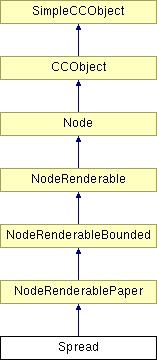
#include <spread.h>
Inheritance diagram for Spread:
Public Member Functions | |
| Spread () | |
| This constructor creates a Spread linked to no other nodes, with all status flags false, and NULL bounding and pasteboard rectangles. | |
| Spread (Node *ContextNode, AttachNodeDirection Direction, const DocRect &PasteRect, MILLIPOINT BleedOffset=0, BOOL Locked=FALSE, BOOL Mangled=FALSE, BOOL Marked=FALSE, BOOL Selected=FALSE) | |
| This method initialises the node and links it to ContextNode in the direction specified by Direction. All neccesary tree links are updated. | |
| virtual DocRect | GetBoundingRect (BOOL DontUseAttrs=FALSE, BOOL HitTest=FALSE) |
| returns the nodes bounding rectangle. If the rectangle is valid the rectangle is simply returned, but is IsBoundingRectValid is FALSE (cos someone called InvaldateBoundingRect() on this node, or one of its children) then the bounding rect is first calculated and the flag reset, before it is returned. The Spreads bounds rect is measured in Document Coords and this conversion is made in here. ie. All objects below the spread measure their coords etc relative to the spread, but the spread itself is measured relative to the document. | |
| DocRect | GetDrawingSize () const |
| Works out the size of the rectangle encompassing the drawing. Code also used to work out the pixel size in the bitmap export options dialog box. Graeme (13/7/00) - Changed the code so that the background layer is ignored. | |
| String | Describe (BOOL Plural, BOOL Verbose) |
| To return a description of the Node object in either the singular or the plural. This method is called by the DescribeRange method. | |
| Spread * | FindNextSpread () |
| To find the next sibling spread. | |
| Spread * | FindPreviousSpread () |
| To find the current spreads previous sibling spread. | |
| Page * | FindFirstPageInSpread () const |
| To find the first page in a spread. | |
| Page * | FindLastPageInSpread () const |
| To find the spread's last page. Layers and other renderable nodes should always be inserted after the last page. Otherwise, there is likely to be redraw problems. | |
| Document * | FindParentDocument () |
| Finds the parent document for this spread. Should always be one present. Defined as an explicit function so that caller just has to check for NULL returns, rather than also checking that the parent is a chapter. Also, makes it more encapsulated and friendly. | |
| Chapter * | FindParentChapter () |
| Finds the parent chapter for this spread. Should always be one present. Defined as an explicit function so that caller just has to check for NULL returns, rather than also checking that the parent is a chapter. Also, makes it more encapsulated and friendly. | |
| Layer * | FindActiveLayer () |
| For finding the spreads active layer. | |
| Layer * | FindFirstLayer () const |
| To find the spread's first layer. | |
| Layer * | FindLastLayer () const |
| To find the spread's last layer. | |
| Layer * | FindFirstGuideLayer () const |
| To find the spread's first guide layer. | |
| Layer * | FindFirstPageBackgroundLayer () const |
| To find the spread's first page background layer. | |
| Layer * | FindFirstFrameLayer () const |
| To find the spread's first frame layer. | |
| Layer * | FindLastFrameLayer () const |
| To find the spread's last framelayer. | |
| DimScale * | GetPtrDimScale () |
| For getting a ptr to the Spread's dimension scale object. | |
| MILLIPOINT | GetBleedOffset () const |
| For getting the Spread's bleed area size. | |
| BOOL | SetBleedOffset (MILLIPOINT Bleed) |
| For setting a new value for the Spread's bleed area size. | |
| BOOL | GetShowDropShadow () const |
| Finds out the current drop shadow display state. | |
| BOOL | SetShowDropShadow (BOOL NewState) |
| Allows the setting of a new drop shadow display state. | |
| virtual BOOL | IsSpread () const |
| Tell the caller that this is a spread node. | |
| virtual SubtreeRenderState | RenderSubtree (RenderRegion *pRender, Node **ppNextNode=NULL, BOOL bClip=TRUE) |
| BOOL | NeedsToExport (RenderRegion *pRender, BOOL VisibleLayersOnly=FALSE, BOOL CheckSelected=FALSE) |
| Indicate that we don't want to export this class of nodes. | |
| void | Render (RenderRegion *pRender) |
| Renders spread items: Pasteboard and off-paste area Main fold line Spread dividers Bleed Area Drop-shadows Spread outline Print margin. | |
| virtual UINT32 | GetNodeSize () const |
| For finding the size of the node. | |
| virtual void | GetDebugDetails (StringBase *Str) |
| For obtaining debug information about the Node. | |
| virtual BOOL | WritePreChildrenWeb (BaseCamelotFilter *pFilter) |
| Web files do not write out spreads. | |
| virtual BOOL | WritePreChildrenNative (BaseCamelotFilter *pFilter) |
| Writes the spread record to the filter. | |
| virtual BOOL | WriteBeginChildRecordsWeb (BaseCamelotFilter *pFilter) |
| Begins the child record sequence for spread in the web format. | |
| virtual BOOL | WriteBeginChildRecordsNative (BaseCamelotFilter *pFilter) |
| Begins the child record sequence for spread in the native format. | |
| virtual BOOL | WriteEndChildRecordsWeb (BaseCamelotFilter *pFilter) |
| Ends the child record sequence for spread in the web format. | |
| virtual BOOL | WriteEndChildRecordsNative (BaseCamelotFilter *pFilter) |
| Ends the child record sequence for spreads in the native format. | |
| DocCoord | GetUserOrigin () |
| void | SetUserOrigin (DocCoord origin) |
| void | SpreadCoordToDocCoord (DocCoord *pSpreadCoord) const |
| To convert between Document and Spread coordinate spaces. | |
| void | SpreadCoordToDocCoord (DocRect *pSpreadCoord) const |
| void | DocCoordToSpreadCoord (DocCoord *pDocCoord) const |
| To convert between Document and Spread coordinate spaces. | |
| void | DocCoordToSpreadCoord (DocRect *pDocCoord) const |
| BOOL | SpreadCoordToPagesCoord (DocCoord *pPagesCoord, DocCoord SpreadCoord) |
| Convert SpreadCoord to PagesCoord (relative to union of pages in spread). | |
| BOOL | PagesCoordToSpreadCoord (DocCoord *pSpreadCoord, DocCoord PagesCoord) |
| Convert PagesCoord (relative to union of pages in spread) to SpreadCoord. | |
| BOOL | GetPagesRect (DocRect *pPagesRect) |
| Get the union rect of all pages on the spread (in SpreadCoords). | |
| BOOL | TextToSpreadCoord (DocCoord *pDocCoord, StringBase *pxText, StringBase *pyText) |
| Convert Coord in text form (relative to union of pages in spread) into SpreadCoord. | |
| BOOL | SpreadCoordToText (String_256 *pxText, String_256 *pyText, DocCoord DocCoord, BOOL xUnitSpecifier=TRUE, BOOL yUnitSpecifier=TRUE, INT32 dp=-1) |
| Convert SpreadCoord into Coord in text form (relative to union of pages in spread) Note: If only Y specifier required and units are prefix then the unit specifier is actually placed before the x value. | |
| BOOL | GetDecimalPlacesForPixelResolution (View *pView, INT32 *dp) |
| Find the number of dp to resolve a pixel in units and scale associated with spread (calulates the both x and y and returns max). | |
| NodeGrid * | FindFirstDefaultGridInSpread () |
| Finds the first default grid that has been defined in this spread. Should be the only one present. | |
| BOOL | CreateDefaultPageAndGrid (BOOL CreateGrid=TRUE) |
| DocRect | GetPageBounds () const |
| Finds the bounding rectangle of this Spread, defined as the smallest rectangle enclosing all the Pages the Spread contains. | |
| DocRect | GetPageVisibleBounds () const |
| Finds the bounding rectangle of this Spread, defined as the smallest rectangle enclosing all the Pages the Spread contains. | |
| BOOL | GetPageSize (MILLIPOINT *Width, MILLIPOINT *Height, MILLIPOINT *Margin, MILLIPOINT *Bleed, BOOL *Dps, BOOL *ShowDropShadow) |
| Allows the current page size specified for a spread to be determined. Assumes that all pages in one spread are the same size and hence returns this size. | |
| BOOL | SetPageSize (const MILLIPOINT Width, const MILLIPOINT Height, const MILLIPOINT Margin, const MILLIPOINT Bleed, const BOOL Dps, const BOOL ShowDropShadow) |
| Allows the setting of a new page size by height and width for all pages in this spread. Also allows changing of other spread attributes such as:- margin around pages in spread, bleed size single/double page spread whether a drop shadow is displayed for this spread. | |
| DocRect | GetWidePasteboard (View *pView) |
| Return the pixelised boundary of the "wide pasteboard". | |
| DocCoord | GetSpreadCoordOrigin (BOOL Pixelise=TRUE, View *pView=NULL) const |
| To determine the spread coordinate origin This is used to convert between document and spread coordinates: DocCoord = SpreadCoord + Origin SpreadCoord = DocCoord - Origin. | |
| void | SetSpreadCoordOrigin (DocCoord NewOrigin) |
| To set the spread coordinate origin This is used to convert between document and spread coordinates: DocCoord = SpreadCoord + Origin SpreadCoord = DocCoord - Origin. | |
| DocCoord | GetMaxPasteboardSize (void) |
| To determine the maximum size that the pasteboard will allow itself to be expanded to. | |
| BOOL | ExpandPasteboardToInclude (DocRect IncludeRect) |
| To expand the pasteboard area to include the given rectangle. Used when objects are moved outside the current pasteboard area to keep them in an area which the user can see. The pasteboard will never expand beyond a maximum size (see Spread::GetMaxPasteboardSize). | |
| void | AdjustPasteboards (void) |
| This runs through all spreads in this spread's parent chapter, doing the following:. | |
| virtual void | PolyCopyNodeContents (NodeRenderable *pNodeCopy) |
| Polymorphically copies the contents of this node to another. | |
| BOOL | SetSpreadAnimPropertiesParam (const DWORD &Loop, const DWORD &GlobalDelay, const DITHER &Dither, const WEB_PALETTE &WebPalette, const PALETTE_COLOURS &ColoursPalette, const DWORD &NumColsInPalette, const BOOL &UseSystemColours, const BOOL &IsBackgroundTransparent) |
| BOOL | GetSpreadAnimPropertiesParam (DWORD *Loop, DWORD *GlobalDelay, DITHER *Dither, WEB_PALETTE *WebPalette, PALETTE_COLOURS *ColoursPalette, DWORD *NumColsInPalette, BOOL *UseSystemColours, BOOL *pIsBgTransparent) |
| Allows access to the Animation Properties details for this spread. Notes: Karim 07/12/00 - added IsBgTransparent parameter. | |
| AnimPropertiesParam & | GetSpreadAnimPropertiesParam () |
| Returns the the Animation Properties details for this spread. | |
| void | SetSpreadAnimPropertiesParam (const AnimPropertiesParam &Param) |
| void | SetAnimationDelay (const DWORD GlobalDelay) |
| Sets the the delay value within the class data member m_AnimPropertiesParam. This value has been recieved from the Animation properties tab. | |
| void | SetAnimationLoop (const DWORD &Loop) |
| Sets the loop value within the class data member m_AnimPropertiesParam. This value has been recieved from the Animation properties tab. | |
| void | SetAnimationColours (const DITHER &Dither, const WEB_PALETTE &WebPalette, const PALETTE_COLOURS &ColoursPalette, const DWORD &NumColsInPalette, const BOOL &IsBackgroundTransparent) |
| void | GetAnimationColours (DITHER *pDither, WEB_PALETTE *pWebPalette, PALETTE_COLOURS *pColoursPalette, DWORD *pNumColsInPalette, BOOL *pIsBackgroundTransparent) |
| virtual BOOL | WriteSpreadAnimProperties (BaseCamelotFilter *pFilter) |
| DocRect | GetAnimationBoundingRect () |
| Returns the stored animation bounding rect for this spread. | |
| void | SetAnimationBoundingRect (const DocRect &BoundingRect) |
| Sets the new stored bounding rect for this spread. | |
| Quality | GetAnimationQuality () |
| Returns the stored quality that the animation for this spread was captured at. | |
| void | SetAnimationQuality (const Quality &NewQuality) |
| Sets the new stored quality that the animation for this spread was captured at. | |
Protected Member Functions | |
| virtual BOOL | WriteSpreadInformation (BaseCamelotFilter *pFilter) |
Exports the page details, margins, bleed size and other spread related information for this spread to the filter. We output an information record rather than the individual pages as:-
| |
| virtual BOOL | WriteSpreadScaling (BaseCamelotFilter *pFilter) |
| Exports the scaling information for this spread to the filter. | |
| BOOL | SetSizeOfAllPages (const MILLIPOINT Width, const MILLIPOINT Height, const MILLIPOINT Margin, const BOOL Dps) |
| Sets the sizes of all pages in this spread to conform to the newly specified width and height. It will try and align all the pages. It will also try and create and or delete any pages which are necessary to conform to the specified single/double page spread flag. Assumes all the pages in a spread are the same size. | |
| BOOL | AlignPasteboards (const DocRect NewPasteRect, const MILLIPOINT Margin) |
| Tries to align all the pasteboards of the spreads in this chapter to the new size of this spread. Checks to see if the objects on the spread are bigger than the newly specified pasteboard rectangle and if so will put a margin around the object rectangle and then combine this with the specified pasteboard height. This means we will not loose any objects off the spread. As it is changing the size and position of the spread, it will invalidate the spreads bounding rectangle so that hopefully all bounding boxes will be recalculated rather than using the old and more than likely wrong cached one. Assumes at present that it is only called on the first spread in the chapter. | |
| virtual void | SetInitialPasteboardRect (const DocRect &PasteRect) |
| To set the initial pasteboard rectangle of this node, and then change the pasteboard rectangles of all its parents. | |
| virtual BOOL | PostImport () |
| This function is called after a document is imported. Nodes should override this function to do any post-import processing. | |
| void | RenderPasteboard (RenderRegion *pRender) |
| To render the pasteboard and off-paste area. | |
| void | RenderBleedArea (RenderRegion *pRender) |
| Renders the Bleed Area rectangle if the BleedOffset is not 0 Scope: private. | |
| virtual Node * | SimpleCopy () |
| This method returns a shallow copy of the node with all Node pointers NULL. The function is virtual, and must be defined for all derived classes. | |
| void | CopyNodeContents (Spread *NodeCopy) |
| This method copies the node's contents to the node pointed to by NodeCopy. | |
| void | RenderDropShadows (RenderRegion *pRender) |
| To render right-hand and bottom drop shadows Scope: private. | |
Protected Attributes | |
| MILLIPOINT | BleedOffset |
| BOOL | ShowDropShadow |
| BOOL | RalphDontShowPaper |
| DocCoord | SpreadOrigin |
| DocCoord | UserOrigin |
| AnimPropertiesParam | m_AnimPropertiesParam |
Private Attributes | |
| DimScale | SpreadDimScale |
Definition at line 138 of file spread.h.
|
|
This constructor creates a Spread linked to no other nodes, with all status flags false, and NULL bounding and pasteboard rectangles.
Definition at line 178 of file spread.cpp. 00178 : NodeRenderablePaper() 00179 { 00180 UserOrigin = DocCoord(0, 0); 00181 SpreadOrigin = DocCoord(0, 0); 00182 BleedOffset = 36000; 00183 ShowDropShadow = TRUE; 00184 RalphDontShowPaper = FALSE; 00185 //AnimPropertiesParam = constructed 00186 //SpreadDimScale = constructed 00187 }
|
|
||||||||||||||||||||||||||||||||||||
|
This method initialises the node and links it to ContextNode in the direction specified by Direction. All neccesary tree links are updated.
Specifies the direction in which this node is to be attached to the ContextNode. The values this variable can take are as follows: PREV : Attach node as a previous sibling of the context node NEXT : Attach node as a next sibling of the context node FIRSTCHILD: Attach node as the first child of the context node LASTCHILD : Attach node as a last child of the context node BoundingRect: Bounding rectangle The remaining inputs specify the status of the node: Locked: Is node locked ? Mangled: Is node mangled ? Marked: Is node marked ? Selected: Is node selected ?
Definition at line 238 of file spread.cpp. 00246 : NodeRenderablePaper(ContextNode, Direction, Locked, Mangled, 00247 Marked, Selected) 00248 { 00249 BleedOffset = Bleed; 00250 00251 // Set the default spread coord origin 00252 SpreadOrigin = PasteRect.lo; 00253 00254 // Pasteboard is used to indicate the width of the document (for scroll bars etc) 00255 SetInitialPasteboardRect(PasteRect); 00256 00257 // Default to showing the drop shadow on the page 00258 ShowDropShadow = TRUE; 00259 00260 // we only render paper in some ralph document modes 00261 RalphDontShowPaper = FALSE; 00262 00263 UserOrigin = DocCoord(0,0); 00264 }
|
|
|
This runs through all spreads in this spread's parent chapter, doing the following:.
2) Move the pasteboards (and contents) as necessary so that recently expanded pasteboards do not overlap neighbouring spreads, and they all butt up against each other nicely. (Note: The whole pasteboard is moved, including shifting the spread coord origin to keep it in the same relative position) 3) Ensure that all default grids fully cover their pasteboard. Finally, it will cause a redraw of all views onto this document to ensure that they are correctly updated. Notes: **** This has only been tested for single-spread Chapters **** (Although it has been written to hopefully handle multiple spreads)
Definition at line 3365 of file spread.cpp. 03366 { 03367 //#if NEW_PASTEBOARD 03368 Chapter* ParentChapter = FindParentChapter(); 03369 ERROR3IF(ParentChapter == NULL, "No parent Chapter?!"); 03370 03371 // First, find the minimum and maximum pasteboard x extents for the entire document. 03372 // Helpfully, our parent Chapter's pasteboard rect is a union of all of ours! 03373 DocRect ChapterBounds = ParentChapter->GetPasteboardRect(); 03374 03375 // Now we loop through all spreads from this one onwards, doing 2 things 03376 // 1) Make sure that each following spread is shifted to the correct document coordinates 03377 // by ensuring its pasteboard is placed after this spread's one. 03378 // 2) Make sure that all default grids in all spreads fully cover the pasteboards. 03379 Spread* pThisSpread = ParentChapter->FindFirstSpread(); 03380 03381 // Force the x extent of the first pasteboard to match all others in this chapter 03382 DocRect TempPasteRect = pThisSpread->GetPasteboardRect(); 03383 TempPasteRect.lo.x = ChapterBounds.lo.x; 03384 TempPasteRect.hi.x = ChapterBounds.hi.x; 03385 03386 /*if (pThisSpread->FindNextSpread()) 03387 { 03388 DocCoord OriginOffset(pThisSpread->SpreadOrigin.x - pThisSpread->PasteboardRect.lo.x, 03389 pThisSpread->SpreadOrigin.y - pThisSpread->PasteboardRect.lo.y); 03390 03391 DocRect r; 03392 pThisSpread->GetPagesRect(&r); 03393 pThisSpread->SpreadCoordToDocCoord(&r); 03394 r.Inflate(18000); 03395 INT32 ydiff = r.lo.y - TempPasteRect.lo.y; 03396 TempPasteRect.lo.y = r.lo.y; 03397 03398 pThisSpread->SpreadOrigin.x = TempPasteRect.lo.x + OriginOffset.x; 03399 pThisSpread->SpreadOrigin.y = TempPasteRect.lo.y + OriginOffset.y - ydiff; 03400 } 03401 */ 03402 03403 pThisSpread->ChangePasteboardRect(TempPasteRect); 03404 pThisSpread->InvalidateBoundingRect(); 03405 03406 // For each spread... 03407 while (pThisSpread != NULL) 03408 { 03409 Progress::Update(); // Update any active hourglass 03410 03411 Spread* pNextSpread = pThisSpread->FindNextSpread(); 03412 03413 // --- If there is a spread following this one, fix its pasteboard rect position 03414 if (pNextSpread != NULL) 03415 { 03416 DocRect FirstPasteRect = pThisSpread->GetPasteboardRect(FALSE); 03417 /*if (pThisSpread->FindNextSpread()) 03418 { 03419 DocRect r; 03420 pThisSpread->GetPagesRect(&r); 03421 pThisSpread->SpreadCoordToDocCoord(&r); 03422 r.Inflate(18000); 03423 FirstPasteRect.lo.y = r.lo.y; 03424 } 03425 if (pThisSpread->FindPreviousSpread()) 03426 { 03427 DocRect r; 03428 pThisSpread->GetPagesRect(&r); 03429 pThisSpread->SpreadCoordToDocCoord(&r); 03430 r.Inflate(18000); 03431 FirstPasteRect.hi.y = r.hi.y; 03432 } 03433 */ 03434 DocRect SecondPasteRect = pNextSpread->GetPasteboardRect(FALSE); 03435 DocCoord OriginOffset(pNextSpread->SpreadOrigin.x - pNextSpread->PasteboardRect.lo.x, 03436 pNextSpread->SpreadOrigin.y - pNextSpread->PasteboardRect.lo.y); 03437 03438 /*if (pNextSpread->FindNextSpread()) 03439 { 03440 DocRect r; 03441 pNextSpread->GetPagesRect(&r); 03442 pNextSpread->SpreadCoordToDocCoord(&r); 03443 r.Inflate(18000); 03444 INT32 ydiff = r.lo.y - SecondPasteRect.lo.y; 03445 SecondPasteRect.lo.y = r.lo.y; 03446 OriginOffset.y -= ydiff; 03447 } 03448 if (pNextSpread->FindPreviousSpread()) 03449 { 03450 DocRect r; 03451 pNextSpread->GetPagesRect(&r); 03452 pNextSpread->SpreadCoordToDocCoord(&r); 03453 r.Inflate(18000); 03454 SecondPasteRect.hi.y = r.hi.y; 03455 } 03456 */ 03457 03458 // Construct a new Pasteboard rectangle of the correct size, and move it 03459 // to lie just below the previous spread's pasteboard area 03460 TempPasteRect = SecondPasteRect; 03461 03462 TempPasteRect.Translate(-TempPasteRect.lo.x, -TempPasteRect.lo.y); 03463 TempPasteRect.Translate(FirstPasteRect.lo.x, FirstPasteRect.lo.y - TempPasteRect.Height()); 03464 03465 // And force the x extent of this pasteboard to match all others in this chapter 03466 TempPasteRect.lo.x = ChapterBounds.lo.x; 03467 TempPasteRect.hi.x = ChapterBounds.hi.x; 03468 03469 // Move the spread coordinate origin so that it stays at the same relative offset 03470 // from the pasteboard bottom left corner, or else all objects inside the spread 03471 // will suddenly shift to a new place on (or off) the pasteboard! 03472 pNextSpread->SpreadOrigin.x = TempPasteRect.lo.x + OriginOffset.x; 03473 pNextSpread->SpreadOrigin.y = TempPasteRect.lo.y + OriginOffset.y; 03474 03475 // Set the new paste rect 03476 pNextSpread->ChangePasteboardRect(TempPasteRect); 03477 03478 // Make sure bounding rectangles are invalidated so that they are recalculated 03479 pNextSpread->InvalidateBoundingRect(); 03480 } 03481 03482 // --- Fix all the default grids to exactly cover their pasteboards 03483 Node *ptr = pThisSpread->FindFirstChild(); 03484 while (ptr != NULL) 03485 { 03486 if (ptr->IsKindOf(CC_RUNTIME_CLASS(NodeGrid))) 03487 { 03488 // Found a grid type node. Check if its a default type. 03489 NodeGrid* pCurrentGrid = (NodeGrid*)ptr; 03490 03491 if (pCurrentGrid->IsDefault()) 03492 { 03493 // Default grids need to fill the spread's pasteboard rect 03494 DocRect Bounds = pThisSpread->GetPasteboardRect(); 03495 DocCoordToSpreadCoord(&Bounds); 03496 03497 // And set the new bounding rect 03498 pCurrentGrid->SetBoundingRect(Bounds); 03499 } 03500 } 03501 03502 ptr = ptr->FindNext(); 03503 } 03504 03505 // --- And move on to the next spread to fix 03506 pThisSpread = pNextSpread; 03507 } 03508 03509 // And invalidate all displayed views on this document, in order to make sure they 03510 // correctly update on screen. 03511 Document *pDoc = (Document *)FindOwnerDoc(); 03512 if (pDoc != NULL) 03513 pDoc->ForceRedraw(); 03514 03515 //#else 03516 //ERROR3("Spread::AdjustPasteboards is unimplemented - see Jason/Phil"); 03517 //#endif 03518 }
|
|
||||||||||||
|
Tries to align all the pasteboards of the spreads in this chapter to the new size of this spread. Checks to see if the objects on the spread are bigger than the newly specified pasteboard rectangle and if so will put a margin around the object rectangle and then combine this with the specified pasteboard height. This means we will not loose any objects off the spread. As it is changing the size and position of the spread, it will invalidate the spreads bounding rectangle so that hopefully all bounding boxes will be recalculated rather than using the old and more than likely wrong cached one. Assumes at present that it is only called on the first spread in the chapter.
Definition at line 2357 of file spread.cpp. 02358 { 02359 ERROR2IF(this==NULL,FALSE,"Spread::AlignPasteboards called on NULL pointer"); 02360 02361 // Work out the overall bounds of the pages and objects on the page in the spread 02362 // This will be in document coordinates 02363 DocRect ObjectsBounds = GetBoundingRect(FALSE); 02364 02365 // Take copy of entry pasteboard rectangle size 02366 DocRect PasteRect = NewPasteRect; 02367 02368 // Note:: The tops of the old paste board rectangle and the new are aligned rather 02369 // than the bottoms. Hence the 0,0s are different. This means that direct comparisons 02370 // between new size, old size and bounding rectangles are not possible. 02371 // First, get the current paste board rectangle for this spread. 02372 DocRect SpreadRect = GetPasteboardRect(); 02373 02374 // Work out the maximum height and width of pasteboard required to encompass all the 02375 // current objects on the page. Include a margin around the outside. 02376 MILLIPOINT HeightReqd = ObjectsBounds.hi.y - SpreadRect.lo.y + Margin; 02377 MILLIPOINT WidthReqd = ObjectsBounds.hi.x - SpreadRect.lo.x + Margin; 02378 // Above calculations will not include objects off the bottom and/or left hand side of 02379 // the page. We would need to shift the bottom left hand corner of the page plus all 02380 // objects if we were going to move these objects back onto the page. 02381 02382 // If bounding rectangle of objects on page is bigger than the size of this new pasteboard 02383 // rectangle then resize the pasteboard to include the objects bounding box. 02384 if (PasteRect.Width() < WidthReqd || 02385 PasteRect.Height() < HeightReqd ) 02386 { 02387 // Work out what the new required width and height of the pasteboard rectangle is 02388 // including a margin size border around the outside of the objects bounding rectangle 02389 // so that all the handles are accessable. 02390 MILLIPOINT SpreadHeight = 0; 02391 MILLIPOINT SpreadWidth = 0; 02392 if (HeightReqd < PasteRect.Height() ) 02393 SpreadHeight = PasteRect.Height(); 02394 else 02395 SpreadHeight = HeightReqd; 02396 02397 if (WidthReqd < PasteRect.Width() ) 02398 SpreadWidth = PasteRect.Width(); 02399 else 02400 SpreadWidth = WidthReqd; 02401 02402 // Contruct a new PasteRect to take this object bounding rectangle into account. 02403 PasteRect = DocRect(MinDocCoord + 0x10000, 02404 (MaxDocCoord - 0x10000) - (SpreadHeight), 02405 (MinDocCoord + 0x10000) + (SpreadWidth), 02406 MaxDocCoord - 0x10000); 02407 } 02408 02409 // Now we have the required size and position, go and set it 02410 ChangePasteboardRect(PasteRect); 02411 02412 // Make the wide pasteboard align to the new one 02413 // REMOVED - WPB now calculated on the fly rather than cached 02414 // WidePasteboard.lo.y = PasteRect.lo.y; 02415 // WidePasteboard.hi.y = PasteRect.hi.y; 02416 02417 // Make sure bounding rectangles are invalidated so that they are recalculated 02418 InvalidateBoundingRect(); 02419 02420 // Now ensure all following spreads are properly attached to this one 02421 // Assumes that we are altering the first spread in the document 02422 // Note this spread as a possible last spread in the document 02423 Spread* pLastSpread = this; 02424 Spread* pThisSpread = this; 02425 Spread* pNextSpread = FindNextSpread(); 02426 while (pNextSpread != NULL) 02427 { 02428 // Next spread present, so adjust the pasteboard on the first/previous spread to 02429 // be correct assuming that it is not the last one present. 02430 // REMOVED- AdjustPasteboardHeight used to set the wide pasteboard - this is no longer necessary 02431 // as the Wide Pasteboard is calculated on the fly rather than cached now. 02432 // pThisSpread->AdjustPasteboardHeight(FALSE); 02433 02434 DocRect FirstPasteRect = pThisSpread->GetPasteboardRect(FALSE); 02435 DocRect SecondPasteRect = pNextSpread->GetPasteboardRect(FALSE); 02436 // Construct a new Pasteboard rectangle of the correct size and initial position 02437 // and then move it down by the height of the first spread (Down = -ve). 02438 DocRect TempPasteRect(MinDocCoord + 0x10000, 02439 (MaxDocCoord - 0x10000) - SecondPasteRect.Height(), 02440 (MinDocCoord + 0x10000) + SecondPasteRect.Width(), 02441 MaxDocCoord - 0x10000); 02442 02443 TempPasteRect.Translate(0, -( FirstPasteRect.Height() )); 02444 // Now we have the required size and position, go and set it 02445 pNextSpread->ChangePasteboardRect(TempPasteRect); 02446 02447 // Make the wide pasteboard align to the new one 02448 // REMOVED - WPB now calculated on the fly rather than cached 02449 // pNextSpread->WidePasteboard.lo.y = TempPasteRect.lo.y; 02450 // pNextSpread->WidePasteboard.hi.y = TempPasteRect.hi.y; 02451 02452 #ifdef _DEBUG 02453 // On Debug versions check that the spreads are aligned correctly 02454 FirstPasteRect = pThisSpread->GetPasteboardRect(FALSE); 02455 SecondPasteRect = pNextSpread->GetPasteboardRect(FALSE); 02456 TRACEUSER( "Neville", _T("First spread low corner y = %d\n"),FirstPasteRect.LowCorner().y); 02457 TRACEUSER( "Neville", _T("Second spread high corner y = %d\n"),SecondPasteRect.HighCorner().y); 02458 ENSURE((SecondPasteRect.HighCorner().y == FirstPasteRect.LowCorner().y), 02459 "Spread::SetPageSize() Spreads are not properly vertically aligned"); 02460 #endif 02461 02462 // Make sure bounding rectangles are invalidated so that they are recalculated 02463 pNextSpread->InvalidateBoundingRect(); 02464 02465 // Note this next spread as a possible last spread and this spread 02466 pLastSpread = pNextSpread; 02467 pThisSpread = pNextSpread; 02468 02469 // Now, see whether there is a next spread or not. 02470 pNextSpread = pNextSpread->FindNextSpread(); 02471 } 02472 02473 // Last spread in document/chapter so adjust the bottom pasteboard to be correct 02474 // REMOVED - this method just adjusts the Wide pasteboard - no longer necessary as the WPB 02475 // is calculated on the fly rather than cached 02476 // if (pLastSpread != NULL) 02477 // pLastSpread->AdjustPasteboardHeight(TRUE); 02478 02479 return TRUE; 02480 }
|
|
|
This method copies the node's contents to the node pointed to by NodeCopy.
Definition at line 953 of file spread.cpp. 00954 { 00955 ERROR3IF(NodeCopy == NULL,"Trying to copy node contents to\n" 00956 "a node pointed to by a NULL pointer"); 00957 NodeRenderablePaper::CopyNodeContents(NodeCopy); 00958 00959 NodeCopy->BleedOffset = BleedOffset; 00960 NodeCopy->ShowDropShadow = ShowDropShadow; 00961 NodeCopy->SpreadOrigin = SpreadOrigin; 00962 NodeCopy->UserOrigin = UserOrigin; 00963 NodeCopy->m_AnimPropertiesParam = m_AnimPropertiesParam; 00964 NodeCopy->SpreadDimScale = SpreadDimScale; 00965 NodeCopy->RalphDontShowPaper = RalphDontShowPaper; 00966 }
|
|
|
Definition at line 2730 of file spread.cpp. 02731 { 02732 // Work out where to put the page and create it 02733 DocRect PageRect(Gap, Gap, Gap+PageWidth, Gap+(1*PageHeight)); 02734 Page *pPage = new Page(this, FIRSTCHILD, PageRect); 02735 if (pPage == NULL) 02736 return(FALSE); 02737 02738 // Create a default blanket grid in the given spread 02739 if (CreateGrid) 02740 NodeGrid::MakeDefaultGrid(this); 02741 02742 return TRUE; 02743 }
|
|
||||||||||||
|
To return a description of the Node object in either the singular or the plural. This method is called by the DescribeRange method.
Reimplemented from Node. Definition at line 295 of file spread.cpp. 00296 { 00297 if (Plural) 00298 return(String(_R(IDS_SPREAD_DESCRP))); 00299 else 00300 return(String(_R(IDS_SPREAD_DESCRS))); 00301 };
|
|
|
Definition at line 3145 of file spread.cpp. 03146 { 03147 ERROR3IF(pDocRect == NULL, "Illegal NULL params"); 03148 03149 DocCoordToSpreadCoord(&pDocRect->lo); 03150 DocCoordToSpreadCoord(&pDocRect->hi); 03151 }
|
|
|
To convert between Document and Spread coordinate spaces.
Definition at line 3133 of file spread.cpp. 03134 { 03135 ERROR3IF(pDocCoord == NULL, "Illegal NULL params"); 03136 03137 DocCoord Origin = GetSpreadCoordOrigin(); 03138 03139 pDocCoord->x -= Origin.x; 03140 pDocCoord->y -= Origin.y; 03141 }
|
|
|
To expand the pasteboard area to include the given rectangle. Used when objects are moved outside the current pasteboard area to keep them in an area which the user can see. The pasteboard will never expand beyond a maximum size (see Spread::GetMaxPasteboardSize).
The pasteboard expands equally in all directions in order to keep all page "margins" equal. This is necessary so that window scroll positions are not messed when we re-load a file
Definition at line 3221 of file spread.cpp. 03222 { 03223 #if NEW_PASTEBOARD 03224 #error ("This code has been commented out for safety. Please uncomment and try again"); 03225 03226 Progress Hourglass; // Ensure an hourglass is running while we're busy 03227 03228 // Convert the Spread coordinates "IncludeRect" into Document coordinates "IncludeDocRect" 03229 DocRect IncludeDocRect(IncludeRect); 03230 SpreadCoordToDocCoord(&IncludeDocRect); 03231 03232 // If the pasteboard is already big enough, return immediately (success) 03233 if (PasteboardRect.ContainsRect(IncludeDocRect)) 03234 return(TRUE); 03235 03236 // Remember where the view was looking before we moved things about 03237 DocView *pView = DocView::GetSelected(); 03238 DocRect ViewRect; 03239 if (pView != NULL) 03240 { 03241 ViewRect = pView->GetDocViewRect(this); 03242 DocCoordToSpreadCoord(&ViewRect); 03243 } 03244 03245 // Inflate the IncludeRect in order to add a margin outside it. 72000mpt => 1 inch 03246 IncludeDocRect.Inflate(72000); 03247 03248 // And include the rectangle into the new pasteboard rectangle 03249 DocRect NewBounds(PasteboardRect); 03250 NewBounds = NewBounds.Union(IncludeDocRect); 03251 03252 // And now find the amount by which the "margin" should change, and inflate the pasteboard 03253 // rect in all directions, to keep the margin equal around the pages. 03254 INT32 InflateBy = 0; 03255 { 03256 InflateBy = ABS(NewBounds.lo.x - PasteboardRect.lo.x); 03257 03258 INT32 temp = ABS(NewBounds.lo.y - PasteboardRect.lo.y); 03259 if (temp > InflateBy) InflateBy = temp; 03260 03261 temp = ABS(NewBounds.hi.x - PasteboardRect.hi.x); 03262 if (temp > InflateBy) InflateBy = temp; 03263 03264 temp = ABS(NewBounds.hi.y - PasteboardRect.hi.y); 03265 if (temp > InflateBy) InflateBy = temp; 03266 03267 03268 // Make sure we don't expand beyond the maximum size 03269 DocCoord MaxSize = GetMaxPasteboardSize(); 03270 if (PasteboardRect.Width() + 2*InflateBy > MaxSize.x) 03271 InflateBy = (MaxSize.x - PasteboardRect.Width()) / 2; 03272 03273 if (PasteboardRect.Height() + 2*InflateBy > MaxSize.y) 03274 InflateBy = (MaxSize.y - PasteboardRect.Height()) / 2; 03275 03276 // And inflate the original pasteboard 03277 NewBounds = PasteboardRect; 03278 NewBounds.Inflate(InflateBy, InflateBy); 03279 } 03280 03281 // Now we have the required size and position, go and set it 03282 ChangePasteboardRect(NewBounds); 03283 03284 // Make sure bounding rectangles are invalidated so that they are recalculated 03285 InvalidateBoundingRect(); 03286 03287 // Now run through all spreads, lining up their pasteboards so they don't overlap, 03288 // and making sure that their default grids fully cover the pasteboards. 03289 // Note that this also ensures that the document is redrawn 03290 AdjustPasteboards(); 03291 03292 Document *pParentDoc = (Document *) FindOwnerDoc(); 03293 if (pParentDoc != NULL) 03294 { 03295 // Pretend that page size has changed to cause related UI to change (rulers mainly) 03296 BROADCAST_TO_ALL(OptionsChangingMsg(pParentDoc, 03297 OptionsChangingMsg::NEWPAGESIZE)); 03298 } 03299 03300 // Try to keep the scroll offsets sensible 03301 if (pView != NULL && pView->GetDoc() == pParentDoc) 03302 { 03303 // First, scroll to the previously visible view rectangle - this will adjust for the 03304 // new size of the pasteboard (i.e. new size of the view window extent) to make the 03305 // view look like it has not moved at all. 03306 pView->ScrollToShow(&ViewRect); 03307 03308 // Now, make sure that the IncludeRect is visible on screen 03309 pView->ScrollToShow(&IncludeRect); 03310 } 03311 03312 return(TRUE); // return - successful 03313 03314 #else 03315 // Pasteboard can never expand. Sniffle, Sob! 03316 // We return TRUE if the pasteboard already includes the specified rectangle, and 03317 // FALSE if we would have to expand to include it. 03318 03319 // Convert the Spread coordinates "IncludeRect" into Document coordinates "IncludeDocRect" 03320 DocRect IncludeDocRect(IncludeRect); 03321 SpreadCoordToDocCoord(&IncludeDocRect); 03322 03323 // If the pasteboard is already big enough, return immediately (success) 03324 if (PasteboardRect.ContainsRect(IncludeDocRect)) 03325 return(TRUE); 03326 03327 return(FALSE); 03328 #endif 03329 }
|
|
|
For finding the spreads active layer.
Definition at line 1096 of file spread.cpp. 01097 { 01098 // Changed by MarkN 11/8/94 to use Spread::FindFirstLayer()and Layer::FindNextLayer() 01099 01100 Layer* pActiveLayer = NULL; 01101 Layer* pLayer = FindFirstLayer(); // Get first child 01102 BOOL MultipleActiveLayers = FALSE; 01103 while (pLayer != NULL) 01104 { 01105 if (pLayer->IsActive()) // we have found an active layer 01106 { 01107 // There should only ever be one active layer 01108 ERROR3IF(pActiveLayer != NULL, "Spread has more than one active layer"); 01109 if (pActiveLayer != NULL) 01110 MultipleActiveLayers = TRUE; 01111 pActiveLayer = pLayer; 01112 } 01113 01114 pLayer = pLayer->FindNextLayer(); // Find next layer 01115 } 01116 01117 // This line added by MarkN 22/3/95, to ensure that this function cannot fail 01118 // as long as there is at least one layer in this spread. 01119 // The MultipleActiveLayers added by Neville 12/6/96 so that multiple active layers 01120 // are fixed, if found. 01121 if (pActiveLayer == NULL || MultipleActiveLayers) 01122 LayerSGallery::EnsureActiveLayerIntegrity(this,&pActiveLayer); 01123 // Fail if the spread has no active layer 01124 return (pActiveLayer); 01125 }
|
|
|
Finds the first default grid that has been defined in this spread. Should be the only one present.
Definition at line 2682 of file spread.cpp. 02683 { 02684 ERROR2IF(this==NULL,NULL,"Spread::FindFirstDefaultGridInSpread called on NULL pointer"); 02685 02686 Node* pCurrentNode = FindFirstChild(); 02687 while(pCurrentNode != NULL) 02688 { 02689 if (pCurrentNode->IsKindOf(CC_RUNTIME_CLASS(NodeGrid))) 02690 { 02691 // Found a grid type node. Check if its a default type. 02692 NodeGrid* pCurrentGrid = (NodeGrid*)pCurrentNode; 02693 if (pCurrentGrid->IsDefault()) 02694 return (pCurrentGrid); 02695 } 02696 02697 pCurrentNode = pCurrentNode->FindNext(); 02698 } 02699 return (NULL); // No default grids were found 02700 }
|
|
|
To find the spread's first frame layer.
Definition at line 1279 of file spread.cpp. 01280 { 01281 // Search through the children of this Spread, looking for Layer nodes. 01282 // Use the special flag for frame layers as its identifier. 01283 Layer* pLayer = FindFirstLayer(); 01284 while (pLayer != NULL) 01285 { 01286 // See if this is a frame layer 01287 if (pLayer->IsFrame()) 01288 { 01289 // Cor blimey, we've found one, so return this layer to the caller 01290 return pLayer; 01291 } 01292 01293 pLayer = pLayer->FindNextLayer(); 01294 } 01295 01296 // Nothing found 01297 return NULL; 01298 }
|
|
|
To find the spread's first guide layer.
Definition at line 1214 of file spread.cpp. 01215 { 01216 Layer* pLayer = FindFirstLayer(); 01217 while (pLayer != NULL) 01218 { 01219 if (pLayer->IsGuide()) 01220 return pLayer; 01221 01222 pLayer = pLayer->FindNextLayer(); 01223 } 01224 01225 return NULL; 01226 }
|
|
|
To find the spread's first layer.
Definition at line 1146 of file spread.cpp. 01147 { 01148 Node* Current = FindFirstChild(); 01149 while (Current != NULL) 01150 { 01151 if (Current->GetRuntimeClass() == CC_RUNTIME_CLASS(Layer)) 01152 { 01153 return (Layer*)Current; 01154 } 01155 Current = Current->FindNext(); 01156 } 01157 01158 return (NULL); 01159 }
|
|
|
To find the spread's first page background layer.
Definition at line 1243 of file spread.cpp. 01244 { 01245 // Search through the children of this Spread, looking for Layer nodes. 01246 // Use the special flag of the page background layer as its identifier. 01247 Layer* pLayer = FindFirstLayer(); 01248 while (pLayer != NULL) 01249 { 01250 // See if this is a page background layer 01251 if (pLayer->IsPageBackground()) 01252 { 01253 // Cor blimey, we've found one, so return this layer to the caller 01254 return pLayer; 01255 } 01256 01257 pLayer = pLayer->FindNextLayer(); 01258 } 01259 01260 // Nothing found 01261 return NULL; 01262 }
|
|
|
To find the first page in a spread.
Definition at line 1007 of file spread.cpp. 01008 { 01009 Node* CurrentNode = FindFirstChild(); 01010 while(CurrentNode != NULL) 01011 { 01012 if (CurrentNode->IsKindOf(CC_RUNTIME_CLASS(Page))) 01013 return ((Page*)CurrentNode); 01014 CurrentNode = CurrentNode->FindNext(); 01015 } 01016 return (NULL); // No pages were found 01017 }
|
|
|
To find the spread's last framelayer.
Definition at line 1315 of file spread.cpp. 01316 { 01317 // Search through the children of this Spread, looking for Layer nodes. 01318 // Use the special flag for frame layers as its identifier. 01319 Layer* pLayer = FindFirstLayer(); 01320 Layer* pLastLayer = NULL; 01321 while (pLayer != NULL) 01322 { 01323 // See if this is a frame layer 01324 if (pLayer->IsFrame()) 01325 { 01326 // Cor blimey, we've found one, so remember this as a potential last frame layer 01327 pLastLayer = pLayer; 01328 } 01329 01330 pLayer = pLayer->FindNextLayer(); 01331 } 01332 01333 // Return what we found as the last layer 01334 return pLastLayer; 01335 }
|
|
|
To find the spread's last layer.
Definition at line 1179 of file spread.cpp. 01180 { 01181 Node* pNode = FindFirstChild(); 01182 Layer* pLastLayer = NULL; 01183 01184 while (pNode != NULL) 01185 { 01186 if (pNode->GetRuntimeClass() == CC_RUNTIME_CLASS(Layer)) 01187 pLastLayer = (Layer*)pNode; 01188 01189 pNode = pNode->FindNext(); 01190 } 01191 01192 return (pLastLayer); 01193 }
|
|
|
To find the spread's last page. Layers and other renderable nodes should always be inserted after the last page. Otherwise, there is likely to be redraw problems.
Definition at line 1354 of file spread.cpp. 01355 { 01356 // Get the first page and then continually get the next page until one is not found 01357 // Each time we get a real page we note this as a potential last page. 01358 Page *pLastPage = NULL; 01359 Page *pPage = FindFirstPageInSpread(); 01360 while (pPage != NULL) 01361 { 01362 pLastPage = pPage; // note this page as a potential last page 01363 pPage = pPage->FindNextPage(); 01364 } 01365 01366 // return what we think is the last page 01367 return pLastPage; 01368 }
|
|
|
To find the next sibling spread.
Definition at line 1036 of file spread.cpp. 01037 { 01038 Node* CurrentNode = FindNext(); 01039 while (CurrentNode != 0) 01040 { 01041 if (CurrentNode->IsSpread()) return (Spread*) CurrentNode; 01042 CurrentNode = CurrentNode->FindNext(); 01043 } 01044 return 0; // No spread found 01045 }
|
|
|
Finds the parent chapter for this spread. Should always be one present. Defined as an explicit function so that caller just has to check for NULL returns, rather than also checking that the parent is a chapter. Also, makes it more encapsulated and friendly.
Definition at line 2652 of file spread.cpp. 02653 { 02654 ERROR2IF(this==NULL,NULL,"Spread::FindParentChapter called on NULL pointer"); 02655 02656 Node* pCurrentNode = FindParent(); 02657 while(pCurrentNode != NULL) 02658 { 02659 if (pCurrentNode->IsKindOf(CC_RUNTIME_CLASS(Chapter))) 02660 return ((Chapter*)pCurrentNode); 02661 pCurrentNode = pCurrentNode->FindParent(); 02662 } 02663 return NULL; 02664 }
|
|
|
Finds the parent document for this spread. Should always be one present. Defined as an explicit function so that caller just has to check for NULL returns, rather than also checking that the parent is a chapter. Also, makes it more encapsulated and friendly.
Definition at line 2610 of file spread.cpp. 02611 { 02612 BaseDocument *pBaseDoc = FindOwnerDoc(); 02613 02614 // Make sure we have a real document 02615 if (!pBaseDoc || !pBaseDoc->IS_KIND_OF(Document)) 02616 { 02617 if (pBaseDoc == NULL) 02618 { 02619 ERROR3("Eh up, the spread has no parent document"); 02620 } 02621 else 02622 { 02623 ERROR3("Document is not a real Document - it's a BaseDocument!"); 02624 } 02625 02626 return NULL; 02627 } 02628 02629 Document *pDoc = (Document *) pBaseDoc; 02630 return pDoc; 02631 }
|
|
|
To find the current spreads previous sibling spread.
Definition at line 1064 of file spread.cpp. 01065 { 01066 Node* CurrentNode = FindPrevious(); 01067 while (CurrentNode != 0) 01068 { 01069 if (CurrentNode->IsSpread()) return (Spread*) CurrentNode; 01070 CurrentNode = CurrentNode->FindPrevious(); 01071 } 01072 return 0; // No spread found 01073 }
|
|
|
Returns the stored animation bounding rect for this spread.
Definition at line 4240 of file spread.cpp. 04241 { 04242 return m_AnimPropertiesParam.GetBoundingRect(); 04243 }
|
|
||||||||||||||||||||||||
|
Definition at line 3941 of file spread.cpp. 03944 { 03945 if (pDither != NULL) 03946 *pDither = m_AnimPropertiesParam.GetDither(); 03947 if (pWebPalette != NULL) 03948 *pWebPalette = m_AnimPropertiesParam.GetPalette(); 03949 if (pColoursPalette != NULL) 03950 *pColoursPalette = m_AnimPropertiesParam.GetPaletteCols(); 03951 if (pNumColsInPalette != NULL) 03952 *pNumColsInPalette = m_AnimPropertiesParam.GetNumColsInPalette(); 03953 if (pIsBackgroundTransparent != NULL) 03954 *pIsBackgroundTransparent = m_AnimPropertiesParam.GetIsBackGroundTransp(); 03955 }
|
|
|
Returns the stored quality that the animation for this spread was captured at.
Definition at line 4274 of file spread.cpp. 04275 { 04276 return m_AnimPropertiesParam.GetAnimationQuality(); 04277 }
|
|
|
For getting the Spread's bleed area size.
Definition at line 1608 of file spread.cpp. 01609 { 01610 return BleedOffset; 01611 }
|
|
||||||||||||
|
returns the nodes bounding rectangle. If the rectangle is valid the rectangle is simply returned, but is IsBoundingRectValid is FALSE (cos someone called InvaldateBoundingRect() on this node, or one of its children) then the bounding rect is first calculated and the flag reset, before it is returned. The Spreads bounds rect is measured in Document Coords and this conversion is made in here. ie. All objects below the spread measure their coords etc relative to the spread, but the spread itself is measured relative to the document.
Reimplemented from NodeRenderableBounded. Definition at line 328 of file spread.cpp. 00329 { 00330 // if the bounding rect of this node is not valid then fill in something 00331 if (!IsBoundingRectValid || DontUseAttrs) 00332 { 00333 // just set it to be an empty rectangle 00334 DocRect BoundRect(0,0,0,0); 00335 00336 Node* pNode = FindFirstChild(); 00337 while (pNode!=NULL) 00338 { 00339 // Add in the bounding rect of this node with all the others 00340 if (pNode->IsBounded()) 00341 BoundRect = BoundRect.Union(((NodeRenderableBounded*)pNode)->GetBoundingRect(DontUseAttrs)); 00342 00343 // And find the next node 00344 pNode = pNode->FindNext(); 00345 } 00346 00347 // Convert the bounding rect obtained from spread coords to document coords 00348 SpreadCoordToDocCoord(&BoundRect); 00349 00350 if (DontUseAttrs) 00351 return BoundRect; 00352 00353 // Copy the unions into the nodes bounding rect param 00354 BoundingRectangle = BoundRect; 00355 00356 // mark the bounding rect as valid 00357 IsBoundingRectValid = TRUE; 00358 } 00359 00360 // and return the bounding rect 00361 return BoundingRectangle; 00362 }
|
|
|
For obtaining debug information about the Node.
Reimplemented from NodeRenderablePaper. Definition at line 1433 of file spread.cpp. 01434 { 01435 NodeRenderablePaper::GetDebugDetails(Str); 01436 String_256 TempStr; 01437 01438 TempStr._MakeMsg(TEXT("\r\nBleed Offset = #1%ld"), BleedOffset); 01439 *Str += TempStr; 01440 01441 TempStr._MakeMsg(TEXT("\r\nSpreadCoord Origin = #1%ld, #2%ld"), 01442 SpreadOrigin.x, SpreadOrigin.y); 01443 *Str += TempStr; 01444 }
|
|
||||||||||||
|
Find the number of dp to resolve a pixel in units and scale associated with spread (calulates the both x and y and returns max).
Definition at line 2933 of file spread.cpp. 02934 { 02935 DimScale* pDimScale=DimScale::GetPtrDimScale(this); 02936 ERROR2IF(pDimScale==NULL,FALSE,"Spread::GetDecimalPlacesForPixelResolution() - pDimScale==NULL"); 02937 02938 INT32 xdp=2; 02939 INT32 ydp=2; 02940 double MPPerUnit=0.0; 02941 if( pDimScale->ConvertToDouble( String_8( _T("1") ), &MPPerUnit ) == FALSE ) 02942 return FALSE; 02943 02944 FIXED16 PixelWidth, 02945 PixelHeight; 02946 02947 pView->GetScaledPixelSize(&PixelWidth, &PixelHeight); 02948 02949 if (PixelWidth==0 || PixelHeight==0) 02950 return FALSE; 02951 02952 ERROR2IF(MPPerUnit<1,FALSE,"Spread::GetDecimalPlacesForPixelResolution() - Millipoints per Unit < 1!"); 02953 xdp=(INT32)log10(MPPerUnit/PixelWidth.MakeDouble() )+1; 02954 ydp=(INT32)log10(MPPerUnit/PixelHeight.MakeDouble())+1; 02955 02956 if (xdp<0) xdp=0; 02957 if (ydp<0) ydp=0; 02958 *dp = xdp>ydp ? xdp : ydp; 02959 return TRUE; 02960 }
|
|
|
Works out the size of the rectangle encompassing the drawing. Code also used to work out the pixel size in the bitmap export options dialog box. Graeme (13/7/00) - Changed the code so that the background layer is ignored.
Definition at line 381 of file spread.cpp. 00382 { 00383 // Start out with an empty clip rectangle. 00384 DocRect SpreadRect; 00385 SpreadRect.MakeEmpty (); 00386 00387 // Find the first layer in the spread. 00388 Layer* pLayer = FindFirstLayer (); 00389 00390 // Loop through the layers, and union the bounding boxes of all visible, non-background 00391 // layers. 00392 while ( pLayer != NULL ) 00393 { 00394 // Let's see if it is visible, and not a background layer. 00395 if ( pLayer->IsVisible() && !pLayer->IsBackground () ) 00396 { 00397 // This one is visible, so union its bounding box in. 00398 SpreadRect = SpreadRect.Union(pLayer->GetBoundingRect () ); 00399 } 00400 00401 // Find the next layer. 00402 pLayer = pLayer->FindNextLayer (); 00403 } 00404 00405 // Return the found rectangle to the caller. 00406 return SpreadRect; 00407 }
|
|
|
To determine the maximum size that the pasteboard will allow itself to be expanded to.
Definition at line 3178 of file spread.cpp. 03179 { 03180 #if !NEW_PASTEBOARD 03181 ERROR3("Warning: GetMaxPasteboardSize is unsupported at present! See Jason/Phil"); 03182 #endif 03183 03184 DocCoord MPB(MaxPasteboardSize, MaxPasteboardSize); 03185 return(MPB); 03186 }
|
|
|
For finding the size of the node.
Reimplemented from Node. Definition at line 1463 of file spread.cpp. 01464 { 01465 return (sizeof(Spread)); 01466 }
|
|
|
Finds the bounding rectangle of this Spread, defined as the smallest rectangle enclosing all the Pages the Spread contains.
Definition at line 1489 of file spread.cpp. 01490 { 01491 // Start with an empty bounding rectangle. 01492 DocRect drBound; 01493 drBound.MakeEmpty(); 01494 01495 // Search through the children of this Spread, looking for Page nodes. 01496 Node* Current = FindFirstChild(); 01497 while (Current != NULL) 01498 { 01499 if (Current->GetRuntimeClass() == CC_RUNTIME_CLASS(Page)) 01500 { 01501 // Found a page node. Take the union of its bounding rectangle and 01502 // the accumulated bounds. 01503 drBound = drBound.Union(((Page*) Current)->GetPageRect()); 01504 } 01505 Current = Current->FindNext(); 01506 } 01507 01508 // Convert the value from spread coordinates to document coords 01509 SpreadCoordToDocCoord(&drBound); 01510 01511 // Return the accumulated bounds. 01512 return drBound; 01513 }
|
|
||||||||||||||||||||||||||||
|
Allows the current page size specified for a spread to be determined. Assumes that all pages in one spread are the same size and hence returns this size.
Definition at line 2097 of file spread.cpp. 02099 { 02100 ERROR2IF(this==NULL,FALSE,"Spread::GetPageSize called on NULL pointer"); 02101 02102 // Set up defaults in case of dodgy exit 02103 if (Width != NULL) *Width = 0; 02104 if (Height != NULL) *Height = 0; 02105 if (Margin != NULL) *Margin = 0; 02106 if (Bleed != NULL) *Bleed = 0; 02107 if (Dps != NULL) *Dps = FALSE; 02108 // WEBSTER-ranbirr-13/11/96 02109 #ifndef WEBSTER 02110 if (ShowDropShadow != NULL) *ShowDropShadow = TRUE; 02111 #endif //webster 02112 Page *pPage = FindFirstPageInSpread(); 02113 ERROR2IF(pPage == NULL,FALSE,"Spread::GetPageSize(): Could not find first Page"); 02114 02115 // Measured in millipoints 02116 DocRect PageRect = pPage->GetPageRect(); 02117 02118 MILLIPOINT PageWidth = PageRect.Width(); 02119 MILLIPOINT PageHeight = PageRect.Height(); 02120 02121 // Set up the return height and width according to this first page 02122 if (Width != NULL) *Width = PageWidth; 02123 if (Height != NULL) *Height = PageHeight; 02124 02125 // Get present low corner position, we will use this to calculate the gap around the pages 02126 DocCoord Low = PageRect.LowCorner(); 02127 // Assume: Margin = the position of the bottom left hand corner of the old page. 02128 // Use y as the initial defualt page is shifted across giving large x and correct y. 02129 if (Margin != NULL) *Margin = Low.y; 02130 02131 // Find out if dps by finding the next page in the spread and see if measurements are 02132 // the same as at present. Will only work in the simple case. 02133 pPage = pPage->FindNextPage(); 02134 02135 if (pPage != NULL) 02136 { 02137 // Measured in millipoints 02138 DocRect Page2Rect = pPage->GetPageRect(); 02139 02140 MILLIPOINT Page2Width = PageRect.Width(); 02141 MILLIPOINT Page2Height = PageRect.Height(); 02142 02143 // lox,loy,hix,hiy 02144 if( Page2Rect.lo.x == PageRect.hi.x && 02145 Page2Rect.lo.y == PageRect.lo.y && 02146 Page2Width == PageWidth && 02147 Page2Height == PageHeight) 02148 { 02149 if (Dps != NULL) *Dps = TRUE; 02150 } 02151 else 02152 { 02153 // unrecognised page structure found 02154 ERROR2(FALSE,"bad page structure found in Spread::GetPageSize"); 02155 } 02156 } 02157 else 02158 { 02159 if (Dps != NULL) *Dps = FALSE; 02160 } 02161 02162 // Now get the current bleed size for the spread 02163 if (Bleed != NULL) *Bleed = GetBleedOffset(); 02164 02165 if (ShowDropShadow != NULL) *ShowDropShadow = GetShowDropShadow(); 02166 02167 return TRUE; 02168 }
|
|
|
Get the union rect of all pages on the spread (in SpreadCoords).
Definition at line 2771 of file spread.cpp. 02772 { 02773 ERROR2IF(pPagesRect==NULL,FALSE,"Spread::GetPagesRect() - pPagesRect==NULL"); 02774 02775 Page* pPage=FindFirstPageInSpread(); 02776 ERROR2IF(pPage==NULL,FALSE,"Spread::GetPagesRect() - no pages in spread!"); 02777 02778 *pPagesRect=pPage->GetPageRect(); 02779 pPage=pPage->FindNextPage(); 02780 while (pPage) 02781 { 02782 DocRect PageRect=pPage->GetPageRect(); 02783 *pPagesRect=pPagesRect->Union(PageRect); 02784 pPage=pPage->FindNextPage(); 02785 } 02786 02787 return TRUE; 02788 }
|
|
|
Finds the bounding rectangle of this Spread, defined as the smallest rectangle enclosing all the Pages the Spread contains.
Definition at line 1540 of file spread.cpp. 01541 { 01542 // Start with an empty bounding rectangle. 01543 DocRect drBound; 01544 drBound.MakeEmpty(); 01545 01546 // Search through the children of this Spread, looking for Layer nodes. 01547 Layer* pCurrent = ((Spread*)this)->FindFirstLayer(); 01548 while (pCurrent != NULL) 01549 { 01550 // Only add the bounding box of the layer in if it is visible and if it is not 01551 // either a guide layer or the page background layer. 01552 if (pCurrent->IncludeLayerInBoundingCalcs()) 01553 { 01554 // Found a visible layer node. Take the union of its bounding rectangle and 01555 // the accumulated bounds. 01556 drBound = drBound.Union(pCurrent->GetBoundingRect()); 01557 } 01558 01559 pCurrent = pCurrent->FindNextLayer(); 01560 } 01561 01562 // Convert the value from spread coordinates to document coords 01563 SpreadCoordToDocCoord(&drBound); 01564 01565 // Return the accumulated bounds. 01566 return drBound; 01567 }
|
|
|
For getting a ptr to the Spread's dimension scale object.
Definition at line 1586 of file spread.cpp. 01587 { 01588 return (&SpreadDimScale); 01589 }
|
|
|
Finds out the current drop shadow display state.
Definition at line 1654 of file spread.cpp. 01655 { 01656 return ShowDropShadow; 01657 }
|
|
|
Returns the the Animation Properties details for this spread.
Definition at line 4145 of file spread.cpp. 04146 { 04147 return m_AnimPropertiesParam; 04148 }
|
|
||||||||||||||||||||||||||||||||||||
|
Allows access to the Animation Properties details for this spread. Notes: Karim 07/12/00 - added IsBgTransparent parameter. BOOL Spread::GetSpreadAnimPropertiesParam(DWORD *Loop, DWORD *GlobalDelay, DITHER *Dither, WEB_PALETTE *WebPalette, PALETTE_COLOURS* ColoursPalette, DWORD* NumColsInPalette, BOOL* UseSystemColours, BOOL* IsBgTransparent)
Definition at line 4193 of file spread.cpp. 04197 { 04198 ERROR2IF(this==NULL,FALSE,"Spread::GetSpreadAnimProperties cslled on NULL pointer"); 04199 04200 *Loop = m_AnimPropertiesParam.GetAnimLoop(); 04201 *GlobalDelay = m_AnimPropertiesParam.GetGlobalAnimDelay(); 04202 *Dither = m_AnimPropertiesParam.GetDither(); 04203 *WebPalette = m_AnimPropertiesParam.GetPalette(); 04204 *ColoursPalette = m_AnimPropertiesParam.GetPaletteCols(); 04205 *NumColsInPalette = m_AnimPropertiesParam.GetNumColsInPalette(); 04206 *UseSystemColours = m_AnimPropertiesParam.GetUseSystemCols(); 04207 if (IsBgTransparent != NULL) 04208 *IsBgTransparent= m_AnimPropertiesParam.GetIsBackGroundTransp(); 04209 04210 return TRUE; 04211 }
|
|
||||||||||||
|
To determine the spread coordinate origin This is used to convert between document and spread coordinates: DocCoord = SpreadCoord + Origin SpreadCoord = DocCoord - Origin.
WARNING: Because the SCO is not associated with the pasteboard corner any more, it is easy to resize the pasteboard so that the SCO lies *outside* the pasteboard. This can cause ERROR3's to go off if you try to call FindEnclosingChapter on the SCO (because no chapter encloses it!). Note that FindEnclosingChapter is called by the (document form) of DocCoord::ToWork. I have changed the ERROR3 message to point at this warning.
Definition at line 3001 of file spread.cpp. 03002 { 03003 #if NEW_PASTEBOARD 03004 // New functionality: Spread Origin is separate from pasteboard bottom left corner 03005 if (Pixelise) 03006 { 03007 DocCoord temp(SpreadOrigin); 03008 03009 if (pView != NULL) 03010 temp.Pixelise(pView); 03011 else 03012 temp.Pixelise(); 03013 03014 return(temp); 03015 } 03016 03017 return(SpreadOrigin); 03018 #else 03019 // To keep the old functionality, the spread origin currently always sits on the 03020 // pasteboard bottom left corner. 03021 if (Pixelise) 03022 { 03023 DocCoord temp(PasteboardRect.lo); 03024 03025 if (pView != NULL) 03026 temp.Pixelise(pView); 03027 else 03028 temp.Pixelise(); 03029 03030 return(temp); 03031 } 03032 03033 return(PasteboardRect.lo); 03034 #endif 03035 }
|
|
|
Definition at line 2753 of file spread.cpp. 02754 { 02755 return UserOrigin; 02756 }
|
|
|
Return the pixelised boundary of the "wide pasteboard".
Definition at line 1381 of file spread.cpp. 01382 { 01383 ERROR2IF(this==NULL,DocRect(0,0,0,0),"GetWidePasteboard called on NULL pointer"); 01384 01385 // A large size - roughly the width/height of 30 A4 pages. We use this to extend 01386 // the WPB to an effective "infinity" in certain directions. 01387 const MILLIPOINT LargeNumber = 30 * (10 * 72000); 01388 01389 DocRect WPB(PasteboardRect); 01390 01391 // Inflate the left/right sides out to effective "infinity" 01392 WPB.Inflate(LargeNumber, 0); 01393 01394 // If this is the very last spread in the chapter, expand its WPB down by "infinity" 01395 if (FindNextSpread() == NULL) 01396 WPB.lo.y -= LargeNumber; 01397 01398 // Pixelise and return the result 01399 WPB.lo.Pixelise(pView); 01400 WPB.hi.Pixelise(pView); 01401 01402 return(WPB); 01403 }
|
|
|
Tell the caller that this is a spread node.
Reimplemented from Node. Definition at line 421 of file spread.cpp. 00422 { 00423 // Yes, this is a spread! 00424 return TRUE; 00425 }
|
|
||||||||||||||||
|
Indicate that we don't want to export this class of nodes.
Reimplemented from NodeRenderablePaper. Definition at line 4315 of file spread.cpp. 04316 { 04317 return TRUE; 04318 }
|
|
||||||||||||
|
Convert PagesCoord (relative to union of pages in spread) to SpreadCoord.
Definition at line 2826 of file spread.cpp. 02827 { 02828 ERROR2IF(pSpreadCoord==NULL,FALSE,"Spread::PagesCoordToSpreadCoord() - pSpreadCoord==NULL"); 02829 02830 DocRect PagesRect; 02831 if (GetPagesRect(&PagesRect)==FALSE) 02832 return FALSE; 02833 02834 *pSpreadCoord=PagesCoord+PagesRect.lo; 02835 return TRUE; 02836 }
|
|
|
Polymorphically copies the contents of this node to another.
Reimplemented from NodeRenderablePaper. Definition at line 981 of file spread.cpp. 00982 { 00983 ENSURE(pNodeCopy, "Trying to copy a node's contents into a NULL node"); 00984 ENSURE(IS_A(pNodeCopy, Spread), "PolyCopyNodeContents given wrong dest node type"); 00985 00986 if (IS_A(pNodeCopy, Spread)) 00987 CopyNodeContents((Spread*)pNodeCopy); 00988 }
|
|
|
This function is called after a document is imported. Nodes should override this function to do any post-import processing.
Notes: Calls the base class PostImport after doing its own processing
Reimplemented from Node. Definition at line 3578 of file spread.cpp. 03579 { 03580 // Get the bounding rect. This comes back in document coords, so we convert to spread 03581 // coords and then call ExpandPasteboardToInclude to include our bounds in the PB area. 03582 if (NodeRenderablePaper::PostImport()) 03583 { 03584 DocRect Bounds = GetBoundingRect(); 03585 DocCoordToSpreadCoord(&Bounds); 03586 ExpandPasteboardToInclude(Bounds); 03587 03588 AdjustPasteboards(); 03589 03590 return(TRUE); 03591 } 03592 03593 return(FALSE); 03594 }
|
|
|
Renders spread items: Pasteboard and off-paste area Main fold line Spread dividers Bleed Area Drop-shadows Spread outline Print margin.
Reimplemented from Node. Definition at line 797 of file spread.cpp. 00798 { 00799 // If we should blow up, then blow up - don't worry, this is a very quick inline check 00800 OpException::BlowUpOnCrashMe(); 00801 00802 // ralph only renders paper/pasteboard in some view modes 00803 #ifdef RALPH 00804 //find the parent NodeDocument 00805 Node* pCurrentNode = FindParent(); 00806 while(pCurrentNode != NULL) 00807 { 00808 if (pCurrentNode->IsNodeDocument()) 00809 break; 00810 pCurrentNode = pCurrentNode->FindParent(); 00811 } 00812 BaseDocument * pDoc =NULL; 00813 // get a Document * 00814 if(pCurrentNode) 00815 pDoc = ((NodeDocument*)(pCurrentNode))->GetParentDoc(); 00816 // set RalphDontShowPaper - it will be tested in RenderPasteboard 00817 if(pDoc) 00818 RalphDontShowPaper =((Document*)pDoc)->RalphDontShowPaper(); 00819 #endif 00820 00821 // --- Render pasteboard --- 00822 RenderPasteboard(pRender); 00823 00824 if(!RalphDontShowPaper) 00825 { 00826 00827 // --- Render main fold line --- 00828 Chapter* pChapter = FindParentChapter(); 00829 ERROR3IF(pChapter == NULL,"Spread::Render: Could not find parent chapter"); 00830 00831 if (pChapter != NULL && pChapter->ShouldShowFoldLine()) 00832 { 00833 MILLIPOINT MainFoldLineXCoord = pChapter->GetFoldLineXCoord(); 00834 00835 DocRect PBRect = GetPasteboardRect(TRUE, pRender->GetRenderView()); 00836 00837 pRender->SetLineWidth(0); // Means single-pixel lines 00838 pRender->SetLineColour(COLOUR_TRANS); 00839 00840 DocColour COLOUR_FOLDLINE = DocColour(150L, 150L, 150L); 00841 COLOUR_FOLDLINE.SetSeparable(FALSE); // Don't colour-separate the fold line 00842 00843 pRender->SetFillColour(COLOUR_FOLDLINE); 00844 pRender->DrawPixelLine(DocCoord(MainFoldLineXCoord, PBRect.lo.y), 00845 DocCoord(MainFoldLineXCoord, PBRect.hi.y)); 00846 } 00847 00848 // --- Render spread dividers --- 00849 00850 // Set the colour for the spread divide (mid grey) 00851 /* DocColour COLOUR_SPREADDIVIDE = DocColour(64L, 32L, 32L); //DocColour(127L, 127L, 127L); 00852 COLOUR_SPREADDIVIDE.SetSeparable(FALSE); // Don't colour-separate the spread divider 00853 00854 pRender->SetLineColour(COLOUR_SPREADDIVIDE); 00855 00856 // Set the line width (Wider for the first spread in the chapter) 00857 if (FindPrevious()==NULL) 00858 { 00859 MILLIPOINT LineWidth = 4*PixelHeight; 00860 pRender->SetLineWidth(LineWidth); 00861 } 00862 else 00863 pRender->SetLineWidth(0); 00864 00865 // Draw line along the top of the pasteboard 00866 View *pView = pRender->GetRenderView(); 00867 MILLIPOINT Width = GetWidePasteboard(pView).Width(); 00868 MILLIPOINT Height = GetWidePasteboard(pView).Height(); 00869 pRender->DrawLine(DocCoord(-Width, Height), DocCoord(Width, Height)); 00870 */ 00871 00872 if (FindPreviousSpread()!=NULL) 00873 { 00874 DocColour COLOUR_SPREADDIVIDE = DocColour(64L, 32L, 32L); //DocColour(127L, 127L, 127L); 00875 COLOUR_SPREADDIVIDE.SetSeparable(FALSE); // Don't colour-separate the spread divider 00876 pRender->SetFillColour(COLOUR_SPREADDIVIDE); 00877 00878 View *pView = pRender->GetRenderView(); 00879 DocRect sd = GetWidePasteboard(pView); 00880 DocCoordToSpreadCoord(&sd); 00881 00882 FIXED16 ScaledPixelWidth; 00883 FIXED16 ScaledPixelHeight; 00884 pRender->GetRenderView()->GetScaledPixelSize(&ScaledPixelWidth, &ScaledPixelHeight); 00885 sd.lo.y = sd.hi.y - ScaledPixelWidth.MakeLong(); 00886 pRender->DrawRect(&sd); 00887 } 00888 00889 // --- Render drop shadows --- 00890 if (ShowDropShadow) 00891 RenderDropShadows( pRender ); 00892 00893 // --- Render bleed area, if not 0 size --- 00894 // Render after page shadow as otherwise page shadow may overdraw the bleed margin 00895 // and the bleed margin will disappear. 00896 RenderBleedArea(pRender); 00897 } 00898 }
|
|
|
Renders the Bleed Area rectangle if the BleedOffset is not 0 Scope: private.
Definition at line 741 of file spread.cpp. 00742 { 00743 if (BleedOffset != 0) 00744 { 00745 // Draw a rectangle BleedOffset outside the common bounding rectangle of all pages 00746 // in the spread. 00747 00748 // Calculate the common bounding rectangle of all the spread's pages 00749 DocRect BleedRectangle; 00750 00751 Page* CurrentPage = FindFirstPageInSpread(); 00752 while(CurrentPage != NULL) 00753 { 00754 DocRect PageRect = CurrentPage->GetPageRect(); 00755 BleedRectangle = BleedRectangle.Union(PageRect); 00756 CurrentPage = CurrentPage->FindNextPage(); 00757 } 00758 BleedRectangle.Inflate(BleedOffset); 00759 00760 // Ensure plotting does not use dithered colours 00761 pRender->SetSolidColours(TRUE); 00762 00763 // Draw a rectangle covering the page 00764 // Set up attributes for drawing page rectangle 00765 pRender->SetLineWidth(0); // Means single-pixel lines 00766 pRender->SetLineColour(COLOUR_TRANS); 00767 00768 DocColour COLOUR_BLEEDAREA(COLOUR_RED); 00769 pRender->SetFillColour(COLOUR_BLEEDAREA); 00770 pRender->DrawPixelRect(&BleedRectangle); 00771 00772 // And return to normal dithered rendering 00773 pRender->SetSolidColours(FALSE); 00774 } 00775 }
|
|
|
To render right-hand and bottom drop shadows Scope: private.
Definition at line 582 of file spread.cpp. 00583 { 00584 // If we have the new page background layer present then we needn't bother redrawing the 00585 // page as we might get a flash of white as we redraw 00586 // Therefore, we don't need to add a pixel on the right hand side page border 00587 BOOL PageBackgroundPresent = FALSE; 00588 // Is there a page background layer on the spread? 00589 Layer* pLayer = FindFirstPageBackgroundLayer(); 00590 // Yes, the layer is present but is it visible? 00591 if (pLayer && pLayer->IsVisible()) 00592 PageBackgroundPresent = TRUE; 00593 00594 // Ensure filled areas are not dithered 00595 pRender->SetSolidColours(TRUE); 00596 00597 // Setup attributes 00598 pRender->SetLineWidth(0); // means single pixel lines 00599 pRender->SetLineColour(COLOUR_TRANS); 00600 00601 DocColour COLOUR_SHADOW(COLOUR_MIDGREY); 00602 pRender->SetFillColour(COLOUR_SHADOW); 00603 00604 // Get the scaled pixel size for the view 00605 FIXED16 ScaledPixelWidth; 00606 FIXED16 ScaledPixelHeight; 00607 pRender->GetRenderView()->GetScaledPixelSize(&ScaledPixelWidth, &ScaledPixelHeight); 00608 00609 // Find out how many millipoints 4 pixels is 00610 MILLIPOINT DropWidth = 4 * (min(ScaledPixelWidth.MakeLong(), ScaledPixelHeight.MakeLong() )); 00611 00612 MILLIPOINT ExtraPixel = ScaledPixelWidth.MakeLong(); 00613 if (PageBackgroundPresent) 00614 ExtraPixel = 0; 00615 00616 // The page we are currently drawing drop shadows for 00617 Page* CurrentPage = FindFirstPageInSpread(); 00618 00619 //Render drop shadows for each page in turn 00620 while (CurrentPage != NULL) 00621 { 00622 // Will indicate if page has a left or right drop shadow 00623 BOOL PageHasADropShadow = FALSE; 00624 DocRect PageRect = CurrentPage->GetPageRect(); 00625 00626 // If the current page has no page to its right then we should render a right-hand 00627 // drop shadow 00628 if (!(CurrentPage->FindRightPage())) 00629 { 00630 // Take width of page outline into account by rendering drop shadow one pixel beyond 00631 // edge of page! This makes drop shadow same width as its height below the page. 00632 DocRect RightHandDropShadow(PageRect.HighCorner().x + ExtraPixel, 00633 PageRect.LowCorner().y - DropWidth, 00634 PageRect.HighCorner().x + DropWidth + ExtraPixel, 00635 PageRect.HighCorner().y - DropWidth 00636 ); 00637 00638 pRender->DrawRect(&RightHandDropShadow); 00639 00640 /* // Attempt to render fuzzy shadow edge using bitmap... 00641 { 00642 DocRect r = RightHandDropShadow; 00643 CWxBitmap* pBitmap = new CWxBitmap(); 00644 pBitmap->LoadBitmap(_R(IDB_SPREAD_RIGHTEDGE)); 00645 KernelBitmap* pkBitmap = new KernelBitmap(pBitmap, TRUE); 00646 00647 pRender->RenderBits(pkBitmap, (DocCoord*)&r, 2, TRUE, NULL); // Unclean! 00648 00649 if (pBitmap) 00650 { 00651 pBitmap->BMBytes = ((CWxBitmap*)OILBitmap::Default)->BMBytes; 00652 } 00653 if (pkBitmap) 00654 { 00655 delete pkBitmap; 00656 pkBitmap = NULL; 00657 } 00658 } 00659 */ 00660 PageHasADropShadow = TRUE; 00661 00662 } 00663 00664 // If the current page has no page vertically joined beneath it then render a 00665 // bottom drop shadow. 00666 if (!(CurrentPage->FindBottomPage())) 00667 { 00668 //Render bottom drop shadow 00669 DocRect BottomDropShadow(PageRect.LowCorner().x + DropWidth, 00670 PageRect.LowCorner().y - DropWidth, 00671 PageRect.HighCorner().x + DropWidth, 00672 PageRect.LowCorner().y 00673 ); 00674 00675 pRender->DrawRect(&BottomDropShadow); 00676 00677 /* // Attempt to render fuzzy shadow edge using bitmap... 00678 { 00679 DocRect r = BottomDropShadow; 00680 CWxBitmap* pBitmap = new CWxBitmap(); 00681 pBitmap->LoadBitmap(_R(IDB_SPREAD_BOTTOMEDGE)); 00682 KernelBitmap* pkBitmap = new KernelBitmap(pBitmap, TRUE); 00683 00684 pRender->RenderBits(pkBitmap, (DocCoord*)&r, 2, TRUE, NULL); // Unclean! 00685 00686 if (pBitmap) 00687 { 00688 pBitmap->BMBytes = ((CWxBitmap*)OILBitmap::Default)->BMBytes; 00689 } 00690 if (pkBitmap) 00691 { 00692 delete pkBitmap; 00693 pkBitmap = NULL; 00694 } 00695 } 00696 */ 00697 PageHasADropShadow = TRUE; 00698 } 00699 00700 // This bit is not very beautiful. If a page has a page to its right and a page beneath 00701 // it, and the page to its right does not have have a page beneath it, then there will 00702 // be a little cube of drop shadow left to draw at the bottom right hand corner of the 00703 // page. 00704 00705 if (!PageHasADropShadow) 00706 { 00707 // The page has a page to its right and a page beneath it 00708 ENSURE( CurrentPage->FindRightPage(), 00709 "Spread::RenderDropShadows: Cannot find right page"); 00710 if (CurrentPage->FindRightPage()->FindBottomPage() == NULL) 00711 { 00712 DocRect MissingCube(PageRect.HighCorner().x, 00713 PageRect.LowCorner().y - DropWidth, 00714 PageRect.HighCorner().x + DropWidth, 00715 PageRect.LowCorner().y); 00716 00717 pRender->DrawRect(&MissingCube); 00718 } 00719 } 00720 00721 // Move to next page 00722 CurrentPage = CurrentPage->FindNextPage(); 00723 } 00724 00725 // And return to normal dithered rendering 00726 pRender->SetSolidColours(FALSE); 00727 }
|
|
|
To render the pasteboard and off-paste area.
Definition at line 445 of file spread.cpp. 00446 { 00447 // Ensure we don't dither the filled areas 00448 pRender->SetSolidColours(TRUE); 00449 00450 // Ensure that the top coord of this pasteboard is exactly the same as the bottom of 00451 // the upper pasteboard. 00452 00453 #ifdef _DEBUG 00454 Spread* PrevSpread = FindPreviousSpread(); 00455 if (PrevSpread != NULL) 00456 ENSURE((PasteboardRect.HighCorner().y == 00457 PrevSpread->GetPasteboardRect(FALSE,pRender->GetRenderView()).LowCorner().y), 00458 "Spreads are not properly vertically aligned"); 00459 #endif 00460 00461 // Find out the Clip rect of the render region to help decide which rectangles to try to draw 00462 DocRect SpreadPasteboard = GetWidePasteboard(pRender->GetRenderView()); 00463 00464 DocCoordToSpreadCoord(&SpreadPasteboard); 00465 00466 Page* CurrentPage = FindFirstPageInSpread(); 00467 00468 // --- Divide the pasteboard up into filled rectangles and render them --- 00469 00470 DocRect CurrentPageRect = CurrentPage->GetPageRect(); 00471 00472 // Ensure that we have a transparent line colour throughout 00473 pRender->SetLineColour(COLOUR_TRANS); 00474 00475 // Set up a pasteboard colour 00476 DocColour COLOUR_PASTEBOARD(192L, 192L, 192L); 00477 #ifdef NO_SPREAD 00478 COLOUR_PASTEBOARD = DocColour(Page::PageColour); 00479 #endif 00480 // colour the pasteboard white to hide it if we're in ralph DRAWING_VIEW mode 00481 // ( this flag is set in Render() ) 00482 if (RalphDontShowPaper) 00483 COLOUR_PASTEBOARD = DocColour(255L, 255L, 255L); 00484 00485 COLOUR_PASTEBOARD.SetSeparable(FALSE); // Don't colour-separate the pasteboard 00486 00487 // We can now have a zero sized top pasteboard and due to pixelization of the 00488 // SpreadPasteboard DocRect this may give rise to errors if Top is just 00489 // constructed. So we must check it before hand. 00490 // Effectively doing the same as the ENSURE((Low.x <= High.x) && (Low.y <= High.y) 00491 // in the DocRect constructor. 00492 if (SpreadPasteboard.HighCorner().y > CurrentPageRect.HighCorner().y) 00493 { 00494 // Render the top pasteboard rectangle 00495 DocRect Top(DocCoord(SpreadPasteboard.LowCorner().x, 00496 CurrentPageRect.HighCorner().y), 00497 DocCoord(SpreadPasteboard.HighCorner().x, 00498 SpreadPasteboard.HighCorner().y)); 00499 00500 pRender->SetFillColour(COLOUR_PASTEBOARD); 00501 pRender->DrawRect(&Top); 00502 } 00503 00504 // For each row of pages in a spread, render a rectangle to the left of the left-most 00505 // page reaching the left of the pasteboard, and a rectangle to the right of the right-most 00506 // page reaching the right of the pasteboard. Also if any off-paste area needs to be rendered 00507 // then render a rectangle to the right of the right pasteboard rectangle. 00508 00509 do 00510 { 00511 // Render rectangle to the left of the left-most page but first check 00512 // that there is enough of a left section to worry about 00513 if (CurrentPageRect.LowCorner().x > SpreadPasteboard.LowCorner().x) 00514 { 00515 // Render rectangle to the left of the left-most page 00516 DocRect Left(DocCoord(SpreadPasteboard.LowCorner().x, 00517 CurrentPageRect.LowCorner().y), 00518 DocCoord(CurrentPageRect.LowCorner().x, 00519 CurrentPageRect.HighCorner().y)); 00520 00521 pRender->SetFillColour(COLOUR_PASTEBOARD); 00522 pRender->DrawRect(&Left); 00523 } 00524 00525 // Find the right-most page in the current row 00526 while (CurrentPage->FindRightPage()) 00527 CurrentPage = CurrentPage->FindNextPage(); 00528 00529 CurrentPageRect = CurrentPage->GetPageRect(); 00530 00531 // Render rectangle to the right of the right-most page but first check 00532 // that there is enough of a right section to worry about 00533 if (SpreadPasteboard.HighCorner().x > CurrentPageRect.HighCorner().x) 00534 { 00535 // Render a rectangle to the right of the right-most page 00536 DocRect Right(DocCoord(CurrentPageRect.HighCorner().x, 00537 CurrentPageRect.LowCorner().y), 00538 DocCoord(SpreadPasteboard.HighCorner().x, 00539 CurrentPageRect.HighCorner().y)); 00540 00541 pRender->SetFillColour(COLOUR_PASTEBOARD); // added 24/3/97 00542 pRender->DrawRect(&Right); 00543 } 00544 00545 CurrentPage = CurrentPage->FindNextPage(); // Move to the first page in the next row 00546 if (CurrentPage != NULL) 00547 { 00548 CurrentPageRect = CurrentPage->GetPageRect(); 00549 } 00550 } while (CurrentPage != NULL); // While there are more rows 00551 00552 // Check that there is enough of a bottom section to worry about 00553 if (CurrentPageRect.LowCorner().y > SpreadPasteboard.LowCorner().y) 00554 { 00555 // Render a rectangle below the lowest page 00556 DocRect Bottom(DocCoord(SpreadPasteboard.LowCorner().x, 00557 SpreadPasteboard.LowCorner().y), 00558 DocCoord(SpreadPasteboard.HighCorner().x, 00559 CurrentPageRect.LowCorner().y)); 00560 00561 pRender->SetFillColour(COLOUR_PASTEBOARD); 00562 pRender->DrawRect(&Bottom); 00563 } 00564 00565 // And revert to normal dithered plotting 00566 pRender->SetSolidColours(FALSE); 00567 }
|
|
||||||||||||||||
|
Reimplemented from NodeRenderablePaper. Definition at line 4291 of file spread.cpp. 04292 { 04293 return SUBTREE_ROOTANDCHILDREN; 04294 }
|
|
|
Sets the new stored bounding rect for this spread.
Definition at line 4224 of file spread.cpp. 04225 { 04226 m_AnimPropertiesParam.SetBoundingRect(BoundingRect); 04227 }
|
|
||||||||||||||||||||||||
|
Definition at line 3900 of file spread.cpp. 03903 { 03904 // test if we need to junk any cached bitmaps 03905 if (Dither != m_AnimPropertiesParam.GetDither() || 03906 WebPalette != m_AnimPropertiesParam.GetPalette() || 03907 ColoursPalette != m_AnimPropertiesParam.GetPaletteCols() || 03908 NumColsInPalette != m_AnimPropertiesParam.GetNumColsInPalette() || 03909 IsBackgroundTransparent != m_AnimPropertiesParam.GetIsBackGroundTransp()) 03910 { 03911 // force a refresh (regrab) of all frames as 03912 // the palette has changed etc.. 03913 PORTNOTETRACE("OpGrabAllFrames","Spread::SetAnimationColours - Not setting OpGrabAllFrames force refresh flag"); 03914 #ifndef EXCLUDE_FROM_XARALX 03915 OpGrabAllFrames::ms_ForceRefreshOfAllFrames = TRUE; 03916 #endif 03917 } 03918 03919 m_AnimPropertiesParam.SetDither(Dither); 03920 m_AnimPropertiesParam.SetPalette(WebPalette); 03921 m_AnimPropertiesParam.SetPaletteCols(ColoursPalette); 03922 m_AnimPropertiesParam.SetNumColsInPalette(NumColsInPalette); 03923 m_AnimPropertiesParam.SetIsBackGroundTransp(IsBackgroundTransparent); 03924 }
|
|
|
Sets the the delay value within the class data member m_AnimPropertiesParam. This value has been recieved from the Animation properties tab.
Definition at line 3879 of file spread.cpp. 03880 { 03881 m_AnimPropertiesParam.SetGlobalanimDelay(GlobalDelay); 03882 }
|
|
|
Sets the loop value within the class data member m_AnimPropertiesParam. This value has been recieved from the Animation properties tab.
Definition at line 3860 of file spread.cpp. 03861 { 03862 m_AnimPropertiesParam.SetAnimLoop(Loop); 03863 }
|
|
|
Sets the new stored quality that the animation for this spread was captured at.
Definition at line 4257 of file spread.cpp. 04258 { 04259 m_AnimPropertiesParam.SetAnimationQuality(NewQuality); 04260 }
|
|
|
For setting a new value for the Spread's bleed area size.
Definition at line 1630 of file spread.cpp. 01631 { 01632 BleedOffset = Bleed; // set up new bleed value 01633 01634 return TRUE; 01635 }
|
|
|
To set the initial pasteboard rectangle of this node, and then change the pasteboard rectangles of all its parents.
Notes: Spread overrides this base class method in order to set its Spread Coordinate Origin suitably. It then calls the base class to do the normal things.
Reimplemented from NodeRenderablePaper. Definition at line 3544 of file spread.cpp. 03545 { 03546 // Call the base class to do its stuff 03547 NodeRenderablePaper::SetInitialPasteboardRect(PasteRect); 03548 03549 // Set the spread coordinate origin to be at the bottom left of the pasteboard by default 03550 SpreadOrigin = PasteboardRect.lo; 03551 }
|
|
||||||||||||||||||||||||||||
|
Allows the setting of a new page size by height and width for all pages in this spread. Also allows changing of other spread attributes such as:- margin around pages in spread, bleed size single/double page spread whether a drop shadow is displayed for this spread.
Definition at line 2196 of file spread.cpp. 02198 { 02199 ERROR2IF(this==NULL,FALSE,"Spread::SetPageSize called on NULL pointer"); 02200 02201 // Resize all the pages in the spread to be of the new size specified. 02202 02203 // To set page size for all pages in this spread we will... 02204 // Find the layout of the pages in the spread (could be X or T shaped!) and calculate 02205 // the overall bounds plus the bounds of the objects on the page. 02206 // Expand pasteboard rect to give same offsets around new pages 02207 // (We won't allow pasteboard to shrink smaller than outermost objects) 02208 // Translate any spread after this one so there's no gap or overlap with this one 02209 // Set each page to the new page size 02210 // Translate pages so they butt up exactly to each other 02211 // (in their original layout of course) 02212 // (We won't try to translate any objects on this spread.) 02213 02214 BOOL ok = TRUE; 02215 02216 // Note the present pages rect 02217 DocRect OldPagesRect; 02218 GetPagesRect(&OldPagesRect); 02219 02220 // find the position of the grid relative to the pages so this can be maintained 02221 NodeGrid* pGrid=FindFirstDefaultGridInSpread(); 02222 ERROR2IF(pGrid==NULL,FALSE,"Spread::SetPageSize() no current default grid"); 02223 DocCoord GridOrigin; 02224 pGrid->GetOrigin(&GridOrigin.x,&GridOrigin.y); 02225 DocCoord PageRelGridOrigin; 02226 SpreadCoordToPagesCoord(&PageRelGridOrigin,GridOrigin); 02227 // Check if Margin < Bleed, if so then add the margin to the bleed 02228 MILLIPOINT PageMargin = 0; 02229 if (Margin < Bleed) 02230 PageMargin = Margin + Bleed; 02231 else 02232 PageMargin = Margin; 02233 02234 // Set up a new pasteboard rectangle to be of the correct size according to the new spec 02235 // for the page or pages for this spread. 02236 // First set up the width of the pages according to whether we require one or two pages. 02237 MILLIPOINT WidthOfPages = 0; 02238 if (Dps) 02239 WidthOfPages = PageMargin + 2 * Width; 02240 else 02241 WidthOfPages = Width; 02242 02243 // Set up the class variables for page height/width to echo the new values so any 02244 // pasteboard calculations use them. 02245 // REMOVED - No other code actually references these variables, so I've removed 'em! 02246 // PageWidth = Width; 02247 // PageHeight = Height; 02248 02249 // Get current pasteboard rectangle 02250 //DocRect OldPasteRect = GetPasteboardRect(FALSE); 02251 02252 // Resize this by the required amount i.e. difference between old and new 02253 DocRect PasteRect(MinDocCoord + 0x10000, 02254 (MaxDocCoord - 0x10000) - (PageMargin + Height + PageMargin), 02255 (MinDocCoord + 0x10000) + (PageMargin + WidthOfPages + PageMargin), 02256 MaxDocCoord - 0x10000); 02257 02258 // Align all the pasteboards for all spreads in this chapter 02259 ok = AlignPasteboards(PasteRect, PageMargin); 02260 if (!ok) 02261 return FALSE; 02262 02263 // Find the chapter which we belong to 02264 Chapter* pChapter = FindParentChapter(); 02265 ERROR3IF(pChapter == NULL,"Spread::SetPageSize: Could not find parent chapter"); 02266 if (pChapter != NULL) 02267 { 02268 // Set the main fold line x coordinate. Initialise to non-showing value 02269 MILLIPOINT FoldLineX = -1000; 02270 // Check if there is another spread present or not 02271 // If not and only a single page then do not show the fold line 02272 Spread* pNextSpread = FindNextSpread(); 02273 if (pNextSpread != NULL || Dps == TRUE) 02274 { 02275 // We have more than one spread and/or a double page spread so 02276 // set the fold line to the join between the two pages or the right hand 02277 // side of the left page 02278 FoldLineX = PageMargin + Width; 02279 } 02280 pChapter->SetFoldLineXCoord(FoldLineX); 02281 pChapter->InvalidateBoundingRect(); 02282 } 02283 02284 // Now change the position of all pages in the spread. 02285 // Calling routine has checked if the page size has changed or not and not called us 02286 // if nothing has changed. 02287 // Should have checked everything including going from dps to sps or sps to dps and 02288 // deleting/adding pages accordingly and setting the new bleed and shadow state. 02289 ok = SetSizeOfAllPages(Width, Height, PageMargin, Dps); 02290 if (!ok) 02291 return FALSE; 02292 02293 // Now set the current bleed size for this spread 02294 ok = ok && SetBleedOffset(Bleed); 02295 if (!ok) 02296 return FALSE; 02297 02298 SetShowDropShadow(ShowDropShadow); 02299 02300 // Adjust the default grid size to fit the new page layout 02301 DocRect Rect = GetPasteboardRect(FALSE); 02302 Rect.Translate(-Rect.lo.x, -Rect.lo.y); 02303 02304 pGrid->SetBoundingRect(Rect); 02305 pGrid->InvalidateBoundingRect(); 02306 PagesCoordToSpreadCoord(&GridOrigin,PageRelGridOrigin); 02307 pGrid->SetOrigin(GridOrigin.x,GridOrigin.y); 02308 02309 // Now, we must ensure that the special page background layer, if present 02310 // gets resized to fit around the new page structure 02311 Layer * pLayer = FindFirstPageBackgroundLayer(); 02312 if (pLayer) 02313 { 02314 // Call the static function in the background op to go and fix up 02315 // the covering rectangle 02316 // First, get that size of the rectangle required to fill the present 02317 // pages. 02318 DocRect NewPagesRect; 02319 GetPagesRect(&NewPagesRect); 02320 // Translate the old pages from the old origin to the new 02321 OldPagesRect.Translate(-OldPagesRect.lo.x, -OldPagesRect.lo.y); 02322 OldPagesRect.Translate(NewPagesRect.lo.x, NewPagesRect.lo.y); 02323 02324 PORTNOTE("other","Removed OpBackground usage") 02325 #ifndef EXCLUDE_FROM_XARALX 02326 OpBackground::FixBackgroundLayer(pLayer, NewPagesRect, OldPagesRect); 02327 #endif 02328 } 02329 02330 return TRUE; 02331 }
|
|
|
Allows the setting of a new drop shadow display state.
Definition at line 1676 of file spread.cpp. 01677 { 01678 // WEBSTER-ranbirr-13/11/96 01679 #ifndef WEBSTER 01680 BOOL OldState = ShowDropShadow; // note current old state 01681 ShowDropShadow = NewState; // Set up the required new state 01682 return OldState; // return old state to the caller 01683 01684 #else //webster 01685 01686 BOOL OldState = FALSE; 01687 ShowDropShadow = FALSE ; 01688 return OldState; // return old state to the caller 01689 #endif //Webster 01690 01691 }
|
|
||||||||||||||||||||
|
Sets the sizes of all pages in this spread to conform to the newly specified width and height. It will try and align all the pages. It will also try and create and or delete any pages which are necessary to conform to the specified single/double page spread flag. Assumes all the pages in a spread are the same size.
Definition at line 2506 of file spread.cpp. 02508 { 02509 ERROR2IF(this==NULL,FALSE,"Spread::SetSizeOfAllPages called on NULL pointer"); 02510 02511 BOOL ok = TRUE; 02512 02513 // Find the first page in the spread 02514 Page *pPage = FindFirstPageInSpread(); 02515 ERROR2IF(pPage == NULL,FALSE,"Spread::SetSizeOfAllPages(): Could not find first Page"); 02516 02517 // Take note of where this first page is 02518 // Page* pFirstPage = pPage; 02519 02520 // Get the size and position of the first page 02521 DocRect OldPageRect = pPage->GetPageRect(); 02522 02523 // Get present low corner position, we will use this to calculate the gap around the pages 02524 DocCoord Low = OldPageRect.LowCorner(); 02525 02526 // Set up the new starting position of the page 02527 Low.x = Margin; 02528 Low.y = Margin; 02529 02530 // Construct a new position and size with the required params 02531 DocRect PageRect(Low, Width, Height); 02532 ok = pPage->SetPageRect(PageRect); 02533 if (!ok) 02534 return FALSE; 02535 02536 // Find out if there is a next page in the spread. If there is, then we need to 02537 // change that as well, if we are in dps mode, or delete it if dps is off 02538 Page* pCurrentPage = pPage; 02539 pPage = pPage->FindNextPage(); 02540 if (pPage != NULL) 02541 { 02542 if (Dps) 02543 { 02544 // Move the current page across by one page worths and set this as the new 02545 // size/position for the next page 02546 PageRect.Translate(Width, 0); 02547 ok = pPage->SetPageRect(PageRect); 02548 if (!ok) 02549 return FALSE; 02550 02551 // Now check to see if any more pages exist. If so then delete them. 02552 pPage = pPage->FindNextPage(); 02553 while (pPage != NULL) 02554 { 02555 ERROR3("Spread::SetSizeOfAllPages extra page found in double page spread"); 02556 } 02557 } 02558 else 02559 { 02560 // Delete any pages over the initial one. 02561 do 02562 { 02563 pPage->CascadeDelete(); 02564 // Of course, Cascade delete does not actually delete the page, so now do that 02565 delete pPage; 02566 // Check to see if any pages remain after the first required one 02567 pPage = pCurrentPage; 02568 pPage = pPage->FindNextPage(); 02569 } 02570 while (pPage != NULL); 02571 } 02572 } 02573 else 02574 { 02575 // If not double page spread then everything is correct 02576 // otherwise we will need to create a page of the correct size and position 02577 if (Dps) 02578 { 02579 // move first page across by one page worths 02580 PageRect.Translate(Width, 0); 02581 // Create a new last page based on this size/position 02582 Page* Page2 = new Page(this, LASTCHILD, PageRect); 02583 if (Page2 == NULL) 02584 { 02585 // We ran out of memory or something 02586 InformError(_R(IDE_NOMORE_MEMORY)); 02587 return FALSE; 02588 } 02589 } 02590 } 02591 02592 return TRUE; 02593 }
|
|
|
Definition at line 4131 of file spread.cpp. 04132 { 04133 m_AnimPropertiesParam = Param; 04134 }
|
|
||||||||||||||||||||||||||||||||||||
|
Definition at line 4162 of file spread.cpp. 04166 { 04167 ERROR2IF(this==NULL,FALSE,"Spread::SetSpreadAnimProperties cslled on NULL pointer"); 04168 04169 m_AnimPropertiesParam.SetAnimLoop(Loop); 04170 m_AnimPropertiesParam.SetGlobalanimDelay(GlobalDelay); 04171 m_AnimPropertiesParam.SetDither(Dither); 04172 m_AnimPropertiesParam.SetPalette(WebPalette); 04173 m_AnimPropertiesParam.SetPaletteCols(ColoursPalette); 04174 m_AnimPropertiesParam.SetNumColsInPalette(NumColsInPalette); 04175 m_AnimPropertiesParam.SetUseSystemCols(UseSystemColours); 04176 m_AnimPropertiesParam.SetIsBackGroundTransp(IsBackgroundTransparent); 04177 04178 return TRUE; 04179 }
|
|
|
To set the spread coordinate origin This is used to convert between document and spread coordinates: DocCoord = SpreadCoord + Origin SpreadCoord = DocCoord - Origin.
Note also that you'll probably have to redraw some stuff! Use carefully - Talk to Jason about it first!
Definition at line 3066 of file spread.cpp. 03067 { 03068 #if !NEW_PASTEBOARD 03069 ERROR3("You can't set the spread coord origin (unimplemented) - Talk to Jason/Phil"); 03070 #endif 03071 03072 SpreadOrigin = NewOrigin; 03073 }
|
|
|
Definition at line 219 of file spread.h. 00219 { UserOrigin=origin; }
|
|
|
This method returns a shallow copy of the node with all Node pointers NULL. The function is virtual, and must be defined for all derived classes.
Reimplemented from NodeRenderablePaper. Definition at line 923 of file spread.cpp. 00924 { 00925 Spread* NodeCopy; 00926 NodeCopy = new Spread(); 00927 ERRORIF(NodeCopy == NULL, _R(IDE_NOMORE_MEMORY), NULL); 00928 CopyNodeContents(NodeCopy); 00929 return (NodeCopy); 00930 }
|
|
|
Definition at line 3106 of file spread.cpp. 03107 { 03108 ERROR3IF(pSpreadRect == NULL, "Illegal NULL params"); 03109 03110 SpreadCoordToDocCoord(&pSpreadRect->lo); 03111 SpreadCoordToDocCoord(&pSpreadRect->hi); 03112 }
|
|
|
To convert between Document and Spread coordinate spaces.
Definition at line 3094 of file spread.cpp. 03095 { 03096 ERROR3IF(pSpreadCoord == NULL, "Illegal NULL params"); 03097 03098 DocCoord Origin = GetSpreadCoordOrigin(); 03099 03100 pSpreadCoord->x += Origin.x; 03101 pSpreadCoord->y += Origin.y; 03102 }
|
|
||||||||||||
|
Convert SpreadCoord to PagesCoord (relative to union of pages in spread).
Definition at line 2802 of file spread.cpp. 02803 { 02804 ERROR2IF(pPagesCoord==NULL,FALSE,"Spread::SpreadCoordToPagesCoord() - pPagesCoord==NULL"); 02805 02806 DocRect PagesRect; 02807 if (GetPagesRect(&PagesRect)==FALSE) 02808 return FALSE; 02809 02810 *pPagesCoord=SpreadCoord-PagesRect.lo; 02811 return TRUE; 02812 }
|
|
||||||||||||||||||||||||||||
|
Convert SpreadCoord into Coord in text form (relative to union of pages in spread) Note: If only Y specifier required and units are prefix then the unit specifier is actually placed before the x value.
Definition at line 2889 of file spread.cpp. 02891 { 02892 ERROR2IF(pxText==NULL,FALSE,"Spread::SpreadCoordToText() - pxText==NULL"); 02893 ERROR2IF(pyText==NULL,FALSE,"Spread::SpreadCoordToText() - pyText==NULL"); 02894 ERROR2IF( dp<-1 ,FALSE,"Spread::SpreadCoordToText() - dp<-1"); 02895 02896 DimScale* pDimScale=DimScale::GetPtrDimScale(this); 02897 ERROR2IF(pDimScale==NULL,FALSE,"Spread::SpreadCoordToText() - pDimScale==NULL"); 02898 02899 // if only Y unit specified, and units are prefix, force X unit specifier only 02900 if (xUnitSpecifier==FALSE && yUnitSpecifier==TRUE) 02901 { 02902 // Get the current unit list from the document and the the current scale units 02903 DocUnitList* pDocUnitList=DocUnitList::GetCurrentDocUnitList(); 02904 ERROR2IF(pDocUnitList==NULL,FALSE,"Spread::SpreadCoordToText() - DocUnitList::GetCurrentDocUnitList() returned NULL"); 02905 Unit* pUnit=pDocUnitList->FindUnit(pDimScale->GetUnits()); 02906 ERROR2IF(pUnit==NULL,FALSE,"Spread::SpreadCoordToText() - pDocUnitList->FindUnit() returned NULL"); 02907 if (pUnit->IsPrefix()) 02908 { 02909 xUnitSpecifier=TRUE; 02910 yUnitSpecifier=FALSE; 02911 } 02912 } 02913 02914 UserCoord UserPos=SpreadCoord.ToUser(this); 02915 pDimScale->ConvertToUnits(UserPos.x, pxText, xUnitSpecifier, dp); 02916 pDimScale->ConvertToUnits(UserPos.y, pyText, yUnitSpecifier, dp); 02917 02918 return TRUE; 02919 }
|
|
||||||||||||||||
|
Convert Coord in text form (relative to union of pages in spread) into SpreadCoord.
Definition at line 2851 of file spread.cpp. 02852 { 02853 ERROR2IF(pSpreadCoord==NULL,FALSE,"Spread::TextToSpreadCoord() - pSpreadCoord==NULL"); 02854 ERROR2IF( pxText==NULL,FALSE,"Spread::TextToSpreadCoord() - pxText==NULL"); 02855 ERROR2IF( pyText==NULL,FALSE,"Spread::TextToSpreadCoord() - pyText==NULL"); 02856 02857 DimScale* pDimScale=DimScale::GetPtrDimScale(this); 02858 ERROR2IF(pDimScale==NULL,FALSE,"Spread::TextToSpreadCoord() - pDimScale==NULL"); 02859 02860 UserCoord UserPos(0,0); 02861 if (pDimScale->ConvertToMillipoints(*pxText, &(UserPos.x))==FALSE) 02862 return FALSE; 02863 if (pDimScale->ConvertToMillipoints(*pyText, &(UserPos.y))==FALSE) 02864 return FALSE; 02865 02866 *pSpreadCoord = UserPos.ToSpread(this); 02867 return TRUE; 02868 }
|
|
|
Begins the child record sequence for spread in the native format.
Reimplemented from Node. Definition at line 3676 of file spread.cpp. 03677 { 03678 #ifdef DO_EXPORT 03679 ERROR2IF(pFilter == NULL,FALSE,"NULL filter param"); 03680 03681 BOOL RecordWritten = FALSE; 03682 03683 // First thing to do is write out the Down record 03684 RecordWritten = (pFilter->WriteZeroSizedRecord(TAG_DOWN)); 03685 03686 // Write out the page sizes etc for this spread 03687 if (RecordWritten) RecordWritten = WriteSpreadInformation(pFilter); 03688 if (RecordWritten) RecordWritten = WriteSpreadScaling(pFilter); 03689 03690 // write out the Animtion Record. 03691 if (RecordWritten) RecordWritten = WriteSpreadAnimProperties(pFilter); 03692 03693 return RecordWritten; 03694 #else 03695 return TRUE; 03696 #endif //DO_EXPORT 03697 }
|
|
|
Begins the child record sequence for spread in the web format.
Reimplemented from Node. Definition at line 3744 of file spread.cpp. 03745 { 03746 return TRUE; 03747 }
|
|
|
Ends the child record sequence for spreads in the native format.
Reimplemented from Node. Definition at line 3716 of file spread.cpp. 03717 { 03718 #ifdef DO_EXPORT 03719 ERROR2IF(pFilter == NULL,FALSE,"NULL filter param"); 03720 return pFilter->WriteZeroSizedRecord(TAG_UP); 03721 #else 03722 return FALSE; 03723 #endif 03724 }
|
|
|
Ends the child record sequence for spread in the web format.
Reimplemented from Node. Definition at line 3767 of file spread.cpp. 03768 { 03769 return TRUE; 03770 }
|
|
|
Writes the spread record to the filter.
Reimplemented from Node. Definition at line 3638 of file spread.cpp. 03639 { 03640 #ifdef DO_EXPORT 03641 ERROR2IF(pFilter == NULL,FALSE,"NULL filter param"); 03642 03643 BOOL RecordWritten = FALSE; 03644 03645 // Always write out the spread record in native files 03646 CXaraFileRecord Rec(TAG_SPREAD,TAG_SPREAD_SIZE); 03647 if (pFilter->Write(&Rec) != 0) 03648 RecordWritten = TRUE; 03649 else 03650 pFilter->GotError(_R(IDE_FILE_WRITE_ERROR)); 03651 03652 return RecordWritten; 03653 #else 03654 return FALSE; 03655 #endif 03656 }
|
|
|
Web files do not write out spreads.
Reimplemented from Node. Definition at line 3617 of file spread.cpp. 03618 { 03619 return FALSE; 03620 }
|
|
|
Definition at line 3785 of file spread.cpp. 03786 { 03787 #ifdef DO_EXPORT 03788 ERROR2IF(pFilter == NULL,FALSE,"NULL filter param"); 03789 03790 BOOL RecordWritten = FALSE; 03791 03792 BOOL ok = TRUE; 03793 03794 // Add a description of the TAG_SPREAD_ANIMPROPS record, for older importers that don't understand this record 03795 pFilter->AddTagDescription(TAG_SPREAD_ANIMPROPS, _R(IDS_TAG_SPREAD_ANIMPROPS)); 03796 03797 // Start a record to save our data in 03798 CXaraFileRecord Rec(TAG_SPREAD_ANIMPROPS, TAG_SPREAD_ANIMPROPS_SIZE); 03799 03800 // Get our information... 03801 DWORD Loop = m_AnimPropertiesParam.GetAnimLoop(); 03802 DWORD GlobalDelay = m_AnimPropertiesParam.GetGlobalAnimDelay(); 03803 DWORD Dither = m_AnimPropertiesParam.GetDither(); 03804 DWORD WebPalette = m_AnimPropertiesParam.GetPalette(); 03805 DWORD ColoursPalette = m_AnimPropertiesParam.GetPaletteCols(); 03806 DWORD NumColsInPalette = m_AnimPropertiesParam.GetNumColsInPalette(); 03807 03808 // We have a flags word so get the bits that affect it 03809 BOOL SystemCols = m_AnimPropertiesParam.GetUseSystemCols(); 03810 BOOL BgTransparent = m_AnimPropertiesParam.GetIsBackGroundTransp(); 03811 03812 // And now fill in the bits in the flags word. 03813 // To be compatible with CX2, we set the flag if BgTransparent is FALSE, 03814 // as CX2 automatically did bg transparent GIFs all the time. 03815 BYTE FlagsWord = (SystemCols ? 1 : 0); 03816 FlagsWord |= (BgTransparent ? 0 : 2); 03817 03818 ok = Rec.Init(); 03819 03820 if (ok) 03821 ok = Rec.WriteUINT32(Loop); 03822 if (ok) 03823 ok = Rec.WriteUINT32(GlobalDelay); 03824 if (ok) 03825 ok = Rec.WriteUINT32(Dither); 03826 if (ok) 03827 ok = Rec.WriteUINT32(WebPalette); 03828 if (ok) 03829 ok = Rec.WriteUINT32(ColoursPalette); 03830 if (ok) 03831 ok = Rec.WriteUINT32(NumColsInPalette); 03832 if (ok) 03833 ok = Rec.WriteUINT32(FlagsWord); 03834 03835 // Write out the record. 03836 if (pFilter->Write(&Rec) != 0) 03837 RecordWritten = TRUE; 03838 else 03839 pFilter->GotError(_R(IDE_FILE_WRITE_ERROR)); 03840 03841 return RecordWritten; 03842 #else 03843 return FALSE; 03844 #endif 03845 }
|
|
|
Exports the page details, margins, bleed size and other spread related information for this spread to the filter. We output an information record rather than the individual pages as:-
Definition at line 3977 of file spread.cpp. 03978 { 03979 #ifdef DO_EXPORT 03980 ERROR2IF(pFilter == NULL,FALSE,"NULL filter param"); 03981 03982 // BOOL RecordWritten = FALSE; 03983 03984 // Now save out the information record 03985 MILLIPOINT Width = 0; 03986 MILLIPOINT Height = 0; 03987 MILLIPOINT Margin = 0; 03988 MILLIPOINT Bleed = 0; 03989 BOOL Dps = TRUE; 03990 BOOL ShowDropShadow = TRUE; 03991 03992 BOOL ok = TRUE; 03993 03994 // and go and get all the page info 03995 if (ok) ok = GetPageSize(&Width, &Height, &Margin, &Bleed, &Dps, &ShowDropShadow); 03996 03997 // If it worked, we had better try and output some info 03998 if (ok) 03999 { 04000 CXaraFileRecord Rec(TAG_SPREADINFORMATION, TAG_SPREADINFORMATION_SIZE); 04001 04002 ok = Rec.Init(); 04003 04004 // Width, Height of page 04005 if (ok) ok = Rec.WriteINT32(Width); 04006 if (ok) ok = Rec.WriteINT32(Height); 04007 // <Margin : MILLIPOINT> The margin to add around all four sides of the pages in the spread to make up the pasteboard. 04008 if (ok) ok = Rec.WriteINT32(Margin); 04009 // <Bleed : MILLIPOINT> Bleed margin to add around all pages in this spread. (0 means none) 04010 if (ok) ok = Rec.WriteINT32(Bleed); 04011 // <SpreadFlags : BYTE> Flags for the current spread. 04012 // SpreadFlags ::= DoublePageSpread | ShowDropShadow 04013 // ShowDropShadow flag to say whether we apply a page shadow behind the page 04014 // DoublePageSpread flag to say whether one or two pages are present 04015 BYTE FlagsWord = (ShowDropShadow ? 2 : 0) | (Dps ? 1 : 0); 04016 if (ok) ok = Rec.WriteBYTE(FlagsWord); 04017 04018 // Finally, write the record out to file 04019 if (ok) ok = (pFilter->Write(&Rec) != 0); 04020 } 04021 04022 return ok; 04023 #else 04024 return FALSE; 04025 #endif 04026 }
|
|
|
Exports the scaling information for this spread to the filter.
Definition at line 4043 of file spread.cpp. 04044 { 04045 #ifdef DO_EXPORT 04046 ERROR2IF(pFilter == NULL,FALSE,"NULL filter param"); 04047 04048 BOOL ok = FALSE; 04049 04050 DimScale* pDimScale = GetPtrDimScale(); 04051 if (pDimScale != NULL) 04052 { 04053 // Find out if it is active 04054 BOOL Active = pDimScale->IsActive(); 04055 04056 // Find out about the scale factor strings 04057 String_32 DrawingScale = pDimScale->GetDrawingScaleStr(); 04058 String_32 RealScale = pDimScale->GetRealScaleStr(); 04059 04060 // If we just save the strings directly, we will named references to the units being used. 04061 // This is bad as if somebody saves out '10cm' and then loads this onto a Japanese version, 04062 // they will not get what they expected. If we strip the scaling factor and units from the strings 04063 // and save this instead, the units as a units reference, then everything will be happy. The units 04064 // will get loaded in and converted into the correct locale format. (Apart from user units of course). 04065 UnitType Default = pDimScale->GetUnits(); 04066 04067 double DrawingScaleValue = 1.0; 04068 UnitType DrawingUnits = NOTYPE; 04069 ok = Convert::StringToComponents(DrawingScale, &DrawingScaleValue, &DrawingUnits); 04070 04071 if (DrawingUnits == NOTYPE) 04072 DrawingUnits = Default; 04073 04074 double RealScaleValue = 1.0; 04075 UnitType RealUnits = NOTYPE; 04076 ok = Convert::StringToComponents(RealScale, &RealScaleValue, &RealUnits); 04077 04078 if (RealUnits == NOTYPE) 04079 RealUnits = Default; 04080 04081 // Convert the unittype into a reference 04082 UnitListComponent * pUnitsComponent = pFilter->GetUnitDocComponent(); 04083 ERROR2IF(pUnitsComponent == NULL,FALSE,"WriteGridAndRulerSettings No units doc component present"); 04084 04085 INT32 DrawingUnitsRef = pUnitsComponent->GetWriteUnitReference(DrawingUnits, pFilter); 04086 INT32 RealUnitsRef = pUnitsComponent->GetWriteUnitReference(RealUnits, pFilter); 04087 04088 INT32 Tag = TAG_SPREADSCALING_INACTIVE; 04089 INT32 Size = TAG_SPREADSCALING_INACTIVE_SIZE; 04090 if (Active) 04091 { 04092 Tag = TAG_SPREADSCALING_ACTIVE; 04093 Size = TAG_SPREADSCALING_ACTIVE_SIZE; 04094 } 04095 04096 CXaraFileRecord Rec(Tag, Size); 04097 04098 ok = Rec.Init(); 04099 04100 if (ok) ok = Rec.WriteDOUBLE(DrawingScaleValue); 04101 if (ok) ok = Rec.WriteINT32(DrawingUnitsRef); 04102 if (ok) ok = Rec.WriteDOUBLE(RealScaleValue); 04103 if (ok) ok = Rec.WriteINT32(RealUnitsRef); 04104 04105 // Finally, write the record out to file 04106 // In the process get the record number that this was written out as 04107 INT32 RecordNumber = 0L; 04108 if (ok) RecordNumber = pFilter->Write(&Rec); 04109 04110 // If we have had a problem at any of the stages then return that to the caller 04111 if (!ok || RecordNumber <= 0) 04112 ok = FALSE; 04113 } 04114 04115 return ok; 04116 #else 04117 return TRUE; 04118 #endif //DO_EXPORT 04119 }
|
|
|
|
|
|
|
|
|
|
|
|
|
|
|
|
|
|
|
|
|
|
 1.4.4
1.4.4