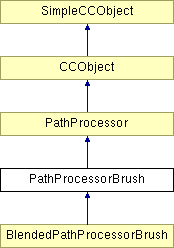
#include <ppbrush.h>
Inheritance diagram for PathProcessorBrush:
Public Member Functions | |
| PathProcessorBrush () | |
| Constructor. | |
| ~PathProcessorBrush () | |
| Destructor - basically this just wipes the caches. | |
| virtual void | ProcessPath (Path *pPath, RenderRegion *pRender, PathShape ShapePath=PATHSHAPE_PATH) |
| Called by the RenderRegion to apply the path processing operation to the given path. | |
| virtual BOOL | WillChangeFillAndBrushSeparately (void) |
| Called by the RenderRegion to determine if this PathProcessorBrush affects the "fill" and "Brush" portions of the path separately. (Generally speaking, only fill/Brush providers will cause these two different "bits" of a path to be rendered separately). This call is made BEFORE this Processor's ProcessPath function will be called. | |
| virtual BOOL | IsAPathProcessorBrush () |
| Virtual identifier. | |
| virtual BOOL | IsDifferent (PathProcessorBrush *pOther) |
| Equality operator. | |
| virtual PathProcessorBrush * | Clone (void) |
| To copy PathProcessorBrush or derived-class object. | |
| virtual BOOL | NeedsTransparency (void) const |
| virtual BOOL | IsBlended () |
| virtual BOOL | DoBecomeA (BecomeA *pBecomeA, Path *pPath, Node *pParent) |
| To convert our brush into its individual paths and attributes, very similar to the bounding box routine in that we extract the path from our parent node and use it to calculate our blenpaths etc. | |
| virtual BOOL | DoesActuallyDoAnything (RenderRegion *pRender) |
| To determine whether or not our path processor is 'default' i.e. if does not change the path at all. If so then the render region will be free to use DrawPathToOutputDevice which will let us use dash patterns, arrowheads etc. | |
| BOOL | WriteNative (BaseCamelotFilter *pFilter) |
| Writes out a record that represents the processor, to either Native or Web file format. | |
| DocRect | CalculateBoundingBox (Path *pPath, NodeRenderableInk *pParent) |
| Calculates the bounding rect, unfortunately the only way to do this is to do a 'fake' render. So this function is essentially the same as processpath but it doesn't require a render region. | |
| DocRect | TimeStampBoundingBox () |
| Calculates the bounding rect, unfortunately the only way to do this is to do a 'fake' render. So this function is essentially the same as processpath but it doesn't require a render region. | |
| void | SetCalculateBoundingBox (BOOL Set) |
| Sets the flag indicating whether or not to calculate the bounding rect on the next pass through RenderBrushAtPoint. | |
| DocRect | GetCachedRect () |
| access fn. | |
| INT32 | GetObjectCountToDistance (MILLIPOINT Distance) |
| To find out how many brush objects we will have in the distance given. | |
| MILLIPOINT | GetDistanceToObject (UINT32 ObjectNum) |
| Finds out at what we distance we place the ObjectNum'th object. | |
| MILLIPOINT | GetSpacingAtDistance (MILLIPOINT Distance) |
| If we are Distance along our path then thif function finds out how far it would be to the next brush object. | |
| BOOL | GetSpacingAndScalingAtDistance (MILLIPOINT Distance, MILLIPOINT *pSpacing, double *pScaling, UINT32 *pPressure=NULL) |
| Retrieves the values for spacing, scaling and pressure, that are in effect at Distance along the path. | |
| BOOL | AdvanceBrushToDistance (MILLIPOINT Distance) |
| Advances the member variables in this PPB to the values they would acquire if the given distance were to be rendered. Basically another variant on GetSpacing AtDistance. | |
| UINT32 | GetLastObject () |
| The last object member keeps track of which object to render next as we proceed along the path. | |
| BOOL | IsThisPathProcessorOnTheStack (RenderRegion *pRender) |
| as above | |
| void | AdjustSpacingForClosedPath (NodeRenderableInk *pInk) |
| When we apply a brush to a closed path we want to adjust the spacing so that the distance between the start object and the end object is the same as the distance between the start object and the second object. Here we check to see if the ink node is a single shape that produces a closed path (no groups etc.). We will then get the length of that path and try to get the best spacing value. | |
| void | AdjustSpacingForClosedPath (Path *pPath, double dPathLength) |
| When we apply a brush to a closed path we want to adjust the spacing so that the distance between the start object and the end object is the same as the distance between the start object and the second object. Here we check to see if the ink node is a single shape that produces a closed path (no groups etc.). We will then get the length of that path and try to get the best spacing value. | |
| void | SetBrushDefinition (BrushHandle Handle) |
| Sets this path processor up to use the given vector Brush definition in all future rendering. | |
| BrushHandle | GetBrushDefinitionHandle (void) |
| As above. | |
| virtual BrushDefinition * | GetOurBrushDefinition () |
| As above. | |
| MILLIPOINT | GetSpacing (void) |
| As above. | |
| BOOL | SetSpacing (MILLIPOINT Spacing) |
| To set the spacing between brush objects. | |
| BOOL | SetSpacingIncrProp (double Incr) |
| To set the spacing increment between brush objects. | |
| double | GetSpacingIncrProp () |
| As above. | |
| BOOL | SetSpacingIncrConst (MILLIPOINT Incr) |
| To set the proportional spacing increment between brush objects. | |
| MILLIPOINT | GetSpacingIncrConst () |
| As above. | |
| UINT32 | GetSpacingMaxRand () |
| As above. | |
| BOOL | SetSpacingMaxRand (UINT32 Value) |
| As above. | |
| UINT32 | GetSpacingRandSeed () |
| As above. | |
| BOOL | SetSpacingRandSeed (UINT32 Value) |
| As above. | |
| void | SetSpacingRandCache (UINTArray *pArray) |
| BOOL | SetSpacingMaxPressure (UINT32 NewMax) |
| As above. | |
| UINT32 | GetSpacingMaxPressure () |
| As above. | |
| MILLIPOINT | GetLastSpacing () |
| As above. | |
| PathOffset | GetPathOffsetType (void) |
| as above | |
| MILLIPOINT | GetPathOffsetValue (void) |
| as above | |
| void | SetPathOffsetType (PathOffset Offset) |
| to set the offset type for this brush | |
| void | SetPathOffsetValue (MILLIPOINT Value) |
| to set the offset distance for this brush | |
| BOOL | SetPathOffsetIncrProp (double Incr) |
| to set the offset distance for this brush | |
| double | GetPathOffsetIncrProp () |
| as above | |
| BOOL | SetPathOffsetIncrConst (MILLIPOINT Incr) |
| to set the offset distance for this brush | |
| MILLIPOINT | GetPathOffsetIncrConst () |
| as above | |
| void | SetOffsetTypeRandCache (UINTArray *pArray) |
| UINT32 | GetOffsetTypeRandSeed () |
| As above. | |
| BOOL | SetOffsetTypeRandSeed (UINT32 Seed) |
| As above. | |
| UINT32 | GetOffsetValueMaxRand () |
| As above. | |
| BOOL | SetOffsetValueMaxRand (UINT32 Value) |
| As above. | |
| UINT32 | GetOffsetValueRandSeed () |
| As above. | |
| BOOL | SetOffsetValueRandSeed (UINT32 Seed) |
| As above. | |
| void | SetOffsetValueRandCache (UINTArray *pArray) |
| void | SetTiling (BOOL Value) |
When a brush tiles it means that the attribute types:
| |
| BOOL | IsTiled () |
| as above | |
| BOOL | SetRotationAngle (double Angle) |
| as above | |
| double | GetRotationAngle () |
| as above | |
| double | GetRotationIncrConst () |
| as above | |
| BOOL | SetRotationIncrConst (double Value) |
| as above | |
| double | GetRotationIncrProp () |
| as above | |
| BOOL | SetRotationIncrProp (double Value) |
| as above | |
| void | SetRotated (BOOL Value) |
| as above | |
| BOOL | IsRotated () |
| as above | |
| UINT32 | GetRotationMaxRand () |
| as above | |
| BOOL | SetRotationMaxRand (UINT32 Value) |
| as above | |
| UINT32 | GetRotationRandSeed () |
| as above | |
| void | SetRotationRandSeed (UINT32 Seed) |
| as above | |
| UINT32 | GetRotationMaxPressure () |
| as above | |
| BOOL | SetRotationMaxPressure (UINT32 Value) |
| as above | |
| double | GetBrushScaling () |
| as above | |
| BOOL | SetBrushScaling (double Scale) |
| to set the member that determine to what scale of the original object each brush object is drawn | |
| double | GetBrushScalingIncr () |
| as above | |
| BOOL | SetBrushScalingIncr (double Incr) |
| to set the member that determine the increment to scaling applied to each brush object Note that the scaling MUST be set before this is called | |
| double | GetBrushScalingIncrConst () |
| as above | |
| BOOL | SetBrushScalingIncrConst (double Value) |
| to set the member that determine the increment to scaling applied to each brush object | |
| UINT32 | GetScalingMaxRand () |
| As above. | |
| BOOL | SetScalingMaxRand (UINT32 Value) |
| As above. | |
| UINT32 | GetScalingRandSeed () |
| As above. | |
| BOOL | SetScalingRandSeed (UINT32 Value) |
| As above. | |
| UINT32 | GetScalingMaxPressure () |
| As above. | |
| BOOL | SetScalingMaxPressure (UINT32 Max) |
| As above. | |
| double | GetLastScaling () |
| As above. | |
| void | SetScaleToLineWidth (BOOL Value) |
| as above | |
| BOOL | IsScalingToLineWidth () |
| void | ScaleToValue (MILLIPOINT Width, BOOL IgnorePressure=FALSE) |
| Scales the brush object such that the height of the largest object is equal to Value. Note that as of 27/10/2000 this must incorporate offset, scaling and rotation values. | |
| double | GetScaleValue (MILLIPOINT Width) |
| as above, but simply retuns the value | |
| double | GetHueIncrement () |
| as above | |
| BOOL | SetHueIncrement (double Incr) |
| as above | |
| UINT32 | GetHueMaxRand () |
| as above | |
| BOOL | SetHueMaxRand (UINT32 Max) |
| as above | |
| UINT32 | GetHueRandSeed () |
| as above | |
| BOOL | SetHueRandSeed (UINT32 Seed) |
| as above | |
| double | GetSatIncrement () |
| as above | |
| BOOL | SetSatIncrement (double Incr) |
| as above | |
| UINT32 | GetSatMaxRand () |
| as above | |
| BOOL | SetSatMaxRand (UINT32 Max) |
| as above | |
| UINT32 | GetSatRandSeed () |
| as above | |
| BOOL | SetSatRandSeed (UINT32 Seed) |
| as above | |
| SequenceType | GetSequenceType () |
| as above | |
| void | SetSequenceType (SequenceType Type) |
| as above | |
| UINT32 | GetSequenceSeed () |
| as above | |
| void | SetSequenceSeed (UINT32 Seed) |
| as above | |
| BOOL | GetUseLocalFillColour () |
| as above | |
| void | SetUseLocalFillColour (BOOL UseLocal) |
| if this flag is set to TRUE, then the cached fill will not be used when rendering. Instead the nearest stroke colour will be rendered. This is so that people can drop colours onto the brush. | |
| BOOL | GetUseLocalTransp () |
| as above | |
| void | SetUseLocalTransp (BOOL) |
| if this flag is set to TRUE then any cached transparencies will not be rendered. Instead the transparency applied to our parent ink object will be rendered. | |
| BOOL | GetUseNamedColours () |
| as above | |
| void | SetUseNamedColours (BOOL Value) |
| if this flag is set to FALSE then any named colours in our brush will not be rendered, instead we will use the local stroke colour | |
| INT32 | GetBrushTransparency () |
| as above | |
| BOOL | SetBrushTransparency (INT32 Value) |
| as above | |
| UINT32 | GetTransparencyPressure () |
| Sets the extent to which pressure affects transparency. | |
| BOOL | SetTransparencyPressure (UINT32 Value) |
| Sets the extent to which pressure affects transparency. | |
| UINT32 | GetNumBrushObjects () |
| as above | |
| void | SetParentAttribute (AttrBrushType *pAttr) |
| as above | |
| AttrBrushType * | GetParentAttribute () |
| returns the attribute associated with this ppb | |
| void | SetMaxScaling (double Scale) |
| as above | |
| void | SetCurrentPressure (UINT32 Pressure) |
| As above. | |
| UINT32 | GetCurrentPressure () |
| As above. | |
| void | CopyBrushData (BrushData *pData) |
| copies the info from the path processor to the brushdata object | |
| void | CopyDataFromObject (BrushData *pData) |
| copies the info from the brushdata object to the processor | |
| MILLIPOINT | GetBrushSize (BOOL IgnorePressure=FALSE) |
| as above | |
| void | SetStrokeColour (DocColour Col) |
| if the brush is overriding colours then this function can be used to set the stroke colour to use. Although this will be set automatically in ProcessPath. Mostly for use by OpDrawBrush | |
| void | RenderBrushAtPoint (DocCoord Point, double Angle, UINT32 BrushObjectIndex, UINT32 Counter, RenderRegion *pRender, HandleBrushBecomeA *pBecomeA=NULL, BOOL RealtimeBrush=FALSE, BrushDefinition *pBrushDefinition=NULL) |
| Multipurpose ! Renders a brush object at the point specified if we supply a render region, or calculates the bounding box of the brush at this point and adds it to our cached rect, or makes calls PassBack for our BecomeA object.Multipurpose ! Renders a brush object at the point specified if we supply a render region, or calculates the bounding box of the brush at this point and adds it to our cached rect, or makes calls PassBack for our BecomeA object. | |
| BOOL | ResetRandomNumberGenerators () |
| Seeds srand with either the seed supplied or by using time (i.e. a random seed) as above, note that you MUST have already seeded the sequence as above, note that you MUST have already seeded the sequence to reset all the random number generators so that they repeat their sequence from the beginning. Call this prior to rendering. | |
| CDistanceSampler * | GetPressureCacheAndInitialise () |
| This should be called to get the pressure cache from the attribute and to set up the relevant members when we wish to start retrieving pressure data from the beginning. | |
| CDistanceSampler * | GetPressureCacheAndInitialise (RenderRegion *pRegion, ValueFunction **ppValFunc) |
| This should be called to get the pressure cache from the attribute and to set up the relevant members when we wish to start retrieving pressure data from the beginning. | |
| CDistanceSampler * | GetPressureCacheAndInitialise (NodeRenderableInk *pInkNode, ValueFunction **ppValFunc) |
| This should be called to get the pressure cache from the attribute and to set up the relevant members when we wish to start retrieving pressure data from the beginning. | |
| void | SwitchAlternateValue () |
| void | Reset () |
Sets the various members etc. to the values that they must hold at the beginning of any of the following:
| |
| double | GetNextScaling (UINT32 Index) |
| Pretty much as above, but with the following notes: There are several different ways of applying a rotation angle to brush objects:. | |
| MILLIPOINT | GetNextSpacing () |
| Returns the next spacing to use, this can be determined in several ways, as with the other object placement attributes. | |
| UINT32 | GetNextInkObject (UINT32 LastObject, UINT32 NumObjects) |
| as above | |
| UINT32 | GetNextOffsetType () |
| as above | |
| void | SetNextOffsetType () |
| Asks the processor to determine its next offset type and record it in a data member. This only occurs if the processor has its path offset type set to random. If you are calling RenderBrushAtPoint externally rather than from ProcessPath then you should call this for each ink object. | |
| BOOL | PrepareForRenderingLoop (UINT32 NumBrushObjects) |
| Prepares the caches that we will use to store data about the transformations performed during rendering. Currently only scaling has been implemented but we should also get rotation and tangential information too. This should be called sometime after calling Reset and before you start actually rendering. | |
| void | CleanUpAfterRender () |
| deletes the caches that we used to store rendering data | |
| BOOL | SetLastRenderedData (UINT32 BrushObject, double Scaling, double Tangent, double Rotation) |
| Should be called to update the caches that store our cached transformation data so that we only have to perform changes in transformations. Currently only OpDrawBrush need call this as the normal path processor rendering loop updates itself, though this may change. Note also that the rotation and tangent data are not yet used. | |
| void | DecideWhetherToUseActualScaling (UINT32 BrushObject) |
| Decides whether or not to set the UseActualScaling flag for the next call of GetNextScaling. Basically if we have not rendered this object before then the scaling we wish to use will be the absolute scaling. However subsequently we only wish to know about scaling changes. This function is called by OpDrawBrush::RenderStepsForTime, and ProcessPath. | |
Static Public Member Functions | |
| static void | GetRandomLimits (UINT32 Base, UINT32 MaxRand, UINT32 *pLower, UINT32 *pUpper) |
| To determine the upper and lower bounds of a random range. | |
| static void | GetRotationRandomLimits (UINT32 Base, UINT32 MaxRand, UINT32 *pLower, UINT32 *pUpper) |
| To determine the upper and lower bounds of a random range, differs from the above function in that the maximum rotation random factor is different. | |
Protected Member Functions | |
| void | RenderAttributes (RenderRegion *pRender, CCAttrMap *pAttrMap, CHSVChanger *pReplacer, CTransparencyReplacer *pTranspRep) |
Renders the attributes to the given render region. This function has ended up being really messy because people have insisted on being able to override various of the cached attributes. Heres a brief rundown:
| |
| void | AdjustFillAttributes (CCAttrMap *pAttrMap, CHSVChanger *pReplacer, CTransparencyReplacer *pTransRep) |
| DocCoord | AdjustPositionForOffset (DocCoord OriginalPosition, double Angle, double Scaling, MILLIPOINT, UINT32 OffsetType) |
| To determine where the next brush object should be drawn. The position from the line can be altered by the following factors;. | |
| DocCoord | AdjustPositionForBlendPathOffset (DocCoord OriginalPosition, BlendPathOffset *pOffset, double Scaling, double Angle) |
| To determine where the next brush object should be drawn. The position from the line can be altered by the following factors;. | |
| void | AddPointsInRectToList (DocRect Rect, Path *pPath, CPathPointList *pList) |
| void | AddAllPointsToList (Path *pPath, CPathPointList *pList) |
| BOOL | GetPointAtDistance (Path *pPath, MILLIPOINT Distance, DocCoord *pPoint, double *pTangent) |
| Gets the coordinate of a point a certain distance along this path, either by looking in its cache pr by calling the Path class function. | |
| void | RenderTimeStampPoints (RenderRegion *pRender) |
| Accesses the timestamp cache of the parent attribute and tests its points against the bounds of the render region, rendering them if they are inside. | |
| INT32 | HowManyObjectsInDistance (MILLIPOINT Distance) |
| as above | |
| UINT32 | GetCurrentPressureEffect (UINT32 MaxEffect, BOOL FixedMax=FALSE) |
| Simply pass in the maximum effect that you allow and this returns the effect caused by the current pressure value. | |
| void | AdjustAndRenderTransparency (RenderRegion *pRender, AttrFillGeometry *pAttrTransp, CTransparencyReplacer *pRep) |
| double | GetNextAngle () |
| Pretty much as above, but with the following notes: There are several different ways of applying a rotation angle to brush objects:. | |
| MILLIPOINT | GetNextOffset () |
| as above | |
| double | GetNextSaturationMultiplier () |
| this differs slightly from the other GetNext functions in that it does not return a saturation value. Instead it returns a multiplier value which should be given to an HSVChanger object, the HSVChanger should then apply that multiplier to the colours in the brush | |
| double | GetNextHueMultiplier () |
| this differs slightly from the other GetNext functions in that it does not return a hue value. Instead it returns a multiplier value which should be given to an HSVChanger object, the HSVChanger should then apply that multiplier to the colours in the brush | |
| double | GetNextTransparencyAdjust () |
| double | GetNextPressureTranspAdjust () |
| as above, currently the only thing that affects transparency is pressure. Note that -1 indicates that we are not adjusting transparency | |
| BOOL | ObjectIsWithinRect (DocRect Rect, DocCoord Centre, MILLIPOINT HalfWidth, MILLIPOINT HalfHeight, double Scaling, double Angle=0) |
| as above | |
| CSampleItem | GetNextSampleItem (CDistanceSampler *pSampler, ValueFunction *pValFunc, double PathProportion=0) |
| Your one stop shop for getting the next pressure value to use. Note that we may not be using pressure at all in which case all of the inputs will be NULL. | |
Protected Attributes | |
| BrushHandle | m_BrushHandle |
| double | m_LastScalingRendered |
| BOOL * | m_pObjectRendered |
| BOOL | m_UseActualScaling |
| double * | m_pLastScalingRendered |
| double * | m_pLastTangent |
| double * | m_pLastRotation |
| DocColour | m_CurrentStrokeCol |
| BOOL | m_DisableMe |
| MILLIPOINT | m_BrushSpacing |
| double | m_BrushSpacingIncrProp |
| MILLIPOINT | m_BrushSpacingIncrConst |
| UINT32 | m_BrushSpacingMaxRand |
| UINT32 | m_BrushSpacingRandSeed |
| UINT32 | m_SpacingMaxPressure |
| MILLIPOINT | m_LastSpacing |
| BOOL | m_bTile |
| BOOL | m_bRotate |
| double | m_RotateAngle |
| double | m_RotAngleIncrProp |
| double | m_RotAngleIncrConst |
| double | m_LastAngle |
| UINT32 | m_RotationMaxRand |
| UINT32 | m_RotationRandSeed |
| UINT32 | m_RotationMaxPressure |
| PathOffset | m_PathOffsetType |
| MILLIPOINT | m_PathOffsetValue |
| double | m_PathOffsetIncrProp |
| MILLIPOINT | m_PathOffsetIncrConst |
| UINT32 | m_OffsetMaxPressure |
| MILLIPOINT | m_LastOffset |
| UINT32 | m_LastOffsetType |
| UINT32 | m_OffsetTypeRandSeed |
| UINT32 | m_OffsetValueMaxRand |
| UINT32 | m_OffsetValueRandSeed |
| double | m_BrushScaling |
| double | m_BrushScalingIncr |
| double | m_BrushScalingIncrConst |
| double | m_LastScaling |
| double | m_CurrentScaling |
| UINT32 | m_BrushScalingMaxRand |
| UINT32 | m_BrushScalingRandSeed |
| UINT32 | m_ScalingMaxPressure |
| double | m_BrushHueIncrement |
| UINT32 | m_BrushHueMaxRand |
| UINT32 | m_BrushHueRandSeed |
| UINT32 | m_HueMaxPressure |
| double | m_LastHueMultiplier |
| double | m_BrushSatIncrement |
| UINT32 | m_BrushSatMaxRand |
| UINT32 | m_BrushSatRandSeed |
| UINT32 | m_SatMaxPressure |
| double | m_LastSatMultiplier |
| SequenceType | m_SequenceType |
| UINT32 | m_SequenceRandSeed |
| BOOL | m_MirrorSeqAscend |
| BOOL | m_bUseLocalFillColour |
| BOOL | m_bUseLocalTransp |
| BOOL | m_bUseNamedColours |
| INT32 | m_BrushTransparency |
| UINT32 | m_TranspMaxPressure |
| UINT32 | m_TimeStampMaxPressure |
| UINT32 | m_AltValue |
| MILLIPOINT | m_LineWidth |
| BOOL | m_bScaleToLineWidth |
| BOOL | m_bRenderAllAttributes |
| AttrBrushType * | m_pParentAttr |
| PressureItem | m_CurrentPressure |
| DocRect | m_CachedRect |
| BOOL | m_bCalculateRect |
| BOOL | m_bValidPressure |
| AttrFlatTranspFill * | m_pDefaultTransp |
| MILLIPOINT | m_LastSpacingNoRandom |
| MILLIPOINT | m_LastOffsetNoRandom |
| double | m_LastScalingNoRandom |
| double | m_LastRotationNoRandom |
| double | m_MaxScaling |
| UINT32 | m_LastObject |
| MTRand * | m_pSpacingRNG |
| MTRand * | m_pScalingRNG |
| MTRand * | m_pOffsetTypeRNG |
| MTRand * | m_pOffsetValueRNG |
| MTRand * | m_pRotationRNG |
| MTRand * | m_pSaturationRNG |
| MTRand * | m_pHueRNG |
| MTRand * | m_pSequenceRNG |
Private Member Functions | |
| CC_DECLARE_DYNAMIC (PathProcessorBrush) | |
Definition at line 150 of file ppbrush.h.
|
|
|
Destructor - basically this just wipes the caches.
Definition at line 270 of file ppbrush.cpp. 00271 { 00272 00273 #ifdef USE_MTRNG 00274 if (m_pSpacingRNG != NULL) 00275 delete m_pSpacingRNG; 00276 if (m_pScalingRNG != NULL) 00277 delete m_pScalingRNG; 00278 if (m_pOffsetTypeRNG != NULL) 00279 delete m_pOffsetTypeRNG; 00280 if (m_pOffsetValueRNG != NULL) 00281 delete m_pOffsetValueRNG; 00282 if (m_pRotationRNG != NULL) 00283 delete m_pRotationRNG; 00284 if (m_pSaturationRNG != NULL) 00285 delete m_pSaturationRNG; 00286 if (m_pHueRNG != NULL) 00287 delete m_pHueRNG; 00288 if (m_pSequenceRNG != NULL) 00289 delete m_pSequenceRNG; 00290 #endif 00291 00292 if (m_pDefaultTransp != NULL) 00293 delete m_pDefaultTransp; 00294 }
|
|
||||||||||||
|
|
|
||||||||||||||||
|
|
|
||||||||||||||||
|
Definition at line 1786 of file ppbrush.cpp. 01788 { 01789 if (pRender == NULL || pAttrTransp == NULL || pRep == NULL) 01790 return; 01791 01792 if (!pAttrTransp->IsATranspFill()) 01793 { 01794 ERROR3("Attribute is not transparent in PathProcessorBrush::AdjustAndRenderTransparency"); 01795 return; 01796 } 01797 01798 TranspFillAttribute* pTranspVal = (TranspFillAttribute*)pAttrTransp->GetAttributeValue(); 01799 if (pTranspVal != NULL) 01800 { 01801 // see if our parent attr has a local transparency value, if so we will use that 01802 if (m_pParentAttr != NULL) 01803 { 01804 UINT32 ReplaceVal = m_pParentAttr->GetLocalTranspValue(); 01805 if (ReplaceVal > 0) 01806 pRep->SetReplacementValue((INT32)ReplaceVal); 01807 UINT32 Type = m_pParentAttr->GetLocalTranspType(); 01808 pTranspVal->SetTranspType(Type); 01809 } 01810 pRep->SetTransparencyAttr(pTranspVal); 01811 pRep->ReplaceTransparency(); 01812 } 01813 01814 pAttrTransp->Render(pRender); 01815 }
|
|
||||||||||||||||
|
Definition at line 1837 of file ppbrush.cpp. 01839 { 01840 if (pAttrMap == NULL || pColChange == NULL || pTranspRep == NULL) 01841 { 01842 ERROR3("Invalid inputs to PathProcessorBrush::AdjustFillAttributes"); 01843 return; 01844 } 01845 01846 01847 // lets find our attributes 01848 CCRuntimeClass *pType; 01849 void *pVal; 01850 NodeAttribute *pNodeAttr; 01851 01852 BOOL FoundTransp = FALSE; 01853 01854 // iterating all (key, value) pairs 01855 for( CCAttrMap::iterator Pos = pAttrMap->GetStartPosition(); Pos != pAttrMap->GetEndPosition(); ) 01856 { 01857 // Get attr at position Pos 01858 pAttrMap->GetNextAssoc(Pos,pType,pVal); 01859 01860 // pVal is actually an attribute, so get a ptr to it and render it 01861 pNodeAttr = (NodeAttribute *)pVal; 01862 01863 if (pNodeAttr->IsAColourFill()) 01864 { 01865 if (!m_bUseLocalFillColour) 01866 { 01867 01868 //first find out if we have a named colour 01869 ColourFillAttribute* pVal = (ColourFillAttribute*)pNodeAttr->GetAttributeValue(); 01870 if (pVal->ContainsNamedColour()) 01871 { 01872 if (!m_bUseNamedColours) 01873 { 01874 // we need to initialise the Replacer with our attribute and the local 01875 // stroke colour 01876 if (m_pParentAttr != NULL && pColChange != NULL) 01877 { 01878 DocColour Col = m_CurrentStrokeCol; 01879 pColChange->Initialise(pVal, &Col); 01880 pColChange->ReplaceColours(); 01881 01882 } 01883 // note that CNamedColorReplacer::RestoreColours() MUST be called AFTER 01884 // DrawPaths in the render routine, if it is not the the colours are permanently replaced. 01885 } 01886 } 01887 01888 // change HSV values if we need to 01889 if (pColChange->ShouldChangeHSV()) 01890 { 01891 pColChange->SetColourFill(pVal); 01892 pColChange->ChangeHSVValues(); 01893 } 01894 01895 } 01896 01897 } 01898 if (pNodeAttr->IsATranspFill()) 01899 { 01900 TranspFillAttribute* pTranspVal = (TranspFillAttribute*)pNodeAttr->GetAttributeValue(); 01901 if (pTranspVal != NULL) 01902 { 01903 // see if our parent attr has a local transparency value, if so we will use that 01904 if (m_pParentAttr != NULL) 01905 { 01906 UINT32 ReplaceVal = m_pParentAttr->GetLocalTranspValue(); 01907 if (ReplaceVal > 0) 01908 { 01909 pTranspRep->SetReplacementValue((INT32)ReplaceVal); 01910 UINT32 Type = m_pParentAttr->GetLocalTranspType(); 01911 pTranspVal->SetTranspType(Type); 01912 } 01913 01914 } 01915 01916 pTranspRep->SetTransparencyAttr(pTranspVal); 01917 pTranspRep->ReplaceTransparency(); 01918 FoundTransp = TRUE; 01919 } 01920 } 01921 01922 } 01923 01924 // if we didn't find a transparency attribute then we might have to make one 01925 if (FoundTransp == FALSE) 01926 { 01927 AttrFlatTranspFill* pTransp = new AttrFlatTranspFill; 01928 if (m_pParentAttr != NULL && pTransp != NULL) 01929 { 01930 // get the transparency value of our parent 01931 UINT32 TranspVal = m_pParentAttr->GetLocalTranspValue(); 01932 TranspFillAttribute* pTranspVal = (TranspFillAttribute*)pTransp->GetAttributeValue(); 01933 pTranspVal->Transp = TranspVal; 01934 01935 UINT32 Type = m_pParentAttr->GetLocalTranspType(); 01936 pTranspVal->SetTranspType(Type); 01937 01938 // add it to the map 01939 pAttrMap->SetAt( CC_RUNTIME_CLASS(AttrFlatTranspFill), (void*)pTransp ); 01940 01941 // now do the replacing 01942 pTranspRep->SetTransparencyAttr(pTranspVal); 01943 pTranspRep->ReplaceTransparency(); 01944 01945 } 01946 01947 } 01948 }
|
|
||||||||||||||||||||
|
To determine where the next brush object should be drawn. The position from the line can be altered by the following factors;.
Definition at line 2078 of file ppbrush.cpp. 02080 { 02081 if (pOffset->m_XOffset == 0 && pOffset->m_YOffset == 0) 02082 return OriginalPoint; 02083 02084 MILLIPOINT XOffset; 02085 MILLIPOINT YOffset; 02086 02087 DocCoord RotateCentre = OriginalPoint; 02088 02089 XOffset = (MILLIPOINT)(pOffset->m_XOffset *Scaling); 02090 YOffset = (MILLIPOINT)(pOffset->m_YOffset *Scaling); 02091 02092 // not much to it really 02093 OriginalPoint.translate(XOffset, YOffset); 02094 02095 return OriginalPoint; 02096 }
|
|
||||||||||||||||||||||||
|
To determine where the next brush object should be drawn. The position from the line can be altered by the following factors;.
Definition at line 1978 of file ppbrush.cpp. 01981 { 01982 // if its zero or less we don't want to know 01983 if (OffsetValue <= 0) 01984 return OriginalPoint; 01985 01986 // scale it to our current scaling 01987 OffsetValue = (MILLIPOINT)((double) OffsetValue * Scaling); 01988 // TRACEUSER( "Diccon", _T("OffsetVal = %d\n"), OffsetValue); 01989 double theta; 01990 double NewX; 01991 double NewY; 01992 01993 01994 switch (m_PathOffsetType) 01995 { 01996 case OFFSET_NONE: 01997 break; 01998 case OFFSET_ALTERNATE: 01999 if (m_AltValue == 0) 02000 { 02001 theta = Angle - (PI / 2); 02002 } 02003 else 02004 { 02005 theta = Angle + (PI / 2); 02006 } 02007 02008 NewX = OffsetValue * cos (theta); 02009 NewY = OffsetValue * sin (theta); 02010 // TRACEUSER( "Diccon", _T("Y Offset = %d\n"), (INT32)NewY); 02011 OriginalPoint.translate((INT32)NewX, (INT32)NewY); 02012 break; 02013 case OFFSET_RIGHT: 02014 theta = Angle - (PI / 2); 02015 NewX = OffsetValue * cos (theta); 02016 NewY = OffsetValue * sin (theta); 02017 OriginalPoint.translate((INT32)NewX, (INT32)NewY); 02018 break; 02019 case OFFSET_LEFT: 02020 theta = Angle + (PI / 2); 02021 NewX = OffsetValue * cos (theta); 02022 NewY = OffsetValue * sin (theta); 02023 OriginalPoint.translate((INT32)NewX, (INT32)NewY); 02024 break; 02025 case OFFSET_RANDOM: 02026 { 02027 // TRACEUSER( "Diccon", _T("Offset type = %d\n"), OffsetType); 02028 switch (OffsetType) 02029 { 02030 case OFFSETTYPE_LEFT: 02031 theta = Angle + (PI / 2); 02032 NewX = OffsetValue * cos (theta); 02033 NewY = OffsetValue * sin (theta); 02034 OriginalPoint.translate((INT32)NewX, (INT32)NewY); 02035 break; 02036 case OFFSETTYPE_RIGHT: 02037 theta = Angle - (PI / 2); 02038 NewX = OffsetValue * cos (theta); 02039 NewY = OffsetValue * sin (theta); 02040 OriginalPoint.translate((INT32)NewX, (INT32)NewY); 02041 break; 02042 case OFFSETTYPE_CENTRE: 02043 break; 02044 default: 02045 ERROR3("Invalid offset type returned"); 02046 break; 02047 } 02048 break; 02049 } 02050 02051 default: 02052 ERROR3("Unknown offset type"); 02053 break; 02054 } 02055 02056 return OriginalPoint; 02057 }
|
|
||||||||||||
|
When we apply a brush to a closed path we want to adjust the spacing so that the distance between the start object and the end object is the same as the distance between the start object and the second object. Here we check to see if the ink node is a single shape that produces a closed path (no groups etc.). We will then get the length of that path and try to get the best spacing value.
Definition at line 3645 of file ppbrush.cpp. 03646 { 03647 if (pPath == NULL || !pPath->IsClosed()) 03648 return; 03649 03651 03652 // what we want to do is set the spacing so that it places the first 03653 // and last object on the same spot 03654 03655 // get the number of objects with the current spacing 03656 double ActualSpacing = m_BrushScaling * (double)m_BrushSpacing; 03657 INT32 NumObjects = (INT32)(dPathLength / ActualSpacing); 03658 03659 // Ensure that the NumObjects value isn't equal to zero. This prevents a divide by 03660 // zero error from being thrown. 03661 if ( NumObjects == 0 ) 03662 { 03663 NumObjects = 1; 03664 } 03665 03666 // work out what the spacing would be if we used the whole of the path exactly 03667 double NewActualSpacing = dPathLength / (double)NumObjects; 03668 03669 double NewSpacing = NewActualSpacing / m_BrushScaling; 03670 03671 // set the new value 03672 SetSpacing((MILLIPOINT)NewSpacing); 03673 }
|
|
|
When we apply a brush to a closed path we want to adjust the spacing so that the distance between the start object and the end object is the same as the distance between the start object and the second object. Here we check to see if the ink node is a single shape that produces a closed path (no groups etc.). We will then get the length of that path and try to get the best spacing value.
Definition at line 3597 of file ppbrush.cpp. 03598 { 03599 if (pInk == NULL) 03600 { 03601 ERROR3("Ink node is NULL in PathProcessorBrush::AdjustSpacingForClosedPath"); 03602 return; 03603 } 03604 if (pInk->IsCompound()) 03605 return; 03606 03607 // Use a SimpleBecomeA to get the path from the parent object 03608 SimpleBecomeA BecomeA(BECOMEA_PASSBACK, CC_RUNTIME_CLASS(NodePath), NULL); 03609 03610 if (pInk->DoBecomeA(&BecomeA)) 03611 { 03612 NodePath* pNodePath = BecomeA.GetNodePath(); 03613 if (pNodePath) 03614 { 03615 if (pNodePath->InkPath.IsClosed()) 03616 { 03617 AdjustSpacingForClosedPath(&(pNodePath->InkPath), pNodePath->InkPath.GetPathLength(750/2)); 03618 } 03619 03620 // delete the nodepath we got 03621 delete pNodePath; 03622 } 03623 } 03624 03625 }
|
|
|
Advances the member variables in this PPB to the values they would acquire if the given distance were to be rendered. Basically another variant on GetSpacing AtDistance.
Definition at line 3490 of file ppbrush.cpp. 03491 { 03492 ERROR2IF(Distance < 0, FALSE, "Invalid input to PathProcessorBrush::GetSpacingAndScalingAtDistance"); 03493 BrushDefinition* pDef = BrushComponent::FindBrushDefinition(m_BrushHandle); 03494 ERROR2IF(pDef == NULL, FALSE,"No brush definition in PathProcessorBrush::AdvanceBrushToDistance"); 03495 03496 // first reset our members so we start at the beginning 03497 Reset(); 03498 03499 // get the pressure cache from our attribute, if there is one 03500 CDistanceSampler* pSampler = GetPressureCacheAndInitialise(); 03501 CSampleItem TheItem; 03502 03503 UINT32 Count = 0; 03504 03505 UINT32 NumBrushObjects = pDef->GetNumBrushObjects(); 03506 UINT32 BrushObject = m_LastObject; 03507 if (NumBrushObjects > 1 && m_SequenceType == SEQ_RANDOM) 03508 BrushObject = GetNextInkObject(m_LastObject, NumBrushObjects); 03509 03510 m_CurrentScaling = GetNextScaling(Count++); 03511 MILLIPOINT Spacing = GetNextSpacing(); 03512 MILLIPOINT DistanceSoFar = 0; // we start at 10 MP in from the start of the path, for consistenc 03513 03514 while (DistanceSoFar <= Distance) 03515 { 03516 // increment our distance 03517 #ifdef SCALESPACING 03518 DistanceSoFar += (MILLIPOINT)(Spacing * m_CurrentScaling); 03519 #else 03520 DistanceSoFar += (MILLIPOINT)Spacing; 03521 #endif 03522 GetNextOffsetType(); 03523 GetNextOffset(); 03524 GetNextAngle(); 03525 GetNextHueMultiplier(); 03526 GetNextSaturationMultiplier(); 03527 // get the next pressure value, if there is one 03528 if (pSampler != NULL) 03529 { 03530 if (pSampler->GetNext(&TheItem)) 03531 { 03532 if (TheItem.m_Pressure < MAXPRESSURE) 03533 m_CurrentPressure.m_Pressure = TheItem.m_Pressure; 03534 } 03535 #ifdef SCALESPACING 03536 pSampler->SetSampleRateFromSpacing((INT32)(Spacing * m_CurrentScaling)); 03537 #else 03538 pSampler->SetSampleRateFromSpacing(Spacing); 03539 #endif 03540 } 03541 03542 03543 // get the next spacing and scaling values 03544 Spacing = GetNextSpacing(); 03545 m_CurrentScaling = GetNextScaling(Count++); 03546 03547 if (m_AltValue == 0) 03548 m_AltValue = 1; 03549 else 03550 m_AltValue = 0; 03551 03552 if (NumBrushObjects > 1) 03553 BrushObject = GetNextInkObject(BrushObject, NumBrushObjects); 03554 } 03555 m_LastObject = BrushObject; 03556 return TRUE; 03557 }
|
|
||||||||||||
|
Calculates the bounding rect, unfortunately the only way to do this is to do a 'fake' render. So this function is essentially the same as processpath but it doesn't require a render region.
Definition at line 2431 of file ppbrush.cpp. 02432 { 02433 DocRect ReturnRect(0,0,0,0); 02434 02435 ERROR2IF(pPath == NULL, ReturnRect, "Path is null in PathProcessorBrush::CalculateBoundingBox"); 02436 ERROR2IF(pParent == NULL, ReturnRect, "Parent is null in PathProcessorBrush::CalculateBoundingBox"); 02437 02438 // if we are timestamping then use a different method and return 02439 if (m_pParentAttr != NULL) 02440 { 02441 if (m_pParentAttr->IsTimeStamping()) 02442 { 02443 return TimeStampBoundingBox(); 02444 } 02445 } 02446 BrushDefinition* pBrushDef = GetOurBrushDefinition(); 02447 if (pBrushDef == NULL) 02448 { 02449 return ReturnRect; 02450 } 02451 02452 // get the definition to generate its data copies for us 02453 if (!pBrushDef->StartRender()) 02454 { 02455 TRACEUSER( "Diccon", _T("Unable to start render brush for bounding box\n")); 02456 return ReturnRect; 02457 } 02458 02459 Reset(); 02460 02461 if (m_BrushScaling <= 0) 02462 return ReturnRect; 02463 02464 UINT32 NumBrushObjects = pBrushDef->GetNumBrushObjects(); 02465 02466 if (!PrepareForRenderingLoop(NumBrushObjects)) 02467 return ReturnRect; 02468 02469 // some variables to keep track of where we are on the path 02470 double dPathLength = pPath->GetPathLength(750/2); 02471 // double dOrigPathLength = dPathLength; 02472 MILLIPOINT PathLength = (MILLIPOINT)dPathLength; 02473 double PathProportion = 0.0; 02474 02475 // this records the distance along the path at which we want to find a point 02476 MILLIPOINT DistanceToPoint = 10; 02477 02478 // declare some locals that we need in the loop 02479 MILLIPOINT Spacing = m_BrushSpacing; 02480 CPathPointInfo PathPoint; 02481 double Angle; 02482 DocCoord Point; 02483 BOOL ok = FALSE; 02484 // BOOL Found = TRUE; 02485 UINT32 Count = 0; 02486 UINT32 BrushObjectToRender = m_LastObject; 02487 02488 02489 /* To get our pressure data we will use either a cache that is held by our parent attribute 02490 OR use a value function if a VariableWidthAttribute has been rendered into the render region*/ 02491 02492 // get our pressure data 02493 ValueFunction* pValFunc = NULL; 02494 CDistanceSampler* pPressure = GetPressureCacheAndInitialise(pParent, &pValFunc); 02495 CSampleItem TheItem; // we need this in the loop 02496 02497 // find our line width 02498 /* AttrLineWidth* pLineWidth = NULL; 02499 pParent->FindAppliedAttribute(CC_RUNTIME_CLASS(AttrLineWidth), (NodeAttribute**)pLineWidth); 02500 if (pLineWidth) 02501 { 02502 INT32 Width = pLineWidth->Value.LineWidth; 02503 ScaleToValue(Width, !m_bValidPressure); 02504 } 02505 */ 02506 m_bRenderAllAttributes = TRUE; 02507 02508 m_CachedRect = DocRect(0,0,0,0); 02509 m_bCalculateRect = TRUE; 02510 02511 TRACEUSER( "Diccon", _T("About to calculate bounding box\n")); 02512 02513 // get the first spacing and scaling values 02514 m_UseActualScaling = TRUE; 02515 m_CurrentScaling = GetNextScaling(Count); 02516 m_LastScalingRendered = m_CurrentScaling; 02517 02518 Spacing = GetNextSpacing(); 02519 02520 02521 while (DistanceToPoint < PathLength) 02522 { 02523 // TRACEUSER( "Diccon", _T("Count %d\n"), Count); 02524 // try and get the point 02525 ok = GetPointAtDistance(pPath, DistanceToPoint, &Point, &Angle); 02526 02527 if (ok) 02528 { 02529 GetNextAngle(); 02530 SetNextOffsetType(); 02531 GetNextOffset(); 02532 02533 if (m_CurrentScaling > 0) 02534 RenderBrushAtPoint(Point, Angle, 02535 BrushObjectToRender, Count, NULL); 02536 Count++; 02537 02538 // get the index of the next object. 02539 if (NumBrushObjects > 1) 02540 BrushObjectToRender = GetNextInkObject(BrushObjectToRender, NumBrushObjects); 02541 02542 DecideWhetherToUseActualScaling(BrushObjectToRender); 02543 } 02544 02545 if (pPressure != NULL) 02546 { 02547 if (pPressure->GetNext(&TheItem)) 02548 { 02549 if (TheItem.m_Pressure < 0 || TheItem.m_Pressure > MAXPRESSURE) 02550 { 02551 //ERROR3("Invalid pressure in PathProcessorBrush::CalculateBoundingBox"); 02552 //TRACEUSER( "Diccon", _T("Invalid pressure %d at count %d\n"), TheItem.m_Pressure, Count); 02553 } 02554 else 02555 { 02556 m_CurrentPressure.m_Pressure = TheItem.m_Pressure; 02557 //RACEUSER("Diccon", "BBox pressure %d, = %d\n", Count, m_CurrentPressure.m_Pressure); 02558 } 02559 } 02560 // else 02561 // ERROR3("Unable to get pressure item in PathProcessorBrush::CalculateBoundingBox"); 02562 } 02563 #ifdef SCALESPACING 02564 DistanceToPoint += (MILLIPOINT)(Spacing * m_LastScaling); 02565 02566 if (pPressure) 02567 pPressure->SetSampleRateFromSpacing((INT32)(Spacing * m_CurrentScaling)); 02568 #else 02569 DistanceToPoint += (MILLIPOINT)(Spacing * m_BrushScaling); 02570 02571 if (pPressure) 02572 pPressure->SetSampleRateFromSpacing((INT32)(Spacing * m_CurrentScaling)); 02573 #endif 02574 02575 // get the next distance 02576 Spacing = GetNextSpacing(); 02577 m_LastScalingRendered = m_pLastScalingRendered[BrushObjectToRender]; 02578 02579 if (pValFunc != NULL) 02580 { 02581 PathProportion = (double)DistanceToPoint / dPathLength; 02582 m_CurrentPressure.m_Pressure = GetNextSampleItem(NULL, pValFunc, PathProportion).m_Pressure; 02583 if (m_CurrentPressure.m_Pressure > MAXPRESSURE) 02584 m_CurrentPressure.m_Pressure = MAXPRESSURE; 02585 } 02586 02587 m_CurrentScaling = GetNextScaling(Count); 02588 02589 // we're now allowed to go to zero scaling, but if we do so we must stop rendering 02590 if (m_CurrentScaling <= 0) 02591 break; 02592 02593 // this member keeps track of which side we should offset on if we have 02594 // an alternating offset 02595 if (m_AltValue == 0) 02596 m_AltValue = 1; 02597 else 02598 m_AltValue = 0; 02599 02600 } 02601 02602 /*some more awful hacks 02603 if (!m_CachedRect.IsEmpty() && (!pBrushDef->BrushContainsGroup())) 02604 { 02605 DocRect InkRect = pBrushDef->GetLargestBoundingBox(); 02606 MILLIPOINT Height = (MILLIPOINT)(InkRect.Height() * m_BrushScaling); 02607 MILLIPOINT Width = (MILLIPOINT)(InkRect.Width() * m_BrushScaling); 02608 } 02609 */ 02610 // TRACEUSER( "Diccon", _T("Bounding rect: Height = %d, Width = %d\n"), m_CachedRect.Height(), m_CachedRect.Width()); 02611 m_bCalculateRect = FALSE; 02612 TRACEUSER( "Diccon", _T("Finished bounding box\n")); 02613 CleanUpAfterRender(); 02614 pBrushDef->StopRender(); 02615 02616 return m_CachedRect; 02617 }
|
|
|
|
|
|
deletes the caches that we used to store rendering data
Definition at line 7185 of file ppbrush.cpp. 07186 { 07187 if (m_pObjectRendered != NULL) 07188 { 07189 delete m_pObjectRendered; 07190 m_pObjectRendered = NULL; 07191 } 07192 if (m_pLastScalingRendered != NULL) 07193 { 07194 delete m_pLastScalingRendered; 07195 m_pLastScalingRendered = NULL; 07196 } 07197 if (m_pLastTangent != NULL) 07198 { 07199 delete m_pLastTangent; 07200 m_pLastTangent = NULL; 07201 } 07202 if (m_pLastRotation != NULL) 07203 { 07204 delete m_pLastRotation; 07205 m_pLastRotation = NULL; 07206 } 07207 }
|
|
|
|
|
copies the info from the brushdata object to the processor
Definition at line 5791 of file ppbrush.cpp. 05792 { 05793 if (pData == NULL) 05794 { 05795 ERROR3("NULL brush data object"); 05796 return; 05797 } 05798 m_BrushHandle = pData->m_BrushHandle; 05799 05800 // scaling 05801 SetBrushScaling(pData->m_BrushScaling); 05802 m_BrushScalingIncr = pData->m_BrushScalingIncr; 05803 m_BrushScalingIncrConst = pData->m_BrushScalingIncrConst; 05804 m_BrushScalingMaxRand = pData->m_BrushScalingMaxRand; 05805 m_BrushScalingRandSeed = pData->m_BrushScalingRandSeed; 05806 m_ScalingMaxPressure = pData->m_ScalingMaxPressure; 05807 05808 // rotation 05809 m_bRotate = pData->m_bRotate; 05810 SetRotationAngle(pData->m_RotateAngle); 05811 m_RotAngleIncrConst = pData->m_RotAngleIncrConst; 05812 m_RotAngleIncrProp = pData->m_RotAngleIncrProp; 05813 m_RotationMaxRand = pData->m_RotationMaxRand; 05814 m_RotationRandSeed = pData->m_RotationRandSeed; 05815 05816 //spacing 05817 SetSpacing(pData->m_BrushSpacing); 05818 m_BrushSpacingIncrConst = pData->m_BrushSpacingIncrConst; 05819 m_BrushSpacingIncrProp = pData->m_BrushSpacingIncrProp; 05820 m_BrushSpacingMaxRand = pData->m_BrushSpacingMaxRand; 05821 m_BrushSpacingRandSeed = pData->m_BrushSpacingRandSeed; 05822 05823 //offset 05824 m_PathOffsetType = pData->m_PathOffsetType; 05825 SetPathOffsetValue(pData->m_PathOffsetValue); 05826 m_PathOffsetIncrConst = pData->m_PathOffsetIncrConst; 05827 m_PathOffsetIncrProp = pData->m_PathOffsetIncrProp; 05828 m_OffsetValueMaxRand = pData->m_OffsetValueMaxRand; 05829 m_OffsetValueRandSeed = pData->m_OffsetValueRandSeed; 05830 m_OffsetTypeRandSeed = pData->m_OffsetTypeRandSeed; 05831 05832 // colour variation 05833 m_BrushHueMaxRand = pData->m_BrushHueMaxRand; 05834 m_BrushHueRandSeed = pData->m_BrushHueRandSeed; 05835 m_BrushSatMaxRand = pData->m_BrushSatMaxRand; 05836 m_BrushSatRandSeed = pData->m_BrushSatRandSeed; 05837 05838 // Transparency 05839 m_BrushTransparency = pData->m_BrushTransparency; 05840 m_TranspMaxPressure = pData->m_TranspMaxPressure; 05841 05842 05843 m_bTile = pData->m_bTile; 05844 05845 m_SequenceType = pData->m_SequenceType; 05846 m_SequenceRandSeed = pData->m_SequenceRandSeed; 05847 05848 m_bUseLocalFillColour = pData->m_bUseLocalFillColour; 05849 m_bUseLocalTransp = pData->m_bUseLocalTransp; 05850 m_bUseNamedColours = pData->m_bUseNamedColour; 05851 05852 05853 }
|
|
|
Decides whether or not to set the UseActualScaling flag for the next call of GetNextScaling. Basically if we have not rendered this object before then the scaling we wish to use will be the absolute scaling. However subsequently we only wish to know about scaling changes. This function is called by OpDrawBrush::RenderStepsForTime, and ProcessPath.
Definition at line 7276 of file ppbrush.cpp. 07277 { 07278 if (m_pObjectRendered == NULL || m_pLastScalingRendered == NULL) 07279 { 07280 ERROR3("Data caches have not been initialised in PathProcessorBrush::DecideWhetherToUseActualScaling"); 07281 return; 07282 } 07283 07284 07285 07286 //#ifdef _DEBUG 07287 if (BrushObject >= GetNumBrushObjects()) 07288 { 07289 ERROR3("Object index out of bounds in PathProcessorBrush::SetLastRenderedData"); 07290 return; 07291 } 07292 07293 //#endif 07294 07295 if (m_pObjectRendered[BrushObject]) 07296 { 07297 m_UseActualScaling = FALSE; 07298 m_LastScalingRendered = m_pLastScalingRendered[BrushObject]; 07299 } 07300 else 07301 { 07302 m_UseActualScaling = TRUE; 07303 } 07304 // Phil, 14/01/2004 this change accompanies the rewritten RenderBrushAtPoint function 07305 // This routine was a bodge because RenderBrushAtPoint used to permanently affect the size (scale) 07306 // of the brush path definitions!!! ARGH! 07307 // The new routine leave path definitions untouched. 07308 #ifdef NEW_RENDERBRUSHATPOINT 07309 m_UseActualScaling = TRUE; 07310 #endif 07311 07312 }
|
|
||||||||||||||||
|
To convert our brush into its individual paths and attributes, very similar to the bounding box routine in that we extract the path from our parent node and use it to calculate our blenpaths etc.
Reimplemented from PathProcessor. Definition at line 2766 of file ppbrush.cpp. 02767 { 02768 ERROR2IF(pBecomeA == NULL, FALSE, "BecomeA pointer is NULL in PathProcessorBrush::DoBecomeA"); 02769 ERROR2IF(pParent == NULL, FALSE, "Parent is NULL in PathProcessorBrush::DoBecomeA"); 02770 ERROR2IF(pPath == NULL, FALSE, "Path is NULL in PathProcessorBrush::DoBecomeA"); 02771 02772 BeginSlowJob(); 02773 02774 TRACEUSER( "Diccon", _T("ABOUT TO BECOME A\n")); 02775 02776 BrushDefinition* pBrushDef = GetOurBrushDefinition(); 02777 if (pBrushDef == NULL) 02778 { 02779 return FALSE; 02780 } 02781 if (!pBrushDef->StartRender()) 02782 return FALSE; 02783 02784 UINT32 NumBrushObjects = pBrushDef->GetNumBrushObjects(); 02785 if (!PrepareForRenderingLoop(NumBrushObjects)) 02786 return FALSE; 02787 Reset(); 02788 02789 if (m_BrushScaling <= 0) 02790 return TRUE; 02791 02792 // some variables to keep track of where we are on the path 02793 double dPathLength = pPath->GetPathLength(750/2); 02794 double dOrigPathLength = dPathLength; 02795 MILLIPOINT PathLength = (MILLIPOINT)dPathLength; 02796 double PathProportion = 0.0; 02797 02798 // this records the distance along the path at which we want to find a point 02799 MILLIPOINT DistanceToPoint = 0; 02800 02801 // declare some locals that we need in the loop 02802 MILLIPOINT Spacing = m_BrushSpacing; 02803 CPathPointInfo PathPoint; 02804 double Angle; 02805 DocCoord Point; 02806 BOOL ok = FALSE; 02807 // BOOL Found = TRUE; 02808 UINT32 Count = 0; 02809 UINT32 BrushObjectToRender = m_LastObject; 02810 02811 m_bRenderAllAttributes = TRUE; 02812 02813 if (pPath->IsClosed()) 02814 { 02815 // if the path is closed then hopefully we will have adjusted the spacing so that the 02816 // path length fits an integer number of objects. However we do not want to render 02817 // two objects on the start point so reduce the path length we actually use 02818 double ActualSpacing = m_BrushScaling * (double)m_BrushSpacing; 02819 02820 PathLength -= (MILLIPOINT)(ActualSpacing * 0.2); // we need some margin for error 02821 dPathLength = (double)PathLength; 02822 AdjustSpacingForClosedPath(pPath, dOrigPathLength); 02823 02824 if (pParent->IsARegularShape()) 02825 pPath->Reverse(); 02826 02827 } 02828 02829 // get our pressure data 02830 ValueFunction* pValFunc = NULL; 02831 CDistanceSampler* pPressure = GetPressureCacheAndInitialise((NodeRenderableInk*)pParent, &pValFunc); 02832 CSampleItem TheItem; // we need this in the loop 02833 02834 // make an object to deal with the blendpaths etc 02835 HandleBrushBecomeA HandleBecomeA; 02836 HandleBecomeA.SetSecondary(pBecomeA->IsSecondary()); 02837 02838 // Allocate a new group to hold all our objects 02839 UndoableOperation* pUndoOp = pBecomeA->GetUndoOp(); 02840 NodeRenderableInk* pContext = (NodeRenderableInk*)pParent; 02841 NodeGroup* pNodeGroup = NULL; 02842 02843 // we need a new group node if we are replacing the brush or passing back to BrushBecomeAGroup 02844 if (pBecomeA->GetReason() == BECOMEA_REPLACE || pBecomeA->IsBrushBecomeAGroup()) 02845 { 02846 ALLOC_WITH_FAIL(pNodeGroup, (new NodeGroup), pUndoOp); 02847 if (pNodeGroup == NULL) 02848 return FALSE; 02849 02850 pContext = pNodeGroup; 02851 } 02852 02853 02854 if (pBecomeA->GetReason() == BECOMEA_REPLACE) 02855 { 02856 // insert the new group next to our parent 02857 if (pUndoOp) 02858 { 02859 BOOL ok = TRUE; 02860 // If we don't own the parent node, we should insert after (on top of) it 02861 if (pBecomeA->IsSecondary()) 02862 ok = pUndoOp->DoInsertNewNode(pContext,pParent,NEXT,FALSE,FALSE,FALSE,FALSE); 02863 else 02864 ok = pUndoOp->DoInsertNewNode(pContext,pParent,PREV,FALSE,FALSE,FALSE,FALSE); 02865 02866 if (!ok) 02867 { 02868 delete pNodeGroup; 02869 return FALSE; 02870 } 02871 } 02872 else 02873 { 02874 pContext->AttachNode(pParent, PREV); 02875 } 02876 02877 HandleBecomeA.Initialise(pBecomeA, pNodeGroup, pParent); 02878 } 02879 else 02880 HandleBecomeA.Initialise(pBecomeA, pContext, pParent); 02881 02882 // we need the local stroke colour 02883 NodeAttribute* pStrokeColour = NULL; 02884 02885 // get the attribute 02886 ((NodeRenderableInk*)pParent)->FindAppliedAttribute(CC_RUNTIME_CLASS(AttrStrokeColour), &pStrokeColour); 02887 02888 if (pStrokeColour != NULL) 02889 { 02890 02891 // get the stroke colour 02892 StrokeColourAttribute* pVal = (StrokeColourAttribute*)pStrokeColour->GetAttributeValue(); 02893 if (pVal != NULL) 02894 m_CurrentStrokeCol = pVal->Colour; 02895 } 02896 02897 // get the first spacing and scaling values 02898 m_UseActualScaling = TRUE; 02899 m_CurrentScaling = GetNextScaling(Count); 02900 m_LastScalingRendered = m_CurrentScaling; 02901 02902 Spacing = GetNextSpacing(); 02903 while (DistanceToPoint < PathLength) 02904 { 02905 // TRACEUSER( "Diccon", _T("Count %d\n"), Count); 02906 // try and get the point 02907 ok = GetPointAtDistance(pPath, DistanceToPoint, &Point, &Angle); 02908 GetNextAngle(); 02909 GetNextOffset(); 02910 GetNextHueMultiplier(); 02911 GetNextSaturationMultiplier(); 02912 if (ok) 02913 { 02914 SetNextOffsetType(); 02915 02916 if (m_CurrentScaling > 0) 02917 RenderBrushAtPoint(Point, Angle, 02918 BrushObjectToRender, Count, NULL, &HandleBecomeA); 02919 02920 // get the next pressure value 02921 if (pPressure != NULL) 02922 { 02923 double pLength = dOrigPathLength; // Don't keep calling pPath->GetPathLength(); It's complex! 02924 double pDataLength = pPressure->GetDistanceRep (), count = pPressure->GetCount (); 02925 double dataRatio = 1.0; 02926 02927 if (pDataLength < pLength) 02928 { 02929 dataRatio = pDataLength / pLength; 02930 } 02931 else 02932 { 02933 dataRatio = pLength / pDataLength; 02934 } 02935 02936 double offset = 1.0; 02937 02938 if (DistanceToPoint < pLength) 02939 { 02940 offset = (DistanceToPoint / pLength) * dataRatio * count; 02941 } 02942 else 02943 { 02944 offset = (pLength / DistanceToPoint) * dataRatio * count; 02945 } 02946 02947 if (pPressure->GetAtPos (offset, &TheItem))//GetNext(&TheItem)) 02948 { 02949 if (TheItem.m_Pressure < MAXPRESSURE) 02950 m_CurrentPressure.m_Pressure = TheItem.m_Pressure; 02951 else 02952 m_CurrentPressure.m_Pressure = MAXPRESSURE; 02953 // TRACEUSER( "Diccon", _T("Pressure = %d\n"), TheItem.m_Pressure); 02954 } 02955 } 02956 02957 Count++; 02958 02959 // get the index of the next object. 02960 if (NumBrushObjects > 1) 02961 BrushObjectToRender = GetNextInkObject(BrushObjectToRender, NumBrushObjects); 02962 02963 DecideWhetherToUseActualScaling(BrushObjectToRender); 02964 } 02965 #ifdef SCALESPACING 02966 DistanceToPoint += (MILLIPOINT)(Spacing * m_LastScaling); 02967 02968 if (pPressure) 02969 pPressure->SetSampleRateFromSpacing((INT32)(Spacing * m_CurrentScaling)); 02970 #else 02971 DistanceToPoint += (MILLIPOINT)(Spacing * m_BrushScaling); 02972 02973 if (pPressure) 02974 pPressure->SetSampleRateFromSpacing(Spacing); 02975 #endif 02976 02977 if (pValFunc != NULL) 02978 { 02979 PathProportion = (double)DistanceToPoint / dPathLength; 02980 m_CurrentPressure.m_Pressure = GetNextSampleItem(NULL, pValFunc, PathProportion).m_Pressure; 02981 if (m_CurrentPressure.m_Pressure > MAXPRESSURE) 02982 m_CurrentPressure.m_Pressure = MAXPRESSURE; 02983 } 02984 02985 // get the next distance 02986 Spacing = GetNextSpacing(); 02987 m_LastScalingRendered = m_pLastScalingRendered[BrushObjectToRender]; 02988 m_CurrentScaling = GetNextScaling(Count); 02989 02990 // this member keeps track of which side we should offset on if we have 02991 // an alternating offset 02992 if (m_AltValue == 0) 02993 m_AltValue = 1; 02994 else 02995 m_AltValue = 0; 02996 02997 } 02998 02999 pBrushDef->StopRender(); 03000 03001 CleanUpAfterRender(); 03002 TRACEUSER( "Diccon", _T("FINISHED BRUSH DOBECOMEA\n")); 03003 03004 if (pBecomeA->GetReason() == BECOMEA_REPLACE) 03005 { 03006 HandleBecomeA.FinishPassback(); // Call passback even in Replace mode to inform handler of 03007 // location of new object(s) in document 03008 return HandleBecomeA.HideCreatedByNode(); // hide the original node 03009 } 03010 else 03011 return HandleBecomeA.FinishPassback(); 03012 03013 return FALSE; 03014 }
|
|
|
To determine whether or not our path processor is 'default' i.e. if does not change the path at all. If so then the render region will be free to use DrawPathToOutputDevice which will let us use dash patterns, arrowheads etc.
Reimplemented from PathProcessor. Definition at line 3034 of file ppbrush.cpp. 03035 { 03036 if (pRender == NULL) 03037 { 03038 ERROR3("No render region supplied to PathProcessorBrush::DoesActuallyDoAnything"); 03039 return FALSE; 03040 } 03041 03042 // get the line width , if its too small we don't want to draw anything 03043 LineWidthAttribute* pLine = (LineWidthAttribute*)pRender->GetCurrentAttribute(ATTR_LINEWIDTH); 03044 03045 if (pLine && pLine->LineWidth < 500) 03046 return FALSE; 03047 03048 // if we have a transparent stroke colour then don't bother either 03049 StrokeColourAttribute* pStroke = (StrokeColourAttribute*)pRender->GetCurrentAttribute(ATTR_STROKECOLOUR); 03050 03051 if (pStroke && pStroke != NULL) 03052 { 03053 if (pStroke->Colour.IsTransparent()) 03054 return FALSE; 03055 } 03056 return TRUE; 03057 }
|
|
|
As above.
Definition at line 3263 of file ppbrush.cpp. 03264 { 03265 return m_BrushHandle; 03266 }
|
|
|
as above
Definition at line 4833 of file ppbrush.cpp. 04834 { 04835 return m_BrushScaling; 04836 }
|
|
|
as above
Definition at line 4890 of file ppbrush.cpp. 04891 { 04892 return m_BrushScalingIncr; 04893 }
|
|
|
as above
Definition at line 4938 of file ppbrush.cpp. 04939 { 04940 return m_BrushScalingIncrConst; 04941 }
|
|
|
as above
Definition at line 6007 of file ppbrush.cpp. 06008 { 06009 BrushDefinition* pBrushDef = GetOurBrushDefinition(); 06010 if (pBrushDef == NULL) 06011 return -1; 06012 DocRect BRect = pBrushDef->GetLargestBoundingBox(); 06013 if (BRect.IsEmpty()) 06014 return -1; 06015 06016 MILLIPOINT Height = BRect.Height(); 06017 MILLIPOINT Width = BRect.Width(); 06018 // double dHeight = (double)Height; 06019 // double dWidth = (double)Width; 06020 06021 double ScaleFactor = 1.0; 06022 06023 // firstly, if we are rotated, or have random rotation, then use the longest side 06024 if (m_RotationMaxRand > 0 || m_RotateAngle != 0.0 || !m_bRotate) 06025 { 06026 if (Width > Height) 06027 Height = Width; 06028 } 06029 06030 if (m_BrushScalingMaxRand > 0) 06031 { 06032 // find out the random range 06033 UINT32 Lower = 0; 06034 UINT32 Upper = 0; 06035 GetRandomLimits(100, m_BrushScalingMaxRand, &Lower, &Upper); 06036 06037 //Use the upper limit 06038 ScaleFactor *= ((double)Upper * 0.01); 06039 } 06040 06041 /* if (m_ScalingMaxPressure > 0 && !IgnorePressure) 06042 { 06043 ScaleFactor *= ((double)m_ScalingMaxPressure * 0.01 + 1.0); 06044 06045 } 06046 */ 06047 MILLIPOINT NewHeight = (MILLIPOINT)((double)Height * ScaleFactor); 06048 06049 // if we have random offset then there will be some effect, this is separate from the offset amount 06050 if (m_OffsetValueMaxRand > 0) 06051 { 06052 // rand value is a percentage of object size 06053 double RandMultiplier = (double)m_OffsetValueMaxRand * 0.01; 06054 double OffsetAmount = (double)Height * RandMultiplier; 06055 06056 // remember that it goes both sides 06057 MILLIPOINT mpAmount = (MILLIPOINT)(2*OffsetAmount); 06058 NewHeight += mpAmount; 06059 } 06060 06061 switch (m_PathOffsetType) 06062 { 06063 case OFFSET_NONE: 06064 break; 06065 case OFFSET_LEFT: 06066 case OFFSET_RIGHT: 06067 case OFFSET_ALTERNATE: 06068 { 06069 MILLIPOINT OffsetIncr = 2 * m_PathOffsetValue; 06070 NewHeight += OffsetIncr; 06071 } 06072 break; 06073 case OFFSET_RANDOM: 06074 break; 06075 default: 06076 ERROR3("Invalid offset type"); 06077 } 06078 06079 return NewHeight; 06080 }
|
|
|
as above
Definition at line 5544 of file ppbrush.cpp. 05545 { 05546 return m_BrushTransparency; 05547 }
|
|
|
access fn.
Definition at line 2744 of file ppbrush.cpp. 02745 { 02746 return m_CachedRect; 02747 }
|
|
|
As above.
Definition at line 6771 of file ppbrush.cpp. 06772 { 06773 return m_CurrentPressure.m_Pressure; 06774 }
|
|
||||||||||||
|
Simply pass in the maximum effect that you allow and this returns the effect caused by the current pressure value.
Definition at line 6682 of file ppbrush.cpp. 06683 { 06684 if (m_CurrentPressure.m_Pressure < 0 || m_CurrentPressure.m_Pressure > MAXPRESSURE) 06685 { 06686 ERROR3("Invalid pressure here Jim"); 06687 return 0; 06688 } 06689 06690 // set the maximum, we have the option to fix this at 100% if we want 06691 UINT32 MaxPercent = 100; 06692 if (!FixedMaximum) 06693 MaxPercent += MaxEffect; 06694 06695 UINT32 MinPercent = 100 - MaxEffect; 06696 UINT32 Range = MaxPercent - MinPercent; 06697 06698 double PressureVal = (double)((double)Range / (double)MAXPRESSURE); 06699 UINT32 CurrentPressure = (UINT32)(PressureVal * m_CurrentPressure.m_Pressure); 06700 06701 return MinPercent + CurrentPressure; 06702 }
|
|
|
Finds out at what we distance we place the ObjectNum'th object.
Definition at line 3333 of file ppbrush.cpp. 03334 { 03335 MILLIPOINT Distance = 0; 03336 UINT32 ObjectCounter = 0; 03337 03338 Reset(); // reset our RNG 03339 03340 while (ObjectCounter < ObjectNum) 03341 { 03342 Distance += GetNextSpacing(); 03343 ObjectCounter++; 03344 } 03345 return Distance; 03346 }
|
|
|
as above
Definition at line 5120 of file ppbrush.cpp. 05121 { 05122 return m_BrushHueIncrement; 05123 }
|
|
|
as above
Definition at line 5159 of file ppbrush.cpp. 05160 { 05161 return m_BrushHueMaxRand; 05162 }
|
|
|
as above
Definition at line 5199 of file ppbrush.cpp. 05200 { 05201 return m_BrushHueRandSeed; 05202 }
|
|
|
The last object member keeps track of which object to render next as we proceed along the path.
Definition at line 3573 of file ppbrush.cpp. 03574 { 03575 return m_LastObject; 03576 }
|
|
|
As above.
Definition at line 5081 of file ppbrush.cpp. 05082 { 05083 return m_LastScaling; 05084 }
|
|
|
As above.
Definition at line 4172 of file ppbrush.cpp. 04173 { 04174 return m_LastSpacing; 04175 }
|
|
|
Pretty much as above, but with the following notes: There are several different ways of applying a rotation angle to brush objects:.
Definition at line 6107 of file ppbrush.cpp. 06108 { 06109 double NewAngle = m_LastRotationNoRandom; 06110 06111 NewAngle += m_RotAngleIncrConst; 06112 m_LastRotationNoRandom = NewAngle; 06113 double Rand = 0; 06114 double PressureAngle = 1.0; 06115 #ifdef USE_MTRNG 06116 if (m_RotationMaxRand != 0) 06117 { 06118 if (m_pRotationRNG != NULL) 06119 { 06120 // first find out our random range 06121 // UINT32 UpperLimit = 0; 06122 // UINT32 LowerLimit = 0; 06123 06124 // GetRotationRandomLimits(100, m_RotationMaxRand, &LowerLimit, &UpperLimit); 06125 06126 Rand = (double)m_pRotationRNG->GetNextRandomNumberScaled(m_RotationMaxRand, 0); 06127 06128 //double R = (Rand * 0.01) * 360; 06129 //TRACEUSER( "Phil", _T("Random = %f, Random angle = %f\n"), Rand, R); 06130 } 06131 else 06132 ERROR3("Rotation RNG is NULL"); 06133 } 06134 06135 #endif 06136 if (m_RotationMaxPressure > 0 && m_bValidPressure) 06137 { 06138 UINT32 PressureVal = GetCurrentPressureEffect(m_RotationMaxPressure); 06139 //TRACEUSER( "Diccon", _T("Pressure adj = %d\n"), PressureVal); 06140 PressureAngle = (double)PressureVal / 100; //* 180; 06141 06142 } 06143 m_LastAngle = (NewAngle * PressureAngle) + Rand; 06144 06145 while (m_LastAngle > 360) 06146 m_LastAngle -= 360; 06147 //TRACEUSER( "Diccon", _T("Next angle = %f\n"), m_LastAngle); 06148 return m_LastAngle; 06149 }
|
|
|
this differs slightly from the other GetNext functions in that it does not return a hue value. Instead it returns a multiplier value which should be given to an HSVChanger object, the HSVChanger should then apply that multiplier to the colours in the brush
Definition at line 6566 of file ppbrush.cpp. 06567 { 06568 double NextHue = 0; 06569 #ifdef USE_MTRNG 06570 if (m_BrushHueMaxRand > 0) 06571 { 06572 if (m_pHueRNG != NULL) 06573 { 06574 // first find out our random range 06575 // UINT32 UpperLimit = 0; 06576 UINT32 LowerLimit = 0; 06577 06578 // GetRandomLimits(100, m_BrushHueMaxRand, &LowerLimit, &UpperLimit); 06579 06580 // we want our random numbers in the range 100% +/- MaxRand 06581 UINT32 Random = m_pHueRNG->GetNextRandomNumberScaled(m_BrushHueMaxRand*2, LowerLimit); 06582 06583 // INT32 RealRand = Random - 100; 06584 //double Mult = (double)RealRand / 100; 06585 NextHue = (double)Random - m_BrushHueMaxRand ; 06586 } 06587 else 06588 ERROR3("HueVal RNG is NULL"); 06589 } 06590 #endif 06591 m_LastHueMultiplier = NextHue; 06592 // TRACEUSER( "Diccon", _T("Next Hue = %f\n"), NextHue); 06593 return NextHue; 06594 }
|
|
||||||||||||
|
as above
Definition at line 6338 of file ppbrush.cpp. 06339 { 06340 if (LastObject > NumObjects) 06341 { 06342 ERROR3("Duh, last object can't be greater than maximum"); 06343 return 0; 06344 } 06345 UINT32 RetVal = 0; 06346 switch (m_SequenceType) 06347 { 06348 case SEQ_FORWARD: 06349 if (LastObject < NumObjects -1) 06350 RetVal= ++LastObject; 06351 else 06352 RetVal = 0; 06353 break; 06354 case SEQ_BACKWARD: 06355 if (LastObject > 0) 06356 RetVal = --LastObject; 06357 else 06358 RetVal = NumObjects -1; 06359 break; 06360 case SEQ_MIRROR: 06361 // go forward if we are ascending 06362 if (m_MirrorSeqAscend) 06363 { 06364 if (LastObject < NumObjects -1) 06365 RetVal = ++LastObject; 06366 else 06367 { 06368 m_MirrorSeqAscend = FALSE; 06369 RetVal = NumObjects -1; 06370 } 06371 } 06372 else // go backward if we are descending 06373 { 06374 if (LastObject > 0) 06375 RetVal = --LastObject; 06376 else 06377 { 06378 m_MirrorSeqAscend = TRUE; 06379 RetVal = 0; 06380 } 06381 } 06382 break; 06383 case SEQ_RANDOM: 06384 //RetVal = GetNextRandomNumberScaled(NumObjects, 0); 06385 if (m_pSequenceRNG != NULL) 06386 { 06387 RetVal = m_pSequenceRNG->GetNextRandomNumberScaled(NumObjects, 0); 06388 } 06389 else 06390 { 06391 ERROR3("Trying to get a random number with no RNG"); 06392 } 06393 06394 break; 06395 default: 06396 ERROR3("invalid sequence type"); 06397 RetVal = 0; 06398 break; 06399 } 06400 // quick check 06401 if (RetVal >= NumObjects) 06402 RetVal--; 06403 06404 // TRACEUSER( "Diccon", _T("Ink object = %d, "), RetVal); 06405 return RetVal; 06406 06407 06408 }
|
|
|
as above
Definition at line 6426 of file ppbrush.cpp. 06427 { 06428 ERROR2IF(m_LastOffset < 0, 0, "Invalid last Offset"); 06429 ERROR2IF(m_PathOffsetValue < 0, 0, "Invalid Offset value"); 06430 06431 MILLIPOINT NewOffset = m_LastOffsetNoRandom; 06432 06433 // do the proportional incrementfirst 06434 if (m_PathOffsetIncrProp != 1.0) 06435 NewOffset = (MILLIPOINT)(m_PathOffsetIncrProp * m_LastOffset); 06436 06437 // add the constant increment 06438 if (m_PathOffsetIncrConst != 0) 06439 NewOffset += m_PathOffsetIncrConst; 06440 06441 m_LastOffsetNoRandom = NewOffset; 06442 06443 #ifdef USE_MTRNG 06444 if (m_OffsetValueMaxRand > 0) 06445 { 06446 // if (m_PathOffsetValue > 0) 06447 { 06448 if (m_pOffsetValueRNG != NULL) 06449 { 06450 // first find out our random range 06451 // UINT32 UpperLimit = 0; 06452 UINT32 LowerLimit = 0; 06453 06454 // GetRandomLimits(100, m_OffsetValueMaxRand, &LowerLimit, &UpperLimit); 06455 06456 // we want our random numbers in the range 100% +/- MaxRand 06457 UINT32 Random = m_pOffsetValueRNG->GetNextRandomNumberScaled(m_OffsetValueMaxRand, LowerLimit); 06458 06459 double Mult = (double)Random / 100; 06460 06461 BrushDefinition* pBrushDef = GetOurBrushDefinition(); 06462 if (pBrushDef != NULL) 06463 { 06464 DocRect BRect = pBrushDef->GetLargestBoundingBox(); 06465 if (!BRect.IsEmpty()) 06466 { 06467 double Height = (double)BRect.Height(); 06468 Height = Height * Mult; 06469 06470 NewOffset += (INT32)Height; 06471 } 06472 } 06473 06474 //NewOffset = (MILLIPOINT)(((double)NewOffset) * Mult); 06475 //TRACEUSER( "Diccon", _T("Spacing = %d\n"), NewSpacing); 06476 } 06477 else 06478 ERROR3("OffsetVal RNG is NULL"); 06479 } 06480 } 06481 #endif 06482 06483 06484 if (NewOffset < 0) 06485 NewOffset = 0; 06486 else 06487 { 06488 if (NewOffset > MAX_BRUSH_OFFSET) 06489 NewOffset = MAX_BRUSH_OFFSET; 06490 } 06491 m_LastOffset = NewOffset; 06492 // TRACEUSER( "Diccon", _T("Offset = %d\n"), m_LastOffset); 06493 return m_LastOffset; 06494 }
|
|
|
as above
Definition at line 6635 of file ppbrush.cpp. 06638 { 06639 06640 if (m_PathOffsetType != OFFSET_RANDOM ) 06641 { 06642 //ERROR3("Trying to get random offset type when we shouldn't be"); 06643 return OFFSETTYPE_CENTRE; 06644 } 06645 06646 UINT32 Offset = OFFSETTYPE_CENTRE; 06647 #ifdef USE_MTRNG 06648 if (m_pOffsetTypeRNG == NULL) 06649 { 06650 ERROR3("Offset Type RNG is NULL"); 06651 return OFFSETTYPE_CENTRE; 06652 } 06653 // get a random number, if its even we go left, if its odd we go right 06654 UINT32 Rand = m_pOffsetTypeRNG->operator ()(); 06655 if (Rand % 2 == 0) 06656 Offset = OFFSETTYPE_LEFT; 06657 else 06658 Offset = OFFSETTYPE_RIGHT; 06659 06660 //TRACEUSER( "Diccon", _T("Offset Type = %d\n"), Offset); 06661 #endif 06662 return Offset; 06663 }
|
|
|
as above, currently the only thing that affects transparency is pressure. Note that -1 indicates that we are not adjusting transparency
Definition at line 6744 of file ppbrush.cpp. 06745 { 06746 double Retval = 1.0; 06747 06748 if (m_TranspMaxPressure != 0) 06749 { 06750 double PressureEffect = (double)GetCurrentPressureEffect(m_TranspMaxPressure); 06751 if (PressureEffect != 100) 06752 { 06753 Retval = PressureEffect *0.01; 06754 // TRACEUSER( "Diccon", _T("Transp adjust %f\n"), Retval); 06755 } 06756 } 06757 return Retval; 06758 }
|
|
||||||||||||||||
|
Your one stop shop for getting the next pressure value to use. Note that we may not be using pressure at all in which case all of the inputs will be NULL.
Definition at line 3876 of file ppbrush.cpp. 03878 { 03879 if (PathProportion > 1.0) 03880 PathProportion = 0.98; 03881 if (PathProportion < 0.0) 03882 PathProportion = 0.0; 03883 03884 // make a default item 03885 CSampleItem TheItem; 03886 TheItem.m_Pressure = MAXPRESSURE / 2; 03887 03888 // if we have a value function then use that 03889 if (pValFunc != NULL) 03890 { 03891 double Val = pValFunc->GetValue(PathProportion); 03892 TheItem.m_Pressure = (UINT32)((double)MAXPRESSURE * Val); 03893 // TRACEUSER( "Diccon", _T("Sample pressure = %d\n"), TheItem.m_Pressure); 03894 } 03895 else if (pSampler != NULL) // otherwise use the sampler 03896 { 03897 pSampler->GetNext(&TheItem); 03898 } 03899 03900 return TheItem; 03901 }
|
|
|
this differs slightly from the other GetNext functions in that it does not return a saturation value. Instead it returns a multiplier value which should be given to an HSVChanger object, the HSVChanger should then apply that multiplier to the colours in the brush
Definition at line 6515 of file ppbrush.cpp. 06516 { 06517 double NextSat = 0; 06518 #ifdef USE_MTRNG 06519 if (m_BrushSatMaxRand > 0) 06520 { 06521 if (m_pSaturationRNG != NULL) 06522 { 06523 // first find out our random range 06524 UINT32 UpperLimit = 0; 06525 UINT32 LowerLimit = 0; 06526 06527 GetRandomLimits(100, m_BrushSatMaxRand, &LowerLimit, &UpperLimit); 06528 06529 // we want our random numbers in the range 100% +/- MaxRand 06530 UINT32 Random = m_pSaturationRNG->GetNextRandomNumberScaled(UpperLimit, LowerLimit); 06531 06532 // do a bit of cheating here as we want to allow negative numbers 06533 INT32 NewRand = Random - 100; 06534 double Mult = (double)NewRand / 100; 06535 // TRACEUSER( "Diccon", _T("Sat Rand = %d\n"), NewRand); 06536 NextSat = Mult; 06537 06538 } 06539 else 06540 ERROR3("SaturationVal RNG is NULL"); 06541 } 06542 #endif 06543 m_LastSatMultiplier = NextSat; 06544 return NextSat; 06545 }
|
|
|
Pretty much as above, but with the following notes: There are several different ways of applying a rotation angle to brush objects:.
Definition at line 6170 of file ppbrush.cpp. 06171 { 06172 ERROR2IF(m_LastScaling < 0, 1.0, "Invalid scaling value"); 06173 ERROR2IF(m_BrushScalingIncr <= 0, 1.0, "Invalid scaling value"); 06174 06175 double NewScaling = m_BrushScaling; 06176 if (Index > 0) 06177 NewScaling = m_LastScalingNoRandom; 06178 double RandomScale = 1.0; 06179 double PressureScale = 1.0; 06180 06181 // record the last value before randomness 06182 m_LastScalingNoRandom = NewScaling; 06183 if (m_BrushScalingMaxRand != 0) 06184 { 06185 #ifdef USE_MTRNG 06186 if (m_pScalingRNG != NULL) 06187 { 06188 // first find out our random range 06189 UINT32 UpperLimit = 0; 06190 UINT32 LowerLimit = 0; 06191 06192 GetRandomLimits(100, m_BrushScalingMaxRand, &LowerLimit, &UpperLimit); 06193 // we want our random numbers in the range 100% +/- MaxRand 06194 UINT32 Random = m_pScalingRNG->GetNextRandomNumberScaled(UpperLimit, LowerLimit, 100); 06195 06196 //TRACEUSER( "Diccon", _T("Random val = %d\n"), Random); 06197 RandomScale = (double)Random / 100; 06198 //TRACEUSER( "Phil", _T("Scaling = %f\n"), m_BrushScaling * RandomScale); 06199 } 06200 #endif 06201 } 06202 if (m_ScalingMaxPressure > 0 && m_bValidPressure) 06203 { 06204 UINT32 PressureVal = GetCurrentPressureEffect(m_ScalingMaxPressure, TRUE); 06205 06206 PressureScale = (double)PressureVal / 100; 06207 // TRACEUSER( "Diccon", _T("Pressure Val = %d, Scale = %f\n"), PressureVal, PressureScale); 06208 } 06209 06210 NewScaling = NewScaling * RandomScale * PressureScale; 06211 06212 // we're no longer stopping you from going under the minimum scaling, but there is code in place 06213 // to break out of the rendering loop if you do so. 06214 06215 /* if (NewScaling <= MIN_BRUSH_SCALE) 06216 NewScaling = MIN_BRUSH_SCALE; 06217 else */ 06218 { 06219 if (NewScaling >= m_MaxScaling) 06220 NewScaling = m_MaxScaling; 06221 } 06222 06223 // if its the first object then we want to return the actual scaling value, 06224 // not the change in scaling 06225 double NextScaling = NewScaling; 06226 06227 if (!m_UseActualScaling) 06228 NextScaling = NewScaling / m_LastScalingRendered; 06229 06230 m_LastScaling = NewScaling; 06231 06232 //TRACEUSER( "Diccon", _T("Actual Scaling = %f, Next Scaling = %f, Last Rendered = %f\n"), NewScaling, NextScaling, m_LastScalingRendered); 06233 06234 return NextScaling; 06235 }
|
|
|
Returns the next spacing to use, this can be determined in several ways, as with the other object placement attributes.
Definition at line 6253 of file ppbrush.cpp. 06254 { 06255 ERROR2IF(m_LastSpacing <= 0, 10000, "Invalid last spacing"); 06256 ERROR2IF(m_BrushSpacing <= 0, 10000, "Invalid spacing value"); 06257 06258 // start of with the previous spacing value, before it had its random effect added. 06259 // If we don't do this then we end up with a random walk effect, always getting either 06260 // bigger or smaller 06261 MILLIPOINT NewSpacing = m_LastSpacingNoRandom; 06262 06263 // do the proportional incrementfirst 06264 if (m_BrushSpacingIncrProp != 1.0) 06265 NewSpacing = (MILLIPOINT)(m_BrushSpacingIncrProp * m_LastSpacing); 06266 06267 // add the constant increment 06268 if (m_BrushSpacingIncrConst != 0) 06269 NewSpacing += m_BrushSpacingIncrConst; 06270 06271 // store this value so we can use it next time 06272 m_LastSpacingNoRandom = NewSpacing; 06273 06274 if (m_BrushSpacingMaxRand != 0) 06275 { 06276 #ifdef USE_MTRNG 06277 if (m_pSpacingRNG != NULL) 06278 { 06279 // first find out our random range 06280 UINT32 UpperLimit = 0; 06281 UINT32 LowerLimit = 0; 06282 06283 GetRandomLimits(100, m_BrushSpacingMaxRand, &LowerLimit, &UpperLimit); 06284 // we want our random numbers in the range 100% +/- MaxRand 06285 //UINT32 Random = m_pSpacingRNG->GetNextRandomNumberScaled(100 + m_BrushSpacingMaxRand, 06286 // 100 - m_BrushSpacingMaxRand); 06287 06288 // now ask our RNG to get a number between these limits 06289 UINT32 Random = m_pSpacingRNG->GetNextRandomNumberScaled(UpperLimit, LowerLimit/2, 100); 06290 06291 // we treat our numbers as percentages 06292 double Mult = (double)Random / 100; 06293 //TRACEUSER( "Diccon", _T("Random spacing multiplier = %f\n"), Mult); 06294 NewSpacing = (MILLIPOINT)(((double)NewSpacing) * Mult); 06295 06296 } 06297 #endif 06298 } 06299 if (m_SpacingMaxPressure > 0 && m_bValidPressure) 06300 { 06301 UINT32 PressureVal = GetCurrentPressureEffect(m_SpacingMaxPressure); 06302 // TRACEUSER( "Diccon", _T("Pressure adj = %d\n"), PressureVal); 06303 double PressureScale = (double)PressureVal / 100; 06304 NewSpacing = (MILLIPOINT)((double)NewSpacing * PressureScale); 06305 } 06306 06307 06308 06309 if (NewSpacing < MIN_BRUSH_SPACING) 06310 NewSpacing = MIN_BRUSH_SPACING; 06311 else 06312 { 06313 if (NewSpacing > MAX_BRUSH_SPACING) 06314 NewSpacing = MAX_BRUSH_SPACING; 06315 } 06316 06317 m_LastSpacing = NewSpacing; 06319 return m_LastSpacing; 06320 }
|
|
|
Definition at line 6723 of file ppbrush.cpp. 06724 { 06725 return (double)m_BrushTransparency * 0.01; 06726 }
|
|
|
as above
Definition at line 5477 of file ppbrush.cpp. 05478 { 05479 BrushDefinition* pBrushDef = GetOurBrushDefinition(); 05480 if (pBrushDef == NULL) 05481 return 0; 05482 return pBrushDef->GetNumBrushObjects(); 05483 }
|
|
|
To find out how many brush objects we will have in the distance given.
Definition at line 3305 of file ppbrush.cpp. 03306 { 03307 if (Distance < 0) 03308 return -1; 03309 Reset(); // set our RNG back to the start 03310 MILLIPOINT DistanceSoFar = 0; 03311 INT32 Count = 0; 03312 while (DistanceSoFar < Distance) 03313 { 03314 DistanceSoFar += GetNextSpacing(); 03315 Count++; 03316 } 03317 return Count; 03318 }
|
|
|
As above.
Definition at line 4451 of file ppbrush.cpp. 04452 { 04453 return m_OffsetTypeRandSeed; 04454 }
|
|
|
As above.
Definition at line 4362 of file ppbrush.cpp. 04363 { 04364 return m_OffsetValueMaxRand; 04365 }
|
|
|
As above.
Definition at line 4401 of file ppbrush.cpp. 04402 { 04403 return m_OffsetValueRandSeed; 04404 }
|
|
|
As above.
Reimplemented in BlendedPathProcessorBrush. Definition at line 3070 of file ppbrush.cpp. 03071 { 03072 // first check to see that we have been assigned a brush 03073 if (m_BrushHandle == BrushHandle_NoBrush) 03074 { 03075 //ERROR3("This processor has not been assigned a brush"); 03076 return NULL; 03077 } 03078 03079 return BrushComponent::FindBrushDefinition(m_BrushHandle); 03080 03081 }
|
|
|
returns the attribute associated with this ppb
Definition at line 5888 of file ppbrush.cpp. 05889 { 05890 return m_pParentAttr; 05891 }
|
|
|
as above
Definition at line 4282 of file ppbrush.cpp. 04283 { 04284 return m_PathOffsetIncrConst; 04285 }
|
|
|
as above
Definition at line 4319 of file ppbrush.cpp. 04320 { 04321 return m_PathOffsetIncrProp; 04322 }
|
|
|
as above
Definition at line 4190 of file ppbrush.cpp. 04191 { 04192 return m_PathOffsetType; 04193 }
|
|
|
as above
Definition at line 4238 of file ppbrush.cpp. 04239 { 04240 return m_PathOffsetValue; 04241 }
|
|
||||||||||||||||||||
|
Gets the coordinate of a point a certain distance along this path, either by looking in its cache pr by calling the Path class function.
Definition at line 2278 of file ppbrush.cpp. 02280 { 02281 ERROR2IF(pPoint == NULL,FALSE,"NULL pPoint param"); 02282 ERROR2IF(pPath == NULL, FALSE, "Path is NULL"); 02283 // ERROR2IF(m_pParentAttr == NULL, FALSE, "parent attribute is NULL"); 02284 BOOL Found = FALSE; 02285 BrushPointInfo PointInfo; 02286 02287 02288 #ifdef BRUSHPOINTSCACHE 02289 // retrieve pointer to the cache from parent attribute 02290 PointsMap* pCache = NULL; 02291 if (m_pParentAttr != NULL && m_pParentAttr->CanUsePointsCache()) 02292 { 02293 pCache = m_pParentAttr->GetCache(); 02294 if (pCache != NULL) 02295 { 02296 // look for point in the cache 02297 PointsMap::iterator iter = pCache->find( Distance ); 02298 Found = ( pCache->end() != iter ); 02299 if( Found ) 02300 { 02301 PointInfo = iter->second; 02302 } 02303 02304 // if (Found) 02305 // TRACEUSER( "Diccon", _T("Point found in cache %d, %d\n"), PointInfo.m_Point.x, PointInfo.m_Point.y); 02306 } 02307 } 02308 02309 #endif 02310 if (!Found) 02311 { 02312 // get the point from the path 02313 if (pPath->GetPointAtDistance(Distance,&PointInfo.m_Point,&PointInfo.m_Tangent, &PointInfo.m_Pressure)) 02314 { 02315 #ifdef BRUSHPOINTSCACHE 02316 // insert it into the cache 02317 if (pCache != NULL) 02318 (*pCache)[Distance] = PointInfo; 02319 #endif 02320 //TRACEUSER( "Diccon", _T("Point %d, %d found from line\n"), PointInfo.m_Point.x, PointInfo.m_Point.y); 02321 Found = TRUE; 02322 } 02323 02324 } 02325 02326 if (Found) 02327 { 02328 *pPoint = PointInfo.m_Point; 02329 if (pTangent) 02330 *pTangent = PointInfo.m_Tangent; 02331 02332 } 02333 02334 02335 if (Found == FALSE) 02336 TRACEUSER( "Diccon", _T("Not found at distance %d\n"), Distance); 02337 return Found; 02338 }
|
|
||||||||||||
|
This should be called to get the pressure cache from the attribute and to set up the relevant members when we wish to start retrieving pressure data from the beginning.
Definition at line 3818 of file ppbrush.cpp. 03820 { 03821 ERROR2IF(pInkNode == NULL, NULL, "Ink node is NULL in PathProcessorBrush::GetPressureCacheAndInitialise"); 03822 03823 ValueFunction* pValFunc = NULL; 03824 AttrVariableWidth* pVarWidth = NULL; 03825 03826 if (pInkNode->FindAppliedAttribute(CC_RUNTIME_CLASS(AttrVariableWidth), (NodeAttribute**)&pVarWidth)) 03827 { 03828 VariableWidthAttrValue* pVal = (VariableWidthAttrValue*)pVarWidth->GetAttributeValue(); 03829 pValFunc = pVal->GetWidthFunction(); 03830 } 03831 03832 // If it is a constant width stroke, then we ignore it, try to get the cache from the attribute instead 03833 if (pValFunc == NULL || IS_A(pValFunc, ValueFunctionConstant)) 03834 return GetPressureCacheAndInitialise(); 03835 else 03836 { 03837 // set our starting pressure value 03838 03839 // set the default pressure to normal value 03840 m_CurrentPressure.m_Pressure = MAXPRESSURE / 2; 03841 03842 // get the first value out of the value function 03843 double Val = pValFunc->GetValue(0); 03844 03845 m_CurrentPressure.m_Pressure = (UINT32)((double)MAXPRESSURE * Val); 03846 03847 // assign it to the output pointer 03848 *ppValFunc = pValFunc; 03849 03850 m_bValidPressure = TRUE; 03851 } 03852 03853 03854 return NULL; 03855 }
|
|
||||||||||||
|
This should be called to get the pressure cache from the attribute and to set up the relevant members when we wish to start retrieving pressure data from the beginning.
Definition at line 3757 of file ppbrush.cpp. 03758 { 03759 ERROR2IF(pRegion == NULL, NULL, "Render region is NULL in PathProcessorBrush::GetPressureCacheAndInitialise"); 03760 03761 ValueFunction* pValFunc = NULL; 03762 03763 // first look for the variable width function 03764 VariableWidthAttrValue *pVarWidthAttr = (VariableWidthAttrValue *) pRegion->GetCurrentAttribute(ATTR_VARWIDTH); 03765 if (pVarWidthAttr != NULL) 03766 pValFunc = pVarWidthAttr->GetWidthFunction(); 03767 03768 03769 // If it is a constant width stroke, then we ignore it, try to get the cache from the attribute instead 03770 if (pValFunc == NULL || IS_A(pValFunc, ValueFunctionConstant)) 03771 return GetPressureCacheAndInitialise(); 03772 else 03773 { 03774 // set our starting pressure value 03775 03776 // set the default pressure to normal value 03777 m_CurrentPressure.m_Pressure = MAXPRESSURE / 2; 03778 03779 // get the first value out of the value function 03780 double Val = pValFunc->GetValue(0); 03781 03782 m_CurrentPressure.m_Pressure = (UINT32)((double)MAXPRESSURE * Val); 03783 03784 // assign it to the output pointer 03785 *ppValFunc = pValFunc; 03786 03787 m_bValidPressure = TRUE; 03788 } 03789 return NULL; 03790 }
|
|
|
This should be called to get the pressure cache from the attribute and to set up the relevant members when we wish to start retrieving pressure data from the beginning.
Definition at line 3689 of file ppbrush.cpp. 03690 { 03691 // initialise to NULL 03692 CDistanceSampler* pPressure = NULL; 03693 03694 // get the cache from our parent attribute 03695 if (m_pParentAttr != NULL) 03696 pPressure = m_pParentAttr->GetPressureCache(); 03697 03698 03699 // initialise members to their starting values 03700 CSampleItem TheItem; 03701 03702 // our first sample is a short distance in 03703 MILLIPOINT FirstDistance = 10; 03704 03705 // set the default pressure to normal value 03706 m_CurrentPressure.m_Pressure = MAXPRESSURE / 2; 03707 if (pPressure == NULL) 03708 m_bValidPressure = FALSE; 03709 else 03710 { 03711 if (pPressure->GetAt(0, &TheItem)) 03712 { 03713 if (TheItem.m_Pressure < 0 || TheItem.m_Pressure > MAXPRESSURE) 03714 { 03715 ERROR3("Invalid pressure here "); 03716 } 03717 else 03718 { 03719 m_CurrentPressure.m_Pressure = TheItem.m_Pressure; 03720 pPressure->SetSampleRateFromSpacing(FirstDistance); 03721 } 03722 } 03723 else 03724 ERROR3("Unable to retrieve first pressure value in PathProcessorBrush::ProcessPath"); 03725 03726 m_bValidPressure = TRUE; 03727 } 03728 return pPressure; 03729 }
|
|
||||||||||||||||||||
|
To determine the upper and lower bounds of a random range.
Definition at line 6818 of file ppbrush.cpp. 06819 { 06820 // quick checks 06821 if (pLower == NULL || pUpper == NULL) 06822 { 06823 ERROR3("Illegal entry parameters in PathProcessorBrush::GetRandomLimits"); 06824 return; 06825 } 06826 06827 if (MaxRand > MAX_RANDOM_AMOUNT || MaxRand < MIN_RANDOM_AMOUNT) 06828 { 06829 ERROR3("Illegal entry parameters in PathProcessorBrush::GetRandomLimits"); 06830 *pLower = Base; 06831 *pUpper = Base; 06832 return; 06833 } 06834 06835 if (MaxRand == 0) 06836 { 06837 *pLower = Base; 06838 *pUpper = Base; 06839 return; 06840 } 06841 06842 // so we're ok. 06843 double RandomFactor = (double)MaxRand / 100; 06844 RandomFactor = (RandomFactor * MAX_RANDOM_FACTOR) + MIN_RANDOM_FACTOR; 06845 06846 *pLower = (UINT32)((double)Base / RandomFactor); 06847 *pUpper =(UINT32)((double)Base * RandomFactor); 06848 06849 06850 return; 06851 }
|
|
|
as above
Definition at line 4570 of file ppbrush.cpp. 04571 { 04572 return m_RotateAngle; 04573 }
|
|
|
as above
Definition at line 4609 of file ppbrush.cpp. 04610 { 04611 return m_RotAngleIncrConst; 04612 }
|
|
|
as above
Definition at line 4648 of file ppbrush.cpp. 04649 { 04650 return m_RotAngleIncrProp; 04651 }
|
|
|
as above
Definition at line 4754 of file ppbrush.cpp. 04755 { 04756 return m_RotationMaxPressure; 04757 }
|
|
|
as above
Definition at line 4666 of file ppbrush.cpp. 04667 { 04668 return m_RotationMaxRand; 04669 }
|
|
||||||||||||||||||||
|
To determine the upper and lower bounds of a random range, differs from the above function in that the maximum rotation random factor is different.
Definition at line 6874 of file ppbrush.cpp. 06875 { 06876 // quick checks 06877 if (pLower == NULL || pUpper == NULL) 06878 { 06879 ERROR3("Illegal entry parameters in PathProcessorBrush::GetRandomLimits"); 06880 return; 06881 } 06882 06883 if (MaxRand > MAX_RANDOM_AMOUNT || MaxRand < MIN_RANDOM_AMOUNT) 06884 { 06885 ERROR3("Illegal entry parameters in PathProcessorBrush::GetRandomLimits"); 06886 *pLower = Base; 06887 *pUpper = Base; 06888 return; 06889 } 06890 06891 if (MaxRand == 0) 06892 { 06893 *pLower = Base; 06894 *pUpper = Base; 06895 return; 06896 } 06897 06898 // so we're ok. 06899 double RandomFactor = (double)MaxRand / 100; 06900 RandomFactor = (RandomFactor * MAX_ROTATION_RANDOM_FACTOR) + MIN_RANDOM_FACTOR; 06901 06902 *pLower = (UINT32)((double)Base / RandomFactor); 06903 *pUpper =(UINT32)((double)Base * RandomFactor); 06904 06905 06906 return; 06907 06908 }
|
|
|
as above
Definition at line 4705 of file ppbrush.cpp. 04706 { 04707 return m_RotationRandSeed; 04708 }
|
|
|
as above
Definition at line 5250 of file ppbrush.cpp. 05251 { 05252 return m_BrushSatIncrement; 05253 }
|
|
|
as above
Definition at line 5289 of file ppbrush.cpp. 05290 { 05291 return m_BrushSatMaxRand; 05292 }
|
|
|
as above
Definition at line 5329 of file ppbrush.cpp. 05330 { 05331 return m_BrushSatRandSeed; 05332 }
|
|
|
as above, but simply retuns the value
Definition at line 5986 of file ppbrush.cpp. 05987 { 05988 MILLIPOINT Height = GetBrushSize(); 05989 double ScaleFactor = double((double)Value / (double)Height); 05990 05991 return ScaleFactor; 05992 }
|
|
|
As above.
Definition at line 5064 of file ppbrush.cpp. 05065 { 05066 return m_ScalingMaxPressure; 05067 }
|
|
|
As above.
Definition at line 4979 of file ppbrush.cpp. 04980 { 04981 return m_BrushScalingMaxRand; 04982 }
|
|
|
As above.
Definition at line 5018 of file ppbrush.cpp. 05019 { 05020 return m_BrushScalingRandSeed; 05021 }
|
|
|
as above
Definition at line 5456 of file ppbrush.cpp. 05457 { 05458 return m_SequenceRandSeed; 05459 }
|
|
|
as above
Definition at line 5379 of file ppbrush.cpp. 05380 { 05381 return m_SequenceType; 05382 }
|
|
|
As above.
Definition at line 3949 of file ppbrush.cpp. 03950 { 03951 return m_BrushSpacing; 03952 }
|
|
||||||||||||||||||||
|
Retrieves the values for spacing, scaling and pressure, that are in effect at Distance along the path.
2nd Note: The spacing value is a bit of a misnomer, what we really retrieve is the distance to the next object after Distance. Definition at line 3405 of file ppbrush.cpp. 03408 { 03409 // some checks 03410 ERROR2IF(pSpacing == NULL, FALSE, "Invalid input to PathProcessorBrush::GetSpacingAndScalingAtDistance"); 03411 ERROR2IF(pScaling == NULL, FALSE, "Invalid input to PathProcessorBrush::GetSpacingAndScalingAtDistance"); 03412 ERROR2IF(Distance < 0, FALSE, "Invalid input to PathProcessorBrush::GetSpacingAndScalingAtDistance"); 03413 03414 // first reset our members so we start at the beginning 03415 Reset(); 03416 03417 // get the pressure cache from our attribute, if there is one 03418 CDistanceSampler* pSampler = GetPressureCacheAndInitialise(); 03419 CSampleItem TheItem; 03420 03421 UINT32 Count = 0; 03422 m_CurrentScaling = GetNextScaling(Count); 03423 MILLIPOINT Spacing = GetNextSpacing(); 03424 MILLIPOINT DistanceSoFar = 0; // we start at 10 MP in from the start of the path, for consistenc 03425 03426 while (DistanceSoFar <= Distance) 03427 { 03428 // increment our distance 03429 #ifdef SCALESPACING 03430 DistanceSoFar += (MILLIPOINT)(Spacing * m_LastScaling); 03431 #else 03432 DistanceSoFar += (MILLIPOINT)Spacing; 03433 #endif 03434 03435 // get the next pressure value, if there is one 03436 if (pSampler != NULL) 03437 { 03438 if (pSampler->GetNext(&TheItem)) 03439 { 03440 if (TheItem.m_Pressure < MAXPRESSURE) 03441 m_CurrentPressure.m_Pressure = TheItem.m_Pressure; 03442 } 03443 } 03444 #ifdef SCALESPACING 03445 if (pPressure) 03446 pSampler->SetSampleRateFromSpacing((INT32)(Spacing * m_LastScaling)); 03447 #else 03448 if (pPressure) 03449 pSampler->SetSampleRateFromSpacing(Spacing); 03450 #endif 03451 03452 // get the next spacing and scaling values 03453 Spacing = GetNextSpacing(); 03454 m_CurrentScaling = GetNextScaling(Count); 03455 } 03456 03457 // we want the distance to the next brush object 03458 MILLIPOINT DistanceGap = DistanceSoFar - Distance; 03459 if (Spacing < DistanceGap) 03460 DistanceGap = Spacing; 03461 03462 // hopefully this little hack will deal with the case when we are adding to the start of the path 03463 if (DistanceGap == 0) 03464 DistanceGap = Spacing; 03465 03466 // assign the data we've found 03467 *pSpacing = DistanceGap; 03468 *pScaling = m_CurrentScaling; 03469 if (pPressure != NULL) 03470 *pPressure = m_CurrentPressure.m_Pressure; 03471 03472 return TRUE; 03473 }
|
|
|
If we are Distance along our path then thif function finds out how far it would be to the next brush object.
Definition at line 3361 of file ppbrush.cpp. 03362 { 03363 if (Distance < 0) 03364 return -1; 03365 03366 Reset(); // set our RNG 03367 03368 MILLIPOINT DistanceSoFar = 0; 03369 03370 while (DistanceSoFar <= Distance) 03371 { 03372 DistanceSoFar+= GetNextSpacing(); 03373 } 03374 03375 MILLIPOINT SpacingGap = DistanceSoFar - Distance; 03376 TRACEUSER( "Diccon", _T("Spacing at distance = %d\n"), SpacingGap); 03377 return SpacingGap; 03378 }
|
|
|
As above.
Definition at line 4028 of file ppbrush.cpp. 04029 { 04030 return m_BrushSpacingIncrConst; 04031 }
|
|
|
As above.
Definition at line 3990 of file ppbrush.cpp. 03991 { 03992 return m_BrushSpacingIncrProp; 03993 }
|
|
|
As above.
Definition at line 4153 of file ppbrush.cpp. 04154 { 04155 return m_SpacingMaxPressure; 04156 }
|
|
|
As above.
Definition at line 4045 of file ppbrush.cpp. 04046 { 04047 return m_BrushSpacingMaxRand; 04048 }
|
|
|
As above.
Definition at line 4084 of file ppbrush.cpp. 04085 { 04086 return m_BrushSpacingRandSeed; 04087 }
|
|
|
Sets the extent to which pressure affects transparency.
Definition at line 5606 of file ppbrush.cpp. 05607 { 05608 return m_TranspMaxPressure; 05609 }
|
|
|
as above
Definition at line 5499 of file ppbrush.cpp. 05500 { 05501 return m_bUseLocalFillColour; 05502 }
|
|
|
as above
Definition at line 5624 of file ppbrush.cpp. 05625 { 05626 return m_bUseLocalTransp; 05627 }
|
|
|
as above
Definition at line 5663 of file ppbrush.cpp. 05664 { 05665 return m_bUseNamedColours; 05666 }
|
|
|
as above
Definition at line 7033 of file ppbrush.cpp. 07034 { 07035 INT32 NumObjects = 0; 07036 MILLIPOINT DistanceSoFar = 0; 07037 MILLIPOINT Spacing = m_BrushSpacing; 07038 07039 while (DistanceSoFar <= Distance) 07040 { 07041 NumObjects++; 07042 Spacing = (MILLIPOINT)(Spacing * m_BrushSpacingIncrProp); 07043 Spacing += m_BrushSpacingIncrConst; 07044 if (Spacing < MIN_BRUSH_SPACING) 07045 Spacing = MIN_BRUSH_SPACING; 07046 else 07047 { 07048 if (Spacing > MAX_BRUSH_SPACING) 07049 Spacing = MAX_BRUSH_SPACING; 07050 } 07051 DistanceSoFar += Spacing; 07052 } 07053 return NumObjects; 07054 }
|
|
|
Virtual identifier.
Reimplemented from PathProcessor. Definition at line 336 of file ppbrush.cpp. 00337 { 00338 return TRUE; 00339 }
|
|
|
Reimplemented in BlendedPathProcessorBrush. Definition at line 181 of file ppbrush.h. 00181 { return FALSE;}
|
|
|
Equality operator.
Definition at line 3103 of file ppbrush.cpp. 03104 { 03105 ERROR3IF(pOther == NULL, "Illegal NULL param"); 03106 03107 if (GetRuntimeClass() != pOther->GetRuntimeClass()) 03108 return(TRUE); 03109 03110 // compare all the members 03111 if ( 03112 (m_BrushHandle != pOther->GetBrushDefinitionHandle()) 03113 || (m_BrushSpacing != pOther->GetSpacing()) 03114 || (m_BrushSpacingIncrConst != pOther->GetSpacingIncrConst()) 03115 || (m_BrushSpacingIncrProp != pOther->GetSpacingIncrProp()) 03116 || (m_BrushSpacingMaxRand != pOther->GetSpacingMaxRand()) 03117 || (m_BrushSpacingRandSeed != pOther->GetSpacingRandSeed()) 03118 || (m_BrushScaling != pOther->GetBrushScaling()) 03119 || (m_BrushScalingIncr != pOther->GetBrushScalingIncr()) 03120 || (m_BrushScalingIncrConst != pOther->GetBrushScalingIncrConst()) 03121 || (m_BrushScalingMaxRand != pOther->GetScalingMaxRand()) 03122 || (m_BrushScalingRandSeed != pOther->GetScalingRandSeed()) 03123 || (m_RotateAngle != pOther->GetRotationAngle()) 03124 || (m_RotAngleIncrConst != pOther->GetRotationIncrConst()) 03125 || (m_RotationMaxRand != pOther->GetRotationMaxRand()) 03126 || (m_RotationRandSeed != pOther->GetRotationRandSeed()) 03127 || (m_bTile != pOther->IsTiled()) 03128 || (m_bRotate != pOther->IsRotated()) 03129 || (m_PathOffsetType != pOther->GetPathOffsetType()) 03130 || (m_PathOffsetValue != pOther->GetPathOffsetValue()) 03131 || (m_PathOffsetIncrConst != pOther->GetPathOffsetIncrConst()) 03132 || (m_PathOffsetIncrProp != pOther->GetPathOffsetIncrProp()) 03133 || (m_OffsetValueMaxRand != pOther->GetOffsetValueMaxRand()) 03134 || (m_OffsetValueRandSeed != pOther->GetOffsetValueRandSeed()) 03135 || (m_OffsetTypeRandSeed != pOther->GetOffsetTypeRandSeed()) 03136 || (m_SequenceType != pOther->GetSequenceType()) 03137 || (m_SequenceRandSeed != pOther->GetSequenceSeed()) 03138 || (m_bUseLocalFillColour != pOther->GetUseLocalFillColour()) 03139 || (m_bUseLocalTransp != pOther->GetUseLocalTransp()) 03140 || (m_bUseNamedColours != pOther->GetUseNamedColours()) 03141 ) 03142 return TRUE; 03143 03144 // must be the same 03145 return(FALSE); 03146 }
|
|
|
as above
Definition at line 4795 of file ppbrush.cpp. 04796 { 04797 return m_bRotate; 04798 }
|
|
|
Definition at line 299 of file ppbrush.h. 00299 { return m_bScaleToLineWidth;}
|
|
|
as above
Definition at line 7072 of file ppbrush.cpp. 07073 { 07074 if (pRender == NULL) 07075 { 07076 ERROR3("Render Region is NULL in PathProcessorBrush::IsThisPathProcessorOnTheStack"); 07077 return TRUE; // for safety, as returning TRUE means we will probably not regenerate the brush 07078 } 07079 07080 BOOL Retval = FALSE; 07081 PathProcessor* pPathProc = pRender->GetFirstPathProcessor(); 07082 07083 while (pPathProc != NULL) 07084 { 07085 // is it a brush? 07086 if (pPathProc->IsAPathProcessorBrush()) 07087 { 07088 // is it our brush? 07089 if (((PathProcessorBrush*)pPathProc)->GetBrushDefinitionHandle() == m_BrushHandle) 07090 { 07091 if (pPathProc != this) 07092 { 07093 Retval = TRUE; 07094 break; 07095 } 07096 } 07097 } 07098 pPathProc = pPathProc->GetNextProcessor(); 07099 } 07100 07101 return Retval; 07102 }
|
|
|
as above
Definition at line 4523 of file ppbrush.cpp. 04524 { 04525 return m_bTile; 04526 }
|
|
|
Reimplemented from PathProcessor. Definition at line 178 of file ppbrush.h. 00178 {return FALSE;};
|
|
||||||||||||||||||||||||||||
|
as above
Definition at line 2226 of file ppbrush.cpp. 02228 { 02229 if (Rect.IsEmpty()) 02230 return FALSE; 02231 02232 // if we're scaling then adjust the object widths 02233 if (Scaling != 1.0) 02234 { 02235 if (Scaling <=0) 02236 return FALSE; 02237 HalfHeight = (MILLIPOINT)((double)HalfHeight * Scaling); 02238 HalfWidth = (MILLIPOINT)((double)HalfWidth * Scaling); 02239 } 02240 02241 02242 DocRect TestRect; 02243 TestRect.hi.x = Centre.x + HalfWidth; 02244 TestRect.lo.x = Centre.x - HalfWidth; 02245 TestRect.hi.y = Centre.y + HalfHeight; 02246 TestRect.lo.y = Centre.y - HalfHeight; 02247 02248 BrushAttrValue::RotateBounds(Angle, &TestRect, &Centre); 02249 02250 02251 if (Rect.IsIntersectedWith(TestRect)) 02252 { 02253 //TRACEUSER( "Diccon", _T("Rects intersect\n")); 02254 return TRUE; 02255 } 02256 02257 return FALSE; 02258 }
|
|
|
Prepares the caches that we will use to store data about the transformations performed during rendering. Currently only scaling has been implemented but we should also get rotation and tangential information too. This should be called sometime after calling Reset and before you start actually rendering.
Definition at line 7120 of file ppbrush.cpp. 07121 { 07122 ERROR2IF(NumBrushObjects > MAX_BRUSH_OBJECTS, FALSE, "Too many objects in PathProcessorBrush::PrepareForRenderingLoop"); 07123 ERROR2IF(NumBrushObjects == 0, FALSE, "No objects in PathProcessorBrush::PrepareForRenderingLoop"); 07124 07125 // make an array with a flag for each object which is set the first time it is rendered 07126 m_pObjectRendered = new BOOL[NumBrushObjects]; 07127 if (m_pObjectRendered == NULL) 07128 return FALSE; 07129 07130 // Initialise to false 07131 for (UINT32 i = 0; i < NumBrushObjects; i++) 07132 m_pObjectRendered[i] = FALSE; 07133 07134 // make an array to hold the scaling values 07135 m_pLastScalingRendered = new double[NumBrushObjects]; 07136 if (m_pLastScalingRendered == NULL) 07137 { 07138 delete m_pObjectRendered; 07139 m_pObjectRendered = NULL; 07140 return FALSE; 07141 } 07142 07143 // initialise to our base scaling value 07144 for ( UINT32 i = 0; i < NumBrushObjects; i++) 07145 m_pLastScalingRendered[i] = m_BrushScaling; 07146 07147 /*Special note: As of 7/12/2000 only the Scaling cache is actually in use, 07148 m_pLastTangent = new double[NumBrushObjects]; 07149 if (m_pLastTangent == NULL) 07150 { 07151 CleanUpAfterRender(); 07152 return FALSE; 07153 } 07154 for (i = 0; i < NumBrushObjects; i++) 07155 m_pLastTangent[i] = 0.0; 07156 07157 m_pLastRotation = new double[NumBrushObjects]; 07158 if (m_pLastRotation == NULL) 07159 { 07160 CleanUpAfterRender(); 07161 return FALSE; 07162 } 07163 for (i = 0; i < NumBrushObjects; i++) 07164 m_pLastRotation[i] = 0.0; 07165 */ 07166 // we always want to use the actual scaling first time out 07167 m_UseActualScaling = TRUE; 07168 07169 return TRUE; 07170 }
|
|
||||||||||||||||
|
Called by the RenderRegion to apply the path processing operation to the given path.
Notes: * When rendering a path, always pass in your 'this' pointer to RenderRegion::DrawPath, so that you don't End an infinite recursion! To stop rendering of the path, simply return without calling the RR To render this path unchanged, simply call directly back to the RR: pRender->DrawPath(pPath, this); Implements PathProcessor. Definition at line 365 of file ppbrush.cpp. 00367 { 00368 ERROR3IF(pPath == NULL || pRender == NULL, "Illegal NULL Params"); 00369 00370 // We don't touch it if we're doing EOR rendering 00371 if (pRender->DrawingMode != DM_COPYPEN) 00372 { 00373 pRender->DrawPath(pPath, this); 00374 return; 00375 } 00376 00377 00378 // --- If the quality is set low enough, strokes are just rendered as centrelines 00379 // "low enough" is defined as the same point that Blends show their middle parts 00380 // BLOCK 00381 { 00382 QualityAttribute *pQuality = (QualityAttribute *) pRender->GetCurrentAttribute(ATTR_QUALITY); 00383 if (pQuality != NULL && pQuality->QualityValue.GetBlendQuality() != Quality::FullBlend) 00384 { 00385 pRender->DrawPath(pPath, this, ShapePath); 00386 return; 00387 } 00388 } 00389 00390 00391 #ifdef NEWFASTBRUSHES 00392 GRenderRegionWrapper* pRendWrap = NULL; 00393 RenderRegion *pOrig = NULL; 00394 NodePath* pParentPath = NULL; 00395 00396 if (pLinkedAttr) 00397 { 00398 TRACEUSER( "Phil", _T("PathProcessorBrush::ProcessPath: entered with pNewAttr")); 00399 if (pLinkedAttr->GetCachedBitmap ()) 00400 { 00401 // we have a bitmap, then render that .... 00402 pLinkedAttr->GetCachedBitmap ()->Render(pRender); 00403 TRACEUSER( "Phil", _T("PathProcessorBrush::ProcessPath: rendered with bitmap\n")); 00404 return; 00405 } 00406 else 00407 { 00408 // we need to change this to be a parent of the correct type! 00409 pParentPath = (NodePath*) pLinkedAttr->GetBoundsParent (); 00410 00411 if (pParentPath) 00412 { 00413 // we will try and generate a bitmap (cached render) of this path .... 00414 pRendWrap = GRenderRegionWrapper::GetAppropriateRenderWrapper ((GRenderRegion*)pRender, 1.0, pParentPath->GetBoundingRect (), 32, TRUE); 00415 TRACEUSER( "Phil", _T("PathProcessorBrush::ProcessPath: rendered with path\n")); 00416 } 00417 else 00418 { 00419 // since were here - somebody is probably drawing to the render region directly, so we need to 00420 // fake that the fact that we don't have a parent 00421 // we do this using the current clip rect of the supplied render region ... 00422 00423 pRendWrap = GRenderRegionWrapper::GetAppropriateRenderWrapper ((GRenderRegion*)pRender, 1.0, pRender->GetClipRect (), 32, TRUE); 00424 TRACEUSER( "Phil", _T("PathProcessorBrush::ProcessPath: rendered with path\n")); 00425 } 00426 // else will allow processing as normal .... 00427 } 00428 } 00429 00430 if (pRendWrap) 00431 { 00432 pOrig = pRender; 00433 pRender = (RenderRegion*) pRendWrap->GetRenderRegion(); 00434 } 00435 #endif 00436 00437 // if we don't have a brush definition then just draw the path (our brush may have been deleted) 00438 BrushDefinition* pBrushDef = GetOurBrushDefinition(); 00439 if (pBrushDef == NULL) 00440 { 00441 pRender->DrawPath(pPath, this); 00442 return; 00443 } 00444 00445 Reset(); // sets all our members to the values they should hold at the start of the path 00446 00447 // if we have no stroke colour then we will want to just draw the line as transparent and then leave. 00448 // If we don't then filled shapes lose their fill. Note that we must get the strokecolour attribute 00449 // before we SaveContext. 00450 StrokeColourAttribute* pStroke = (StrokeColourAttribute*)pRender->GetCurrentAttribute(ATTR_STROKECOLOUR); 00451 BOOL NoStroke = FALSE; 00452 00453 if (pStroke != NULL) 00454 { 00455 m_CurrentStrokeCol = pStroke->Colour; 00456 NoStroke = pStroke->Colour.IsTransparent(); 00457 } 00458 else 00459 { 00460 NoStroke = TRUE; 00461 } 00462 00463 // get the line width , if we don't exit due to no stroke colour then we will scale to this value 00464 LineWidthAttribute* pLine = (LineWidthAttribute*)pRender->GetCurrentAttribute(ATTR_LINEWIDTH); 00465 00466 // first things: we need to draw the path in order to get any fill effect we might have, however 00467 // we don't actually want to see the path so set a transparent line colour 00468 // ColourFillAttribute* pFill = (ColourFillAttribute*)pRender->GetCurrentAttribute(ATTR_FILLGEOMETRY); 00469 00470 pRender->SaveContext(); 00471 00472 pRender->SetLineColour(COLOUR_TRANS); 00473 // pRender->SetLineWidth(500); 00474 pRender->DrawPath(pPath, this); 00475 00476 if (NoStroke) 00477 { 00478 pRender->RestoreContext(); 00479 return; 00480 } 00481 00482 // scale to our line width 00483 UINT32 LineWidth = pLine->LineWidth; 00484 00485 // get the brush definition to make copies of its data for rendering 00486 if (!pBrushDef->StartRender()) 00487 { 00488 TRACEUSER( "Diccon", _T("Unable to render brush%d\n")); 00489 pRender->DrawPath(pPath, this); 00490 pRender->RestoreContext(); 00491 return; 00492 } 00493 00494 UINT32 NumBrushObjects = pBrushDef->GetNumBrushObjects(); 00495 00496 // prepares caches to store transformation data 00497 if (!PrepareForRenderingLoop(NumBrushObjects)) 00498 { 00499 pRender->RestoreContext(); 00500 return; 00501 } 00502 00503 // get some variables to keep track of where we are on the path 00504 double dPathLength = pPath->GetPathLength(750/2); 00505 double dOrigPathLength = dPathLength; 00506 MILLIPOINT PathLength = (MILLIPOINT)dPathLength; 00507 double PathProportion = 0.0; 00508 00509 // this records the distance along the path at which we want to find a point 00510 MILLIPOINT DistanceToPoint = 10; 00511 00512 // declare some locals that we need in the loop 00513 MILLIPOINT Spacing = m_BrushSpacing; 00514 00515 CPathPointInfo PathPoint; 00516 double Angle; 00517 DocCoord Point; 00518 BOOL ok = FALSE; 00519 BOOL Found = TRUE; 00520 UINT32 Count = 0; 00521 00522 //TRACEUSER( "Phil", _T("Start Process Path\n")); 00523 00524 UINT32 BrushObjectToRender = m_LastObject; 00525 00526 00527 // we will need to work out if each object needs to be rendered by testing its bounds 00528 // against the bounds of our render region. This information will be used when calling 00529 // OnjectIsWithinRect 00530 DocRect RenderRect = pRender->GetClipRect(); 00531 DocRect InkRect = pBrushDef->GetLargestBoundingBox(); 00532 00533 MILLIPOINT InkWidth = InkRect.Width() / 2; 00534 MILLIPOINT InkHeight = InkRect.Height() / 2; 00535 00536 // To get our pressure data we will use either a cache that is held by our parent attribute 00537 // OR use a value function if a VariableWidthAttribute has been rendered into the render region 00538 00539 // get our pressure data 00540 ValueFunction* pValFunc = NULL; 00541 CDistanceSampler* pPressure = GetPressureCacheAndInitialise(pRender, &pValFunc); 00542 CSampleItem TheItem; // we need this in the loop 00543 00544 // scale to the right line width 00545 if (LineWidth < 500) 00546 LineWidth = 500; 00547 00548 ScaleToValue(LineWidth, !m_bValidPressure); 00549 00550 // render a dummy variable width attribute 00551 VariableWidthAttrValue* pVarWidth = new VariableWidthAttrValue(NULL); 00552 if (pVarWidth) 00553 pRender->SetVariableWidth(pVarWidth, TRUE); 00554 00555 // start a tiny ways in so that our first point doesn't necessarily have 00556 // a tangent of zero 00557 DistanceToPoint = 10; 00558 00559 m_bRenderAllAttributes = TRUE; 00560 00561 DocCoord TestPoint; 00562 00563 if (pPath->IsClosed()) 00564 { 00565 // if the path is closed then hopefully we will have adjusted the spacing so that the 00566 // path length fits an integer number of objects. However we do not want to render 00567 // two objects on the start point so reduce the path length we actually use 00568 double ActualSpacing = m_BrushScaling * (double)m_BrushSpacing; 00569 00570 PathLength -= (MILLIPOINT)(ActualSpacing * 0.2); // we need some margin for error 00571 dPathLength = (double)PathLength; 00572 00573 AdjustSpacingForClosedPath(pPath, dOrigPathLength); 00574 } 00575 00576 00577 m_LastScalingRendered = m_BrushScaling; 00578 m_CurrentScaling = GetNextScaling(Count); 00579 // bear in mind we've now got two scaling variables at work here. m_CurrentScaling records the actual scaling 00580 // that will be performed on our ink objects. m_LastScaling is the scaling value compared to the starting size 00581 // of the objects. e.g. if m_CurrentScaling = 1.5 then that means the objects will be scaled by 1.5 prior to 00582 // being rendered. If m_LastScaling = 1.5 it means that the objects are currently 1.5 times as big as they 00583 // originally were. I should probably rename these variables at some point. 00584 00585 Spacing = GetNextSpacing(); 00586 double TestAngle = 0; 00587 m_LastScalingRendered = m_CurrentScaling; 00588 00589 // If we are printing or exporting then don't do the clip test 00590 BOOL bScan = pRender->IsKindOf(CC_RUNTIME_CLASS(ScanningRenderRegion)) 00591 || pRender->IsKindOf(CC_RUNTIME_CLASS(VectorFileRenderRegion)); 00592 00593 BOOL bContinue = TRUE; 00594 00595 //::timeBeginPeriod(0); 00596 //DWORD timeStart = ::timeGetTime(); 00597 while ((DistanceToPoint < PathLength) && bContinue) 00598 { 00599 // TRACEUSER( "Diccon", _T("Count %d\n"), Count); 00600 // try and get the point 00601 ok = GetPointAtDistance(pPath, DistanceToPoint, &Point, &Angle); 00602 00603 // get the offset type (only important for random offset types) 00604 m_LastOffsetType = GetNextOffsetType(); 00605 00606 if (ok) 00607 { 00608 00609 // TRACEUSER( "Diccon", _T("Scaling = %f\n"), m_CurrentScaling); 00610 TestPoint = AdjustPositionForOffset(Point, Angle, m_BrushScaling, GetNextOffset(), m_LastOffsetType); 00611 GetNextAngle(); 00612 GetNextHueMultiplier(); 00613 GetNextSaturationMultiplier(); 00614 00615 // if we're rotated then rotate the rect 00616 TestAngle = m_LastAngle; 00617 if (m_bRotate) 00618 TestAngle += (Angle / PI * 180); //the angle we get from GetPoint is in radians but we want degrees 00619 00620 // is it in our render region? 00621 //TRACEUSER( "Phil", _T("Test ObjectIsWithinRect %d at %d, %d. Angle = %f\n"), Count, Point.x, Point.y, Angle); 00622 if (bScan || ObjectIsWithinRect(RenderRect, TestPoint, InkWidth, InkHeight, m_LastScaling, TestAngle)) 00623 { 00624 //TRACEUSER( "Phil", _T("Rendering Object %d at %d, %d. Angle = %f\n"), Count, Point.x, Point.y, Angle); 00625 if (m_CurrentScaling > 0) 00626 RenderBrushAtPoint(Point, Angle, BrushObjectToRender, Count, pRender); 00627 00628 // if we've only got one object then don't keep rendering attributes that we don't have to 00629 if (NumBrushObjects == 1) 00630 m_bRenderAllAttributes = FALSE; 00631 00632 } 00633 // else 00634 // TRACEUSER( "Diccon", _T("NOT Rendering Object %d at %d, %d. Angle = %f\n"), Count, Point.x, Point.y, Angle); 00635 00636 Count++; 00637 // get the index of the next object. 00638 if (NumBrushObjects > 1) 00639 { 00640 BrushObjectToRender = GetNextInkObject(BrushObjectToRender, NumBrushObjects); 00641 } 00642 // if the flag for this object is false then we have not rendered it yet so we need to 00643 // get the absolute scaling value. If we have already rendered it then we want a scaling 00644 // value relative to its last scaling. 00645 DecideWhetherToUseActualScaling(BrushObjectToRender); 00646 00647 } 00648 00649 // do we really want to automatically scale the spacing??? keep it for now 00650 00651 #ifdef SCALESPACING 00652 DistanceToPoint += (MILLIPOINT)(Spacing * m_LastScaling); 00653 00654 if (pPressure) 00655 pPressure->SetSampleRateFromSpacing((INT32)(Spacing * m_CurrentScaling)); 00656 #else 00657 DistanceToPoint += (MILLIPOINT)(Spacing * m_BrushScaling); 00658 #endif 00659 // get the next distance 00660 Spacing = GetNextSpacing(); 00661 00662 if (pValFunc != NULL) 00663 { 00664 PathProportion = (double)DistanceToPoint / dPathLength; 00665 m_CurrentPressure.m_Pressure = GetNextSampleItem(NULL, pValFunc, PathProportion).m_Pressure; 00666 00667 // our pressure values can sometimes be erroneous 00668 if (m_CurrentPressure.m_Pressure > MAXPRESSURE) 00669 m_CurrentPressure.m_Pressure = MAXPRESSURE; 00670 } 00671 00672 if (pPressure != NULL) 00673 { 00674 double pLength = dOrigPathLength; // Don't keep callnig pPath->GetPathLength(); It's complex! 00675 double pDataLength = pPressure->GetDistanceRep (), count = pPressure->GetCount (); 00676 double dataRatio = 1.0; 00677 00678 if (pDataLength < pLength) 00679 { 00680 dataRatio = pDataLength / pLength; 00681 } 00682 else 00683 { 00684 dataRatio = pLength / pDataLength; 00685 } 00686 00687 double offset = 1.0; 00688 00689 if (DistanceToPoint < pLength) 00690 { 00691 offset = (DistanceToPoint / pLength) * dataRatio * count; 00692 } 00693 else 00694 { 00695 offset = (pLength / DistanceToPoint) * dataRatio * count; 00696 } 00697 00698 if (pPressure->GetAtPos (offset, &TheItem))//GetNext(&TheItem)) 00699 { 00700 if (TheItem.m_Pressure < MAXPRESSURE) 00701 m_CurrentPressure.m_Pressure = TheItem.m_Pressure; 00702 else 00703 m_CurrentPressure.m_Pressure = MAXPRESSURE; 00704 // TRACEUSER( "Diccon", _T("Pressure = %d\n"), TheItem.m_Pressure); 00705 } 00706 } 00707 00708 // to get the next scaling we need to set the last scaling member to the value of the 00709 // object we are about to render next 00710 m_LastScalingRendered = m_pLastScalingRendered[BrushObjectToRender]; 00711 m_CurrentScaling = GetNextScaling(Count); 00712 00713 //TRACEUSER( "Diccon", _T("Spacing = %d, Scaling = %f\n"), Spacing, m_CurrentScaling); 00714 // this member keeps track of which side we should offset on if we have 00715 // an alternating offset 00716 if (m_AltValue == 0) 00717 m_AltValue = 1; 00718 else 00719 m_AltValue = 0; 00720 if (Found == FALSE) 00721 TRACEUSER( "Diccon", _T("Failed to find point at %d\n"), DistanceToPoint); 00722 00723 // see if we get more rendering time 00724 bContinue = TRUE; //pView->CanContinue(pRender); 00725 } 00726 //TRACEUSER( "Phil", _T("ProcessPath Duration = %d\n"), ::timeGetTime()-timeStart); 00727 //::timeEndPeriod(0); 00728 00729 CleanUpAfterRender(); 00730 00731 TRACEUSER( "Diccon", _T("Finished Process Path, rendered %d objects\n"), Count); 00732 00733 pRender->RestoreContext(); 00734 00735 pBrushDef->StopRender(); 00736 00737 #ifdef NEWFASTBRUSHES 00738 if (pRendWrap) 00739 { 00740 pRender = pOrig; 00741 00742 KernelBitmap* kBmp = pRendWrap->GetKernelBitmap(); 00743 pRendWrap->RestorePreviousRendererState(); 00744 00745 NodePath* pParentPath = (NodePath*) pLinkedAttr->GetBoundsParent (); 00746 00747 NodeBitmap* DummyBmp = new NodeBitmap(); 00748 00749 if (DummyBmp) 00750 { 00751 DummyBmp->SetUpPath(); 00752 00753 if (pParentPath) 00754 { 00755 DummyBmp->CreateShape(pParentPath->GetBoundingRect ()); 00756 } 00757 else 00758 { 00759 // CGS: since were here - somebody is probably drawing to the render region directly, so we need to 00760 // fake that the fact that we don't have a parent 00761 // we do this using the current clip rect of the supplied render region ... 00762 // NOTE: 00763 00764 DummyBmp->CreateShape(pRender->GetClipRect ()); 00765 } 00766 00767 DummyBmp->GetBitmapRef()->SetBitmap(kBmp); 00768 pLinkedAttr->SetCachedBitmap (DummyBmp); 00769 DummyBmp->Render (pRender); 00770 } 00771 } 00772 #endif 00773 }
|
|
||||||||||||||||||||
|
Renders the attributes to the given render region. This function has ended up being really messy because people have insisted on being able to override various of the cached attributes. Heres a brief rundown:
Definition at line 1620 of file ppbrush.cpp. 01622 { 01623 // Check entry params 01624 BOOL ok = (pRender != NULL && pAttrMap != NULL); 01625 ERROR3IF(!ok,"One or more NULL entry params"); 01626 if (!ok) return; 01627 01628 BOOL bRenderedTransp = FALSE; 01629 BOOL bRenderedColourFill = FALSE; 01630 01631 CCRuntimeClass *pType; 01632 void *pVal; 01633 NodeAttribute *pNodeAttr; 01634 01635 m_bRenderAllAttributes = TRUE; // now that we always need to have rendered transparencies we must force this on 01636 01637 pRender->SetFillColour(COLOUR_NONE);// clear any previous fill colours 01638 01639 // iterating all (key, value) pairs 01640 for( CCAttrMap::iterator Pos = pAttrMap->GetStartPosition(); Pos != pAttrMap->GetEndPosition(); ) 01641 { 01642 // Get attr at position Pos 01643 pAttrMap->GetNextAssoc( Pos, pType, pVal ); 01644 01645 // pVal is actually an attribute, so get a ptr to it and render it 01646 pNodeAttr = (NodeAttribute *)pVal; 01647 01648 // if its a fill we might prefer to use the local stroke colour instead 01649 if (pNodeAttr->IsAColourFill() && !pNodeAttr->IsATranspFill() && !pNodeAttr->IsABitmapFill()) 01650 { 01651 01652 // as we now have to deal with named colours this is a bit complex but basically: 01653 // - if m_bUseLocalFillColour == FALSE, && m_bUseNamedColours == FALSE && this fill has 01654 // a named colour, then we will end up rendering the local colour anyway. Otherwise we 01655 // will render this colour normally. 01656 // Another case to cater for, if we have hue and saturation variations then we need to do those also 01657 01658 bRenderedColourFill = TRUE; 01659 if (!m_bUseLocalFillColour) 01660 { 01661 01662 //first find out if we have a named colour 01663 ColourFillAttribute* pVal = (ColourFillAttribute*)pNodeAttr->GetAttributeValue(); 01664 if (pVal->ContainsNamedColour()) 01665 { 01666 if (!m_bUseNamedColours) 01667 { 01668 //TRACEUSER( "Diccon", _T("Overriding Named Colours\n")); 01669 // we need to initialise the Replacer with our attribute and the local 01670 // stroke colour 01671 01672 DocColour Col = m_CurrentStrokeCol; 01673 pColChange->Initialise(pVal, &Col); 01674 pColChange->ReplaceColours(); 01675 01676 // note that CNamedColorReplacer::RestoreColours() MUST be called AFTER 01677 // DrawPaths in the render routine, if it is not the the colours are permanently replaced. 01678 } 01679 } 01680 01681 // change HSV values if we need to 01682 if (pColChange->ShouldChangeHSV()) 01683 { 01684 pColChange->SetColourFill(pVal); 01685 pColChange->ChangeHSVValues(); 01686 } 01687 01688 // check to see if we actually need to render it 01689 if (m_bRenderAllAttributes || pNodeAttr->NeedsToRenderAtEachBrushStroke()) 01690 { 01691 pNodeAttr->Render(pRender); 01692 } 01693 01694 } 01695 else 01696 { 01697 // we want the local colour 01698 if (m_pParentAttr != NULL) 01699 { 01700 DocColour LocalColour = m_CurrentStrokeCol; 01701 if (pColChange != NULL) 01702 { 01703 pColChange->ChangeColour(&LocalColour); 01704 } 01705 pRender->SetFillColour(LocalColour); 01706 } 01707 } 01708 } 01709 else if (pNodeAttr->IsATranspFill()) 01710 { 01711 AdjustAndRenderTransparency(pRender, (AttrFillGeometry*)pNodeAttr, pTranspRep); 01712 bRenderedTransp = TRUE; 01713 } 01714 else 01715 { 01716 01717 if (m_bRenderAllAttributes || pNodeAttr->NeedsToRenderAtEachBrushStroke()) 01718 { 01719 pNodeAttr->Render(pRender); 01720 } 01721 } 01722 01723 } 01724 01725 01726 if (m_bRenderAllAttributes) 01727 { 01728 // as we can't restore contexts and we have not already rendered a transparency then 01729 //we must render a blank transparency, in case we have a transpareny left over from the last object 01730 if (m_pDefaultTransp != NULL && !bRenderedTransp) 01731 { 01732 AdjustAndRenderTransparency(pRender, m_pDefaultTransp, pTranspRep); 01733 m_pDefaultTransp->Render(pRender); 01734 } 01735 } 01736 01737 if (bRenderedColourFill == FALSE) 01738 pRender->SetFillColour(COLOUR_NONE); 01739 01740 // ensure that if we are tiling then our fill mapping type is not single 01741 if (m_bTile) 01742 { 01743 FillMappingAttribute* pVal = (FillMappingAttribute*)pRender->GetCurrentAttribute(ATTR_FILLMAPPING); 01744 if (pVal) 01745 { 01746 if (pVal->Repeat == RT_Simple) 01747 { 01748 // Whose dozy idea was this? This directly alters the FillMapping attribute 01749 // applied to the object with the brush-stroked outline. 01750 // pVal->Repeat = RT_Repeating; 01751 01752 // Instead we will create a copy of the current attribute, set it's Repeat 01753 // value to "repeating" and render it. 01754 FillMappingAttribute* pNewVal = (FillMappingAttribute*)(pVal->GetRuntimeClass()->CreateObject()); 01755 if (pNewVal) 01756 { 01757 pNewVal->SimpleCopy(pVal); 01758 pNewVal->Repeat = RT_Repeating; 01759 pRender->SetFillMapping(pNewVal, TRUE); 01760 } 01761 } 01762 } 01763 } 01764 }
|
|
||||||||||||||||||||||||||||||||||||
|
Multipurpose ! Renders a brush object at the point specified if we supply a render region, or calculates the bounding box of the brush at this point and adds it to our cached rect, or makes calls PassBack for our BecomeA object.Multipurpose ! Renders a brush object at the point specified if we supply a render region, or calculates the bounding box of the brush at this point and adds it to our cached rect, or makes calls PassBack for our BecomeA object.
Essentially what this does is: For each Brushref For Each Path and AttrMap belonging to the brushref Work out render point, based on Coord provided plus offset Scale Rotate Rotate for tangent either render, or do passback, depending on who's calling Reverse the transformations, however now that we are using copies rather than the original paths etc. we can probably ditch these. Definition at line 1187 of file ppbrush.cpp. 01190 { 01191 BrushDefinition* pOurBrushDef = NULL; 01192 if (!pBrushDefinition) 01193 { 01194 pOurBrushDef = GetOurBrushDefinition(); 01195 } 01196 else 01197 { 01198 pOurBrushDef = pBrushDefinition; 01199 } 01200 01201 if (pOurBrushDef == NULL) 01202 return; 01203 01204 // TRACEUSER( "Diccon", _T("Brush Object = %d\n"), BrushIndex); 01205 01206 // lets declare some locals here that we need in the loop later 01207 Trans2DMatrix Trans; 01208 Trans2DMatrix Rotate; 01209 Trans2DMatrix RevRotate; 01210 Trans2DMatrix TangMat; 01211 Trans2DMatrix RevTangent; 01212 Trans2DMatrix Scale; 01213 // Trans2DMatrix RevScale; 01214 01215 // allocate some locals outside the loop 01216 BrushRef* pBrushRef; // the brushref for this brush object 01217 CCAttrMap* pAttrMap = NULL; // the attrmap that holds the attributes for each brush 01218 Path* pRenderPath = NULL; // the path that we will render 01219 DocCoord* pRenderCoords = NULL; // pointer to the coords of pRenderPath 01220 INT32 NumRenderCoords = 0; // num coords in pRenderPath 01221 DocCoord RenderPoint; // the coord to render at 01222 01223 POSITION ListPosition; 01224 BlendPathOffset* pOffset = NULL; // pointer to the x,y offset of each individual object within 01225 // a brush made from a group 01226 01227 // quickly ensure that we will draw a brush object 01228 if (BrushIndex >= pOurBrushDef->GetNumBrushObjects()) 01229 BrushIndex = 0; 01230 01231 // get the scaling here, this differs slightly according to whether this is a realtime 01232 // or a normal render (in the latter GetNextScaling was called in ProcessPath) 01233 double Scaling = 1.0; 01234 double ExtraAngle = 0; 01235 if (!RealtimeBrush) 01236 { 01237 Scaling = m_CurrentScaling; 01238 ExtraAngle = m_LastAngle; 01239 } 01240 else 01241 { 01242 ExtraAngle = GetNextAngle(); 01243 Scaling = GetNextScaling(Counter); 01244 if (Scaling <= 0) 01245 return; 01246 01247 GetNextHueMultiplier(); 01248 GetNextSaturationMultiplier(); 01249 01250 } 01251 01252 // get the offset value from the path 01253 MILLIPOINT OffsetVal = 0; 01254 if (RealtimeBrush) // || pRender == NULL) 01255 OffsetVal = GetNextOffset(); 01256 else 01257 OffsetVal = m_LastOffset; 01258 01259 double TranspAdjust = GetNextTransparencyAdjust(); 01260 double PressureTranspAdjust = GetNextPressureTranspAdjust(); 01261 01262 pBrushRef = pOurBrushDef->GetBrushRef(BrushIndex); 01263 01264 if (pBrushRef == NULL) 01265 { 01266 ERROR3("No brushref in RenderBrushAtPoint"); 01267 return; 01268 } 01269 DocCoord RotateCoord; 01270 UINT32 NumBlendPaths = pBrushRef->GetNumBlendPaths(); 01271 01272 // if we are dealing with multiple blendpaths then 01273 // a) we want to render all attributes always and 01274 // b) we want to do our tangential rotation around the point where the centre 01275 // of the group would be 01276 BOOL SpecifyRotateCoord = FALSE; 01277 01278 if (NumBlendPaths > 1) 01279 { 01280 m_bRenderAllAttributes = TRUE; 01281 SpecifyRotateCoord = TRUE; 01282 } 01283 01284 if (pBrushRef!= NULL) 01285 { 01286 pOffset = pBrushRef->GetFirstOffset(&ListPosition); 01287 //pBlendPath = pBrushRef->GetFirstBlendPath(); 01288 pRenderPath = pBrushRef->GetFirstCopyPath(); 01289 01290 DocRect ChangedRect = DocRect(0,0,0,0); 01291 DocRect BRect; 01292 01293 // if we're doing a passback/convert to shapes then tell it how many blendpaths we have 01294 if (pBecomeA != NULL) 01295 pBecomeA->SetNumBlendPaths(NumBlendPaths); 01296 UINT32 ObjectCounter = 0; 01297 while (pRenderPath != NULL) 01298 { 01299 // get data that we need for transformations 01300 pRenderCoords = pRenderPath->GetCoordArray(); 01301 NumRenderCoords = pRenderPath->GetNumCoords(); 01302 01303 ObjectCounter++; 01304 // first work out where we are going to translate to 01305 RenderPoint = AdjustPositionForOffset(Point, Tangent, m_BrushScaling, OffsetVal, m_LastOffsetType); 01306 01307 // if we have a group that we want to rotate tangentially, we want the centre 01308 // of rotation to be the original center of the group 01309 if (SpecifyRotateCoord) 01310 RotateCoord = RenderPoint; 01311 01312 if (pOffset != NULL) 01313 RenderPoint = AdjustPositionForBlendPathOffset(RenderPoint, pOffset, m_LastScaling, Tangent); 01314 01315 // find out where the blendpath is at the moment, and transate it 01316 // to where we are now 01317 BRect = pRenderPath->GetBoundingRect(); //pBlendPath->m_pPath->GetBoundingRect(); 01318 DocCoord CurrentPoint = BRect.Centre(); 01319 01320 Trans.SetTransform(RenderPoint.x - CurrentPoint.x, RenderPoint.y - CurrentPoint.y ); 01321 BRect.Translate(RenderPoint.x - CurrentPoint.x, RenderPoint.y - CurrentPoint.y ); 01322 // TRACEUSER( "Diccon", _T("Post translate BRect hiY = %d\n"), BRect.hiy); 01323 01324 01325 // get the attribute map, note that attributes applying to this blendpath 01326 // are transformed by the blendpath::transform fn. 01327 pAttrMap = pBrushRef->GetCurrentAttributeCopy(); //FindAppliedAttributes(pBlendPath); // pBlendPath->FindAppliedAttributes(); 01328 if (pAttrMap == NULL) 01329 { 01330 ERROR3("No applied attributes"); 01331 return; 01332 } 01333 01334 // Transform the path and attributes 01335 Trans.Transform(pRenderCoords, NumRenderCoords); 01336 01337 if (m_bTile) 01338 pAttrMap->TransformForBrush(Trans); 01339 else 01340 pAttrMap->Transform(Trans); 01341 01342 01343 // get the scaling matrices 01344 Matrix ScaleMat; 01345 Matrix RevScaleMat; 01346 01347 // work out the scaling matrix 01348 if (Scaling != 1.0) 01349 { 01350 // get the scaling that we are going to use 01351 FIXED16 NewScale(Scaling); 01352 FIXED16 OldScale = 1 / NewScale; 01353 01354 // translate to origin, scale, translate back 01355 ScaleMat*=Matrix(-BRect.Centre().x, -BRect.Centre().y); 01356 ScaleMat*=Matrix(NewScale, NewScale); 01357 ScaleMat*=Matrix(BRect.Centre().x, BRect.Centre().y); 01358 01359 // set our 2D matrix 01360 Scale.SetTransform(ScaleMat); 01361 Scale.TransLines = TRUE; 01362 01363 // if we're going to end up scaling the line width to zero then set a transparent stroke colour 01364 if (pAttrMap->WillScaleLineWidthToZero(Scale)) 01365 { 01366 AttrStrokeColour* pOldStrokeCol = NULL; 01367 pAttrMap->Lookup((void*)CC_RUNTIME_CLASS(AttrStrokeColour), (void*&)pOldStrokeCol); 01368 if (pOldStrokeCol) 01369 { 01370 // set the transparent colour 01371 pOldStrokeCol->Value.Colour = DocColour(COLOUR_TRANS); 01372 } 01373 else 01374 { 01375 AttrStrokeColour* pNewStrokeCol = new AttrStrokeColour; 01376 pNewStrokeCol->Value.Colour = DocColour(COLOUR_TRANS); 01377 } 01378 01379 } 01380 01381 01382 // scale 'em Danno 01383 Scale.Transform(pRenderCoords, NumRenderCoords); 01384 01385 // if its our first time then scale the fills to the value specified by our member 01386 if (m_UseActualScaling) 01387 { 01388 if (m_BrushScaling != 0) 01389 { 01390 FIXED16 FillScale(m_BrushScaling); 01391 Trans2DMatrix ScaleFills; 01392 Matrix FillScaleMat; 01393 FillScaleMat*=Matrix(-BRect.Centre().x, -BRect.Centre().y); 01394 FillScaleMat*=Matrix(FillScale, FillScale); 01395 FillScaleMat*=Matrix(BRect.Centre().x, BRect.Centre().y); 01396 ScaleFills.SetTransform(FillScaleMat); 01397 01398 pAttrMap->TransformBrushFills(ScaleFills); 01399 } 01400 01401 } 01402 01403 01404 if (m_bTile) 01405 pAttrMap->TransformForBrush(Scale); 01406 else 01407 pAttrMap->Transform(Scale); 01408 01409 // scale the bounding box 01410 ScaleMat.TransformBounds(&BRect); 01411 } 01412 01413 // do tangential rotation 01414 if (m_bRotate) 01415 { 01416 // note that if we have a multiple blendpath situation then we want to rotate 01417 // around what would be the centre point of the group. 01418 double Tang = Tangent / PI * 180; 01419 if (SpecifyRotateCoord) 01420 { 01421 TangMat.SetTransform(RotateCoord, Tang); 01422 RevTangent.SetTransform(RotateCoord, -Tang); 01423 //BrushAttrValue::RotateBounds(Tang, &BRect, &RotateCoord); 01424 } 01425 else 01426 { 01427 TangMat.SetTransform(RenderPoint, Tang); 01428 RevTangent.SetTransform(RenderPoint, -Tang); 01429 // rotate and expand the bounding box 01430 01431 } 01432 BrushAttrValue::RotateBounds(Tang, &BRect); 01433 01434 //pBlendPath->Transform(TangMat.GetpMatrix(), FALSE, m_bTile); 01435 TangMat.Transform(pRenderCoords, NumRenderCoords); 01436 if (m_bTile) 01437 pAttrMap->TransformForBrush(TangMat); 01438 else 01439 pAttrMap->Transform(TangMat); 01440 } 01441 01442 01443 //TRACEUSER( "Diccon", _T("Count = %d, Angle = %f\n"), Counter, m_LastAngle); 01444 // rotate if we have to 01445 if (m_LastAngle != 0 || m_RotationMaxRand != 0) 01446 { 01447 double RotAngle = 0; 01448 RotAngle += m_LastAngle; 01449 if (SpecifyRotateCoord) 01450 Rotate.SetTransform(RotateCoord, RotAngle); 01451 else 01452 Rotate.SetTransform(RenderPoint, RotAngle); 01453 01454 //pBlendPath->Transform(&(Rotate.GetMatrix()),FALSE, m_bTile); 01455 Rotate.Transform(pRenderCoords, NumRenderCoords); 01456 01457 if (m_bTile) 01458 pAttrMap->TransformForBrush(Rotate); 01459 else 01460 pAttrMap->Transform(Rotate); 01461 01462 // set the reverse 01463 RevRotate.SetTransform(RenderPoint, -RotAngle); 01464 // rotate the bounding rect 01465 BrushAttrValue::RotateBounds(RotAngle, &BRect); 01466 } 01467 01468 // we now need a colour replacer, in case we are overriding colours 01469 CHSVChanger ColChanger; 01470 ColChanger.SetHueMultiplier(m_LastHueMultiplier); 01471 ColChanger.SetSaturationMultiplier(m_LastSatMultiplier); 01472 01473 // we also want a transparency replacer 01474 CTransparencyReplacer TranspRep; 01475 01476 TranspRep.SetAdjustmentValue(TranspAdjust); 01477 TranspRep.SetInvertedAdjuster(PressureTranspAdjust); 01478 01479 // finally lets draw it 01480 if (pRender != NULL) 01481 { 01482 RenderAttributes(pRender, pAttrMap, &ColChanger, &TranspRep); 01483 // if (!RealtimeBrush) 01484 pRender->DrawPath(pRenderPath, this); 01485 01486 } 01487 // if we're doing a passback/convert to shapes then do it here 01488 if (pBecomeA != NULL) 01489 { 01490 AdjustFillAttributes(pAttrMap, &ColChanger, &TranspRep); 01491 pBecomeA->Passback(pRenderPath, pAttrMap, ObjectCounter); 01492 } 01493 01494 // we must restore any colours we replaced after drawing the path 01495 if (ColChanger.IsInitialised()) 01496 ColChanger.RestoreColours(); 01497 if (TranspRep.IsInitialised()) 01498 TranspRep.RestoreTransparency(); 01499 01500 // get true bounding rect here, including the linewidth 01501 AttrLineWidth* pLineWidth = NULL; 01502 pAttrMap->Lookup((void*)CC_RUNTIME_CLASS(AttrLineWidth), (void*&)pLineWidth); 01503 INT32 LineWidth = 1500; 01504 if (pLineWidth != NULL) 01505 { 01506 LineWidth = pLineWidth->Value.LineWidth; 01507 if (LineWidth <= 500) 01508 LineWidth = 1500; 01509 } 01510 01511 //pBlendPath->m_pPath->GetTrueBoundingRect(&BRect, LineWidth, pAttrMap); 01512 pRenderPath->GetTrueBoundingRect(&BRect, LineWidth, NULL); 01513 01514 // reverse the rotation 01515 if (m_LastAngle != 0 ) 01516 { 01517 // pBlendPath->Transform(RevRotate.GetpMatrix(), FALSE, m_bTile); 01518 RevRotate.Transform(pRenderCoords, NumRenderCoords); 01519 if (m_bTile) 01520 pAttrMap->TransformForBrush(RevRotate); 01521 else 01522 pAttrMap->Transform(RevRotate); 01523 DocRect NewRect = BRect; 01524 BrushAttrValue::RotateBounds(m_LastAngle, &NewRect); 01525 BRect = BRect.Union(NewRect); 01526 } 01527 // reverse the tangential rotation 01528 if (m_bRotate ) 01529 { 01530 //pBlendPath->Transform(RevTangent.GetpMatrix(), FALSE, m_bTile); 01531 RevTangent.Transform(pRenderCoords, NumRenderCoords); 01532 if (m_bTile) 01533 pAttrMap->TransformForBrush(RevTangent); 01534 else 01535 pAttrMap->Transform(RevTangent); 01536 01537 DocRect NewRect = BRect; 01538 BrushAttrValue::RotateBounds(Tangent, &NewRect); 01539 BRect = BRect.Union(NewRect); 01540 } 01541 //TRACEUSER( "Diccon", _T("Rendering Object %d at %d, %d\n"), m_BrushStep, Point.x, Point.y); 01542 01543 // if we have not already retrieved the last item then get it here 01544 if (ListPosition != NULL) 01545 pOffset = pBrushRef->GetNextOffset(&ListPosition); 01546 01547 pRenderPath = pBrushRef->GetNextCopyPath(); 01548 01549 //pBlendPath = pBrushRef->GetNextBlendPath(pBlendPath); 01550 01551 // we need to know the on screen area that has changed 01552 if (ChangedRect.IsEmpty()) 01553 ChangedRect = BRect; 01554 else 01555 ChangedRect = ChangedRect.Union(BRect); 01556 01557 // if we are calculating the bounding rect then do it here using the previous calculation 01558 if (m_bCalculateRect) 01559 { 01560 if (m_CachedRect.IsEmpty()) 01561 m_CachedRect = ChangedRect; 01562 else 01563 m_CachedRect = m_CachedRect.Union(ChangedRect); 01564 } 01565 01566 } // end while pBlendPath 01567 01568 // if we are drawing the brush in realtime then set the changed bounding box 01569 if (RealtimeBrush == TRUE) 01570 { 01571 // oh no, another awful hack 01572 INT32 Height = ChangedRect.Height(); 01573 INT32 Width = ChangedRect.Width(); 01574 // if (NumBlendPaths > 1) 01575 // ChangedRect.Inflate((INT32)(Height * 1.25), (INT32)(Width *1.25)); 01576 01577 ((GRenderBrush*)pRender)->SetChangedBBox(ChangedRect); 01578 } 01579 01580 } // end if pBrushRef 01581 01582 m_pObjectRendered[BrushIndex] = TRUE; // Set the flag to say we have rendered 01583 m_pLastScalingRendered[BrushIndex] = m_LastScaling; // record the scaling we rendered at 01584 01585 }
|
|
|
Accesses the timestamp cache of the parent attribute and tests its points against the bounds of the render region, rendering them if they are inside.
Definition at line 2114 of file ppbrush.cpp. 02115 { 02116 if (m_pParentAttr == NULL) 02117 { 02118 //ERROR3("Parent attribute is null"); 02119 return; 02120 } 02121 02122 BrushDefinition* pBrushDef = GetOurBrushDefinition(); 02123 if (pBrushDef == NULL) 02124 { 02125 ERROR3("No brush definition"); 02126 return; 02127 } 02128 02129 UINT32 NumBrushObjects = pBrushDef->GetNumBrushObjects(); 02130 02131 Reset(); 02132 02133 // declare some locals that we need in the loop 02134 // BOOL ok = FALSE; 02135 // BOOL Found = TRUE; 02136 UINT32 Count = 0; 02137 UINT32 BrushObjectToRender = 0; 02138 02139 DocRect InkRect = pBrushDef->GetLargestBoundingBox(); 02140 DocRect RenderRect = pRender->GetClipRect(); 02141 02142 // if we're rotated then rotate the rect, don't have time to work out 02143 // the exact angle so use 90 deg, which gives the largest increase in size 02144 if ((m_bRotate) || (m_RotateAngle != 0.0) || m_RotationMaxRand != 0) 02145 m_pParentAttr->RotateBounds(90, &InkRect); 02146 02147 MILLIPOINT InkWidth = InkRect.Width() / 2; 02148 MILLIPOINT InkHeight = InkRect.Height() / 2; 02149 02150 // get the list from our attribvute 02151 TimeStampList* pTimeStampList = m_pParentAttr->GetTimeStampList(); 02152 if( pTimeStampList == NULL || pTimeStampList->empty() ) 02153 { 02154 ERROR3("No Timestamp list"); 02155 return; 02156 } 02157 TimeStampList::iterator ListPos = pTimeStampList->begin(); 02158 TimeStampBrushPoint TSBP; 02159 // PressureList* pPressure = m_pParentAttr->GetPressureCache(); 02160 // POSITION PressurePos; 02161 // if (pPressure) 02162 // PressurePos = pPressure->GetHeadPosition(); 02163 m_bRenderAllAttributes = TRUE; 02164 DocCoord TestPoint; 02165 m_bRenderAllAttributes = TRUE; 02166 while( ListPos != pTimeStampList->end() ) 02167 { 02168 TSBP = *ListPos++; 02169 02170 m_CurrentScaling = GetNextScaling(Count); 02171 // if (pPressure != NULL) 02172 // { 02173 // if (PressurePos != NULL) 02174 // m_CurrentPressure = 127; //pPressure->GetNext(PressurePos); 02175 // } 02176 // get the offset type (only important for random offset types) 02177 SetNextOffsetType(); 02178 GetNextAngle(); 02179 TestPoint = AdjustPositionForOffset(TSBP.m_Point, TSBP.m_Tangent, m_CurrentScaling, GetNextOffset(), m_LastOffsetType); 02180 // is it in our render region? 02181 if (ObjectIsWithinRect(RenderRect, TestPoint, InkWidth, InkHeight, m_CurrentScaling)) 02182 { 02183 // TRACEUSER( "Diccon", _T("Rendering Object\n")); 02184 RenderBrushAtPoint(TSBP.m_Point, TSBP.m_Tangent, 02185 BrushObjectToRender, Count, pRender); 02186 02187 } 02188 if (NumBrushObjects > 1) 02189 BrushObjectToRender = GetNextInkObject(BrushObjectToRender, NumBrushObjects); 02190 Count++; 02191 GetNextAngle(); 02192 // this member keeps track of which side we should offset on if we have 02193 // an alternating offset 02194 if (m_AltValue == 0) 02195 m_AltValue = 1; 02196 else 02197 m_AltValue = 0; 02198 02199 } 02200 pRender->RestoreContext(); 02201 // TRACEUSER( "Diccon", _T("Rendered %d Objects\n"), Count); 02202 }
|
|
|
Sets the various members etc. to the values that they must hold at the beginning of any of the following:
Definition at line 2357 of file ppbrush.cpp. 02358 { 02359 // set members to record variations for each step 02360 m_LastScaling = m_BrushScaling; 02361 m_LastScalingRendered = m_BrushScaling; 02362 m_LastSpacing = m_BrushSpacing; 02363 m_LastOffset = m_PathOffsetValue; 02364 m_LastAngle = m_RotateAngle; 02365 m_AltValue = 0; 02366 m_LastObject = 0; 02367 m_LastHueMultiplier = m_BrushHueIncrement; 02368 m_LastSatMultiplier = m_BrushSatIncrement; 02369 02370 m_LastSpacingNoRandom = m_BrushSpacing; 02371 if (m_PathOffsetType != OFFSET_RANDOM) 02372 m_LastOffsetNoRandom = m_PathOffsetValue; 02373 else 02374 m_LastOffsetNoRandom = 0; 02375 02376 m_LastScalingNoRandom = m_BrushScaling; 02377 m_LastRotationNoRandom = m_RotateAngle; 02378 02379 m_CurrentStrokeCol = DocColour(COLOUR_BLACK); 02380 02381 // reset our random number generators 02382 ResetRandomNumberGenerators(); 02383 02384 02385 // to find out which object comes first in the sequence we may need 02386 // to know how many objects we're going to have 02387 02388 UINT32 NumObjects = 1; 02389 BrushDefinition* pDef = GetOurBrushDefinition(); 02390 ERROR3IF(pDef == NULL, "No brush definition in PathProcessorBrush::Reset"); 02391 02392 if (pDef) 02393 { 02394 NumObjects = pDef->GetNumBrushObjects(); 02395 02396 switch (m_SequenceType) 02397 { 02398 case SEQ_FORWARD: 02399 case SEQ_MIRROR: 02400 m_LastObject = 0; 02401 m_MirrorSeqAscend = TRUE; //we always start ascending 02402 break; 02403 case SEQ_BACKWARD: 02404 m_LastObject = NumObjects -1; 02405 break; 02406 case SEQ_RANDOM: 02407 if (NumObjects > 1) 02408 m_LastObject = GetNextInkObject(m_LastObject, NumObjects); 02409 break; 02410 default: 02411 ERROR3("Invalid sequence type in PathProcessorBrush::Reset"); 02412 } 02413 } 02414 }
|
|
|
Seeds srand with either the seed supplied or by using time (i.e. a random seed) as above, note that you MUST have already seeded the sequence as above, note that you MUST have already seeded the sequence to reset all the random number generators so that they repeat their sequence from the beginning. Call this prior to rendering.
Definition at line 6996 of file ppbrush.cpp. 06997 { 06998 #ifdef USE_MTRNG 06999 if (m_pSpacingRNG != NULL) 07000 m_pSpacingRNG->seed((UINT32)m_BrushSpacingRandSeed); 07001 if (m_pScalingRNG != NULL) 07002 m_pScalingRNG->seed((UINT32)m_BrushScalingRandSeed); 07003 if (m_pOffsetTypeRNG != NULL) 07004 m_pOffsetTypeRNG->seed((UINT32)m_OffsetTypeRandSeed); 07005 if (m_pOffsetValueRNG != NULL) 07006 m_pOffsetValueRNG->seed((UINT32)m_OffsetValueRandSeed); 07007 if (m_pSaturationRNG != NULL) 07008 m_pSaturationRNG->seed((UINT32)m_BrushSatRandSeed); 07009 if (m_pHueRNG != NULL) 07010 m_pHueRNG->seed((UINT32)m_BrushHueRandSeed); 07011 if (m_pRotationRNG != NULL) 07012 m_pRotationRNG->seed((UINT32) m_RotationRandSeed); 07013 if (m_pSequenceRNG != NULL) 07014 m_pSequenceRNG->seed((UINT32) m_SequenceRandSeed); 07015 #endif 07016 return TRUE; 07017 }
|
|
||||||||||||
|
Scales the brush object such that the height of the largest object is equal to Value. Note that as of 27/10/2000 this must incorporate offset, scaling and rotation values.
Definition at line 5948 of file ppbrush.cpp. 05949 { 05950 // if (/*(m_bScaleToLineWidth == FALSE) ||*/ (m_LineWidth == ScaleValue)) 05951 // return; 05952 05953 /* if (!IgnorePressure) 05954 INT32 i = 1; // what's all this about then? AMB 05955 */ 05956 MILLIPOINT Height = GetBrushSize(IgnorePressure); 05957 double ScaleFactor = double((double)ScaleValue / (double)Height); 05958 05959 05960 //TRACEUSER( "Diccon", _T("Scaling to value %f\n"), ScaleFactor); 05961 if (ScaleFactor <= 0.0) 05962 { 05963 //ERROR3("Argh - attempting to scale below zero"); 05964 ScaleFactor = 1.0; 05965 } 05966 05967 SetBrushScaling(ScaleFactor); 05968 m_LineWidth = ScaleValue; 05969 }
|
|
|
Sets this path processor up to use the given vector Brush definition in all future rendering.
Definition at line 3244 of file ppbrush.cpp. 03245 { 03246 m_BrushHandle = Handle; 03247 }
|
|
|
to set the member that determine to what scale of the original object each brush object is drawn
Definition at line 4854 of file ppbrush.cpp. 04855 { 04856 /*if (Scale <= MIN_BRUSH_SCALE ) 04857 { 04858 //InformError(_R(IDS_BRUSH_SCALE_TOOSMALL)); 04859 m_BrushScaling = MIN_BRUSH_SCALE; 04860 return TRUE; 04861 } 04862 else*/ if (Scale >= MAX_BRUSH_SCALE) 04863 { 04864 //InformError(_R(IDS_BRUSH_SCALE_TOOBIG)); 04865 m_BrushScaling = MAX_BRUSH_SCALE; 04866 return TRUE; 04867 } 04868 04869 m_BrushScaling = Scale; 04870 m_CurrentScaling = Scale; 04871 m_LastScaling = Scale; 04872 m_LastScalingNoRandom = Scale; 04873 return TRUE; 04874 }
|
|
|
to set the member that determine the increment to scaling applied to each brush object Note that the scaling MUST be set before this is called
Definition at line 4912 of file ppbrush.cpp. 04913 { 04914 if (Incr <= 0) 04915 { 04916 //ERROR3("Negative scaling increment"); 04917 return FALSE; 04918 } 04919 04920 m_BrushScalingIncr = Incr; 04921 return TRUE; 04922 }
|
|
|
to set the member that determine the increment to scaling applied to each brush object
Definition at line 4958 of file ppbrush.cpp. 04959 { 04960 if (Abs(Incr) >= 100) 04961 { 04962 return FALSE; 04963 } 04964 m_BrushScalingIncrConst = Incr; 04965 return TRUE; 04966 }
|
|
|
as above
Definition at line 5563 of file ppbrush.cpp. 05564 { 05565 if (Value > MAX_TRANSP_VALUE) 05566 return FALSE; 05567 05568 m_BrushTransparency = Value; 05569 return TRUE; 05570 }
|
|
|
Sets the flag indicating whether or not to calculate the bounding rect on the next pass through RenderBrushAtPoint.
Definition at line 2727 of file ppbrush.cpp. 02728 { 02729 m_bCalculateRect = Set; 02730 }
|
|
|
As above.
Definition at line 6788 of file ppbrush.cpp. 06789 { 06790 if (Pressure < 0 || Pressure > MAXPRESSURE) 06791 return; 06792 06793 m_CurrentPressure.m_Pressure = Pressure; 06794 m_bValidPressure = TRUE; 06795 }
|
|
|
as above
Definition at line 5139 of file ppbrush.cpp. 05140 { 05141 m_BrushHueIncrement = Incr; 05142 return TRUE; 05143 }
|
|
|
as above
Definition at line 5179 of file ppbrush.cpp. 05180 { 05181 m_BrushHueMaxRand = Rand; 05182 return TRUE; 05183 }
|
|
|
as above
Definition at line 5219 of file ppbrush.cpp. 05220 { 05221 m_BrushHueRandSeed = Rand; 05222 05223 #ifdef USE_MTRNG 05224 if(m_pHueRNG == NULL) 05225 { 05226 m_pHueRNG = new MTRand((UINT32)Rand); 05227 if (m_pHueRNG == NULL) 05228 return FALSE; 05229 } 05230 else 05231 m_pHueRNG->seed((UINT32)Rand); 05232 #endif 05233 return TRUE; 05234 }
|
|
||||||||||||||||||||
|
Should be called to update the caches that store our cached transformation data so that we only have to perform changes in transformations. Currently only OpDrawBrush need call this as the normal path processor rendering loop updates itself, though this may change. Note also that the rotation and tangent data are not yet used.
Definition at line 7231 of file ppbrush.cpp. 07233 { 07234 ERROR2IF(m_pObjectRendered == NULL || m_pLastScalingRendered == NULL || 07235 m_pLastTangent == NULL || m_pLastRotation == NULL, FALSE, "Data caches have not been initialised in PathProcessorBrush::SetLastRenderedData"); 07236 07237 07238 #ifdef _DEBUG 07239 if (BrushObject > GetNumBrushObjects()) 07240 { 07241 ERROR3("Object index out of bounds in PathProcessorBrush::SetLastRenderedData"); 07242 return FALSE; 07243 } 07244 07245 #endif 07246 m_pObjectRendered[BrushObject] = TRUE; 07247 m_pLastScalingRendered[BrushObject] = Scaling; 07248 m_pLastTangent[BrushObject] = Tangent; 07249 m_pLastRotation[BrushObject] = Rotation; 07250 07251 m_LastScalingRendered = Scaling; 07252 07253 return TRUE; 07254 }
|
|
|
as above
Definition at line 5908 of file ppbrush.cpp. 05909 { 05910 m_MaxScaling = Value; 05911 }
|
|
|
Asks the processor to determine its next offset type and record it in a data member. This only occurs if the processor has its path offset type set to random. If you are calling RenderBrushAtPoint externally rather than from ProcessPath then you should call this for each ink object.
Definition at line 6613 of file ppbrush.cpp. 06614 { 06615 if (m_PathOffsetType == OFFSET_RANDOM) 06616 m_LastOffsetType = GetNextOffsetType(); 06617 else 06618 m_LastOffsetType = OFFSETTYPE_CENTRE; // default to centre 06619 }
|
|
|
|
|
|
As above.
Definition at line 4468 of file ppbrush.cpp. 04469 { 04470 #ifdef USE_MTRNG 04471 if(m_pOffsetTypeRNG == NULL) 04472 { 04473 m_pOffsetTypeRNG = new MTRand((UINT32)Value); 04474 if (m_pOffsetTypeRNG == NULL) 04475 return FALSE; 04476 } 04477 else 04478 m_pOffsetTypeRNG->seed((UINT32)Value); 04479 #endif 04480 04481 m_OffsetTypeRandSeed = Value; 04482 return TRUE; 04483 04484 }
|
|
|
As above.
Definition at line 4380 of file ppbrush.cpp. 04381 { 04382 if (Value < MIN_BRUSH_RAND || Value > MAX_BRUSH_RAND) 04383 return FALSE; 04384 04385 m_OffsetValueMaxRand = Value; 04386 return TRUE; 04387 }
|
|
|
|
|
|
As above.
Definition at line 4419 of file ppbrush.cpp. 04420 { 04421 #ifdef USE_MTRNG 04422 if(m_pOffsetValueRNG == NULL) 04423 { 04424 m_pOffsetValueRNG = new MTRand((UINT32)Value); 04425 if (m_pOffsetValueRNG == NULL) 04426 return FALSE; 04427 } 04428 else 04429 m_pOffsetValueRNG->seed((UINT32)Value); 04430 #endif 04431 m_OffsetValueRandSeed = Value; 04432 return TRUE; 04433 04434 }
|
|
|
as above
Definition at line 5869 of file ppbrush.cpp. 05870 { 05871 m_pParentAttr = pAttr; 05872 }
|
|
|
to set the offset distance for this brush
Definition at line 4299 of file ppbrush.cpp. 04300 { 04301 m_PathOffsetIncrConst = Value; 04302 return TRUE; 04303 }
|
|
|
to set the offset distance for this brush
Definition at line 4336 of file ppbrush.cpp. 04337 { 04338 if (Incr <= 0 ) 04339 return FALSE; 04340 // test to see if 10 objects takes us to the limit 04341 // Don't do this anymore, as we limit our spacing at render-time 04342 /* double TenIncr = pow(Incr, 10.0); 04343 if ((m_PathOffsetValue * TenIncr) >= MAX_BRUSH_SPACING) 04344 return FALSE; 04345 */ 04346 m_PathOffsetIncrProp = Incr; 04347 return TRUE; 04348 }
|
|
|
to set the offset type for this brush
Definition at line 4208 of file ppbrush.cpp. 04209 { 04210 #ifdef USE_MTRNG 04211 if (m_pOffsetTypeRNG == NULL) 04212 { 04213 m_pOffsetTypeRNG = new MTRand; 04214 if (m_pOffsetTypeRNG == NULL) 04215 return; 04216 } 04217 m_pOffsetTypeRNG->seed((UINT32)m_OffsetTypeRandSeed); 04218 #endif 04219 04220 m_PathOffsetType = Offset; 04221 }
|
|
|
to set the offset distance for this brush
Definition at line 4255 of file ppbrush.cpp. 04256 { 04257 if (Value < 0 || Value > MAX_BRUSH_SPACING) 04258 { 04259 // ERROR3("invalid offset value"); 04260 return; 04261 } 04262 04263 m_PathOffsetValue = Value; 04264 m_LastOffset = Value; 04265 m_LastOffsetNoRandom = m_PathOffsetValue; 04266 }
|
|
|
as above
Definition at line 4814 of file ppbrush.cpp. 04815 { 04816 m_bRotate = Value; 04817 }
|
|
|
as above
Definition at line 4543 of file ppbrush.cpp. 04544 { 04545 /*if (Angle <= MIN_ANGLE || Angle >= MAX_ANGLE) 04546 { 04547 ERROR3("Invalid angle"); 04548 return FALSE; 04549 04550 }*/ 04551 m_RotateAngle = Angle; 04552 m_LastAngle = m_RotateAngle; 04553 m_LastRotationNoRandom = m_RotateAngle; 04554 return TRUE; 04555 }
|
|
|
as above
Definition at line 4589 of file ppbrush.cpp. 04590 { 04591 m_RotAngleIncrConst = Angle; 04592 04593 return TRUE; 04594 }
|
|
|
as above
Definition at line 4628 of file ppbrush.cpp. 04629 { 04630 m_RotAngleIncrProp = Value; 04631 04632 return TRUE; 04633 }
|
|
|
as above
Definition at line 4774 of file ppbrush.cpp. 04775 { 04776 if (Value < MIN_PRESSURE_EFFECT || Value > MAX_PRESSURE_EFFECT) 04777 return FALSE; 04778 m_RotationMaxPressure = Value; 04779 return TRUE; 04780 }
|
|
|
as above
Definition at line 4685 of file ppbrush.cpp. 04686 { 04687 m_RotationMaxRand = Value; 04688 return TRUE; 04689 }
|
|
|
as above
Definition at line 4725 of file ppbrush.cpp. 04726 { 04727 #ifdef USE_MTRNG 04728 if (m_pRotationRNG == NULL) 04729 { 04730 m_pRotationRNG = new MTRand; 04731 if (m_pRotationRNG == NULL) 04732 return; 04733 } 04734 m_pRotationRNG->seed((UINT32)Seed); 04735 #endif 04736 m_RotationRandSeed = Seed; 04737 }
|
|
|
as above
Definition at line 5269 of file ppbrush.cpp. 05270 { 05271 m_BrushSatIncrement = Incr; 05272 return TRUE; 05273 }
|
|
|
as above
Definition at line 5309 of file ppbrush.cpp. 05310 { 05311 m_BrushSatMaxRand = Rand; 05312 return TRUE; 05313 }
|
|
|
as above
Definition at line 5349 of file ppbrush.cpp. 05350 { 05351 m_BrushSatRandSeed = Rand; 05352 05353 #ifdef USE_MTRNG 05354 if(m_pSaturationRNG == NULL) 05355 { 05356 m_pSaturationRNG = new MTRand((UINT32)Rand); 05357 if (m_pSaturationRNG == NULL) 05358 return FALSE; 05359 } 05360 else 05361 m_pSaturationRNG->seed((UINT32)Rand); 05362 #endif 05363 return TRUE; 05364 }
|
|
|
as above
Definition at line 5927 of file ppbrush.cpp. 05928 { 05929 m_bScaleToLineWidth = Value; 05930 }
|
|
|
As above.
Definition at line 5098 of file ppbrush.cpp. 05099 { 05100 if (Max < MIN_PRESSURE_EFFECT || Max > MAX_PRESSURE_EFFECT) 05101 return FALSE; 05102 m_ScalingMaxPressure = Max; 05103 return TRUE; 05104 }
|
|
|
As above.
Definition at line 4997 of file ppbrush.cpp. 04998 { 04999 if (Value < MIN_BRUSH_RAND || Value > MAX_BRUSH_RAND) 05000 return FALSE; 05001 05002 m_BrushScalingMaxRand = Value; 05003 return TRUE; 05004 }
|
|
|
As above.
Definition at line 5036 of file ppbrush.cpp. 05037 { 05038 #ifdef USE_MTRNG 05039 if(m_pScalingRNG == NULL) 05040 { 05041 m_pScalingRNG = new MTRand((UINT32)Value); 05042 if (m_pScalingRNG == NULL) 05043 return FALSE; 05044 } 05045 else 05046 m_pScalingRNG->seed((UINT32)Value); 05047 #endif 05048 m_BrushScalingRandSeed = Value; 05049 return TRUE; 05050 }
|
|
|
as above
Definition at line 5423 of file ppbrush.cpp. 05424 { 05425 m_SequenceRandSeed = Seed; 05426 if (m_SequenceType == SEQ_RANDOM) 05427 { 05428 #ifdef USE_MTRNG 05429 if (m_pSequenceRNG == NULL) 05430 { 05431 m_pSequenceRNG = new MTRand; 05432 if (m_pSequenceRNG == NULL) 05433 return; 05434 } 05435 m_pSequenceRNG->seed((UINT32)Seed); 05436 } 05437 #endif 05438 05439 05440 }
|
|
|
as above
Definition at line 5398 of file ppbrush.cpp. 05399 { 05400 m_SequenceType = Type; 05401 if (Type == SEQ_MIRROR) 05402 m_MirrorSeqAscend = TRUE; 05403 05404 // if we're going random then initialise the RNG 05405 if (m_SequenceType == SEQ_RANDOM) 05406 SetSequenceSeed(m_SequenceRandSeed); 05407 }
|
|
|
To set the spacing between brush objects.
Definition at line 3922 of file ppbrush.cpp. 03923 { 03924 if (Spacing < MIN_BRUSH_SPACING || Spacing > MAX_BRUSH_SPACING) 03925 return FALSE; 03926 03927 m_BrushSpacing = Spacing; 03928 m_LastSpacing = Spacing; 03929 m_LastSpacingNoRandom = Spacing; 03930 // TRACEUSER( "Diccon", _T("Spacing Set at %d\n"), m_BrushSpacing); 03931 03932 return TRUE; 03933 03934 }
|
|
|
To set the proportional spacing increment between brush objects.
Definition at line 4009 of file ppbrush.cpp. 04010 { 04011 04012 m_BrushSpacingIncrConst = Incr; 04013 return TRUE; 04014 }
|
|
|
To set the spacing increment between brush objects.
Definition at line 3968 of file ppbrush.cpp. 03969 { 03970 if (Incr <= 0) 03971 return FALSE; 03972 03973 m_BrushSpacingIncrProp = Incr; 03974 return TRUE; 03975 }
|
|
|
As above.
Definition at line 4131 of file ppbrush.cpp. 04132 { 04133 if (Max < MIN_PRESSURE_EFFECT || Max > MAX_PRESSURE_EFFECT) 04134 return FALSE; 04135 04136 m_SpacingMaxPressure = Max; 04137 return TRUE; 04138 }
|
|
|
As above.
Definition at line 4063 of file ppbrush.cpp. 04064 { 04065 if (Value < MIN_BRUSH_RAND || Value > MAX_BRUSH_RAND) 04066 return FALSE; 04067 04068 m_BrushSpacingMaxRand = Value; 04069 return TRUE; 04070 }
|
|
|
|
|
|
As above.
Definition at line 4102 of file ppbrush.cpp. 04103 { 04104 #ifdef USE_MTRNG 04105 if(m_pSpacingRNG == NULL) 04106 { 04107 m_pSpacingRNG = new MTRand((UINT32)Value); 04108 if (m_pSpacingRNG == NULL) 04109 return FALSE; 04110 } 04111 else 04112 m_pSpacingRNG->seed((UINT32)Value); 04113 #endif 04114 m_BrushSpacingRandSeed = Value; 04115 return TRUE; 04116 }
|
|
|
if the brush is overriding colours then this function can be used to set the stroke colour to use. Although this will be set automatically in ProcessPath. Mostly for use by OpDrawBrush
Definition at line 7330 of file ppbrush.cpp. 07331 { 07332 m_CurrentStrokeCol = Col; 07333 }
|
|
|
When a brush tiles it means that the attribute types:
Definition at line 4503 of file ppbrush.cpp. 04504 { 04505 m_bTile = Value; 04506 }
|
|
|
Sets the extent to which pressure affects transparency.
Definition at line 5586 of file ppbrush.cpp. 05587 { 05588 m_TranspMaxPressure = Value; 05589 return TRUE; 05590 }
|
|
|
if this flag is set to TRUE, then the cached fill will not be used when rendering. Instead the nearest stroke colour will be rendered. This is so that people can drop colours onto the brush.
Definition at line 5520 of file ppbrush.cpp. 05521 { 05522 m_bUseLocalFillColour = UseLocal; 05523 05524 // we want to switch our named colours option off, the semantics of this seem a little 05525 // wrong because we are not going to use named colours, perhaps I need a new name 05526 if (UseLocal) 05527 m_bUseNamedColours = TRUE; 05528 }
|
|
|
if this flag is set to TRUE then any cached transparencies will not be rendered. Instead the transparency applied to our parent ink object will be rendered.
Definition at line 5644 of file ppbrush.cpp. 05645 { 05646 m_bUseLocalTransp = UseLocal; 05647 }
|
|
|
if this flag is set to FALSE then any named colours in our brush will not be rendered, instead we will use the local stroke colour
Definition at line 5683 of file ppbrush.cpp. 05684 { 05685 m_bUseNamedColours = Value; 05686 if (!Value) 05687 m_bUseLocalFillColour = FALSE; 05688 }
|
|
|
Definition at line 3284 of file ppbrush.cpp. 03285 { 03286 if (m_AltValue == 0) 03287 m_AltValue = 1; 03288 else 03289 m_AltValue = 0; 03290 }
|
|
|
Calculates the bounding rect, unfortunately the only way to do this is to do a 'fake' render. So this function is essentially the same as processpath but it doesn't require a render region.
Definition at line 2634 of file ppbrush.cpp. 02635 { 02636 if (m_pParentAttr == NULL) 02637 { 02638 //ERROR3("Parent attribute is null"); 02639 return DocRect(0,0,0,0); 02640 } 02641 02642 BrushDefinition* pBrushDef = GetOurBrushDefinition(); 02643 if (pBrushDef == NULL) 02644 { 02645 ERROR3("No brush definition"); 02646 return DocRect(0,0,0,0); 02647 } 02648 02649 UINT32 NumBrushObjects = pBrushDef->GetNumBrushObjects(); 02650 02651 // seed the sequence random number generator 02652 if (m_SequenceType == SEQ_RANDOM) 02653 srand(m_SequenceRandSeed); 02654 02655 // reset our random number generators 02656 ResetRandomNumberGenerators(); 02657 02658 // declare some locals that we need in the loop 02659 // BOOL ok = FALSE; 02660 // BOOL Found = TRUE; 02661 UINT32 Count = 0; 02662 UINT32 BrushObjectToRender = 0; 02663 02664 02665 // get the list from our attribvute 02666 TimeStampList* pTimeStampList = m_pParentAttr->GetTimeStampList(); 02667 if (pTimeStampList == NULL || pTimeStampList->empty()) 02668 { 02669 ERROR3("No Timestamp list"); 02670 return DocRect(0,0,0,0); 02671 } 02672 TimeStampList::iterator ListPos = pTimeStampList->begin(); 02673 TimeStampBrushPoint TSBP; 02674 // PressureList* pPressure = m_pParentAttr->GetPressureCache(); 02675 // POSITION PressurePos; 02676 // if (pPressure != NULL) 02677 // PressurePos = pPressure->GetHeadPosition(); 02678 02679 m_bCalculateRect = TRUE; 02680 m_CachedRect = DocRect(0,0,0,0); 02681 while (ListPos != pTimeStampList->end()) 02682 { 02683 TSBP = *ListPos++; 02684 02685 m_CurrentScaling = GetNextScaling(Count); 02686 // if (pPressure != NULL) 02687 // { 02688 // if (PressurePos != NULL) 02689 // m_CurrentPressure = 127; //pPressure->GetNext(PressurePos); 02690 // } 02691 02692 02693 RenderBrushAtPoint(TSBP.m_Point, TSBP.m_Tangent, 02694 BrushObjectToRender, Count, NULL); 02695 02696 02697 if (NumBrushObjects > 1) 02698 BrushObjectToRender = GetNextInkObject(BrushObjectToRender, NumBrushObjects); 02699 Count++; 02700 02701 // this member keeps track of which side we should offset on if we have 02702 // an alternating offset 02703 if (m_AltValue == 0) 02704 m_AltValue = 1; 02705 else 02706 m_AltValue = 0; 02707 } 02708 02709 return m_CachedRect; 02710 02711 }
|
|
|
Called by the RenderRegion to determine if this PathProcessorBrush affects the "fill" and "Brush" portions of the path separately. (Generally speaking, only fill/Brush providers will cause these two different "bits" of a path to be rendered separately). This call is made BEFORE this Processor's ProcessPath function will be called.
Notes: Actually this call serves no purpose in this derived class. Definition at line 318 of file ppbrush.cpp. 00319 { 00320 return(TRUE); 00321 }
|
|
|
Writes out a record that represents the processor, to either Native or Web file format.
Definition at line 7360 of file ppbrush.cpp. 07361 { 07362 ERROR3IF(pFilter == NULL, "Illegal NULL param"); 07363 07364 CXaraFileRecord Record(TAG_BRUSHATTR, TAG_BRUSHATTR_SIZE); 07365 BOOL ok = Record.Init(); 07366 07367 BYTE Flags = 0; 07368 if (m_bTile) 07369 Flags |= TAG_BRUSHTILE_FLAG; 07370 if (m_bRotate) 07371 Flags |= TAG_BRUSHROTATE_FLAG; 07372 07373 // INT32 Offset = (INT32)m_PathOffsetType; 07374 07375 if (ok) ok = Record.WriteUINT32(m_BrushHandle); 07376 if (ok) ok = Record.WriteINT32(m_BrushSpacing); 07377 if (ok) ok = Record.WriteBYTE(Flags); 07378 if (ok) ok = Record.WriteDOUBLE(m_RotateAngle); 07379 if (ok) ok = Record.WriteINT32(m_PathOffsetType); 07380 if (ok) ok = Record.WriteINT32(m_PathOffsetValue); 07381 if (ok) ok = Record.WriteDOUBLE(m_BrushScaling); 07382 if (ok) ok = pFilter->Write(&Record); 07383 07384 CXaraFileRecord NextRec(TAG_MOREBRUSHATTR, TAG_MOREBRUSHATTR_SIZE); 07385 if (ok) ok = NextRec.Init(); 07386 if (ok) ok = NextRec.WriteDOUBLE(m_BrushSpacingIncrProp); 07387 if (ok) ok = NextRec.WriteINT32(m_BrushSpacingIncrConst); 07388 if (ok) ok = NextRec.WriteINT32((INT32)m_BrushSpacingMaxRand); 07389 if (ok) ok = NextRec.WriteINT32((INT32)m_BrushSpacingRandSeed); 07390 07391 if (ok) ok = NextRec.WriteDOUBLE(m_BrushScalingIncr); 07392 if (ok) ok = NextRec.WriteINT32((INT32)m_BrushScalingMaxRand); 07393 if (ok) ok = NextRec.WriteINT32((INT32)m_BrushScalingRandSeed); 07394 07395 if (ok) ok = NextRec.WriteINT32((INT32)m_SequenceType); 07396 if (ok) ok = NextRec.WriteINT32((INT32)m_SequenceRandSeed); 07397 07398 if (ok) ok = NextRec.WriteDOUBLE(m_PathOffsetIncrProp); 07399 if (ok) ok = NextRec.WriteINT32(m_PathOffsetIncrConst); 07400 if (ok) ok = NextRec.WriteINT32((INT32)m_OffsetTypeRandSeed); 07401 if (ok) ok = NextRec.WriteINT32((INT32)m_OffsetValueMaxRand); 07402 if (ok) ok = NextRec.WriteINT32((INT32)m_OffsetValueRandSeed); 07403 INT32 UseFill = m_bUseLocalFillColour ? 1234 : 0; 07404 if (ok) ok = NextRec.WriteINT32(UseFill); 07405 07406 if (ok) ok = pFilter->Write(&NextRec); 07407 07408 CXaraFileRecord AnotherRec(TAG_EVENMOREBRUSHATTR, TAG_EVENMOREBRUSHATTR_SIZE); 07409 if (ok) ok = AnotherRec.Init(); 07410 if (ok) ok = AnotherRec.WriteINT32((INT32)m_RotationMaxRand); 07411 if (ok) ok = AnotherRec.WriteINT32((INT32)m_RotationRandSeed); 07412 BYTE ScaleFlag = 0; 07413 ScaleFlag |= TAG_SCALETOWIDTH_FLAG; 07414 if (ok) ok = AnotherRec.WriteBYTE(ScaleFlag); 07415 if (ok) ok = pFilter->Write(&AnotherRec); 07416 07417 // write the fill flags out 07418 CXaraFileRecord FillRec(TAG_BRUSHATTRFILLFLAGS, TAG_BRUSHATTRFILLFLAGS_SIZE); 07419 if (ok) ok = FillRec.Init(); 07420 BYTE FillFlags = 0; 07421 if (m_bUseLocalFillColour) 07422 FillFlags |= BRUSHFILLFLAG_LOCALFILL; 07423 07424 if (m_bUseLocalTransp) 07425 FillFlags |= BRUSHFILLFLAG_LOCALTRANSP; 07426 07427 if (m_bUseNamedColours) 07428 FillFlags |= BRUSHFILLFLAG_NAMEDCOL; 07429 07430 if (ok) ok = FillRec.WriteBYTE(FillFlags); 07431 if (ok) ok = pFilter->Write(&FillRec); 07432 07433 // write the pressure info 07434 CXaraFileRecord PressureRec(TAG_BRUSHATTRPRESSUREINFO, TAG_BRUSHATTRPRESSUREINFO_SIZE); 07435 if (ok) ok = PressureRec.Init(); 07436 if (ok) ok = PressureRec.WriteINT32((INT32)m_ScalingMaxPressure); 07437 if (ok) ok = PressureRec.WriteINT32((INT32)m_SpacingMaxPressure); 07438 if (ok) ok = PressureRec.WriteINT32((INT32)m_OffsetMaxPressure); 07439 if (ok) ok = PressureRec.WriteINT32((INT32)m_RotationMaxPressure); 07440 if (ok) ok = PressureRec.WriteINT32((INT32)m_HueMaxPressure); 07441 if (ok) ok = PressureRec.WriteINT32((INT32)m_SatMaxPressure); 07442 if (ok) ok = PressureRec.WriteINT32((INT32)m_TimeStampMaxPressure); 07443 if (ok) ok = pFilter->Write(&PressureRec); 07444 07445 // write the transparency data - plus a few other things I forget elsewhere 07446 CXaraFileRecord TranspRec(TAG_BRUSHATTRTRANSPINFO, TAG_BRUSHATTRTRANSPINFO_SIZE); 07447 if (ok) ok = TranspRec.Init(); 07448 if (ok) ok = TranspRec.WriteINT32(m_BrushTransparency); 07449 if (ok) ok = TranspRec.WriteINT32(INT32(m_TranspMaxPressure)); 07450 if (ok) ok = TranspRec.WriteDOUBLE(m_RotAngleIncrConst); 07451 if (ok) ok = TranspRec.WriteDOUBLE(m_BrushScalingIncrConst); 07452 if (ok) ok = TranspRec.WriteINT32(INT32(m_BrushHueMaxRand)); 07453 if (ok) ok = TranspRec.WriteINT32(INT32(m_BrushHueRandSeed)); 07454 if (ok) ok = TranspRec.WriteINT32(INT32(m_BrushSatMaxRand)); 07455 if (ok) ok = TranspRec.WriteINT32(INT32(m_BrushSatRandSeed)); 07456 07457 if (ok) ok = pFilter->Write(&TranspRec); 07458 07459 // recall that the timestamping data and the pressure data belong to 07460 // the attribute so they are written out there 07461 07462 return ok; 07463 }
|
|
|
|
|
|
|
|
|
|
|
|
|
|
|
|
|
|
Hue and saturation values |
|
|
|
|
|
|
|
|
|
|
|
|
|
|
|
|
|
Scaling values |
|
|
|
|
|
|
|
|
|
|
|
|
|
|
Spacing values |
|
|
|
|
|
|
|
|
|
|
|
|
|
|
Transparency values |
|
|
|
|
|
|
|
|
|
|
|
|
|
|
|
|
|
|
|
|
|
|
|
|
|
|
|
|
|
|
|
|
Reimplemented from PathProcessor. |
|
|
|
|
|
|
|
|
|
|
|
|
|
|
|
|
|
|
|
|
|
|
|
|
|
|
|
|
|
|
|
|
|
|
|
|
|
|
|
|
|
|
|
|
|
|
|
|
|
|
|
|
|
|
|
|
|
|
|
|
|
|
|
|
|
|
|
|
|
|
|
Offset values |
|
|
|
|
|
|
|
|
|
|
|
|
|
|
|
|
|
|
|
|
|
|
|
|
|
|
|
|
|
|
|
|
|
|
|
|
|
|
|
|
|
|
|
|
|
|
|
|
|
|
|
|
|
Rotation values |
|
|
|
|
|
|
|
|
|
|
|
|
|
|
|
|
|
|
|
|
Sequence values |
|
|
|
|
|
|
|
|
|
|
|
|
 1.4.4
1.4.4