#include <nodebmp.h>
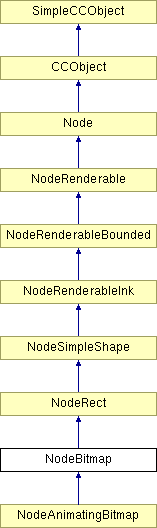
Inheritance diagram for NodeBitmap:
Public Member Functions | |
| NodeBitmap () | |
| This constructor creates a NodeBitmap linked to no other with all status flags false and an uninitialized bounding rectangle. | |
| NodeBitmap (Node *ContextNode, AttachNodeDirection Direction, BOOL Locked=FALSE, BOOL Mangled=FALSE, BOOL Marked=FALSE, BOOL Selected=FALSE) | |
| This constructor initialises the nodes flags and links it to ContextNode in the direction specified by Direction. All neccesary tree links are updated. | |
| virtual Node * | SimpleCopy () |
| Makes a copy of all the data in the node. | |
| void | CopyNodeContents (NodeBitmap *NodeCopy) |
| Copies the data in the node by first calling the base class to get it to copy its stuff, and then copying its own stuff Scope: protected. | |
| virtual void | PolyCopyNodeContents (NodeRenderable *pNodeCopy) |
| Polymorphically copies the contents of this node to another. | |
| virtual String | Describe (BOOL Plural, BOOL Verbose) |
| To return a description of the NodeBitmap object in either the singular or the plural. This method is called by the DescribeRange method. The description will always begin with a lower case letter. | |
| virtual KernelBitmap * | EnumerateBitmaps (UINT32 Count) |
| Find out what bitmaps, if any, are used by this node. | |
| virtual double | GetEffectiveBitmapMinDPI (KernelBitmap *pBitmap) |
| virtual BOOL | ReplaceBitmap (KernelBitmap *pOrigBitmap, KernelBitmap *pNewBitmap) |
| virtual BOOL | SupportsClipboardFormat (InternalClipboardFormat *Format) const |
| Determine if a node supports a given internal data type. This is used by the clipboard when exporting to other applications in order to determine if certain data types can be supplied. | |
| UINT32 | GetBitmapDPI () |
| Caculates the actual DPI of the bitmap on the page. | |
| virtual void | Render (RenderRegion *pRender) |
| Will render the bitmap contained within the object to the given render region. | |
| virtual void | PreExportRender (RenderRegion *pRender) |
| Prevent the base class NodeRect::PreExportRender() function from exporting anything to mark this as a rectangle object - because it's not; it's a bitmap object. | |
| virtual BOOL | ExportRender (RenderRegion *pRender) |
| Export a bitmap object to a file. | |
| virtual INT32 | GetSizeOfExport (Filter *) |
| Determine how many 'nodes' this bitmap is equivalent to. We use the rough approximation that each scanline taks the same amount of space as a typical node. This gives us enough granularity for a reasonably accurate and smooth progress display update. | |
| virtual BOOL | RequiresAttrib (NodeAttribute *pAttrib, BOOL Search=FALSE) |
| Determine which attributes a bitmap object supports a particular type of attribute. A bitmap only supports transparent fill geometries, mappings, and effects - all other attributes are rejected. | |
| virtual BOOL | ApplyDefaultBitmapAttrs (UndoableOperation *pOp, AttrBitmapTranspFill *pTranspBitmap=NULL) |
| Apply the default attributes that a NodeBitmap needs. This is specific to Bitmap Nodes, which need the Start and End colours to be NONE initially, and also need to ensure the line width is 0. There is now an optional pointer to a transparent bitmap fill to be applied over the current bitmap node. This is used by the transparent GIF import code. | |
| virtual BOOL | OnNodePopUp (Spread *pSpread, DocCoord PointerPos, ContextMenu *pMenu) |
| Allows the Node to respond to pop up menu clicks on it (rather than its blobs). | |
| virtual UINT32 | GetNodeSize () const |
| For finding the size of the node. | |
| virtual BOOL | IsABitmap () const |
| virtual BOOL | NeedsTransparency () const |
| Called. | |
| virtual BOOL | CanBecomeA (BecomeA *pBecomeA) |
| This function is used by the convert to shapes operation. It determines if the node or any of its children can convert themselves into an InkClass object. In the case of a node bitmap we must stop it from it having the make shapes applied as otherwise we will loose the bitmap from view. NodeSimpleShape overrides the baseclass function to return True. | |
| virtual BOOL | DoBecomeA (BecomeA *pBecomeA) |
| Transforms the object into another type of object. Note: changed 7/10/94 by MarkN to take the pBecomeA param, so that more data could be passed to these functions in the future without causing massive rebuilds due to the editing of node.h. | |
| BOOL | AllowOp (ObjChangeParam *, BOOL) |
| This is the way to ask a node if you can do an op to it. | |
| BOOL | MakeContoneBitmap (UndoableOperation *) |
| Make this NodeBitmap into a grey level version of itself. | |
| virtual KernelBitmapRef * | GetBitmapRef () |
| virtual KernelBitmap * | GetBitmap () |
| Get the bitmap referenced by this node. | |
| virtual BOOL | HidingNode () |
| This virtual function is called whenever the node is hidden. It allows the node do things like 'optimise' itself to use less memory or send a message to let others know it is being hidden etc. | |
| virtual BOOL | ShowingNode () |
| This virtual function is called whenever the node is re-shown after being Hidden. It allows the node to reconstruct itself if it was optimised or send a message to let others know it is back etc. | |
| virtual void | SetStartColour (DocColour *) |
| Set the start colour of a bitmap palette. | |
| virtual void | SetEndColour (DocColour *) |
| Set the end colour of a bitmap palette. | |
| virtual DocColour * | GetStartColour () |
| Gets the start colour of the bitmap palette. | |
| virtual DocColour * | GetEndColour () |
| Gets the end colour of the bitmap palette. | |
| virtual BOOL | GetApplyContoneColour () |
| BOOL | HasSimpleOrientation (RenderRegion *) |
| Determine if a bitmap is classified as a 'simple' bitmap, for use during the complex rendering of a view - if the render region can support simple bitmaps and this function returns TRUE, then we render the bitmap directly, otherwise it goes into the masked GDraw bitmap and is rendered that way. | |
| virtual BOOL | OnClick (DocCoord PointerPos, ClickType Click, ClickModifiers ClickMods, Spread *pSpread) |
| Allows the Node to respond to clicks by selecting its blobs or starting drags etc. This functions should be overridden in the all the NodeRenderableInk classes so that this version never gets called. Eg the NodePath class might claim the click if it happened over one of its unselected blobs. | |
| virtual TCHAR * | GetDefaultOpToken () |
| virtual void | SetAspectRatio (double dExWidth, double dExHeight, BOOL bPathAndFill) |
| To reset the stored path and Parallelogram to retain their shape and scale but to take on a new aspect ratio. | |
| virtual BOOL | ReleaseCached (BOOL bAndParents=TRUE, BOOL bAndChildren=TRUE, BOOL bSelf=TRUE, BOOL bAndDerived=TRUE) |
| Get rid of cached data held in the tree. | |
| virtual DocRect | GetOriginalBitmapRect () |
| Find the starting point for the instance transform. | |
| virtual Matrix | GetInstanceTransform () |
| Find the instance transform matrix Notes: Parallelogram format includes 4 coords and is stored in this format: 0-------1 | | 3-------2 (Why?). | |
| virtual BOOL | CanSupplyDirectBitmap () |
| virtual BOOL | GetDirectBitmap (RenderRegion *pRender, LPBITMAPINFO *plpInfo, LPBYTE *plpBits, DocRect *pRect, Matrix *pMat, double *pdRes) |
| Return details of direct bitmap to caller (caller is usually a NodeBitmapEffect). | |
| virtual BOOL | WritePreChildrenWeb (BaseCamelotFilter *pFilter) |
| saves a NodeBitmap to the filter | |
| virtual BOOL | WritePreChildrenNative (BaseCamelotFilter *pFilter) |
Static Public Member Functions | |
| static KernelBitmap * | CheckGreyscaleBitmap (KernelBitmap *pBitmap, UINT32 PromptID, UINT32 OkID) |
| Checks a bitmap to see if can be applied as a texture, and gives the option to create a grey level version if not. | |
Public Attributes | |
| KernelBitmapRef | BitmapRef |
Protected Member Functions | |
| virtual BOOL | HasBitmapAttrs () |
| Test whether we need to render this bitmap before we can return it from GetDirectBitmap. | |
Protected Attributes | |
| DocColour | Colour |
| DocColour | EndColour |
| BOOL | ApplyContoneColour |
Private Member Functions | |
| CC_DECLARE_DYNCREATE (NodeBitmap) | |
Definition at line 124 of file nodebmp.h.
|
|
This constructor creates a NodeBitmap linked to no other with all status flags false and an uninitialized bounding rectangle.
Definition at line 266 of file nodebmp.cpp. 00266 : NodeRect() 00267 { 00268 Colour = COLOUR_NONE; 00269 EndColour = COLOUR_NONE; 00270 00271 ApplyContoneColour = FALSE; 00272 }
|
|
||||||||||||||||||||||||||||
|
This constructor initialises the nodes flags and links it to ContextNode in the direction specified by Direction. All neccesary tree links are updated.
Specifies the direction in which the node is to be attached to the ContextNode. The values this variable can take are as follows: PREV : Attach node as a previous sibling of the context node NEXT : Attach node as a next sibling of the context node FIRSTCHILD: Attach node as the first child of the context node LASTCHILD : Attach node as a last child of the context node The remaining inputs specify the status of the node: Locked: Is node locked ? Mangled: Is node mangled ? Marked: Is node marked ? Selected: Is node selected ? Note: SetUpPath() must be called before the NodeBitmap is in a state in which it can be used.
Definition at line 235 of file nodebmp.cpp. 00241 :NodeRect(ContextNode, Direction, Locked, Mangled, Marked, Selected ) 00242 { 00243 Colour = COLOUR_NONE; 00244 EndColour = COLOUR_NONE; 00245 00246 ApplyContoneColour = FALSE; 00247 }
|
|
||||||||||||
|
This is the way to ask a node if you can do an op to it.
For example, the op could change the node's appearence (e.g. attr application, editing a path), replace the node with another node (e.g. because it uses hidden nodes to hide the original and put another node in its place, or "make shapes"), delete the node (e.g. the delete and cut ops), etc. This function gives the node a chance to say NO. It also gives the parents a chance to say no too. E.g. a blend node will allow itself to be deleted, but it will NOT allow a child of itself to be deleted). This call should only be made on selected, or parents of selected, nodes. It makes a decision as a straight node if it is selected. It makes a decision as a parent if it has selected children. E.g. NodeBlend::AllowOp(...op delete...) if the node is selected, then it will return TRUE (parents permitting), i.e. I can be deleted if the node is a parent of selected it will return FALSE (i.e. can't delete children of blends). So when the node is selected, you are asking the node if you can do the op to it. When the node is a parent of a selected node, you are asking if you can do the op to one of its children. If the 'SetOpPermissionState' param is TRUE, the following indented lines applies: The node's op permission state is set according to the result of this function. If TRUE is returned, then the node's op permission state will be left unchanged. AND the parent's op permission state will be set to PERMISSION_ALLOWED if FALSE is returned, then the node's op permission state will be PERMISSION_DENIED, AND all it's parents (up to the layer) will be set to PERMISSION_DENIED Also, all parents of this node are called via their AllowOp() func with the same state as this node. This means that after this call, you can guarantee that all of its parents will have either a PERMISSION_DENIED or PERMISSION_ALLOWED state. Note: Even if this node tries to set all it's parents to have a PERMISSION_DENIED state, if any of its parents have previously been set to PERMISSION_ALLOWED they will remain in that state (see SetOpPermission()). Why? Well, it is possible for a parent node to have one child with a PERMISSION_DENIED and another child with a PERMISSION_ALLOWED. It this state the parent MUST be in state PERMISSION_ALLOWED, because at least one of its children will allow the op to happen to it. So, after this call: The op permission state for this node will be either left unchanged (and therefore remain PERMISSION_UNDEFINED), or PERMISSION_DENIED. The parent's op permission state will be either PERMISSION_ALLOWED, or PERMISSION_DENIED. This is so UndoableOperation::UpdateChangedNodes() will only call OnChildChange() on parent nodes, because it only calls that func for nodes that have an op permission state of PERMISSION_ALLOWED.
Definition at line 1479 of file nodebmp.cpp. 01479 { 01480 BOOL AnyAllowed=AllowOp_AccountForCompound(pParam, SetOpPermissionState); 01481 // if called by a parent, just pass this result back 01482 if (pParam->GetDirection()==OBJCHANGE_CALLEDBYPARENT) 01483 return AnyAllowed; 01484 } 01485 else 01486 { 01487 // clean out the calling-child ptr, so it doesn't get passed around unintentionally. 01488 pParam->SetCallingChild(NULL); 01489 } 01490 01491 // at this point we must have been called directly by the op or via a child AllowOp() 01492 01493 // decide if we allow it ... 01494 BOOL allowed=TRUE; 01495 ObjChangeFlags Flags = pParam->GetChangeFlags(); 01496 01497 if (Flags.Attribute) 01498 { 01499 // Someone is applying an attribute ..... 01500 // We really need to check the actual attribute, so for 01501 // now we'll rely on the fact that the 'RequiresAttrib()' 01502 // function will have been called before this one. 01503 01504 // If we are applying a contone colour, then make sure we 01505 // are a Grey level bitmap, and give the user the option 01506 // of making one if not. 01507 if (ApplyContoneColour) 01508 { 01509 // 'ApplyContoneColour' is set in the 'RequiresAttrib()' 01510 // function if a contone colour change attr is applied. 01511 allowed = MakeContoneBitmap(pParam->GetOpPointer()); 01512 } 01513 } 01514 01515 // if we allowed it, see if our parents do ... 01516 if (allowed && Parent!=NULL) 01517 { 01518 ObjChangeDirection OldDirection=pParam->GetDirection(); 01519 pParam->SetCallingChild(this); 01520 pParam->SetDirection(OBJCHANGE_CALLEDBYCHILD); 01521 allowed=Parent->AllowOp(pParam,SetOpPermissionState); 01522 pParam->SetDirection(OldDirection); 01523 } 01524 01525 // if setting permisions ... 01526 if (SetOpPermissionState) 01527 { 01528 // if allowed, mark parent accordingly, else mark child as denied and update parents 01529 if (allowed) 01530 Parent->SetOpPermission(PERMISSION_ALLOWED); 01531 else 01532 SetOpPermission(PERMISSION_DENIED,TRUE); 01533 } 01534 01535 // return result (directly, or indirectly via a child AllowOp()) to op 01536 return allowed; 01537 } 01538 01539 /******************************************************************************************** 01540 01541 > BOOL NodeBitmap::MakeContoneBitmap(UndoableOperation* pOperation) 01542 01543 Author: Will_Cowling (Xara Group Ltd) <camelotdev@xara.com>
|
|
||||||||||||
|
Apply the default attributes that a NodeBitmap needs. This is specific to Bitmap Nodes, which need the Start and End colours to be NONE initially, and also need to ensure the line width is 0. There is now an optional pointer to a transparent bitmap fill to be applied over the current bitmap node. This is used by the transparent GIF import code.
Definition at line 997 of file nodebmp.cpp. 00999 { 01000 if (pTranspBitmap != NULL) 01001 { 01002 pTranspBitmap->AttachNode(this, FIRSTCHILD); 01003 01004 // Apply it as a single tiled fill. Otherwise in the GIF transparency case 01005 // the repeating can give ghost pixels along the edges. 01006 AttrTranspFillMappingLinear *pNoRepeatAttr = new AttrTranspFillMappingLinear; 01007 if (pNoRepeatAttr == NULL) 01008 return FALSE; 01009 01010 pNoRepeatAttr->Value.Repeat = 1; 01011 01012 pNoRepeatAttr->AttachNode(this, FIRSTCHILD); 01013 } 01014 01015 Node* pLineColAttr = new AttrStrokeColour(); 01016 if (pLineColAttr == NULL) 01017 return FALSE; 01018 01019 /* 01020 Node* pLineTranspAttr = new AttrStrokeTransp(); 01021 if (pLineTranspAttr == NULL) 01022 { 01023 delete pLineColAttr; 01024 return FALSE; 01025 } 01026 */ 01027 01028 Node* pFillColAttr = new AttrFlatColourFill(); 01029 if (pFillColAttr == NULL) 01030 { 01031 delete pLineColAttr; 01032 // delete pLineTranspAttr; 01033 return FALSE; 01034 } 01035 01036 Node* pLineWidthAttr = new AttrLineWidth(); 01037 if (pFillColAttr == NULL) 01038 { 01039 delete pLineColAttr; 01040 // delete pLineTranspAttr; 01041 delete pFillColAttr; 01042 return FALSE; 01043 } 01044 01045 DocColour colorNull(COLOUR_NONE); 01046 ((AttrFillGeometry*)pLineColAttr)->SetStartColour( &colorNull ); 01047 ((AttrFillGeometry*)pFillColAttr)->SetStartColour( &colorNull ); 01048 ((AttrLineWidth*)pLineWidthAttr)->Value.LineWidth = 0; 01049 01050 // UINT32 LineTransp = 255; 01051 // ((AttrFillGeometry*)pLineTranspAttr)->SetStartTransp(&LineTransp); 01052 // ((AttrFillGeometry*)pLineTranspAttr)->SetTranspType(1); 01053 01054 pLineColAttr->AttachNode(this, FIRSTCHILD); 01055 // pLineTranspAttr->AttachNode(this, FIRSTCHILD); 01056 pFillColAttr->AttachNode(this, FIRSTCHILD); 01057 pLineWidthAttr->AttachNode(this, FIRSTCHILD); 01058 01059 return TRUE; 01060 }
|
|
|
This function is used by the convert to shapes operation. It determines if the node or any of its children can convert themselves into an InkClass object. In the case of a node bitmap we must stop it from it having the make shapes applied as otherwise we will loose the bitmap from view. NodeSimpleShape overrides the baseclass function to return True.
Also, the entry value of *pNumObjects cannot be assumed to be 0. Reimplemented from NodeSimpleShape. Definition at line 1087 of file nodebmp.cpp. 01088 { 01089 // The NodeBitmap can become a NodePath (with a bitmap fill) 01090 if (pBecomeA->BAPath()) 01091 { 01092 pBecomeA->AddCount(1); 01093 return TRUE; 01094 } 01095 01096 return FALSE; 01097 }
|
|
|
Reimplemented from NodeRenderableInk. Definition at line 217 of file nodebmp.h. 00217 {return TRUE;}
|
|
|
|
|
||||||||||||||||
|
Checks a bitmap to see if can be applied as a texture, and gives the option to create a grey level version if not.
Definition at line 1578 of file nodebmp.cpp.
|
|
|
Copies the data in the node by first calling the base class to get it to copy its stuff, and then copying its own stuff Scope: protected.
Definition at line 312 of file nodebmp.cpp. 00313 { 00314 NodeRect::CopyNodeContents(NodeCopy); 00315 00316 // Copy contents specific to derived class here 00317 00318 // Copy KernelBitmap reference 00319 NodeCopy->BitmapRef = BitmapRef; 00320 00321 // We need to copy the cached bitmaps into the new node 00322 // But since this cached (option 2) bitmap is only ever used as an intermediate stage 00323 // in producing another cached bitmap, we probably don't need to copy it 00324 //CopyCached(pCopyOfNode, GetPixelWidth(), 2); // Copy cached bitmaps, options 0, 1 and 2 (original and processed) 00325 }
|
|
||||||||||||
|
To return a description of the NodeBitmap object in either the singular or the plural. This method is called by the DescribeRange method. The description will always begin with a lower case letter.
Reimplemented from NodeRect. Reimplemented in NodeAnimatingBitmap. Definition at line 370 of file nodebmp.cpp. 00371 { 00372 #if !defined(EXCLUDE_FROM_RALPH) 00373 if (Plural) 00374 { 00375 return(String(_R(IDS_BITMAP_DESCRP))); 00376 } 00377 else 00378 { 00379 if (GetBitmap() == NULL || GetBitmap()->ActualBitmap == NULL) 00380 return(String(_R(IDS_BITMAP_DESCRS))); 00381 00382 // If we have a bitmap, then include it's name and actual dpi 00383 // in the desciption 00384 00385 String_256 BmpName = GetBitmap()->ActualBitmap->GetName(); 00386 String_64 TrunkName; 00387 if (BmpName.Length() > 12) 00388 { 00389 BmpName.Left(&TrunkName, 9); 00390 TrunkName += _T("..."); 00391 } 00392 else 00393 { 00394 BmpName.Left(&TrunkName, 12); 00395 } 00396 00397 String_256 DpiText; 00398 UINT32 dpi = GetBitmapDPI(); 00399 00400 if (dpi > 0) 00401 { 00402 String_256 jcf(_R(IDS_NODEBMP_DPI_FORMAT)); 00403 camSnprintf(DpiText, 256, jcf, dpi); 00404 } 00405 00406 String_64 TrunkDpi; 00407 DpiText.Left(&TrunkDpi, 11); 00408 00409 String_256 Desc(_R(IDS_BITMAP_DESCRS)); 00410 String_64 TrunkDesc; 00411 Desc.Left(&TrunkDesc, 6); 00412 00413 if (Verbose) 00414 { 00415 String_32 ret = TrunkDesc; 00416 ret += TEXT(" '"); 00417 ret += TrunkName; 00418 ret += TEXT("'"); 00419 ret += TrunkDpi; 00420 return ret; 00421 // return(String(TrunkDesc+TEXT(" '")+TrunkName+TEXT("'")+TrunkDpi)); 00422 } 00423 else 00424 { 00425 String_32 ret = TrunkDesc; 00426 ret += TEXT(" "); 00427 ret += TrunkName; 00428 return ret; 00429 // return(String(TrunkDesc+TEXT(" ")+TrunkName)); 00430 } 00431 } 00432 #else 00433 return(String(_R(IDS_BITMAP_DESCRP))); 00434 #endif 00435 }
|
|
|
Transforms the object into another type of object. Note: changed 7/10/94 by MarkN to take the pBecomeA param, so that more data could be passed to these functions in the future without causing massive rebuilds due to the editing of node.h.
Reimplemented from NodeSimpleShape. Definition at line 1118 of file nodebmp.cpp. 01119 { 01120 // Check for a NULL entry param 01121 ERROR2IF_PF(pBecomeA == NULL,FALSE,("pBecomeA is NULL")); 01122 01123 // This lump checks that the Reason is one that we understand 01124 // It also makes sure that we don't have a NULL UndoOp ptr 01125 BOOL ValidReason = (pBecomeA->GetReason() == BECOMEA_REPLACE || pBecomeA->GetReason() == BECOMEA_PASSBACK); 01126 ERROR2IF_PF(!ValidReason,FALSE,("Unkown BecomeA reason %d",pBecomeA->GetReason())); 01127 01128 // pBecomeA->Reason is one that we understand. 01129 01130 UndoableOperation* pUndoOp = pBecomeA->GetUndoOp(); 01131 BOOL Success = TRUE; // Our success flag (Important that this defaults to TRUE) 01132 NodePath* pNewNodePath = NULL; // Ptr to a new NodePath, if we get to make one. 01133 01134 if (pBecomeA->BAPath()) 01135 { 01136 // We need to create a new NodePath, no matter what the reason. 01137 01138 // Allocate a new NodePath node 01139 ALLOC_WITH_FAIL(pNewNodePath, (new NodePath), pBecomeA->GetUndoOp()); 01140 Success = (pNewNodePath != NULL); 01141 01142 // Initialise the path 01143 if (Success) CALL_WITH_FAIL(pNewNodePath->InkPath.Initialise(InkPath.GetNumCoords(),12), pBecomeA->GetUndoOp(), Success); 01144 if (Success) CALL_WITH_FAIL(pNewNodePath->InkPath.CopyPathDataFrom(&InkPath), pBecomeA->GetUndoOp(), Success); 01145 01146 if (Success) pNewNodePath->InkPath.IsFilled = TRUE; 01147 01148 // If Success is TRUE, then we now have a new NodePath object that contains this shape's path 01149 01150 if (Success) 01151 { 01152 // Remember the contone colours before we go and hide the applied attributes 01153 DocColour* ContoneStart = GetStartColour(); 01154 DocColour* ContoneEnd = GetEndColour(); 01155 01156 switch (pBecomeA->GetReason()) 01157 { 01158 case BECOMEA_REPLACE : 01159 { 01160 // It's a BECOMEA_REPLACE, so replace this node with the new NodePath in an undoable way 01161 01162 // Can't do it in an undoable way without an Undo Op 01163 // ERROR2IF_PF(pBecomeA->GetUndoOp() == NULL,FALSE,("GetUndoOp() returned NULL")); 01164 01165 // The NodeBitmap uses the Fill and line colours to set it's 01166 // contone colours. 01167 // But the bitmap fill doesn't need them, so we will Hide 01168 // any of these attributes that we find applied 01169 Node* pChild = FindFirstChild(); 01170 while (pChild != NULL) 01171 { 01172 Node* pThisChild = pChild; 01173 pChild = pChild->FindNext(); // Find next before we hide this child 01174 01175 if (pThisChild->IsAnAttribute()) 01176 { 01177 NodeAttribute* pAttr = (NodeAttribute*)pThisChild; 01178 01179 if (pAttr->IsAColourFill() || 01180 pAttr->IsAStrokeColour() ) 01181 { 01182 if (pUndoOp) 01183 { 01184 // Hide and Fill or Line colour attributes 01185 NodeHidden* pNodeHidden; 01186 Success = pBecomeA->GetUndoOp()->DoHideNode(pAttr, TRUE, &pNodeHidden); 01187 } 01188 else 01189 { 01190 pAttr->CascadeDelete(); 01191 delete pAttr; 01192 } 01193 } 01194 } 01195 } 01196 01197 // Now make a Bitmap Fill that is equivalent to this NodeBitmap 01198 AttrFillGeometry* pBitmapFill; 01199 ALLOC_WITH_FAIL(pBitmapFill , new AttrBitmapColourFill(), pBecomeA->GetUndoOp()); 01200 01201 if (pBitmapFill) 01202 { 01203 pBitmapFill->AttachBitmap(GetBitmap()); 01204 01205 // Set any contone colours that we have 01206 pBitmapFill->SetStartColour(ContoneStart); 01207 pBitmapFill->SetEndColour(ContoneEnd); 01208 01209 // Set the control points from the NodeBitmap Parallelogram 01210 pBitmapFill->SetStartPoint(&Parallel[3]); 01211 pBitmapFill->SetEndPoint(&Parallel[2]); 01212 pBitmapFill->SetEndPoint2(&Parallel[0]); 01213 01214 pBitmapFill->AttachNode(this, FIRSTCHILD); 01215 01216 if (pUndoOp) 01217 { 01218 // Create a hide node action to hide the node when we undo 01219 HideNodeAction* UndoHideNodeAction; 01220 Success = (HideNodeAction::Init(pBecomeA->GetUndoOp(), 01221 pBecomeA->GetUndoOp()->GetUndoActionList(), 01222 pBitmapFill, 01223 TRUE, // Include subtree size 01224 ( Action**)(&UndoHideNodeAction)) 01225 != AC_FAIL); 01226 } 01227 } 01228 01229 // We also need to make sure it has no line colour 01230 AttrFillGeometry* pStrokeColour; 01231 ALLOC_WITH_FAIL(pStrokeColour , new AttrStrokeColour(), pBecomeA->GetUndoOp()); 01232 01233 if (pStrokeColour) 01234 { 01235 // Ensure the line colour is set to NONE 01236 DocColour NoCol = COLOUR_NONE; 01237 pStrokeColour->SetStartColour(&NoCol); 01238 01239 pStrokeColour->AttachNode(this, FIRSTCHILD); 01240 01241 if (pUndoOp) 01242 { 01243 // Create a hide node action to hide the node when we undo 01244 HideNodeAction* UndoHideNodeAction; 01245 Success = (HideNodeAction::Init(pBecomeA->GetUndoOp(), 01246 pBecomeA->GetUndoOp()->GetUndoActionList(), 01247 pStrokeColour, 01248 TRUE, // Include subtree size 01249 ( Action**)(&UndoHideNodeAction)) 01250 != AC_FAIL); 01251 } 01252 } 01253 01254 // Copy the node's attributes 01255 CALL_WITH_FAIL(CopyChildrenTo(pNewNodePath), pBecomeA->GetUndoOp(), Success); 01256 01257 // Insert the new NodePath into the tree, next to this node 01258 pNewNodePath->AttachNode(this,NEXT); 01259 01260 if (Success) 01261 { 01262 // Set the bounds 01263 pNewNodePath->InvalidateBoundingRect(); 01264 pNewNodePath->SetSelected(IsSelected()); 01265 01266 if (pUndoOp) 01267 { 01268 // Create a hide node action to hide the node when we undo 01269 HideNodeAction* UndoHideNodeAction; 01270 Success = (HideNodeAction::Init(pBecomeA->GetUndoOp(), 01271 pBecomeA->GetUndoOp()->GetUndoActionList(), 01272 pNewNodePath, 01273 TRUE, // Include subtree size 01274 ( Action**)(&UndoHideNodeAction)) 01275 != AC_FAIL); 01276 } 01277 } 01278 01279 if (Success) 01280 { 01281 CCAttrMap AttrMap; 01282 CCAttrMap* pAttrMap = NULL; 01283 BOOL bFoundAttrs = pNewNodePath->FindAppliedAttributes(&AttrMap); 01284 if (bFoundAttrs) 01285 pAttrMap = AttrMap.Copy(); 01286 pBecomeA->PassBack(pNewNodePath, this, pAttrMap); 01287 } 01288 01289 // Now hide this NodeBitmap 01290 if (pUndoOp) 01291 { 01292 NodeHidden* pNodeHidden; 01293 Success = pBecomeA->GetUndoOp()->DoHideNode(this, TRUE, &pNodeHidden); 01294 } 01295 else 01296 { 01297 CascadeDelete(); 01298 delete this; // Scary! 01299 } 01300 } 01301 break; 01302 01303 case BECOMEA_PASSBACK : 01304 { 01305 // First find all attributes applied to this node... 01306 // 30 is a default value - this will grow if it needs more space 01307 CCAttrMap* pAttribMap = new CCAttrMap(30); 01308 CCAttrMap* pCopyOfAttrMap = NULL; 01309 01310 // Now find any attributes that are applied to this node. 01311 /*BOOL FoundAttrs =*/ FindAppliedAttributes(pAttribMap); 01312 01313 // size_t AttrCount = FoundAttrs ? pAttribMap->GetCount() : 30; 01314 01315 // Now make a copy of the applied attributes map 01316 pCopyOfAttrMap = pAttribMap->Copy ();//new CCAttrMap(AttrCount); 01317 if (pCopyOfAttrMap != NULL) 01318 { 01319 // We've made a copy of the Attr map now, so we don't need 01320 // the old one anymore 01321 delete pAttribMap; 01322 01323 // Replace the Fill and Line Colour attributes 01324 // in the Attr Map copy 01325 01326 AttrFillGeometry* pBitmapFill = new AttrBitmapColourFill(); 01327 if (pBitmapFill) 01328 { 01329 // Make a Bitmap Fill that is equivalent to this 01330 // node bitmap 01331 pBitmapFill->AttachBitmap(GetBitmap()); 01332 01333 // Set any contone colours that we have 01334 pBitmapFill->SetStartColour(ContoneStart); 01335 pBitmapFill->SetEndColour(ContoneEnd); 01336 01337 // Set the control points from the NodeBitmap Parallelogram 01338 pBitmapFill->SetStartPoint(&Parallel[3]); 01339 pBitmapFill->SetEndPoint(&Parallel[2]); 01340 pBitmapFill->SetEndPoint2(&Parallel[0]); 01341 01342 void* pOldFill; 01343 if( pCopyOfAttrMap->Lookup( CC_RUNTIME_CLASS(AttrFillGeometry), pOldFill ) ) 01344 { 01345 // We need to Remove and Delete the existing Fill Attr 01346 pCopyOfAttrMap->RemoveKey( CC_RUNTIME_CLASS(AttrFillGeometry) ); 01347 delete (AttrFillGeometry*)pOldFill; 01348 } 01349 01350 // Add the Bitmap fill into the Attr Map 01351 pCopyOfAttrMap->SetAt( CC_RUNTIME_CLASS(AttrFillGeometry), (void*)pBitmapFill ); 01352 } 01353 01354 AttrFillGeometry* pStrokeColour = new AttrStrokeColour(); 01355 if (pStrokeColour) 01356 { 01357 // Ensure the line colour is set to NONE 01358 DocColour NoCol = COLOUR_NONE; 01359 pStrokeColour->SetStartColour(&NoCol); 01360 01361 void* pOldStroke; 01362 if( pCopyOfAttrMap->Lookup( CC_RUNTIME_CLASS(AttrStrokeColour), pOldStroke ) ) 01363 { 01364 // We need to Remove and Delete the existing Stroke Colour Attr 01365 pCopyOfAttrMap->RemoveKey( CC_RUNTIME_CLASS(AttrStrokeColour) ); 01366 delete (AttrFillGeometry*)pOldStroke; 01367 } 01368 01369 // Add the new Stroke Colour into the Attr Map 01370 pCopyOfAttrMap->SetAt( CC_RUNTIME_CLASS(AttrStrokeColour), (void*)pStrokeColour ); 01371 } 01372 } 01373 01374 Success = pBecomeA->PassBack(pNewNodePath, this, pCopyOfAttrMap); 01375 } 01376 break; 01377 01378 case BECOMEA_TEST: 01379 // Do nothing 01380 break; 01381 01382 default: 01383 { 01384 ERROR3("Unhandled BecomeA type in NodeBitmap::DoBecomeA"); 01385 } 01386 } 01387 } 01388 } 01389 01390 if (!Success) 01391 { 01392 if (pNewNodePath != NULL) 01393 { 01394 // Delete all the NodePath's children (if it has any) and unlink it from the tree (if it's linked) 01395 // This is all done by CascadeDelete() 01396 pNewNodePath->CascadeDelete(); 01397 delete pNewNodePath; 01398 pNewNodePath = NULL; 01399 } 01400 } 01401 01402 return Success; 01403 } 01404 01405 /******************************************************************************************** 01406 01407 > virtual BOOL NodeBitmap::AllowOp(ObjChangeParam* pParam,BOOL SetOpPermissionState = TRUE) 01408 01409 Author: Mark_Neves (Xara Group Ltd) <camelotdev@xara.com>
|
|
|
Find out what bitmaps, if any, are used by this node.
This function supports nodes that use more than one bitmap - you call this function repeatedly and keep incrementing the Count parameter that you pass in each time by 1. You should stop calling it when it returns NULL, as this indicates that no more bitmaps are used by this node. Count should start off as 0 for the first call. Note that this function can (and often will) return NULL for the first call, as many nodes don't use bitmaps, obviously.
Reimplemented from Node. Reimplemented in NodeAnimatingBitmap. Definition at line 2444 of file nodebmp.cpp.
|
|
|
Export a bitmap object to a file.
Reimplemented from NodeRenderableInk. Definition at line 625 of file nodebmp.cpp. 00626 { 00627 #ifdef DO_EXPORT 00628 if (pRegion->IsKindOf(CC_RUNTIME_CLASS(CamelotEPSRenderRegion))) 00629 { 00630 // Get valid transparency fill for this object 00631 CamelotEPSRenderRegion *pCamelotRegion = (CamelotEPSRenderRegion *) pRegion; 00632 pCamelotRegion->GetValidPathAttributes(); 00633 00634 // Output bitmap object position and keyword... 00635 EPSExportDC *pDC = (EPSExportDC *) pRegion->GetRenderDC(); 00636 00637 DocCoord *Coords = InkPath.GetCoordArray(); 00638 00639 // Bodge Code 00640 00641 // So this is some Bodge code to make Bitmaps in moulds, save themselves 00642 // correctly if a Line colour is applied to the Mould. 00643 00644 // This line colour makes the Bitmap think it has been contoned, so we save out 00645 // a contoned version, which is looks incorrect when re-loaded. 00646 00647 // To get around this problem, this code checks specifically for the situation, 00648 // and forces the bitmap to be saved as a non-contoned version. 00649 00650 BOOL CanSaveAsContoned = TRUE; 00651 BOOL LineColourIsAppliedToMould = FALSE; 00652 00653 if (GetBitmap() && GetBitmap()->GetBPP() <= 8) 00654 { 00655 // We only need to worry about this for < 8BPP 00656 NodeAttribute* pLineAttr; 00657 00658 // So we find the applied Stroke Colour ... 00659 if (FindAppliedAttribute(CC_RUNTIME_CLASS(AttrStrokeColour), &pLineAttr)) 00660 { 00661 Node* pParent = pLineAttr->FindParent(); 00662 00663 // And if it has been applied to a Mould ... 00664 if (pParent && IS_A(pParent, NodeMould)) 00665 { 00666 LineColourIsAppliedToMould = TRUE; 00667 00668 // and there is no Flat Colour Applied to the Bitmap, 00669 // then this flag will be FALSE, stopping the bitmap 00670 // from being saved as contone. 00671 CanSaveAsContoned = (GetEndColour() != NULL); 00672 } 00673 } 00674 } 00675 00676 if (CanSaveAsContoned && (GetStartColour() || GetEndColour())) 00677 { 00678 // Must be a contone bitmap 00679 00680 // If either the start or end colour is NULL, we need 00681 // to output a dummy colour, because 'No_Colour' doesn't 00682 // get saved 00683 if (LineColourIsAppliedToMould || GetStartColour() == NULL) 00684 { 00685 DocColour StartCol; 00686 AttributeManager::FindDefaultColour(ColourManager::GetCurrentColourList(), 00687 _R(IDS_BLACKNAME), &StartCol); 00688 00689 if (*GetEndColour() == StartCol) 00690 { 00691 AttributeManager::FindDefaultColour(ColourManager::GetCurrentColourList(), 00692 _R(IDS_WHITENAME), &StartCol); 00693 } 00694 00695 // Output dummy start colour here 00696 if (StartCol.FindParentIndexedColour() == NULL) 00697 { 00698 // Unnamed colour 00699 PColourCMYK CMYK; 00700 StartCol.GetCMYKValue(&CMYK); 00701 pDC->OutputColour(&CMYK); 00702 pDC->OutputToken(_T("K")); 00703 } 00704 else 00705 { 00706 // Named colour 00707 pDC->OutputNamedColour(&StartCol); 00708 pDC->OutputToken(_T("X")); 00709 } 00710 00711 pDC->OutputNewLine(); 00712 } 00713 else if (GetEndColour() == NULL) 00714 { 00715 DocColour EndCol; 00716 AttributeManager::FindDefaultColour(ColourManager::GetCurrentColourList(), 00717 _R(IDS_WHITENAME), &EndCol); 00718 00719 if (*GetStartColour() == EndCol) 00720 { 00721 AttributeManager::FindDefaultColour(ColourManager::GetCurrentColourList(), 00722 _R(IDS_BLACKNAME), &EndCol); 00723 } 00724 00725 // Output dummy end colour here 00726 if (EndCol.FindParentIndexedColour() == NULL) 00727 { 00728 // Unnamed colour 00729 PColourCMYK CMYK; 00730 EndCol.GetCMYKValue(&CMYK); 00731 pDC->OutputColour(&CMYK); 00732 pDC->OutputToken(_T("k")); 00733 } 00734 else 00735 { 00736 // Named colour 00737 pDC->OutputNamedColour(&EndCol); 00738 pDC->OutputToken(_T("x")); 00739 } 00740 00741 pDC->OutputNewLine(); 00742 } 00743 00744 // Co-ords first, 00745 for (INT32 i = 0; i <= 3; i++) 00746 pDC->OutputCoord(Coords[i]); 00747 00748 // ...then the bitmap object token. 00749 pDC->OutputToken(_T("cbm")); 00750 pDC->OutputNewLine(); 00751 00752 // ...and then the bitmap data itself. 00753 pDC->GetParentFilter()->ExportBitmap(*GetBitmap()); 00754 } 00755 else 00756 { 00757 // It's not a contone bitmap. 00758 // Oh bum. We've made a bit of a bo-bo with these. 00759 // Since we don't save 'no-colour' we don't know that 00760 // the bitmap has no-colour when re-loaded, and so it 00761 // uses the 'current' fill colour, so sometimes the bitmaps 00762 // come out coloured, when they shouldn't be. 00763 00764 // Solution .... We'll save this bitmap as a bitmap fill 00765 // (which already has a non-contone format), and save out 00766 // some extra stuff to tell the import routines that it's 00767 // not a bitmap fill, but really a bitmap object. 00768 // This means it will look correct in the Viewer (they'll 00769 // be loaded as bitmap filled paths), but will appear as 00770 // bitmaps when loaded into the main program. 00771 00772 // So first we'll output a new eps object (which will be Ignored by 00773 // the viewer), telling the main program that the following 00774 // object is really a bitmap object 00775 00776 pDC->OutputValue((INT32) EOTAG_BITMAPFLAGS); 00777 pDC->OutputToken(_T("cso")); // Start of new object type 00778 00779 pDC->OutputToken(_T("cbot")); // Flag the next bitmap fill as an object 00780 00781 pDC->OutputToken(_T("ceo")); // End of new object type 00782 pDC->OutputNewLine(); 00783 00784 // Now output the Bitmap fill 00785 pDC->OutputCoord(Coords[3]); 00786 pDC->OutputCoord(Coords[2]); 00787 pDC->OutputCoord(Coords[0]); 00788 00789 pDC->OutputValue((INT32) CAMEPS_FILL_BITMAP); 00790 pDC->OutputToken(_T("cax")); 00791 pDC->OutputNewLine(); 00792 00793 // ...and then the bitmap data itself. 00794 pDC->GetParentFilter()->ExportBitmap(*GetBitmap()); 00795 00796 // Now output a filled path for the Viewer to render 00797 // This will be skipped over by the new import code 00798 pDC->OutputCoord(Coords[0]); 00799 pDC->OutputToken(_T("m")); 00800 pDC->OutputNewLine(); 00801 pDC->OutputCoord(Coords[1]); 00802 pDC->OutputToken(_T("l")); 00803 pDC->OutputNewLine(); 00804 pDC->OutputCoord(Coords[2]); 00805 pDC->OutputToken(_T("l")); 00806 pDC->OutputNewLine(); 00807 pDC->OutputCoord(Coords[3]); 00808 pDC->OutputToken(_T("l")); 00809 pDC->OutputNewLine(); 00810 pDC->OutputCoord(Coords[0]); 00811 pDC->OutputToken(_T("l")); 00812 pDC->OutputNewLine(); 00813 pDC->OutputToken(_T("F")); // Filled path 00814 pDC->OutputNewLine(); 00815 } 00816 00817 // Now force the Fill Colour, Line Colour, and Line Width 00818 // attribute to output themselves again, 'cus old versions 00819 // (including the Viewer) will corrupt these attributes for 00820 // any subsequent objects 00821 00822 // Get rid of the current copies of the last output attrs 00823 delete pCamelotRegion->LastOutputAttrs[ATTR_FILLGEOMETRY].pAttr; 00824 delete pCamelotRegion->LastOutputAttrs[ATTR_STROKECOLOUR].pAttr; 00825 delete pCamelotRegion->LastOutputAttrs[ATTR_LINEWIDTH].pAttr; 00826 00827 // NULL the pointers 00828 pCamelotRegion->LastOutputAttrs[ATTR_FILLGEOMETRY].pAttr = NULL; 00829 pCamelotRegion->LastOutputAttrs[ATTR_STROKECOLOUR].pAttr = NULL; 00830 pCamelotRegion->LastOutputAttrs[ATTR_LINEWIDTH].pAttr = NULL; 00831 00832 // and clear the Temp flags so we don't try and delete them on exit 00833 pCamelotRegion->LastOutputAttrs[ATTR_FILLGEOMETRY].Temp = FALSE; 00834 pCamelotRegion->LastOutputAttrs[ATTR_STROKECOLOUR].Temp = FALSE; 00835 pCamelotRegion->LastOutputAttrs[ATTR_LINEWIDTH].Temp = FALSE; 00836 00837 // Re-output the attributes we've just reset 00838 pCamelotRegion->GetValidPathAttributes(); 00839 00840 // Tell caller we rendered ourselves ok 00841 return TRUE; 00842 } 00843 PORTNOTE("cmx", "Disabled CMXRenderRegion") 00844 #ifndef EXCLUDE_FROM_XARALX 00845 else if (pRegion->IsKindOf(CC_RUNTIME_CLASS(CMXRenderRegion))) 00846 { 00847 // mark start of a group... 00848 CMXExportDC *pDC = (CMXExportDC *)pRegion->GetRenderDC(); 00849 ERROR2IF(pDC == NULL, FALSE, "no dc in CMXRenderRegion"); 00850 KernelBitmap *pBittyThingy = BitmapRef.GetBitmap(); 00851 ERROR2IF(pBittyThingy == NULL, FALSE, "no bitmap in the node"); 00852 00853 pDC->WriteBitmap ( pBittyThingy, ( DocCoord * ) ( &Parallel ), 00854 CMXExportDC::CMXBITMAPCOLOURSOURCE_LINEANDFILL ); 00855 00856 return TRUE; 00857 } 00858 #endif 00859 else if ( pRegion->IsKindOf ( CC_RUNTIME_CLASS ( AIEPSRenderRegion ) ) ) 00860 { 00861 // Grab a pointer to the AIEPS_RenderRegion. 00862 AIEPSRenderRegion *pAIEPSRR = static_cast<AIEPSRenderRegion*> ( pRegion ); 00863 00864 // Write the bitmap using the render region's custom code. 00865 return pAIEPSRR->ExportBitmap ( this ); 00866 } 00867 00868 #endif 00869 // Render this node in the normal way 00870 return FALSE; 00871 }
|
|
|
Definition at line 194 of file nodebmp.h. 00194 {return ApplyContoneColour;};
|
|
|
Get the bitmap referenced by this node.
Reimplemented in NodeAnimatingBitmap. Definition at line 1603 of file nodebmp.cpp. 01603 { 01604 ERROR2IF(pBitmap->GetParentBitmapList() == NULL, NULL, "Deleted bitmap has no parent list"); 01605 01606 // Use the default bitmap instead 01607 pBitmap = pBitmap->GetParentBitmapList()->FindDefaultBitmap(); 01608 01609 // There should always be a default bitmap in the list 01610 ERROR2IF(pBitmap == NULL, 0L, "Couldn't find the default bitmap"); 01611 } 01612 01613 return pBitmap; 01614 } 01615 01616 /*********************************************************************************************** 01617 01618 > virtual BOOL NodeBitmap::HidingNode() 01619 01620 Author: Will_Cowling (Xara Group Ltd) <camelotdev@xara.com>
|
|
|
Caculates the actual DPI of the bitmap on the page.
Definition at line 448 of file nodebmp.cpp. 00449 { 00450 UINT32 Dpi = 0; 00451 00452 if (GetBitmap() == NULL) 00453 return 0; 00454 00455 // Do we have a valid bitmap ? 00456 OILBitmap *OilBM = GetBitmap()->ActualBitmap; 00457 00458 if (OilBM != NULL) 00459 { 00460 BitmapInfo Info; 00461 OilBM->GetInfo(&Info); 00462 00463 // Get the Width of the Bitmap in Pixels 00464 INT32 PixWidth = Info.PixelWidth; 00465 INT32 PixHeight = Info.PixelHeight; 00466 00467 // Get the Width of the Bitmap in Millipoints 00468 INT32 Width = INT32(Parallel[0].Distance(Parallel[1])); 00469 INT32 Height = INT32(Parallel[1].Distance(Parallel[2])); 00470 00471 // Use doubles so that we can round up as well as down. This improves 00472 // the dpi calculated. 00473 double HDpi = 0; 00474 double VDpi = 0; 00475 00476 if (Width > 0) 00477 HDpi = ((double)PixWidth * 72000.0)/(double)Width; 00478 00479 if (Height > 0) 00480 VDpi = ((double)PixHeight * 72000.0)/(double)Height; 00481 00482 // Use the smaller of the two dpi values 00483 Dpi = (UINT32)(HDpi + 0.5); 00484 if (VDpi < Dpi) 00485 Dpi = (UINT32)(VDpi + 0.5); 00486 } 00487 00488 return Dpi; 00489 }
|
|
|
Reimplemented in NodeAnimatingBitmap. Definition at line 182 of file nodebmp.h. 00182 { return &BitmapRef; }
|
|
|
Reimplemented from Node. Definition at line 206 of file nodebmp.h.
|
|
||||||||||||||||||||||||||||
|
Return details of direct bitmap to caller (caller is usually a NodeBitmapEffect).
Reimplemented from NodeRenderableInk. Definition at line 1960 of file nodebmp.cpp. 01968 { 01969 // Lookup processed bitmap in cache 01970 CBitmapCache* pBitmapCache = Camelot.GetBitmapCache(); 01971 if (pBitmapCache==NULL) 01972 return FALSE; 01973 01974 CBitmapCacheKey inky(this, 72000.0/pkBitmap->GetHorizontalDPI(), 2); // Option 2 is processed/rendered bitmap (see below) 01975 CCachedBitmap cbmp; 01976 BOOL bFound = pBitmapCache->Lookup(inky, cbmp); 01977 if (bFound) 01978 { 01979 if (plpInfo) *plpInfo = cbmp.pbmpInfo; 01980 if (plpBits) *plpBits = cbmp.pbmpBits; 01981 return TRUE; 01982 } 01983 01984 // We need to create a new bitmap here that captures the effects of the attributes 01985 // 01986 // If we don't have a RenderRegion, we can't build it, so return NULLs to indicate 01987 // that we need to be called again with a RenderRegion (allows quick test) 01988 // (See EnsureLiveEffectOriginalBitmaps) 01989 if (pRender == NULL) 01990 { 01991 if (plpInfo) *plpInfo = NULL; 01992 if (plpBits) *plpBits = NULL; 01993 return TRUE; 01994 } 01995 01996 // We must "render" this bitmap to capture the attributes that effect its appearance 01997 // By default, we can't do arbitrarily transformed bitmaps - use a bitmap fill. 01998 AttrFillGeometry* pTranspAttr = NULL; 01999 AttrFeather* pFeatherAttr = NULL; 02000 BitmapTranspFillAttribute* pFeatherTransp = NULL; 02001 KernelBitmap* pFeatherBitmap = NULL; 02002 MILLIPOINT mpScaledFeatherSize = 0; 02003 CProfileBiasGain profileFeather; 02004 DocRect CaptureRect = GetOriginalBitmapRect(); 02005 CaptureFlags caFlags = CaptureFlags(cfLOCKEDTRANSPARENT | cfFULLCOVERAGE); 02006 pRender->StartCapture(this, CaptureRect, CAPTUREINFO(ctNESTABLE, caFlags), TRUE, FALSE, pkBitmap->GetHorizontalDPI()); 02007 pRender->SaveContext(); 02008 02009 { // ------------------------------------------------------ 02010 // Setup coords for rendering in DirectBitmap domain 02011 DocCoord coords[3]; 02012 coords[0] = CaptureRect.lo; 02013 coords[1] = DocCoord(CaptureRect.hi.x, CaptureRect.lo.y); 02014 coords[2] = DocCoord(CaptureRect.lo.x, CaptureRect.hi.y); 02015 02016 // Create the path to be rendered in the DirectBitmap domain 02017 Path InkPath; 02018 InkPath.Initialise(); 02019 InkPath.AddMoveTo(coords[0]); 02020 InkPath.AddLineTo(coords[1]); 02021 InkPath.AddLineTo(DocCoord(coords[2].x+coords[1].x-coords[0].x, coords[2].y+coords[1].y-coords[0].y)); 02022 InkPath.AddLineTo(coords[2]); 02023 InkPath.AddLineTo(coords[0]); 02024 InkPath.CloseSubPath(); 02025 InkPath.IsFilled = TRUE; 02026 02027 // Compute the inverse transform matrix - a matrix to get from "Screen space" to "Direct space" 02028 Matrix matInverse = GetInstanceTransform().Inverse(); 02029 02030 // No lines on the rectangle 02031 pRender->SetLineColour(COLOUR_TRANS); 02032 pRender->SetLineWidth(0); 02033 02034 // Render the transparency geometry using inverse Direct-Screen transform 02035 // (This bitmap is being rendered in "Direct space" whereas the transparency attribute 02036 // was applied in "Screen space") 02037 NodeAttribute* pAttr; 02038 if (FindAppliedAttribute(CC_RUNTIME_CLASS(AttrTranspFillGeometry), &pAttr)) 02039 { 02040 if (pAttr && !pAttr->IsADefaultAttr() && !pAttr->HasEquivalentDefaultValue(TRUE)) 02041 { 02042 pTranspAttr = (AttrFillGeometry*) ((AttrFillGeometry*)pAttr)->SimpleCopy(); 02043 if (pTranspAttr) 02044 { 02045 DocCoord tcoords[4]; 02046 DocCoord* pCoord = NULL; 02047 pCoord = pTranspAttr->GetStartPoint(); 02048 tcoords[0] = pCoord ? *pCoord : DocCoord(0,0); 02049 pCoord = pTranspAttr->GetEndPoint(); 02050 tcoords[1] = pCoord ? *pCoord : DocCoord(0,0); 02051 pCoord = pTranspAttr->GetEndPoint2(); 02052 tcoords[2] = pCoord ? *pCoord : DocCoord(0,0); 02053 pCoord = pTranspAttr->GetEndPoint3(); 02054 tcoords[3] = pCoord ? *pCoord : DocCoord(0,0); 02055 02056 matInverse.transform(tcoords, 4); 02057 02058 pTranspAttr->SetStartPoint(&tcoords[0]); 02059 pTranspAttr->SetEndPoint(&tcoords[1]); 02060 pTranspAttr->SetEndPoint2(&tcoords[2]); 02061 pTranspAttr->SetEndPoint3(&tcoords[3]); 02062 02063 pTranspAttr->Render(pRender); 02064 } 02065 } 02066 } 02067 02068 // Render the feather attribute with inverse scaled feather width 02069 // (This bitmap is being rendered in "Direct space" whereas the attribute 02070 // was applied in "Screen space") 02071 if (FindAppliedAttribute(CC_RUNTIME_CLASS(AttrFeather), &pAttr)) 02072 { 02073 // currently, we only generate an offscreen bitmap for GRenderRegions, although we are 02074 // 'rendered' into all RR's. therefore we must quit quietly if pRender is not a GRR. 02075 if (pAttr && !pAttr->IsADefaultAttr() && !pAttr->HasEquivalentDefaultValue(TRUE) && pRender->IS_KIND_OF(GRenderRegion)) 02076 { 02077 // We can't render the feather attribute or a copy of it because the crappy 02078 // thing relies intimately on its connection to the tree to get geometric 02079 // information. 02080 GRenderRegion* pGRR = (GRenderRegion*)pRender; 02081 pFeatherAttr = (AttrFeather*) ((AttrFeather*)pAttr)->SimpleCopy(); 02082 if (pFeatherAttr) 02083 { 02084 mpScaledFeatherSize = pFeatherAttr->Value.GetFeatherSize(); 02085 FIXED16 f16Scale; 02086 matInverse.Decompose(&f16Scale); // Should take aspect into account as well??? 02087 mpScaledFeatherSize = (MILLIPOINT)((double)mpScaledFeatherSize * f16Scale.MakeDouble() + 0.5); 02088 pFeatherAttr->Value.SetFeatherSize(mpScaledFeatherSize); 02089 02090 profileFeather = pFeatherAttr->Value.GetProfile(); 02091 02092 // Don't let the feather render itself, but call it's core functions with 02093 // our special information to get it to create the crucial transparency bitmap fill 02094 pFeatherAttr->Value.CreateFeatherTransp(pGRR, &InkPath, 72000.0/((double)(pkBitmap->GetHorizontalDPI())), &pFeatherTransp, &pFeatherBitmap); 02095 02096 if (pFeatherTransp) 02097 { 02098 TranspFillMappingLinearAttribute* pFeatherTranspMapping = new TranspFillMappingLinearAttribute; 02099 pFeatherTranspMapping->Repeat = 0; 02100 pRender->SetTranspFillMapping(pFeatherTranspMapping, TRUE); 02101 02102 pRender->SetTranspFillGeometry(pFeatherTransp, TRUE); 02103 } 02104 } 02105 } 02106 } 02107 02108 // Simple bitmap fill which fills the whole shape 02109 BitmapFillAttribute *pBitmapAttr = new BitmapFillAttribute; 02110 pBitmapAttr->GetBitmapRef()->SetBitmap(pkBitmap); 02111 02112 if (GetStartColour()) 02113 pBitmapAttr->SetStartColour(GetStartColour()); 02114 02115 if (GetEndColour()) 02116 pBitmapAttr->SetEndColour(GetEndColour()); 02117 02118 // Set fill coords 02119 pBitmapAttr->StartPoint = coords[0]; 02120 pBitmapAttr->EndPoint = coords[1]; 02121 pBitmapAttr->EndPoint2 = coords[2]; 02122 02123 // Set bitmap attribute, and get the render region to throw it away when it's finished 02124 // with (hence the TRUE parameter). 02125 pRender->SetFillGeometry(pBitmapAttr, TRUE); 02126 02127 // Set the mapping to have no repeat, otherwise we get artifacts at the edges when 02128 // anti-aliasing is enabled (see bug 1391). 02129 FillMappingLinearAttribute *pNoRepeatAttr = new FillMappingLinearAttribute; 02130 02131 // Prevent tesselation to get rid of possible edge effects 02132 pNoRepeatAttr->Repeat = 0; 02133 02134 // Set mapping attribute, and get the render region to throw it away when it's finished 02135 // with (hence the TRUE parameter). 02136 pRender->SetFillMapping(pNoRepeatAttr, TRUE); 02137 02138 // Draw the bitmap by rendering a bitmap filled path. 02139 pRender->DrawPath(&InkPath); 02140 } // ------------------------------------------------------ 02141 02142 pRender->RestoreContext(); 02143 if (pTranspAttr) 02144 { 02145 delete pTranspAttr; 02146 pTranspAttr = NULL; 02147 } 02148 02149 if (pFeatherAttr) 02150 { 02151 delete pFeatherAttr; 02152 pFeatherAttr = NULL; 02153 } 02154 02155 // Don't need this because pFeatherTransp is rendered with "Temp=TRUE" so that the RenderRegion will delete it 02156 // if (pFeatherTransp) 02157 // { 02158 // delete pFeatherTransp; 02159 // pFeatherTransp = NULL; 02160 // } 02161 02162 if (pFeatherBitmap != NULL) 02163 { 02164 delete pFeatherBitmap; 02165 pFeatherBitmap = NULL; 02166 } 02167 02168 LPBITMAPINFO lpInfo = NULL; 02169 LPBYTE lpBits = NULL; 02170 pRender->StopCapture(this, FALSE, FALSE, &lpInfo, &lpBits, &CaptureRect); 02171 02172 // We should now have a bitmap containing an upright version of the NodeBitmap 02173 // with transparency and contoning applied as per the attributes in the tree 02174 if (lpInfo && lpBits) 02175 { 02176 *plpInfo = lpInfo; 02177 *plpBits = lpBits; 02178 02179 // Cache the PROCESSED/RENDERED bitmap as Option 2 02180 CBitmapCacheKey inky(this, 72000.0/pkBitmap->GetHorizontalDPI(), 2); 02181 CCachedBitmap cbmp; 02182 cbmp.pbmpBits = lpBits; 02183 cbmp.pbmpInfo = lpInfo; 02184 cbmp.SetCachedRect(CaptureRect); 02185 cbmp.nPriority = CACHEPRIORITY_TEMPBITMAP_HIGH; 02186 if (cbmp.IsValid()) 02187 pBitmapCache->StoreBitmap(inky, cbmp); 02188 } 02189 } 02190 02191 return TRUE; 02192 } 02193 02194 02195 02196 02197 /******************************************************************************************** 02198
|
|
|
Reimplemented from Node. Definition at line 2465 of file nodebmp.cpp. 02466 { 02467 BitmapInfo Info; 02468 OilBM->GetInfo(&Info); 02469 02470 // Get the Width of the Bitmap in Pixels 02471 INT32 PixWidth = Info.PixelWidth; 02472 INT32 PixHeight = Info.PixelHeight; 02473 02474 // Get the Width of the Bitmap in Millipoints 02475 INT32 Width = INT32(Parallel[0].Distance(Parallel[1])); 02476 INT32 Height = INT32(Parallel[1].Distance(Parallel[2])); 02477 02478 // Use doubles so that we can round up as well as down. This improves 02479 // the dpi calculated. 02480 double HDpi = 0; 02481 double VDpi = 0; 02482 02483 if (Width > 0) 02484 HDpi = ((double)PixWidth * 72000.0)/(double)Width; 02485 02486 if (Height > 0) 02487 VDpi = ((double)PixHeight * 72000.0)/(double)Height; 02488 02489 // Use the smaller of the two dpi values 02490 if (HDpi < VDpi) 02491 return(HDpi); 02492 else 02493 return(VDpi); 02494 } 02495 } 02496 02497 return(1e9); 02498 } 02499 02500 02501 02502 /**************************************************************************** 02503 02504 > BOOL NodeBitmap::ReplaceBitmap(KernelBitmap* pOrigBitmap, KernelBitmap* pNewBitmap)
|
|
|
Gets the end colour of the bitmap palette.
Definition at line 1757 of file nodebmp.cpp. 01761 { 01762 NodeAttribute* pFillAttr; 01763 01764 if (!FindAppliedAttribute(CC_RUNTIME_CLASS(AttrFillGeometry), &pFillAttr)) 01765 return NULL; 01766 01767 DocColour* Col = ((AttrFillGeometry*)pFillAttr)->GetStartColour(); 01768 if (Col && *Col != COLOUR_NONE) 01769 return Col; 01770 // } 01771 01772 return NULL; 01773 } 01774 01775 01776 /******************************************************************************************** 01777 01778 > BOOL NodeBitmap::HasSimpleOrientation(RenderRegion *pRegion) 01779
|
|
|
Find the instance transform matrix Notes: Parallelogram format includes 4 coords and is stored in this format: 0-------1 | | 3-------2 (Why?).
Definition at line 1869 of file nodebmp.cpp. |
|
|
For finding the size of the node.
Reimplemented from NodeRect. Reimplemented in NodeAnimatingBitmap. Definition at line 503 of file nodebmp.cpp. 00504 { 00505 return (sizeof(NodeBitmap)); 00506 }
|
|
|
Find the starting point for the instance transform.
Definition at line 1922 of file nodebmp.cpp. 01925 : Pixel width, ignoring bitmap's stated DPI 01926 // oRect.hi.y = 750.0 * pkBitmap->GetHeight(); // Note: Pixel height, ignoring bitmap's stated DPI 01927 oRect.hi.x = pkBitmap->GetRecommendedWidth(); 01928 oRect.hi.y = pkBitmap->GetRecommendedHeight(); 01929 01930 return oRect; 01931 } 01932 01933 01934 01935 01936 /******************************************************************************************** 01937
|
|
|
Determine how many 'nodes' this bitmap is equivalent to. We use the rough approximation that each scanline taks the same amount of space as a typical node. This gives us enough granularity for a reasonably accurate and smooth progress display update.
Reimplemented from NodeRenderable. Definition at line 890 of file nodebmp.cpp. 00891 { 00892 #ifdef DO_EXPORT 00893 // Are we going to save the bitmap out as part of this object? 00894 if (pFilter->GetBitmapSupportLevel() != SimpleBitmapSupport) 00895 // No - just one node 00896 return 1; 00897 00898 // Find out how many scanlines there are, and return as the result. 00899 KernelBitmap *pBitmap = GetBitmap(); 00900 BitmapInfo Info; 00901 if (!pBitmap->ActualBitmap->GetInfo(&Info)) 00902 // something has gone wrong! 00903 return 1; 00904 00905 // Return number of scanlines. 00906 return Info.PixelHeight; 00907 #else 00908 return 0; 00909 #endif 00910 }
|
|
|
Gets the start colour of the bitmap palette.
Definition at line 1722 of file nodebmp.cpp. 01726 { 01727 NodeAttribute* pLineAttr; 01728 01729 if (!FindAppliedAttribute(CC_RUNTIME_CLASS(AttrStrokeColour), &pLineAttr)) 01730 return NULL; 01731 01732 DocColour* Col = ((AttrStrokeColour*)pLineAttr)->GetStartColour(); 01733 if (Col && *Col != COLOUR_NONE) 01734 return Col; 01735 // } 01736 01737 return NULL; 01738 } 01739 01740 /******************************************************************************************** 01741 01742 > DocColour* NodeBitmap::GetEndColour() 01743 01744 Author: Will_Cowling (Xara Group Ltd) <camelotdev@xara.com>
|
|
|
Test whether we need to render this bitmap before we can return it from GetDirectBitmap.
Definition at line 2218 of file nodebmp.cpp. 02219 { 02220 if (pAttr && !pAttr->IsADefaultAttr() && !pAttr->HasEquivalentDefaultValue(TRUE)) 02221 return TRUE; 02222 } 02223 02224 if (FindAppliedAttribute(CC_RUNTIME_CLASS(AttrFeather), &pAttr)) 02225 { 02226 if (pAttr && !pAttr->IsADefaultAttr() && !pAttr->HasEquivalentDefaultValue(TRUE)) 02227 return TRUE; 02228 } 02229 02230 return FALSE; 02231 } 02232 02233 02234 02235 02236 /******************************************************************************************** 02237
|
|
|
Determine if a bitmap is classified as a 'simple' bitmap, for use during the complex rendering of a view - if the render region can support simple bitmaps and this function returns TRUE, then we render the bitmap directly, otherwise it goes into the masked GDraw bitmap and is rendered that way.
Definition at line 1800 of file nodebmp.cpp. 01832 { 01833 // Yes - simple rectangular orientation. 01834 return TRUE; 01835 } 01836 #endif 01837 // Complex bitmap orientation 01838 return FALSE; 01839 } 01840 01841 01842 01843 01844 /******************************************************************************************** 01845
|
|
|
This virtual function is called whenever the node is hidden. It allows the node do things like 'optimise' itself to use less memory or send a message to let others know it is being hidden etc.
Reimplemented from Node. Definition at line 1637 of file nodebmp.cpp.
|
|
|
Reimplemented from Node. Definition at line 2543 of file nodebmp.cpp.
|
|
|
Make this NodeBitmap into a grey level version of itself.
Definition at line 1555 of file nodebmp.cpp.
|
|
|
Called.
Reimplemented from Node. Definition at line 2352 of file nodebmp.cpp. 02355 { 02356 // If the bitmap is 8 bpp or less then check for a transparent colour 02357 if(pNonConst->GetBitmap()->GetBPP() <= 8) 02358 { 02359 INT32 TranspIndex; 02360 02361 // If the bitmap has a transparency index then we'll need to force transparency on 02362 if (pNonConst->GetBitmap()->GetTransparencyIndex(&TranspIndex)) 02363 return TRUE; 02364 } 02365 02366 if(pNonConst->GetBitmap()->GetBPP() == 32) 02367 { 02368 // Mark H - If we`ve got a 32 bit bitmap then we must make sure we render into a 32bit 02369 // render region to get the correct output! 02370 return TRUE; 02371 } 02372 } 02373 02374 return FALSE; 02375 */ 02376 } 02377 02378 /******************************************************************************************** 02379 02380 > BOOL WritePreChildrenWeb(BaseCamelotFilter* pFilter); 02381 BOOL WritePreChildrenNative(BaseCamelotFilter* pFilter); 02382
|
|
||||||||||||||||||||
|
Allows the Node to respond to clicks by selecting its blobs or starting drags etc. This functions should be overridden in the all the NodeRenderableInk classes so that this version never gets called. Eg the NodePath class might claim the click if it happened over one of its unselected blobs.
Reimplemented from NodeSimpleShape. Definition at line 2572 of file nodebmp.cpp. 02574 { 02575 // We're going to start up a new dialog so we want to clear out any click 02576 // processing logic that may be in process... 02577 DocView* pDocView = DocView::GetCurrent(); 02578 if (pDocView) 02579 pDocView->ClearClickState(); 02580 02581 // Invoke and XPE Edit operation 02582 OpDescriptor* pOpDesc = OpDescriptor::FindOpDescriptor(OPTOKEN_XPE_EDIT); 02583 if (pOpDesc) 02584 { 02585 pOpDesc->Invoke(); 02586 return TRUE; 02587 } 02588 } 02589 #endif 02590 // did not use the click 02591 return FALSE; 02592 } 02593 02594 02595 02596 02597 /******************************************************************************************** 02598
|
|
||||||||||||||||
|
Allows the Node to respond to pop up menu clicks on it (rather than its blobs).
Reimplemented from NodeRenderableInk. Definition at line 524 of file nodebmp.cpp. 00525 { 00526 #if !defined(EXCLUDE_FROM_RALPH) 00527 00528 BOOL ok = TRUE; 00529 00530 PORTNOTE("liveeffects", "XPE menu option disabled") 00531 #ifndef EXCLUDE_FROM_XARALX 00532 ok = ok && pMenu->BuildCommand(OPTOKEN_XPE_EDIT, FALSE); 00533 #endif 00534 00535 //ok = ok && pMenu->BuildCommand(OPTOKEN_BFXDLG, FALSE); 00536 00537 #ifdef PHOTOSHOPPLUGINS 00538 // Only add in if required - general plug-in removal at present 00539 // Add a sub-menu tacked onto this which is the main PhotoShopContextMenu 00540 // we have real OpTokens and so can do it properly 00541 // Well, in fact we will ask the PhotoShopContextMenu to do it for us! 00542 // ok = ok && pMenu->BuildCommand(OPTOKEN_PLUGINS_UNDO_MENU, FALSE); 00543 // MenuItem* pMainRoot = pMenu->GetLastItem(); 00544 MenuItem* pMainRoot = NULL; 00545 // Add a submenu which is the list of bitmap based plug-ins. 00546 // We have no need for specifying a document and a bitmap as this will be read 00547 // by the undoable op. 00548 // There should not be a separator and we should use the undoable versions 00549 // of the operations (hence FALSE, TRUE). 00550 ok = ok && PlugInsContextMenu::BuildMenu(NULL, NULL, pMenu, pMainRoot, FALSE, TRUE); 00551 #endif // PHOTOSHOPPLUGINS 00552 00553 ok = ok && pMenu->BuildCommand(OPTOKEN_TRACEDLG, TRUE); 00554 00555 return ok; 00556 00557 #else // !defined(EXCLUDE_FROM_RALPH) 00558 00559 return FALSE; 00560 00561 #endif // !defined(EXCLUDE_FROM_RALPH) 00562 }
|
|
|
Polymorphically copies the contents of this node to another.
Reimplemented from NodeSimpleShape. Reimplemented in NodeAnimatingBitmap. Definition at line 342 of file nodebmp.cpp. 00343 { 00344 ENSURE(pNodeCopy, "Trying to copy a node's contents into a NULL node"); 00345 ENSURE(IS_A(pNodeCopy, NodeBitmap), "PolyCopyNodeContents given wrong dest node type"); 00346 00347 if (IS_A(pNodeCopy, NodeBitmap)) 00348 CopyNodeContents((NodeBitmap*)pNodeCopy); 00349 }
|
|
|
Prevent the base class NodeRect::PreExportRender() function from exporting anything to mark this as a rectangle object - because it's not; it's a bitmap object.
Reimplemented from NodeRect. Definition at line 603 of file nodebmp.cpp. 00604 { 00605 // No action, and we want to stop the base class from exporting any 'rectangly' 00606 // information that might confuse us. 00607 }
|
|
||||||||||||||||||||
|
Get rid of cached data held in the tree.
Reimplemented from NodeRenderableBounded. Definition at line 2261 of file nodebmp.cpp. 02267 { 02268 Node* pChild = FindFirstChild(); 02269 while (pChild) 02270 { 02271 if (pChild->IsBounded()) 02272 ((NodeRenderableBounded*)pChild)->ReleaseCached(FALSE, TRUE, TRUE, TRUE); 02273 02274 pChild = pChild->FindNext(); 02275 } 02276 } 02277 02278 // If I can't be cached, neither can my parent... 02279 if (bAndParents && FindParent() && FindParent()->IsBounded()) 02280 ((NodeRenderableBounded*)FindParent())->ReleaseCached(TRUE, FALSE, TRUE, TRUE); 02281 02282 return TRUE; 02283 } 02284 02285 02286 02287 02288 /******************************************************************************************** 02289
|
|
|
Will render the bitmap contained within the object to the given render region.
Reimplemented from NodeSimpleShape. Definition at line 578 of file nodebmp.cpp. 00579 { 00580 // No need to render if we are going to supply directly to a capture 00581 Capture* pCapture = pRender->GetTopCapture(); 00582 if (!(pCapture && pCapture->ConsumeDirectBitmap(this))) 00583 { 00584 // Render the transformed bitmap 00585 pRender->DrawTransformedBitmap(this); 00586 } 00587 }
|
|
||||||||||||
|
Reimplemented from Node. Definition at line 2522 of file nodebmp.cpp.
|
|
||||||||||||
|
Determine which attributes a bitmap object supports a particular type of attribute. A bitmap only supports transparent fill geometries, mappings, and effects - all other attributes are rejected.
Reimplemented from NodeRenderableInk. Definition at line 931 of file nodebmp.cpp. 00932 { 00933 // Sanity checks 00934 ERROR2IF(pAttrib == NULL, FALSE, "Pointer is null in NodeBitmap::RequiresAttrib"); 00935 00936 if ((pAttrib->IS_KIND_OF(AttrColourChange) || 00937 pAttrib->IS_KIND_OF(AttrStrokeColourChange))) 00938 { 00939 // Someone's trying to apply a contone colour 00940 // Remember this, so we can do a conversion in the 00941 // AllowOp routine. 00942 ApplyContoneColour = TRUE; 00943 00944 // Just say yes 00945 return TRUE; 00946 } 00947 00948 ApplyContoneColour = FALSE; 00949 00950 // Is it one we want? 00951 return ((pAttrib->IsAColourFill() && pAttrib->IsAFlatFill()) || 00952 pAttrib->IsAStrokeColour() || 00953 pAttrib->IsATranspFill() || 00954 pAttrib->IS_KIND_OF(AttrValueChange) || 00955 pAttrib->IS_KIND_OF(AttrColourDrop) || 00956 pAttrib->IS_KIND_OF(AttrTranspFillMapping) || 00957 pAttrib->IS_KIND_OF(AttrFillEffect) || 00958 pAttrib->IS_KIND_OF(AttrFillMapping) || 00959 PORTNOTE("other","Removed AttrWebAddress") 00960 #ifndef EXCLUDE_FROM_XARALX 00961 pAttrib->IS_KIND_OF(AttrWebAddress) || //Added by Graham 1/9/96, so bitmaps can have HotLinks 00962 #endif 00963 pAttrib->IS_KIND_OF(AttrUser) 00964 ); 00965 }
|
|
||||||||||||||||
|
To reset the stored path and Parallelogram to retain their shape and scale but to take on a new aspect ratio.
Definition at line 2618 of file nodebmp.cpp. 02625 : 02626 P3 = P2+P1-P0 02627 02628 If you dont want the centre to move then: 02629 C = (P1+P2)*0.5 02630 Dxx = (P1x-P0x)*NW/W 02631 Dxy = (P1y-P0y)*NW/W 02632 Dyx = (P2x-P0x)*NH/H 02633 Dyy = (P2y-P0y)*NH/H 02634 NP0x = (P1x+P2x-Dxx -Dyx)*0.5 02635 NP0y = (P1y+P2y-Dxy -Dyy)*0.5 02636 NP1x = NP0x+Dxx 02637 NP1y = NP0y+Dxy 02638 NP2x = NP0x+Dyx 02639 NP2y = NP0y+Dyy 02640 NP3x = NP0x+Dxx+Dyx 02641 NP3y = NP0y+Dxy+Dyy 02642 02643 Phil says: 02644 Parallelogram points are stored in this order: 02645 3 <- 2 02646 v ^ 02647 0 -> 1 02648 */ 02649 DocCoord p0 = Parallel[0]; 02650 DocCoord p1 = Parallel[1]; 02651 DocCoord p2 = Parallel[3]; 02652 02653 double w = double(GetBitmap()->GetWidth()); 02654 double h = double(GetBitmap()->GetHeight()); 02655 02656 DocCoord C = DocCoord::OneHalf( p1, p2 ); 02657 INT32 dxx = INT32(( p1.x - p0.x ) * dExWidth / w); 02658 INT32 dxy = INT32(( p1.y - p0.y ) * dExWidth / w); 02659 INT32 dyx = INT32(( p2.x - p0.x ) * dExHeight / h); 02660 INT32 dyy = INT32(( p2.y - p0.y ) * dExHeight / h); 02661 02662 INT32 ox = INT32(( p1.x + p2.x - dxx - dyx ) * 0.5); 02663 INT32 oy = INT32(( p1.y + p2.y - dxy - dyy ) * 0.5); 02664 Parallel[0].x = ox; 02665 Parallel[0].y = oy; 02666 Parallel[1].x = ox+dxx; 02667 Parallel[1].y = oy+dxy; 02668 Parallel[3].x = ox+dyx; 02669 Parallel[3].y = oy+dyy; 02670 Parallel[2].x = ox+dxx+dyx; 02671 Parallel[2].y = oy+dxy+dyy; 02672 02673 UpdateShape(); 02674 InvalidateBoundingRect(); 02675 } 02676 02677 02678 02679 02680 #if !defined(EXCLUDE_FROM_RALPH) 02681 //-----------------------------------------------------------------------------------------------
|
|
|
Set the end colour of a bitmap palette.
Definition at line 1703 of file nodebmp.cpp.
|
|
|
Set the start colour of a bitmap palette.
Definition at line 1685 of file nodebmp.cpp.
|
|
|
This virtual function is called whenever the node is re-shown after being Hidden. It allows the node to reconstruct itself if it was optimised or send a message to let others know it is back etc.
Reimplemented from Node. Definition at line 1664 of file nodebmp.cpp.
|
|
|
Makes a copy of all the data in the node.
Reimplemented from NodeRect. Reimplemented in NodeAnimatingBitmap. Definition at line 287 of file nodebmp.cpp. 00288 { 00289 // Make a new NodeBitmap and then copy things into it 00290 NodeBitmap* NodeCopy = new NodeBitmap(); 00291 if (NodeCopy) 00292 CopyNodeContents(NodeCopy); 00293 00294 return NodeCopy; 00295 }
|
|
|
Determine if a node supports a given internal data type. This is used by the clipboard when exporting to other applications in order to determine if certain data types can be supplied.
Text - As well as paths, some objects can provide text chars Bitmap - Bitmap fills can render a filled object or supply the bitmap used for filling with. See InternalClipboardFormat (kernel.h) for more details Notes: TextChars can be exported as either "vector" or "text" data
Reimplemented from Node. Definition at line 2325 of file nodebmp.cpp.
|
|
|
Reimplemented from Node. Definition at line 2408 of file nodebmp.cpp.
|
|
|
saves a NodeBitmap to the filter
Reimplemented from Node. Definition at line 2397 of file nodebmp.cpp. 02403 { 02404 #ifdef DO_EXPORT 02405 ERROR2IF(pFilter==NULL, FALSE, "Parameter pFilter == NULL"); 02406
|
|
|
|
|
|
|
|
|
|
|
|
|
 1.4.4
1.4.4