#include <saveeps.h>
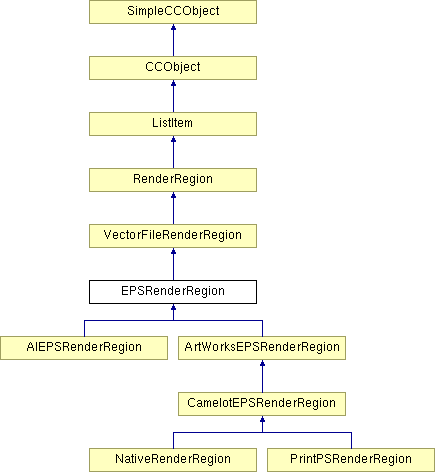
Inheritance diagram for EPSRenderRegion:
Public Member Functions | |
| EPSRenderRegion (DocRect ClipRect, Matrix ConvertMatrix, FIXED16 ViewScale) | |
| Constructor for an EPSOutputFilter object. The object should be initialised before use. | |
| BOOL | Init () |
| Initialise an EPSOutputFilter object. | |
| BOOL | AttachDevice (View *ViewToAttach, CNativeDC *DCToAttach, Spread *SpreadToAttach, bool fOwned=false) |
| Attach the EPS render region to a device context and a spread to export. | |
| BOOL | InitDevice () |
| Initialise the device specific mechanisms for this render region. | |
| virtual BOOL | RenderChar (WCHAR ch, Matrix *pMatrix) |
| virtual BOOL | SaveAttribute (UINT32 Index, AttributeValue *pAttr, BOOL Temp) |
| Saves the current attribute on the attribute context stack, and installs the given attribute as the new attribute. If the attribute object is temporary, then it is deleted when the attribute is popped off the stack. See RenderRegion::RestoreAttribute. | |
| virtual BOOL | CloseDown () |
| Tells the EPS render region that all rendering is finished and the region is about to be shut down, so it should output any trailer etc that is required. | |
| virtual void | DrawPathToOutputDevice (Path *PathToRender, PathShape shapePath) |
| Output all the commands required to render this path to the EPS file. | |
| void | ExportPath (Path *DrawPath, BOOL DataOnly, BOOL PureDataOnly=FALSE) |
| Output all the commands required to render this path to the EPS file. If this is a compound path, the stroke/fill operators will always be output, regardless of the value of the DataOnly parameter. | |
| virtual void | GetValidPathAttributes () |
| Ensure the EPS context has the correct attributes for drawing paths. This required because when the path attributes change, we don't output the EPS commands to reflect this straight away - we set a flag to indicate that the attributes have changed, and then when this function is called, it notices that the attributes have changed, and outputs the EPS commands to select these attributes. This avoids redundant and copious attribute code in our EPS files. (The flags used are ValidPen and FillFlags.ValidGeometry). | |
| virtual void | GetValidTextAttributes () |
| Text equivalent of GetValidPathAttributes(). | |
| virtual void | GetRenderRegionCaps (RRCaps *pCaps) |
| This function allows render regions to admit to what they can and can not render. This allows other areas of the program to come in and help render regions out in some situations, if they are unable to render everything. eg. an OSRenderRegion can not render transparancy. | |
| virtual BOOL | WantsGrids () |
| This function is designed to help with the rendering of grids, as they are not always wanted (eg xara eps). EPS classes generally do not want to render grids. The ones that do (NativeEPS) should replace this with a version that returns TRUE. | |
| virtual BOOL | WriteNewLine (void) |
| Outputs a new line tag to the file. | |
| virtual void | SetClipRegion (ClipRegionAttribute *pClipAttr, BOOL Temp) |
| Shrink the RR's clipping region to the region defined by pClipAttr. We do this by: 1. Recording a save-state command. 2. Exporting a description of the clipping path in pClipAttr. 3. Recording a 'clip-to-last-path' command. 4. Recording a 'start-new-path' command, as we don't want our clip-path to get stroked or rendered in any way. | |
| virtual void | RestoreClipRegion (ClipRegionAttribute *pClipAttr, BOOL Temp) |
| Restore the RR's clipping region. We do this by recording a restore-state command. | |
Protected Member Functions | |
| virtual void | OutputFontName (void) |
| Output an Illustrator format fontname and pointsize token. The format is /_fontname[-Bold|-Italic|-BoldItalic] pointsize Tf. EncodeFontName will generate this format from an internal fontname. DocodeFontName will return an internal format fontname and flags where nec. | |
| INT32 | GetFontStyle (void) |
| Compile the current style attributes. | |
| virtual BOOL | WriteEPSVersion (void) |
| Writes the EPS version used by this particular file type. | |
| virtual BOOL | WriteEPSBoundingBox (void) |
| Writes an EPS bounding box. | |
| virtual BOOL | WriteEPSProcessColours (void) |
| Does nothing - process colours are only relevant in AI files. | |
| virtual BOOL | WriteEPSResources (EPSFilter *pFilter, Document *pDocument) |
| This is a stub function, that's over-loaded in the AIEPS render region. It's used to write out the necessary resources for an AI file. | |
| virtual BOOL | WriteEPSProlog (EPSFilter *pFilter, Document *pDocument) |
| This is a stub function, that's over-loaded in the AIEPS render region. It's used to write out the necessary Prolog script for an AI file. | |
| virtual BOOL | WriteEPSTrailerComments (void) |
| Writes the comments out at the end of an EPS file. | |
| virtual BOOL | WriteProlog (KernelDC *) |
| Output any PostScript prolog for this render region. For EPS and printing, this means output of our PostScript rendering procedures; for Native files we do nothing. | |
| virtual BOOL | WriteSetup (KernelDC *) |
| Output any PostScript setup for this render region. For EPS and printing, this means output of our PostScript code to initialise the context for rendering; for Native files we do nothing. | |
| virtual BOOL | WriteSepTables (KernelDC *) |
| Output the current set of device printer profiles as Postscript data arrays. Our Postscript prolog functions will use these arrays when creating separations. (if we are not separating, we do nothing). | |
| virtual BOOL | WriteSepFunctions (KernelDC *) |
| Output the current set of separation functions for this EPS file if any. These will usually be present in printable postscript versions of EPS render regions. | |
| BOOL | SetLastOutputAttribute (INT32 AttrID) |
| Check to see if the current attribute is the same as the last one that was output in EPS. | |
| void | ResetOutputAttributes (void) |
| Resets the attribute array so that all attributes are considered to be invalidated - i.e. the next time an attribute is needed, it will always be output, regardless of whether the last attribute output was the same as it. This is mainly used for PostScript printing when we use the OS to do text, because we cannot be sure of how the OS will leave the graphics state after doing text output, so we assume nothing, and reset all required attributes after doing text output via the OS. | |
| virtual BOOL | WriteFileVersion (KernelDC *) |
| This allows the filter to save out a comment line giving file version information. At present, in anything but Native format, it does nothing. | |
| virtual BOOL | WriteCompressionState (KernelDC *) |
| This starts the compression process. Called just after we output the document information so that this is not compressed and the galleries can access it easily. In this baseclass version we do nothing as compression would be a very bad thing. | |
| virtual BOOL | WriteEndCompressionState (KernelDC *) |
| This is called once almost everything has been output, just before we output the EOF and we fix the EPS header. In this baseclass version we do nothing as compression would be a very bad thing. | |
| virtual BOOL | WriteGradientFills (Document *pDocument) |
| This function is a stub function, which is overwritten in the AI render region. | |
| virtual BOOL | WriteDocumentSetup (Document *pDocument, EPSFilter *pFilter) |
| Browse through the tree, and if a text story is found invoke the document setup function. By only exporting the font setup when necessary, the file size produced is smaller (which makes it easier for me to interpret :) ), and it should hopefully make the filter run a bit faster too. | |
| virtual BOOL | EndLayer (void) |
| If there is an existing layer, it writes the end of layer tags, before creating a new layer record. | |
| ColourPlate * | GetOutputColourPlate (ColourModel ColModel) |
| void | GetOutputColourPlate (ColourModel ColModel, ColourContext **ppContext, ColourPlate **ppPlate) |
| This render region is associated with a document view. This function retrieves the colour context from this view and returns it along with a plate (if available). ColourModel is used to determin which plate to return from the context. If there is no view pContext and pPlate will be NULL. If there is no context in the view both return values will be NULL If there is a context but no plate attached to it, one can assume the current render action is not separated. | |
| virtual void | OutputWindingRule () |
| Output winding rule token to the EPS file. | |
| virtual void | OutputStrokeColour () |
| Output a stroke colour. This calls either OutputStrokeRGBcolour or OutputStrokeCMYKColour depending on the colour model. | |
| virtual void | OutputLineWidth () |
| Output the standard line width token and measure for EPS. | |
| virtual void | OutputJoinType () |
| Output the standard EPS join type. | |
| virtual void | OutputDashPatternInit () |
| Sets up the next dash pattern for output. | |
| virtual void | OutputDashPattern () |
| Output the current dash pattern settings. Watch for interaction with line widths, a change of line width causes the dash pattern to become invalid. To output a dash pattern correctly, use the following code. | |
| virtual void | OutputStartCap () |
| Output the start cap setting using the usual 'J' EPS token. | |
| virtual void | OutputMitreLimit () |
| Output the current mitre limit value using the usual 'M' EPS token. | |
| virtual void | OutputFillColour () |
| This now delegates the output to either OutputFillRGBColour or OutputFillCMYKColour, depending on the colour model used. | |
| virtual void | OutputStrokeRGBColour () |
| Output the current stroke colour as RGB. This function will use one of the following EPS tokens XA - if not separating and colour is unnamed XX - if not separating and colour is named G - if separating. | |
| virtual void | OutputFillRGBColour () |
| Output the current fill colour as RGB. This function will use one of the following EPS tokens Xa - if not separating and colour is unnamed Xx - if not separating and colour is named g - if separating. | |
| virtual void | OutputStrokeCMYKColour () |
| Output the current stroke colour. This function will use one of the following EPS tokens K - if not separating and colour is unnamed X - if not separating and colour is named G - if separating. | |
| virtual void | OutputFillCMYKColour () |
| Output the current fill colour in CMYK mode. This function will use one of the following EPS tokens k - if not separating and colour is unnamed x - if not separating and colour is named g - if separating. | |
| virtual void | OutputTextRenderMode () |
| Output the change in the text's Render Mode (Tr) - this happens when the text's fill or line colour changes to or from blank, see-through colour. | |
| virtual void | OutputTextAspectRatio () |
| Output the change in the text's aspect ratio (Tx). | |
| virtual void | OutputTextTracking () |
| Output the change in the tracking (Tt). | |
| virtual void | OutputTextJustification () |
| Output the change in the text justification (Ta). | |
| virtual void | OutputTextLineSpacing () |
| Output the change in the line spacing (Tl). | |
| virtual void | OutputTextBaselineShift () |
| Output the change in Baseline shift (Ts). | |
| virtual void | OutputTextSubSuperScript () |
| Output the change in the Sub/Super script attribute (Ts). | |
| virtual void | WriteGradientFillInstance () |
| This function allows extra work to be done on gradient fills, when the fill and/or stroke operators are written. i.e. at the last possible moment before rendering. | |
Protected Attributes | |
| BOOL | ValidPen |
| CCLexFile * | ExportFile |
| TCHAR * | CreatorString |
| RRCaps | Caps |
| BOOL | m_bValidPathAttrs |
| BOOL | m_bValidTextAttrs |
Friends | |
| class | NodeBitmap |
Definition at line 125 of file saveeps.h.
|
||||||||||||||||
|
Constructor for an EPSOutputFilter object. The object should be initialised before use.
Definition at line 157 of file saveeps.cpp. 00157 : 00158 VectorFileRenderRegion(ClipRect, ConvertMatrix, ViewScale) 00159 { 00160 ValidPen = FALSE; 00161 CreatorString = _T("Adobe Illustrator 3.0 (exported by Camelot)"); 00162 00163 ExportFile = NULL; 00164 m_bValidPathAttrs = TRUE; 00165 m_bValidTextAttrs = TRUE; 00166 }
|
|
||||||||||||||||||||
|
Attach the EPS render region to a device context and a spread to export.
Reimplemented from RenderRegion. Definition at line 212 of file saveeps.cpp. 00213 { 00214 // Sanity checks 00215 // ENSURE(pView == NULL, "Bad window pointer in EPSRenderRegion::AttachDevice"); 00216 00217 // Call the base class first 00218 if (!RenderRegion::AttachDevice(pView, pDC, pSpread)) 00219 return FALSE; 00220 00221 // Save the first node we need to export. 00222 // CurrentRenderState = pSpread->FindFirstForExport(this, FALSE); 00223 00224 // Get a pointer to the CCDiskFile object 00225 EPSExportDC* pEPSDC = (EPSExportDC*) CCDC::ConvertFromNativeDC(pDC); 00226 ExportFile = pEPSDC->ExportFile; 00227 00228 // All okey dokey 00229 return TRUE; 00230 }
|
|
|
Tells the EPS render region that all rendering is finished and the region is about to be shut down, so it should output any trailer etc that is required.
Reimplemented from RenderRegion. Reimplemented in PrintPSRenderRegion. Definition at line 438 of file saveeps.cpp. 00439 { 00440 // Close down any active layers. 00441 EndLayer (); 00442 00443 // Write out the trailer. 00444 WriteEPSTrailerComments (); 00445 00446 return TRUE; 00447 }
|
|
||||||||||||
|
Output all the commands required to render this path to the EPS file.
Implements RenderRegion. Reimplemented in CamelotEPSRenderRegion. Definition at line 1681 of file saveeps.cpp. 01682 { 01683 // ChrisG - 26/10/00 Only export paths if they have any co-ordinates - Exporting 01684 // paths with no co-ords causes no end of hassle in the ExportPath function below, 01685 // where they are used as controls for while loops, positions in arrays (but with 01686 // one subtracted), etc... 01687 if (DrawPath->GetNumCoords ()) 01688 { 01689 // If we are not drawing complex shapes and this shape is, then return 01690 if ((!RenderComplexShapes) && (TestForComplexShape(&Caps))) 01691 return; 01692 01693 ExportPath(DrawPath, FALSE); 01694 01695 // Now do the arrow heads if the render region can't do them directly 01696 // -- But only draw arrow heads if the path is "stroked" 01697 if (DrawPath->IsStroked && !Caps.ArrowHeads) 01698 { 01699 // Doesn't support arrow heads directly so we render them as paths. 01700 DrawPathArrowHeads(DrawPath->GetCoordArray(), 01701 DrawPath->GetVerbArray(), 01702 DrawPath->GetNumCoords()); 01703 } 01704 } 01705 }
|
|
|
If there is an existing layer, it writes the end of layer tags, before creating a new layer record.
Reimplemented in AIEPSRenderRegion. Definition at line 2141 of file saveeps.cpp. 02142 { 02143 // Don't do anything. 02144 return TRUE; 02145 }
|
|
||||||||||||||||
|
Output all the commands required to render this path to the EPS file. If this is a compound path, the stroke/fill operators will always be output, regardless of the value of the DataOnly parameter.
Definition at line 1732 of file saveeps.cpp. 01733 { 01734 // Only change data if we have actually have data to change 01735 if (!PureDataOnly) 01736 { 01737 // Make sure we draw in the right colours 01738 GetValidPathAttributes(); 01739 } 01740 01741 // Get the device context for our export file. 01742 KernelDC *pDC = (KernelDC*)CCDC::ConvertFromNativeDC(RenderDC); 01743 01744 DocCoord* Coords = DrawPath->GetCoordArray(); 01745 PathVerb* Verbs = DrawPath->GetVerbArray(); 01746 INT32 NumCoords = DrawPath->GetNumCoords(); 01747 01748 // Position we are reading points from 01749 INT32 ReadPos = 1; 01750 01751 // Check to see if this is a compound path. If it is, there will be more than one 01752 // moveto command. 01753 BOOL CompoundPath = FALSE; 01754 01755 while (ReadPos < NumCoords) 01756 { 01757 // Find out the type of element that we are over (after the close flag has been removed) 01758 if (((Verbs[ReadPos]) & (~PT_CLOSEFIGURE) ) == PT_MOVETO) 01759 { 01760 // This is a compound path - stop searching for moveto's. 01761 CompoundPath = TRUE; 01762 break; 01763 } 01764 // Try next point 01765 ReadPos++; 01766 } 01767 01768 // Karim 24/05/2000 - don't want this bracket data if the PureDataOnly flag is set. 01769 if (CompoundPath && !PureDataOnly) 01770 { 01771 // Bracket compound paths./ 01772 pDC->OutputToken(_T("*u")); 01773 pDC->OutputNewLine(); 01774 } 01775 01776 // Work out how to render the path (stroke, fill, both, none, etc.) 01777 TCHAR PathTypeOpen[2] = _T("N"); 01778 TCHAR PathTypeClosed[2]; 01779 01780 // Work out if the path is filled. 01781 BOOL IsFilled = TRUE; 01782 01783 ColourFillAttribute *pFillAttr = 01784 (ColourFillAttribute *) CurrentAttrs[ATTR_FILLGEOMETRY].pAttr; 01785 01786 if (pFillAttr->IsKindOf(CC_RUNTIME_CLASS(FlatFillAttribute)) && 01787 pFillAttr->Colour.IsTransparent()) 01788 { 01789 // Flat fill with transparent colour => no fill 01790 IsFilled = FALSE; 01791 } 01792 01793 if (!DrawPath->IsFilled) 01794 IsFilled = FALSE; 01795 01796 // Work out what should be done to the path 01797 if (RR_STROKECOLOUR().IsTransparent() || !DrawPath->IsStroked) 01798 { 01799 if (IsFilled) 01800 // Fill path 01801 PathTypeOpen[0] = 'F'; 01802 } 01803 else 01804 { 01805 if (IsFilled) 01806 // Stroke and fill path 01807 PathTypeOpen[0] = 'B'; 01808 else 01809 // Stroke path, leaving it unfilled 01810 PathTypeOpen[0] = 'S'; 01811 } 01812 01813 // make closed varity of PathType 01814 PathTypeClosed[0] = camTolower(PathTypeOpen[0]); 01815 PathTypeClosed[1] = '\0'; 01816 01817 // Reset to start of path 01818 ReadPos = 0; 01819 01820 // loop through the whole path 01821 while(ReadPos < NumCoords) 01822 { 01823 // Find out the type of element that we are over (after the close flag has been removed) 01824 // Coord P[4]; 01825 switch ( (Verbs[ReadPos]) & (~PT_CLOSEFIGURE) ) 01826 { 01827 case PT_MOVETO: 01828 // If this is in the middle of the path, specify how this sub-path 01829 // should be rendered - this is needed so that we re-import all the flags 01830 // correctly on complex paths (e.g. PT_CLOSEFIGURE) 01831 // Karim 25/05/2000 - changed so we don't output this stroking token if PureDataOnly. 01832 if (ReadPos > 0 && !PureDataOnly) 01833 { 01834 pDC->OutputToken(((Verbs[ReadPos - 1] & PT_CLOSEFIGURE) != 0)?PathTypeClosed:PathTypeOpen); 01835 pDC->OutputNewLine(); 01836 } 01837 01838 // Output the moveto command 01839 pDC->OutputCoord(Coords[ReadPos]); 01840 pDC->OutputToken(TEXT("m")); 01841 pDC->OutputNewLine(); 01842 ReadPos++; 01843 break; 01844 01845 01846 case PT_LINETO: 01847 // Output the lineto command 01848 pDC->OutputCoord(Coords[ReadPos]); 01849 pDC->OutputToken(TEXT("l")); 01850 pDC->OutputNewLine(); 01851 ReadPos++; 01852 break; 01853 01854 01855 case PT_BEZIERTO: 01856 // If this point is a bezier, then the next 2 points should be beziers to 01857 ENSURE((Verbs[ReadPos+1]) & (~PT_CLOSEFIGURE), "Bezier found with 1 point"); 01858 ENSURE((Verbs[ReadPos+2]) & (~PT_CLOSEFIGURE), "Bezier found with 2 points"); 01859 01860 // Make sure that this is not at the start of the path 01861 ENSURE(ReadPos > 0, "Broken path found while exporting EPS" ); 01862 01863 // Output the moveto command 01864 pDC->OutputCoord(Coords[ReadPos]); 01865 pDC->OutputCoord(Coords[ReadPos+1]); 01866 pDC->OutputCoord(Coords[ReadPos+2]); 01867 pDC->OutputToken(TEXT("c")); 01868 pDC->OutputNewLine(); 01869 ReadPos += 3; 01870 break; 01871 01872 default: 01873 ENSURE( FALSE, "We found a Path Element that does not exist!" ); 01874 break; 01875 } 01876 } 01877 01878 // Karim 24/05/2000 - if PureDataOnly is specified, then we *really* don't want to render here! 01879 if (!PureDataOnly && (!DataOnly || CompoundPath)) 01880 { 01881 // Write out any additional info it's a gradient fill. 01882 if (pFillAttr->IsAGradFill ()) 01883 { 01884 WriteGradientFillInstance (); 01885 } 01886 01887 // Do the final (or possibly only) render command 01888 pDC->OutputToken(((Verbs[NumCoords - 1] & PT_CLOSEFIGURE) != 0)?PathTypeClosed:PathTypeOpen); 01889 pDC->OutputNewLine(); 01890 } 01891 01892 // Karim 24/05/2000 - don't want this bracket data if the PureDataOnly flag is set. 01893 if (CompoundPath && !PureDataOnly) 01894 { 01895 // End compound path 01896 pDC->OutputToken(_T("*U")); 01897 pDC->OutputNewLine(); 01898 } 01899 }
|
|
|
Compile the current style attributes.
Definition at line 622 of file saveeps.cpp. 00623 { 00624 INT32 Style = 0; 00625 if (RR_TXTBOLD()) Style+=1; 00626 if (RR_TXTITALIC()) Style+=2; 00627 return Style; 00628 }
|
|
||||||||||||||||
|
This render region is associated with a document view. This function retrieves the colour context from this view and returns it along with a plate (if available). ColourModel is used to determin which plate to return from the context. If there is no view pContext and pPlate will be NULL. If there is no context in the view both return values will be NULL If there is a context but no plate attached to it, one can assume the current render action is not separated.
Definition at line 1646 of file saveeps.cpp. 01647 { 01648 ColourContext *pCurContext=NULL; 01649 ColourPlate *pCurPlate=NULL; 01650 01651 // Get the render region view and find its local CMYK colour context 01652 View* pCurrView = GetRenderView(); 01653 if (pCurrView!=NULL) 01654 pCurContext = pCurrView->GetColourContext(ColModel, TRUE); 01655 01656 // If we have a context, check for mono output. 01657 if (pCurContext!=NULL) 01658 pCurPlate = pCurContext->GetColourPlate(); 01659 01660 // Set return vars 01661 if (pContext!=NULL) 01662 (*pContext) = pCurContext; 01663 if (pPlate!=NULL) 01664 (*pPlate) = pCurPlate; 01665 }
|
|
|
|
|
|
This function allows render regions to admit to what they can and can not render. This allows other areas of the program to come in and help render regions out in some situations, if they are unable to render everything. eg. an OSRenderRegion can not render transparancy.
Reimplemented from RenderRegion. Reimplemented in CamelotEPSRenderRegion, and NativeRenderRegion. Definition at line 2435 of file saveeps.cpp. 02436 { 02437 // This forces line attributes - dash patterns and arrow heads to be output 02438 // properly for EPS, rather than using Camelot 'shorthand' tokens. 02439 pCaps->CanDoNothing(); 02440 pCaps->ClippedOutput = TRUE; 02441 }
|
|
|
Ensure the EPS context has the correct attributes for drawing paths. This required because when the path attributes change, we don't output the EPS commands to reflect this straight away - we set a flag to indicate that the attributes have changed, and then when this function is called, it notices that the attributes have changed, and outputs the EPS commands to select these attributes. This avoids redundant and copious attribute code in our EPS files. (The flags used are ValidPen and FillFlags.ValidGeometry).
Reimplemented in ArtWorksEPSRenderRegion, CamelotEPSRenderRegion, and NativeRenderRegion. Definition at line 1011 of file saveeps.cpp. 01012 { 01013 // Path stroking. Do nothing if the stroke is transparent. 01014 // Note, if this changes you MUST investigate and change GetValidTextAttributes 01015 // cause this needs to output transparent stroke colours. 01016 if (SetLastOutputAttribute(ATTR_WINDINGRULE) || !m_bValidPathAttrs) 01017 { 01018 OutputWindingRule (); 01019 } 01020 01021 if (!RR_STROKECOLOUR().IsTransparent()) 01022 { 01023 if (SetLastOutputAttribute(ATTR_STROKECOLOUR) || !m_bValidPathAttrs) 01024 OutputStrokeColour(); 01025 } 01026 01027 if (SetLastOutputAttribute(ATTR_LINEWIDTH) || !m_bValidPathAttrs) 01028 OutputLineWidth(); 01029 01030 if (SetLastOutputAttribute(ATTR_JOINTYPE) || !m_bValidPathAttrs) 01031 OutputJoinType(); 01032 01033 // Set up the dash pattern first. 01034 OutputDashPatternInit(); 01035 if (SetLastOutputAttribute(ATTR_DASHPATTERN) || !m_bValidPathAttrs) 01036 OutputDashPattern(); 01037 01038 if (SetLastOutputAttribute(ATTR_STARTCAP) || !m_bValidPathAttrs) 01039 OutputStartCap(); 01040 01041 if (SetLastOutputAttribute(ATTR_MITRELIMIT) || !m_bValidPathAttrs) 01042 OutputMitreLimit(); 01043 01044 // Path filling 01045 01046 if (!RR_FILLCOLOUR().IsTransparent()) 01047 { 01048 if (SetLastOutputAttribute(ATTR_FILLGEOMETRY) || !m_bValidPathAttrs) 01049 OutputFillColour(); 01050 } 01051 01052 // The path attributes must be valid (as we've just written them). 01053 m_bValidPathAttrs = TRUE; 01054 01055 }
|
|
|
Text equivalent of GetValidPathAttributes().
Reimplemented in NativeRenderRegion. Definition at line 643 of file saveeps.cpp. 00644 { 00645 // Illustrator does not specify a token for changing 00646 // -fontsize 00647 // -bold 00648 // -italic 00649 // We need to use the standard Tf token. (see OutputFontName) 00650 00651 BOOL FontOut = FALSE; 00652 if (SetLastOutputAttribute(ATTR_TXTFONTTYPEFACE)) 00653 { 00654 FontOut=TRUE; 00655 } 00656 00657 if (SetLastOutputAttribute(ATTR_TXTFONTSIZE)) 00658 { 00659 FontOut=TRUE; 00660 } 00661 00662 if (SetLastOutputAttribute(ATTR_TXTBOLD)) 00663 { 00664 FontOut=TRUE; 00665 } 00666 00667 if (SetLastOutputAttribute(ATTR_TXTITALIC)) 00668 { 00669 FontOut=TRUE; 00670 } 00671 00672 if (!m_bValidTextAttrs) 00673 { 00674 FontOut = TRUE; 00675 } 00676 00677 // ok check whether a font change needs generating 00678 if (FontOut) 00679 OutputFontName(); 00680 00681 00682 BOOL FillNLine = FALSE; 00683 if (SetLastOutputAttribute(ATTR_STROKECOLOUR)) 00684 { 00685 FillNLine = TRUE; 00686 } 00687 00688 if (SetLastOutputAttribute(ATTR_FILLGEOMETRY)) 00689 { 00690 FillNLine = TRUE; 00691 } 00692 00693 if (!m_bValidTextAttrs) 00694 { 00695 FillNLine = TRUE; 00696 } 00697 00698 // Text Render mode needs changing as Text has gained or lost fill and/or 00699 // line colours 00700 if (FillNLine) 00701 { 00702 OutputTextRenderMode (); 00703 } 00704 00705 if (SetLastOutputAttribute(ATTR_TXTASPECTRATIO) || !m_bValidTextAttrs) 00706 { 00707 OutputTextAspectRatio (); 00708 } 00709 00710 if (SetLastOutputAttribute(ATTR_TXTTRACKING) || !m_bValidTextAttrs) 00711 { 00712 OutputTextTracking (); 00713 } 00714 00715 if (SetLastOutputAttribute(ATTR_TXTJUSTIFICATION) || !m_bValidTextAttrs) 00716 { 00717 OutputTextJustification (); 00718 } 00719 00720 // BODGE TEXT - should this be output before any lines rather than on a line 00721 // by line basis? 00722 if (SetLastOutputAttribute(ATTR_TXTLINESPACE) || !m_bValidTextAttrs) 00723 { 00724 OutputTextLineSpacing (); 00725 } 00726 00727 if (SetLastOutputAttribute(ATTR_TXTBASELINE) || !m_bValidTextAttrs) 00728 { 00729 OutputTextBaselineShift (); 00730 } 00731 00732 if (SetLastOutputAttribute(ATTR_TXTSCRIPT) || !m_bValidTextAttrs) 00733 { 00734 OutputTextSubSuperScript (); 00735 } 00736 00737 // The text attributes are now Definitely valid (as we've just written all of them) 00738 m_bValidTextAttrs = TRUE; 00739 }
|
|
|
Initialise an EPSOutputFilter object.
Reimplemented from VectorFileRenderRegion. Definition at line 182 of file saveeps.cpp. 00183 { 00184 // Initialise all member variables. 00185 ValidPen = FALSE; 00186 LastOutputAttrs = NULL; 00187 ExportFile = NULL; 00188 CreatorString = NULL; 00189 00190 m_bValidPathAttrs = TRUE; 00191 m_bValidTextAttrs = TRUE; 00192 00193 // All ok 00194 return TRUE; 00195 }
|
|
|
Initialise the device specific mechanisms for this render region.
Reimplemented from RenderRegion. Reimplemented in PrintPSRenderRegion. Definition at line 247 of file saveeps.cpp. 00248 { 00249 // Call base class 00250 if (!RenderRegion::InitDevice()) 00251 return FALSE; 00252 00253 // Set the render caps up 00254 GetRenderRegionCaps(&Caps); 00255 00256 // Buffer used to build up the %%For and %%CreationDate comments. 00257 TCHAR buf[300]; 00258 00259 // Find out which document we're using 00260 ENSURE(RenderView->GetDoc() != NULL, "View's document is NULL!"); 00261 Document *TheDocument = RenderView->GetDoc(); 00262 00263 KernelDC *pDC = (KernelDC*)CCDC::ConvertFromNativeDC(RenderDC); 00264 00265 // Output the standard EPS header affair... 00266 WriteEPSVersion (); 00267 00268 // Name of program that created this file. 00269 pDC->OutputToken ( _T("%%Creator:") ); 00270 pDC->OutputToken ( CreatorString ); 00271 pDC->OutputNewLine (); 00272 00273 // File version saving. In anything but Native format does nothing 00274 WriteFileVersion ( pDC ); 00275 00276 // Output the %%For comment 00277 camSprintf(buf, _T("%%%%For: (%s) (%s)"), ReleaseInfo::GetLicensee(), ReleaseInfo::GetCompany()); 00278 pDC->OutputToken(buf); 00279 pDC->OutputNewLine(); 00280 00281 // The title of the picture 00282 String_256 DocumentTitle = TheDocument->GetTitle(); 00283 camSprintf(buf, _T("%%%%Title: (%s)"), (TCHAR *) DocumentTitle); 00284 pDC->OutputToken(buf); 00285 pDC->OutputNewLine(); 00286 00287 // Date this file was created. 00288 time_t Now; 00289 time(&Now); 00290 struct tm *pNow = localtime(&Now); 00291 #if 1 00292 char buf2[100]; 00293 strftime(buf2, 100, "%%%%CreationDate: (%d/%m/%y) (%I:%M %p)", pNow); 00294 INT32 i=0; 00295 char c; 00296 do 00297 { 00298 c=buf2[i]; 00299 buf[i]=c; // 1:1 char/TCHAR conversion 00300 i++; 00301 } while (c); 00302 00303 #else 00304 _tcsftime(buf, 100, "%%%%CreationDate: (%d/%m/%y) (%I:%M %p)", pNow); 00305 #endif 00306 pDC->OutputToken(buf); 00307 pDC->OutputNewLine(); 00308 00309 // Bounding box. 00310 WriteEPSBoundingBox (); 00311 00312 // Get a handle to our filter 00313 EPSExportDC *pExportDC = (EPSExportDC *) pDC; 00314 EPSFilter *pFilter = (EPSFilter *) pExportDC->GetParentFilter(); 00315 00316 // Write out the document's process colours. (Only for AIEPS.) 00317 WriteEPSProcessColours (); 00318 00319 // Write out the Documents fonts 00320 TheDocument->WriteEPSFonts ( pFilter ); 00321 00322 // Write out the Documents resources 00323 WriteEPSResources ( pFilter, TheDocument ); 00324 00325 // Write out the Documents comments 00326 TheDocument->WriteEPSComments ( pFilter ); 00327 00328 // We can say compress this file if native. 00329 // We will leave the document comments in so that things like the clipart gallery 00330 // can still easily access this useful information. 00331 // 00332 // Compressed saving. In anything but Native format does nothing 00333 WriteCompressionState ( pDC ); 00334 00335 // Get all the document components to output their header comments (if any) 00336 DocComponent *pComponent = TheDocument->EnumerateDocComponents ( NULL ); 00337 00338 while (pComponent != NULL) 00339 { 00340 // Inform this document component that we are about to start an EPS export. 00341 pComponent->WriteEPSComments(pFilter); 00342 00343 // Look for next doc component 00344 pComponent = TheDocument->EnumerateDocComponents(pComponent); 00345 } 00346 00347 // No more comments 00348 pDC->OutputToken ( _T("%%EndComments") ); 00349 pDC->OutputNewLine (); 00350 00351 // Do the prolog... 00352 pDC->OutputToken ( _T("%%BeginProlog") ); 00353 pDC->OutputNewLine (); 00354 00355 // Do the render region specific prolog. 00356 WriteProlog ( pDC ); 00357 00358 // Write out the document,s Prolog script. 00359 WriteEPSProlog ( pFilter, TheDocument ); 00360 00361 // and the doc components prolog 00362 pComponent = TheDocument->EnumerateDocComponents(NULL); 00363 while (pComponent != NULL) 00364 { 00365 // Get this document component to write its EPS prolog out to the file. 00366 pComponent->WriteEPSProlog(pFilter); 00367 00368 // Look for next doc component 00369 pComponent = TheDocument->EnumerateDocComponents(pComponent); 00370 } 00371 00372 pDC->OutputToken(_T("%%EndProlog")); 00373 pDC->OutputNewLine(); 00374 00375 // Do the setup... 00376 pDC->OutputToken(_T("%%BeginSetup")); 00377 pDC->OutputNewLine(); 00378 00379 // Do the render region specific setup. 00380 WriteSetup ( pDC ); 00381 00382 // Write out the font definition. 00383 WriteDocumentSetup ( TheDocument, pFilter ); 00384 00385 // and the components setup 00386 pComponent = TheDocument->EnumerateDocComponents(NULL); 00387 while (pComponent != NULL) 00388 { 00389 // Get this document component to write its EPS setup out to the file. 00390 pComponent->WriteEPSSetup(pFilter); 00391 00392 // Look for next doc component 00393 pComponent = TheDocument->EnumerateDocComponents(pComponent); 00394 } 00395 00396 // Parse through the tree, locate the gradient fills, and write them out 00397 // to the file. 00398 WriteGradientFills ( TheDocument ); 00399 00400 // Wrap up the header section 00401 pDC->OutputToken(_T("%%EndSetup")); 00402 pDC->OutputNewLine(); 00403 00404 // We are into the main script of the EPS file here, so give the 00405 // doc components one last chance to write something out 00406 pComponent = TheDocument->EnumerateDocComponents(NULL); 00407 00408 while (pComponent != NULL) 00409 { 00410 // Get this document component to write its EPS Script data to the file 00411 pComponent->WriteScript(pFilter); 00412 00413 // Look for next doc component 00414 pComponent = TheDocument->EnumerateDocComponents(pComponent); 00415 } 00416 00417 // Set up render region 00418 InitClipping (); 00419 00420 // All ok 00421 return TRUE; 00422 }
|
|
|
Output the current dash pattern settings. Watch for interaction with line widths, a change of line width causes the dash pattern to become invalid. To output a dash pattern correctly, use the following code.
Reimplemented in AIEPSRenderRegion. Definition at line 1173 of file saveeps.cpp. 01174 { 01175 KernelDC *pDC = (KernelDC*)CCDC::ConvertFromNativeDC(RenderDC); 01176 01177 // Set dash pattern 01178 INT32 NumEls = RR_DASHPATTERN().Elements; 01179 INT32* TempArray = NULL; 01180 01181 // If the dash patterns need scaling, then we need to scale them 01182 // here, as Illustrator format uses absolute sizes for the dash 01183 // patterns, rather than the 'relative to line width' that we use 01184 // INT32 DashLineWidth = RR_DASHPATTERN().LineWidth; 01185 INT32 LineWidth = RR_LINEWIDTH(); 01186 01187 BOOL DoScale = RR_DASHPATTERN().ScaleWithLineWidth; 01188 FIXED16 Scale = DoScale ? (double(LineWidth) / double(RR_DASHPATTERN().LineWidth)) : 1; 01189 01190 // Don't bother with zero width lines 01191 if (LineWidth == 0) 01192 NumEls = 0; 01193 01194 // But we needn't bother if there are no elements 01195 if (NumEls > 0) 01196 { 01197 INT32* DashArray = RR_DASHPATTERN().ElementData; 01198 TempArray = new INT32[NumEls]; 01199 01200 if (TempArray) 01201 { 01202 for (INT32 el=0; el<NumEls; el++) 01203 { 01204 TempArray[el] = LongMulFixed16(DashArray[el], Scale); 01205 01206 if (TempArray[el] == 0) 01207 { 01208 // Found a zero dash element - this line is obviously too small 01209 // to bother with dash patterns. 01210 NumEls = 0; 01211 break; 01212 } 01213 } 01214 } 01215 } 01216 01217 // Output the (possibly scaled) array of On-Off distances 01218 pDC->OutputArray(TempArray, NumEls); 01219 01220 // Delete the temp buffer if necessary 01221 delete TempArray; 01222 01223 // Also scale the Dash Start Offset if need be 01224 INT32 Offset = LongMulFixed16(RR_DASHPATTERN().DashStart, Scale); 01225 pDC->OutputUserSpaceValue(Offset); 01226 01227 pDC->OutputToken(_T("d")); 01228 pDC->OutputNewLine(); 01229 }
|
|
|
Sets up the next dash pattern for output.
Definition at line 1138 of file saveeps.cpp. 01139 { 01140 if (!StrokeFlags.ValidDashPattern && (RR_DASHPATTERN().Elements > 0)) 01141 { 01142 // Delete the attribute if necessary 01143 if (LastOutputAttrs[ATTR_DASHPATTERN].Temp) 01144 delete LastOutputAttrs[ATTR_DASHPATTERN].pAttr; 01145 01146 // Set to NULL to force it to be output by SetLastOutputAttribute() 01147 LastOutputAttrs[ATTR_DASHPATTERN].pAttr = NULL; 01148 } 01149 01150 // Don't do this again until we need to. 01151 StrokeFlags.ValidDashPattern = TRUE; 01152 }
|
|
|
Output the current fill colour in CMYK mode. This function will use one of the following EPS tokens k - if not separating and colour is unnamed x - if not separating and colour is named g - if separating.
Reimplemented in AIEPSRenderRegion. Definition at line 1494 of file saveeps.cpp. 01495 { 01496 KernelDC *pDC = (KernelDC*)CCDC::ConvertFromNativeDC(RenderDC); 01497 01498 PColourCMYK CMYK; 01499 01500 // retrieve the output plate if there is one 01501 ColourContext* pContext; 01502 ColourPlate* pSeparation; 01503 GetOutputColourPlate(COLOURMODEL_CMYK, &pContext, &pSeparation); 01504 01505 // It seems that in composite mode we always output c,m,y,k colour 01506 // and don't have a monochromatic composite mode. So we don't need 01507 // to check this. 01508 if (pSeparation==NULL) 01509 { 01510 // We're in colour output mode, so output the colour values. 01511 RR_FILLCOLOUR().GetCMYKValue(pContext, &CMYK); 01512 pDC->OutputColour(&CMYK); 01513 01514 if (RR_FILLCOLOUR().FindParentIndexedColour() == NULL) 01515 { 01516 // Unnamed colour - add 'k' token 01517 pDC->OutputToken(_T("k")); 01518 } 01519 else 01520 { 01521 // Named colour - add Name, tint and 'x' token 01522 pDC->OutputColourName(&(RR_FILLCOLOUR())); 01523 pDC->OutputValue((INT32)0); 01524 pDC->OutputToken(_T("x")); 01525 } 01526 } 01527 else 01528 { 01529 // Assume unnamed colour as 'g' grey fill operator does 01530 // not allow for custom greys. 01531 if (pSeparation->IsMonochrome()) 01532 { 01533 RR_FILLCOLOUR().GetCMYKValue(pContext, &CMYK); 01534 BYTE c = 0xFF - CMYK.Key; 01535 pDC->OutputColourValue(c); 01536 pDC->OutputToken(_T("g")); 01537 } 01538 else 01539 { 01540 RR_FILLCOLOUR().GetCMYKValue(pContext, &CMYK); 01541 pDC->OutputColour(&CMYK); 01542 pDC->OutputToken(_T("k")); 01543 } 01544 } 01545 01546 pDC->OutputNewLine(); 01547 }
|
|
|
This now delegates the output to either OutputFillRGBColour or OutputFillCMYKColour, depending on the colour model used.
Reimplemented in AIEPSRenderRegion, ArtWorksEPSRenderRegion, CamelotEPSRenderRegion, and NativeRenderRegion. Definition at line 1465 of file saveeps.cpp. 01466 { 01467 if (RR_FILLCOLOUR().GetColourModel() == COLOURMODEL_RGBT || 01468 RR_FILLCOLOUR().GetColourModel() == COLOURMODEL_HSVT) 01469 { 01470 // Use new RGB fill colours if we're using an RGB colour model 01471 OutputFillRGBColour (); 01472 } 01473 else 01474 { 01475 // Use old CMYK version if we're not. 01476 OutputFillCMYKColour (); 01477 } 01478 }
|
|
|
Output the current fill colour as RGB. This function will use one of the following EPS tokens Xa - if not separating and colour is unnamed Xx - if not separating and colour is named g - if separating.
Reimplemented in AIEPSRenderRegion. Definition at line 1564 of file saveeps.cpp. 01565 { 01566 KernelDC *pDC = (KernelDC*)CCDC::ConvertFromNativeDC(RenderDC); 01567 01568 INT32 red; 01569 INT32 green; 01570 INT32 blue;; 01571 PColourCMYK CMYK; 01572 01573 // retrieve the output plate if there is one 01574 ColourContext* pContext; 01575 ColourPlate* pSeparation; 01576 GetOutputColourPlate(COLOURMODEL_CMYK, &pContext, &pSeparation); 01577 01578 if (pSeparation==NULL) 01579 { 01580 // We're in colour output mode, so output the colour values (as RGB). 01581 RR_FILLCOLOUR().GetRGBValue (&red, &green, &blue); 01582 pDC->OutputColourValue (red); 01583 pDC->OutputColourValue (green); 01584 pDC->OutputColourValue (blue); 01585 01586 if (RR_FILLCOLOUR().FindParentIndexedColour() == NULL) 01587 { 01588 // Unnamed colour - add 'Xa' token 01589 pDC->OutputToken(_T("Xa")); 01590 } 01591 else 01592 { 01593 // Named colour - add Name, tint, RGB flag and 'Xx' token 01594 pDC->OutputColourName(&(RR_FILLCOLOUR())); 01595 pDC->OutputValue((INT32)0); 01596 pDC->OutputValue((INT32)1); 01597 pDC->OutputToken(_T("Xx")); 01598 } 01599 } 01600 else 01601 { 01602 // Assume unnamed colour as 'g' grey fill operator does 01603 // not allow for custom greys. 01604 if (pSeparation->IsMonochrome()) 01605 { 01606 RR_FILLCOLOUR().GetCMYKValue(pContext, &CMYK); 01607 BYTE c = 0xFF - CMYK.Key; 01608 pDC->OutputColourValue(c); 01609 pDC->OutputToken(_T("g")); 01610 } 01611 else 01612 { 01613 RR_FILLCOLOUR().GetCMYKValue(pContext, &CMYK); 01614 pDC->OutputColour(&CMYK); 01615 pDC->OutputToken(_T("k")); 01616 } 01617 } 01618 01619 pDC->OutputNewLine(); 01620 }
|
|
|
Output an Illustrator format fontname and pointsize token. The format is /_fontname[-Bold|-Italic|-BoldItalic] pointsize Tf. EncodeFontName will generate this format from an internal fontname. DocodeFontName will return an internal format fontname and flags where nec.
Reimplemented in AIEPSRenderRegion. Definition at line 584 of file saveeps.cpp. 00585 { 00586 KernelDC *pDC = (KernelDC*)CCDC::ConvertFromNativeDC(RenderDC); 00587 00588 String_64 FontName; 00589 String_64 EncodedFontName; 00590 String_64 Append(_T("/_")); 00591 00592 // get information about the current font 00593 FONTMANAGER->GetFontName(RR_TXTFONTTYPEFACE(), FontName); 00594 00595 // Graeme (31-3-00) - I've lifted this piece of code from the CamelotEPSRenderRegion. It 00596 // appears to map an existing, encoded font name onto its Postscript counterpart. 00597 FONTMANAGER->EncodeAndMapFontName(FontName, EncodedFontName, GetFontStyle()); 00598 00599 EncodedFontName.Insert(Append,0); 00600 pDC->OutputToken((TCHAR *)EncodedFontName); 00601 00602 // Output the fontsize next 00603 double PointSize = ((double)RR_TXTFONTSIZE())/1000; 00604 pDC->OutputFloat(PointSize,3); 00605 00606 // finally do output the font token 00607 pDC->OutputToken(_T("Tf")); 00608 pDC->OutputNewLine(); 00609 }
|
|
|
Output the standard EPS join type.
Reimplemented in AIEPSRenderRegion. Definition at line 1111 of file saveeps.cpp. 01112 { 01113 KernelDC *pDC = (KernelDC*)CCDC::ConvertFromNativeDC(RenderDC); 01114 01115 // Set line Join Type 01116 pDC->OutputValue((UINT32)RR_JOINTYPE()); 01117 pDC->OutputToken(_T("j")); 01118 pDC->OutputNewLine(); 01119 }
|
|
|
Output the standard line width token and measure for EPS.
Reimplemented in AIEPSRenderRegion. Definition at line 1090 of file saveeps.cpp. 01091 { 01092 KernelDC *pDC = (KernelDC*)CCDC::ConvertFromNativeDC(RenderDC); 01093 01094 // Set line width 01095 pDC->OutputUserSpaceValue(RR_LINEWIDTH()); 01096 pDC->OutputToken(_T("w")); 01097 pDC->OutputNewLine(); 01098 }
|
|
|
Output the current mitre limit value using the usual 'M' EPS token.
Reimplemented in AIEPSRenderRegion. Definition at line 1263 of file saveeps.cpp. 01264 { 01265 // KernelDC *pDC = (KernelDC*)CCDC::ConvertFromNativeDC(RenderDC); 01266 01267 // Set mitre limit 01268 01269 // We have no way of altering Mitre Limits, so there's not 01270 // much point in saving them. 01271 01272 // pDC->OutputUserSpaceValue(RR_MITRELIMIT()); 01273 // pDC->OutputToken("M"); 01274 // pDC->OutputNewLine(); 01275 }
|
|
|
Output the start cap setting using the usual 'J' EPS token.
Reimplemented in AIEPSRenderRegion. Definition at line 1242 of file saveeps.cpp. 01243 { 01244 KernelDC *pDC = (KernelDC*)CCDC::ConvertFromNativeDC(RenderDC); 01245 01246 // Set line cap style 01247 pDC->OutputValue((UINT32)RR_STARTCAP()); 01248 pDC->OutputToken(_T("J")); 01249 pDC->OutputNewLine(); 01250 }
|
|
|
Output the current stroke colour. This function will use one of the following EPS tokens K - if not separating and colour is unnamed X - if not separating and colour is named G - if separating.
Reimplemented in AIEPSRenderRegion. Definition at line 1321 of file saveeps.cpp. 01322 { 01323 KernelDC *pDC = (KernelDC*)CCDC::ConvertFromNativeDC(RenderDC); 01324 01325 PColourCMYK CMYK; 01326 01327 // Assume no local context at present 01328 ColourContext* pContext; 01329 ColourPlate* pSeparation; 01330 GetOutputColourPlate(COLOURMODEL_CMYK, &pContext, &pSeparation); 01331 01332 if (pSeparation==NULL) 01333 { 01334 // Get the current line colour in CMYK values, unless it's transparent 01335 // Print out colour component values 01336 RR_STROKECOLOUR().GetCMYKValue(pContext, &CMYK); 01337 pDC->OutputColour(&CMYK); 01338 01339 if (RR_STROKECOLOUR().FindParentIndexedColour() == NULL) 01340 { 01341 // Unnamed colour - just add 'K' token 01342 pDC->OutputToken(_T("K")); 01343 } 01344 else 01345 { 01346 // Named colour - add Name, tint value, and 'X' token 01347 pDC->OutputColourName(&(RR_STROKECOLOUR())); 01348 pDC->OutputValue((INT32)0); 01349 pDC->OutputToken(_T("X")); 01350 } 01351 } 01352 else 01353 { 01354 // Assume unnamed colour as 'g' grey fill operator does 01355 // not allow for custom greys. 01356 if (pSeparation->IsMonochrome()) 01357 { 01358 RR_STROKECOLOUR().GetCMYKValue(pContext, &CMYK); 01359 BYTE c = 0xFF - CMYK.Key; 01360 pDC->OutputColourValue(c); 01361 pDC->OutputToken(_T("G")); 01362 } 01363 else 01364 { 01365 RR_STROKECOLOUR().GetCMYKValue(pContext, &CMYK); 01366 pDC->OutputColour(&CMYK); 01367 pDC->OutputToken(_T("X")); 01368 } 01369 } 01370 01371 pDC->OutputNewLine(); 01372 }
|
|
|
Output a stroke colour. This calls either OutputStrokeRGBcolour or OutputStrokeCMYKColour depending on the colour model.
Reimplemented in AIEPSRenderRegion, ArtWorksEPSRenderRegion, CamelotEPSRenderRegion, and NativeRenderRegion. Definition at line 1291 of file saveeps.cpp. 01292 { 01293 if (RR_STROKECOLOUR().GetColourModel() == COLOURMODEL_RGBT || 01294 RR_STROKECOLOUR().GetColourModel() == COLOURMODEL_HSVT) 01295 { 01296 // Use new RGB fill colours if we're using an RGB colour model 01297 OutputStrokeRGBColour (); 01298 } 01299 else 01300 { 01301 // Use old CMYK version if we're not. 01302 OutputStrokeCMYKColour (); 01303 } 01304 }
|
|
|
Output the current stroke colour as RGB. This function will use one of the following EPS tokens XA - if not separating and colour is unnamed XX - if not separating and colour is named G - if separating.
Reimplemented in AIEPSRenderRegion. Definition at line 1390 of file saveeps.cpp. 01391 { 01392 KernelDC *pDC = (KernelDC*)CCDC::ConvertFromNativeDC(RenderDC); 01393 01394 // Colour values. 01395 INT32 red; 01396 INT32 green; 01397 INT32 blue; 01398 PColourCMYK CMYK; 01399 01400 // Assume no local context at present - used as a check to make sure that we 01401 // aren't exporting as seperations. 01402 ColourContext* pContext; 01403 ColourPlate* pSeparation; 01404 GetOutputColourPlate (COLOURMODEL_CMYK, &pContext, &pSeparation); 01405 01406 if (pSeparation==NULL) 01407 { 01408 // As expected, we ain't using seperations, so we can output as RGB. 01409 01410 // Get the current line colour in RGB values and print them out. 01411 RR_STROKECOLOUR().GetRGBValue (&red, &green, &blue); 01412 pDC->OutputColourValue (red); 01413 pDC->OutputColourValue (green); 01414 pDC->OutputColourValue (blue); 01415 01416 if (RR_STROKECOLOUR().FindParentIndexedColour() == NULL) 01417 { 01418 // Unnamed colour - just add 'XA' token 01419 pDC->OutputToken (_T("XA")); 01420 } 01421 else 01422 { 01423 // Named colour - add Name, tint value, RGB flag and 'XX' token 01424 pDC->OutputColourName (&(RR_STROKECOLOUR())); 01425 pDC->OutputValue((INT32)0); 01426 pDC->OutputValue((INT32)1); 01427 pDC->OutputToken(_T("XX")); 01428 } 01429 } 01430 else 01431 { 01432 // Since we are seperating the colours, then use CMYK mode. 01433 01434 // Assume unnamed colour as 'g' grey fill operator does 01435 // not allow for custom greys. 01436 if (pSeparation->IsMonochrome()) 01437 { 01438 RR_STROKECOLOUR().GetCMYKValue(pContext, &CMYK); 01439 BYTE c = 0xFF - CMYK.Key; 01440 pDC->OutputColourValue(c); 01441 pDC->OutputToken(_T("G")); 01442 } 01443 else 01444 { 01445 RR_STROKECOLOUR().GetCMYKValue(pContext, &CMYK); 01446 pDC->OutputColour(&CMYK); 01447 pDC->OutputToken(_T("X")); 01448 } 01449 } 01450 01451 pDC->OutputNewLine(); 01452 }
|
|
|
Output the change in the text's aspect ratio (Tx).
Reimplemented in AIEPSRenderRegion. Definition at line 797 of file saveeps.cpp. 00798 { 00799 KernelDC *pDC = (KernelDC*)CCDC::ConvertFromNativeDC(RenderDC); 00800 00801 pDC->OutputReal(RR_TXTASPECTRATIO().MakeDouble()*100.0); // convert from ratio to % 00802 pDC->OutputToken(_T("Tz")); 00803 pDC->OutputNewLine(); 00804 }
|
|
|
Output the change in Baseline shift (Ts).
Reimplemented in AIEPSRenderRegion. Definition at line 929 of file saveeps.cpp. 00930 { 00931 KernelDC *pDC = (KernelDC*)CCDC::ConvertFromNativeDC(RenderDC); 00932 00933 // Output baseline shift in points 00934 // format = rise Ts 00935 double BaseLine = ((double)RR_TXTBASELINE())/1000; 00936 pDC->OutputFloat(BaseLine,3); 00937 pDC->OutputToken(_T("Ts")); 00938 pDC->OutputNewLine(); 00939 }
|
|
|
Output the change in the text justification (Ta).
Reimplemented in AIEPSRenderRegion. Definition at line 842 of file saveeps.cpp. 00843 { 00844 KernelDC *pDC = (KernelDC*)CCDC::ConvertFromNativeDC(RenderDC); 00845 00846 // Output aspect ratio in %, 100 is default 00847 switch (RR_TXTJUSTIFICATION()) 00848 { 00849 case JLEFT: 00850 pDC->OutputValue((INT32)0); 00851 break; 00852 case JRIGHT: 00853 pDC->OutputValue((INT32)2); 00854 break; 00855 case JCENTRE: 00856 pDC->OutputValue((INT32)1); 00857 break; 00858 case JFULL: 00859 pDC->OutputValue((INT32)3); 00860 break; 00861 } 00862 pDC->OutputToken(_T("Ta")); 00863 pDC->OutputNewLine(); 00864 }
|
|
|
Output the change in the line spacing (Tl).
Reimplemented in AIEPSRenderRegion. Definition at line 876 of file saveeps.cpp. 00877 { 00878 KernelDC *pDC = (KernelDC*)CCDC::ConvertFromNativeDC(RenderDC); 00879 00880 // Output line spacing in points. 00881 // format - paraspace linespace Tl 00882 double ptLineSpace; 00883 double ptParaSpace=0; 00884 00885 TxtLineSpaceAttribute* pLineSpace = (TxtLineSpaceAttribute*)(CurrentAttrs[ATTR_TXTLINESPACE].pAttr); 00886 00887 // There are some rules for reading the linespacing value which I shall divulge 00888 // If IsARation is true then use the proportinal linespacing value. 00889 // else use the absolute linespacing 00890 // However if the absolute linespacing is zero, then we MUST use the proportional 00891 // linespacing. Eeek! 00892 // ie it is an error if (absolute==0 && !IsARatio()) which we will check for here 00893 00894 double FontSize = (double)RR_TXTFONTSIZE(); // in millipoints 12pt = 12000 mp 00895 double absLineSpace = (double)pLineSpace->Value; 00896 double proLineSpace = (pLineSpace->Ratio).MakeDouble(); 00897 00898 BOOL Proportional = pLineSpace->IsARatio(); 00899 00900 if (!Proportional && absLineSpace==0) 00901 { 00902 ERROR3("Absolute line spacing is zero yet IsARatio() is FALSE, in GetValidTextAttributes()"); 00903 // Make sure we use the proportional value no matter what. 00904 Proportional=TRUE; 00905 } 00906 00907 if (Proportional) 00908 ptLineSpace = FontSize*proLineSpace/1000; 00909 else 00910 ptLineSpace = absLineSpace/1000; 00911 00912 pDC->OutputReal(ptLineSpace); 00913 pDC->OutputReal(ptParaSpace); 00914 pDC->OutputToken(_T("Tl")); 00915 pDC->OutputNewLine(); 00916 }
|
|
|
Output the change in the text's Render Mode (Tr) - this happens when the text's fill or line colour changes to or from blank, see-through colour.
Reimplemented in AIEPSRenderRegion. Definition at line 754 of file saveeps.cpp. 00755 { 00756 KernelDC *pDC = (KernelDC*)CCDC::ConvertFromNativeDC(RenderDC); 00757 00758 INT32 Style=0; 00759 00760 // Is there a currently active fill colour? 00761 if (! (RR_FILLCOLOUR().IsTransparent()) ) 00762 Style+=1; 00763 00764 // Is there a currently active line colour? 00765 if (! (RR_STROKECOLOUR().IsTransparent()) ) 00766 Style+=2; 00767 00768 switch (Style) 00769 { 00770 case 0: pDC->OutputToken(_T("3 Tr")); // Invisible 00771 pDC->OutputNewLine(); 00772 break; 00773 case 1: pDC->OutputToken(_T("0 Tr")); // filled only 00774 pDC->OutputNewLine(); 00775 break; 00776 case 2: pDC->OutputToken(_T("1 Tr")); // stroked only 00777 pDC->OutputNewLine(); 00778 break; 00779 case 3: pDC->OutputToken(_T("2 Tr")); // filled and stroked 00780 pDC->OutputNewLine(); 00781 break; 00782 } 00783 }
|
|
|
Output the change in the Sub/Super script attribute (Ts).
Reimplemented in AIEPSRenderRegion. Definition at line 952 of file saveeps.cpp. 00953 { 00954 KernelDC *pDC = (KernelDC*)CCDC::ConvertFromNativeDC(RenderDC); 00955 00956 // Output sub/superscript 00957 double FontSize = ((double)RR_TXTFONTSIZE())/1000; // in millipoints 12pt = 12000 mp 00958 00959 TxtScriptAttribute* pScript = RR_TXTSCRIPT(); 00960 double offset = (pScript->Offset).MakeDouble(); 00961 double size = (pScript->Size).MakeDouble(); 00962 00963 pDC->OutputToken(_T("%%XSScript")); 00964 pDC->OutputNewLine(); 00965 00966 double rise = FontSize*offset; 00967 00968 pDC->OutputFloat(rise,3); 00969 pDC->OutputToken(_T("Ts")); 00970 pDC->OutputNewLine(); 00971 00972 double ptsize = FontSize*size; 00973 00974 String_64 MappedFont; 00975 String_64 Append(_T("/_")); 00976 00977 String_64 FontName; 00978 FONTMANAGER->GetFontName(RR_TXTFONTTYPEFACE(), FontName); 00979 00980 // Graeme (31-3-00) - Map the encoded name onto the PS font name. 00981 FONTMANAGER->EncodeAndMapFontName(FontName,MappedFont,GetFontStyle()); 00982 00983 // Graeme (14-6-00) - I should add ascent and descent values, but Camelot doesn't 00984 // seem to store them anywhere. 00985 MappedFont.Insert(Append,0); 00986 pDC->OutputToken((TCHAR *)MappedFont); 00987 pDC->OutputFloat(ptsize,3); 00988 // Output the ascent. 00989 // Output the descent. 00990 pDC->OutputToken(_T("Tf")); 00991 pDC->OutputNewLine(); 00992 }
|
|
|
Output the change in the tracking (Tt).
Reimplemented in AIEPSRenderRegion. Definition at line 818 of file saveeps.cpp. 00819 { 00820 KernelDC *pDC = (KernelDC*)CCDC::ConvertFromNativeDC(RenderDC); 00821 00822 // Must be output in 1/1000 of an em. 00823 // 1 em = point size of font. 00824 // Tracking internally =millipoints. 00825 pDC->OutputValue(RR_TXTTRACKING()); 00826 pDC->OutputToken(_T("Tt")); 00827 pDC->OutputNewLine(); 00828 }
|
|
|
Output winding rule token to the EPS file.
Reimplemented in AIEPSRenderRegion. Definition at line 1072 of file saveeps.cpp.
|
|
||||||||||||
|
Reimplemented from RenderRegion. Reimplemented in AIEPSRenderRegion, CamelotEPSRenderRegion, NativeRenderRegion, and PrintPSRenderRegion. Definition at line 497 of file saveeps.cpp. 00498 { 00499 // If we are not drawing complex shapes and this shape is, then return 00500 if ((!RenderComplexShapes) && (TestForComplexShape(&Caps))) 00501 return TRUE; 00502 00503 ERROR2IF( this==NULL,FALSE,"RenderRegion::RenderChar() - this==NULL"); 00504 ERROR2IF(pMatrix==NULL,FALSE,"RenderRegion::RenderChar() - pMatrix==NULL"); 00505 00506 00507 #if EXPORT_TEXT 00508 // Check for changed attributes 00509 GetValidPathAttributes(); 00510 GetValidTextAttributes(); 00511 00512 // BODGE TEXT - need to account for unicode! 00513 KernelDC *pDC = (KernelDC*)CCDC::ConvertFromNativeDC(RenderDC); 00514 00515 TCHAR Buf[64]; 00516 00517 camSprintf(Buf,_T("%c"),ch); 00518 00519 pDC->OutputString(Buf); 00520 pDC->OutputToken(_T("Tx")); 00521 pDC->OutputNewLine(); 00522 00523 #else 00524 // just do what RenderRegion::RenderChar() would do! 00525 00526 // create the TCHAR's path 00527 Path* pCharPath=CreateCharPath(ch,pMatrix); 00528 if (pCharPath==NULL) 00529 return FALSE; 00530 00531 // draw path using current attibutes in render region 00532 if (pCharPath->GetNumCoords()!=0) 00533 DrawPath(pCharPath); 00534 00535 // clean up 00536 delete pCharPath; 00537 #endif 00538 00539 return TRUE; 00540 }
|
|
|
Resets the attribute array so that all attributes are considered to be invalidated - i.e. the next time an attribute is needed, it will always be output, regardless of whether the last attribute output was the same as it. This is mainly used for PostScript printing when we use the OS to do text, because we cannot be sure of how the OS will leave the graphics state after doing text output, so we assume nothing, and reset all required attributes after doing text output via the OS.
Definition at line 1992 of file saveeps.cpp. 01993 { 01994 // Delete any temp attributes and mark all attrs as NULL. 01995 if (LastOutputAttrs != NULL) 01996 { 01997 for (INT32 i = 0; i < NumCurrentAttrs; i++) 01998 { 01999 if (LastOutputAttrs[i].Temp) 02000 delete LastOutputAttrs[i].pAttr; 02001 02002 LastOutputAttrs[i].pAttr = NULL; 02003 LastOutputAttrs[i].Temp = FALSE; 02004 } 02005 } 02006 }
|
|
||||||||||||
|
Restore the RR's clipping region. We do this by recording a restore-state command.
Reimplemented from RenderRegion. Reimplemented in AIEPSRenderRegion. Definition at line 2548 of file saveeps.cpp. 02549 { 02550 // we should never be entered when the current clipattr has a NULL path, as what this 02551 // means is that either somebody somehow did a SetClipRegion() with such an attr, or 02552 // somebody is trying to Restore() over the default ClipRegionAttribute (which holds a 02553 // NULL path ptr). Neither of these actions should occur. 02554 02555 if (RR_CLIPREGION()->GetClipPath() == NULL) 02556 { 02557 ERROR3("EPSRenderRegion::RestoreClipRegion; Current ClipRegionAttribute has a NULL path"); 02558 } 02559 else 02560 { 02561 // Update the RR's table of current attributes. 02562 RenderRegion::RestoreClipRegion(pClipAttr, Temp); 02563 02564 // Get the device context for our export file. 02565 KernelDC *pDC = (KernelDC*)CCDC::ConvertFromNativeDC(RenderDC); 02566 02567 // export a 'grestore' command. 02568 pDC->OutputToken(TEXT("grestore")); 02569 pDC->OutputNewLine(); 02570 } 02571 }
|
|
||||||||||||||||
|
Saves the current attribute on the attribute context stack, and installs the given attribute as the new attribute. If the attribute object is temporary, then it is deleted when the attribute is popped off the stack. See RenderRegion::RestoreAttribute.
Reimplemented from RenderRegion. Definition at line 469 of file saveeps.cpp. 00470 { 00471 // Push the current attribute onto the stack, and install the new attribute as 00472 // the 'current' one. 00473 if (TheStack.Push(CurrentAttrs[Index].pAttr, CurrentAttrs[Index].Temp)) 00474 { 00475 CurrentAttrs[Index].pAttr = pAttr; 00476 CurrentAttrs[Index].Temp = Temp; 00477 00478 // Everything worked ok. 00479 return TRUE; 00480 } 00481 00482 // Failed 00483 return FALSE; 00484 }
|
|
||||||||||||
|
Shrink the RR's clipping region to the region defined by pClipAttr. We do this by: 1. Recording a save-state command. 2. Exporting a description of the clipping path in pClipAttr. 3. Recording a 'clip-to-last-path' command. 4. Recording a 'start-new-path' command, as we don't want our clip-path to get stroked or rendered in any way.
See also: RenderRegion::SetClipRegion() Reimplemented from RenderRegion. Reimplemented in AIEPSRenderRegion. Definition at line 2492 of file saveeps.cpp. 02493 { 02494 if (pClipAttr->GetClipPath() != NULL) 02495 { 02496 // Update the RR's table of current attributes. 02497 RenderRegion::SetClipRegion(pClipAttr, Temp); 02498 02499 // Get the device context for our export file. 02500 KernelDC *pDC = (KernelDC*)CCDC::ConvertFromNativeDC(RenderDC); 02501 02502 // export a 'gsave' command. 02503 pDC->OutputToken(TEXT("gsave")); 02504 pDC->OutputNewLine(); 02505 02506 // export a description of the clipping path - data only, please. 02507 ExportPath(pClipAttr->GetClipPath(), TRUE, TRUE); 02508 02509 // export a 'clip' command. note that if our current winding rule is for even-odd 02510 // winding, we must export an 'eoclip' command instead. 02511 if (RR_WINDINGRULE() == EvenOddWinding) 02512 pDC->OutputToken(TEXT("eoclip")); 02513 else 02514 pDC->OutputToken(TEXT("clip")); 02515 pDC->OutputNewLine(); 02516 02517 // export a 'newpath' command. 02518 pDC->OutputToken(TEXT("newpath")); 02519 pDC->OutputNewLine(); 02520 } 02521 }
|
|
|
Check to see if the current attribute is the same as the last one that was output in EPS.
Definition at line 1915 of file saveeps.cpp. 01916 { 01917 ERROR2IF(LastOutputAttrs == NULL, FALSE, "No 'LastOutputAttrs' array in EPSRenderRegion::SetLastOutputAttribute"); 01918 ERROR2IF(CurrentAttrs == NULL, FALSE, "No 'CurrentAttrs' array in EPSRenderRegion::SetLastOutputAttribute"); 01919 ERROR2IF(AttrID > NumCurrentAttrs, FALSE, "Bad AttrID passed to EPSRenderRegion::SetLastOutputAttribute"); 01920 01921 // Find the Current Attr of the same Type 01922 AttributeValue* pAttr = CurrentAttrs[AttrID].pAttr; 01923 01924 // Removed by Will. Bitmap output now sets these to NULL, so force certain attributes 01925 // to be output again. 01926 //ERROR2IF(pAttr == NULL, FALSE, "Couldn't find Current Attr in EPSRenderRegion::SetLastOutputAttribute"); 01927 01928 // If no attribute of this type has been output yet, 01929 // or the current attribute is different to the last 01930 // attribute we output, then set the Last Output 01931 // attribute to the current one 01932 01933 if (LastOutputAttrs[AttrID].pAttr == NULL || 01934 LastOutputAttrs[AttrID].pAttr->IsDifferent(pAttr)) 01935 { 01936 if (LastOutputAttrs[AttrID].Temp && 01937 LastOutputAttrs[AttrID].pAttr != NULL) 01938 { 01939 // Get rid of this copy, as we are about to over write it 01940 delete LastOutputAttrs[AttrID].pAttr; 01941 } 01942 01943 // We always take a copy because blends create attributes that are temporary 01944 // but are not marked as such (for complex reasons). 01945 if (TRUE) // (CurrentAttrs[AttrID].Temp) 01946 { 01947 // If the current attribute is a temporary attribute, 01948 // then we need to make a copy of it, otherwise it may 01949 // have been deleted when we try and look at it later on 01950 CCRuntimeClass* ObjectType = pAttr->GetRuntimeClass(); 01951 AttributeValue* AttrClone = (AttributeValue*)ObjectType->CreateObject(); 01952 AttrClone->SimpleCopy(pAttr); 01953 01954 LastOutputAttrs[AttrID].pAttr = AttrClone; 01955 LastOutputAttrs[AttrID].Temp = TRUE; 01956 } 01957 else 01958 { 01959 // This must be an attribute in the tree, so we know 01960 // it won't get deleted 01961 LastOutputAttrs[AttrID].pAttr = pAttr; 01962 LastOutputAttrs[AttrID].Temp = FALSE; 01963 } 01964 01965 return TRUE; 01966 } 01967 else 01968 { 01969 // The current attribute is the same as the last one 01970 // that was output 01971 return FALSE; 01972 } 01973 }
|
|
|
This function is designed to help with the rendering of grids, as they are not always wanted (eg xara eps). EPS classes generally do not want to render grids. The ones that do (NativeEPS) should replace this with a version that returns TRUE.
Reimplemented from RenderRegion. Reimplemented in NativeRenderRegion. Definition at line 2457 of file saveeps.cpp. 02458 { 02459 return FALSE; 02460 }
|
|
|
This starts the compression process. Called just after we output the document information so that this is not compressed and the galleries can access it easily. In this baseclass version we do nothing as compression would be a very bad thing.
Reimplemented in NativeRenderRegion. Definition at line 2049 of file saveeps.cpp. 02050 { 02051 // No compression required here... 02052 return TRUE; 02053 }
|
|
||||||||||||
|
Browse through the tree, and if a text story is found invoke the document setup function. By only exporting the font setup when necessary, the file size produced is smaller (which makes it easier for me to interpret :) ), and it should hopefully make the filter run a bit faster too.
Reimplemented in AIEPSRenderRegion. Definition at line 2119 of file saveeps.cpp. 02121 { 02122 // Do nothing for normal EPS, only AIEPS files. 02123 return TRUE; 02124 }
|
|
|
This is called once almost everything has been output, just before we output the EOF and we fix the EPS header. In this baseclass version we do nothing as compression would be a very bad thing.
Reimplemented in NativeRenderRegion. Definition at line 2073 of file saveeps.cpp. 02074 { 02075 // No compression required here... 02076 return TRUE; 02077 }
|
|
|
Writes an EPS bounding box.
Reimplemented in ArtWorksEPSRenderRegion, and CamelotEPSRenderRegion. Definition at line 2188 of file saveeps.cpp. 02189 { 02190 // Cast a pointer to the appropriate DC. 02191 KernelDC *pDC = static_cast<KernelDC*> ( CCDC::ConvertFromNativeDC(RenderDC) ); 02192 DocRect BBox = RenderSpread->GetBoundingRect (); 02193 02194 // Bounding box type stuff - get the spread's bounding box and convert from DocCoords 02195 // to spread coords. 02196 RenderSpread->DocCoordToSpreadCoord(&BBox); 02197 02198 // Write the bounding box to the file. 02199 pDC->OutputToken ( _T("%%BoundingBox:") ); 02200 pDC->OutputCoord ( BBox.lo, ACCURACY_ROUNDDOWN ); 02201 pDC->OutputCoord ( BBox.hi, ACCURACY_ROUNDUP ); 02202 pDC->OutputNewLine (); 02203 02204 // Write a hires bounding box to the file. 02205 pDC->OutputToken ( _T("%%HiResBoundingBox:") ); 02206 pDC->OutputCoord ( BBox.lo, ACCURACY_NORMAL ); 02207 pDC->OutputCoord ( BBox.hi, ACCURACY_NORMAL ); 02208 pDC->OutputNewLine (); 02209 02210 // Success. 02211 return TRUE; 02212 }
|
|
|
Does nothing - process colours are only relevant in AI files.
Reimplemented in AIEPSRenderRegion. Definition at line 2228 of file saveeps.cpp. 02229 { 02230 // It always works! :) 02231 return TRUE; 02232 }
|
|
||||||||||||
|
This is a stub function, that's over-loaded in the AIEPS render region. It's used to write out the necessary Prolog script for an AI file.
Reimplemented in AIEPSRenderRegion. Definition at line 2274 of file saveeps.cpp. 02276 { 02277 // We don't need to do anything yet. 02278 return TRUE; 02279 }
|
|
||||||||||||
|
This is a stub function, that's over-loaded in the AIEPS render region. It's used to write out the necessary resources for an AI file.
Reimplemented in AIEPSRenderRegion. Definition at line 2250 of file saveeps.cpp. 02252 { 02253 // We don't need to do anything yet. 02254 return TRUE; 02255 }
|
|
|
Writes the comments out at the end of an EPS file.
Reimplemented in ArtWorksEPSRenderRegion, and CamelotEPSRenderRegion. Definition at line 2295 of file saveeps.cpp. 02296 { 02297 // Get a pointer to the kernel DC. 02298 KernelDC *pDC = static_cast<KernelDC*> ( CCDC::ConvertFromNativeDC(RenderDC) ); 02299 EPSExportDC *pExportDC = static_cast<EPSExportDC*> ( pDC ); 02300 EPSFilter *pFilter = static_cast<EPSFilter *> ( pExportDC->GetParentFilter () ); 02301 Document *pDocument = RenderView->GetDoc (); 02302 // Find out which document we're using. 02303 ENSURE ( pDocument != NULL, "View's document is NULL!" ); 02304 02305 // Write out the page trailer. 02306 pDC->OutputToken ( _T("%%PageTrailer") ); 02307 pDC->OutputNewLine (); 02308 pDC->OutputToken ( _T("showpage") ); 02309 pDC->OutputNewLine (); 02310 pDC->OutputToken ( _T("%%Trailer") ); 02311 pDC->OutputNewLine (); 02312 02313 // Write out the Documents trailer comments 02314 pDocument->WriteEPSTrailer ( pFilter ); 02315 02316 // Close down the compression system before we write out the fixed form of the header. 02317 WriteEndCompressionState ( pDC ); 02318 02319 // End of file token. 02320 pDC->OutputToken ( _T("%%EOF") ); 02321 pDC->OutputNewLine (); 02322 02323 // Success! 02324 return TRUE; 02325 }
|
|
|
Writes the EPS version used by this particular file type.
Reimplemented in AIEPSRenderRegion. Definition at line 2161 of file saveeps.cpp. 02162 { 02163 // Cast a pointer to the appropriate DC. 02164 KernelDC *pDC = static_cast<KernelDC*> ( CCDC::ConvertFromNativeDC(RenderDC) ); 02165 02166 // Output the standard EPS header start token. 02167 pDC->OutputToken ( _T("%!PS-Adobe-2.0 EPSF-1.2") ); 02168 pDC->OutputNewLine (); 02169 02170 // Success. 02171 return TRUE; 02172 }
|
|
|
This allows the filter to save out a comment line giving file version information. At present, in anything but Native format, it does nothing.
Reimplemented in NativeRenderRegion. Definition at line 2024 of file saveeps.cpp. 02025 { 02026 // No file version required here... 02027 return TRUE; 02028 }
|
|
|
This function allows extra work to be done on gradient fills, when the fill and/or stroke operators are written. i.e. at the last possible moment before rendering.
Reimplemented in AIEPSRenderRegion. Definition at line 2590 of file saveeps.cpp. 02591 { 02592 // do absolutely nothing, unless it's AI (which should be picked up in AIEPSRenderRegion) 02593 }
|
|
|
This function is a stub function, which is overwritten in the AI render region.
Reimplemented in AIEPSRenderRegion. Definition at line 2094 of file saveeps.cpp. 02095 { 02096 // We don't do anything, so just return TRUE. 02097 return TRUE; 02098 }
|
|
|
Outputs a new line tag to the file.
Reimplemented from RenderRegion. Reimplemented in AIEPSRenderRegion, and CamelotEPSRenderRegion. Definition at line 555 of file saveeps.cpp. 00556 { 00557 EPSExportDC *pDC = static_cast<EPSExportDC*> ( CCDC::ConvertFromNativeDC(RenderDC) ); 00558 00559 // Check for changed attributes. 00560 GetValidPathAttributes (); 00561 GetValidTextAttributes (); 00562 00563 // Output the tokens 00564 pDC->OutputToken ( _T("(\\r)") ); 00565 pDC->OutputToken ( _T("TX") ); 00566 pDC->OutputNewLine (); 00567 00568 return TRUE; 00569 }
|
|
|
Output any PostScript prolog for this render region. For EPS and printing, this means output of our PostScript rendering procedures; for Native files we do nothing.
Reimplemented in CamelotEPSRenderRegion, NativeRenderRegion, and PrintPSRenderRegion. Definition at line 2344 of file saveeps.cpp. 02345 { 02346 // No PostScript procedure defns here... 02347 return TRUE; 02348 }
|
|
|
Output the current set of separation functions for this EPS file if any. These will usually be present in printable postscript versions of EPS render regions.
Reimplemented in PrintPSRenderRegion. Definition at line 2414 of file saveeps.cpp. 02415 { 02416 // No Postscript separation functions here 02417 return TRUE; 02418 }
|
|
|
Output the current set of device printer profiles as Postscript data arrays. Our Postscript prolog functions will use these arrays when creating separations. (if we are not separating, we do nothing).
Reimplemented in PrintPSRenderRegion. Definition at line 2390 of file saveeps.cpp. 02391 { 02392 // No Postscript separation tables here 02393 return TRUE; 02394 }
|
|
|
Output any PostScript setup for this render region. For EPS and printing, this means output of our PostScript code to initialise the context for rendering; for Native files we do nothing.
Reimplemented in CamelotEPSRenderRegion, NativeRenderRegion, and PrintPSRenderRegion. Definition at line 2367 of file saveeps.cpp. 02368 { 02369 // No PostScript setup code here... 02370 return TRUE; 02371 }
|
|
|
|
|
|
|
|
|
|
|
|
|
|
|
|
|
|
|
|
|
|
 1.4.4
1.4.4