#include <epsfiltr.h>
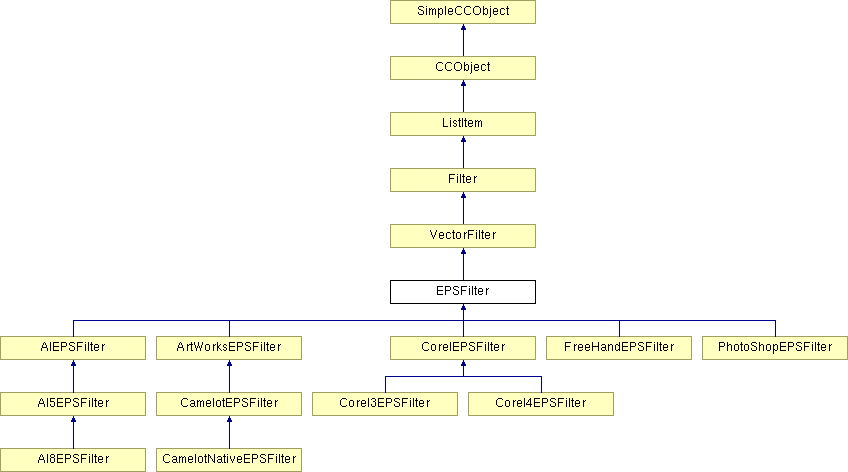
Inheritance diagram for EPSFilter:
Public Types | |
| enum | PathType { PATH_NORMAL, PATH_DISCARD, PATH_DISCARD_STICKY, PATH_RECT, PATH_ELLIPSE, PATH_MANGLED } |
Public Member Functions | |
| EPSFilter () | |
| Constructor for an EPSFilter object. The object should be initialised before use. | |
| virtual BOOL | Init () |
| Initialise an EPSFilter object. This is a base class and so should never actually be initialised so this function will always return FALSE, and also ENSURE in debug builds. | |
| INT32 | HowCompatible (PathName &Filename, ADDR HeaderStart, UINT32 HeaderSize, UINT32 FileSize) |
| Looks at the start of the file to see if it recognises the file as belonging to it. | |
| BOOL | IsDefaultDocRequired (const TCHAR *pcszPathName) |
| Works out if opening a file of this type requires a default document to be loaded. If the file format supplies the document then return FALSE otherwise return TRUE. An example would be opening a bitmap file. This has no document defined in the file format and so we need to laod the default document before importing the bitmap into this file. In this baseclass version return FALSE and hence assume that the filters that need to will override this function to return TRUE. | |
| BOOL | DoImport (SelOperation *Op, CCLexFile *, Document *DestDoc, BOOL, ImportPosition *Pos=NULL, KernelBitmap **ppImportedBitmap=NULL, DocCoord *pPosTranslate=NULL, String_256 *URL=NULL) |
| Read EPS data from an EPS file, and convert it into Camelot tree data structures. When the file reading is complete, a forced redraw is issued for the area affected by the new data. At the moment, the data is just put on the first layer of the first spread of the first chapter in the document, and this is a bodge. The operation is terminated (i.e. its End() function is called) if the operation completed succesfully. | |
| BOOL | DoExport (Operation *, CCLexFile *, PathName *, Document *, BOOL) |
| Exports the File as EPS. The various forms of EPS are to be found in the classes derived from this one. | |
| BOOL | ExportBinaryHeader (CCLexFile *) |
| Outputs the initial binary Header for EPS files that contain a TIFF preview of the EPS. This format is described on page 729 of the Big Red Postscript book (PostScript Language Reference Manual Second Edition). The basic form is as follows :- MonoOn: Bytes 0-3 C5D0D3C6 Bytes 4-7 Byte pos of start of PostScript in file Bytes 8-11 Length of PostScript section in Bytes Bytes 12-15 Start of MetaFile (always 0 from Camelot) Bytes 16-19 Length of MetaFile (always 0 from Camelot) Bytes 20-23 Start of TIFF file Bytes 24-27 Length of TIFF file Bytes 28-29 Checksum or FFFF. | |
| BOOL | CorrectBinaryHeader (CCLexFile *) |
| Goes back to the binary header at the start of the file and fills in the correct values to all the fields. | |
| virtual BOOL | WriteEPSProlog () |
| Allows the filter a chance to write out something in the Prolog section. | |
| virtual BOOL | WriteEPSSetup () |
| Allows the filter a chance to write out something in the Prolog section. | |
| virtual BOOL | WriteEPSComments () |
| Allows the filter a chance to write out something in the Prolog section. | |
| virtual BOOL | WriteScript () |
| Allows the filter a chance to write out something in the Prolog section. | |
| virtual BOOL | NeedsPrintComponents (void) |
| Allows the program to determine whether print components are needed for this flavour of EPS. | |
| TCHAR * | GetEPSCommand (EPSCommand Cmd) |
| Given an EPS token, return the string representation of it; mainly for debugging purposes. | |
| EPSExportDC * | GetExportDC () |
| EPSRenderRegion * | GetExportRegion () |
| virtual INT32 | ImportBinary (ADDR pData, INT32 Length) |
| Converts EPS hex strings into binary data. Attempts to read the number of bytes specified from the file. | |
| virtual BOOL | AddNewNode (Node *pNewNode) |
| When a new node is created, this function puts it into the tree in the correct place. It may add it into a group, or a new layer which is currently being constructed, or onto an existing layer. | |
| void | HandleEPSError () |
| Cleans up when a syntax error is encountered in the EPS file. Any objects constructed so far are deleted, and the error message ID is set. | |
| INT32 | DecodeHexString (ADDR pData, INT32 Length, INT32 nStart=0) |
| Treat the current token as a hex string, and decode it into binary data and place it in the buffer provided by the caller. No more than Length bytes should be placed in the buffer. | |
| BOOL | ResetImportOrigin () |
| If the importer changes the pages in the document when loading, this allows it to reset the origin. | |
| BOOL | ResetImportOrigin (DocCoord NewOrigin) |
| Instructs the filter to use the new origin, because we are importing and otherwise QuickShapes and Text Stories will be incorrectly positioned. | |
Static Public Member Functions | |
| static BOOL | InitPrefs () |
| Initialise preferences for EPS formats. This is used by the Camelot EPS export filter, and includes font mappings, DPI, PostScript language level control, and exporting text as curves. | |
Static Public Attributes | |
| static INT32 | XSEPSExportPSType = 2 |
| static INT32 | XSEPSExportDPI = 200 |
| static BOOL | XSEPSExportTextAsCurves = FALSE |
Protected Member Functions | |
| virtual BOOL | PrepareToImport () |
| Prepare to import EPS data using this filter. This sets up the filter to a sensible state for reading. | |
| virtual void | CleanUpAfterImport (BOOL Successful) |
| Cleans up the memory allocated by EPSFilter::PrepareToImport() - used when the import process ends, either normally or abnormally. | |
| void | DecodeToken () |
| Decode the PostScript token that is contained in the 'TokenBuf' buffer. This is not used for strings, comments, or array brackets, but is used to detect tokens which are floating point numbers, integers, EPS keywords, or PostScript 'names' (e.g. font names). In other words, any token which cannot be identified solely by its first character. | |
| virtual void | LookUpToken () |
| Determines if the current token is one of the standard Illustrator tokens. The 'Token' variable is set accordingly. If the token is not recognised, it is assumed to be a PostScript 'name'. | |
| virtual BOOL | ProcessToken () |
| Examines the current token and performs whatever actions are necessary to process its meaning. Operands are simply pushed onto the EPS stack, and keywords are either acted upon, or ignored if they describe something that Camelot does not yet support (in the latter case, the operands of the keyword, if any, are simply discarded from the stack). | |
| BOOL | GetToken () |
| Extract a token from the input stream. The Token variable holds the type of the token, and TokenBuf holds the characters that make up the token (be it a command, a string. a number, or whatever). | |
| BOOL | GetLineToken () |
| Extract a token from the input stream in a line-based manner. The Token variable holds the type of the token, and TokenBuf holds the characters that make up the token (be it a command, a string. a number, or whatever). | |
| BOOL | HandleToken () |
| 'Handles' the current EPS token - if it's an EOL or EOF token, it updates the progress display, otherwise it just calls ProcessToken(); | |
| BOOL | ProcessEndOfPath (void) |
| Processes the end-of-path directive. | |
| BOOL | ProcessUnfilledPath (void) |
| Processes the end-of-path directive of an unfilled or unstroked path. | |
| BOOL | ProcessGroup () |
| Reads in all the elements of a group structure in the EPS file. | |
| virtual BOOL | ProcessComment (BOOL BypassDocComponents=FALSE) |
| Decodes an EPS comment - usually starting with "%%", e.g. %BeginProlog etc. | |
| BOOL | ProcessRectangle (NodeRect *pRect, NodeRegularShape *pQuickShape) |
| Having read in a rectangle path, this function builds a QuickShape rectangle as defined by the path. | |
| BOOL | ProcessEllipse (NodeEllipse *pEllipse, NodeRegularShape *pQuickShape) |
| Having read in a ellipse path, this function builds a QuickShape ellipse as defined by the path. | |
| virtual BOOL | ProcessFilterComment () |
| Override this function to claim EPS comments for the filter to decode. This function is called after the usual comments are checked for such as %BeginProlog etc, but *before* the doc components are called. If you want to claim the current token (i.e. as held in TokenBuf), return TRUE. | |
| void | HandleNoMemory () |
| Cleans up when the filter runs out of memory when importing a file. Any objects constructed so far are deleted, and the error message ID is set. | |
| virtual BOOL | AddAttributes (NodeRenderableBounded *pNode, BOOL Stroked, BOOL Filled) |
| Add attributes to an object being constructed. The attributes are optimised so that if they are the same as the document's default attributes, they are not applied. | |
| virtual INT32 | EPSHeaderIsOk (ADDR pFileHeader, UINT32 HeaderSize) |
| Checks to see if the EPS comment headers specify that this is an Illustrator generated EPS file, as required. | |
| BOOL | UseLayer (String_256 &LayerName, BOOL GuideLayer=FALSE) |
| This is a wrapper around the new AddLayer method, which now returns a pointer to the newly created layer, which is where all the work is done. I've done this to preserve the original interface. | |
| Layer * | AddLayer (String_256 &LayerName, BOOL GuideLayer) |
| Given a layer name, construct a new layer, or find an existing layer with the same name, and cause new nodes to be added to the resulting layer. | |
| BOOL | StartGroup () |
| Used when a group structure needs to be created - after this is called, all new nodes added with AddNewNode() will be added as children of this new group, until EndGroup is called. | |
| BOOL | EndGroup (BOOL Masked=FALSE) |
| Used when a group has finished being constructed and we want to return to normal node positioning. The group is added to the document when this function is called (although that depending on the current filter mode, i.e. whether this is a new or existing layer, it may not be added directly to the documnent tree straight away - it may be deferred until the next layer is found, or the import has ended). | |
| virtual BOOL | ValidateGroup (Node *Group) |
| Validate a group. Can be overridden to, for example, ensure that groups have at least two children. | |
| virtual BOOL | MaskedGroupEnding () |
| Function to call when a masked group ends. Gives a chance to restore graphic states and the like. | |
| virtual void | ProcessTextMatrix (Matrix *pMatrix) |
| Having read a text object position matrix from the file, we may (dependent on the filter type), need to process it in some way, ie add in the spread origin. | |
| BOOL | AttachAllNodes () |
| Called at the end of an import - attaches any nodes to the tree that have not yet been attached. e.g. a new layer node, or a group node if layers are being ignored. | |
| BOOL | InsertNewNode (Node *pNewNode) |
| This function adds a node to the tree in an undoable way. It uses DoInsertNewNode() to do this. If it fails then 'pNewNode' and all its children are deleted. It adds the node as a child of the node pointed to by 'pNode'. | |
| virtual BOOL | Import_gsave () |
| stores the current path and attributes to emulate a gsave in the imported EPS file. All things are copied. States can be nested. | |
| virtual BOOL | Import_grestore () |
| restores path and attributes saved by the matching Import_gsave. | |
| virtual BOOL | PrepareToExport (CCLexFile *, Spread *pSpread) |
| Prepare to import EPS data using this filter. This sets up the filter to a sensible state for reading. | |
| virtual void | CleanUpAfterExport () |
| Cleans up the memory allocated by EPSFilter::PrepareToImport() - used when the import process ends, either normally or abnormally. | |
| virtual EPSExportDC * | CreateExportDC () |
| This allows the EPS filter to choose which sort of EPSExportDC to use. Most filters will use this default one, but some (Native Save/Load eps) will make use of a different ExportDC derived from EPSExportDC. This function simply returns the result of a 'new' and does no checking on the returned parameter. It is perfectly valid for this function to return NULL (meaning no ExportDC could be created) and the calling function should handle this appropriatly. | |
| void | RemoveMessage (CCLexFile *pFile) |
| Removes the Copyright message that appears in the middle of our native file format. | |
| virtual BOOL | GetExportOptions () |
| Allows the user to be prompted to get information for export. Base class returns True so that nothing happens by default. Scope: Protected. | |
| virtual BOOL | ProcessEPSComment () |
| Tries to process the contents of a comment. First it asks the filter and then it tries the document and all the doc components to see if it is one of thiers. | |
| virtual BOOL | ProcessEPSTrailer () |
| Handles the end of the page (I think). | |
| virtual BOOL | ProcessBoundingBox () |
| Tries to make use of the BoundingBox info in the EPS file. | |
| void | ProcessEPSProlog () |
| void | ProcessEPSSetup () |
| void | GetEPSColour (DocColour *DestCol, PColourCMYK *pCMYK, TintType Tint, FIXEDPOINT TintVal, String_64 *ColName) |
| Used when an EPS colour definition has just been read off the stack. Provides a centralised way of interpreting the usual colour definitions and getting a valid DocColour out of it. This copes with all sorts of things such as creating an indexed colour for named colours, and even handles creation of special colours for tinted named colours. Basically, it's a fire-and-forget function :-). If all else fails, it falls back to an immediate DocColour. | |
| void | GetEPSColourRGB (DocColour *DestCol, INT32 red, INT32 green, INT32 blue, TintType Tint, FIXEDPOINT TintVal, String_64 *ColName) |
| Identical to EPSFilter::GetEPSColour, except that it deals with RGB colours instead of CMYK ones. | |
| void | MakeLayerNameUnique (String_256 &LayerName, Spread *pSpread) |
| Given a layer name, ensure it is unique within the spread. If a clash occurs then the following layer names are tried until a unique one is found. (Assuming layer name is "Foreground" in this example). | |
| BOOL | ProcessText () |
| Reads in all the elements of a Text structure in the EPS file. | |
| BOOL | GetStoryMatrix (Matrix *pMatrix) |
| Reads in all the elements of a Text Story Matrix. | |
| BOOL | SetStrokeColourNone () |
| Updates the current attribute for StrokeColour with the value of COLOUR_NONE. | |
| BOOL | SetFillColourNone () |
| Updates the current attribute for FillColour with the value of COLOUR_NONE. | |
| BOOL | MakeNewTextLine (Node *pParent) |
| Reads in all the elements of a Text structure in the EPS file. | |
Protected Attributes | |
| FilePos | EPSStart |
| FilePos | EPSEnd |
| FilePos | PreviewStart |
| FilePos | PreviewEnd |
| UINT32 | FilterNameID |
| UINT32 | FilterInfoID |
| EPSCommentList | EPSComments |
| CCLexFile * | EPSFile |
| const TCHAR * | TokenBuf |
| INT32 | LastProgressUpdate |
| EPSCommand | Token |
| union { | |
| INT32 Long | |
| FIXEDPOINT FixedPoint | |
| double Double | |
| TCHAR * String | |
| TCHAR * Comment | |
| } | TokenData |
| EPSStack | Stack |
| DocRect | SpreadRect |
| NodePath * | pPath |
| Layer * | pLayer |
| Page * | pPage |
| Node * | pNode |
| EPSFlagsDefn | EPSFlags |
| struct { | |
| SelOperation * pOp | |
| ImportPosition * Pos | |
| Spread * pSpread | |
| } | ImportInfo |
| PathType | ThePathType |
| EPSRenderRegion * | ExportRegion |
| EPSExportDC * | ExportDCPtr |
| ColourListComponent * | pColours |
| DocCoord | ShapeBBox [4] |
| Node * | pFirstNodeInRange |
| Node * | pLastNodeInRange |
| BOOL | AdjustOrigin |
| BOOL | SupportsLayers |
| BOOL | UseLayers |
| INT32 | GroupNesting |
| INT32 | MaskedGroupNesting |
| BOOL | InvalidPathFound |
| Path * | pInkPath |
| EPSClipContext | ClipRegion |
| INT32 | TextComment [3] |
| List | GraphicStateStack |
| EPSFilter::_FontFlags | FontFlags |
| FontClass | ClassOfFont |
| INT32 | NewMouldThreshold |
| BOOL | EPS_Group |
| FilePos | EndOfEPS |
Static Protected Attributes | |
| static CommandMap | Commands [] |
| static RangeList | ImportRange |
Private Member Functions | |
| CC_DECLARE_DYNAMIC (EPSFilter) | |
Classes | |
| struct | _FontFlags |
Definition at line 455 of file epsfiltr.h.
|
|
Definition at line 494 of file epsfiltr.h. 00495 { 00496 PATH_NORMAL, 00497 PATH_DISCARD, 00498 PATH_DISCARD_STICKY, 00499 PATH_RECT, 00500 PATH_ELLIPSE, 00501 PATH_MANGLED 00502 } PathType;
|
|
|
Constructor for an EPSFilter object. The object should be initialised before use.
Definition at line 942 of file epsfiltr.cpp. 00943 { 00944 ImportMsgID = _R(IDT_IMPORTMSG_AI); 00945 Flags.CanImport = TRUE; 00946 //WEBSTER-Martin-27/01/97 00947 #ifdef WEBSTER 00948 Flags.CanExport = FALSE; 00949 #else 00950 Flags.CanExport = TRUE; 00951 #endif //WEBSTER 00952 FilterID = FILTERID_AIEPS; 00953 00954 #ifndef DO_EXPORT 00955 Flags.CanExport = FALSE; 00956 #endif 00957 00958 EPSFile = NULL; 00959 TokenBuf = NULL; 00960 pColours = NULL; 00961 00962 ExportDCPtr = NULL; 00963 ExportRegion = NULL; 00964 ExportMsgID = _R(IDT_EXPORTMSG_AI); 00965 00966 AdjustOrigin = TRUE; 00967 SupportsLayers = TRUE; 00968 00969 // The offsets into the file for the Preview thing 00970 EPSStart = 0; 00971 EPSEnd = 0; 00972 PreviewStart = 0; 00973 PreviewEnd = 0; 00974 00975 TextComment[0] = 0; 00976 TextComment[1] = 0; 00977 TextComment[2] = 1; 00978 00979 // set the font extras block vars. These indicate to the 00980 // filter to do something special with the next set of font attributes 00981 FontFlags.Bold = FALSE; 00982 FontFlags.Italic = FALSE; 00983 00984 // Set the font type to assume we are loading true type fonts unless 00985 // told otherwise. 00986 ClassOfFont = FC_TRUETYPE; 00987 00988 // Define the mould threshold default value. 00989 NewMouldThreshold = MOULD_V1THRESHOLD; 00990 00991 // We're not in a group at first. 00992 EPS_Group = FALSE; 00993 00994 // Clear the length of the file to the end of the EPS code. 00995 EndOfEPS = 0; 00996 00997 // Set up the comment list. These are the known DSC comments, and how to handle them. 00998 EPSComments.Add ( _T("%%BeginProlog"), _T("%%EndProlog"), TRUE, 0 ); 00999 EPSComments.Add ( _T("%%BeginSetup"), _T("%%EndSetup"), TRUE, 0 ); 01000 EPSComments.Add ( _T("%%BeginDocument"), _T("%%EndDocument"), FALSE, 0 ); 01001 EPSComments.Add ( _T("%%BeginPageSetup"), _T("%%EndPageSetup"), FALSE, 0 ); 01002 EPSComments.Add ( _T("%%BeginDefaults"), _T("%%EndDefaults"), FALSE, 0 ); 01003 EPSComments.Add ( _T("%%BeginEmulation"), _T("%%EndEmulation"), FALSE, 0 ); 01004 EPSComments.Add ( _T("%%BeginPreview"), _T("%%EndPreview"), FALSE, 0 ); 01005 EPSComments.Add ( _T("%%BeginFeature"), _T("%%EndFeature"), FALSE, 0 ); 01006 EPSComments.Add ( _T("%%BeginFile"), _T("%%EndFile"), FALSE, 0 ); 01007 EPSComments.Add ( _T("%%BeginFont"), _T("%%EndFont"), FALSE, 0 ); 01008 EPSComments.Add ( _T("%%BeginProcSet"), _T("%%EndProcSet"), FALSE, 0 ); 01009 EPSComments.Add ( _T("%%BeginResource"), _T("%%EndResource"), FALSE, 0 ); 01010 EPSComments.Add ( _T("%%BeginCustomColor"), _T("%%EndCustomColor"), FALSE, 0 ); 01011 EPSComments.Add ( _T("%%BeginProcessColor"), _T("%%EndProcessColor"), FALSE, 0 ); 01012 }
|
|
||||||||||||||||
|
Add attributes to an object being constructed. The attributes are optimised so that if they are the same as the document's default attributes, they are not applied.
Reimplemented in CorelEPSFilter. Definition at line 2695 of file epsfiltr.cpp. 02696 { 02697 DocColour OldCol; 02698 02699 // If not stroked, temporarily set the ignore bit on the line colour attribute. 02700 if (!Stroked) 02701 { 02702 StrokeColourAttribute *pAttr = 02703 (StrokeColourAttribute *) CurrentAttrs[ATTR_STROKECOLOUR].pAttr; 02704 02705 OldCol = pAttr->Colour; 02706 DocColour trans(COLOUR_TRANS); 02707 if (!SetLineColour(trans)) 02708 return FALSE; 02709 } 02710 02711 // If not filled, then set the ignore bit on the fill attribute. 02712 if (!Filled) //pPath->InkPath.IsFilled) 02713 { 02714 CurrentAttrs[ATTR_FILLGEOMETRY].Ignore = TRUE; 02715 } 02716 02717 // Add attributes to the path, if they are different from the default... 02718 BOOL Result = AttributeManager::ApplyBasedOnDefaults(pNode, CurrentAttrs); 02719 02720 // If not stroked, reinstall old line colour. 02721 if (!Stroked) 02722 // This can't fail. (tempting fate or wot!) 02723 SetLineColour(OldCol); 02724 02725 // Enable the fill attribute again 02726 CurrentAttrs[ATTR_FILLGEOMETRY].Ignore = FALSE; 02727 02728 // Re-enable path-filling, in case it was disabled for this object 02729 SetPathFilled(TRUE); 02730 02731 // Return success or failure 02732 return Result; 02733 }
|
|
||||||||||||
|
Given a layer name, construct a new layer, or find an existing layer with the same name, and cause new nodes to be added to the resulting layer.
Definition at line 2389 of file epsfiltr.cpp. 02391 { 02392 // Have we currently got a pending new layer to add to the tree? 02393 if (EPSFlags.AddToNewLayer) 02394 { 02395 // Yes - add the new layer to the tree. 02396 EPSFlags.AddToNewLayer = FALSE; 02397 pNode = ImportInfo.pSpread; 02398 if (!InsertNewNode((Node *) pLayer)) 02399 return FALSE; 02400 02401 // Remember it 02402 ImportRange.AddRange(pLayer, pLayer); 02403 } 02404 else if (pFirstNodeInRange != NULL) 02405 { 02406 // We have just finished adding a range of nodes to an existing layer so let's 02407 // remember the nodes. 02408 ImportRange.AddRange(pFirstNodeInRange, pLastNodeInRange); 02409 pFirstNodeInRange = NULL; 02410 pLastNodeInRange = NULL; 02411 } 02412 02413 // Find out if we need a new layer name, because there is already one with this name. 02414 String_256 NewLayerName = LayerName; 02415 MakeLayerNameUnique(NewLayerName, ImportInfo.pSpread); 02416 02417 // Make a new layer using this name. 02418 if (GuideLayer) 02419 { 02420 #if !defined(EXCLUDE_FROM_RALPH) 02421 // WEBSTER - markn 15/1/97 02422 // CreateGuideLayer() used to be part of OpGuideline class, now part of Layer class 02423 pLayer = Layer::CreateGuideLayer(); 02424 #else 02425 ERROR3("EPSFilter::UseLayer GuideLayer == TRUE - whoop whoop ! BAD !"); 02426 #endif 02427 } 02428 else 02429 pLayer = new Layer; 02430 02431 ERRORIF(pLayer == NULL, _R(IDT_EPS_NOMEMORY), FALSE); 02432 pLayer->SetLayerID(NewLayerName); 02433 EPSFlags.AddToNewLayer = TRUE; 02434 02435 // Make it the new destination node for all new nodes. 02436 pNode = (Node *) pLayer; 02437 02438 // Pass the layer pointer out. 02439 return pLayer; 02440 }
|
|
|
When a new node is created, this function puts it into the tree in the correct place. It may add it into a group, or a new layer which is currently being constructed, or onto an existing layer.
Reimplemented in FreeHandEPSFilter. Definition at line 2088 of file epsfiltr.cpp. 02089 { 02090 if ((EPSFlags.AddToNewLayer) || (!UseLayers)) 02091 { 02092 // Simple case - just add to the new layer node 02093 pNewNode->AttachNode(pNode, LASTCHILD); 02094 02095 if (pNewNode->IsBounded()) 02096 { 02097 // Update the bounds for this object 02098 NodeRenderableBounded *pBounded = (NodeRenderableBounded *) pNewNode; 02099 pBounded->InvalidateBoundingRect(); 02100 } 02101 } 02102 else 02103 { 02104 // Tricky case - we have to add the node to the existing layer in the 02105 // document in an undoable way. 02106 return InsertNewNode(pNewNode); 02107 } 02108 02109 // All went ok. 02110 return TRUE; 02111 }
|
|
|
Called at the end of an import - attaches any nodes to the tree that have not yet been attached. e.g. a new layer node, or a group node if layers are being ignored.
Definition at line 2237 of file epsfiltr.cpp. 02238 { 02239 BOOL Success = TRUE; 02240 NodeGroup *pGroup=NULL; 02241 02242 if (UseLayers) 02243 { 02244 // Check to see if there is an outstanding layer node to add... 02245 if (EPSFlags.AddToNewLayer) 02246 { 02247 // Yes - add it... 02248 02249 // We're adding the layer to the spread now 02250 EPSFlags.AddToNewLayer = FALSE; 02251 Node *pLayer = pNode; 02252 pNode = ImportInfo.pSpread; 02253 02254 // Do it. 02255 Success = AddNewNode(pLayer); 02256 02257 // Remember it 02258 if (Success) 02259 ImportRange.AddRange(pLayer, pLayer); 02260 } 02261 else if (pFirstNodeInRange != NULL) 02262 { 02263 // We have just finished adding a range of nodes to an existing layer so let's 02264 // remember the nodes. 02265 ImportRange.AddRange(pFirstNodeInRange, pLastNodeInRange); 02266 pFirstNodeInRange = NULL; 02267 pLastNodeInRange = NULL; 02268 } 02269 } 02270 else 02271 { 02272 // No layers - always imported as a group, so add it into the tree. 02273 pGroup = (NodeGroup *) pNode; 02274 pNode = (Node *) pLayer; 02275 02276 Success = InsertNewNode(pGroup); 02277 } 02278 02279 if (!Success) 02280 return FALSE; 02281 02282 // we need the bounding rect to do this (not the one with attributes) 02283 DocRect BoundsRect; 02284 02285 if (UseLayers) 02286 BoundsRect = ImportRange.GetBoundingRect(); 02287 else 02288 BoundsRect = pGroup->GetBoundingRect(TRUE); 02289 02290 // Translate objects to the drag and drop position if necessary... 02291 Coord Offset; 02292 02293 if (GetDragAndDropTranslation(ImportInfo.Pos, BoundsRect, &Offset)) 02294 { 02295 Trans2DMatrix Xlate(Offset.x, Offset.y); 02296 02297 if (UseLayers) 02298 { 02299 // Transform the range of nodes and then delete the range info. 02300 ImportRange.Transform(Xlate); 02301 02302 // Transform the bounding rect too because we use it to invalidate the region. 02303 BoundsRect.Translate(Offset.x, Offset.y); 02304 } 02305 else 02306 { 02307 // Just transform the group node 02308 pGroup->Transform(Xlate); 02309 } 02310 } 02311 02312 // Invalidate the region 02313 02314 if (UseLayers) 02315 { 02316 // Importing with layers - invalidate the bounds of all the inserted nodes 02317 Success = ImportInfo.pOp->DoInvalidateRegion(ImportInfo.pSpread, BoundsRect); 02318 } 02319 else 02320 { 02321 // When importing as a group, we select the group node at the end, so we need to 02322 // invalidate the blob bounding rect to get the redraw correct. 02323 Success = ImportInfo.pOp->DoInvalidateNodeRegion(pGroup, TRUE, FALSE); 02324 } 02325 02326 if (!Success) 02327 { 02328 // Need to add tidy up code here. 02329 return FALSE; 02330 } 02331 02332 // Make sure the node insertion position is in the correct place 02333 TheDocument->ResetInsertionPosition(); 02334 02335 return Success; 02336 }
|
|
|
|
|
|
Cleans up the memory allocated by EPSFilter::PrepareToImport() - used when the import process ends, either normally or abnormally.
Definition at line 4839 of file epsfiltr.cpp. 04840 { 04841 #ifdef DO_EXPORT 04842 // Get rid of our dynamic objects 04843 if (ExportDCPtr!=NULL) 04844 delete ExportDCPtr; 04845 ExportDCPtr = NULL; 04846 04847 if (ExportRegion!=NULL) 04848 delete ExportRegion; 04849 ExportRegion = NULL; 04850 04851 // Inform all the document components that we have finished exporting 04852 DocComponent *pComponent = TheDocument->EnumerateDocComponents(NULL); 04853 04854 while (pComponent != NULL) 04855 { 04856 // Inform this document component that we have finished exporting 04857 pComponent->EPSEndExport(this); 04858 04859 // Look for next doc component 04860 pComponent = TheDocument->EnumerateDocComponents(pComponent); 04861 } 04862 #endif 04863 }
|
|
|
Cleans up the memory allocated by EPSFilter::PrepareToImport() - used when the import process ends, either normally or abnormally.
Reimplemented in AI5EPSFilter, PhotoShopEPSFilter, CamelotEPSFilter, FreeHandEPSFilter, and CamelotNativeEPSFilter. Definition at line 1264 of file epsfiltr.cpp. 01265 { 01266 DeleteCurrentAttrs(); 01267 01268 // Get rid of file object 01269 EPSFile->DeinitLexer(); 01270 EPSFile = NULL; 01271 TokenBuf = NULL; 01272 01273 // get rid of anything on the graphic state stack 01274 TRACEUSER( "Ben", _T("Entries on GraphicStateStack = %d\n"), GraphicStateStack.GetCount()); 01275 GraphicStateStack.DeleteAll(); 01276 01277 // Throw away handle to colour list component. 01278 pColours = NULL; 01279 01280 // Inform all the document components that we have finished importing 01281 TheDocument->EPSEndImport(this, Successful); 01282 DocComponent *pComponent = TheDocument->EnumerateDocComponents(NULL); 01283 01284 while (pComponent != NULL) 01285 { 01286 // Inform this document component that we have finished importing 01287 pComponent->EPSEndImport(this, Successful); 01288 01289 // Look for next doc component 01290 pComponent = TheDocument->EnumerateDocComponents(pComponent); 01291 } 01292 01293 // If imported with layers, make sure the top layer becomes the active one. 01294 if (Successful) // && UseLayers) 01295 { 01296 LayerSGallery::MakeTopLayerActive(ImportInfo.pSpread); 01297 BROADCAST_TO_ALL(SpreadMsg(ImportInfo.pSpread,SpreadMsg::LAYERCHANGES)); 01298 } 01299 01300 // Inform the user if we found any bad paths 01301 // BODGE: This is disabled while we are doing the clipart so the batch converter 01302 // can run unattended. 01303 if (0 && InvalidPathFound) 01304 InformWarning(_R(IDT_IMPORT_BAD_PATH_FOUND)); 01305 01306 // Clean up import range items. 01307 ImportRange.DeleteAll(); 01308 01309 TheDocument->PostImport(); 01310 }
|
|
|
Goes back to the binary header at the start of the file and fills in the correct values to all the fields.
Definition at line 4571 of file epsfiltr.cpp. 04572 { 04573 #ifdef DO_EXPORT 04574 INT32 Length = 0; 04575 INT32 Zero = 0; 04576 04577 // Seek back to the first thing that needs changing 04578 // The Start of PostScript 04579 pFile->seek(4); 04580 04581 // Write out the start of postscript (4-7) 04582 if (pFile->write(&EPSStart, 4).fail()) 04583 return FALSE; 04584 04585 // Write out the length of postscript (8-11) 04586 Length = EPSEnd - EPSStart; 04587 if (pFile->write(&Length, 4).fail()) 04588 return FALSE; 04589 04590 // Write out the Start of metafile (12-15) 04591 if (pFile->write(&Zero, 4).fail()) 04592 return FALSE; 04593 04594 // Write out the length of metafile (16-19) 04595 if (pFile->write(&Zero, 4).fail()) 04596 return FALSE; 04597 04598 // Write out the start of TIFF 04599 if (pFile->write(&PreviewStart, 4).fail()) 04600 return FALSE; 04601 04602 // Write out the legth of TIFF 04603 Length = PreviewEnd - PreviewStart; 04604 if (pFile->write(&Length, 4).fail()) 04605 return FALSE; 04606 #endif 04607 // All seemed to work 04608 return TRUE; 04609 }
|
|
|
This allows the EPS filter to choose which sort of EPSExportDC to use. Most filters will use this default one, but some (Native Save/Load eps) will make use of a different ExportDC derived from EPSExportDC. This function simply returns the result of a 'new' and does no checking on the returned parameter. It is perfectly valid for this function to return NULL (meaning no ExportDC could be created) and the calling function should handle this appropriatly.
Reimplemented in CamelotNativeEPSFilter. Definition at line 4710 of file epsfiltr.cpp. 04711 { 04712 #ifdef DO_EXPORT 04713 // Create and return a DC 04714 return new EPSExportDC(this); 04715 #else 04716 return NULL; 04717 #endif 04718 }
|
|
||||||||||||||||
|
Treat the current token as a hex string, and decode it into binary data and place it in the buffer provided by the caller. No more than Length bytes should be placed in the buffer.
Definition at line 5242 of file epsfiltr.cpp. 05243 { 05244 INT32 TokenLen = camStrlen(TokenBuf + nStart); 05245 INT32 Ofs = 0; 05246 05247 // Assume hex strings are even-numbered in length for the moment 05248 ENSURE((TokenLen & 1) == 0, "Bad hex string length in DecodeHexString"); 05249 05250 // Work out how much of the string we should decode 05251 INT32 MaxOfs = Length * 2; 05252 05253 // Decode the string two characters at a time 05254 for (INT32 i = nStart; (i < TokenLen) && (i < MaxOfs); i += 2) 05255 { 05256 TCHAR Ch = camToupper(TokenBuf[i]); 05257 BYTE Byte; 05258 05259 // Decode first digit. 05260 if ((Ch >= '0') && (Ch <= '9')) 05261 { 05262 Byte = (BYTE) (Ch - '0'); 05263 } 05264 else if ((Ch >= 'A') && (Ch <= 'F')) 05265 { 05266 Byte = (BYTE) (Ch - 'A') + 10; 05267 } 05268 else 05269 { 05270 // Error in hex data 05271 return -1; 05272 } 05273 05274 Ch = camToupper(TokenBuf[i+1]); 05275 Byte <<= 4; 05276 05277 // Decode swcond digit. 05278 if ((Ch >= '0') && (Ch <= '9')) 05279 { 05280 Byte |= (BYTE) (Ch - '0'); 05281 } 05282 else if ((Ch >= 'A') && (Ch <= 'F')) 05283 { 05284 Byte |= (BYTE) (Ch - 'A') + 10; 05285 } 05286 else 05287 { 05288 // Error in hex data 05289 return -1; 05290 } 05291 05292 pData[Ofs++] = Byte; 05293 } 05294 05295 // How much data did we read? 05296 return Ofs; 05297 }
|
|
|
Decode the PostScript token that is contained in the 'TokenBuf' buffer. This is not used for strings, comments, or array brackets, but is used to detect tokens which are floating point numbers, integers, EPS keywords, or PostScript 'names' (e.g. font names). In other words, any token which cannot be identified solely by its first character.
Definition at line 1781 of file epsfiltr.cpp. 01782 { 01783 // 01784 // Determine what we just read into TokenBuf. 01785 // 01786 ENSURE(camStrcmp(TokenBuf,_T("}bd")) != 0, "Found a }bd token!"); 01787 01788 // Not interested in comments, unless it's actually a strange token 01789 if (Token == EPSC_Comment) 01790 { 01791 LookUpToken(); 01792 return; 01793 } 01794 01795 // i is the index if the character we are currently examining. 01796 INT32 i = 0; 01797 01798 // FoundDot is TRUE if we have already encountered a '.' character in this token. 01799 BOOL FoundDot = FALSE; 01800 01801 // Number is TRUE if we haven't found any characters (or combination of characters, 01802 // eg. a token with two '.' characters in it) which mean that this token cannot be a 01803 // number (either floating point ot integer). 01804 BOOL Number = TRUE; 01805 01806 // FoundFloatingPoint is TRUE if we have found a number that cannot be represented 01807 // by an integer or fixed point, i.e. it is in scientific notation (with exponent), or 01808 // the number has more than 3dp of precision. 01809 BOOL FoundFloatingPoint = FALSE; 01810 INT32 Precision = 0; 01811 01812 // Try a floating point number first... 01813 01814 while (TokenBuf[i] != 0) 01815 { 01816 TCHAR c = TokenBuf[i]; 01817 01818 if (c == '.') 01819 { 01820 if (FoundDot) 01821 { 01822 // Found more than one dot - not a number 01823 Number = FALSE; 01824 break; 01825 } 01826 else 01827 { 01828 // Found the first '.' in this token 01829 FoundDot = TRUE; 01830 } 01831 } 01832 else 01833 { 01834 if (FoundDot) 01835 { 01836 // If it's a number, check the precision needed to represent it 01837 if (isdigit(c)) 01838 { 01839 Precision++; 01840 if (Precision > 3) 01841 FoundFloatingPoint = TRUE; 01842 } 01843 else 01844 { 01845 // Check for illegal characters 01846 if ((c == 'e') || (c == 'E')) 01847 { 01848 // Found an exponent 01849 FoundFloatingPoint = TRUE; 01850 } 01851 else if ((c != '-') && (c != '+')) 01852 { 01853 // Illegal character - e.g. alphanumeric, etc 01854 Number = FALSE; 01855 break; 01856 } 01857 } 01858 } 01859 else if (!isdigit(c) && (c != '-') && (c != '+')) 01860 { 01861 // Illegal character - e.g. alphanumeric, etc 01862 Number = FALSE; 01863 break; 01864 } 01865 } 01866 01867 i++; 01868 } 01869 01870 if (Number) 01871 { 01872 // It's a number - is it integer, fixed point, or floating point? 01873 if (FoundFloatingPoint) 01874 { 01875 // Floating point 01876 Token = EPSC_Double; 01877 TokenData.Double=0.0; 01878 camSscanf(TokenBuf,_T("%lf"),&TokenData.Double); 01879 } 01880 else if (FoundDot) 01881 { 01882 // Fixed point 01883 Token = EPSC_FixedPoint; 01884 TokenData.FixedPoint.FromAscii(TokenBuf); 01885 } 01886 else 01887 { 01888 // Integer 01889 Token = EPSC_Integer; 01890 TokenData.Long=0; 01891 camSscanf(TokenBuf,_T("%d"),&TokenData.Long); 01892 } 01893 01894 return; // All done - found a number 01895 } 01896 01897 // Try to find this token in the set(s) of tokens understood by this filter. 01898 LookUpToken(); 01899 }
|
|
||||||||||||||||||||||||
|
Exports the File as EPS. The various forms of EPS are to be found in the classes derived from this one.
Reimplemented from Filter. Definition at line 4884 of file epsfiltr.cpp. 04886 { 04887 #ifdef DO_EXPORT 04888 // See if the EPS filters need some exporting options or not 04889 BOOL ok = GetExportOptions(); 04890 if (!ok) 04891 { 04892 // User has cancelled the operation so set our error whcih will be suppressed 04893 // and return FALSE 04894 Error::SetError(_R(IDN_USER_CANCELLED),0); 04895 return FALSE; 04896 } 04897 04898 // Used to open the file up before starting DoExport. But this meant a cancel on the export 04899 // options dialog had filled the file, if it was already present. So now up up here if 04900 // not open already. In the PreviewBitmap case the file will already be open. 04901 if (!pFile->isOpen()) 04902 { 04903 if (pFile->IsKindOf(CC_RUNTIME_CLASS(CCDiskFile))) 04904 { 04905 ok = OpenExportFile((CCDiskFile*) pFile, pPath); 04906 if (!ok) 04907 return FALSE; 04908 } 04909 else 04910 { 04911 TRACEUSER( "JustinF", _T("Tried to open non-CCDiskFile in EPSFilter::DoExport\n")); 04912 return FALSE; 04913 } 04914 } 04915 04916 // Do we want a Preview Bitmap while we are here? 04917 Filter* pFilter = NULL; 04918 04919 if (WantPreviewBmp) 04920 { 04921 // Graeme (23/5/00) - The preview bitmap was originally a TIFF, but for 04922 // Xara X I've changed it to be a PNG. The preview filter code in the 04923 // older versions of Camelot (CorelXARA 1 and 2) *SHOULD* work OK with 04924 // this. 04925 pFilter = Filter::GetFirst(); 04926 04927 // (ChrisG 28/11/00) - The preview bitmap should be in TIFF format, 04928 // otherwise import into Quark Express, etc... doesn't show anything 04929 // but a block stating that this is Postscript data; 04930 while ((pFilter != NULL) && (pFilter->FilterID != FILTERID_PREVIEW_TIFF)) 04931 { 04932 // Try the next filter 04933 pFilter = Filter::GetNext(pFilter); 04934 } 04935 04936 // If we've found a filter, set up the preview export. 04937 if ( pFilter!=NULL ) 04938 { 04939 // Get ready for the binary header 04940 EPSStart = 0; 04941 EPSEnd = 0; 04942 PreviewStart = 0; 04943 PreviewEnd = 0; 04944 04945 // Save out the Binary header 04946 if (!ExportBinaryHeader(pFile)) 04947 { 04948 CleanUpAfterExport(); 04949 return FALSE; 04950 } 04951 04952 // if this is the Native Exporter, then we want to force the Preview to a fixed size 04953 //WEBSTER-Martin-03/01/97 04954 INT32 OldPreviewSize = PreviewFilter::PreviewBitmapSize; 04955 04956 if (IS_KIND_OF(CamelotNativeEPSFilter)) 04957 { 04958 // Set the Preview to be just over an inch accross 04959 PreviewFilter::PreviewBitmapSize = 96000; 04960 } 04961 04962 // Get as Bitmap Filter and set it up 04963 BaseBitmapFilter* pBitmapFilter = static_cast<BaseBitmapFilter*> ( pFilter ); 04964 pBitmapFilter->SetPreviewBitmap(TRUE); 04965 PreviewStart = pFile->tell(); 04966 04967 // Export the Preview to the file 04968 if (!pBitmapFilter->DoExport(pOp, pFile, pPath, pDoc, TRUE)) 04969 { 04970 // The Preview bitmap failed to export 04971 // Go back to where the bitmap started 04972 pFile->seek(PreviewStart); 04973 04974 // mark the fact that no bitmap was saved 04975 PreviewStart = 0; 04976 PreviewEnd = 0; 04977 } 04978 else 04979 { 04980 // Mark where the tiff ends 04981 PreviewEnd = pFile->tell(); 04982 } 04983 04984 // Find out where the EPS Starts 04985 EPSStart = pFile->tell(); 04986 04987 // Set it back 04988 pBitmapFilter->SetPreviewBitmap(FALSE); 04989 //WEBSTER-Martin-03/01/97 04990 if (IS_KIND_OF(CamelotNativeEPSFilter)) 04991 { 04992 // Set the Preview back to its default setting 04993 PreviewFilter::PreviewBitmapSize = OldPreviewSize; 04994 } 04995 } 04996 } 04997 04998 // Set up document pointer 04999 TheDocument = pDoc; 05000 05001 // Get pointer to the spread to export. 05002 PORTNOTE("spread", "Multi-spread warning!") 05003 Spread *pSpread = GetFirstSpread(pDoc); 05004 05005 // Set up device context and render region for this export. 05006 if (!PrepareToExport(pFile, pSpread)) 05007 { 05008 CleanUpAfterExport(); 05009 return FALSE; 05010 } 05011 05012 // Export the data to the file 05013 if (!ExportRender(ExportRegion)) 05014 { 05015 CleanUpAfterExport(); 05016 return FALSE; 05017 } 05018 05019 // All done - deallocate dynamic objects and return success. 05020 CleanUpAfterExport(); 05021 05022 // Detach document 05023 TheDocument = NULL; 05024 05025 // Do we want a Preview Bitmap while we are here (and were we able to make one) 05026 if ((WantPreviewBmp) && (pFilter!=NULL)) 05027 { 05028 // Find out where the PostScript ended 05029 EPSEnd = pFile->tell(); 05030 05031 // BODGE to make the viewer work. 05032 // The viewer will get a read error if the EPS data i.e. not including the EPS 05033 // header and preview bitmap, is less than 1k as this is the section loaded in 05034 // by Filters::LoadInitialSegment and it will error if less than 1k long. 05035 INT32 Length = EPSEnd - EPSStart; 05036 if (Length < 1024) 05037 { 05038 const TCHAR PadChar = '\n'; 05039 // Pad the file up the required size 05040 FilePos CurrentPosition = pFile->tell(); 05041 while ((CurrentPosition - EPSEnd) < 1024) 05042 { 05043 if (pFile->put(PadChar).fail()) 05044 break; 05045 CurrentPosition = pFile->tell(); 05046 } 05047 05048 } 05049 05050 // Correct the binary header, now we know where everything is 05051 if (!CorrectBinaryHeader(pFile)) 05052 { 05053 ERROR1(FALSE, _R(IDT_EXPORT_INTERNAL_ERR)); 05054 } 05055 05056 // Go back and rub out the copyright in the middle of the file 05057 RemoveMessage(pFile); 05058 } 05059 #endif 05060 return TRUE; 05061 }
|
|
||||||||||||||||||||||||||||||||||||
|
Read EPS data from an EPS file, and convert it into Camelot tree data structures. When the file reading is complete, a forced redraw is issued for the area affected by the new data. At the moment, the data is just put on the first layer of the first spread of the first chapter in the document, and this is a bodge. The operation is terminated (i.e. its End() function is called) if the operation completed succesfully.
Reimplemented from Filter. Definition at line 1464 of file epsfiltr.cpp. 01467 { 01468 // Set up document pointer 01469 TheDocument = DestDoc; 01470 01471 // Remember operation and position so we can use them to add nodes in other functions. 01472 ImportInfo.pOp = Op; 01473 ImportInfo.Pos = Pos; 01474 ImportInfo.pSpread = NULL; 01475 01476 // Get ready to read some EPS data 01477 EPSFile = pFile; 01478 01479 // See if we are capable of having a Preview bitmap attached. 01480 if ( pFile->IS_KIND_OF ( CCStreamFile ) ) 01481 { 01482 // OK, we will have to check for a preview bmp and skip to the Postscript if there is one 01483 // read the first 4 bytes and see if they match the magic PostScript word 01484 // Note this works in non-unicode mode 01485 char Buf[4]; 01486 01487 // clear the buffer 01488 memset(Buf, 0, 4); 01489 01490 // read the bytes in 01491 pFile->read(Buf, 4); 01492 01493 // see if its a match 01494 if ((Buf[0]=='\xC5') && (Buf[1]=='\xD0') && (Buf[2]=='\xD3') && (Buf[3]=='\xC6')) 01495 { 01496 // Yes, this is a binary EPS file that has a TIFF attached, so find the EPS 01497 FilePos StartOfEPS = 0; 01498 EndOfEPS = 0; 01499 01500 pFile->read(&StartOfEPS, 4); 01501 TRACEUSER( "Rik", _T("EPS Starts at %ld\n"), StartOfEPS); 01502 01503 // Now try to find a pointer to the end of the EPS stuff. 01504 pFile->read ( &EndOfEPS, 4 ); 01505 01506 EndOfEPS += StartOfEPS; 01507 01508 // Seek to the start of the EPS ready for the importer to read it. 01509 pFile->seekIn(StartOfEPS, ios::beg); 01510 } 01511 else 01512 { 01513 // Nope, this must be any ordinary EPS file, so go back to the start of the file 01514 pFile->seekIn(0, ios::beg); 01515 01516 EndOfEPS = pFile->Size (); 01517 } 01518 } 01519 01520 // Get the right spread... 01521 Spread *pSpread; 01522 01523 if (Pos == NULL) 01524 { 01525 // Find the layer on the first page of this document... 01526 pSpread = GetFirstSpread(DestDoc); 01527 } 01528 else 01529 { 01530 // Use the spread provided 01531 pSpread = Pos->pSpread; 01532 } 01533 01534 // Remember it 01535 ImportInfo.pSpread = pSpread; 01536 01537 // Let the filter set up itself ready to import 01538 if (!PrepareToImport()) 01539 { 01540 // Didn't work (no memory) 01541 CleanUpAfterImport(FALSE); 01542 return FALSE; 01543 } 01544 01545 pLayer = pSpread->FindActiveLayer(); 01546 01547 // Get the spread's bounding rectangle and convert it to spread coords. 01548 SpreadRect = pSpread->GetPasteboardRect(); 01549 pSpread->DocCoordToSpreadCoord(&SpreadRect); 01550 01551 // pNode is where new objects will go - they all go into a group so the user 01552 // can easily drag the imported EPS file around. They can then ungroup it afterwards 01553 // if they want. 01554 01555 // If we're ignoring layers, load it all in as a group on the active layer; 01556 // otherwise default to adding to the active layer. 01557 NodeGroup *pEPSGroup = NULL; 01558 if (UseLayers) 01559 { 01560 EPSFlags.AddToNewLayer = FALSE; 01561 pNode = (Node *) pLayer; 01562 } 01563 else 01564 { 01565 pEPSGroup = new NodeGroup; 01566 ERRORIF(pEPSGroup == NULL, _R(IDT_EPS_NOMEMORY), FALSE); 01567 pNode = pEPSGroup; 01568 } 01569 01570 // Scaling factor is 1000 for ArtWorks EPS files 01571 Stack.SetCoordScaleFactor(EPSScaleFactor); 01572 01573 if (Pos == NULL) 01574 { 01575 // For now, position EPS objects on 1st page of spread 1 01576 Page *pPage = pSpread->FindFirstPageInSpread(); 01577 ERROR3IF(pPage == NULL, "Spread has no pages"); 01578 01579 // Use bottom left of page as origin 01580 if (pPage) 01581 { 01582 DocRect PageRect = pPage->GetPageRect(); 01583 Stack.SetCoordOrigin(PageRect.lo); 01584 } 01585 } 01586 else 01587 { 01588 // Use position provided 01589 Stack.SetCoordOrigin(Pos->Position); 01590 } 01591 01592 // No complex path initially 01593 EPSFlags.ComplexPath = 0;//FALSE; 01594 01595 // Try to open the file 01596 // The file is already open when it is passed in 01597 01598 // Find out the size of the file, in bytes. 01599 INT32 filesize = EPSFile->Size(); 01600 if (filesize == -1) 01601 { 01602 TRACEUSER("JustinF", _T("Couldn't take size of the EPS file\n")); 01603 return FALSE; 01604 } 01605 01606 // Initialise 01607 LastProgressUpdate = 0; 01608 01609 // Set the progress indicator, this next bit might take a while. 01610 //String_64 ImportMessage(ImportMsgID); 01611 String_64 ImportMessage = GetImportProgressString(EPSFile, GetImportMsgID()); 01612 BeginSlowJob(filesize, TRUE, &ImportMessage); 01613 01614 // Process each token in the file 01615 do 01616 { 01617 GetToken(); 01618 } 01619 while (HandleToken() && (!EPSFlags.EPSErrorEncountered) && (!EPSFile->eof())); 01620 01621 // File loaded ok if we reached eof (and no outstanding groups left) 01622 BOOL Ok = (GroupNesting == 0) && 01623 (MaskedGroupNesting == 0) && 01624 (EPSFile->eof() && !EPSFile->fail()); 01625 01626 #if _DEBUG 01627 Stack.Dump(this); 01628 #endif 01629 01630 // If the load failed for any reason, delete the subtree we have created; otherwise 01631 // graft it into the tree (currently bodged to be on the first layer of the second page. 01632 if (!Ok) 01633 { 01634 // Failed - delete the sub-tree we just created, and report error. 01635 if (UseLayers) 01636 { 01637 // Clean up if we need to 01638 if (pNode!=NULL) 01639 { 01640 // If UseLayers is set, the pNode usually refers to a node in the tree 01641 // So the last thing we want to do is start 01642 // deleting it. The operation unwinding will do that for us. 01643 01644 //pNode->CascadeDelete(); 01645 //delete pNode; 01646 pNode = NULL; 01647 } 01648 } 01649 else 01650 { 01651 // Clean up the group if we need to 01652 if (pEPSGroup!=NULL) 01653 { 01654 pEPSGroup->CascadeDelete(); 01655 //delete pEPSGroup; 01656 pEPSGroup = NULL; 01657 } 01658 } 01659 01660 // Tidy up after ourselves. 01661 // NB. we must delete the imported group before telling the document components, 01662 // otherwise, eg. the colour list component will try to delete indexed colours 01663 // when they are still referenced by nodes in the group. 01664 CleanUpAfterImport(FALSE); 01665 01666 // Detach document. 01667 TheDocument = NULL; 01668 01669 Op->FailAndExecute(); 01670 01671 // All work has been completed. 01672 EndSlowJob(); 01673 #if !defined(EXCLUDE_FROM_RALPH) 01674 DialogBarOp::UpdateStateOfAllBars(); 01675 #endif 01676 return FALSE; 01677 } 01678 01679 // Try to attach any outstanding nodes 01680 BOOL Success = AttachAllNodes(); 01681 01682 // (Chris G 17/11/00) - the following fix was removed, as it was causing a crash when 01683 // new clipart indices were created from old .xar files (by selecting a new folder with 01684 // at least one old (CorelXara 2) .xar file in the file dialog which appears after the 01685 // "DiscClipart" button is pressed (in the Clipart gallery)). Since the old bug report 01686 // numbers are no longer valid (this was added to fix bug nos. 1469 and 3262 in 1995 - 01687 // checked into sourcesafe database "VSS", epsfiltr.cpp, checkin 82/83 by Ben Summers 01688 // on 8/7/95 and 12/7/95) it was impossible to find out why this fix was added, but it 01689 // appears to attempt to avoid name-clashing of the layers. 01690 01691 // This fix: Sourcesafe DB: "Camelot2000", epsfiltr.cpp, ChrisG, no. 28, 17/11/00 01692 01693 // nasty thing: 01694 // if importing with layers, and there's only one layer, make it pretend it was 01695 // importing without layers. ie, completely ignore the user's preferences if we 01696 // just happen to feel like it. 01697 01698 01699 // Tidy up after ourselves 01700 CleanUpAfterImport(TRUE); 01701 01702 // Detach document. 01703 TheDocument = NULL; 01704 01705 // End job and inform caller of the success or failure of the venture. 01706 EndSlowJob(); 01707 #if !defined(EXCLUDE_FROM_RALPH) 01708 DialogBarOp::UpdateStateOfAllBars(); 01709 #endif 01710 return Success; 01711 }
|
|
|
Used when a group has finished being constructed and we want to return to normal node positioning. The group is added to the document when this function is called (although that depending on the current filter mode, i.e. whether this is a new or existing layer, it may not be added directly to the documnent tree straight away - it may be deferred until the next layer is found, or the import has ended).
Definition at line 2575 of file epsfiltr.cpp. 02576 { 02577 // Sanity check 02578 ENSURE(pNode->IsKindOf(CC_RUNTIME_CLASS(NodeGroup)), "No group in EPSFilter::EndGroup"); 02579 02580 // Finishing the handling of the group, next we're not in a group anymore. 02581 // EPS_Group = FALSE; 02582 02583 if(Masked) 02584 { 02585 // call the derived class 02586 if(!MaskedGroupEnding()) 02587 return FALSE; // error... 02588 } 02589 02590 // Remember the group node 02591 Node *pGroup = pNode; 02592 02593 // Get the parent of the group node, and use that to add new objects to 02594 pNode = pNode->FindParent(); 02595 ENSURE(pNode != NULL, "Group has no parent in ProcessGroup()"); 02596 02597 // Check for bad groups, i.e. groups with no children 02598 Node *pChild = pGroup->FindFirstChild(); 02599 if (pChild == NULL) 02600 { 02601 // if pFirstNodeInRange is this node, set it to zero 02602 if(pFirstNodeInRange == pGroup) 02603 pFirstNodeInRange = 0; 02604 02605 // No children! Remove this group from the tree - we must hide it like this 02606 // and not delete it because it may already have been put in the undo buffer 02607 // via DoInsertNewNode(), and so we will end up with a pointer to a deleted item. 02608 // Hence we simply Hide it now and it all comes out in the wash if the user does 02609 // undo/redo. 02610 if (!ImportInfo.pOp->DoHideNode(pGroup, TRUE)) 02611 return FALSE; 02612 } else { 02613 // it was OK - validate it... 02614 if(!ValidateGroup(pGroup)) 02615 return FALSE; 02616 } 02617 02618 // Keep group nesting up to date, and restore clipping region if necessary 02619 if (Masked) 02620 { 02621 MaskedGroupNesting--; 02622 02623 if (!ClipRegion.RestoreContext()) 02624 // Error in EPS 02625 return FALSE; 02626 } 02627 else 02628 GroupNesting--; 02629 02630 return TRUE; 02631 }
|
|
||||||||||||
|
Checks to see if the EPS comment headers specify that this is an Illustrator generated EPS file, as required.
Reimplemented in AI5EPSFilter, AI8EPSFilter, AIEPSFilter, PhotoShopEPSFilter, ArtWorksEPSFilter, CamelotEPSFilter, Corel3EPSFilter, Corel4EPSFilter, FreeHandEPSFilter, and CamelotNativeEPSFilter. Definition at line 1383 of file epsfiltr.cpp. 01384 { 01385 // This function is not unicode 01386 01387 // Check the first line in EPS file 01388 if (strncmp((char *) pFileHeader, "%!PS-Adobe", 10) != 0) 01389 { 01390 // Incorrect version of EPS header line - we don't want this 01391 return 0; 01392 } 01393 01394 // !PS-Adobe line is ok - check creator line... 01395 std::istringstream HeaderFile((char *) pFileHeader, ios_base::in /*HeaderSize*/); 01396 char Buffer[200]; 01397 01398 UINT32 Lines = 0; 01399 while ((Lines < 20) && !HeaderFile.eof()) 01400 { 01401 HeaderFile.getline(Buffer, 200); 01402 Lines++; 01403 01404 // Return TRUE if this file was created by Illustrator, or has been exported in 01405 // Illustrator format. 01406 if (strncmp(Buffer, "%%Creator: Adobe Illustrator", 28) == 0) 01407 // We definitely want this. 01408 return 8; 01409 01410 if (strncmp(Buffer, "%%Creator:", 10) == 0) 01411 { 01412 // Found the creator line - does it contain the word Illustrator? 01413 if (strstr(Buffer, "Illustrator") != NULL) 01414 return 9; 01415 else 01416 break; 01417 } 01418 01419 // If we find the compression token then stop the search as we don't want to start 01420 // looking in the compressed data! 01421 if (strncmp(Buffer, "%%Compression:", 14)==0) 01422 break; 01423 } 01424 01425 // Didn't find a suitable Creator line, but the EPS line was ok, so return 01426 // that we're interested, but not sure. 01427 return 5; 01428 }
|
|
|
Outputs the initial binary Header for EPS files that contain a TIFF preview of the EPS. This format is described on page 729 of the Big Red Postscript book (PostScript Language Reference Manual Second Edition). The basic form is as follows :- MonoOn: Bytes 0-3 C5D0D3C6 Bytes 4-7 Byte pos of start of PostScript in file Bytes 8-11 Length of PostScript section in Bytes Bytes 12-15 Start of MetaFile (always 0 from Camelot) Bytes 16-19 Length of MetaFile (always 0 from Camelot) Bytes 20-23 Start of TIFF file Bytes 24-27 Length of TIFF file Bytes 28-29 Checksum or FFFF.
Definition at line 4527 of file epsfiltr.cpp. 04528 { 04529 #ifdef DO_EXPORT 04530 // Output the header here 04531 TCHAR Buf[30]; 04532 04533 // Clear it to zero 04534 memset(Buf, 0, 30); 04535 04536 // Fill the buffer with the Magic number that must appear at the start of the file 04537 // acording to the PostScript Manual 04538 Buf[0] = '\xC5'; 04539 Buf[1] = '\xD0'; 04540 Buf[2] = '\xD3'; 04541 Buf[3] = '\xC6'; 04542 04543 // Fill in the Checksum to FFFF (meaning ignore checksum) 04544 Buf[28] = '\xFF'; 04545 Buf[29] = '\xFF'; 04546 04547 // Write out the Magic number (0-3) 04548 if (pFile->write(Buf, 30).fail()) 04549 return FALSE; 04550 04551 #endif 04552 // all worked 04553 return TRUE; 04554 }
|
|
||||||||||||||||||||||||
|
Used when an EPS colour definition has just been read off the stack. Provides a centralised way of interpreting the usual colour definitions and getting a valid DocColour out of it. This copes with all sorts of things such as creating an indexed colour for named colours, and even handles creation of special colours for tinted named colours. Basically, it's a fire-and-forget function :-). If all else fails, it falls back to an immediate DocColour.
Definition at line 2763 of file epsfiltr.cpp. 02767 { 02768 IndexedColour *pIndexed = NULL; 02769 02770 // Set up the colour with what we have. 02771 DestCol->SetCMYKValue(pCMYK); 02772 02773 // Nasty hack time: 02774 // When saving immediate colours in a context where only named colours are expected, 02775 // e.g. when saving a grad fill that has an immediate colour, we use the name defined 02776 // by the constant 'ImmediateColourFudgeyBodgeName' (which is defined in epsfiltr.h) 02777 // to indicate this, so when we encounter this name, we don't treat it as an indexed 02778 // (named) colour - we treat it as an immediate colour). -- Tim 02779 BOOL IsNamed = ColName ? (ColName->CompareTo(ImmediateColourFudgeyBodgeName) != 0) : FALSE; 02780 02781 if (((Tint == TINT_ILLUSTRATOR) || (Tint == TINT_COREL)) && IsNamed) 02782 { 02783 if (ColName->Length() > 0) 02784 { 02785 // Named colour - try to find it. 02786 pIndexed = pColours->FindNamedColour((TCHAR *) (*ColName), DestCol, 02787 (TintVal * 100) / FixedPointScale); 02788 02789 if (!pIndexed) 02790 { 02791 TRACEUSER("Tim", _T("Unable to find named colour: %s\n"), (TCHAR *) (*ColName)); 02792 } 02793 } 02794 else 02795 { 02796 // A zero-length colour name is how Camelot currently represents 02797 // 'no colour' in grad fill colours, e.g. fade from red to no colour, i.e. 02798 // fade to 100% transparent. 02799 // In future we should have a proper named colour in Camelot that is 100% 02800 // transparent and we can use that. Until then... 02801 DocColour TransCol(COLOUR_TRANS); 02802 (*DestCol) = TransCol; 02803 } 02804 } 02805 else 02806 { 02807 // Unnamed colour - make a new indexed colour for it, or look up a previous 02808 // definition if it exists. We don't bother if the user has disabled loading 02809 // of unnamed colours. 02810 // 02811 // NB. The TRUE value for the 'Strict' parameter - we may well have defined 02812 // a colour called this already but with different values, so we always want 02813 // to check the colour definition as well as the name. 02814 if (Filter::AddUnnamedColours) 02815 { 02816 pIndexed = pColours->FindNamedColour(String_64(_R(IDS_K_EPSFILTER_UNNAMED)), DestCol, 100, TRUE); 02817 02818 if (!pIndexed) 02819 { 02820 TRACEUSER("Tim", _T("Unable to construct an unnamed colour\n")); 02821 } 02822 } 02823 } 02824 02825 if (pIndexed != NULL) 02826 { 02827 // Found the indexed colour, so use it. 02828 DestCol->MakeRefToIndexedColour(pIndexed); 02829 } 02830 02831 // If no indexed colour made, we're stuck with an immediate colour... 02832 }
|
|
||||||||||||||||||||||||||||||||
|
Identical to EPSFilter::GetEPSColour, except that it deals with RGB colours instead of CMYK ones.
Definition at line 2860 of file epsfiltr.cpp. 02864 { 02865 IndexedColour *pIndexed = NULL; 02866 02867 // Set up the colour with what we have. 02868 DestCol->SetRGBValue(red, green, blue); 02869 02870 // Nasty hack time: 02871 // When saving immediate colours in a context where only named colours are expected, 02872 // e.g. when saving a grad fill that has an immediate colour, we use the name defined 02873 // by the constant 'ImmediateColourFudgeyBodgeName' (which is defined in epsfiltr.h) 02874 // to indicate this, so when we encounter this name, we don't treat it as an indexed 02875 // (named) colour - we treat it as an immediate colour). -- Tim 02876 BOOL IsNamed = ColName ? (ColName->CompareTo(ImmediateColourFudgeyBodgeName) != 0) : FALSE; 02877 02878 if (((Tint == TINT_ILLUSTRATOR) || (Tint == TINT_COREL)) && IsNamed) 02879 { 02880 if (ColName->Length() > 0) 02881 { 02882 // Named colour - try to find it. 02883 pIndexed = pColours->FindNamedColour((TCHAR *) (*ColName), DestCol, 02884 (TintVal * 100) / FixedPointScale); 02885 } 02886 else 02887 { 02888 // A zero-length colour name is how Camelot currently represents 02889 // 'no colour' in grad fill colours, e.g. fade from red to no colour, i.e. 02890 // fade to 100% transparent. 02891 // In future we should have a proper named colour in Camelot that is 100% 02892 // transparent and we can use that. Until then... 02893 DocColour TransCol(COLOUR_TRANS); 02894 (*DestCol) = TransCol; 02895 } 02896 } 02897 else 02898 { 02899 // Unnamed colour - make a new indexed colour for it, or look up a previous 02900 // definition if it exists. We don't bother if the user has disabled loading 02901 // of unnamed colours. 02902 // 02903 // NB. The TRUE value for the 'Strict' parameter - we may well have defined 02904 // a colour called this already but with different values, so we always want 02905 // to check the colour definition as well as the name. 02906 if (Filter::AddUnnamedColours) 02907 { 02908 pIndexed = pColours->FindNamedColour(String_64(_R(IDS_K_EPSFILTER_UNNAMED)), DestCol, 100, TRUE); 02909 } 02910 } 02911 02912 if (pIndexed != NULL) 02913 { 02914 // Found the indexed colour, so use it. 02915 DestCol->MakeRefToIndexedColour(pIndexed); 02916 } 02917 02918 // If no indexed colour made, we're stuck with an immediate colour... 02919 }
|
|
|
Given an EPS token, return the string representation of it; mainly for debugging purposes.
Reimplemented in AI5EPSFilter, AIEPSFilter, ArtWorksEPSFilter, CamelotEPSFilter, CorelEPSFilter, Corel3EPSFilter, and Corel4EPSFilter. Definition at line 4484 of file epsfiltr.cpp. 04485 { 04486 INT32 i = 0; 04487 while (Commands[i].Cmd != EPSC_Invalid) 04488 { 04489 if (Commands[i].Cmd == Cmd) 04490 return Commands[i].CmdStr; 04491 04492 // Try next command 04493 i++; 04494 } 04495 04496 // Couldn't find it - just return "Invalid" 04497 return Commands[i].CmdStr; 04498 }
|
|
|
Definition at line 486 of file epsfiltr.h. 00486 { return ExportDCPtr; }
|
|
|
Allows the user to be prompted to get information for export. Base class returns True so that nothing happens by default. Scope: Protected.
Reimplemented in CamelotEPSFilter, and CamelotNativeEPSFilter. Definition at line 4735 of file epsfiltr.cpp. 04736 { 04737 // baseclass version does nothing, so just return TRUE 04738 return TRUE; 04739 }
|
|
|
Definition at line 487 of file epsfiltr.h. 00487 { return ExportRegion; }
|
|
|
Extract a token from the input stream in a line-based manner. The Token variable holds the type of the token, and TokenBuf holds the characters that make up the token (be it a command, a string. a number, or whatever).
Definition at line 2020 of file epsfiltr.cpp. 02021 { 02022 Token = EPSC_Invalid; 02023 02024 // Ensure that the file doesn't run on past the end of the EPS segment. 02025 if ( !EPSFile->IsCompressionSet () && EPSFile->tell () > EndOfEPS ) 02026 { 02027 // Skip to the end of the file. 02028 EPSFile->seekIn ( 0, ios::end ); 02029 } 02030 02031 if (!EPSFile->GetLineToken()) 02032 return FALSE; 02033 02034 // No effect if at EOF 02035 switch (EPSFile->GetTokenType()) 02036 { 02037 case TOKEN_EOF: 02038 return TRUE; // EOF does not count as an error - TOKEN_EOF is a valid token 02039 02040 case TOKEN_EOL: 02041 Token = EPSC_EOL; 02042 return TRUE; 02043 02044 case TOKEN_STRING: 02045 Token = EPSC_String; 02046 return TRUE; 02047 02048 case TOKEN_COMMENT: 02049 // Give filters a chance to claim comments as tokens for some strange EPS 02050 // formats (e.g. Illustrator 5) 02051 Token = EPSC_Comment; 02052 DecodeToken(); 02053 return TRUE; 02054 02055 default: 02056 break; 02057 } 02058 02059 ENSURE((EPSFile->GetTokenType() == TOKEN_NORMAL) || 02060 (EPSFile->GetTokenType() == TOKEN_LINE), 02061 "Bad token type in EPSFilter::GetLineToken()"); 02062 02063 // Decode this token 02064 DecodeToken(); 02065 02066 // Token extracted ok 02067 return TRUE; 02068 }
|
|
|
Reads in all the elements of a Text Story Matrix.
Definition at line 5862 of file epsfiltr.cpp. 05863 { 05864 while (!EPSFile->eof()) 05865 { 05866 GetToken(); 05867 05868 // Look for the end of text token... 05869 switch (Token) 05870 { 05871 case EPSC_Tp: // found the start of a text path. 05872 { 05873 INT32 StartDist; 05874 if (!Stack.Pop(&StartDist)) 05875 return FALSE; 05876 05877 if (!Stack.Pop(pMatrix, FALSE)) 05878 return FALSE; 05879 05880 // if we've loaded an illustrator file we need to fix up 05881 // the text matrix position 05882 ProcessTextMatrix(pMatrix); 05883 05884 return TRUE; 05885 } 05886 default: 05887 if(!HandleToken()) 05888 return FALSE; 05889 break; 05890 } 05891 } 05892 05893 HandleEPSError(); 05894 return FALSE; 05895 }
|
|
|
Extract a token from the input stream. The Token variable holds the type of the token, and TokenBuf holds the characters that make up the token (be it a command, a string. a number, or whatever).
Definition at line 1955 of file epsfiltr.cpp. 01956 { 01957 // Initialise the token type. 01958 Token = EPSC_Invalid; 01959 01960 // Ensure that the file doesn't run on past the end of the EPS segment. 01961 if ( !EPSFile->IsCompressionSet () && EPSFile->tell () > EndOfEPS ) 01962 { 01963 // Skip to the end of the file. 01964 EPSFile->seekIn ( 0, ios::end ); 01965 } 01966 01967 if (!EPSFile->GetToken()) 01968 return FALSE; 01969 01970 // No effect if at EOF 01971 switch (EPSFile->GetTokenType()) 01972 { 01973 case TOKEN_EOF: 01974 return TRUE; // EOF does not count as an error - TOKEN_EOF is a valid token 01975 01976 case TOKEN_EOL: 01977 Token = EPSC_EOL; 01978 return TRUE; 01979 01980 case TOKEN_STRING: 01981 Token = EPSC_String; 01982 return TRUE; 01983 01984 case TOKEN_COMMENT: 01985 Token = EPSC_Comment; 01986 break; // Comments may be tokens in some EPS formats. 01987 01988 default: 01989 break; 01990 } 01991 01992 ENSURE((EPSFile->GetTokenType() == TOKEN_NORMAL) || (EPSFile->GetTokenType() == TOKEN_COMMENT), 01993 "Bad token type in EPSFilter::GetToken()"); 01994 01995 // Decode this token 01996 DecodeToken(); 01997 01998 // Token extracted ok 01999 return TRUE; 02000 }
|
|
|
Cleans up when a syntax error is encountered in the EPS file. Any objects constructed so far are deleted, and the error message ID is set.
Definition at line 4363 of file epsfiltr.cpp. 04364 { 04365 // Error - EPS contains a syntax error. 04366 TRACE( _T("EPS syntax error at token <%s> (line %ld, TCHAR %d)\n"), 04367 TokenBuf, EPSFile->GetLineNumber(), EPSFile->GetCharOffset()); 04368 04369 // Destroy any half-created paths 04370 if (pPath != NULL) 04371 { 04372 pPath->CascadeDelete(); 04373 pPath = NULL; 04374 } 04375 else 04376 { 04377 delete pInkPath; 04378 } 04379 04380 pInkPath = NULL; 04381 04382 // We know we've found an error, so clear the stack before we delete it so we don't 04383 // set off the ENSURE in EPSStack::~EPSStack. 04384 Stack.DeleteAll (); 04385 04386 // Set global flag - this is a bodge until I set up a proper C++ exception to do this. 04387 EPSFlags.EPSErrorEncountered = TRUE; 04388 04389 // Set the error for the caller to report 04390 String_256 ErrMsg; 04391 ErrMsg.MakeMsg(_R(IDT_EPS_BADSYNTAX), EPSFile->GetLineNumber(), EPSFile->GetCharOffset()); 04392 Error::SetError(_R(IDT_EPS_BADSYNTAX), (TCHAR *) ErrMsg, 0); 04393 }
|
|
|
Cleans up when the filter runs out of memory when importing a file. Any objects constructed so far are deleted, and the error message ID is set.
Definition at line 4407 of file epsfiltr.cpp. 04408 { 04409 // Destroy any half-created paths 04410 if (pPath != NULL) 04411 { 04412 pPath->CascadeDelete(); 04413 pPath = NULL; 04414 } 04415 else 04416 { 04417 delete pInkPath; 04418 } 04419 04420 pInkPath = NULL; 04421 04422 // Set the error for the caller to report (if it was a memory problem) 04423 if (Error::GetErrorNumber() == _R(IDS_OUT_OF_MEMORY)) 04424 Error::SetError(_R(IDT_EPS_NOMEMORY)); 04425 else 04426 // Must be an error in the file - e.g. bad path data 04427 HandleEPSError(); 04428 }
|
|
|
'Handles' the current EPS token - if it's an EOL or EOF token, it updates the progress display, otherwise it just calls ProcessToken();
Definition at line 1729 of file epsfiltr.cpp. 01730 { 01731 // BOOL Error = FALSE; 01732 01733 // At the end of a line or the file? 01734 if ((Token != EPSC_EOL) && (Token != EPSC_EOF)) 01735 { 01736 // No, so try to process this token - if it fails, we have encountered an 01737 // error, so quit the loop. 01738 if (!ProcessToken()) 01739 return FALSE; 01740 } 01741 else 01742 { 01743 // Update the progress counter at the end of every 2kbytes, and break out of 01744 // the loop if the user has hit Crtl-C etc. 01745 INT32 CharsRead = EPSFile->GetCharsRead(); 01746 01747 if (CharsRead > (LastProgressUpdate + 2048)) 01748 { 01749 if (!ContinueSlowJob(CharsRead)) 01750 { 01751 // Abort operation - make sure nodes are deleted and not added to the tree. 01752 ERROR(_R(IDT_IMPORT_USERABORT), FALSE); 01753 } 01754 01755 // Update the progress counter 01756 LastProgressUpdate = CharsRead; 01757 } 01758 } 01759 01760 // All ok 01761 return TRUE; 01762 }
|
|
||||||||||||||||||||
|
Looks at the start of the file to see if it recognises the file as belonging to it.
Reimplemented from Filter. Definition at line 1332 of file epsfiltr.cpp. 01334 { 01335 PORTNOTE("byteorder", "TODO: Check byte ordering") 01336 return EPSHeaderIsOk(HeaderStart, HeaderSize); 01337 }
|
|
|
restores path and attributes saved by the matching Import_gsave.
Definition at line 6358 of file epsfiltr.cpp. 06359 { 06360 // find the graphics state to restore... 06361 EPSSavedGraphicState *State = (EPSSavedGraphicState *)GraphicStateStack.GetTail(); 06362 06363 if(State == 0) 06364 { 06365 // no entry on stack - there's an error in the EPS 06366 return FALSE; 06367 } 06368 06369 // swap the path over 06370 if(pPath != 0) 06371 { 06372 pPath->CascadeDelete(); 06373 delete pPath; 06374 pPath = 0; 06375 pInkPath = 0; 06376 } 06377 pPath = State->pPath; 06378 State->pPath = 0; 06379 ThePathType = (EPSFilter::PathType)State->ThePathType; 06380 if(pPath != 0) 06381 { 06382 pInkPath = &pPath->InkPath; 06383 } 06384 else 06385 { 06386 pInkPath = 0; 06387 } 06388 06389 // restore the flags 06390 EPSFlags = State->EPSFlags; 06391 06392 // move the attributes over 06393 // number of attributes? 06394 INT32 NumAttrs = AttributeManager::GetNumAttributes(); 06395 06396 // move the attributes 06397 for (INT32 i = 0; i < NumAttrs; i++) 06398 { 06399 // if there's a temporary one there, delete it 06400 if(CurrentAttrs[i].Temp && CurrentAttrs[i].pAttr != 0) 06401 { 06402 delete CurrentAttrs[i].pAttr; 06403 CurrentAttrs[i].pAttr = 0; 06404 } 06405 06406 // move this one over 06407 CurrentAttrs[i].pAttr = State->Attrs[i].pAttr; 06408 State->Attrs[i].pAttr = 0; 06409 06410 CurrentAttrs[i].Temp = State->Attrs[i].Temp; 06411 CurrentAttrs[i].Ignore = State->Attrs[i].Ignore; 06412 } 06413 06414 // delete this item 06415 delete GraphicStateStack.RemoveItem(State); 06416 06417 return TRUE; 06418 }
|
|
|
stores the current path and attributes to emulate a gsave in the imported EPS file. All things are copied. States can be nested.
Definition at line 6267 of file epsfiltr.cpp. 06268 { 06269 // get a new item to put everything in 06270 EPSSavedGraphicState *State = new EPSSavedGraphicState; 06271 06272 if(State == 0 || !State->Setup()) 06273 { 06274 delete State; 06275 return FALSE; 06276 } 06277 06278 // copy the path into it 06279 if(pPath != 0) 06280 { 06281 if(!pPath->NodeCopy((Node **)&State->pPath)) 06282 { 06283 delete State; 06284 return FALSE; 06285 } 06286 } 06287 else 06288 { 06289 State->pPath = 0; 06290 } 06291 06292 06293 State->ThePathType = ThePathType; 06294 06295 // save the flags 06296 State->EPSFlags = EPSFlags; 06297 06298 // copy all the attributes into it 06299 06300 // number of attributes? 06301 INT32 NumAttrs = AttributeManager::GetNumAttributes(); 06302 06303 // copy the values in 06304 for (INT32 i = 0; i < NumAttrs; i++) 06305 { 06306 if(CurrentAttrs[i].pAttr != 0) 06307 { 06308 if(CurrentAttrs[i].Temp) 06309 { 06310 // copy this attribute 06311 CCRuntimeClass* ObjectType = CurrentAttrs[i].pAttr->GetRuntimeClass(); 06312 AttributeValue* AttrClone = (AttributeValue*)ObjectType->CreateObject(); 06313 06314 if(AttrClone == 0) 06315 { 06316 delete State; 06317 return FALSE; 06318 } 06319 06320 AttrClone->SimpleCopy(CurrentAttrs[i].pAttr); 06321 06322 // pop a pointer to it in the state 06323 State->Attrs[i].pAttr = AttrClone; 06324 } 06325 else 06326 { 06327 State->Attrs[i].pAttr = CurrentAttrs[i].pAttr; 06328 } 06329 } 06330 else 06331 { 06332 State->Attrs[i].pAttr = 0; 06333 } 06334 State->Attrs[i].Temp = CurrentAttrs[i].Temp; 06335 State->Attrs[i].Ignore = CurrentAttrs[i].Ignore; 06336 } 06337 06338 // add the state to the list 06339 GraphicStateStack.AddTail(State); 06340 06341 return TRUE; 06342 }
|
|
||||||||||||
|
Converts EPS hex strings into binary data. Attempts to read the number of bytes specified from the file.
Reimplemented from Filter. Reimplemented in CamelotNativeEPSFilter. Definition at line 5171 of file epsfiltr.cpp. 05172 { 05173 do 05174 { 05175 // Get the next token from the file 05176 if (!EPSFile->GetHexToken()) 05177 return FALSE; 05178 05179 INT32 CharsRead = EPSFile->GetCharsRead(); 05180 05181 if (CharsRead > (LastProgressUpdate + 2048)) 05182 { 05183 if (!ContinueSlowJob(CharsRead)) 05184 { 05185 // Abort operation - make sure nodes are deleted and not added to the tree. 05186 ERROR(_R(IDT_IMPORT_USERABORT), FALSE); 05187 } 05188 else 05189 { 05190 LastProgressUpdate = CharsRead; 05191 } 05192 } 05193 05194 // Ignore whitespace 05195 if (EPSFile->GetTokenType() == TOKEN_STRING) 05196 // Error 05197 break; 05198 05199 // Decode the token into hex data. 05200 INT32 nBytes = DecodeHexString(pData, Length); 05201 05202 if (nBytes == -1) 05203 { 05204 // Error 05205 ENSURE(FALSE, "Error in EPS hex data"); 05206 break; 05207 } 05208 05209 pData += nBytes; 05210 Length -= nBytes; 05211 } 05212 while ((Length > 0) && !EPSFile->eof()); 05213 05214 if (Length == 0) 05215 // All ok 05216 return TRUE; 05217 05218 // Error encountered 05219 ENSURE(FALSE, "Error importing binary data from EPS file"); 05220 return FALSE; 05221 }
|
|
|
Initialise an EPSFilter object. This is a base class and so should never actually be initialised so this function will always return FALSE, and also ENSURE in debug builds.
Implements Filter. Reimplemented in AI5EPSFilter, AI8EPSFilter, AIEPSFilter, PhotoShopEPSFilter, ArtWorksEPSFilter, CamelotEPSFilter, CorelEPSFilter, Corel3EPSFilter, Corel4EPSFilter, FreeHandEPSFilter, and CamelotNativeEPSFilter. Definition at line 1027 of file epsfiltr.cpp. 01028 { 01029 // This class is now used only as basis for deriving EPS filters - it should not 01030 // actually be used as a real filter. 01031 ENSURE(FALSE, "Base EPSFilter class called! Do not use this!"); 01032 return FALSE; 01033 }
|
|
|
Initialise preferences for EPS formats. This is used by the Camelot EPS export filter, and includes font mappings, DPI, PostScript language level control, and exporting text as curves.
Definition at line 1047 of file epsfiltr.cpp. 01048 { 01049 #ifndef STANDALONE 01050 01051 // Register preferences for EPS output. 01052 Camelot.DeclareSection(_T("EPS"), 5); 01053 Camelot.DeclarePref(NULL, _T("ExportPSType"), &XSEPSExportPSType, 0, 2); 01054 Camelot.DeclarePref(NULL, _T("ExportDPI"), &XSEPSExportDPI, 10, 600); 01055 Camelot.DeclarePref(NULL, _T("ExportTextAsCurves"), &XSEPSExportTextAsCurves); 01056 01057 // Register preferences for font mappings from TrueType to PostScript names. 01058 // This is used by Camelot EPS (or any other filter or class that wants to use it). 01059 Camelot.DeclareSection( _T("EPSFontMapping"), 50); 01060 01061 static const TCHAR FontMappings[][2][30] = 01062 { 01063 // Standard PostScript font mappings 01064 01065 // 01066 // TrueType name => PostScript name 01067 // 01068 { _T("Times-New-Roman"), _T("Times-Roman") }, 01069 { _T("Times-New-Roman-Bold"), _T("Times-Bold") }, 01070 { _T("Times-New-Roman-Italic"), _T("Times-Italic") }, 01071 { _T("Times-New-Roman-BoldItalic"), _T("Times-BoldItalic") }, 01072 { _T("Arial"), _T("Helvetica") }, 01073 { _T("Arial-Bold"), _T("Helvetica-Bold") }, 01074 { _T("Arial-Italic"), _T("Helvetica-Oblique") }, 01075 { _T("Arial-BoldItalic"), _T("Helvetica-BoldOblique") }, 01076 { _T("Courier-New"), _T("Courier") }, 01077 { _T("Courier-New-Bold"), _T("Courier-Bold") }, 01078 { _T("Courier-New-Italic"), _T("Courier-Oblique") }, 01079 { _T("Courier-New-BoldItalic"), _T("Courier-BoldOblique") }, 01080 { _T("Michael"), _T("Palatino-Roman") }, 01081 { _T("Michael-Bold"), _T("Palatino-Bold") }, 01082 { _T("Michael-Italic"), _T("Palatino-Italic") }, 01083 { _T("Michael-BoldItalic"), _T("Palatino-BoldItalic") }, 01084 { _T("NewSchbook"), _T("NewCenturySchlbk-Roman") }, 01085 { _T("NewSchbook-Bold"), _T("NewCenturySchlbk-Bold") }, 01086 { _T("NewSchbook-Italic"), _T("NewCenturySchlbk-Italic") }, 01087 { _T("NewSchbook-BoldItalic"), _T("NewCenturySchlbk-BoldItalic") }, 01088 { _T("ZapfDingbatsBT"), _T("ZapfDingbats") }, 01089 { _T("Symbol"), _T("Symbol") }, 01090 01091 #if 0 01092 // Currently we have no TrueType equivalents for these fonts. 01093 { _T(""), _T("AvantGarde-Book") }, 01094 { _T(""), _T("AvantGarde-Demi") }, 01095 { _T(""), _T("AvantGarde-BookOblique") }, 01096 { _T(""), _T("AvantGarde-DemiOblique") }, 01097 { _T(""), _T("Bookman-Light") }, 01098 { _T(""), _T("Bookman-Demi") }, 01099 { _T(""), _T("Bookman-LightItalic") }, 01100 { _T(""), _T("Bookman-DemiItalic") }, 01101 { _T(""), _T("ZapfChancery-MediumItalic") }, 01102 #endif 01103 01104 // Terminator 01105 { _T(""), _T("") } 01106 }; 01107 01108 // Loop to declare all of these font mappings... 01109 INT32 i = 0; 01110 while (camStrclen(FontMappings[i][0]) > 0) 01111 { 01112 Camelot.SetPrefDirect( _T("EPSFontMapping"), 01113 (TCHAR *) &FontMappings[i][0][0], 01114 &FontMappings[i][1][0]); 01115 i++; 01116 } 01117 01118 #endif 01119 01120 // All ok 01121 return TRUE; 01122 }
|
|
|
This function adds a node to the tree in an undoable way. It uses DoInsertNewNode() to do this. If it fails then 'pNewNode' and all its children are deleted. It adds the node as a child of the node pointed to by 'pNode'.
Definition at line 2131 of file epsfiltr.cpp. 02132 { 02133 // We have to add a NodeRenderableBounded. 02134 ENSURE(pNewNode->IS_KIND_OF(NodeRenderableBounded), 02135 "Trying to add a non-bounded node while importing!"); 02136 NodeRenderableBounded *pNodeBounded = (NodeRenderableBounded *) pNewNode; 02137 02138 // Add the node and invalidate the region... 02139 if (pNodeBounded == (NodeRenderableBounded *) pLayer) 02140 { 02141 // Adding a new layer - sanity check 02142 ENSURE(pNode == ImportInfo.pSpread, "Not adding layer to correct spread!"); 02143 } 02144 02145 // Some flags to see if things worked 02146 BOOL Success = FALSE; 02147 BOOL ReadyToInsert = TRUE; 02148 02149 // We will see if the new node is a layer. 02150 // if not we will have to check to see if there is a layer in the document 02151 if (!pNewNode->IS_KIND_OF(Layer)) 02152 { 02153 // Its not a layer, so check that there is a layer (and try and make one if not) 02154 if (!MakeSureLayerExists(TheDocument)) 02155 { 02156 // There is no layer and one could not be made, so we will have to fail 02157 ReadyToInsert = FALSE; 02158 } 02159 else 02160 { 02161 // There is a layer in the document, so change the insertion node for the 02162 // filter if we need to. 02163 if (pNode==NULL) 02164 { 02165 // Find the spread and the active layer on it 02166 Spread* pSpread = ImportInfo.pSpread; 02167 if (pSpread!=NULL) 02168 pNode = (Node*) pSpread->FindActiveLayer(); 02169 } 02170 } 02171 } 02172 02173 // If we passed the layer test, then we can carry on and try and insert the new nodes 02174 if (ReadyToInsert) 02175 { 02176 // We don't invalidate the region because we do that at the end when the import 02177 // has finished. 02178 if (UseLayers) 02179 { 02180 // Importing with layers - don't select the imported objects. 02181 Success = ImportInfo.pOp->DoInsertNewNode(pNodeBounded, pNode, LASTCHILD, 02182 FALSE, FALSE, FALSE); 02183 02184 // Update the range pointers 02185 if (pFirstNodeInRange == NULL) 02186 pFirstNodeInRange = pNodeBounded; 02187 02188 // Only update if the node is a direct child of a layer, because node ranges 02189 // should be held in terms of pointers to children of layers, otherwise the 02190 // end of the range will not be found and will spill over. 02191 if (pNodeBounded->FindParent()->IS_KIND_OF(Layer)) 02192 pLastNodeInRange = pNodeBounded; 02193 } 02194 else 02195 { 02196 // This is without layers, i.e. as a group, so we want to add it to the correct 02197 // place on the active layer, so we use this form of DoInsertNewNode which uses 02198 // the 'InsertionNode' thingy to put it in the right place. 02199 Success = ImportInfo.pOp->DoInsertNewNode(pNodeBounded, ImportInfo.pSpread, 02200 FALSE); 02201 } 02202 } 02203 02204 // If it worked, try to optimise attributes - this currently just factors out attributes 02205 // common to compound objects. 02206 if ((!Success) || (!pNewNode->OptimiseAttributes())) 02207 { 02208 // It didn't work - delete the sub-tree we've created 02209 pNewNode->CascadeDelete(); 02210 delete pNewNode; 02211 02212 // Return failure 02213 ImportInfo.pOp->FailAndExecute(); 02214 return FALSE; 02215 } 02216 02217 // It worked! 02218 return TRUE; 02219 }
|
|
|
Works out if opening a file of this type requires a default document to be loaded. If the file format supplies the document then return FALSE otherwise return TRUE. An example would be opening a bitmap file. This has no document defined in the file format and so we need to laod the default document before importing the bitmap into this file. In this baseclass version return FALSE and hence assume that the filters that need to will override this function to return TRUE.
Reimplemented from Filter. Reimplemented in CamelotEPSFilter. Definition at line 1361 of file epsfiltr.cpp. 01362 { 01363 return TRUE; 01364 }
|
|
|
Determines if the current token is one of the standard Illustrator tokens. The 'Token' variable is set accordingly. If the token is not recognised, it is assumed to be a PostScript 'name'.
Reimplemented in AI5EPSFilter, AI8EPSFilter, AIEPSFilter, ArtWorksEPSFilter, CamelotEPSFilter, CorelEPSFilter, Corel3EPSFilter, Corel4EPSFilter, FreeHandEPSFilter, and CamelotNativeEPSFilter. Definition at line 1914 of file epsfiltr.cpp. 01915 { 01916 // Not interested in comments 01917 if (Token == EPSC_Comment) 01918 return; 01919 01920 // Check to see if it is a keyword - cycle through the array of keyword names and 01921 // compare against our token (could use a hash table?) 01922 INT32 i = 0; 01923 while (Commands[i].Cmd != EPSC_Invalid) 01924 { 01925 if (camStrcmp(TokenBuf, Commands[i].CmdStr) == 0) 01926 { 01927 // Found the token - set the token variable and exit. 01928 Token = Commands[i].Cmd; 01929 return; 01930 } 01931 // Try next command 01932 i++; 01933 } 01934 01935 // Keyword not found - must be a PostScript 'name' 01936 Token = EPSC_Name; 01937 }
|
|
||||||||||||
|
Given a layer name, ensure it is unique within the spread. If a clash occurs then the following layer names are tried until a unique one is found. (Assuming layer name is "Foreground" in this example).
Definition at line 2468 of file epsfiltr.cpp. 02469 { 02470 BOOL TriedImported = FALSE; 02471 UINT32 Number = 2; 02472 String_256 NewName = LayerName; 02473 02474 Layer *pFirstLayer = pSpread->FindFirstLayer(); 02475 Layer *pLayer = pFirstLayer; 02476 02477 while (pLayer != NULL) 02478 { 02479 // Get info on this layer. 02480 LayerStatus Status = pLayer->GetLayerStatus(); 02481 02482 // Does this layer have the same name as the proposed new one? 02483 if (Status.StringLayerID == NewName) 02484 { 02485 // Yes - try a new name 02486 if (TriedImported) 02487 { 02488 // Try adding a number instead of "Imported" 02489 TCHAR NumBuf[10]; 02490 camSprintf(NumBuf, TEXT(" %d"), Number); 02491 NewName = LayerName; 02492 NewName += NumBuf; 02493 02494 // Make sure we try a different number next time 02495 Number++; 02496 } 02497 else 02498 { 02499 // Try prefixing the name with "Imported" 02500 NewName.Load(_R(IDS_K_EPSFILTER_IMPORTED)); 02501 NewName += LayerName; 02502 TriedImported = TRUE; 02503 } 02504 02505 // Start from first layer again 02506 pLayer = pFirstLayer; 02507 } 02508 else 02509 { 02510 // Try next layer 02511 pLayer = pLayer->FindNextLayer(); 02512 } 02513 } 02514 02515 // Found an acceptable name - use it 02516 LayerName = NewName; 02517 }
|
|
|
Reads in all the elements of a Text structure in the EPS file.
Definition at line 5928 of file epsfiltr.cpp. 05929 { 05930 pNode = pParent; 05931 TextLine* pTextLine = new TextLine(); 05932 if(!AddNewNode(pTextLine)) 05933 return FALSE; 05934 // make all future chars etc.. children of this line 05935 pNode = pTextLine; 05936 return TRUE; 05937 }
|
|
|
Function to call when a masked group ends. Gives a chance to restore graphic states and the like.
Reimplemented in FreeHandEPSFilter. Definition at line 2668 of file epsfiltr.cpp.
|
|
|
Allows the program to determine whether print components are needed for this flavour of EPS.
Reimplemented in AIEPSFilter, and ArtWorksEPSFilter. Definition at line 4687 of file epsfiltr.cpp. 04688 { 04689 // Default behaviour - assume that they are needed. 04690 return TRUE; 04691 }
|
|
||||||||||||
|
Prepare to import EPS data using this filter. This sets up the filter to a sensible state for reading.
Reimplemented in AIEPSFilter, ArtWorksEPSFilter, CamelotEPSFilter, and CamelotNativeEPSFilter. Definition at line 4758 of file epsfiltr.cpp. 04759 { 04760 #ifdef DO_EXPORT 04761 // Created the 'file' DC for rendering and try to open the specified file. 04762 ExportDCPtr = CreateExportDC(); 04763 04764 if (ExportDCPtr == NULL) 04765 return FALSE; 04766 04767 try 04768 { 04769 ExportDCPtr->Init(pFile); 04770 } 04771 catch(CFileException) 04772 { 04773 // Could not open the export file - return error 04774 return FALSE; 04775 } 04776 04777 // Get the position of the first page, and use this to set the origin. 04778 Page *pPage = pSpread->FindFirstPageInSpread(); 04779 ENSURE(pPage != NULL, "Spread has no pages"); 04780 ERRORIF(pPage == NULL, _R(IDT_DOC_BADSTRUCTURE), FALSE); 04781 04782 // Use bottom left of page as origin 04783 DocRect PageRect = pPage->GetPageRect(); 04784 ExportDCPtr->SetOrigin(PageRect.lo); 04785 04786 // Create a new render region to export to: 04787 04788 // Don't care about clip regions when exporting - create a null region. 04789 DocRect NullClipRect; 04790 NullClipRect.MakeEmpty(); 04791 04792 if (IS_A(this, EPSFilter)) 04793 { 04794 // Don't use rendering matrix when exporting EPS as it uses fractional coordinates. 04795 Matrix Identity; 04796 04797 // Don't use view scale; set to 1 04798 FIXED16 Scale(1); 04799 04800 // Create the region 04801 ExportRegion = new EPSRenderRegion(NullClipRect, Identity, Scale); 04802 if (ExportRegion == NULL) 04803 return FALSE; 04804 04805 // Attach to the right device. 04806 ExportRegion->AttachDevice(DocView::GetSelected(), ExportDCPtr->GetDC(), pSpread); 04807 } 04808 04809 // Inform all the document components that we are about to export 04810 DocComponent *pComponent = TheDocument->EnumerateDocComponents(NULL); 04811 04812 while (pComponent != NULL) 04813 { 04814 // Inform this document component that we are about to start an EPS export. 04815 pComponent->EPSStartExport(this); 04816 04817 // Look for next doc component 04818 pComponent = TheDocument->EnumerateDocComponents(pComponent); 04819 } 04820 #endif 04821 // All ok 04822 return TRUE; 04823 };
|
|
|
Prepare to import EPS data using this filter. This sets up the filter to a sensible state for reading.
Reimplemented in AI5EPSFilter, PhotoShopEPSFilter, CamelotEPSFilter, FreeHandEPSFilter, and CamelotNativeEPSFilter. Definition at line 1142 of file epsfiltr.cpp. 01143 { 01144 if (!SetUpCurrentAttrs()) 01145 return FALSE; 01146 01147 // Start the selection operation. 01148 if (!ImportInfo.pOp->DoStartSelOp(FALSE)) 01149 return FALSE; 01150 01151 // Error if no file object. 01152 if (EPSFile == NULL) 01153 return FALSE; 01154 01155 // Get ready to parse EPS tokens. 01156 EPSFile->InitLexer(); 01157 EPSFile->SetDelimiters("()<>[]{}/%"); 01158 EPSFile->SetCommentMarker('%'); 01159 EPSFile->SetStringDelimiters("()"); 01160 01161 TokenBuf = EPSFile->GetTokenBuf(); 01162 Token = EPSC_Invalid; 01163 01164 EPSFlags.ComplexPath = 0;//FALSE; 01165 EPSFlags.StrokeComplexPath = FALSE; 01166 EPSFlags.NoAttributes = FALSE; 01167 EPSFlags.EPSErrorEncountered = FALSE; 01168 EPSFlags.AddToNewLayer = FALSE; 01169 EPSFlags.PathIsHidden = FALSE; 01170 01171 ThePathType = PATH_NORMAL; 01172 01173 01174 // Decide whether we need to use layers or not 01175 // Neville 7/8/97 - Layers are bad in Webster as they conflict with frames 01176 // Now the same is true in Camelot 01177 #ifndef WEBSTER 01178 // If the format supports layers and we are importing then we need to make a decision 01179 // based on whether the present document has frames in or not 01180 // Otherwise, just use the old code 01181 if (SupportsLayers && TheDocument->IsImporting()) 01182 { 01183 // Otherwise if we are in:- 01184 // - a framed document then remove all layers from importing 01185 // - a layered document then import with layers 01186 ERROR2IF(ImportInfo.pSpread == NULL,FALSE,"EPSFilter::PrepareToImport No spread"); 01187 Layer * pFrame = ImportInfo.pSpread->FindFirstFrameLayer(); 01188 if (pFrame == NULL) 01189 UseLayers = TRUE; // Layered = allow layers 01190 else 01191 UseLayers = FALSE; // Framed = disallow layers 01192 } 01193 else 01194 UseLayers = SupportsLayers && Filter::ImportWithLayers; 01195 #else 01196 // Do we want to import with layers? Use the preference flags to determine the actions 01197 if ( SupportsLayers && 01198 (!TheDocument->IsImporting() && Filter::OpenWithLayers) || 01199 (TheDocument->IsImporting() && Filter::ImportWithLayers) 01200 ) 01201 UseLayers = TRUE; 01202 else 01203 UseLayers = FALSE; 01204 #endif // WEBSTER 01205 01206 // No path is being constructed 01207 pPath = NULL; 01208 pInkPath = NULL; 01209 01210 // No nodes imported yet. 01211 ImportRange.DeleteAll(); 01212 pFirstNodeInRange = NULL; 01213 pLastNodeInRange = NULL; 01214 01215 // No groups found yet. 01216 GroupNesting = 0; 01217 MaskedGroupNesting = 0; 01218 01219 // No invalid paths found yet 01220 InvalidPathFound = FALSE; 01221 01222 // Inform all the document components that we are about to import 01223 TheDocument->EPSStartImport(this); 01224 DocComponent *pComponent = TheDocument->EnumerateDocComponents(NULL); 01225 01226 while (pComponent != NULL) 01227 { 01228 // Inform this document component that we are about to start an EPS import. 01229 pComponent->EPSStartImport(this); 01230 01231 // If this is the colour component, remember it 01232 if (pComponent->GetRuntimeClass() == CC_RUNTIME_CLASS(ColourListComponent)) 01233 pColours = (ColourListComponent *) pComponent; 01234 01235 // Look for next doc component 01236 pComponent = TheDocument->EnumerateDocComponents(pComponent); 01237 } 01238 01239 ENSURE(pColours != NULL, "Didn't find a colour list component!"); 01240 if (pColours == NULL) 01241 // Tricky to import if we can't find the colours! 01242 return FALSE; 01243 01244 // All ok 01245 return TRUE; 01246 }
|
|
|
Tries to make use of the BoundingBox info in the EPS file.
Definition at line 4275 of file epsfiltr.cpp. 04276 { 04277 // Does this filter care about the bounding box? 04278 if (!AdjustOrigin) 04279 // No - discard it 04280 return TRUE; 04281 04282 // Found the image's bounding box - set the origin accordingly. 04283 DocRect BBox; 04284 04285 // Take a copy of the bounding box line so we can decompose it. 04286 TCHAR BBoxStr[50]; 04287 camStrncpy(BBoxStr, TokenBuf + 14, 50); 04288 04289 // Extract the minimum values (converting to millipoints) 04290 TCHAR *Next = BBoxStr; 04291 TCHAR *Num; 04292 04293 Num=Next; 04294 while(*Next && (*Next!=_T(' '))) 04295 Next++; 04296 if (*Next) 04297 *(Next++)=0; 04298 if (!Num || !*Num) 04299 // Error encountered in bounding box data - ignore it. 04300 return TRUE; 04301 BBox.lo.x = 0; 04302 camSscanf(Num, _T("%d"), &BBox.lo.x); 04303 BBox.lo.x *= 1000; 04304 04305 Num=Next; 04306 while(*Next && (*Next!=_T(' '))) 04307 Next++; 04308 if (*Next) 04309 *(Next++)=0; 04310 if (!Num || !*Num) 04311 // Error encountered in bounding box data - ignore it. 04312 return TRUE; 04313 BBox.lo.y = 0; 04314 camSscanf(Num, _T("%d"), &BBox.lo.y); 04315 BBox.lo.y *= 1000; 04316 04317 Num=Next; 04318 while(*Next && (*Next!=_T(' '))) 04319 Next++; 04320 if (*Next) 04321 *(Next++)=0; 04322 if (!Num || !*Num) 04323 // Error encountered in bounding box data - ignore it. 04324 return TRUE; 04325 BBox.hi.x = 0; 04326 camSscanf(Num, _T("%d"), &BBox.hi.x); 04327 BBox.hi.x *= 1000; 04328 04329 Num=Next; 04330 while(*Next && (*Next!=_T(' '))) 04331 Next++; 04332 if (*Next) 04333 *(Next++)=0; 04334 if (!Num || !*Num) 04335 // Error encountered in bounding box data - ignore it. 04336 return TRUE; 04337 BBox.hi.y = 0; 04338 camSscanf(Num, _T("%d"), &BBox.hi.y); 04339 BBox.hi.y *= 1000; 04340 04341 // Is this bounding box within the spread area? 04342 if (!SpreadRect.ContainsRect(BBox)) 04343 // No - adjust the origin 04344 Stack.TranslateCoordOrigin(-BBox.lo.x, -BBox.lo.y); 04345 04346 // It worked! 04347 return TRUE; 04348 }
|
|
|
Decodes an EPS comment - usually starting with "%%", e.g. %BeginProlog etc.
Definition at line 3999 of file epsfiltr.cpp. 04000 { 04001 if ((camStrncmp(TokenBuf, _T("%%Trailer"), 9) == 0) || 04002 (camStrncmp(TokenBuf, _T("%%PageTrailer"), 13) == 0)) 04003 { 04004 ProcessEPSTrailer(); 04005 } 04006 else if (camStrncmp(TokenBuf, _T("%%BoundingBox:"), 14) == 0) 04007 { 04008 ProcessBoundingBox(); 04009 } 04010 else 04011 { 04012 // Look for our known EPS/DSC comments 04013 INT32 Index = 0; 04014 BOOL FoundComment = FALSE; 04015 EPSCommentDef Comments; 04016 04017 for(;;) 04018 { 04019 Comments = EPSComments.ReturnElement ( Index ); 04020 INT32 StartLen = camStrclen( Comments.StartMarker ); 04021 04022 if (StartLen == 0) 04023 { 04024 // No more comments to try 04025 break; 04026 } 04027 04028 if (camStrncmp(TokenBuf, Comments.StartMarker, StartLen) == 0) 04029 { 04030 FoundComment = TRUE; 04031 break; 04032 } 04033 04034 // Try the next comment 04035 Index++; 04036 } 04037 04038 if (FoundComment) 04039 { 04040 // Look for the end of this comment block. 04041 INT32 EndLen = camStrclen(Comments.EndMarker); 04042 04043 do 04044 { 04045 GetLineToken(); 04046 04047 if (Token == EPSC_Comment) 04048 { 04049 if (camStrncmp(TokenBuf, Comments.EndMarker, EndLen) == 0) 04050 { 04051 // Found the end of the comment block 04052 break; 04053 } 04054 04055 // Special case for brain-damaged formats that don't bother to 04056 // bracket prolog segments correctly 04057 if ((camStrncmp(TokenBuf, _T("%%EndProlog"), 11) == 0) || 04058 (camStrncmp(TokenBuf, _T("%%EndSetup"), 10) == 0)) 04059 { 04060 // Found the end of the prolog/setup - this means we're not in the 04061 // prolog or setup processing loop (otherwise the above test 04062 // would have caught it) - it must be the next loop out. 04063 // So we put the token back onto the stream for the outer loop to 04064 // find and recognise, and quit our loop. 04065 EPSFile->UngetToken(); 04066 break; 04067 } 04068 04069 04070 // This is a comment - should we decode it? 04071 if (Comments.ProcessContents) 04072 { 04073 // Yes - first try the filter itself, and if that doesn't 04074 // need it, then try the document components. 04075 ProcessEPSComment(); 04076 } 04077 else 04078 { 04079 // No - recurse to handle nested comment blocks, and make sure it 04080 // isn't passed to the doc components. 04081 ProcessComment(TRUE); 04082 } 04083 } 04084 04085 if (EPSFlags.EPSErrorEncountered) 04086 return FALSE; 04087 } 04088 while (!EPSFile->eof()); 04089 } 04090 else if (!BypassDocComponents) 04091 { 04092 // We're all out of ideas, so let the document components have a bash 04093 ProcessEPSComment(); 04094 } 04095 } 04096 04097 return TRUE; 04098 }
|
|
||||||||||||
|
Having read in a ellipse path, this function builds a QuickShape ellipse as defined by the path.
Definition at line 6091 of file epsfiltr.cpp. 06092 { 06093 BOOL ok = TRUE; 06094 06095 if ((pEllipse != NULL) && (pQuickShape != NULL) && (pEllipse->InkPath.GetNumCoords() == 13)) 06096 { 06097 if (ok) 06098 ok = pQuickShape->SetUpShape(); 06099 const DocCoord Centre = DocCoord::OneHalf(ShapeBBox[0], ShapeBBox[2]); 06100 const double Height = DocCoord::DistanceFromLine(ShapeBBox[0], ShapeBBox[1], Centre); 06101 const double Width = DocCoord::DistanceFromLine(ShapeBBox[1], ShapeBBox[2], Centre); 06102 06103 if (ok && pQuickShape->MakeEllipse((INT32)Width, (INT32)Height)) 06104 { 06105 // Now skew, rotate and translate the ellipse as required 06106 // Get rotation 06107 DocCoord RenderMajor = DocCoord::OneHalf(ShapeBBox[0], ShapeBBox[1]); 06108 06109 double RotAngle = atan2((double)RenderMajor.y-Centre.y,(double)RenderMajor.x-Centre.x) - (PI/2); 06110 //double SkewAngle= atan2(pQuickShape->GetUTMinorAxes().y,pQuickShape->GetUTMinorAxes().x) - (PI/2); 06111 06112 Matrix mat( ANGLE( RotAngle * ( 180 / PI ) ) ); 06113 Trans2DMatrix TransMat( mat ); 06114 TransMat *= Trans2DMatrix(Centre.x,Centre.y); 06115 pQuickShape->Transform(TransMat); 06116 } 06117 else 06118 { 06119 ERROR3("MakeEllipse failed"); 06120 ok = FALSE; 06121 } 06122 } 06123 else 06124 { 06125 ERROR3("Bad ellipse path in EPS import!"); 06126 ok = FALSE; 06127 } 06128 06129 return ok; 06130 }
|
|
|
Processes the end-of-path directive.
Definition at line 3664 of file epsfiltr.cpp. 03665 { 03666 // Not a 'hidden' path, so mark it as such. 03667 EPSFlags.PathIsHidden = FALSE; 03668 03669 if (ThePathType == PATH_DISCARD) 03670 { 03671 // Discard this path, but try to use the next one. 03672 ThePathType = PATH_NORMAL; 03673 return TRUE; 03674 } 03675 03676 if (ThePathType == PATH_DISCARD_STICKY) 03677 // Keep discarding paths until explicitly told not to. 03678 return TRUE; 03679 03680 ENSURE((ThePathType == PATH_NORMAL) || 03681 (ThePathType == PATH_RECT) || 03682 (ThePathType == PATH_ELLIPSE) || 03683 (ThePathType == PATH_MANGLED), "No path in stroke!"); 03684 03685 // If no path being constructed, probably just some strange masking going on 03686 // that we can't cope with yet, so ignore it. 03687 if (pPath == NULL) 03688 return TRUE; 03689 03690 // Terminate path 03691 if ((Token == EPSC_s) || (Token == EPSC_b) || (Token == EPSC_f)) 03692 { 03693 if (!pPath->InkPath.CloseSubPath()) 03694 // Not enough dynamic heap to insert the final element of the path 03695 return FALSE; 03696 03697 // This path is closed - set the filled flag. 03698 pPath->InkPath.IsFilled = TRUE; 03699 } 03700 03701 // Make the path filled or not, depending on the EPS token 03702 if ((Token == EPSC_b) || 03703 (Token == EPSC_B) || 03704 (Token == EPSC_F) || 03705 (Token == EPSC_f)) 03706 { 03707 // Path is filled. 03708 pPath->InkPath.IsFilled = TRUE; 03709 SetPathFilled(TRUE); 03710 } 03711 else 03712 { 03713 SetPathFilled(FALSE); 03714 } 03715 03716 // Do any extra things we need to complete the construction of 03717 // the pPath object 03718 03719 // Do any extra things we need to complete the construction of 03720 // the pPath object 03721 BOOL InsertQuickShape = FALSE; 03722 NodeRegularShape* pQuickShape = NULL; 03723 03724 switch (ThePathType) 03725 { 03726 case PATH_RECT: 03727 pQuickShape = new NodeRegularShape; 03728 if (pQuickShape != NULL) 03729 { 03730 if (ProcessRectangle((NodeRect*)pPath, pQuickShape)) 03731 InsertQuickShape = TRUE; 03732 else 03733 { 03734 // It's not really a rectangle after all - insert it as a path 03735 delete pQuickShape; 03736 NodeRect* OldRect = (NodeRect*)pPath; 03737 pPath = new NodePath(); 03738 if ((pPath == NULL) || !pPath->InkPath.Initialise(OldRect->InkPath.GetNumCoords())) 03739 return TRUE; 03740 pPath->InkPath.CopyPathDataFrom(&OldRect->InkPath); 03741 delete OldRect; 03742 } 03743 } 03744 else 03745 { 03746 return FALSE; 03747 } 03748 break; 03749 03750 case PATH_ELLIPSE: 03751 pQuickShape = new NodeRegularShape; 03752 if (pQuickShape != NULL) 03753 { 03754 if (ProcessEllipse((NodeEllipse*)pPath, pQuickShape)) 03755 InsertQuickShape = TRUE; 03756 else 03757 { 03758 // It's not really an ellipse after all - insert it as a path 03759 delete pQuickShape; 03760 NodeEllipse* OldElip = (NodeEllipse*)pPath; 03761 pPath = new NodePath(); 03762 if ((pPath == NULL) || !pPath->InkPath.Initialise(OldElip->InkPath.GetNumCoords())) 03763 return FALSE; 03764 pPath->InkPath.CopyPathDataFrom(&OldElip->InkPath); 03765 delete OldElip; 03766 } 03767 } 03768 else 03769 { 03770 return FALSE; 03771 } 03772 break; 03773 03774 default: 03775 break; 03776 } 03777 03778 if (EPSFlags.ComplexPath == 0) 03779 { 03780 // Not a complex path, so we terminate properly... 03781 if (InsertQuickShape) 03782 { 03783 // Make sure the bbox is updated... 03784 pQuickShape->InvalidateBoundingRect(); 03785 pQuickShape->InvalidateCache(); 03786 03787 // Add the attributes, if we haven't done so for this path 03788 if (EPSFlags.NoAttributes) 03789 { 03790 if (!AddAttributes(pQuickShape, (Token != EPSC_f) && (Token != EPSC_F), pPath->InkPath.IsFilled)) 03791 return FALSE; 03792 03793 EPSFlags.NoAttributes = FALSE; 03794 } 03795 03796 delete pPath; // Delete the old rect/ellipse; 03797 03798 // Add this path into the tree 03799 if (!AddNewNode(pQuickShape)) 03800 return FALSE; 03801 } 03802 else 03803 { 03804 // Make sure this path is valid 03805 if (!pPath->InkPath.EnsureValid()) 03806 { 03807 // No - throw it away. 03808 delete pPath; 03809 InvalidPathFound = TRUE; 03810 } 03811 else 03812 { 03813 // It's valid so we finish normally. 03814 03815 // First, we clip if necessary 03816 if (!ClipRegion.ClipPathToRegion(&pPath->InkPath)) 03817 // Error! 03818 return FALSE; 03819 03820 // (Chris G 16/11/00) - Fix to make sure we don't attempt to write a path 03821 // that's been clipped into oblivion. i.e. has no points left. 03822 if (pPath->InkPath.EnsureValid ()) 03823 { 03824 // Make sure the bbox is updated... 03825 pPath->InvalidateBoundingRect(); 03826 03827 // Add the attributes, if we haven't done so for this path 03828 if (EPSFlags.NoAttributes) 03829 { 03830 if (!AddAttributes(pPath, (Token != EPSC_f) && (Token != EPSC_F), pPath->InkPath.IsFilled)) 03831 return FALSE; 03832 EPSFlags.NoAttributes = FALSE; 03833 } 03834 03835 // Add this path into the tree 03836 if (!AddNewNode(pPath)) 03837 return FALSE; 03838 } 03839 else 03840 { 03841 delete pPath; 03842 InvalidPathFound = TRUE; 03843 } 03844 } 03845 } 03846 03847 // We've finished building this path - set to NULL so the other routines 03848 // know that we're not building a path any more. 03849 pPath = NULL; 03850 pInkPath = NULL; 03851 } 03852 else 03853 EPSFlags.StrokeComplexPath = (Token != EPSC_f) && (Token != EPSC_F); 03854 03855 // Handle the next path normally 03856 ThePathType = PATH_NORMAL; 03857 03858 // It worked! 03859 return TRUE; 03860 }
|
|
|
Tries to process the contents of a comment. First it asks the filter and then it tries the document and all the doc components to see if it is one of thiers.
Definition at line 4143 of file epsfiltr.cpp. 04144 { 04145 // First try the filter to see if it understands this comment... 04146 if (ProcessFilterComment()) 04147 // Yes - we're done. 04148 return TRUE; 04149 04150 // We will start off by assuming that there are no doc components 04151 DocComponent *pComponent = NULL; 04152 ProcessEPSResult Result = EPSCommentUnknown; 04153 04154 // ask the document what it thinks about the comment 04155 Result = TheDocument->ProcessEPSComment(this, TokenBuf); 04156 04157 // If the document did not like the comment, let the doc components have a go 04158 if (Result == EPSCommentUnknown) 04159 pComponent = TheDocument->EnumerateDocComponents(NULL); 04160 04161 while (pComponent != NULL) 04162 { 04163 // Does this document component want this comment? 04164 Result = pComponent->ProcessEPSComment(this, TokenBuf); 04165 04166 if (Result != EPSCommentUnknown) 04167 // The component recognised the EPS comment 04168 break; 04169 04170 // Otherwise, not recognised - try the next document component. 04171 pComponent = TheDocument->EnumerateDocComponents(pComponent); 04172 } 04173 04174 // Work out if the comment was known to the doc-component - if the comment is 04175 // not known to any of them, we return FALSE to let the filter proces it. 04176 BOOL Recognised = Result != EPSCommentUnknown; 04177 04178 // There may be continuation comments, so check for them. 04179 do 04180 { 04181 // Get the next token 04182 GetToken(); 04183 04184 if ((Token != EPSC_Comment) || (camStrncmp(TokenBuf, _T("%%+"), 3) != 0)) 04185 { 04186 // Not a continuation comment - so we're finished 04187 if (Result == EPSCommentOK) 04188 { 04189 // Tell the document component that this comment has finished. 04190 if (pComponent==NULL) 04191 TheDocument->EndOfEPSComment(this); 04192 else 04193 pComponent->EndOfEPSComment(this); 04194 } 04195 04196 // Put this token back onto the stream as we don't want to use it 04197 EPSFile->UngetToken(); 04198 04199 break; 04200 } 04201 04202 // Found a continuation comment - work out what to do with it 04203 if (Result == EPSCommentOK) 04204 { 04205 // The component understands this comment, so pass it on 04206 if (pComponent==NULL) 04207 Result = TheDocument->ProcessEPSComment(this, TokenBuf); 04208 else 04209 Result = pComponent->ProcessEPSComment(this, TokenBuf); 04210 } 04211 else 04212 { 04213 // Either the comment was not understood by any of the document components, 04214 // or it contained an error - either way, discard the rest of this comment. 04215 // i.e. ignore it 04216 } 04217 } while (!EPSFile->eof()); 04218 04219 // Tell the caller whether or not we understood this comment. 04220 return (Recognised); 04221 }
|
|
|
|
|
|
|
|
|
Handles the end of the page (I think).
Definition at line 4236 of file epsfiltr.cpp. 04237 { 04238 BOOL Result = FALSE; 04239 04240 // Found the end of a page, skip lines until another DSC comment is found. 04241 // This is so we skip the optional procset tidyup code that Illustrator 04242 // puts in. 04243 do 04244 { 04245 GetToken(); 04246 04247 // Is it a DSC comment? 04248 if ((Token == EPSC_Comment) && (TokenBuf[1] == '%')) 04249 { // Yes - quit the loop - this is the end of the trailer. 04250 Result = TRUE; 04251 break; 04252 } 04253 04254 } while (!EPSFile->eof()); 04255 04256 // Put this comment back onto the input stream so it is processed properly. 04257 EPSFile->UngetToken(); 04258 04259 return Result; 04260 }
|
|
|
Override this function to claim EPS comments for the filter to decode. This function is called after the usual comments are checked for such as %BeginProlog etc, but *before* the doc components are called. If you want to claim the current token (i.e. as held in TokenBuf), return TRUE.
Reimplemented in AI5EPSFilter, and CamelotNativeEPSFilter. Definition at line 4118 of file epsfiltr.cpp. 04119 { 04120 // This is the base class - there are no EPS comments specific to this filter. 04121 if (camStrncmp(TokenBuf, _T("%%XSScript"), 10) == 0) 04122 { 04123 TextComment[0]=2; 04124 return TRUE; 04125 } 04126 return FALSE; 04127 }
|
|
|
Reads in all the elements of a group structure in the EPS file.
Definition at line 4442 of file epsfiltr.cpp. 04443 { 04444 if (!StartGroup()) 04445 return FALSE; 04446 04447 // Keep processing tokens until we find the end of the group 04448 do 04449 { 04450 GetToken(); 04451 04452 // Look for the end of the group token(s)... 04453 if ((Token == EPSC_U) || (Token == EPSC_Q)) 04454 { 04455 return EndGroup(Token == EPSC_Q); 04456 } 04457 } 04458 // Otherwise keep going until an error or eof is encountered 04459 while (HandleToken() && (!EPSFile->eof())); 04460 04461 if (EPSFile->eof()) 04462 { 04463 // Didn't find end of group - syntax error; deal with it 04464 HandleEPSError(); 04465 } 04466 04467 // If we're here, something went wrong 04468 return FALSE; 04469 }
|
|
||||||||||||
|
Having read in a rectangle path, this function builds a QuickShape rectangle as defined by the path.
Definition at line 6035 of file epsfiltr.cpp. 06036 { 06037 BOOL ok = TRUE; 06038 06039 if ((pRect != NULL) && (pQuickShape != NULL) && (pRect->InkPath.GetNumCoords() == 5)) 06040 { 06041 if (ok) 06042 ok = pQuickShape->SetUpShape(); 06043 DocCoord *Points = pRect->InkPath.GetCoordArray(); 06044 if (ok && pQuickShape->MakeRectangle((INT32)(Points[0].Distance(Points[1])), 06045 (INT32)(Points[1].Distance(Points[2])),0)) 06046 { 06047 // Now skew, rotate and translate the rectangle as required 06048 // Get rotation 06049 DocCoord Centre = DocCoord::OneHalf(Points[0], Points[2]); 06050 DocCoord RenderMajor = DocCoord::OneHalf(Points[0], Points[1]); 06051 06052 double RotAngle = atan2((double)RenderMajor.y-Centre.y,(double)RenderMajor.x-Centre.x) - (PI/2); 06053 //double SkewAngle= atan2(pQuickShape->GetUTMinorAxes().y,pQuickShape->GetUTMinorAxes().x) - (PI/2); 06054 06055 Matrix mat( ANGLE( RotAngle * ( 180 / PI ) ) ); 06056 Trans2DMatrix TransMat( mat ); 06057 TransMat *= Trans2DMatrix(Centre.x,Centre.y); 06058 pQuickShape->Transform(TransMat); 06059 } 06060 else 06061 { 06062 ERROR3("MakeRectangle failed"); 06063 ok = FALSE; 06064 } 06065 } 06066 else 06067 { 06068 ERROR3("Bad rectangle path in EPS import!"); 06069 ok = FALSE; 06070 } 06071 06072 return ok; 06073 }
|
|
|
Reads in all the elements of a Text structure in the EPS file.
Definition at line 5362 of file epsfiltr.cpp. 05363 { 05364 INT32 Type; 05365 Stack.Pop(&Type); 05366 Node *OldPos = pNode; 05367 BOOL PastAnEOL = FALSE; 05368 05369 // we don't support area text 05370 if ((Type!=0) && (Type!=2)) 05371 return TRUE; 05372 05373 // Create a matrix to use 05374 Matrix StoryMat; 05375 if (!GetStoryMatrix(&StoryMat)) 05376 { 05377 HandleEPSError(); 05378 return FALSE; 05379 } 05380 05381 // create the text story 05382 TextStory *TheStory = new TextStory(); 05383 AddNewNode(TheStory); 05384 05385 // set the story matrix 05386 TheStory->SetStoryMatrix(StoryMat); 05387 05388 // change insert position 05389 pNode = TheStory; 05390 05391 while (!EPSFile->eof()) 05392 { 05393 GetToken(); 05394 05395 switch (Token) 05396 { 05397 // Start of a new text object 05398 case EPSC_To: 05399 { 05400 ERROR2RAW("Bad Error in EPS .. TextObject inside TextObject !"); 05401 goto error; 05402 } 05403 05404 // Found the end of text so return done. 05405 case EPSC_TO: 05406 { 05407 if (!TheStory->AttachCaretAttributes()) 05408 goto error; 05409 05410 // (ChrisG 29/3/2001) - Make sure that the last line has an EOL node at the end. 05411 TextLine * pLine = TheStory->FindLastLine (); 05412 if (!pLine->FindEOLNode ()) 05413 { 05414 EOLNode* pEOL = new EOLNode(); 05415 if (!AddNewNode(pEOL)) 05416 goto error; 05417 } 05418 05419 pNode = OldPos; 05420 return TRUE; 05421 } 05422 05423 // text render type 05424 case EPSC_Tr: 05425 { 05426 INT32 Style; 05427 if (!Stack.Pop(&Style)) 05428 goto error; 05429 05430 switch (Style) 05431 { 05432 case 0: // Fill text (create a transparent line colour) 05433 SetStrokeColourNone(); 05434 break; 05435 case 1: // stroke text (create a transparent fill colour) 05436 SetFillColourNone(); 05437 break; 05438 case 2: // fill and stroke text 05439 break; 05440 case 3: // text with no fill or stroke (create transparent fill and line) 05441 SetStrokeColourNone(); 05442 SetFillColourNone(); 05443 break; 05444 } 05445 break; 05446 } 05447 05448 case EPSC_Tx: 05449 case EPSC_Tj: 05450 case EPSC_TX: // found some text 05451 { 05452 // we want to add text 05453 if (PastAnEOL) 05454 { 05455 MakeNewTextLine(TheStory); 05456 PastAnEOL = FALSE; 05457 } 05458 05459 String_256 Text; 05460 05461 if (!Stack.Pop(&Text)) 05462 goto error; 05463 05464 TCHAR * buf = (TCHAR*)Text; 05465 INT32 len = Text.Length(); 05466 05467 TextChar* pCh = NULL; 05468 // BODGE 05469 for ( INT32 i = 0; i < len; i++) 05470 { 05471 // check for a carriage return 05472 if (buf[i]==_T('\r')) 05473 { 05474 PastAnEOL = TRUE; 05475 05476 EOLNode* pEOL = new EOLNode(); 05477 if (!AddNewNode(pEOL)) 05478 goto error; 05479 05480 if (!AttributeManager::ApplyBasedOnDefaults(pEOL,CurrentAttrs)) 05481 goto error; 05482 } 05483 // (ChrisG 2/4/2001) Don't import overflow (invisible) text, unless it's a 05484 // newline. Technically speaking this should still be imported, but it is 05485 // redundant information that Xara X won't ever use, so why import it? 05486 else if (Token != EPSC_TX) 05487 { 05488 // create a TextChar node 05489 pCh = new TextChar(); 05490 if (pCh == NULL) 05491 goto error; 05492 05493 pCh->SetUnicodeValue((WCHAR)buf[i]); 05494 05495 // Make sure we actually fill our paths matey 05496 if (!SetPathFilled(TRUE)) 05497 goto error; 05498 05499 if(!AddNewNode(pCh)) 05500 goto error; 05501 05502 if (!AttributeManager::ApplyBasedOnDefaults(pCh,CurrentAttrs)) 05503 goto error; 05504 } 05505 } 05506 05507 // now turn off single character attributes 05508 break; 05509 } 05510 05511 05512 case EPSC_T_: 05513 { 05514 // ok we've received a T* token so translate the text matrix by 05515 // (-lineleading, 0) according to the documentation. Is this correct? 05516 // What I should do for now is to check wether we have a return code 05517 // in the last line generated and if not create one 05518 05519 break; 05520 } 05521 05522 // end of text path - not sure about this !! 05523 case EPSC_TP: // create a text line 05524 { 05525 if (!MakeNewTextLine(TheStory)) 05526 goto error; 05527 05528 CaretNode* pCaret = new CaretNode(); 05529 if (!AddNewNode(pCaret)) 05530 goto error; 05531 05532 break; 05533 } 05534 05535 // Aspect Ratio % 05536 case EPSC_Tz: 05537 { 05538 double Aspect; 05539 if (!Stack.Pop(&Aspect)) 05540 goto error; 05541 if (!SetTextAspectRatio(FIXED16(Aspect/100.0))) // convert back from % to ratio! 05542 goto error; 05543 break; 05544 } 05545 05546 // Tracking 05547 case EPSC_Tt: 05548 { 05549 INT32 Tracking; 05550 if (!Stack.Pop(&Tracking)) 05551 goto error; 05552 if (!SetTextTracking(Tracking)) 05553 goto error; 05554 break; 05555 } 05556 05557 case EPSC_Ta: // Justification 05558 { 05559 Justification JustVal=JLEFT; 05560 INT32 Justify; 05561 if (!Stack.Pop(&Justify)) 05562 goto error; 05563 switch (Justify) 05564 { 05565 case 0: 05566 JustVal = JLEFT; 05567 break; 05568 case 2: 05569 JustVal = JRIGHT; 05570 break; 05571 case 1: 05572 JustVal = JCENTRE; 05573 break; 05574 case 3: 05575 JustVal = JFULL; 05576 break; 05577 } 05578 if (!SetTextJustification(JustVal)) 05579 goto error; 05580 break; 05581 } 05582 05583 // line spacing, format= linespace paraspace Tl 05584 case EPSC_Tl: 05585 { 05586 double lineLead, paraLead; 05587 05588 if (!Stack.Pop(¶Lead)) 05589 goto error; 05590 05591 if (!Stack.Pop(&lineLead)) 05592 goto error; 05593 05594 // line lead measure in absolute pointsize 05595 INT32 lead = (INT32)(lineLead*1000); 05596 05597 if (!SetTextLineSpacing(1,0,lead,0)) 05598 goto error; 05599 05600 break; 05601 } 05602 05603 05604 // create a Kern Code. 05605 case EPSC_Tk: 05606 { 05607 05608 // we want to add text 05609 if (PastAnEOL) 05610 { 05611 MakeNewTextLine(TheStory); 05612 PastAnEOL = FALSE; 05613 } 05614 05615 INT32 AutoKern; 05616 DocCoord KernValue; 05617 05618 KernCode* pKernCode = new KernCode(); 05619 if (!pKernCode) 05620 goto error; 05621 05622 if (!Stack.Pop(&KernValue.x)) 05623 goto error; 05624 05625 if (!Stack.Pop(&AutoKern)) 05626 goto error; 05627 05628 pKernCode->SetValue(KernValue); 05629 05630 if (!AddNewNode(pKernCode)) 05631 goto error; 05632 05633 if (!AttributeManager::ApplyBasedOnDefaults(pKernCode,CurrentAttrs)) 05634 goto error; 05635 05636 break; 05637 } 05638 05639 // Baseline shift 05640 case EPSC_Ts: 05641 { 05642 double BaseShift; 05643 05644 if (!Stack.Pop(&BaseShift)) 05645 goto error; 05646 05647 INT32 RealShift = (INT32)(BaseShift*1000+0.5); 05648 05649 if (TextComment[0]>0) 05650 { 05651 TextComment[1]=RealShift; 05652 TextComment[0]--; 05653 if (TextComment[0]==0) 05654 { 05655 if (!SetTextScript(TextComment[1], TextComment[2])) 05656 goto error; 05657 TextComment[1]=0; 05658 TextComment[2]=0; 05659 } 05660 } 05661 else 05662 { 05663 if (!SetTextBaseLine(RealShift)) 05664 goto error; 05665 } 05666 break; 05667 } 05668 05669 // Font name, pointsize 05670 case EPSC_Tf: 05671 { 05672 String_64 EncodedName; 05673 double FSize; 05674 05675 // Pop the font size. 05676 if (!Stack.Pop(&FSize)) 05677 goto error; 05678 05679 // Graeme (12/6/00) - The font format has changed with AI7, which adds two 05680 // more operators to the definition. The AI5 operator expects a string here - 05681 // if it's not present (i.e. the Pop fails), then we guess that it's an AI7 05682 // file, and make a second attempt to pull the font size and name from the 05683 // stack. 05684 if ( !Stack.Pop ( &EncodedName ) ) 05685 { 05686 // We're dealing with an AI7 font, which contains descent and spacing 05687 // information. Ignore the last item, and use the next two as the 05688 // size and font name fields. 05689 05690 // Pull out the font size. 05691 if ( !Stack.Pop ( &FSize ) ) 05692 goto error; 05693 05694 // And take a second stab at getting the font name. 05695 if ( !Stack.Pop ( &EncodedName ) ) 05696 goto error; 05697 } 05698 05699 // Calculate the millipoint fontsize. 05700 INT32 MillFSize = (INT32)(FSize*1000+0.5); 05701 05702 // check whether we're inside a sub/super script comment 05703 if (TextComment[0]>0) 05704 { 05705 TextComment[2]=MillFSize; 05706 TextComment[0]--; 05707 if (TextComment[0]==0) 05708 { 05709 if (!SetTextScript(TextComment[1], TextComment[2])) 05710 goto error; 05711 TextComment[1]=0; 05712 TextComment[2]=0; 05713 } 05714 } 05715 else 05716 { 05717 if (!SetTextFont(&EncodedName, MillFSize)) 05718 goto error; 05719 } 05720 break; 05721 } 05722 05723 // Unicode character handling (only output in native documents) 05724 // This is inserted here rather than in the native filter due 05725 // to EOL characters and the way the old code generates new lines. 05726 // We keep a LOCAL PastAnEOL flag to let us know whether we need 05727 // to generate a new line for the next character or not. This avoids 05728 // dangling lines with no chars in. Unfortunately all vars are local 05729 // to this routine and hence the native class cant get at them. So for 05730 // this single token, the native class will pass it up here where we 05731 // can get at it. 05732 05733 case EPSC_ctx: 05734 { 05735 INT32 numc=0, ch, i, buff[256]; 05736 TextChar* pCh = NULL; 05737 05738 // we want to add text 05739 if (PastAnEOL) 05740 { 05741 MakeNewTextLine(TheStory); 05742 PastAnEOL = FALSE; 05743 } 05744 05745 // get the number of unicode characters in this string 05746 if (!Stack.Pop(&numc)) 05747 goto error; 05748 05749 if (numc>255) 05750 goto error; 05751 05752 for (i=0; i<numc; i++) 05753 { 05754 if (!Stack.Pop(&ch)) 05755 goto error; 05756 05757 buff[i]=ch; 05758 } 05759 05760 for (i=(numc-1); i>=0; i--) 05761 { 05762 // create a TextChar node 05763 pCh = new TextChar(); 05764 if (pCh == NULL) 05765 goto error; 05766 05767 pCh->SetUnicodeValue((WCHAR)buff[i]); 05768 05769 // Make sure we actually fill our paths matey 05770 if (!SetPathFilled(TRUE)) 05771 goto error; 05772 05773 if (!AddNewNode(pCh)) 05774 goto error; 05775 05776 if (!AttributeManager::ApplyBasedOnDefaults(pCh,CurrentAttrs)) 05777 goto error; 05778 } 05779 05780 break; 05781 } 05782 05783 case EPSC_ctex: 05784 { 05785 // the text extras token 05786 INT32 version; 05787 05788 if (!Stack.Pop(&version)) 05789 goto error; 05790 05791 switch (version) 05792 { 05793 case 0: 05794 double Scale,Aspect,Rotation,Shear; 05795 INT32 AsShapes, WordWrapping; 05796 MILLIPOINT StoryWidth; 05797 05798 if (!Stack.Pop(&AsShapes)) 05799 goto error; 05800 if (!Stack.Pop(&Shear)) 05801 goto error; 05802 if (!Stack.Pop(&Rotation)) 05803 goto error; 05804 if (!Stack.Pop(&Aspect)) 05805 goto error; 05806 if (!Stack.Pop(&Scale)) 05807 goto error; 05808 if (!Stack.Pop(&StoryWidth)) 05809 StoryWidth = 0; 05810 if (!Stack.Pop(&WordWrapping)) 05811 WordWrapping = FALSE; 05812 05813 // Set values in story here.... 05814 TheStory->SetWordWrapping(WordWrapping); 05815 TheStory->SetStoryWidth(StoryWidth); 05816 TheStory->SetCharsScale(Scale); 05817 TheStory->SetCharsAspect(Aspect); 05818 TheStory->SetCharsRotation(Rotation); 05819 TheStory->SetCharsShear(Shear); 05820 TheStory->SetPrintingAsShapes(AsShapes); 05821 05822 break; 05823 05824 default: 05825 // don't understand this version so chuck it! 05826 if (!Stack.Discard()) 05827 goto error; 05828 } 05829 05830 break; 05831 } 05832 05833 default: 05834 if (!HandleToken()) 05835 goto error; 05836 break; 05837 } 05838 } 05839 05840 error: 05841 pNode = OldPos; 05842 05843 HandleEPSError(); 05844 return FALSE; 05845 }
|
|
|
Having read a text object position matrix from the file, we may (dependent on the filter type), need to process it in some way, ie add in the spread origin.
Reimplemented in AIEPSFilter. Definition at line 5911 of file epsfiltr.cpp.
|
|
|
Examines the current token and performs whatever actions are necessary to process its meaning. Operands are simply pushed onto the EPS stack, and keywords are either acted upon, or ignored if they describe something that Camelot does not yet support (in the latter case, the operands of the keyword, if any, are simply discarded from the stack).
Reimplemented in AI5EPSFilter, AI8EPSFilter, AIEPSFilter, ArtWorksEPSFilter, CamelotEPSFilter, CorelEPSFilter, Corel3EPSFilter, Corel4EPSFilter, FreeHandEPSFilter, and CamelotNativeEPSFilter. Definition at line 2941 of file epsfiltr.cpp. 02942 { 02943 // Variables used to extract operands from the stack 02944 DocCoord Coords[3]; 02945 PColourCMYK Col; 02946 DocColour DocCol; 02947 double Double; 02948 DocRect BoundingRect; 02949 PathFlags Flags; 02950 TintType Tint = TINT_NONE; 02951 FIXEDPOINT TintVal; 02952 LineCapType LineCap; 02953 JointType JoinType; 02954 INT32 ArraySize; 02955 INT32 Array[8]; 02956 DashRec Dash; 02957 INT32 Long; 02958 String_64 ColName; 02959 02960 // Decode the command, and execute it... 02961 switch (Token) 02962 { 02963 case EPSC_showpage: 02964 // No action required 02965 break; 02966 02967 case EPSC_end: 02968 // No action required 02969 break; 02970 02971 // Graphics state operators 02972 case EPSC_A: 02973 TRACE(_T("Ignoring graphics state token\n")); 02974 if (!Stack.Discard()) 02975 goto EPSError; 02976 break; 02977 02978 case EPSC_i: 02979 TRACE(_T("Ignoring token i\n")); 02980 if (!Stack.Discard()) 02981 goto EPSError; 02982 break; 02983 02984 case EPSC_D: 02985 TRACE(_T("Ignoring token D\n")); 02986 if (!Stack.Discard()) 02987 goto EPSError; 02988 break; 02989 02990 case EPSC_M: 02991 // Set current mitre limit (defined in points) 02992 if (Stack.Pop(&Double)) 02993 { 02994 // Scale mitre limit from points to millipoints, and remember for future 02995 // objects. 02996 if (!SetMitreLimit((MILLIPOINT) (Double * EPSScaleFactor))) 02997 goto NoMemory; 02998 } 02999 else 03000 goto EPSError; 03001 break; 03002 03003 03004 // Group related procedures 03005 03006 // Start of group 03007 case EPSC_u: 03008 GroupNesting++; 03009 return ProcessGroup(); 03010 03011 // End of group 03012 case EPSC_U: 03013 // We're not in a group at the moment - syntax error in EPS 03014 goto EPSError; 03015 03016 03017 // Colour operators 03018 case EPSC_g: 03019 if (Stack.PopGrayScale(&Col)) 03020 { 03021 // Remember this fill colour for future objects 03022 DocCol.SetCMYKValue(&Col); 03023 if (!SetFillColour(DocCol)) 03024 goto NoMemory; 03025 } 03026 else 03027 // Invalid colour operands 03028 goto EPSError; 03029 break; 03030 03031 case EPSC_G: 03032 if (Stack.PopGrayScale(&Col)) 03033 { 03034 // Remember this line colour for future objects 03035 DocCol.SetCMYKValue(&Col); 03036 if (!SetLineColour(DocCol)) 03037 goto NoMemory; 03038 } 03039 else 03040 // Invalid colour operands 03041 goto EPSError; 03042 break; 03043 03044 case EPSC_p: 03045 case EPSC_P: 03046 // pattern 03047 TRACE(_T("Ignoring token p(P)\n")); 03048 if ( !Stack.DiscardArray() || !Stack.Discard(10) ) 03049 goto EPSError; 03050 break; 03051 03052 03053 case EPSC_x: 03054 case EPSC_X: 03055 Tint = TINT_ILLUSTRATOR; 03056 case EPSC_k: 03057 case EPSC_K: 03058 // Set current line/fill colour (CMYK) 03059 if (Stack.PopColour(&Col, Tint, &TintVal, &ColName)) 03060 { 03061 GetEPSColour(&DocCol, &Col, Tint, TintVal, &ColName); 03062 03063 // Remember this colour for future objects 03064 if ((Token == EPSC_x) || (Token == EPSC_k)) 03065 { 03066 if (!SetFillColour(DocCol)) 03067 goto NoMemory; 03068 } 03069 else 03070 { 03071 if (!SetLineColour(DocCol)) 03072 goto NoMemory; 03073 } 03074 } 03075 else 03076 // Invalid colour operands 03077 goto EPSError; 03078 break; 03079 03080 03081 // Overprint related procedures 03082 case EPSC_O: 03083 03084 TRACE(_T("Ignoring token O\n")); 03085 if (!Stack.Discard()) 03086 goto EPSError; 03087 break; 03088 03089 case EPSC_R: 03090 03091 TRACE(_T("Ignoring token R\n")); 03092 if (!Stack.Discard()) 03093 goto EPSError; 03094 break; 03095 03096 case EPSC_w: 03097 // Set current line width (defined in points) 03098 if (Stack.Pop(&Double)) 03099 { 03100 // Scale line width from points to millipoints, and remember for future 03101 // objects. 03102 if (!SetLineWidth((MILLIPOINT) (Double * EPSScaleFactor))) 03103 goto NoMemory; 03104 } 03105 else 03106 goto EPSError; 03107 break; 03108 03109 case EPSC_j: 03110 // Line join style 03111 if (!Stack.Pop(&Long)) 03112 goto EPSError; 03113 03114 // Decode line join style 03115 switch (Long) 03116 { 03117 case 0: JoinType = MitreJoin; break; 03118 case 1: JoinType = RoundJoin; break; 03119 case 2: JoinType = BevelledJoin; break; 03120 // Unknown join style. 03121 default: goto EPSError; 03122 } 03123 03124 // Try to set this line join style 03125 if (!SetJoinType(JoinType)) 03126 goto NoMemory; 03127 break; 03128 03129 case EPSC_J: 03130 // Line cap style 03131 if (!Stack.Pop(&Long)) 03132 goto EPSError; 03133 03134 // Decode line cap style 03135 switch (Long) 03136 { 03137 case 0: LineCap = LineCapButt; break; 03138 case 1: LineCap = LineCapRound; break; 03139 case 2: LineCap = LineCapSquare; break; 03140 // Unknown cap style. 03141 default: goto EPSError; 03142 } 03143 03144 // Try to set this line cap style 03145 if (!SetLineCap(LineCap)) 03146 goto NoMemory; 03147 break; 03148 03149 case EPSC_d: 03150 // Read a DashPattern 03151 if (!Stack.Pop(&Double)) 03152 goto EPSError; 03153 03154 TRACEUSER( "Will", _T("Importing dash pattern\n")); 03155 03156 // Start offset into the Dash array 03157 Dash.DashStart = (MILLIPOINT) (Double * EPSScaleFactor); 03158 03159 // Now get the actual dash elements 03160 ArraySize = 8; // Max number of elements 03161 if (!Stack.PopArray(Array, &ArraySize)) 03162 goto EPSError; 03163 03164 Dash.Elements = ArraySize; 03165 Dash.ElementData = Array; 03166 03167 // We've lost the scaling information, so we won't try to 03168 // scale this Dash Pattern. 03169 Dash.ScaleWithLineWidth = FALSE; 03170 03171 // Now set the Dash Pattern 03172 if (!SetDashPattern(Dash)) 03173 goto NoMemory; 03174 break; 03175 03176 // 03177 // Procedures that define a path object 03178 // 03179 03180 // MoveTo 03181 case EPSC_m: 03182 // Get the co-ordinate from the stack 03183 if (Stack.PopCoordPair(&Coords[0])) 03184 { 03185 if ((ThePathType != PATH_DISCARD) && (ThePathType != PATH_DISCARD_STICKY)) 03186 { 03187 if ((pPath == NULL) && (pInkPath == NULL)) 03188 { 03189 // We need a new NodePath because there isn't an InkPath around to use. 03190 03191 // Create a new NodePath object 03192 switch (ThePathType) 03193 { 03194 case PATH_NORMAL: 03195 pPath = new NodePath; 03196 break; 03197 03198 case PATH_RECT: 03199 pPath = (NodePath *) new NodeRect; 03200 break; 03201 03202 case PATH_ELLIPSE: 03203 pPath = (NodePath *) new NodeEllipse; 03204 break; 03205 03206 case PATH_MANGLED: 03207 pPath = new NodePath; 03208 if (pPath) 03209 pPath->SetMangled(TRUE); 03210 break; 03211 03212 default: 03213 ENSURE(FALSE, "Unknown path type in EPS filter!"); 03214 goto EPSError; 03215 } 03216 03217 // No attributes on the path yet 03218 EPSFlags.NoAttributes = TRUE; 03219 03220 if ((pPath == NULL) || (!pPath->SetUpPath())) 03221 // Not enough memory to initialise path 03222 goto NoMemory; 03223 03224 // Position tag at start of path. 03225 pPath->InkPath.FindStartOfPath(); 03226 03227 // Point inkpath pointer at the nodepath's path object. 03228 pInkPath = &pPath->InkPath; 03229 } 03230 03231 else if (EPSFlags.PathIsHidden) 03232 { 03233 // The last path was handled by an 'H' or 'h' operator, so 03234 // it was not deleted, so we delete it now. 03235 // (This is so we cope with incorrect ArtWorks EPS!) 03236 pInkPath->ClearPath(); 03237 } 03238 03239 // Error handling for "else if (EPSFlags.ComplexPath == 0)" to 03240 // go in here if necessary. The program seems to work better 03241 // without it. 03242 03243 // Insert a moveto into the path 03244 if (!pInkPath->InsertMoveTo(Coords[0])) 03245 { 03246 // Not enough dynamic heap to insert the moveto command 03247 goto NoMemory; 03248 } 03249 } 03250 } 03251 else 03252 // Invalid number/type of coordinate operands 03253 goto EPSError; 03254 break; 03255 03256 // LineTo 03257 case EPSC_l: 03258 case EPSC_L: 03259 // Get the co-ordinate from the stack 03260 if (Stack.PopCoordPair(&Coords[0])) 03261 { 03262 if ((ThePathType != PATH_DISCARD) && (ThePathType != PATH_DISCARD_STICKY)) 03263 { 03264 if (pInkPath == NULL) 03265 // Paths must start with a moveto 03266 goto EPSError; 03267 03268 if (Token == EPSC_l) 03269 Flags.IsSmooth = TRUE; 03270 if (!pInkPath->InsertLineTo(Coords[0], &Flags)) 03271 // Not enough dynamic heap to insert the lineto command 03272 goto NoMemory; 03273 } 03274 } 03275 else 03276 // Invalid number/type of coordinate operands 03277 goto EPSError; 03278 break; 03279 03280 // Curveto 03281 case EPSC_c: 03282 case EPSC_C: 03283 // Get the co-ordinate from the stack 03284 if (Stack.PopCoordPair(&Coords[2]) && 03285 Stack.PopCoordPair(&Coords[1]) && 03286 Stack.PopCoordPair(&Coords[0])) 03287 { 03288 if ((ThePathType != PATH_DISCARD) && (ThePathType != PATH_DISCARD_STICKY)) 03289 { 03290 if (pInkPath == NULL) 03291 // Paths must start with a moveto 03292 goto EPSError; 03293 03294 if (Token == EPSC_c) 03295 Flags.IsSmooth = TRUE; 03296 if (!pInkPath->InsertCurveTo(Coords[0], Coords[1], Coords[2], &Flags)) 03297 // Not enough dynamic heap to insert the curveto command 03298 goto NoMemory; 03299 } 03300 } 03301 else 03302 // Invalid number/type of coordinate operands 03303 goto EPSError; 03304 break; 03305 03306 // This curve token only has two coordinate pairs - the first 03307 // is implicitly the previous coordinate 03308 case EPSC_v: 03309 case EPSC_V: 03310 // Get the co-ordinate from the stack 03311 if (Stack.PopCoordPair(&Coords[2]) && 03312 Stack.PopCoordPair(&Coords[1])) 03313 { 03314 if ((ThePathType != PATH_DISCARD) && (ThePathType != PATH_DISCARD_STICKY)) 03315 { 03316 if (pInkPath == NULL) 03317 // Paths must start with a moveto 03318 goto EPSError; 03319 03320 if (Token == EPSC_v) 03321 Flags.IsSmooth = TRUE; 03322 03323 // Find out what the previous coordinate was: 03324 INT32 index = pInkPath->GetNumCoords(); 03325 DocCoord* pCoord = pInkPath->GetCoordArray(); 03326 Coords[0] = pCoord[index-1]; 03327 if (!pInkPath->InsertCurveTo(Coords[0], Coords[1], Coords[2], &Flags)) 03328 // Not enough dynamic heap to insert the curveto command 03329 goto NoMemory; 03330 } 03331 } 03332 else 03333 // Invalid number/type of coordinate operands 03334 goto EPSError; 03335 break; 03336 03337 case EPSC_y: 03338 case EPSC_Y: 03339 // Get the co-ordinate from the stack 03340 if (Stack.PopCoordPair(&Coords[2]) && 03341 Stack.PopCoordPair(&Coords[0])) 03342 { 03343 if ((ThePathType != PATH_DISCARD) && (ThePathType != PATH_DISCARD_STICKY)) 03344 { 03345 if (pInkPath == NULL) 03346 // Paths must start with a moveto 03347 goto EPSError; 03348 03349 if (Token == EPSC_y) 03350 Flags.IsSmooth = TRUE; 03351 if (!pInkPath->InsertCurveTo(Coords[0], Coords[2], Coords[2], &Flags)) 03352 // Not enough dynamic heap to insert the curveto command 03353 goto NoMemory; 03354 } 03355 } 03356 else 03357 // Invalid number/type of coordinate operands 03358 goto EPSError; 03359 break; 03360 03361 case EPSC_S: 03362 case EPSC_b: 03363 case EPSC_B: 03364 case EPSC_f: 03365 case EPSC_F: 03366 case EPSC_s: 03367 // Process the end of path directive. 03368 if ( !ProcessEndOfPath () ) 03369 goto NoMemory; 03370 break; 03371 03372 // Hidden path - not stroked or filled, or used up. 03373 case EPSC_h: 03374 case EPSC_H: 03375 // Mark as a hidden flag to get around ArtWorks EPS bug. 03376 EPSFlags.PathIsHidden = TRUE; 03377 03378 // Terminate path 03379 if (Token == EPSC_h) 03380 { 03381 if (!pPath->InkPath.CloseSubPath()) 03382 // Not enough dynamic heap to insert the final element of the path 03383 goto NoMemory; 03384 03385 // This path is closed - set the filled flag. 03386 pPath->InkPath.IsFilled = TRUE; 03387 } 03388 break; 03389 03390 // Path is not stroked or filled, but it is used up. 03391 case EPSC_n: 03392 case EPSC_N: 03393 // Process the end of path directive. 03394 if ( !ProcessUnfilledPath () ) 03395 goto NoMemory; 03396 break; 03397 03398 case EPSC__u: // *u 03399 if ((EPSFlags.ComplexPath != 0) && !EPS_Group) 03400 // Can't start a complex path if one is still being constructed. 03401 // Apart in a group where we're actually dealing with a clipping! 03402 goto EPSError; 03403 03404 if(EPS_Group && (EPSFlags.ComplexPath == 0)) 03405 ClipRegion.StartComplexClipRegion(); 03406 03407 // Set the flag so the moveto routine knows that a complex path is being 03408 // created. 03409 03410 EPSFlags.ComplexPath++; 03411 03412 03413 // Default to not stroking paths. 03414 EPSFlags.StrokeComplexPath = FALSE; 03415 break; 03416 03417 case EPSC__U: // *U 03418 if (EPSFlags.ComplexPath == 0) 03419 // Can't end a complex path if we're not currently constructing one 03420 goto EPSError; 03421 03422 // EPSFlags.ComplexPath = FALSE; 03423 EPSFlags.ComplexPath--; 03424 if(EPSFlags.ComplexPath <= 0) 03425 { 03426 EPSFlags.ComplexPath = 0; 03427 03428 if(EPS_Group) 03429 ClipRegion.EndComplexClipRegion(); 03430 03431 if ((ThePathType != PATH_DISCARD) && (ThePathType != PATH_DISCARD_STICKY)) 03432 { 03433 if (pPath == NULL) 03434 // Paths must start with a moveto 03435 goto EPSError; 03436 03437 // Make sure this path is valid 03438 if (!pPath->InkPath.EnsureValid()) 03439 { 03440 // Invalid path - throw it away 03441 delete pPath; 03442 InvalidPathFound = TRUE; 03443 } 03444 else 03445 { 03446 // First, we clip if necessary 03447 if (!ClipRegion.ClipPathToRegion(&pPath->InkPath)) 03448 // Error! 03449 goto NoMemory; 03450 03451 // Make sure bounding box is up to date. 03452 pPath->InvalidateBoundingRect(); 03453 03454 // Add the attributes, if we haven't done so for this path 03455 if (EPSFlags.NoAttributes) 03456 { 03457 if (!AddAttributes(pPath, EPSFlags.StrokeComplexPath, pPath->InkPath.IsFilled)) 03458 goto NoMemory; 03459 EPSFlags.NoAttributes = FALSE; 03460 } 03461 03462 // Add this path into the tree 03463 if (!AddNewNode(pPath)) 03464 goto NoMemory; 03465 } 03466 03467 // We've finished building this path - set to NULL so the other routines 03468 // know that we're not building a path any more. 03469 pPath = NULL; 03470 pInkPath = NULL; 03471 } 03472 } 03473 03474 break; 03475 03476 03477 // Clipping operators 03478 03479 case EPSC_q: 03480 // Starting a clipped (masked) group - save the clip context before we start. 03481 ClipRegion.SaveContext(); 03482 03483 // And keep in mind we're clipping! 03484 EPS_Group = TRUE; 03485 03486 // Start decoding the masked group... 03487 MaskedGroupNesting++; 03488 return (ProcessGroup()); 03489 03490 case EPSC_Q: 03491 // We're not in a masked group at the moment - syntax error in EPS 03492 goto EPSError; 03493 03494 case EPSC_W: 03495 // Use this path to augment the clipping region... 03496 if (pInkPath == NULL) 03497 // No path to use! 03498 goto EPSError; 03499 03500 if (!ClipRegion.AddNewClippingPath(pInkPath)) 03501 // Error! 03502 return FALSE; 03503 03504 break; 03505 03506 03507 // Text operators 03508 case EPSC_To: 03509 return ProcessText(); 03510 break; 03511 03512 case EPSC_TO: 03513 TRACE(_T("Ignoring token TO\n")); 03514 break; 03515 03516 case EPSC_Tp: 03517 TRACE(_T("Ignoring token Tp\n")); 03518 if (!Stack.Discard(7)) 03519 goto EPSError; 03520 break; 03521 03522 case EPSC_TP: 03523 TRACE(_T("Ignoring token TP\n")); 03524 break; 03525 03526 case EPSC_Tm: 03527 TRACE(_T("Ignoring token Tm\n")); 03528 if (!Stack.Discard(6)) 03529 goto EPSError; 03530 break; 03531 03532 case EPSC_Td: 03533 TRACE(_T("Ignoring token Td\n")); 03534 if (!Stack.Discard(2)) 03535 goto EPSError; 03536 break; 03537 03538 case EPSC_T_: 03539 TRACE(_T("Ignoring token T\n")); 03540 break; 03541 03542 case EPSC_TR: 03543 TRACE(_T("Ignoring token TR\n")); 03544 if (!Stack.Discard(8)) 03545 goto EPSError; 03546 break; 03547 03548 // Text Attribute operators 03549 case EPSC_Tr: 03550 case EPSC_Ta: 03551 case EPSC_Tt: 03552 case EPSC_Tw: 03553 case EPSC_Tc: 03554 case EPSC_Ts: 03555 case EPSC_Tz: 03556 case EPSC_TA: 03557 case EPSC_Tq: 03558 TRACE(_T("Ignoring text attribute token\n")); 03559 if (!Stack.Discard()) 03560 goto EPSError; 03561 break; 03562 03563 case EPSC_Tf: 03564 case EPSC_Tl: 03565 TRACE(_T("Ignoring token Tf/Tl\n")); 03566 if (!Stack.Discard(2)) 03567 goto EPSError; 03568 break; 03569 03570 case EPSC_TW: 03571 case EPSC_TC: 03572 case EPSC_Ti: 03573 TRACE(_T("Ignoring text token\n")); 03574 if (!Stack.Discard(3)) 03575 goto EPSError; 03576 break; 03577 03578 03579 // Text Body operators 03580 case EPSC_Tx: 03581 case EPSC_Tj: 03582 case EPSC_TX: 03583 TRACE(_T("Ignoring text body tokens\n")); 03584 if (!Stack.Discard()) 03585 goto EPSError; 03586 break; 03587 03588 case EPSC_Tk: 03589 case EPSC_TK: 03590 TRACE(_T("Ignoring token Tk(K)\n")); 03591 if (!Stack.Discard(2)) 03592 goto EPSError; 03593 break; 03594 03595 case EPSC_Tplus: 03596 case EPSC_Tminus: 03597 TRACE(_T("Ignoring token T+/T-\n")); 03598 break; 03599 03600 03601 // Special tokens 03602 case EPSC_Name: 03603 return Stack.Push(TokenBuf, TRUE); 03604 03605 case EPSC_ArrayStart: 03606 case EPSC_ArrayEnd: 03607 return Stack.Push(Token); 03608 03609 case EPSC_Slash: 03610 // Don't care about literal names 03611 break; 03612 03613 case EPSC_Integer: 03614 return Stack.Push(TokenData.Long); 03615 03616 case EPSC_Double: 03617 return Stack.Push(TokenData.Double); 03618 03619 case EPSC_FixedPoint: 03620 return Stack.Push(TokenData.FixedPoint); 03621 03622 case EPSC_String: 03623 return Stack.Push(TokenBuf); 03624 03625 case EPSC_Comment: 03626 return ProcessComment(); 03627 03628 default: 03629 // Token not understood 03630 goto EPSError; 03631 } 03632 03633 03634 // No errors encountered while parsing this token and its operands. 03635 return TRUE; 03636 03637 03638 // Error handlers: 03639 03640 EPSError: 03641 HandleEPSError(); 03642 return FALSE; 03643 03644 NoMemory: 03645 HandleNoMemory(); 03646 return FALSE; 03647 // Error - Out of memory while reading EPS file 03648 03649 }
|
|
|
Processes the end-of-path directive of an unfilled or unstroked path.
Definition at line 3875 of file epsfiltr.cpp. 03876 { 03877 // Not a 'hidden' path, so mark it as such. 03878 EPSFlags.PathIsHidden = FALSE; 03879 03880 if (ThePathType == PATH_DISCARD) 03881 { 03882 // Discard this path, but try to use the next one. 03883 ThePathType = PATH_NORMAL; 03884 return TRUE; 03885 } 03886 03887 if (ThePathType == PATH_DISCARD_STICKY) 03888 // Keep discarding paths until explicitly told not to. 03889 return TRUE; 03890 03891 ENSURE((ThePathType == PATH_NORMAL) || 03892 (ThePathType == PATH_RECT) || 03893 (ThePathType == PATH_ELLIPSE) || 03894 (ThePathType == PATH_MANGLED), "No path in hide!"); 03895 // If no path being constructed, probably just some strange masking going on 03896 // that we can't cope with yet, so ignore it. 03897 if (pPath == NULL) 03898 return TRUE; 03899 03900 // Terminate path 03901 if ((Token == EPSC_h) || (Token == EPSC_n)) 03902 { 03903 if (!pPath->InkPath.CloseSubPath()) 03904 // Not enough dynamic heap to insert the final element of the path 03905 return FALSE; 03906 03907 // This path is closed - set the filled flag. 03908 pPath->InkPath.IsFilled = TRUE; 03909 } 03910 03911 // Make the path not filled. 03912 SetPathFilled(FALSE); 03913 03914 // Add the attributes, if we haven't done so for this path 03915 if (EPSFlags.NoAttributes) 03916 { 03917 // Add attributes (FALSE => not stroked) 03918 if (!AddAttributes(pPath, FALSE, pPath->InkPath.IsFilled)) 03919 return FALSE; 03920 EPSFlags.NoAttributes = FALSE; 03921 } 03922 03923 // Do the wierdness required for NodeRectangles 03924 if (ThePathType == PATH_RECT) 03925 { 03926 // Make sure we have a semi-valid path for a rectangle 03927 NodeRect *pRect = (NodeRect *) pPath; 03928 ENSURE(pRect->InkPath.GetNumCoords() == 5, 03929 "Bad rectangle path in EPS import!"); 03930 03931 // Copy the path coordinates into the parallelogram 03932 DocCoord *Points = pRect->InkPath.GetCoordArray(); 03933 for (INT32 i = 0; i <= 3; i++) 03934 pRect->Parallel[i] = Points[i]; 03935 } 03936 else if (ThePathType == PATH_ELLIPSE) 03937 { 03938 // Make sure we have a semi-valid path for an ellipse 03939 NodeEllipse *pEllipse = (NodeEllipse *) pPath; 03940 ENSURE(pEllipse->InkPath.GetNumCoords() == 13, 03941 "Bad ellipse path in EPS import!"); 03942 03943 // Copy the path coordinates into the parallelogram 03944 for (INT32 i = 0; i <= 3; i++) 03945 pEllipse->Parallel[i] = ShapeBBox[i]; 03946 } 03947 03948 if (EPSFlags.ComplexPath == 0) 03949 { 03950 // Not a complex path, so we terminate properly. 03951 03952 // Make sure this path is valid 03953 if (!pPath->InkPath.EnsureValid()) 03954 { 03955 // Invalid path - discard it 03956 delete pPath; 03957 InvalidPathFound = TRUE; 03958 } 03959 else 03960 { 03961 // Path is ok so carry on. 03962 pPath->InvalidateBoundingRect(); 03963 03964 // Add this path into the tree 03965 if (!AddNewNode(pPath)) 03966 return FALSE; 03967 } 03968 03969 // We've finished building this path - set to NULL so the other routines 03970 // know that we're not building a path any more. 03971 pPath = NULL; 03972 pInkPath = NULL; 03973 } 03974 else 03975 EPSFlags.StrokeComplexPath = FALSE; 03976 03977 // Handle the next path normally 03978 ThePathType = PATH_NORMAL; 03979 03980 // Success! 03981 return TRUE; 03982 }
|
|
|
Removes the Copyright message that appears in the middle of our native file format.
Definition at line 5076 of file epsfiltr.cpp. 05077 { 05078 #ifdef DO_EXPORT 05079 // What we are looking for 05080 TCHAR Message[] = _T("1992 ACCUSOFT INC, ALL RIGHTS RESERVED"); 05081 String_64 Replace(_T("Xara Studio, Xara Studio, Xara Studio.")); 05082 INT32 Length = camStrlen(Message); 05083 TCHAR Ch = 0; 05084 FilePos StartOfStr = 0; 05085 05086 try 05087 { 05088 // Go to the start of the Preview bitmap 05089 if (pFile->seekIn(PreviewStart, ios::beg).fail()) 05090 return; 05091 05092 // Start looking for the string 05093 INT32 CharsToSearch = PreviewEnd - PreviewStart; 05094 INT32 MatchedChars = 0; 05095 05096 // Get the first TCHAR and start looking 05097 char cch; 05098 pFile->get(cch); 05099 Ch=TCHAR(cch); // convert using 1:1 map 05100 while ((!pFile->eof()) && (!pFile->fail()) && (MatchedChars<Length) && (CharsToSearch>0)) 05101 { 05102 // Count this TCHAR 05103 CharsToSearch--; 05104 05105 // see if matches our string 05106 if (Ch==Message[MatchedChars]) 05107 { 05108 // see if it is the first TCHAR in the string 05109 if (MatchedChars==0) 05110 { 05111 // We have just read the first TCHAR so the start is 05112 // where we are now, minus 1 05113 StartOfStr = pFile->tell() - 1; 05114 } 05115 05116 // Count the TCHAR 05117 MatchedChars++; 05118 } 05119 else 05120 { 05121 // Mismatch, so start again 05122 MatchedChars=0; 05123 } 05124 05125 // Get the next TCHAR in the file and return if there is a problem 05126 char cch; 05127 pFile->get(cch); 05128 Ch=TCHAR(cch); // convert using 1:1 map 05129 } 05130 05131 // If we found the whole string, replace it 05132 if (MatchedChars==Length) 05133 { 05134 // Go back to the start of the string 05135 pFile->seek(StartOfStr); 05136 pFile->write(Replace); 05137 TRACEUSER( "Rik", _T("Replaced copyright\n")); 05138 } 05139 } 05140 05141 catch(CFileException) 05142 { 05143 // There was a problem, so don't change the message 05144 return; 05145 } 05146 05147 #endif 05148 }
|
|
|
Instructs the filter to use the new origin, because we are importing and otherwise QuickShapes and Text Stories will be incorrectly positioned.
Definition at line 5340 of file epsfiltr.cpp.
|
|
|
If the importer changes the pages in the document when loading, this allows it to reset the origin.
Definition at line 5313 of file epsfiltr.cpp. 05314 { 05315 // For now, position EPS objects on 1st page of spread 1 05316 Page *pPage = ImportInfo.pSpread->FindFirstPageInSpread(); 05317 ERROR2IF(pPage==NULL, FALSE, "Spread has no pages"); 05318 05319 // Use bottom left of page as origin 05320 DocRect PageRect = pPage->GetPageRect(); 05321 Stack.SetCoordOrigin(PageRect.lo); 05322 05323 // worked 05324 return TRUE; 05325 }
|
|
|
Updates the current attribute for FillColour with the value of COLOUR_NONE.
Definition at line 5995 of file epsfiltr.cpp. 05996 { 05997 // Sanity check 05998 ENSURE(CurrentAttrs != NULL, "No current attributes in filter!"); 05999 06000 // If we haven't changed this attribute yet, then make a new attribute object for 06001 // our own personal use... 06002 if (!CurrentAttrs[ATTR_FILLGEOMETRY].Temp) 06003 { 06004 // Make the correct attribute value and install it as the current one. 06005 CurrentAttrs[ATTR_FILLGEOMETRY].pAttr = new FlatFillAttribute(); 06006 if (CurrentAttrs[ATTR_FILLGEOMETRY].pAttr == NULL) 06007 return FALSE; 06008 CurrentAttrs[ATTR_FILLGEOMETRY].Temp = TRUE; 06009 } 06010 06011 // Fill Colour must be NONE. 06012 FlatFillAttribute* pFillCol = (FlatFillAttribute*)CurrentAttrs[ATTR_FILLGEOMETRY].pAttr; 06013 DocColour none(COLOUR_NONE); 06014 pFillCol->SetStartColour(&none); 06015 // All worked ok. 06016 return TRUE; 06017 }
|
|
|
Updates the current attribute for StrokeColour with the value of COLOUR_NONE.
Definition at line 5956 of file epsfiltr.cpp. 05957 { 05958 // Sanity check 05959 ENSURE(CurrentAttrs != NULL, "No current attributes in filter!"); 05960 05961 // If we haven't changed this attribute yet, then make a new attribute object for 05962 // our own personal use... 05963 if (!CurrentAttrs[ATTR_STROKECOLOUR].Temp) 05964 { 05965 // Make the correct attribute value and install it as the current one. 05966 CurrentAttrs[ATTR_STROKECOLOUR].pAttr = new StrokeColourAttribute(); 05967 if (CurrentAttrs[ATTR_STROKECOLOUR].pAttr == NULL) 05968 return FALSE; 05969 CurrentAttrs[ATTR_STROKECOLOUR].Temp = TRUE; 05970 } 05971 05972 // Line Colour must be NONE. 05973 StrokeColourAttribute* pLineCol = (StrokeColourAttribute*)CurrentAttrs[ATTR_STROKECOLOUR].pAttr; 05974 DocColour none(COLOUR_NONE); 05975 pLineCol->SetStartColour(&none); 05976 // All worked ok. 05977 return TRUE; 05978 }
|
|
|
Used when a group structure needs to be created - after this is called, all new nodes added with AddNewNode() will be added as children of this new group, until EndGroup is called.
Definition at line 2537 of file epsfiltr.cpp. 02538 { 02539 // Make a new group node for this group 02540 NodeGroup *pGroup = new NodeGroup; 02541 ERRORIF(pGroup == NULL, _R(IDT_EPS_NOMEMORY), FALSE); 02542 02543 // Add it into the tree 02544 if (!AddNewNode(pGroup)) 02545 return FALSE; 02546 02547 // Make sure new objects are added as children of the node 02548 pNode = pGroup; 02549 02550 // All ok 02551 return TRUE; 02552 }
|
|
||||||||||||
|
This is a wrapper around the new AddLayer method, which now returns a pointer to the newly created layer, which is where all the work is done. I've done this to preserve the original interface.
Definition at line 2356 of file epsfiltr.cpp. 02358 { 02359 // Create a new layer using the layer name information. 02360 if ( AddLayer ( LayerName, GuideLayer ) != NULL ) 02361 { 02362 // Things went OK. 02363 return TRUE; 02364 } 02365 else 02366 { 02367 // A problem occurred. 02368 return FALSE; 02369 } 02370 }
|
|
|
Validate a group. Can be overridden to, for example, ensure that groups have at least two children.
Reimplemented in FreeHandEPSFilter. Definition at line 2648 of file epsfiltr.cpp. 02649 { 02650 return TRUE; 02651 }
|
|
|
Allows the filter a chance to write out something in the Prolog section.
Definition at line 4654 of file epsfiltr.cpp. 04655 { 04656 return TRUE; 04657 }
|
|
|
Allows the filter a chance to write out something in the Prolog section.
Definition at line 4622 of file epsfiltr.cpp. 04623 { 04624 return TRUE; 04625 }
|
|
|
Allows the filter a chance to write out something in the Prolog section.
Definition at line 4638 of file epsfiltr.cpp. 04639 { 04640 return TRUE; 04641 }
|
|
|
Allows the filter a chance to write out something in the Prolog section.
Definition at line 4670 of file epsfiltr.cpp. 04671 { 04672 return TRUE; 04673 }
|
|
|
Definition at line 696 of file epsfiltr.h. |
|
|
Definition at line 729 of file epsfiltr.h. |
|
|
Definition at line 715 of file epsfiltr.h. |
|
|
Definition at line 610 of file epsfiltr.h. |
|
|
Definition at line 634 of file epsfiltr.h. |
|
|
Definition at line 632 of file epsfiltr.h. |
|
|
Definition at line 738 of file epsfiltr.h. |
|
|
Definition at line 735 of file epsfiltr.h. |
|
|
Definition at line 613 of file epsfiltr.h. |
|
|
Definition at line 601 of file epsfiltr.h. |
|
|
Definition at line 616 of file epsfiltr.h. |
|
|
Definition at line 657 of file epsfiltr.h. |
|
|
Definition at line 600 of file epsfiltr.h. |
|
|
Definition at line 677 of file epsfiltr.h. |
|
|
Definition at line 676 of file epsfiltr.h. |
|
|
Definition at line 607 of file epsfiltr.h. |
|
|
Definition at line 606 of file epsfiltr.h. |
|
|
Definition at line 631 of file epsfiltr.h. |
|
|
|
|
|
Definition at line 720 of file epsfiltr.h. |
|
|
Definition at line 705 of file epsfiltr.h. |
|
|
|
|
|
Definition at line 687 of file epsfiltr.h. |
|
|
Definition at line 709 of file epsfiltr.h. |
|
|
Definition at line 622 of file epsfiltr.h. |
|
|
Definition at line 630 of file epsfiltr.h. |
|
|
Definition at line 706 of file epsfiltr.h. |
|
|
Definition at line 732 of file epsfiltr.h. |
|
|
Definition at line 681 of file epsfiltr.h. |
|
|
Definition at line 690 of file epsfiltr.h. |
|
|
Definition at line 712 of file epsfiltr.h. |
|
|
Definition at line 690 of file epsfiltr.h. |
|
|
Definition at line 648 of file epsfiltr.h. |
|
|
Definition at line 654 of file epsfiltr.h. |
|
|
Definition at line 662 of file epsfiltr.h. |
|
|
Definition at line 665 of file epsfiltr.h. |
|
|
Definition at line 651 of file epsfiltr.h. |
|
|
Definition at line 645 of file epsfiltr.h. |
|
|
Definition at line 603 of file epsfiltr.h. |
|
|
Definition at line 602 of file epsfiltr.h. |
|
|
Definition at line 668 of file epsfiltr.h. |
|
|
Definition at line 684 of file epsfiltr.h. |
|
|
Definition at line 642 of file epsfiltr.h. |
|
|
Definition at line 638 of file epsfiltr.h. |
|
|
Definition at line 633 of file epsfiltr.h. |
|
|
Definition at line 699 of file epsfiltr.h. |
|
|
Definition at line 717 of file epsfiltr.h. |
|
|
Definition at line 673 of file epsfiltr.h. |
|
|
Definition at line 625 of file epsfiltr.h. |
|
|
Definition at line 619 of file epsfiltr.h. |
|
|
|
|
|
Definition at line 702 of file epsfiltr.h. |
|
|
Definition at line 515 of file epsfiltr.h. |
|
|
Definition at line 514 of file epsfiltr.h. |
|
|
Definition at line 516 of file epsfiltr.h. |
 1.4.4
1.4.4